key CHEVROLET COLORADO 2018 Service Manual
[x] Cancel search | Manufacturer: CHEVROLET, Model Year: 2018, Model line: COLORADO, Model: CHEVROLET COLORADO 2018Pages: 421, PDF Size: 5.58 MB
Page 277 of 421
Chevrolet Colorado Owner Manual (GMNA-Localizing-U.S./Canada/Mexico-
11349743) - 2018 - crc - 10/12/17
276 Vehicle Care
California Perchlorate
Materials Requirements
Certain types of automotive
applications, such as airbag
initiators, seat belt pretensioners,
and lithium batteries contained in
Remote Keyless Entry transmitters,
may contain perchlorate materials.
Special handling may be necessary.
For additional information, see
www.dtsc.ca.gov/hazardouswaste/
perchlorate.
Accessories and
Modifications
Adding non-dealer accessories or
making modifications to the vehicle
can affect vehicle performance and
safety, including such things as
airbags, braking, stability, ride and
handling, emissions systems,
aerodynamics, durability, and
electronic systems like antilock
brakes, traction control, and stability
control. These accessories or
modifications could even cause
malfunction or damage not covered
by the vehicle warranty.Damage to suspension components
caused by modifying vehicle height
outside of factory settings will not be
covered by the vehicle warranty.
Damage to vehicle components
resulting from modifications or the
installation or use of non-GM
certified parts, including control
module or software modifications, is
not covered under the terms of the
vehicle warranty and may affect
remaining warranty coverage for
affected parts.
GM Accessories are designed to
complement and function with other
systems on the vehicle. See your
dealer to accessorize the vehicle
using genuine GM Accessories
installed by a dealer technician.
Also, see
Adding Equipment to the
Airbag-Equipped Vehicle 071.
Vehicle Checks
Doing Your Own
Service Work
{Warning
It can be dangerous to work on
your vehicle if you do not have
the proper knowledge, service
manual, tools, or parts. Always
follow owner ’s manual procedures
and consult the service manual
for your vehicle before doing any
service work.
If doing some of your own service
work, use the proper service
manual. It tells you much more
about how to service the vehicle
than this manual can. To order the
proper service manual, see Service
Publications Ordering Information
0 391.
This vehicle has an airbag system.
Before attempting to do your own
service work, see Servicing the
Airbag-Equipped Vehicle 070.
Page 300 of 421
Chevrolet Colorado Owner Manual (GMNA-Localizing-U.S./Canada/Mexico-
11349743) - 2018 - crc - 10/12/17
Vehicle Care 299
2. Apply both the parking brakeand the regular brake.
Do not use the accelerator
pedal, and be ready to turn off
the engine immediately if it
starts.
3. For automatic transmission vehicles, try to start the engine
in each gear. The vehicle
should start only in P (Park) or
N (Neutral). If the vehicle starts
in any other position, contact
your dealer for service.
For manual transmission
vehicles, put the shift lever in
Neutral, push the clutch pedal
down halfway, and try to start
the engine. The vehicle should
start only when the clutch
pedal is pushed down all the
way to the floor. If the vehicle
starts when the clutch pedal is
not pushed all the way down,
contact your dealer for service.Automatic Transmission
Shift Lock Control
Function Check
{Warning
When you are doing this
inspection, the vehicle could
move suddenly. If the vehicle
moves, you or others could be
injured.
1. Before starting this check, be sure there is enough room
around the vehicle. It should be
parked on a level surface.
2. Apply the parking brake. Be ready to apply the regular
brake immediately if the vehicle
begins to move.
3. With the engine off, turn the ignition on, but do not start the
engine. Without applying the
regular brake, try to move the
shift lever out of P (Park) with normal effort. If the shift lever
moves out of P (Park), contact
your dealer for service.
Ignition Transmission
Lock Check
While parked, and with the parking
brake set, try to turn the ignition off
in each shift lever position.
.
For automatic transmission
vehicles, the ignition should turn
to off only when the shift lever is
in P (Park).
. For manual transmission
vehicles, the ignition should turn
off only when you press the key
release button.
On all vehicles, the ignition key
should come out only when the
ignition is off.
Contact your dealer if service is
required.
Page 337 of 421
Chevrolet Colorado Owner Manual (GMNA-Localizing-U.S./Canada/Mexico-
11349743) - 2018 - crc - 10/12/17
336 Vehicle Care
1. Open the spare tire lock coveron the bumper.
Insert the ignition key, turn, and
pull straight out to remove the
spare tire lock (8), if equipped.
2. Assemble the wheel wrench (7)
and the two jack handle
extensions (6), as shown.
3. Insert the hoist end (openend) (10) of the extension
through the hole (9) in the rear
bumper.
Do not use the chiseled end of
the wheel wrench.
Be sure the hoist end of the
extension (10) connects to the
hoist shaft. The ribbed square
end of the extension is used to
lower the spare tire.
4. Turn the wheel wrench counterclockwise to lower the
spare tire to the ground.
Continue to turn the wheel
wrench until the spare tire can
be pulled out from under the
vehicle.
5. Pull the spare tire out from under the vehicle.
6. Tilt the tire toward the vehicle
with some slack in the cable to
access the tire/wheel retainer.
Tilt the retainer and pull it
through the center of the wheel
along with the cable and
spring.
7. Put the spare tire near the flat tire.
Removing the Flat Tire and
Installing the Spare Tire
Use the following pictures and
instructions to remove the flat tire
and raise the vehicle.
Page 351 of 421
Chevrolet Colorado Owner Manual (GMNA-Localizing-U.S./Canada/Mexico-
11349743) - 2018 - crc - 10/12/17
350 Vehicle Care
Caution
Failure to disconnect the negative
battery cable or to have it contact
the terminals can cause damage
to the vehicle.
6. Disconnect the negative battery cable at the battery and
secure the nut and bolt. Cover
the negative battery post with a
non-conductive material to
prevent any contact with the
negative battery terminal.
7. Shift the transmission to P (Park).
Caution
If the steering column is locked,
vehicle damage may occur.
8. Move the steering wheel to make sure the steering column
is unlocked. 9. With a foot on the brake pedal,
release the parking brake.
Keep the ignition key in the
towed vehicle in ACC/
ACCESSORY to prevent the
steering column from locking.
Disconnecting the Towed Vehicle
Before disconnecting the towed
vehicle: 1. Park on a level surface.
2. Set the parking brake, then shift the transmission to
P (Park), and move the ignition
key to OFF.
3. Connect the battery.
4. Apply the brake pedal.
5. Shift the transfer case out of N (Neutral) to Two-Wheel Drive
High. See “Shifting out of
N (Neutral)” underFour-Wheel
Drive 0231. See your dealer if
the transfer case cannot be
shifted out of N (Neutral).
6. Check that the vehicle is in Two-Wheel Drive High by
shifting the transmission to R (Reverse) and then to D
(Drive). There should be
movement of the vehicle while
shifting.
7. Shift the transmission to P (Park) and turn off the
ignition.
8. Disconnect the vehicle from the tow vehicle.
9. Release the parking brake.
10. Reset any lost presets. The outside temperature
display will default to 0 °C
(32 °F) but will reset with
normal usage.
Page 358 of 421
Chevrolet Colorado Owner Manual (GMNA-Localizing-U.S./Canada/Mexico-
11349743) - 2018 - crc - 10/12/17
Vehicle Care 357
Caution
Chrome wheels and other chrome
trim may be damaged if the
vehicle is not washed after driving
on roads that have been sprayed
with magnesium, calcium,
or sodium chloride. These
chlorides are used on roads for
conditions such as ice and dust.
Always wash the chrome with
soap and water after exposure.
Caution
To avoid surface damage, do not
use strong soaps, chemicals,
abrasive polishes, cleaners,
brushes, or cleaners that contain
acid on aluminum or
chrome-plated wheels. Use only
approved cleaners. Also, never
drive a vehicle with aluminum or
chrome-plated wheels through an
automatic car wash that uses(Continued)
Caution (Continued)
silicone carbide tire cleaning
brushes. Damage could occur
and the repairs would not be
covered by the vehicle warranty.
Brake System
Visually inspect brake lines and
hoses for proper hook-up, binding,
leaks, cracks, chafing, etc. Inspect
disc brake pads for wear and rotors
for surface condition. Inspect drum
brake linings/shoes for wear or
cracks. Inspect all other brake parts.
Steering, Suspension, and
Chassis Components
Visually inspect steering,
suspension, and chassis
components for damaged, loose,
or missing parts or signs of wear at
least once a year.
Inspect power steering for proper
attachment, connections, binding,
leaks, cracks, chafing, etc. Visually check constant velocity joint
boots and axle seals for leaks.
Body Component Lubrication
Lubricate all key lock cylinders,
hood hinges, liftgate hinges, steel
fuel door hinge, and power assist
step hinges, unless the components
are plastic. Applying silicone grease
on weatherstrips with a clean cloth
will make them last longer, seal
better, and not stick or squeak
Underbody Maintenance
At least twice a year, spring and fall,
use plain water to flush any
corrosive materials from the
underbody. Take care to thoroughly
clean any areas where mud and
other debris can collect.
Do not directly power wash the
transfer case and/or front/rear axle
output seals. High pressure water
can overcome the seals and
contaminate the fluid. Contaminated
fluid will decrease the life of the
transfer case and/or axles and
should be replaced.
Page 367 of 421

Chevrolet Colorado Owner Manual (GMNA-Localizing-U.S./Canada/Mexico-
11349743) - 2018 - crc - 10/12/17
366 Service and Maintenance
.Check tire inflation pressures.
See Tire Pressure 0320.
. Inspect tire wear. See Tire
Inspection 0325.
. Visually check for fluid leaks.
. Inspect engine air cleaner filter.
See Engine Air Cleaner/Filter
0 286.
. Inspect brake system. See
Exterior Care 0353.
. Visually inspect steering,
suspension, and chassis
components for damaged, loose,
or missing parts or signs of
wear. See Exterior Care 0353.
. Check restraint system
components. See Safety System
Check 059.
. Visually inspect fuel system for
damage or leaks.
. Visually inspect exhaust system
and nearby heat shields for
loose or damaged parts.
. Lubricate body components. See
Exterior Care 0353. .
Check starter switch. See Starter
Switch Check 0298.
. Check automatic transmission
shift lock control function. See
Automatic Transmission Shift
Lock Control Function Check
0299.
. Check ignition transmission lock.
See Ignition Transmission Lock
Check 0299.
. Check parking brake and
automatic transmission park
mechanism. See Park Brake and
P (Park) Mechanism Check
0 300.
. Check accelerator pedal for
damage, high effort, or binding.
Replace if needed.
. Visually inspect gas strut for
signs of wear, cracks, or other
damage. Check the hold open
ability of the strut. If the hold
open is low, service the gas
strut. See Gas Strut(s) 0301. .
Verify spare tire key lock
operation and lubricate as
needed. See Tire Changing
0 334.
Page 376 of 421
Chevrolet Colorado Owner Manual (GMNA-Localizing-U.S./Canada/Mexico-
11349743) - 2018 - crc - 10/12/17
Service and Maintenance 375
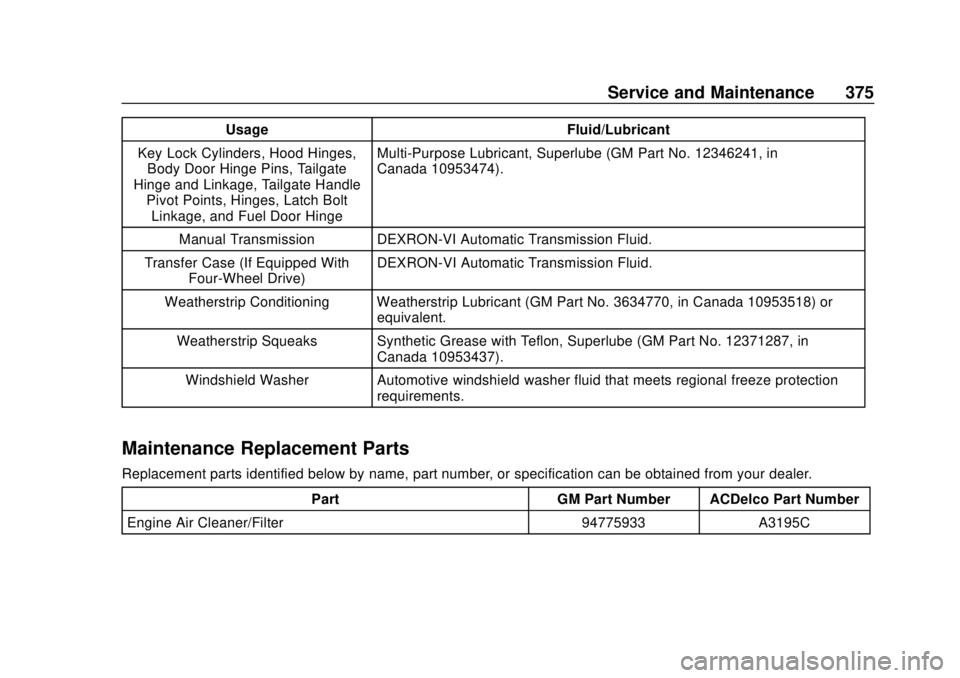
UsageFluid/Lubricant
Key Lock Cylinders, Hood Hinges, Body Door Hinge Pins, Tailgate
Hinge and Linkage, Tailgate Handle Pivot Points, Hinges, Latch BoltLinkage, and Fuel Door Hinge Multi-Purpose Lubricant, Superlube (GM Part No. 12346241, in
Canada 10953474).
Manual Transmission DEXRON-VI Automatic Transmission Fluid.
Transfer Case (If Equipped With Four-Wheel Drive) DEXRON-VI Automatic Transmission Fluid.
Weatherstrip Conditioning Weatherstrip Lubricant (GM Part No. 3634770, in Canada 10953518) or equivalent.
Weatherstrip Squeaks Synthetic Grease with Teflon, Superlube (GM Part No. 12371287, in Canada 10953437).
Windshield Washer Automotive windshield washer fluid that meets regional freeze protection requirements.
Maintenance Replacement Parts
Replacement parts identified below by name, part number, or specification can be obtained from your dealer.
Part GM Part Number ACDelco Part Number
Engine Air Cleaner/Filter 94775933 A3195C
Page 398 of 421
Chevrolet Colorado Owner Manual (GMNA-Localizing-U.S./Canada/Mexico-
11349743) - 2018 - crc - 10/12/17
OnStar 397
Press=to:
. Open the OnStar app on the
infotainment display. See the
infotainment manual for
information on how to use the
OnStar app.
Or
. Make a call, end a call,
or answer an incoming call.
. Give OnStar Hands-Free Calling
voice commands.
. Give OnStar Turn-by-Turn
Navigation voice commands.
. Obtain and customize the Wi-Fi
hotspot name or SSID and
password, if equipped.
Press
Qto connect to an
Advisor to:
. Verify account information or
update contact information.
. Get driving directions.
. Receive a Diagnostic check of
the vehicle's key operating
systems.
. Receive Roadside Assistance. .
Manage Wi-Fi Settings,
if equipped.
Press
>to get a priority connection
to an OnStar Advisor available
24/7 to:
. Get help for an emergency.
. Be a Good Samaritan or
respond to an AMBER Alert.
. Get assistance in severe
weather or other crisis situations
and find evacuation routes.
OnStar Services
Emergency
Emergency Services require an
active, OnStar service plan
(excludes Basic Plan). With
Automatic Crash Response, built-in
sensors can automatically alert a
specially trained OnStar Advisor
who is immediately connected in to
the vehicle to help.
Press
>for a priority connection to
an OnStar Advisor who can contact
emergency service providers, direct
them to your exact location, and
relay important information.
With OnStar Crisis Assist, specially
trained Advisors are available
24 hours a day, 7 days a week, to
provide a central point of contact,
assistance, and information during a
crisis.
With Roadside Assistance, Advisors
can locate a nearby service provider
to help with a flat tire, a battery
jump, or an empty gas tank.
Page 402 of 421

Chevrolet Colorado Owner Manual (GMNA-Localizing-U.S./Canada/Mexico-
11349743) - 2018 - crc - 10/12/17
OnStar 401
2. Say“Call.”System responds:
“Call. Please say the name or
number to call.”
3. Say the entire number without pausing, including a “1”and the
area code. System responds:
“OK, calling.”
Calling 911 Emergency
1. Press=. System responds:
“OnStar ready.”
2. Say “Call.”System responds:
“Call. Please say the name or
number to call.”
3. Say “911”without pausing.
System responds: “911.”
4. Say “Call.”System responds:
“OK, dialing 911.”
Retrieve My Number
1. Press=. System responds:
“OnStar ready.”
2. Say “My number.” System
responds: “Your OnStar
Hands-Free Calling number is,”
then says the number.
End a Call
Press=. System responds: “Call
ended.”
Verify Minutes and Expiration
Press=and say “Minutes” then
“Verify” to check how many minutes
remain and their expiration date.
Diagnostics
By monitoring and reporting on the
vehicle’s key systems, OnStar
Advanced Diagnostics provides a
way to keep up on maintenance.
Capabilities vary by model. See
www.onstar.com for details and
system limitations. Message and
data rates may apply. Advanced
Diagnostics requires an active
OnStar paid service plan, e-mail
address on file, and enrollment in
Advanced Diagnostics.
Includes:
. Diagnostic Alerts: Set
preferences to receive real-time
e-mails, texts, or monthly reports of the vehicle’s health. Or press
Qto have an Advisor initiate a
remote diagnostic report.
. Proactive Alerts: Receive a
real-time e-mail or text message
regarding potential issues with
key vehicle components, such
as the battery, fuel system,
or starter system. Alerts for
potential issues appear on the
infotainment display. Proactive
Alerts are designed to help
predict specific types of issues
based on information collected
from the vehicle. Other factors
may affect vehicle performance.
Not all issues will deliver alerts.
In some cases, a dealer service
check may be required to
confirm the accuracy of the
alerts.
. Dealer Maintenance Notification:
Have the vehicle notify your
preferred dealer when it is time
for maintenance. Your dealer will
then contact you to set up an
appointment.
Page 414 of 421

Chevrolet Colorado Owner Manual (GMNA-Localizing-U.S./Canada/Mexico-
11349743) - 2018 - crc - 10/12/17
Index 413
I
Ignition Positions . . . . . . . . . . . . . . . 216
Ignition Transmission LockCheck . . . . . . . . . . . . . . . . . . . . . . . . . 299
Immobilizer . . . . . . . . . . . . . . . . . . . . . . 37
Indicator
Vehicle Ahead . . . . . . . . . . . . . . . . 125
Infants and Young Children, Restraints . . . . . . . . . . . . . . . . . . . . . . 74
Infotainment . . . . . . . . . . . . . . . . . . . . 150
Infotainment System . . . . . . . . . . . . 395
Instrument Cluster . . . . . . . . . 112, 114
Interior Rearview Mirrors . . . . . . . . . 41
Introduction . . . . . . . . . . . . . . . . . . . . . . . 2
J
Jack
Auxiliary . . . . . . . . . . . . . . . . . . . . . . 165
Jump Starting - North America . . . . . . . . . . . . . . . . . . . . . . . 345
K
Keyless Entry
Remote (RKE) System . . . . . . . . . 30
Keys . . . . . . . . . . . . . . . . . . . . . . . . . . . . . 27
L
Labeling, Tire Sidewall . . . . . . . . . . 314 Lamps
Cargo . . . . . . . . . . . . . . . . . . . . . . . . . 147
Daytime Running (DRL) . . . . . . 144
Dome . . . . . . . . . . . . . . . . . . . . . . . . . 147
Exterior Controls . . . . . . . . . . . . . . 142
Exterior Lamps OffReminder . . . . . . . . . . . . . . . . . . . 143
Exterior Lighting Battery Saver . . . . . . . . . . . . . . . . . . . . . . . 149
Malfunction Indicator (Check Engine) . . . . . . . . . . . . . 120
On Reminder . . . . . . . . . . . . . . . . . 128
Reading . . . . . . . . . . . . . . . . . . . . . . 148
Lane Departure Warning (LDW) . . . . . . . . . . . . . . . . 253
Lane Departure Warning
Light . . . . . . . . . . . . . . . . . . . . . . . . . . 124
Lap-Shoulder Belt . . . . . . . . . . . . . . . 55
LATCH System Replacing Parts after aCrash . . . . . . . . . . . . . . . . . . . . . . . . . 94
LATCH, Lower Anchors and Tethers for Children . . . . . . . . . . . . 80
Lighting Entry . . . . . . . . . . . . . . . . . . . . . . . . . 148
Exit . . . . . . . . . . . . . . . . . . . . . . . . . . . 148
Illumination Control . . . . . . . . . . . 147 Lights
Airbag Readiness . . . . . . . . . . . . . .119
Antilock Brake System
(ABS) Warning . . . . . . . . . . . . . . 123
Brake System Warning . . . . . . . 122
Charging System . . . . . . . . . . . . . 120
Check Engine (Malfunction Indicator) . . . . . . . . . . . . . . . . . . . . 120
Cruise Control . . . . . . . . . . . . . . . . 128
Door Ajar . . . . . . . . . . . . . . . . . . . . . 128
Engine Oil Pressure . . . . . . . . . . 126
Flash-to-Pass . . . . . . . . . . . . . . . . . 143
Four-Wheel-Drive . . . . . . . . . . . . . 124
Front Fog Lamp . . . . . . . . . . . . . . 128
High-Beam On . . . . . . . . . . . . . . . . 127
High/Low Beam Changer . . . . . 143
Hill Descent Control . . . . . . . . . . 124
Lane Departure Warning . . . . . . 124
Low Fuel Warning . . . . . . . . . . . . 127
Seat Belt Reminders . . . . . . . . . . .118
Security . . . . . . . . . . . . . . . . . . . . . . 127
StabiliTrak OFF . . . . . . . . . . . . . . . 125
Tire Pressure . . . . . . . . . . . . . . . . . 126
Tow/Haul Mode . . . . . . . . . . . . . . . 124
Traction Control System (TCS)/StabiliTrak . . . . . . . . . . . . 125
Traction Off . . . . . . . . . . . . . . . . . . . 125
Up-Shift . . . . . . . . . . . . . . . . . . . . . . 124