automatic CHEVROLET COLORADO 2018 Owner's Manual
[x] Cancel search | Manufacturer: CHEVROLET, Model Year: 2018, Model line: COLORADO, Model: CHEVROLET COLORADO 2018Pages: 421, PDF Size: 5.58 MB
Page 8 of 421

Chevrolet Colorado Owner Manual (GMNA-Localizing-U.S./Canada/Mexico-
11349743) - 2018 - crc - 10/12/17
In Brief 7
1.Air Vents 0195.
2. Turn Signal Lever. See Turn
and Lane-Change Signals
0 145.
Driver Information Center (DIC)
(Base Level) Controls (If
Equipped).
See Driver Information Center
(DIC) (Base Level) 0129 or
Driver Information Center (DIC)
(Uplevel) 0131.
3. Instrument Cluster (Upevel)
0114 orInstrument Cluster
(Base Level) 0112.
4. Windshield Wiper/Washer
0107.
5. Light Sensor. See Automatic
Headlamp System 0144.
Vehicle Alarm System Indicator
(If Equipped). See Vehicle
Alarm System 036.
6. Infotainment 0150.
7. Climate Control Systems 0191
(If Equipped).
Automatic Climate Control
System 0193 (If Equipped). 8.
Heated Front Seats 049 (If
Equipped).
9. Power Outlets 0109 (If
Equipped).
10. Shift Lever. SeeAutomatic Transmission
0 224 orManual Transmission
0 229.
11. Auxiliary Jack 0165.
USB Port 0159.
12. Hazard Warning Flashers
0145.
Traction Control/Electronic
Stability Control 0240.
Cargo Lamp 0147.
Lane Departure Warning
(LDW) 0253 (If Equipped).
Hill Descent Control (HDC)
0 243 (If Equipped).
Tow/Haul Mode 0229 (If
Equipped).
Locking Front Axle 0246 (If
Equipped).
Locking Rear Axle 0245 (If
Equipped). 13.
Steering Wheel Controls 0106
(If Equipped).
Driver Information Center (DIC)
(Uplevel) Controls (If
Equipped).
See Driver Information Center
(DIC) (Base Level) 0129 or
Driver Information Center (DIC)
(Uplevel) 0131.
14. Horn 0107.
15. Steering Wheel Adjustment
0106 (Out of View).
16. Cruise Control 0247.
Forward Collision Alert (FCA)
System 0251 (If Equipped).
17. Transfer Case Knob (If Equipped). See Four-Wheel
Drive 0231.
Driver Mode Control (ZR2
Only) 0244 (If Equipped).
18. Hood Release. See Hood
0 277.
19. Parking Brake 0239.
Page 14 of 421
Chevrolet Colorado Owner Manual (GMNA-Localizing-U.S./Canada/Mexico-
11349743) - 2018 - crc - 10/12/17
In Brief 13
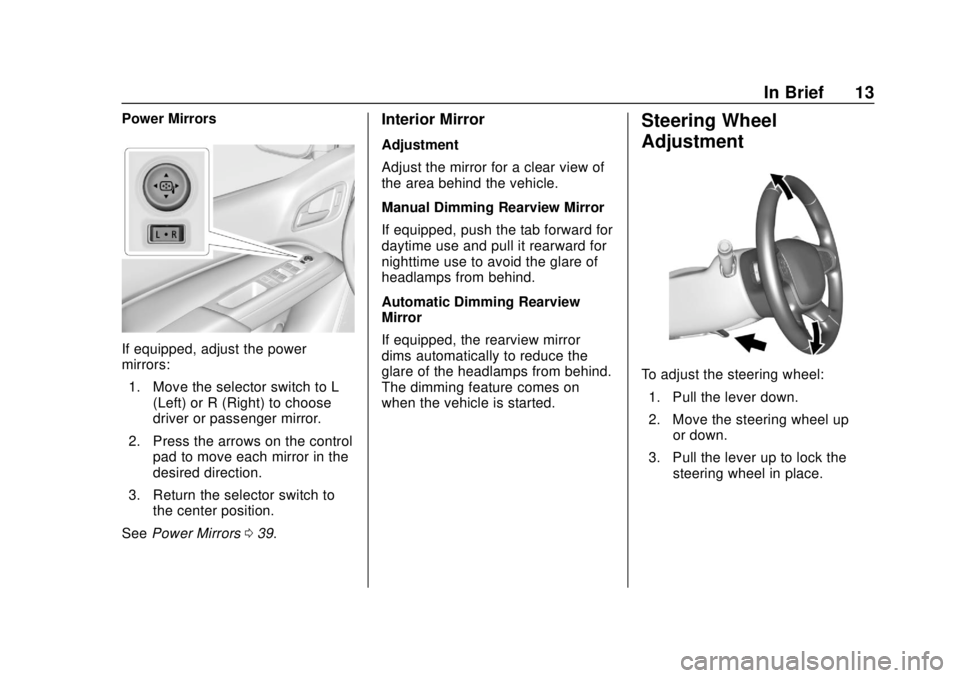
Power Mirrors
If equipped, adjust the power
mirrors:1. Move the selector switch to L (Left) or R (Right) to choose
driver or passenger mirror.
2. Press the arrows on the control pad to move each mirror in the
desired direction.
3. Return the selector switch to the center position.
See Power Mirrors 039.
Interior Mirror
Adjustment
Adjust the mirror for a clear view of
the area behind the vehicle.
Manual Dimming Rearview Mirror
If equipped, push the tab forward for
daytime use and pull it rearward for
nighttime use to avoid the glare of
headlamps from behind.
Automatic Dimming Rearview
Mirror
If equipped, the rearview mirror
dims automatically to reduce the
glare of the headlamps from behind.
The dimming feature comes on
when the vehicle is started.
Steering Wheel
Adjustment
To adjust the steering wheel:
1. Pull the lever down.
2. Move the steering wheel up or down.
3. Pull the lever up to lock the steering wheel in place.
Page 16 of 421
Chevrolet Colorado Owner Manual (GMNA-Localizing-U.S./Canada/Mexico-
11349743) - 2018 - crc - 10/12/17
In Brief 15
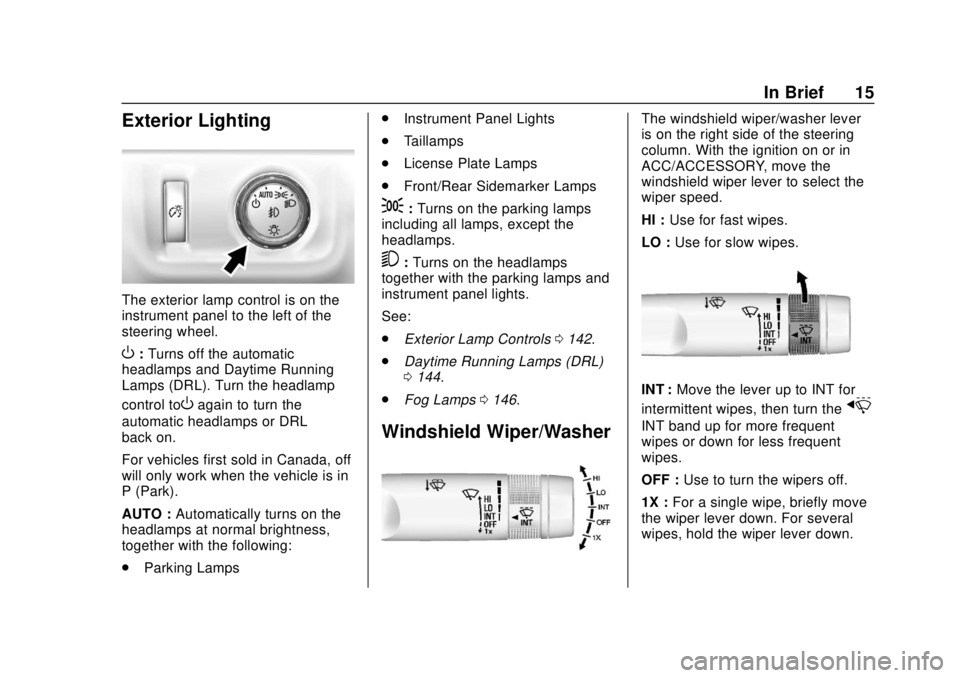
Exterior Lighting
The exterior lamp control is on the
instrument panel to the left of the
steering wheel.
O:Turns off the automatic
headlamps and Daytime Running
Lamps (DRL). Turn the headlamp
control to
Oagain to turn the
automatic headlamps or DRL
back on.
For vehicles first sold in Canada, off
will only work when the vehicle is in
P (Park).
AUTO : Automatically turns on the
headlamps at normal brightness,
together with the following:
. Parking Lamps .
Instrument Panel Lights
. Taillamps
. License Plate Lamps
. Front/Rear Sidemarker Lamps
;:Turns on the parking lamps
including all lamps, except the
headlamps.
5: Turns on the headlamps
together with the parking lamps and
instrument panel lights.
See:
. Exterior Lamp Controls 0142.
. Daytime Running Lamps (DRL)
0144.
. Fog Lamps 0146.
Windshield Wiper/Washer
The windshield wiper/washer lever
is on the right side of the steering
column. With the ignition on or in
ACC/ACCESSORY, move the
windshield wiper lever to select the
wiper speed.
HI : Use for fast wipes.
LO : Use for slow wipes.
INT : Move the lever up to INT for
intermittent wipes, then turn the
x
INT band up for more frequent
wipes or down for less frequent
wipes.
OFF : Use to turn the wipers off.
1X : For a single wipe, briefly move
the wiper lever down. For several
wipes, hold the wiper lever down.
Page 18 of 421
Chevrolet Colorado Owner Manual (GMNA-Localizing-U.S./Canada/Mexico-
11349743) - 2018 - crc - 10/12/17
In Brief 17
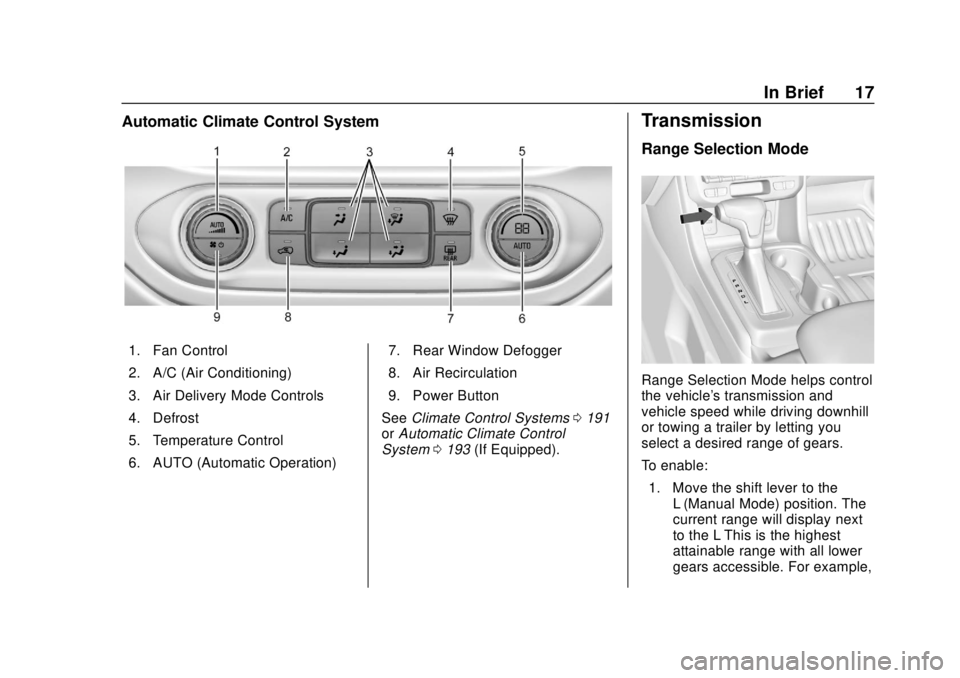
Automatic Climate Control System
1. Fan Control
2. A/C (Air Conditioning)
3. Air Delivery Mode Controls
4. Defrost
5. Temperature Control
6. AUTO (Automatic Operation)7. Rear Window Defogger
8. Air Recirculation
9. Power Button
See Climate Control Systems 0191
or Automatic Climate Control
System 0193 (If Equipped).
Transmission
Range Selection Mode
Range Selection Mode helps control
the vehicle's transmission and
vehicle speed while driving downhill
or towing a trailer by letting you
select a desired range of gears.
To enable:
1. Move the shift lever to the L (Manual Mode) position. The
current range will display next
to the L This is the highest
attainable range with all lower
gears accessible. For example,
Page 19 of 421
Chevrolet Colorado Owner Manual (GMNA-Localizing-U.S./Canada/Mexico-
11349743) - 2018 - crc - 10/12/17
18 In Brief
when 5 (Fifth) gear is selected,
1 (First) through 5 (Fifth) gears
are available.
2. Press the plus/minus button on the shift lever to select the
desired range of gears for
current driving conditions. See
Manual Mode 0227.
Four-Wheel Drive
If the vehicle has four-wheel drive,
the engine's driving power can be
sent to all four wheels for extra
traction.
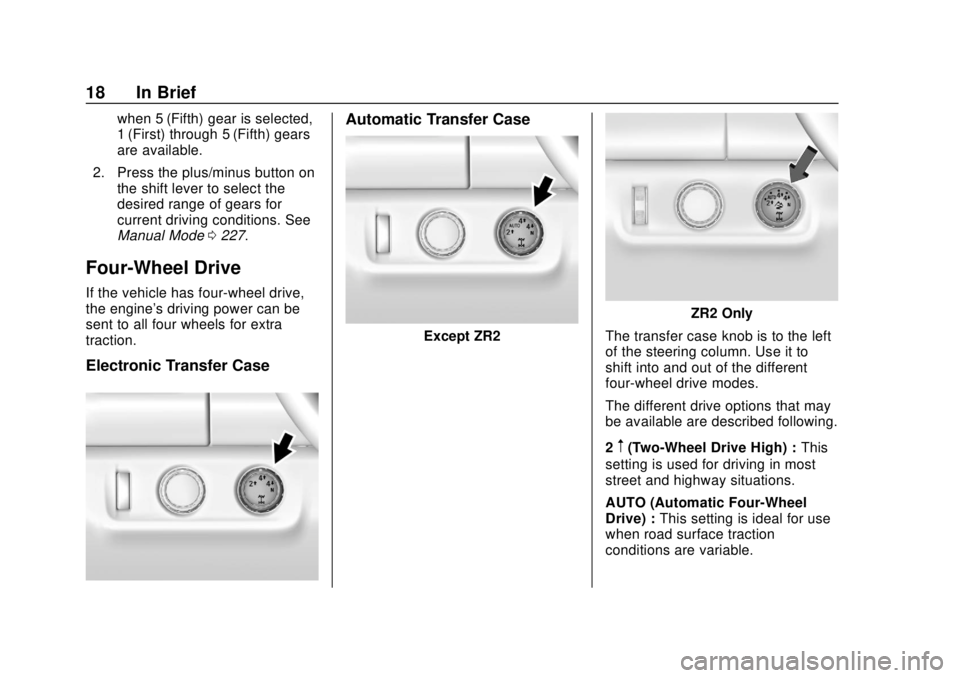
Electronic Transfer Case
Automatic Transfer Case
Except ZR2
ZR2 Only
The transfer case knob is to the left
of the steering column. Use it to
shift into and out of the different
four-wheel drive modes.
The different drive options that may
be available are described following.
2
m(Two-Wheel Drive High) : This
setting is used for driving in most
street and highway situations.
AUTO (Automatic Four-Wheel
Drive) : This setting is ideal for use
when road surface traction
conditions are variable.
Page 25 of 421
Chevrolet Colorado Owner Manual (GMNA-Localizing-U.S./Canada/Mexico-
11349743) - 2018 - crc - 10/12/17
24 In Brief
.To turn off both TCS and
StabiliTrak, press and hold
gon
the center stack until
iandg
illuminate in the instrument
cluster.
. To turn on both systems, press
and release
g.iandgturn off
in the instrument cluster.
StabiliTrak will automatically turn on
if the vehicle exceeds 56 km/h
(35 mph) in normal mode. TCS will
remain off until
gis pressed or until
the ignition is turned off and then
back on.
See Traction Control/Electronic
Stability Control 0240.
Turning the Systems Off and
On (ZR2 Only)
.
To turn off TCS, press and
release
gon the center stack.
iandgilluminate in the
instrument cluster.
. To turn TCS on again, press and
release
g.iandgin the
instrument cluster will turn off. .
To turn off both TCS and
StabiliTrak, press and hold
gon
the center stack, until
iandg
illuminate in the instrument
cluster.
. To turn on both systems, press
and release
g.iandgturn off
in the instrument cluster.
StabiliTrak will automatically turn on
if the vehicle exceeds 56 km/h
(35 mph) in normal mode. TCS will
remain off until
gis pressed or until
the ignition is turned off and then
back on.
See Traction Control/Electronic
Stability Control 0240.
Tire Pressure Monitor
This vehicle may have a Tire
Pressure Monitor System (TPMS).
The low tire pressure warning light
alerts to a significant loss in
pressure of one of the vehicle's
tires. If the warning light comes on,
stop as soon as possible and inflate
the tires to the recommended
pressure shown on the Tire and
Loading Information label. See
Vehicle Load Limits 0210. The
warning light will remain on until the
tire pressure is corrected.
The low tire pressure warning light
may come on in cool weather when
the vehicle is first started, and then
turn off as the vehicle is driven. This
may be an early indicator that the
tire pressures are getting low and
the tires need to be inflated to the
proper pressure.
The TPMS does not replace normal
monthly tire maintenance. Maintain
the correct tire pressures.
See Tire Pressure Monitor System
0 321.
Page 27 of 421
Chevrolet Colorado Owner Manual (GMNA-Localizing-U.S./Canada/Mexico-
11349743) - 2018 - crc - 10/12/17
26 In Brief
2. Fully press the acceleratorpedal slowly three times within
five seconds. If the display
shows 100%, the system is
reset.
See Engine Oil Life System 0283.
Driving for Better Fuel
Economy
Driving habits can affect fuel
mileage. Here are some driving tips
to get the best fuel economy
possible.
.
Avoid fast starts and accelerate
smoothly.
. Brake gradually and avoid
abrupt stops.
. Avoid idling the engine for long
periods of time.
. When road and weather
conditions are appropriate, use
cruise control.
. Always follow posted speed
limits or drive more slowly when
conditions require. .
Keep vehicle tires properly
inflated.
. Combine several trips into a
single trip.
. Replace the vehicle's tires with
the same TPC Spec number
molded into the tire's sidewall
near the size.
. Follow recommended scheduled
maintenance.
Roadside Assistance
Program
U.S.: 1-800-243-8872
TTY Users (U.S. Only):
1-888-889-2438
Canada: 1-800-268-6800
New Chevrolet owners are
automatically enrolled in the
Roadside Assistance Program.
See Roadside Assistance Program
0 386.
Page 28 of 421
Chevrolet Colorado Owner Manual (GMNA-Localizing-U.S./Canada/Mexico-
11349743) - 2018 - crc - 10/12/17
Keys, Doors, and Windows 27
Keys, Doors, and
Windows
Keys and Locks
Keys . . . . . . . . . . . . . . . . . . . . . . . . . . . 27
Remote Keyless Entry (RKE)System . . . . . . . . . . . . . . . . . . . . . . . 30
Remote Keyless Entry (RKE) System Operation . . . . . . . . . . . . 30
Remote Vehicle Start . . . . . . . . . . 32
Door Locks . . . . . . . . . . . . . . . . . . . . 33
Power Door Locks . . . . . . . . . . . . . 34
Delayed Locking . . . . . . . . . . . . . . . 34
Automatic Door Locks . . . . . . . . . 34
Lockout Protection . . . . . . . . . . . . . 35
Safety Locks . . . . . . . . . . . . . . . . . . . 35
Doors
Tailgate . . . . . . . . . . . . . . . . . . . . . . . . 36
Vehicle Security
Vehicle Security . . . . . . . . . . . . . . . . 36
Vehicle Alarm System . . . . . . . . . 36
Immobilizer . . . . . . . . . . . . . . . . . . . . 37
Immobilizer Operation . . . . . . . . . 38
Exterior Mirrors
Convex Mirrors . . . . . . . . . . . . . . . . 38
Manual Mirrors . . . . . . . . . . . . . . . . . 38 Power Mirrors . . . . . . . . . . . . . . . . . . 39
Folding Mirrors . . . . . . . . . . . . . . . . . 39
Heated Mirrors . . . . . . . . . . . . . . . . . 39
Blind Spot Mirrors . . . . . . . . . . . . . . 39
Interior Mirrors
Interior Rearview Mirrors . . . . . . . 41
Manual Rearview Mirror . . . . . . . . 41
Automatic Dimming Rearview
Mirror . . . . . . . . . . . . . . . . . . . . . . . . . 41
Windows
Windows . . . . . . . . . . . . . . . . . . . . . . . 41
Power Windows . . . . . . . . . . . . . . . 42
Rear Windows . . . . . . . . . . . . . . . . . 43
Sun Visors . . . . . . . . . . . . . . . . . . . . . 44
Keys and Locks
Keys
{Warning
Leaving children in a vehicle with
the ignition key is dangerous and
children or others could be
seriously injured or killed. They
could operate the power windows
or other controls or make the
vehicle move. The windows will
function with the keys in the
ignition, and children or others
could be caught in the path of a
closing window. Do not leave
children in a vehicle with the
ignition key.
Page 35 of 421
Chevrolet Colorado Owner Manual (GMNA-Localizing-U.S./Canada/Mexico-
11349743) - 2018 - crc - 10/12/17
34 Keys, Doors, and Windows
To lock a door from the inside, push
down on the door lock knob. To
unlock, pull the door handle once to
unlock the door and again to
unlatch it.
Free-Turning Locks
The door key lock cylinder turns
freely when either the wrong key is
used, or the correct key is not fully
inserted. The free-turning door lock
feature prevents the lock from being
forced open. To reset the lock, turn
it to the vertical position with the
correct key fully inserted. Remove
the key and insert it again. If this
does not reset the lock, turn the key
halfway around in the cylinder and
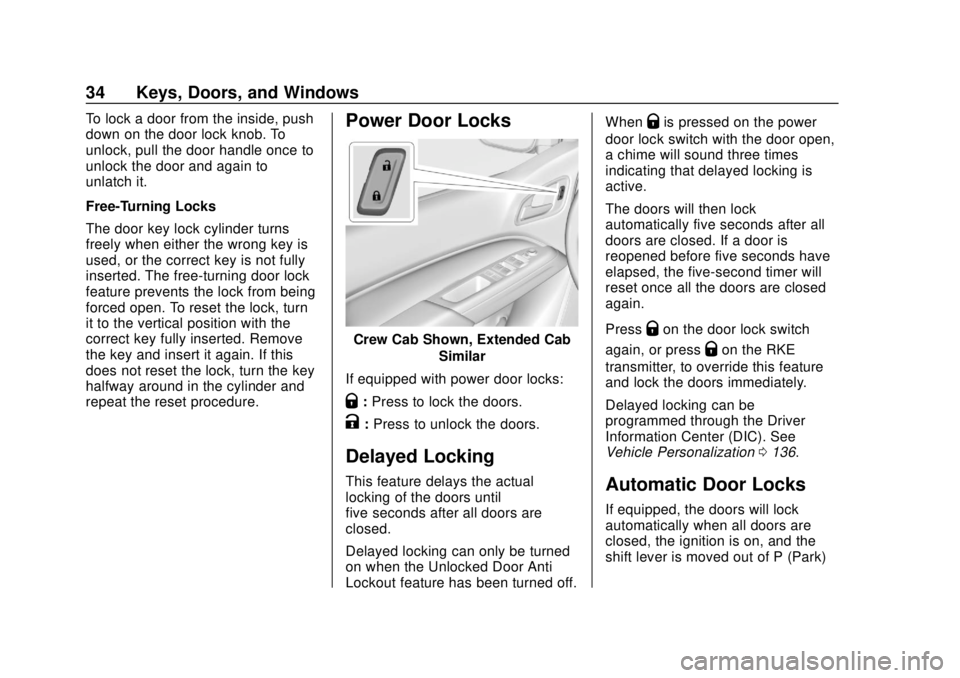
repeat the reset procedure.Power Door Locks
Crew Cab Shown, Extended CabSimilar
If equipped with power door locks:
Q: Press to lock the doors.
K:Press to unlock the doors.
Delayed Locking
This feature delays the actual
locking of the doors until
five seconds after all doors are
closed.
Delayed locking can only be turned
on when the Unlocked Door Anti
Lockout feature has been turned off. When
Qis pressed on the power
door lock switch with the door open,
a chime will sound three times
indicating that delayed locking is
active.
The doors will then lock
automatically five seconds after all
doors are closed. If a door is
reopened before five seconds have
elapsed, the five-second timer will
reset once all the doors are closed
again.
Press
Qon the door lock switch
again, or press
Qon the RKE
transmitter, to override this feature
and lock the doors immediately.
Delayed locking can be
programmed through the Driver
Information Center (DIC). See
Vehicle Personalization 0136.
Automatic Door Locks
If equipped, the doors will lock
automatically when all doors are
closed, the ignition is on, and the
shift lever is moved out of P (Park)
Page 36 of 421
Chevrolet Colorado Owner Manual (GMNA-Localizing-U.S./Canada/Mexico-
11349743) - 2018 - crc - 10/12/17
Keys, Doors, and Windows 35
for automatic transmissions or
vehicle speed is above 13 km/h
(8 mph) for manual transmissions.
To unlock the doors:
.Press
Kon a power door lock
switch.
. If equipped with an automatic
transmission, shift the
transmission into P (Park)
. If equipped with manual
transmission, remove the key
from the ignition when parked.
Automatic door locking cannot be
disabled. Automatic door unlocking
can be programmed. See Vehicle
Personalization 0136.
Lockout Protection
When locking is requested with the
driver door open and the key in the
ignition, all the doors will lock and
then the driver door will unlock. This
can be manually overridden by
pressing and holding
Qon the
power door lock switch. Unlocked Door Anti-Lockout
If Unlocked Door Anti-Lockout has
been turned on and the vehicle is
off, the driver door is open, and
locking is requested, all the doors
will lock and the driver door will
remain unlocked. Push the lock
button on the door or the RKE
transmitter a second time to lock the
driver door. The Unlocked Door
Anti-Lockout feature can be turned
on or off. See
Vehicle
Personalization 0136.
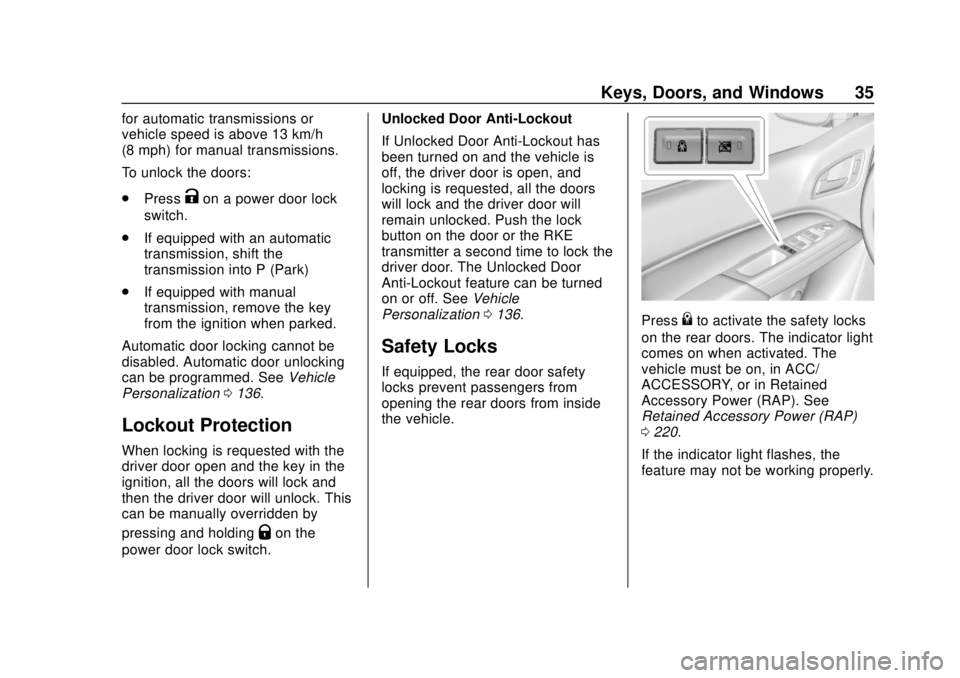
Safety Locks
If equipped, the rear door safety
locks prevent passengers from
opening the rear doors from inside
the vehicle.
Press{to activate the safety locks
on the rear doors. The indicator light
comes on when activated. The
vehicle must be on, in ACC/
ACCESSORY, or in Retained
Accessory Power (RAP). See
Retained Accessory Power (RAP)
0 220.
If the indicator light flashes, the
feature may not be working properly.