head CHEVROLET COLORADO 2019 Owner's Manual
[x] Cancel search | Manufacturer: CHEVROLET, Model Year: 2019, Model line: COLORADO, Model: CHEVROLET COLORADO 2019Pages: 387, PDF Size: 5.69 MB
Page 5 of 387
Chevrolet Colorado Owner Manual (GMNA-Localizing-U.S./Canada/Mexico-
12460274) - 2019 - CRC - 10/1/18
4 Introduction
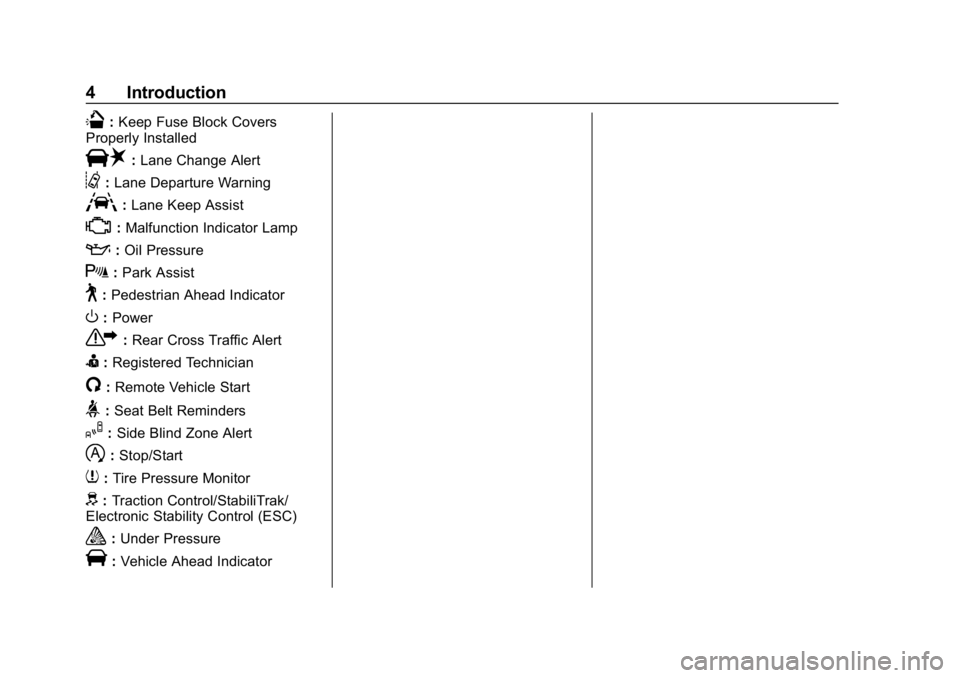
Q:Keep Fuse Block Covers
Properly Installed
|: Lane Change Alert
@:Lane Departure Warning
A:Lane Keep Assist
*:Malfunction Indicator Lamp
::Oil Pressure
X:Park Assist
~:Pedestrian Ahead Indicator
O:Power
7: Rear Cross Traffic Alert
I:Registered Technician
/:Remote Vehicle Start
>:Seat Belt Reminders
I: Side Blind Zone Alert
h:Stop/Start
7: Tire Pressure Monitor
d:Traction Control/StabiliTrak/
Electronic Stability Control (ESC)
a: Under Pressure
V:Vehicle Ahead Indicator
Page 6 of 387
Chevrolet Colorado Owner Manual (GMNA-Localizing-U.S./Canada/Mexico-
12460274) - 2019 - CRC - 10/1/18
In Brief 5
In Brief
Instrument Panel
Instrument Panel . . . . . . . . . . . . . . . . 6
Initial Drive Information
Initial Drive Information . . . . . . . . . . 8
Remote Keyless Entry (RKE)System . . . . . . . . . . . . . . . . . . . . . . . . 8
Remote Vehicle Start . . . . . . . . . . . 9
Door Locks . . . . . . . . . . . . . . . . . . . . . 9
Windows . . . . . . . . . . . . . . . . . . . . . . . . 9
Seat Adjustment . . . . . . . . . . . . . . . 10
Heated Seats . . . . . . . . . . . . . . . . . . 11
Head Restraint Adjustment . . . . 11
Seat Belts . . . . . . . . . . . . . . . . . . . . . . 11
Passenger Sensing System . . . 12
Mirror Adjustment . . . . . . . . . . . . . . 12
Steering Wheel Adjustment . . . . 13
Interior Lighting . . . . . . . . . . . . . . . . 14
Exterior Lighting . . . . . . . . . . . . . . . 14
Windshield Wiper/Washer . . . . . . 15
Climate Controls . . . . . . . . . . . . . . . 16
Transmission . . . . . . . . . . . . . . . . . . 17
Four-Wheel Drive . . . . . . . . . . . . . . 18
Vehicle Features
Infotainment System . . . . . . . . . . . 19
Steering Wheel Controls . . . . . . . 19 Cruise Control . . . . . . . . . . . . . . . . . 19
Driver Information Center (DIC)
(Base Level) . . . . . . . . . . . . . . . . . 20
Driver Information Center (DIC) (Uplevel) . . . . . . . . . . . . . . . . . . . . . 20
Forward Collision Alert (FCA) System . . . . . . . . . . . . . . . . . . . . . . . 21
Lane Departure Warning (LDW) . . . . . . . . . . . . . . . 21
Rear Vision Camera (RVC) . . . . 21
Park Assist . . . . . . . . . . . . . . . . . . . . 21
Power Outlets . . . . . . . . . . . . . . . . . 21
Performance and Maintenance
Traction Control/Electronic Stability Control . . . . . . . . . . . . . . 22
Tire Pressure Monitor . . . . . . . . . . 22
Fuel (Gasoline) . . . . . . . . . . . . . . . . 23
Fuel (Diesel) . . . . . . . . . . . . . . . . . . . 23
E85 or FlexFuel . . . . . . . . . . . . . . . . 23
Engine Oil Life System . . . . . . . . 23
Driving for Better Fuel
Economy . . . . . . . . . . . . . . . . . . . . . 24
Roadside Assistance Program . . . . . . . . . . . . . . . . . . . . . . 24
Page 8 of 387

Chevrolet Colorado Owner Manual (GMNA-Localizing-U.S./Canada/Mexico-
12460274) - 2019 - CRC - 10/1/18
In Brief 7
1.Air Vents 0153.
2. Turn Signal Lever. See Turn
and Lane-Change Signals
0 142.
Driver Information Center (DIC)
(Base Level) Controls (If
Equipped). See Driver
Information Center (DIC) (Base
Level) 0129 orDriver
Information Center (DIC)
(Uplevel) 0131.
3. Instrument Cluster (Base
Level) 0112 orInstrument
Cluster (Uplevel) 0114.
4. Windshield Wiper/Washer
0107.
5. Light Sensor. See Automatic
Headlamp System 0141.
Vehicle Alarm System Indicator
(If Equipped). See Vehicle
Alarm System 034.
6. Infotainment 0147. 7.
Climate Control Systems 0148
(If Equipped).
Automatic Climate Control
System 0150 (If Equipped).
8. Heated Front Seats 048 (If
Equipped).
9. Power Outlets 0108 (If
Equipped).
10. Shift Lever. See Automatic
Transmission 0183 orManual
Transmission 0188.
11. Auxiliary Jack. See the infotainment manual.
USB Port. See the infotainment
manual.
12. Hazard Warning Flashers
0142.
Traction Control/Electronic
Stability Control 0199.
Exterior Cargo Lamps 0143.
Lane Departure Warning
(LDW) 0214 (If Equipped). Hill Descent Control (HDC)
0
202 (If Equipped).
Tow/Haul Mode 0188 (If
Equipped).
Locking Front Axle 0205 (If
Equipped).
Locking Rear Axle 0204 (If
Equipped).
13. Steering Wheel Controls 0106
(If Equipped).
Driver Information Center (DIC)
(Uplevel) Controls (If
Equipped). See Driver
Information Center (DIC) (Base
Level) 0129 orDriver
Information Center (DIC)
(Uplevel) 0131.
14. Horn 0107.
15. Steering Wheel Adjustment
0106 (Out of View).
16. Cruise Control 0206.
Forward Collision Alert (FCA)
System 0212 (If Equipped).
Page 12 of 387
Chevrolet Colorado Owner Manual (GMNA-Localizing-U.S./Canada/Mexico-
12460274) - 2019 - CRC - 10/1/18
In Brief 11
3. Push and pull on the seatbackto make sure it is locked.
To return the seatback to the upright
position: 1. Lift the lever fully without applying pressure to the
seatback.
2. Push and pull on the seatback to make sure it is locked.
See Reclining Seatbacks 047.
Heated Seats
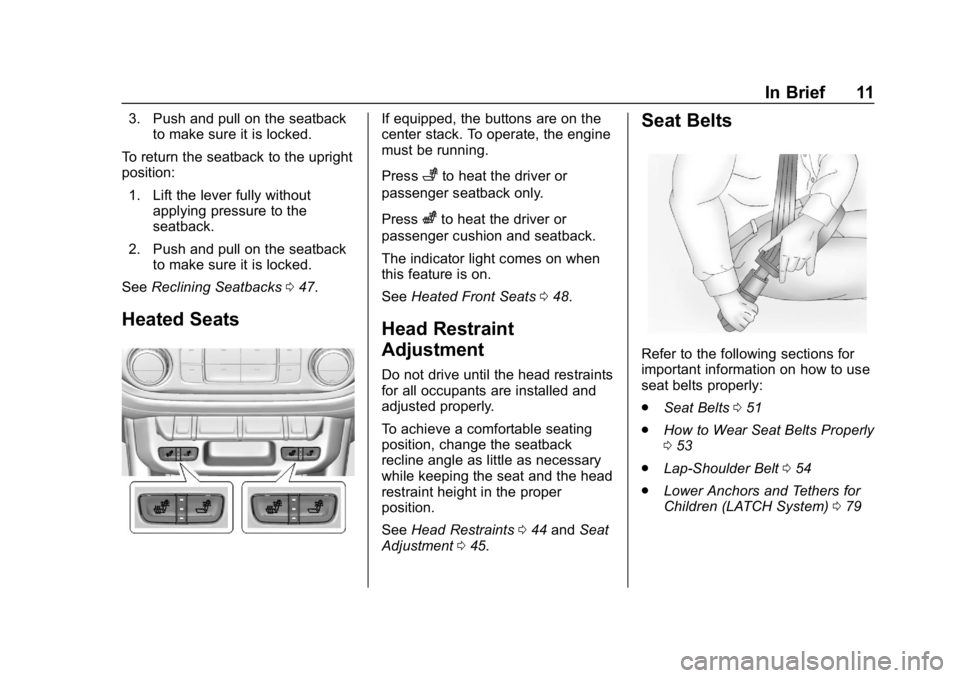
If equipped, the buttons are on the
center stack. To operate, the engine
must be running.
Press
+to heat the driver or
passenger seatback only.
Press
zto heat the driver or
passenger cushion and seatback.
The indicator light comes on when
this feature is on.
See Heated Front Seats 048.
Head Restraint
Adjustment
Do not drive until the head restraints
for all occupants are installed and
adjusted properly.
To achieve a comfortable seating
position, change the seatback
recline angle as little as necessary
while keeping the seat and the head
restraint height in the proper
position.
See Head Restraints 044 and Seat
Adjustment 045.
Seat Belts
Refer to the following sections for
important information on how to use
seat belts properly:
.
Seat Belts 051
. How to Wear Seat Belts Properly
053
. Lap-Shoulder Belt 054
. Lower Anchors and Tethers for
Children (LATCH System) 079
Page 13 of 387
Chevrolet Colorado Owner Manual (GMNA-Localizing-U.S./Canada/Mexico-
12460274) - 2019 - CRC - 10/1/18
12 In Brief
Passenger Sensing
System
United States
Canada and Mexico
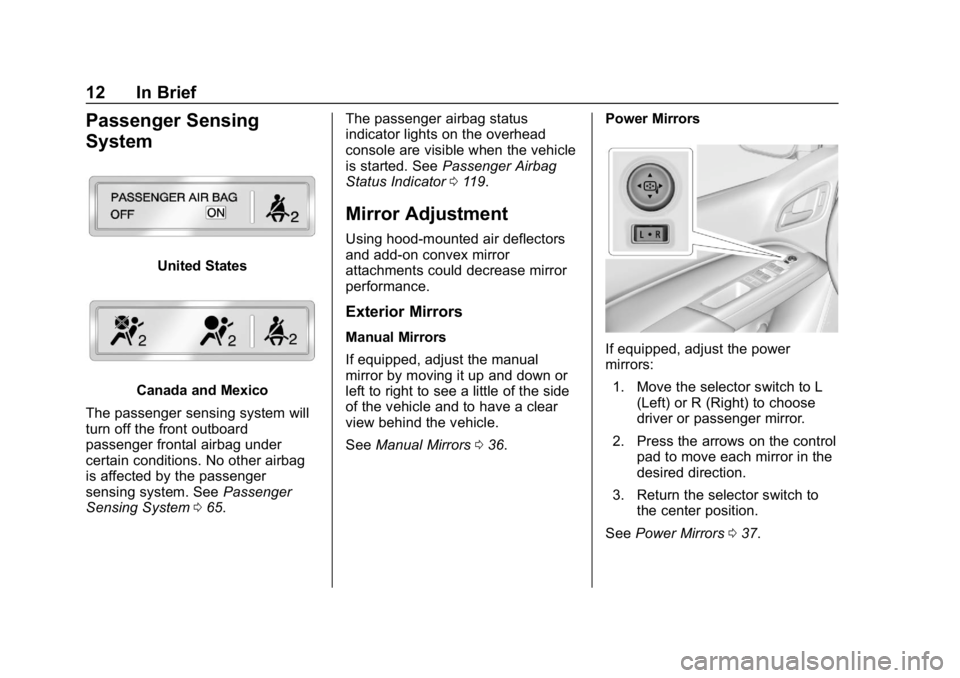
The passenger sensing system will
turn off the front outboard
passenger frontal airbag under
certain conditions. No other airbag
is affected by the passenger
sensing system. See Passenger
Sensing System 065. The passenger airbag status
indicator lights on the overhead
console are visible when the vehicle
is started. See
Passenger Airbag
Status Indicator 0119.
Mirror Adjustment
Using hood-mounted air deflectors
and add-on convex mirror
attachments could decrease mirror
performance.
Exterior Mirrors
Manual Mirrors
If equipped, adjust the manual
mirror by moving it up and down or
left to right to see a little of the side
of the vehicle and to have a clear
view behind the vehicle.
See Manual Mirrors 036. Power MirrorsIf equipped, adjust the power
mirrors:
1. Move the selector switch to L (Left) or R (Right) to choose
driver or passenger mirror.
2. Press the arrows on the control pad to move each mirror in the
desired direction.
3. Return the selector switch to the center position.
See Power Mirrors 037.
Page 14 of 387
Chevrolet Colorado Owner Manual (GMNA-Localizing-U.S./Canada/Mexico-
12460274) - 2019 - CRC - 10/1/18
In Brief 13
Interior Mirror
Adjustment
Adjust the mirror for a clear view of
the area behind the vehicle.
Manual Dimming Rearview Mirror
If equipped, push the tab forward for
daytime use and pull it rearward for
nighttime use to avoid the glare of
headlamps from behind.
Automatic Dimming Rearview
Mirror
If equipped, the rearview mirror
dims automatically to reduce the
glare of the headlamps from behind.
The dimming feature comes on
when the vehicle is started.
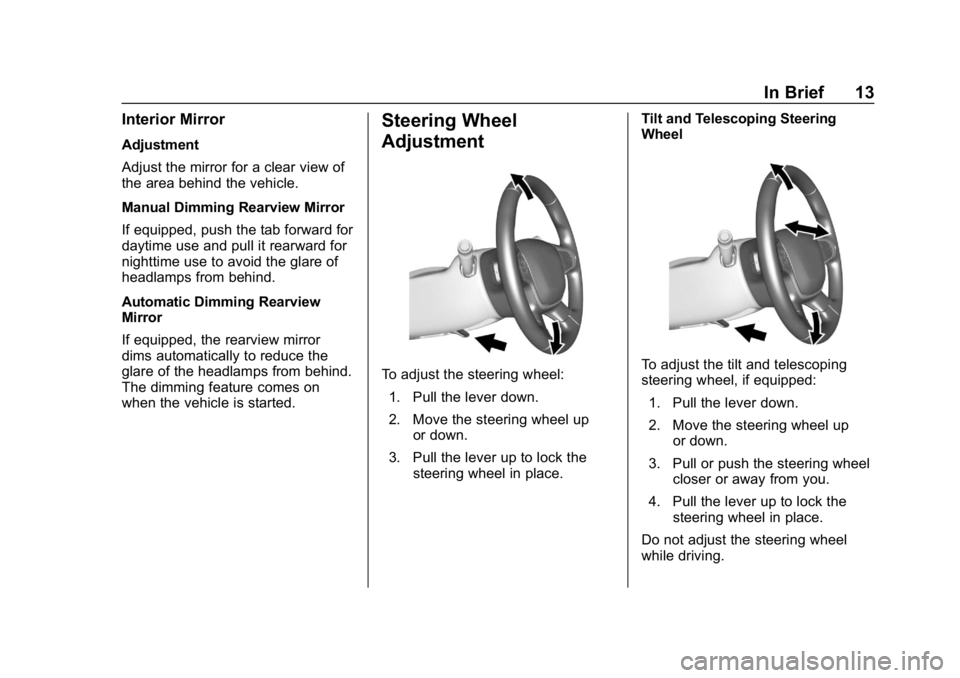
Steering Wheel
Adjustment
To adjust the steering wheel:1. Pull the lever down.
2. Move the steering wheel up or down.
3. Pull the lever up to lock the steering wheel in place. Tilt and Telescoping Steering
WheelTo adjust the tilt and telescoping
steering wheel, if equipped:
1. Pull the lever down.
2. Move the steering wheel up or down.
3. Pull or push the steering wheel closer or away from you.
4. Pull the lever up to lock the steering wheel in place.
Do not adjust the steering wheel
while driving.
Page 15 of 387
Chevrolet Colorado Owner Manual (GMNA-Localizing-U.S./Canada/Mexico-
12460274) - 2019 - CRC - 10/1/18
14 In Brief
Interior Lighting
Dome Lamps
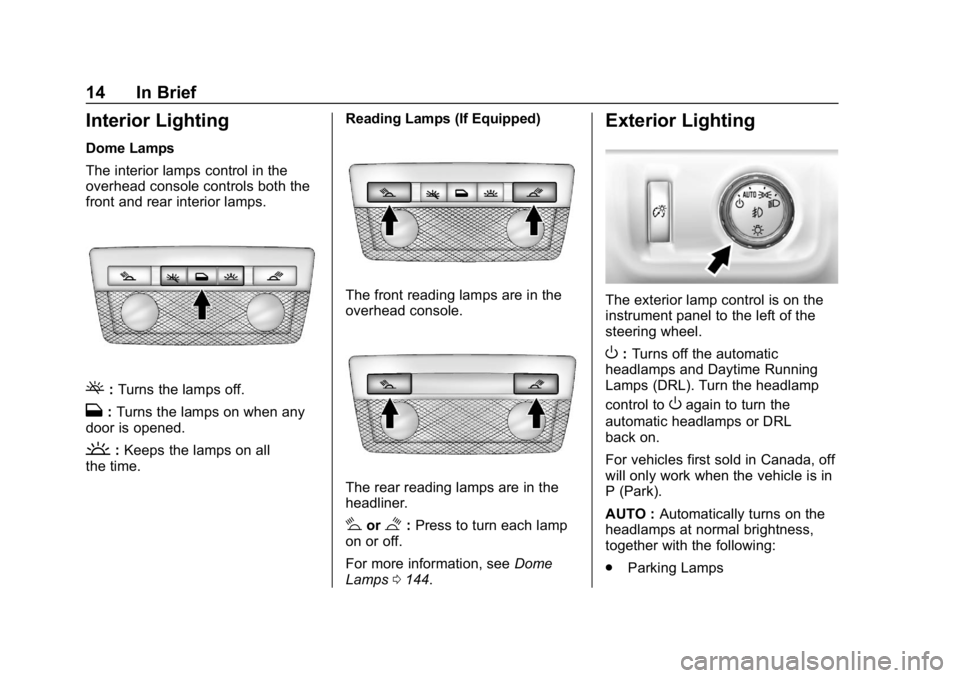
The interior lamps control in the
overhead console controls both the
front and rear interior lamps.
(:Turns the lamps off.
H: Turns the lamps on when any
door is opened.
': Keeps the lamps on all
the time. Reading Lamps (If Equipped)
The front reading lamps are in the
overhead console.
The rear reading lamps are in the
headliner.
#or$:
Press to turn each lamp
on or off.
For more information, see Dome
Lamps 0144.
Exterior Lighting
The exterior lamp control is on the
instrument panel to the left of the
steering wheel.
O:Turns off the automatic
headlamps and Daytime Running
Lamps (DRL). Turn the headlamp
control to
Oagain to turn the
automatic headlamps or DRL
back on.
For vehicles first sold in Canada, off
will only work when the vehicle is in
P (Park).
AUTO : Automatically turns on the
headlamps at normal brightness,
together with the following:
. Parking Lamps
Page 16 of 387
Chevrolet Colorado Owner Manual (GMNA-Localizing-U.S./Canada/Mexico-
12460274) - 2019 - CRC - 10/1/18
In Brief 15
.Instrument Panel Lights
. Taillamps
. License Plate Lamps
. Front/Rear Sidemarker Lamps
;:Turns on the parking lamps
including all lamps, except the
headlamps.
5: Turns on the headlamps
together with the parking lamps and
instrument panel lights.
See:
. Exterior Lamp Controls 0139.
. Daytime Running Lamps (DRL)
0141.
. Fog Lamps 0143.
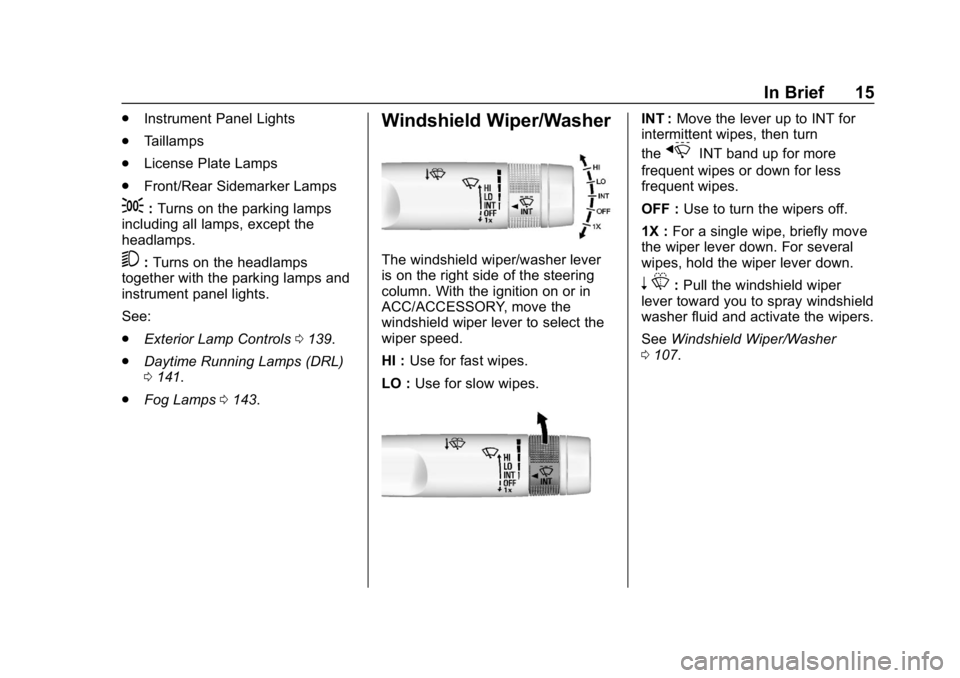
Windshield Wiper/Washer
The windshield wiper/washer lever
is on the right side of the steering
column. With the ignition on or in
ACC/ACCESSORY, move the
windshield wiper lever to select the
wiper speed.
HI : Use for fast wipes.
LO : Use for slow wipes.
INT : Move the lever up to INT for
intermittent wipes, then turn
the
xINT band up for more
frequent wipes or down for less
frequent wipes.
OFF : Use to turn the wipers off.
1X : For a single wipe, briefly move
the wiper lever down. For several
wipes, hold the wiper lever down.
n L: Pull the windshield wiper
lever toward you to spray windshield
washer fluid and activate the wipers.
See Windshield Wiper/Washer
0 107.
Page 22 of 387
Chevrolet Colorado Owner Manual (GMNA-Localizing-U.S./Canada/Mexico-
12460274) - 2019 - CRC - 10/1/18
In Brief 21
Forward Collision Alert
(FCA) System
If equipped, FCA may help avoid or
reduce the harm caused by
front-end crashes. FCA provides a
green indicator,
V, when a vehicle
is detected ahead. This indicator
displays amber if you follow a
vehicle much too closely. When
approaching a vehicle ahead too
quickly, FCA provides a red flashing
alert on the windshield and rapidly
beeps.
See Forward Collision Alert (FCA)
System 0212.
Lane Departure
Warning (LDW)
If equipped, LDW may help avoid
unintentional lane departures at
speeds of 56 km/h (35 mph) or
greater. LDW uses a camera sensor
to detect the lane markings. The
LDW light,
@, is green if a lane
marking is detected. If the vehicle
departs the lane without using a turn signal in that direction, the light will
change to amber and flash. In
addition, beeps will sound.
See
Lane Departure Warning (LDW)
0 214.
Rear Vision
Camera (RVC)
The RVC displays a view of the
area behind the vehicle on the
infotainment display when the
vehicle is shifted into R (Reverse) to
aid with parking and low-speed
backing maneuvers.
See Assistance Systems for Parking
or Backing 0210.
Park Assist
If equipped, Rear Park Assist (RPA)
uses sensors on the rear bumper to
assist with parking and avoiding
objects while in R (Reverse).
It operates at speeds less than
8 km/h (5 mph). RPA may show a
warning triangle on the infotainment
display and/or a graphic on the
instrument cluster to provide the object distance. In addition, multiple
beeps may occur if very close to an
object.
See
Assistance Systems for Parking
or Backing 0210.
Power Outlets
Accessory power outlets can be
used to plug in electrical equipment,
such as a cell phone, MP3
player, etc.
The vehicle may have accessory
power outlets:
.
On the center stack below the
climate control system,
if equipped.
. On the center floor console,
if equipped.
. On the rear of the center storage
console.
Lift the cover to access and replace
when not in use.
See Power Outlets 0108.
Page 40 of 387
Chevrolet Colorado Owner Manual (GMNA-Localizing-U.S./Canada/Mexico-
12460274) - 2019 - CRC - 10/1/18
Keys, Doors, and Windows 39
Interior Mirrors
Interior Rearview Mirrors
Adjust the rearview mirror for a clear
view of the area behind your
vehicle.
If equipped with OnStar, the vehicle
may have three control buttons at
the bottom of the mirror. SeeOnStar
Overview 0363.
To avoid accidental OnStar calls,
clean the mirror with the ignition off.
Do not spray glass cleaner directly
on the mirror. Use a soft towel
dampened with water.
Manual Rearview Mirror
If equipped, push the tab forward for
daytime use and pull it rearward for
nighttime use to avoid glare from
the headlamps from behind.
Automatic Dimming
Rearview Mirror
If equipped, the mirror will
automatically reduce the glare of the
headlamps from behind. The
dimming feature comes on each
time the vehicle is started.
Windows
{Warning
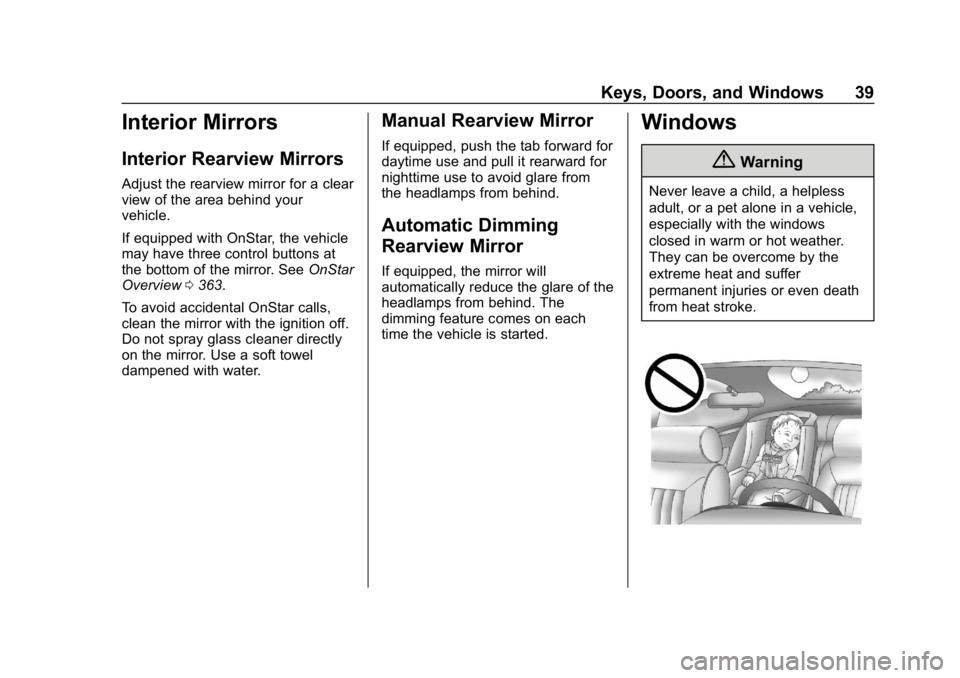
Never leave a child, a helpless
adult, or a pet alone in a vehicle,
especially with the windows
closed in warm or hot weather.
They can be overcome by the
extreme heat and suffer
permanent injuries or even death
from heat stroke.