rear view mirror CHEVROLET COLORADO 2019 Owner's Manual
[x] Cancel search | Manufacturer: CHEVROLET, Model Year: 2019, Model line: COLORADO, Model: CHEVROLET COLORADO 2019Pages: 387, PDF Size: 5.69 MB
Page 14 of 387
Chevrolet Colorado Owner Manual (GMNA-Localizing-U.S./Canada/Mexico-
12460274) - 2019 - CRC - 10/1/18
In Brief 13
Interior Mirror
Adjustment
Adjust the mirror for a clear view of
the area behind the vehicle.
Manual Dimming Rearview Mirror
If equipped, push the tab forward for
daytime use and pull it rearward for
nighttime use to avoid the glare of
headlamps from behind.
Automatic Dimming Rearview
Mirror
If equipped, the rearview mirror
dims automatically to reduce the
glare of the headlamps from behind.
The dimming feature comes on
when the vehicle is started.
Steering Wheel
Adjustment
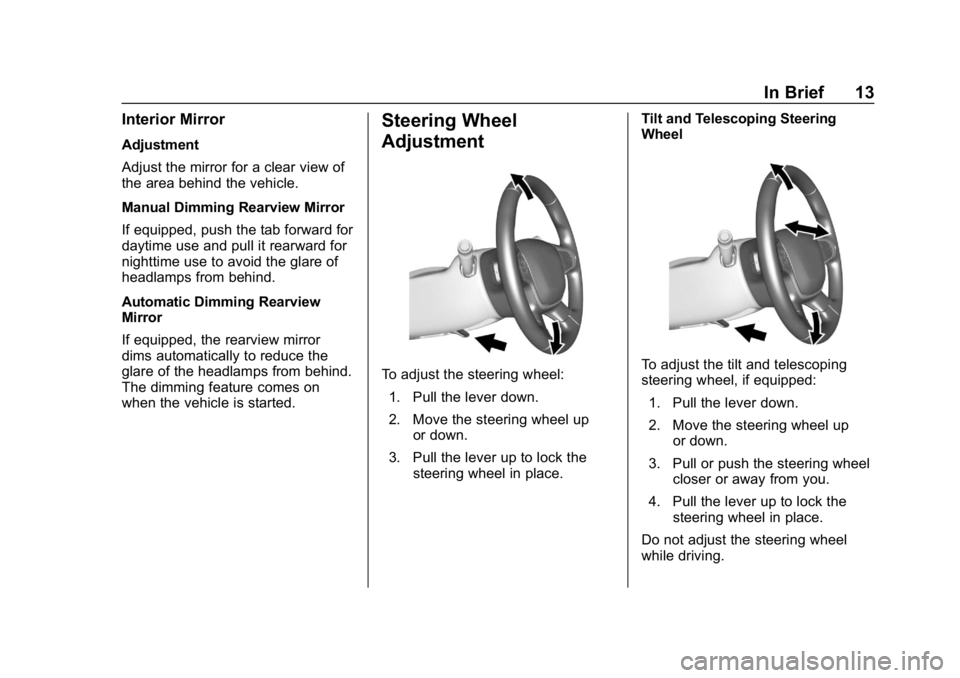
To adjust the steering wheel:1. Pull the lever down.
2. Move the steering wheel up or down.
3. Pull the lever up to lock the steering wheel in place. Tilt and Telescoping Steering
WheelTo adjust the tilt and telescoping
steering wheel, if equipped:
1. Pull the lever down.
2. Move the steering wheel up or down.
3. Pull or push the steering wheel closer or away from you.
4. Pull the lever up to lock the steering wheel in place.
Do not adjust the steering wheel
while driving.
Page 26 of 387
Chevrolet Colorado Owner Manual (GMNA-Localizing-U.S./Canada/Mexico-
12460274) - 2019 - CRC - 10/1/18
Keys, Doors, and Windows 25
Keys, Doors, and
Windows
Keys and Locks
Keys . . . . . . . . . . . . . . . . . . . . . . . . . . . 25
Remote Keyless Entry (RKE)System . . . . . . . . . . . . . . . . . . . . . . . 28
Remote Keyless Entry (RKE) System Operation . . . . . . . . . . . . 28
Remote Vehicle Start . . . . . . . . . . 30
Door Locks . . . . . . . . . . . . . . . . . . . . 31
Power Door Locks . . . . . . . . . . . . . 32
Delayed Locking . . . . . . . . . . . . . . . 32
Automatic Door Locks . . . . . . . . . 33
Lockout Protection . . . . . . . . . . . . . 33
Safety Locks . . . . . . . . . . . . . . . . . . . 33
Doors
Tailgate . . . . . . . . . . . . . . . . . . . . . . . . 34
Vehicle Security
Vehicle Security . . . . . . . . . . . . . . . . 34
Vehicle Alarm System . . . . . . . . . 34
Immobilizer . . . . . . . . . . . . . . . . . . . . 35
Immobilizer Operation . . . . . . . . . 36
Exterior Mirrors
Convex Mirrors . . . . . . . . . . . . . . . . 36
Manual Mirrors . . . . . . . . . . . . . . . . . 36 Power Mirrors . . . . . . . . . . . . . . . . . . 37
Folding Mirrors . . . . . . . . . . . . . . . . . 37
Heated Mirrors . . . . . . . . . . . . . . . . . 37
Blind Spot Mirrors . . . . . . . . . . . . . . 37
Interior Mirrors
Interior Rearview Mirrors . . . . . . . 39
Manual Rearview Mirror . . . . . . . . 39
Automatic Dimming Rearview
Mirror . . . . . . . . . . . . . . . . . . . . . . . . . 39
Windows
Windows . . . . . . . . . . . . . . . . . . . . . . . 39
Power Windows . . . . . . . . . . . . . . . 40
Rear Windows . . . . . . . . . . . . . . . . . 41
Sun Visors . . . . . . . . . . . . . . . . . . . . . 42
Keys and Locks
Keys
{Warning
Leaving children in a vehicle with
the ignition key is dangerous and
children or others could be
seriously injured or killed. They
could operate the power windows
or other controls or make the
vehicle move. The windows will
function with the keys in the
ignition, and children or others
could be caught in the path of a
closing window. Do not leave
children in a vehicle with the
ignition key.
Page 40 of 387
Chevrolet Colorado Owner Manual (GMNA-Localizing-U.S./Canada/Mexico-
12460274) - 2019 - CRC - 10/1/18
Keys, Doors, and Windows 39
Interior Mirrors
Interior Rearview Mirrors
Adjust the rearview mirror for a clear
view of the area behind your
vehicle.
If equipped with OnStar, the vehicle
may have three control buttons at
the bottom of the mirror. SeeOnStar
Overview 0363.
To avoid accidental OnStar calls,
clean the mirror with the ignition off.
Do not spray glass cleaner directly
on the mirror. Use a soft towel
dampened with water.
Manual Rearview Mirror
If equipped, push the tab forward for
daytime use and pull it rearward for
nighttime use to avoid glare from
the headlamps from behind.
Automatic Dimming
Rearview Mirror
If equipped, the mirror will
automatically reduce the glare of the
headlamps from behind. The
dimming feature comes on each
time the vehicle is started.
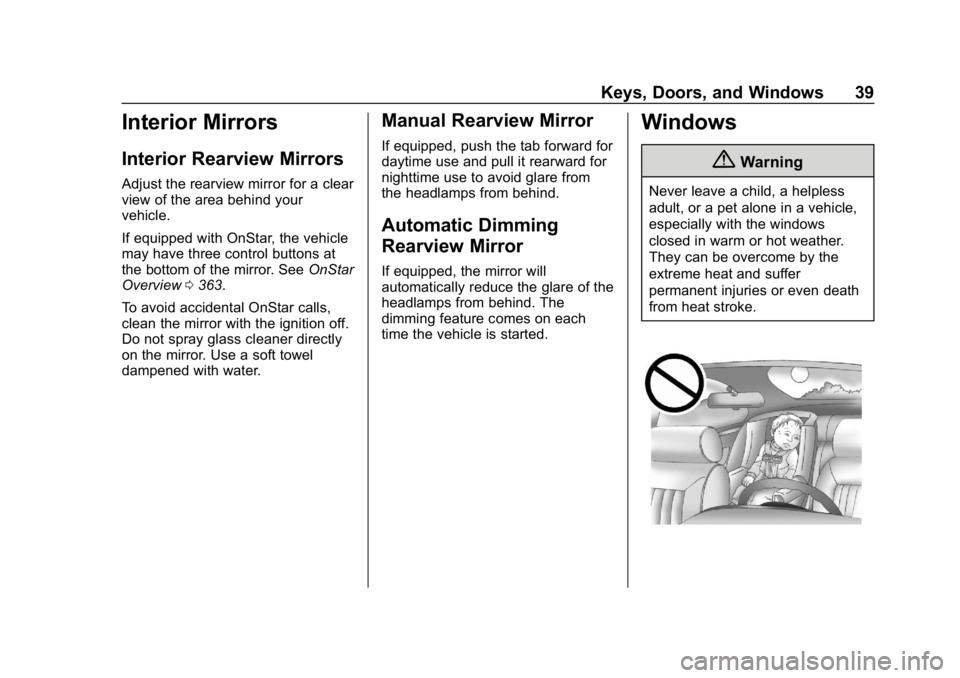
Windows
{Warning
Never leave a child, a helpless
adult, or a pet alone in a vehicle,
especially with the windows
closed in warm or hot weather.
They can be overcome by the
extreme heat and suffer
permanent injuries or even death
from heat stroke.
Page 211 of 387
Chevrolet Colorado Owner Manual (GMNA-Localizing-U.S./Canada/Mexico-
12460274) - 2019 - CRC - 10/1/18
210 Driving and Operating
Information Center (DIC) messages
may display when the systems are
unavailable or blocked..Front and rear bumpers and the
area below the bumpers
. Front grille and headlamps
. Front camera lens in the front
grille or near the front emblem
. Front side and rear side panels
. Outside of the windshield in front
of the rearview mirror
. Side camera lens on the bottom
of the outside mirrors
. Rear side corner bumpers
. Rear Vision Camera above the
license plate
Assistance Systems for
Parking or Backing
If equipped, the Rear Vision Camera
(RVC) and Rear Park Assist (RPA)
may help the driver park or avoid
objects. Always check around the
vehicle when parking or backing.
Rear Vision Camera (RVC)
When the vehicle is shifted into
R (Reverse), the RVC displays an
image of the area behind the vehicle in the infotainment display. The
previous screen displays when the
vehicle is shifted out of R (Reverse)
after a short delay. To return to the
previous screen sooner, press any
button on the infotainment system,
shift into P (Park), or reach a vehicle
speed of approximately 12 km/h
(8 mph). Select the guidance lines
button on the infotainment display to
turn guidance lines on or off.
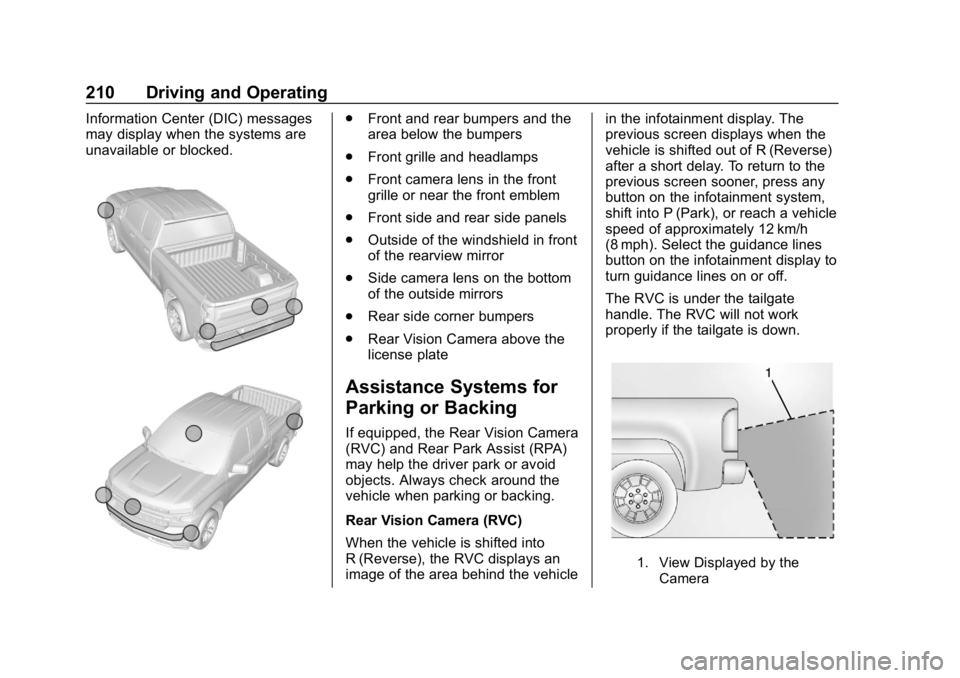
The RVC is under the tailgate
handle. The RVC will not work
properly if the tailgate is down.
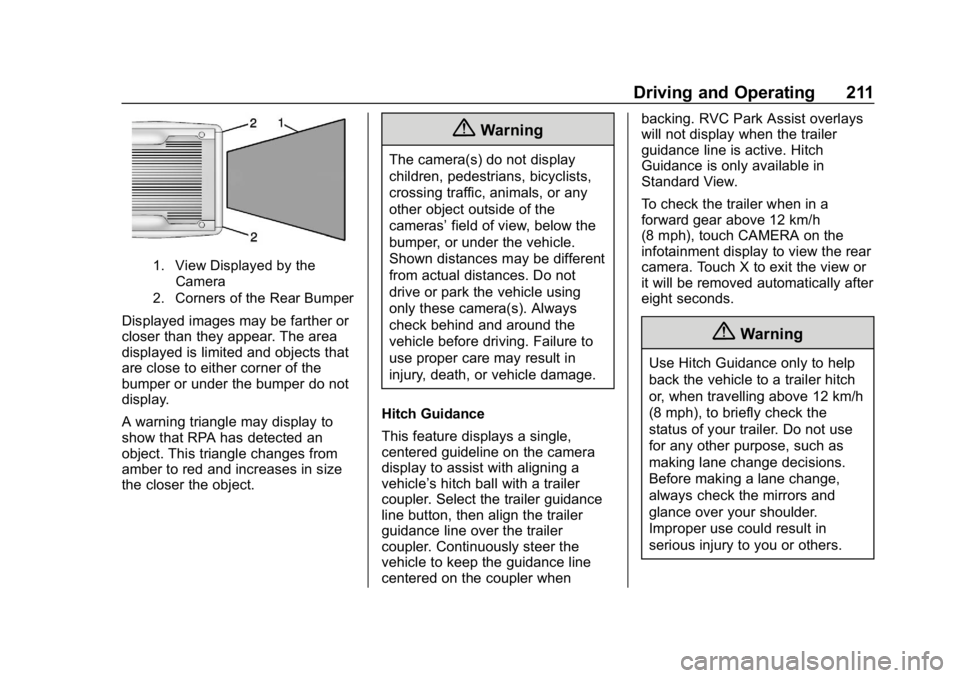
1. View Displayed by the
Camera
Page 212 of 387
Chevrolet Colorado Owner Manual (GMNA-Localizing-U.S./Canada/Mexico-
12460274) - 2019 - CRC - 10/1/18
Driving and Operating 211
1. View Displayed by theCamera
2. Corners of the Rear Bumper
Displayed images may be farther or
closer than they appear. The area
displayed is limited and objects that
are close to either corner of the
bumper or under the bumper do not
display.
A warning triangle may display to
show that RPA has detected an
object. This triangle changes from
amber to red and increases in size
the closer the object.
{Warning
The camera(s) do not display
children, pedestrians, bicyclists,
crossing traffic, animals, or any
other object outside of the
cameras’ field of view, below the
bumper, or under the vehicle.
Shown distances may be different
from actual distances. Do not
drive or park the vehicle using
only these camera(s). Always
check behind and around the
vehicle before driving. Failure to
use proper care may result in
injury, death, or vehicle damage.
Hitch Guidance
This feature displays a single,
centered guideline on the camera
display to assist with aligning a
vehicle’s hitch ball with a trailer
coupler. Select the trailer guidance
line button, then align the trailer
guidance line over the trailer
coupler. Continuously steer the
vehicle to keep the guidance line
centered on the coupler when backing. RVC Park Assist overlays
will not display when the trailer
guidance line is active. Hitch
Guidance is only available in
Standard View.
To check the trailer when in a
forward gear above 12 km/h
(8 mph), touch CAMERA on the
infotainment display to view the rear
camera. Touch X to exit the view or
it will be removed automatically after
eight seconds.
{Warning
Use Hitch Guidance only to help
back the vehicle to a trailer hitch
or, when travelling above 12 km/h
(8 mph), to briefly check the
status of your trailer. Do not use
for any other purpose, such as
making lane change decisions.
Before making a lane change,
always check the mirrors and
glance over your shoulder.
Improper use could result in
serious injury to you or others.
Page 215 of 387
Chevrolet Colorado Owner Manual (GMNA-Localizing-U.S./Canada/Mexico-
12460274) - 2019 - CRC - 10/1/18
214 Driving and Operating
prepare for driver braking to occur
more rapidly which can cause a
brief, mild deceleration. Continue to
apply the brake pedal as needed.
Cruise control may be disengaged
when the Collision Alert occurs.
Tailgating Alert
The vehicle ahead indicator will
display amber when you are
following a detected vehicle ahead
much too closely.
Selecting the Alert Timing
The Collision Alert control is on the
steering wheel. Press
[to set the
FCA timing to Far, Medium, Near,
or Off. The first button press shows
the current setting on the DIC.
Additional button presses will
change this setting. The chosen
setting will remain until it is changed
and will affect the timing of both the Collision Alert and the Tailgating
Alert features. The timing of both
alerts will vary based on vehicle
speed. The faster the vehicle speed,
the farther away the alert will occur.
Consider traffic and weather
conditions when selecting the alert
timing. The range of selectable alert
timing may not be appropriate for all
drivers and driving conditions.
Unnecessary Alerts
FCA may provide unnecessary
alerts for turning vehicles, vehicles
in other lanes, objects that are not
vehicles, or shadows. These alerts
are normal operation and the
vehicle does not need service.
Cleaning the System
If the FCA system does not seem to
operate properly, this may correct
the issue:
.
Clean the outside of the
windshield in front of the
rearview mirror.
. Clean the entire front of the
vehicle.
. Clean the headlamps.
Lane Departure
Warning (LDW)
If equipped, LDW may help avoid
crashes due to unintentional lane
departures. It may provide an alert if
the vehicle is crossing a lane
marking without using a turn signal
in that direction. LDW uses a
camera sensor to detect the lane
markings at speeds of 56 km/h
(35 mph) or greater.
{Warning
The LDW system does not steer
the vehicle. The LDW system
may not:
. Provide enough time to
avoid a crash.
. Detect lane markings under
poor weather or visibility
conditions. This can occur if
the windshield or
headlamps are blocked by
dirt, snow, or ice; if they are
(Continued)
Page 216 of 387
Chevrolet Colorado Owner Manual (GMNA-Localizing-U.S./Canada/Mexico-
12460274) - 2019 - CRC - 10/1/18
Driving and Operating 215
Warning (Continued)
not in proper condition; or if
the sun shines directly into
the camera.
. Detect road edges.
. Detect lanes on winding or
hilly roads.
If LDW only detects lane
markings on one side of the road,
it will only warn you when
departing the lane on the side
where it has detected a lane
marking. Always keep your
attention on the road and
maintain proper vehicle position
within the lane, or vehicle
damage, injury, or death could
occur. Always keep the
windshield, headlamps, and
camera sensors clean and in
good repair. Do not use LDW in
bad weather conditions.
How the System Works
The LDW camera sensor is on the
windshield ahead of the rearview
mirror.
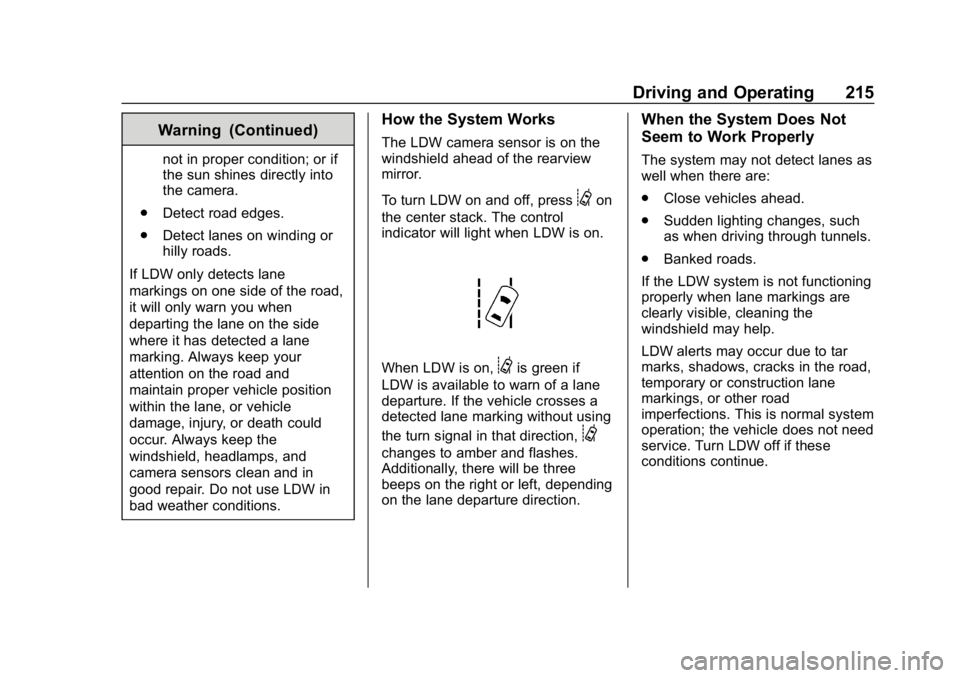
To turn LDW on and off, press
@on
the center stack. The control
indicator will light when LDW is on.
When LDW is on,@is green if
LDW is available to warn of a lane
departure. If the vehicle crosses a
detected lane marking without using
the turn signal in that direction,
@
changes to amber and flashes.
Additionally, there will be three
beeps on the right or left, depending
on the lane departure direction.
When the System Does Not
Seem to Work Properly
The system may not detect lanes as
well when there are:
. Close vehicles ahead.
. Sudden lighting changes, such
as when driving through tunnels.
. Banked roads.
If the LDW system is not functioning
properly when lane markings are
clearly visible, cleaning the
windshield may help.
LDW alerts may occur due to tar
marks, shadows, cracks in the road,
temporary or construction lane
markings, or other road
imperfections. This is normal system
operation; the vehicle does not need
service. Turn LDW off if these
conditions continue.
Page 221 of 387
Chevrolet Colorado Owner Manual (GMNA-Localizing-U.S./Canada/Mexico-
12460274) - 2019 - CRC - 10/1/18
220 Driving and Operating
important for your safety and that of
your passengers. Read this section
carefully before pulling a trailer.
When towing a trailer:
.Become familiar with and follow
all state and local laws that
apply to trailer towing. These
requirements vary from state to
state.
. State laws may require the use
of extended side view mirrors.
Even if not required, you should
install extended side view
mirrors if your visibility is limited
or restricted while towing.
. Do not tow a trailer during the
first 800 km (500 mi) of vehicle
use to prevent damage to the
engine, axle, or other parts.
. It is recommended to perform
the first oil change before heavy
towing.
. During the first 800 km (500 mi)
of trailer towing, do not drive
over 80 km/h (50 mph) and do
not make starts at full throttle. .
Vehicles can tow in D (Drive).
Tow/Haul Mode is recommended
for heavier trailers. See Tow/
Haul Mode 0188. If the
transmission downshifts too
often, a lower gear may be
selected using Manual Mode.
See Manual Mode 0185.
If equipped, the following driver
assistance features should be
turned off when towing a trailer:
. Adaptive Cruise Control (ACC)
. Super Cruise Control
. Lane Keep Assist (LKA)
. Park Assist
. Reverse Automatic
Braking (RAB)
If equipped, the following driver
assistance features should be
turned to alert or off when towing a
trailer:
. Forward Automatic
Braking (FAB)
. Intelligent Brake Assist (IBA)
. Front Pedestrian Braking (FPB) If equipped with Lane Change Alert
(LCA), the LCA detection zones that
extend back from the side of the
vehicle do not move further back
when a trailer is towed. Use caution
while changing lanes when towing a
trailer.
If equipped with Rear Cross Traffic
Alert (RCTA), use caution while
backing up when towing a trailer, as
the RCTA detection zones that
extend out from the back of the
vehicle do not move further back
when a trailer is towed.
{Warning
To prevent serious injury or death
from carbon monoxide (CO),
when towing a trailer:
. Do not drive with the
liftgate, trunk/hatch,
or rear-most window open.
. Fully open the air outlets on
or under the instrument
panel.
(Continued)
Page 278 of 387
Chevrolet Colorado Owner Manual (GMNA-Localizing-U.S./Canada/Mexico-
12460274) - 2019 - CRC - 10/1/18
Vehicle Care 277
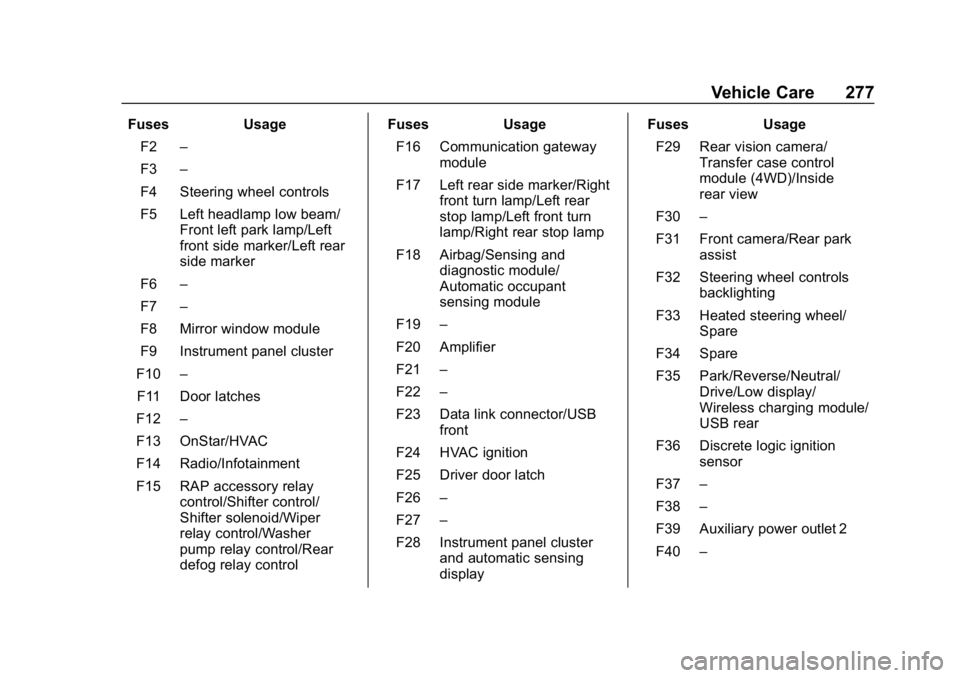
FusesUsage
F2 –
F3 –
F4 Steering wheel controls
F5 Left headlamp low beam/ Front left park lamp/Left
front side marker/Left rear
side marker
F6 –
F7 –
F8 Mirror window module
F9 Instrument panel cluster
F10 –
F11 Door latches
F12 –
F13 OnStar/HVAC
F14 Radio/Infotainment
F15 RAP accessory relay control/Shifter control/
Shifter solenoid/Wiper
relay control/Washer
pump relay control/Rear
defog relay control Fuses
Usage
F16 Communication gateway module
F17 Left rear side marker/Right front turn lamp/Left rear
stop lamp/Left front turn
lamp/Right rear stop lamp
F18 Airbag/Sensing and diagnostic module/
Automatic occupant
sensing module
F19 –
F20 Amplifier
F21 –
F22 –
F23 Data link connector/USB front
F24 HVAC ignition
F25 Driver door latch
F26 –
F27 –
F28 Instrument panel cluster and automatic sensing
display Fuses
Usage
F29 Rear vision camera/ Transfer case control
module (4WD)/Inside
rear view
F30 –
F31 Front camera/Rear park assist
F32 Steering wheel controls backlighting
F33 Heated steering wheel/ Spare
F34 Spare
F35 Park/Reverse/Neutral/ Drive/Low display/
Wireless charging module/
USB rear
F36 Discrete logic ignition sensor
F37 –
F38 –
F39 Auxiliary power outlet 2
F40 –
Page 381 of 387

Chevrolet Colorado Owner Manual (GMNA-Localizing-U.S./Canada/Mexico-
12460274) - 2019 - CRC - 10/1/18
380 Index
Instrument Cluster . . . . . . . . . 112, 114
Interior Rearview Mirrors . . . . . . . . . 39
Introduction . . . . . . . . . . . . . . . . . . . . . . . 2
J
Jump Starting - NorthAmerica . . . . . . . . . . . . . . . . . . . . . . . 312
K
Keyless Entry
Remote (RKE) System . . . . . . . . . 28
Keys . . . . . . . . . . . . . . . . . . . . . . . . . . . . . 25
L
Labeling, Tire Sidewall . . . . . . . . . . 280
Lamps Daytime Running (DRL) . . . . . . 141
Dome . . . . . . . . . . . . . . . . . . . . . . . . . 144
Exterior Cargo . . . . . . . . . . . . . . . . 143
Exterior Controls . . . . . . . . . . . . . . 139
Exterior Lamps OffReminder . . . . . . . . . . . . . . . . . . . 140
Exterior Lighting Battery
Saver . . . . . . . . . . . . . . . . . . . . . . . 146
Malfunction Indicator (Check Engine) . . . . . . . . . . . . . 120
On Reminder . . . . . . . . . . . . . . . . . 128 Lamps (cont'd)
Reading . . . . . . . . . . . . . . . . . . . . . . 145
Lane Departure Warning (LDW) . . . . . . . . . . . . . . . . 214
Lane Departure Warning Light . . . . . . . . . . . . . . . . . . . . . . . . . . 124
Lap-Shoulder Belt . . . . . . . . . . . . . . . 54
LATCH System Replacing Parts after a
Crash . . . . . . . . . . . . . . . . . . . . . . . . . 93
LATCH, Lower Anchors and Tethers for Children . . . . . . . . . . . . 79
Lighting Entry . . . . . . . . . . . . . . . . . . . . . . . . . 145
Exit . . . . . . . . . . . . . . . . . . . . . . . . . . . 145
Illumination Control . . . . . . . . . . . 144
Lights Airbag Readiness . . . . . . . . . . . . . .119
Antilock Brake System
(ABS) Warning . . . . . . . . . . . . . . 123
Brake System Warning . . . . . . . 122
Charging System . . . . . . . . . . . . . 120
Check Engine (Malfunction Indicator) . . . . . . . . . . . . . . . . . . . . 120
Cruise Control . . . . . . . . . . . . . . . . 128
Door Ajar . . . . . . . . . . . . . . . . . . . . . 128
Engine Oil Pressure . . . . . . . . . . 126
Flash-to-Pass . . . . . . . . . . . . . . . . . 140 Lights (cont'd)
Front Fog Lamp . . . . . . . . . . . . . . 128
High-Beam On . . . . . . . . . . . . . . . . 127
High/Low Beam Changer . . . . . 140
Hill Descent Control . . . . . . . . . . 124
Lane Departure Warning . . . . . . 124
Low Fuel Warning . . . . . . . . . . . . 127
Seat Belt Reminders . . . . . . . . . . .118
Security . . . . . . . . . . . . . . . . . . . . . . 127
StabiliTrak OFF . . . . . . . . . . . . . . . 125
Tire Pressure . . . . . . . . . . . . . . . . . 126
Tow/Haul Mode . . . . . . . . . . . . . . . 124
Traction Control System
(TCS)/StabiliTrak . . . . . . . . . . . . 125
Traction Off . . . . . . . . . . . . . . . . . . . 125
Up-Shift . . . . . . . . . . . . . . . . . . . . . . 124
Limited-Slip Differential . . . . . . . . . 204
Locking Front Axle . . . . . . . . . . . . . . 205
Locking Rear Axle . . . . . . . . . . . . . . 204
Locks Automatic Door . . . . . . . . . . . . . . . . . 33
Delayed Locking . . . . . . . . . . . . . . . . 32
Door . . . . . . . . . . . . . . . . . . . . . . . . . . . . 31
Lockout Protection . . . . . . . . . . . . . . 33
Power Door . . . . . . . . . . . . . . . . . . . . . 32
Safety . . . . . . . . . . . . . . . . . . . . . . . . . . 33
Loss of Control . . . . . . . . . . . . . . . . . 159
Low Fuel Warning Light . . . . . . . . . 127