auto stop CHEVROLET COLORADO 2023 User Guide
[x] Cancel search | Manufacturer: CHEVROLET, Model Year: 2023, Model line: COLORADO, Model: CHEVROLET COLORADO 2023Pages: 362, PDF Size: 13.62 MB
Page 153 of 362
Chevrolet Colorado Owner Manual (GMNA-Localizing-U.S./Canada/Mexico-
15274222) - 2022 - CRC - 11/2/21
152 Infotainment System
restrictions will not be applied if this
transmitter key is used to operate
the vehicle.
In vehicles with a pushbutton start system,
if a Teen Driver and a non-Teen Driver key
are both present at start up, the vehicle will
recognize the non-Teen Driver key to start
the vehicle. The Teen Driver settings will not
be active.
For a keyed ignition system: 1. Start the engine.
2. For automatic transmissions, the vehicle must be in P (Park). For manual
transmissions, the vehicle must be
stopped with the parking brake set.
3. From the Settings menu, touch Vehicle and then Teen Driver.
4. Enter the PIN.
5. Touch Setup Keys. The system displays instructions for registering or
unregistering a key. A confirmation
message displays.
Manage Settings
Audio Volume Limit : Allows the audio
volume limit to be turned on or off. Touch
Set Audio Volume Limit to choose the
maximum allowable audio volume level. Set Audio Volume Limit :
Allows a
maximum radio volume to be set. Use the
arrows to choose the maximum allowable
level for the audio volume.
Teen Driver Speed Limiter : Limits the
maximum speed of the vehicle. When the
speed limiter is turned on and the vehicle is
started with a Teen Driver key, the DIC
displays a message that the top speed is
limited.
On certain vehicles, when the Speed Limiter
is turned ON, the vehicle’s maximum
acceleration will be limited. The DIC will
display a message that the acceleration is
limited.
Teen Driver Speed Warning : Allows the
speed warning to be turned on or off. Touch
Set Teen Driver Speed Warning to set the
warning speed.
Set Teen Driver Speed Warning : Displays a
warning in the DIC when exceeding a
selectable speed. Choose the desired speed
warning level. The speed warning does not
limit the speed of the vehicle.
SiriusXM Explicit Content Filter (if
equipped) : Allows the SiriusXM Explicit
Content Filter to be turned ON or OFF.
When ON, the teen driver will not be able to listen to SiriusXM stations that contain
explicit content, and the Explicit Content
Filter selection in the Audio Settings will be
unavailable for change.
When Teen Driver is Active:
.If equipped with Buckle to Drive, shifting
out of P (Park) will be prevented if the
driver seat belt, and in some vehicles the
front passenger seat belt, is not buckled.
.The radio will mute when the driver seat
belt, and in some vehicles the front
passenger seat belt, is not buckled. The
audio from any device paired to the
vehicle will also be muted.
.An object placed on the front passenger
seat, such as a briefcase, handbag,
grocery bag, laptop, or other electronic
device, could cause the passenger sensing
system to falsely sense an unbuckled
front passenger and mute the radio.
If this happens, remove the object from
the seat. See
Passenger Sensing System
0 39.
.Some safety systems, such as Forward
Collision Alert, if equipped, cannot be
turned off.
.The gap setting for the Forward Collision
Alert and Adaptive Cruise Control,
if equipped, cannot be changed.
Page 166 of 362
Chevrolet Colorado Owner Manual (GMNA-Localizing-U.S./Canada/Mexico-
15274222) - 2022 - CRC - 11/2/21
Climate Controls 165
Climate Control Status Display
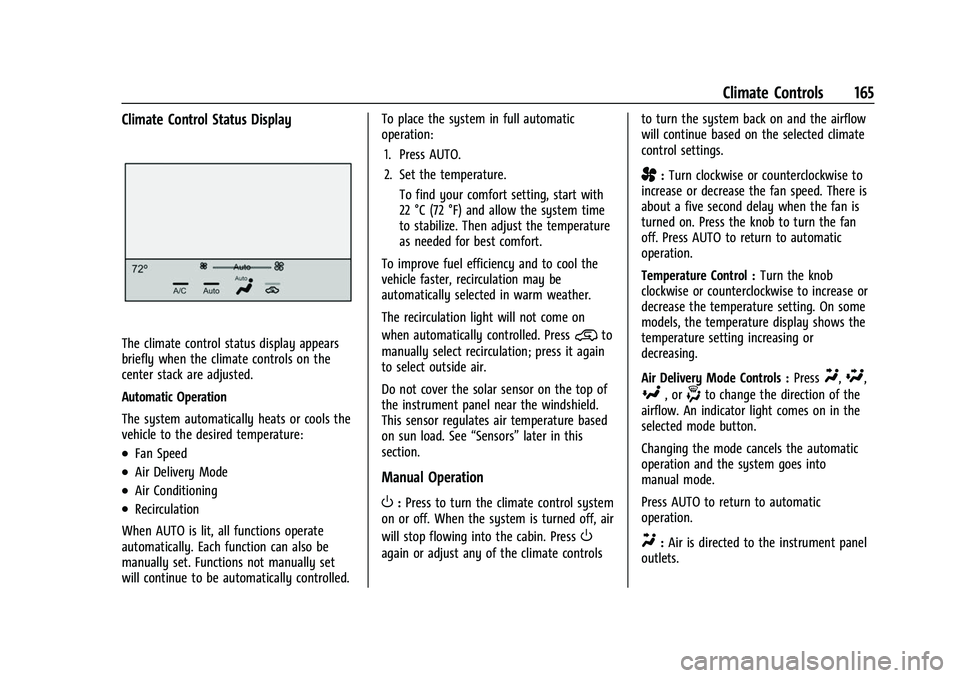
The climate control status display appears
briefly when the climate controls on the
center stack are adjusted.
Automatic Operation
The system automatically heats or cools the
vehicle to the desired temperature:
.Fan Speed
.Air Delivery Mode
.Air Conditioning
.Recirculation
When AUTO is lit, all functions operate
automatically. Each function can also be
manually set. Functions not manually set
will continue to be automatically controlled. To place the system in full automatic
operation:
1. Press AUTO.
2. Set the temperature. To find your comfort setting, start with
22 °C (72 °F) and allow the system time
to stabilize. Then adjust the temperature
as needed for best comfort.
To improve fuel efficiency and to cool the
vehicle faster, recirculation may be
automatically selected in warm weather.
The recirculation light will not come on
when automatically controlled. Press
@to
manually select recirculation; press it again
to select outside air.
Do not cover the solar sensor on the top of
the instrument panel near the windshield.
This sensor regulates air temperature based
on sun load. See “Sensors”later in this
section.
Manual Operation
O: Press to turn the climate control system
on or off. When the system is turned off, air
will stop flowing into the cabin. Press
O
again or adjust any of the climate controls to turn the system back on and the airflow
will continue based on the selected climate
control settings.
A:
Turn clockwise or counterclockwise to
increase or decrease the fan speed. There is
about a five second delay when the fan is
turned on. Press the knob to turn the fan
off. Press AUTO to return to automatic
operation.
Temperature Control : Turn the knob
clockwise or counterclockwise to increase or
decrease the temperature setting. On some
models, the temperature display shows the
temperature setting increasing or
decreasing.
Air Delivery Mode Controls : Press
Y,\,
[, or-to change the direction of the
airflow. An indicator light comes on in the
selected mode button.
Changing the mode cancels the automatic
operation and the system goes into
manual mode.
Press AUTO to return to automatic
operation.
Y: Air is directed to the instrument panel
outlets.
Page 191 of 362
Chevrolet Colorado Owner Manual (GMNA-Localizing-U.S./Canada/Mexico-
15274222) - 2022 - CRC - 11/2/21
190 Driving and Operating
Active Fuel Management
This vehicle's engine may be equipped with
Active Fuel Management, which allows the
engine to operate on either all of its
cylinders, or in reduced cylinder operation
mode, depending on the driving conditions.
When less power is required, such as
cruising at a constant vehicle speed, the
system will operate in reduced cylinder
operation mode, allowing the vehicle to
achieve better fuel economy. When greater
power demands are required, such as
accelerating from a stop, passing,
or merging onto a freeway, the system will
maintain full-cylinder operation. If the
vehicle has an Active Fuel Management
indicator, see Driver Information Center (DIC)
for more information on using this display.
Engine Exhaust{
Warning
Engine exhaust contains carbon monoxide
(CO), which cannot be seen or smelled.
Exposure to CO can cause
unconsciousness and even death. (Continued)
Warning (Continued)
Exhaust may enter the vehicle if:
.The vehicle idles in areas with poor
ventilation (parking garages, tunnels,
deep snow that may block underbody
airflow or tail pipes).
.The exhaust smells or sounds strange
or different.
.The exhaust system leaks due to
corrosion or damage.
.The vehicle exhaust system has been
modified, damaged, or improperly
repaired.
.There are holes or openings in the
vehicle body from damage or
aftermarket modifications that are not
completely sealed.
If unusual fumes are detected or if it is
suspected that exhaust is coming into the
vehicle:
.Drive it only with the windows
completely down.
.Have the vehicle repaired immediately. (Continued)
Warning (Continued)
Never park the vehicle with the engine
running in an enclosed area such as a
garage or a building that has no fresh air
ventilation.
Running the Vehicle While Parked
It is better not to park with the engine
running.
If the vehicle is left with the engine running,
follow the proper steps to be sure the
vehicle will not move. SeeShifting Into Park
0 188 and
Engine Exhaust 0190.
If parking on a hill and pulling a trailer, see
Driving Characteristics and Towing Tips
0 219.
Automatic Transmission
If equipped, there is an electronic shift lever
position indicator within the instrument
cluster. This display comes on when the
ignition key is in ACC/ACCESSORY or
ON/RUN.
Page 193 of 362
Chevrolet Colorado Owner Manual (GMNA-Localizing-U.S./Canada/Mexico-
15274222) - 2022 - CRC - 11/2/21
192 Driving and Operating
Caution
Shifting out of P (Park) or N (Neutral) with
the engine running at high speed may
damage the transmission. The repairs
would not be covered by the vehicle
warranty. Be sure the engine is not
running at high speed when shifting the
vehicle.
Caution
A transmission hot message may display
if the automatic transmission fluid is too
hot. Driving under this condition can
damage the vehicle. Stop and idle the
engine to cool the automatic
transmission fluid. This message clears
when the transmission fluid has cooled
sufficiently.
D : This position is for normal driving.
If more power is needed for passing, press
the accelerator pedal down. D (Drive) can be used when towing a trailer,
carrying a heavy load, driving on steep hills,
or driving off-road. Shift the transmission to
a lower gear range selection if the
transmission shifts too often. See
Manual
Mode 0193.
Downshifting the transmission in slippery
road conditions could result in skidding. See
“Skidding” underLoss of Control 0171.
The vehicle has a shift stabilization feature
that adjusts the transmission shifting to the
current driving conditions in order to reduce
rapid upshifts and downshifts. This shift
stabilization feature is designed to
determine, before making an upshift, if the
engine is able to maintain vehicle speed by
analyzing things such as vehicle speed,
throttle position, and vehicle load. If the
shift stabilization feature determines that a
current vehicle speed cannot be maintained,
the transmission does not upshift and
instead holds the current gear. In some
cases, this could appear to be a delayed
shift, however the transmission is operating
normally. The transmission uses adaptive shift
controls. The adaptive shift control process
continually compares key shift parameters
to pre-programmed ideal shifts stored in the
transmission’s computer. The transmission
constantly makes adjustments to improve
vehicle performance according to how the
vehicle is being used, such as with a heavy
load or when the temperature changes.
During this adaptive shift control process,
shifting might feel different as the
transmission determines the best settings.
When temperatures are very cold, the
transmission's gear shifting could be delayed
providing more stable shifts until the engine
warms up. Shifts could be more noticeable
with a cold transmission. This difference in
shifting is normal.
L :
This position allows selection of a range
of gears appropriate for current driving
conditions. See Manual Mode0193.
Page 194 of 362
Chevrolet Colorado Owner Manual (GMNA-Localizing-U.S./Canada/Mexico-
15274222) - 2022 - CRC - 11/2/21
Driving and Operating 193
Caution
Spinning the tires or holding the vehicle
in one place on a hill using only the
accelerator pedal may damage the
transmission. The repair will not be
covered by the vehicle warranty. If the
vehicle is stuck, do not spin the tires.
When stopping on a hill, use the brakes
to hold the vehicle in place.
Normal Mode Grade Braking
Normal Mode Grade Braking is enabled
when the vehicle is started, but is not
enabled in Range Selection Mode. It assists
in maintaining desired vehicle speeds when
driving on downhill grades by using the
engine and transmission to slow the vehicle.
Manual Mode
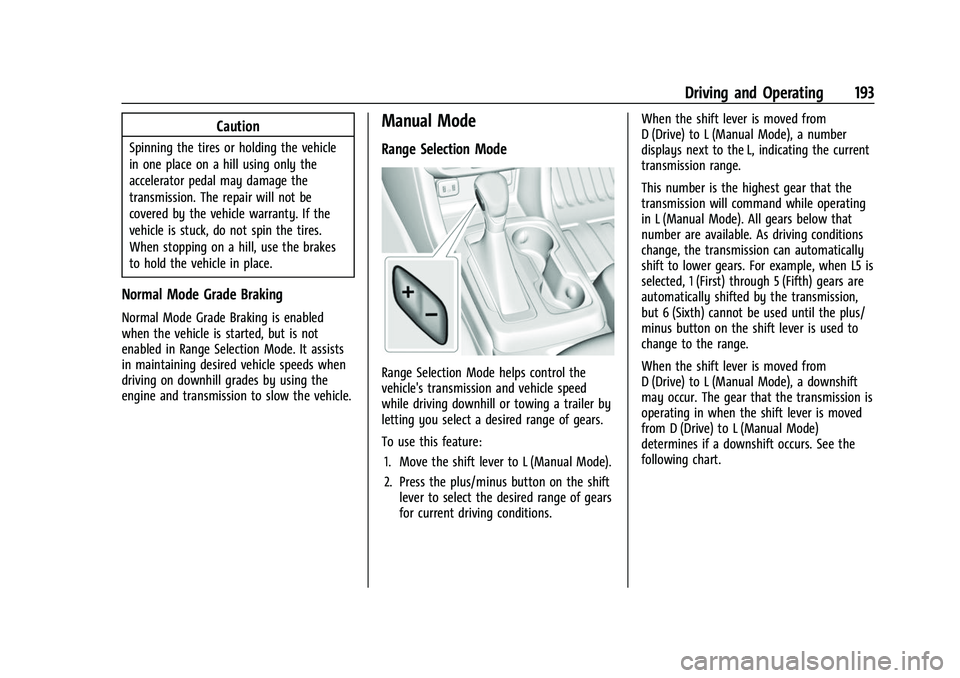
Range Selection Mode
Range Selection Mode helps control the
vehicle's transmission and vehicle speed
while driving downhill or towing a trailer by
letting you select a desired range of gears.
To use this feature:1. Move the shift lever to L (Manual Mode).
2. Press the plus/minus button on the shift lever to select the desired range of gears
for current driving conditions. When the shift lever is moved from
D (Drive) to L (Manual Mode), a number
displays next to the L, indicating the current
transmission range.
This number is the highest gear that the
transmission will command while operating
in L (Manual Mode). All gears below that
number are available. As driving conditions
change, the transmission can automatically
shift to lower gears. For example, when L5 is
selected, 1 (First) through 5 (Fifth) gears are
automatically shifted by the transmission,
but 6 (Sixth) cannot be used until the plus/
minus button on the shift lever is used to
change to the range.
When the shift lever is moved from
D (Drive) to L (Manual Mode), a downshift
may occur. The gear that the transmission is
operating in when the shift lever is moved
from D (Drive) to L (Manual Mode)
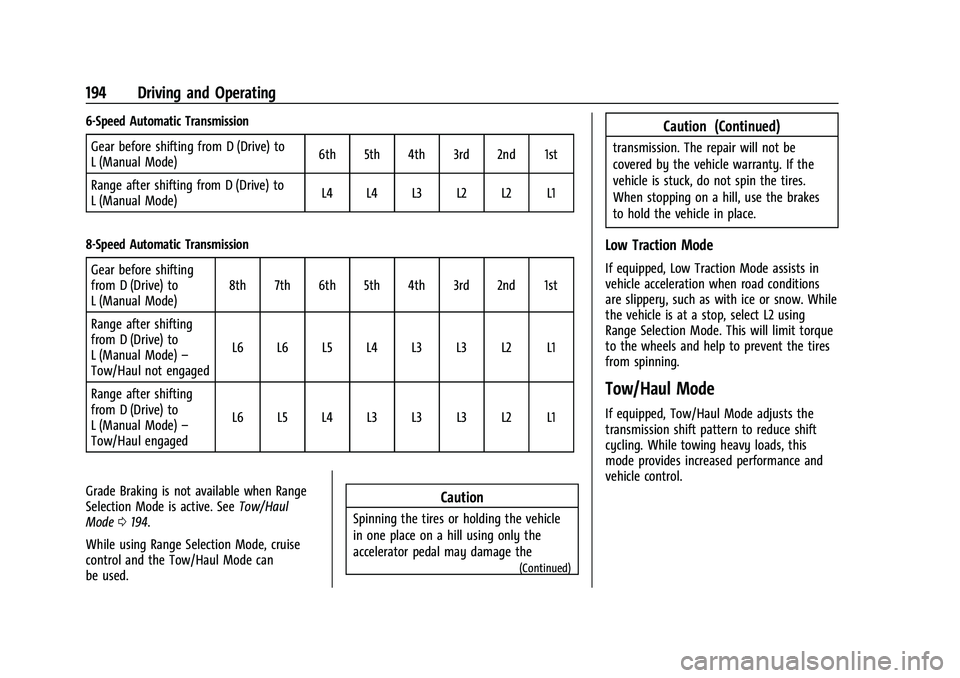
determines if a downshift occurs. See the
following chart.
Page 195 of 362
Chevrolet Colorado Owner Manual (GMNA-Localizing-U.S./Canada/Mexico-
15274222) - 2022 - CRC - 11/2/21
194 Driving and Operating
6-Speed Automatic TransmissionGear before shifting from D (Drive) to
L (Manual Mode) 6th 5th 4th 3rd 2nd 1st
Range after shifting from D (Drive) to
L (Manual Mode) L4 L4 L3 L2 L2 L1
8-Speed Automatic Transmission Gear before shifting
from D (Drive) to
L (Manual Mode) 8th 7th 6th 5th 4th 3rd 2nd 1st
Range after shifting
from D (Drive) to
L (Manual Mode) –
Tow/Haul not engaged L6 L6 L5 L4 L3 L3 L2 L1
Range after shifting
from D (Drive) to
L (Manual Mode) –
Tow/Haul engaged L6 L5 L4 L3 L3 L3 L2 L1
Grade Braking is not available when Range
Selection Mode is active. See Tow/Haul
Mode 0194.
While using Range Selection Mode, cruise
control and the Tow/Haul Mode can
be used.
Caution
Spinning the tires or holding the vehicle
in one place on a hill using only the
accelerator pedal may damage the
(Continued)
Caution (Continued)
transmission. The repair will not be
covered by the vehicle warranty. If the
vehicle is stuck, do not spin the tires.
When stopping on a hill, use the brakes
to hold the vehicle in place.
Low Traction Mode
If equipped, Low Traction Mode assists in
vehicle acceleration when road conditions
are slippery, such as with ice or snow. While
the vehicle is at a stop, select L2 using
Range Selection Mode. This will limit torque
to the wheels and help to prevent the tires
from spinning.
Tow/Haul Mode
If equipped, Tow/Haul Mode adjusts the
transmission shift pattern to reduce shift
cycling. While towing heavy loads, this
mode provides increased performance and
vehicle control.
Page 199 of 362
Chevrolet Colorado Owner Manual (GMNA-Localizing-U.S./Canada/Mexico-
15274222) - 2022 - CRC - 11/2/21
198 Driving and Operating
4. Turn the transfer case shift knob to 2m.
After the transfer case has shifted out of
N (Neutral), the N (Neutral) light will
go out.
5. Shift to P (Park).
Caution
Shifting the transmission into gear before
the requested mode indicator light has
stopped flashing could damage the
transfer case.
6. Release the parking brake.
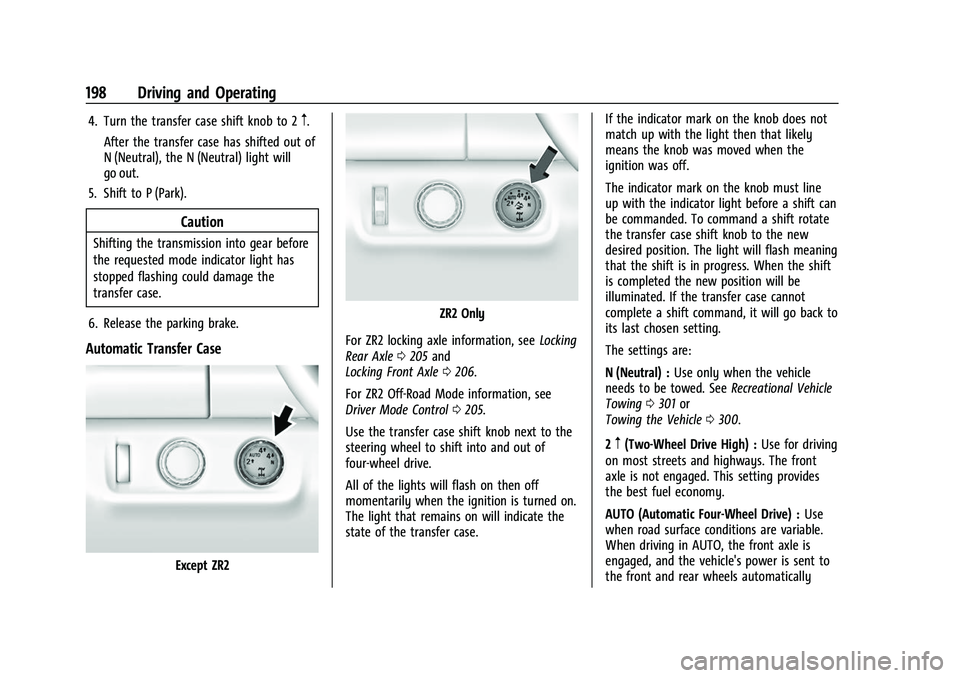
Automatic Transfer Case
Except ZR2
ZR2 Only
For ZR2 locking axle information, see Locking
Rear Axle 0205 and
Locking Front Axle 0206.
For ZR2 Off-Road Mode information, see
Driver Mode Control 0205.
Use the transfer case shift knob next to the
steering wheel to shift into and out of
four-wheel drive.
All of the lights will flash on then off
momentarily when the ignition is turned on.
The light that remains on will indicate the
state of the transfer case. If the indicator mark on the knob does not
match up with the light then that likely
means the knob was moved when the
ignition was off.
The indicator mark on the knob must line
up with the indicator light before a shift can
be commanded. To command a shift rotate
the transfer case shift knob to the new
desired position. The light will flash meaning
that the shift is in progress. When the shift
is completed the new position will be
illuminated. If the transfer case cannot
complete a shift command, it will go back to
its last chosen setting.
The settings are:
N (Neutral) :
Use only when the vehicle
needs to be towed. See Recreational Vehicle
Towing 0301 or
Towing the Vehicle 0300.
2
m(Two-Wheel Drive High) : Use for driving
on most streets and highways. The front
axle is not engaged. This setting provides
the best fuel economy.
AUTO (Automatic Four-Wheel Drive) : Use
when road surface conditions are variable.
When driving in AUTO, the front axle is
engaged, and the vehicle's power is sent to
the front and rear wheels automatically
Page 200 of 362
Chevrolet Colorado Owner Manual (GMNA-Localizing-U.S./Canada/Mexico-
15274222) - 2022 - CRC - 11/2/21
Driving and Operating 199
based on driving conditions. This setting
provides slightly lower fuel economy than
2
m.
Do not use AUTO mode, if equipped, to park
on a steep grade with poor traction such as
ice, snow, mud, or gravel. In AUTO mode
only the rear wheels will hold the vehicle
from sliding when parked. If parking on a
steep grade, use 4
mto keep all four wheels
engaged.
4
m(Four-Wheel Drive High) : This setting
engages the front axle. Use this position
when extra traction is needed, such as when
driving on snowy or icy roads, or when
off-roading.
4
n(Four-Wheel Drive Low) : This setting
engages the front axle and delivers extra
torque. Choose 4
nwhen driving off-road in
deep sand, deep mud, or deep snow, and
while climbing or descending steep hills.
Shifting into 4
nwill turn Traction Control
and StabiliTrak/ESC off. See Traction Control/
Electronic Stability Control 0202. Shifting Into 4
mor AUTO
Turn the knob to the 4
mor AUTO position
at any speed, except from 4
n. The indicator
light will flash while shifting and will remain
on when the shift is completed.
Shifting Into 2
m
Turn the knob to 2mat any speed, except
when shifting from 4
n. The indicator light
will flash while shifting and will remain on
when the shift is completed.
Shifting Into 4
n
When 4nis engaged, keep vehicle speed
below 72 km/h (45 mph).
To shift into 4
n:
1. The ignition must be on and the vehicle must be stopped or moving less than
5 km/h (3 mph) with the transmission in
N (Neutral). It is best for the vehicle to
be moving 1.6 to 3.2 km/h (1 to 2 mph).
2. Turn the knob to 4
n. Wait for the 4n
indicator light to stop flashing before
shifting the transmission into gear.
Caution
Shifting the transmission into gear before
the requested mode indicator light has
stopped flashing could damage the
transfer case.
If the transmission is in gear and/or moving
more than 5 km/h (3 mph), the 4
nindicator
light will flash for 30 seconds, but will not
complete the shift. After 30 seconds the
transfer case will shift to 4
m. Turn the knob
to 4
mto display the indicator. With the
vehicle moving less than 5 km/h (3 mph),
and the transmission in N (Neutral), attempt
the shift again.
Shifting Out of 4
n
To shift:
1. The vehicle must be stopped or moving less than 5 km/h (3 mph) with the
transmission in N (Neutral) and the
ignition on. It is best for the vehicle to
be moving 1.6 to 3.2 km/h (1 to 2 mph).
2. Turn the knob to 4
m, AUTO, or 2m. Wait
for the 4
m, AUTO, or 2mindicator light
to stop flashing before shifting the
transmission into gear.
Page 201 of 362
Chevrolet Colorado Owner Manual (GMNA-Localizing-U.S./Canada/Mexico-
15274222) - 2022 - CRC - 11/2/21
200 Driving and Operating
Caution
Shifting the transmission into gear before
the requested mode indicator light has
stopped flashing could damage the
transfer case.
If the transmission is in gear and/or moving
more than 5 km/h (3 mph), the 4
m, AUTO,
or 2
mindicator light will flash for
30 seconds but will not complete the shift.
With the vehicle moving less than 5 km/h
(3 mph), and the transmission in N (Neutral),
attempt the shift again.
Shifting Into N (Neutral)
To shift:
1. Park the vehicle on a level surface.
2. Set the parking brake and press and hold the brake pedal. See Parking Brake
0 201.
3. Start the vehicle or turn the ignition on.
4. Shift the transmission to N (Neutral).
5. Shift the transfer case to 2
m.
6. Turn the transfer case shift knob clockwise past the 4
ndetent to
N (Neutral) until it stops and hold it
there until the N (Neutral) light starts flashing. This will take at least
10 seconds. Then slowly release the knob
to the 4
nposition. The N (Neutral) light
will come on when the transfer case
shift to N (Neutral) is complete.
7. With the engine running, verify that the transfer case is in N (Neutral) by shifting
the transmission to R (Reverse), then
shift the transmission to D (Drive). There
should be no movement of the vehicle
while shifting the transmission.
8. Turn the engine off, and the ignition to ACC/ACCESSORY.
9. Place the transmission shift lever in P (Park).
Shifting Out of N (Neutral)
To shift: 1. Set the parking brake.
2. Turn the ignition on with the engine off.
3. Shift the transmission to N (Neutral).
4. Turn the transfer case shift knob to 2
m.
After the transfer case has shifted out of
N (Neutral), the N (Neutral) light will
go out and the new 2
mstate will be
displayed. 5. Place the transmission shift lever in
P (Park).
6. Release the parking brake.
Brakes
Antilock Brake System (ABS)
The Antilock Brake System (ABS) helps
prevent a braking skid and maintain steering
while braking hard.
ABS performs a system check when the
vehicle is first driven. A momentary motor
or clicking noise may be heard while this
test is going on, and the brake pedal may
move slightly. This is normal.
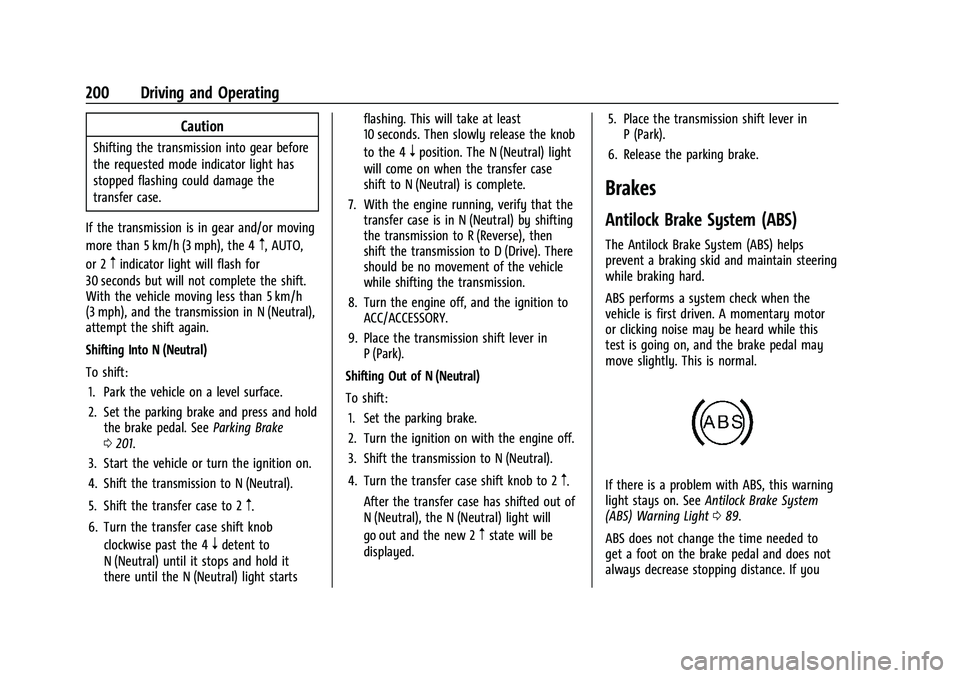
If there is a problem with ABS, this warning
light stays on. See Antilock Brake System
(ABS) Warning Light 089.
ABS does not change the time needed to
get a foot on the brake pedal and does not
always decrease stopping distance. If you
Page 203 of 362
Chevrolet Colorado Owner Manual (GMNA-Localizing-U.S./Canada/Mexico-
15274222) - 2022 - CRC - 11/2/21
202 Driving and Operating
pedal release to accelerator pedal apply. The
brakes release when the accelerator pedal is
applied or automatically release after a few
seconds. The brakes may also release under
other conditions. Do not rely on HSA to hold
the vehicle.
HSA is available when the vehicle is facing
uphill in a forward gear, or when facing
downhill in R (Reverse). The vehicle must
come to a complete stop on a grade for HSA
to activate.
Ride Control Systems
Traction Control/Electronic
Stability Control
System Operation
The vehicle has a Traction Control System
(TCS) and StabiliTrak/Electronic Stability
Control (ESC), an electronic stability control
system. These systems help limit wheel spin
and assist the driver in maintaining control,
especially on slippery road conditions.
TCS activates if it senses that any of the
drive wheels are spinning or beginning to
lose traction. When this happens, TCSapplies the brakes to the spinning wheels
and reduces engine power to limit
wheel spin.
StabiliTrak/ESC activates when the vehicle
senses a difference between the intended
path and the direction the vehicle is actually
traveling. StabiliTrak/ESC selectively applies
braking pressure to any one of the vehicle
wheel brakes to assist the driver in keeping
the vehicle on the intended path.
If cruise control is being used and TCS or
StabiliTrak/ESC begins to limit wheel spin,
cruise control will disengage. Cruise control
may be turned back on when road
conditions allow.
Both systems come on automatically when
the vehicle is started and begins to move.
The systems may be heard or felt while
they are operating or while performing
diagnostic checks. This is normal and does
not mean there is a problem with the
vehicle.
It is recommended to leave both systems on
for normal driving conditions, but it may be
necessary to turn TCS off if the vehicle gets
stuck in sand, mud, ice, or snow. See
If the
Vehicle Is Stuck 0177 and “Turning the
Systems Off and On” later in this section. When the transfer case (if equipped) is in 4
n, the stability system is automatically
disabled, and
gcomes on in the instrument
cluster. Both TCS and StabiliTrak/ESC are
automatically disabled.
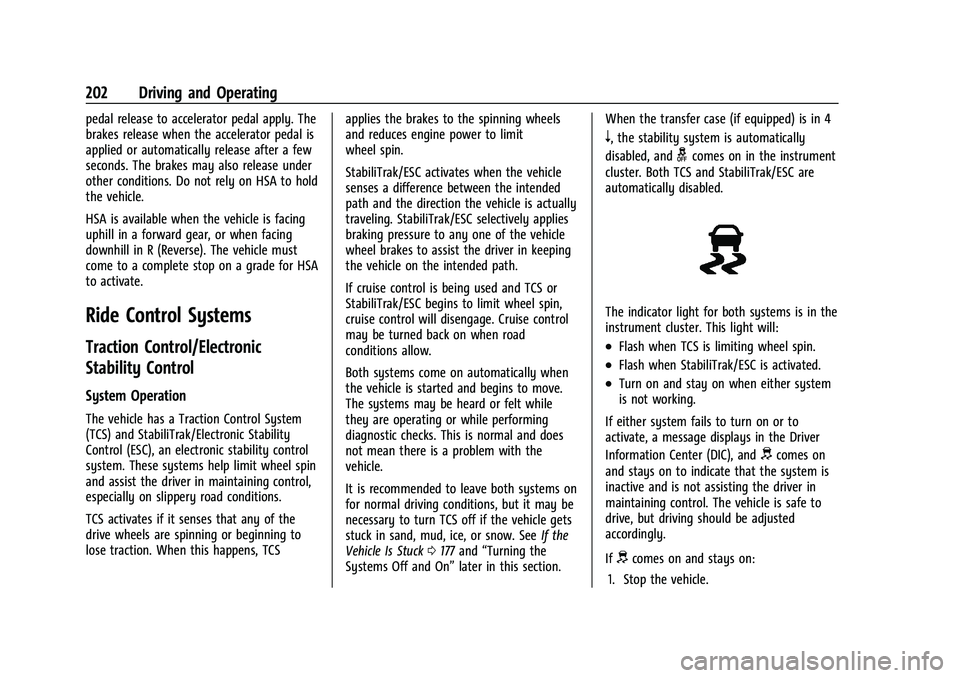
The indicator light for both systems is in the
instrument cluster. This light will:
.Flash when TCS is limiting wheel spin.
.Flash when StabiliTrak/ESC is activated.
.Turn on and stay on when either system
is not working.
If either system fails to turn on or to
activate, a message displays in the Driver
Information Center (DIC), and
dcomes on
and stays on to indicate that the system is
inactive and is not assisting the driver in
maintaining control. The vehicle is safe to
drive, but driving should be adjusted
accordingly.
If
dcomes on and stays on:
1. Stop the vehicle.