display CHEVROLET CORVETTE 1993 4.G Owner's Manual
[x] Cancel search | Manufacturer: CHEVROLET, Model Year: 1993, Model line: CORVETTE, Model: CHEVROLET CORVETTE 1993 4.GPages: 370, PDF Size: 21.43 MB
Page 156 of 370
Downloaded from www.Manualslib.com manuals search engine i
F
I
p4
I
AMIFM Stereo with CassettelCD
Player (Delco-Bose@ Musk
System)
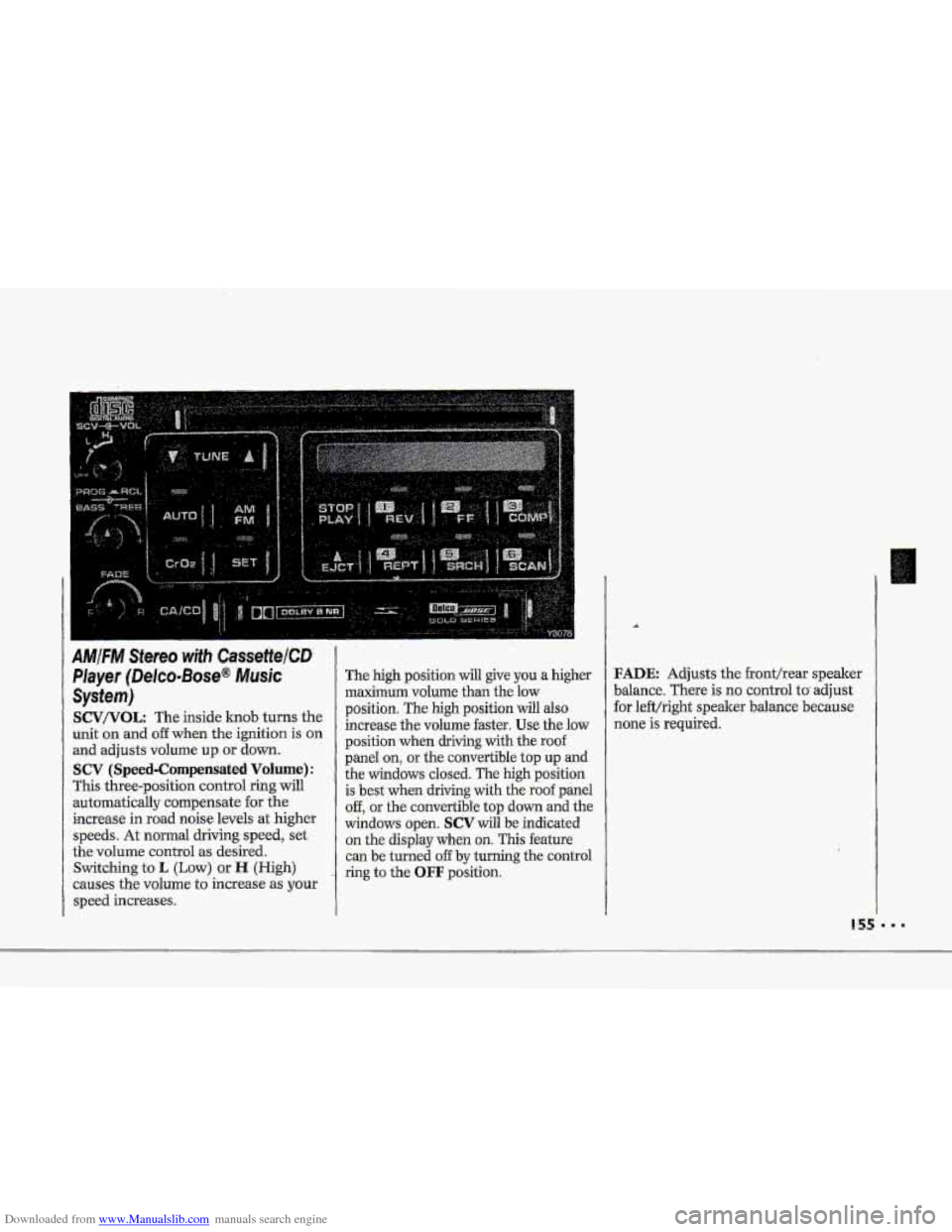
SCV/VOL: The inside lcnob turns the
unit on and
off when the ignition is on
and adjusts volume up or down.
SCV (Speed-Compensated Volume):
This three-position control ring will
automatically compensate for the
increase in road noise levels
at higher
speeds. At normal driving speed, set
the volume control
as desired.
Switching to
L (Low) or H (High)
causes the volume
to increase as your
speed increases.
The high position will give you a higher
maximum volume than the low
position. The
high position will also
increase the volume faster.
Use the low
position when driving with the roof
panel
on, or the convertible top up and
the windows closed. The high position
is best when driving with the roof panel
off, or the convertible top down and the
windows open.
SCV will be indicated
on the display when on. This feature
can be turned
off by turning the control
ring to the
OFF position.
FADE Adjusts the fronthear speaker
balance. There is
no control to adjust
for left/right speaker balance because
none is required.
... .... ... .. ...
.... ... ... .... . :.. .. .... .. ..
Page 157 of 370
Downloaded from www.Manualslib.com manuals search engine .I.
Comfort Controls & Audio Systems
AMIFM Stereo with CassettelCD
Player (Delco-Bose@ Music
System) (CONT.)
Radio Contro~s:
-The digitd display indicates information
on- time or radio station frequency, the
AM or FM radio- band, whether the
station
is in stereo, and other radio
functions..
AMtFM: Press this button to select
either
-the AM OF FM radio- band. The
band you -select-will be displayed on
the digital screen. The frequency -of the
station will also
be displayed, and if
the station is in. stereo,
ST will-:also be
displayed.
Ywr radio has an AMAX-certified
.receiver. .It can produce quality AM
stereo sound and receive C-Qu.am@
stereo broadcasts. AMAX reduces
noise with0u.t reducing
the high
frequencies. you need
for the best
sound. You don't Jiave,to do anything
to your Delco/GM radio because.
AMAX is automatic.
156
RCL (Recall): Press to change
between the clock or the radio station
frequency displayed
on the digital
screen.
AUTO: Press this button, then press
TUNE to tune to the next station on
the
AM or FM band.
An indicator light above a preset station
b-utton will glow when the seekmode
stops .at that station.
TUNE: Press this control to tune in
stations higher or lower
on the AM or
FM radio band. .For rapid tuning, press
and hold one side of TUNE, then press
the other side.
BASS/TREB (Treble): The inside
knob adjusts the bass level up or
down. The outside ring adjusts the
treble bel up or down,
GA/cD: The .display will indicate
CA IN when a cassette is loaded into the unit, or
CD IN when a CD is
loaded into the unit. Cassette play is
also indicated in
the display by an
arrow. CD play.is also .indicated by the
track number
that is displayed when
RCL is pressed. An indicator light will
glow when the button is pressed. Press
,to alternate between cassette and CD
if both are loaded in the unit.
To Preset Radio Stations:
The six numbered pushbuttons can be.
used to preset up to twelve radio
:stations
(six AM and six FM stations).
1. Tune in the desired station.
-2. Press: SET. The SET indicator light
3. While the SET indicator light glows,
press one of the six pushbuttons.
Whenever
you press this button
again,
the preset station will be tuned
in.
will glow.
4. Repeat steps 1 --? for each o€.sirr AM
Page 158 of 370
Downloaded from www.Manualslib.com manuals search engine c
A
4
To Play ,a Cassette Titpe:
This audio system hits automatic
00- Dolby B NR@ to feduce-.baclground
hoke on' Dolby encoded tapes. .Dolby@
Noise Reduction is manufactured u.nder
license from Dolby Laboratorie's
Licensing Corporation.
Doby@ and the
011 symbol are trademarks uf Dolby
Laboratories Licensing Corporation.
Turn the VOL knob to turn the radio
-on. Then push a cassette into the
Cassette
entry door (the-tape side goes
in first). Do Bot use tapes:that are
longer..t€ian
45 minutes on each side.
FF (Fast Forward): Press to advame
-the-:tape, rapidly;. press again to play.
(The radio plays- while the tape is fsst
forwarding.) The indicator light will
glow when this button is .pressed.
.REV (Reverse-): Press to reverse the
-tape rapidly; press .again to play. (The
radio plays while the tape is
rewinding.)
The indicator light will
glow when this button is pressed.
CrO,: -Press. this button when playing
high bias
chrome or metal tapes. Ah
indicator light will glow when this
button-is
pressed. When playing
standard tapes, press again.
PROG (Program): Press to change
the side afthe tape being played..
Arkows- in the- display wiil .indicate the
side currently playing, The-tape player
automatically basins :playing the other
side ofthe cassette when it reaches the
end of a tape:
SCAN: Press this-to sample the
beginning
of eadh track or passage. An
indicator light will come on when the
button.
is, pres.sed. Press agtiih to stop
scanning-.
SRCH (.Search): Press to search €Or
the next select-ion on ihe tape. There
must be at
least a three-second :gap
between selections
on the tape for this
function to,
work. An indicaior light
will'glow when this. button
is presmi.
REPT (Repeat): Press to .return to the
beginnhg
of the current selection-after
10 seconds or more of play. After 10
seconds or 1,ess of pray, the player will
return to the beginning &he previous
selection.
EJCT (Eject): Press to have the
cassette tape ejected (the radio -wilJ
then play). This-button will also-work
when the radio
or ignition are turned
6ff.
STUP/PLAY Press .this to list-en. to
the radio without ejecting the cas'sette..
Page 159 of 370
Downloaded from www.Manualslib.com manuals search engine Comfort Controls & Audio Systems
AMIFM Stereo with CassettelCD
Player (Delco-Bose@
Music
System) (CONTJ
To Play a Compact Disc:
Tf you have the optional compact disc
player, don’t use mini-discs that are
called singles. They will eject, and they
won’t play. Use only full-size compact
discs.
1, Rotate the SCV/VOL (Volume)
knob on your radio to turn on the CD
player.
2. Insert a disc part way into the slot,
with
the label side up. The player will
pull it in. In a few seconds, the disc
should
start on the first track.
... I58
If the disc comes back out and ERR
appears on the display:
The disc may be upside down.
The disc may be dirty, scratched or
wet.
There may be too much moisture in
the
air (wait about one hour and try
again).
The temperature is too hot or cold.
The road you’re driving on may be too
rough.
To display the track being played or the
elapsed time
of the track playing, push
RCL (Recall). Push again to display the
time of day.
FF (Fast Forward): Hold this button
down
to rapidly advance through the
tracks or passages. The
CD will play at
normal
speed when the button is
released. The display will show the
increasing elapsed time.
REV (Reverse): Hold this button
down to rapidly reverse through tracks
or passages. The CD wili play at
normal speed when the button is
released. The display will show the
decreasing elapsed time.
SRCH (Search): Press to search for
the next selection on the disc. When
this button is pressed more than once
or held, the
CD will continue to
advance through the disc. An indicator
light will glow when this button
is
pressed.
RCL (Recall) : Press once to see
which track
is playing. Press again to
see how long your track
has been
playing (EL TIME-elapsed time).
Press again to display the time.
Page 253 of 370
Downloaded from www.Manualslib.com manuals search engine Service & Appearance Care
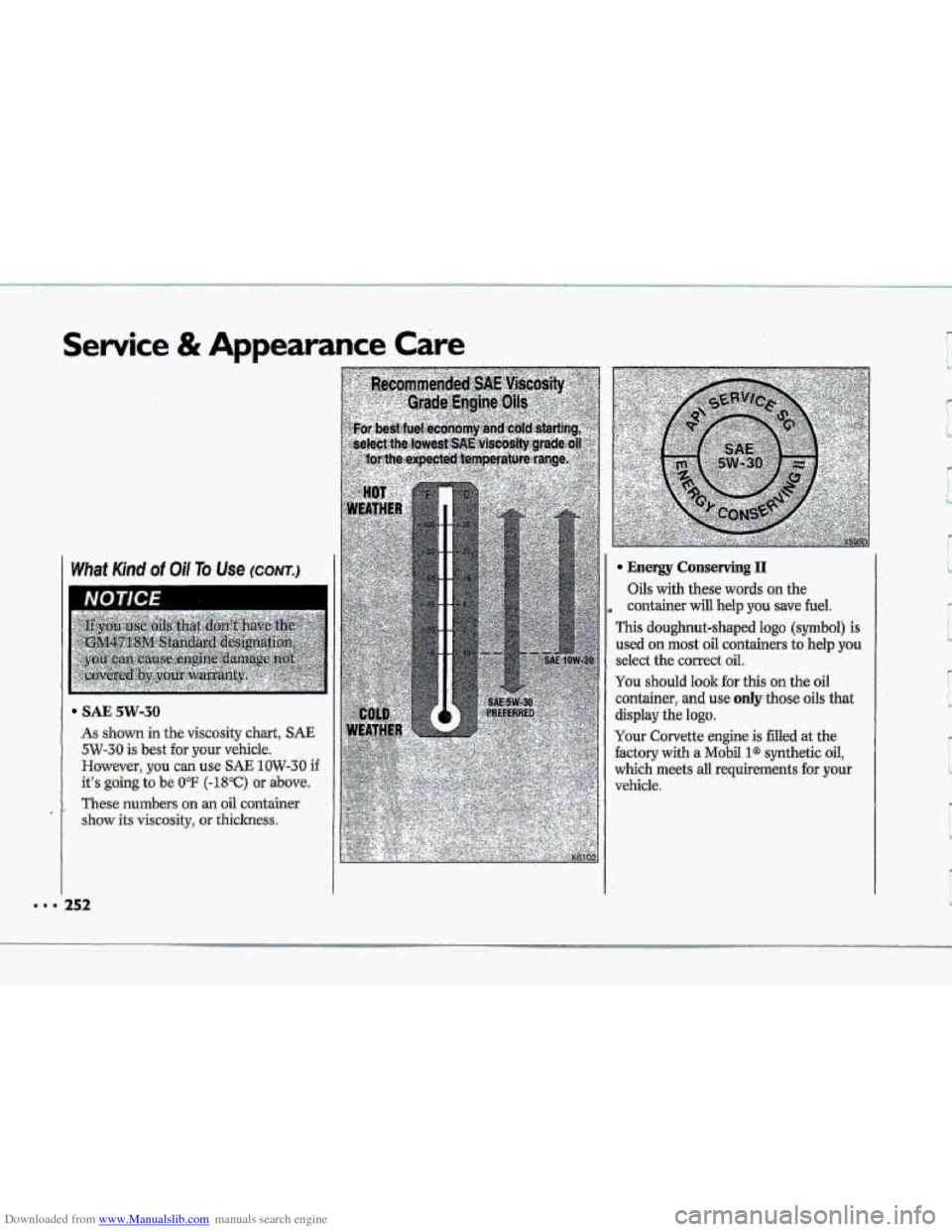
SAE 5w-30
As shown in the viscosity chart, SAE
5W-30 is best for your vehicle.
However,
you can use SAE 1OW-30 if
it’s going to be 0°F (-18°C) or above.
These numbers on an oil container
show its viscosity, or thickness.
Energy Conserving I1
Oils with these words on the
, container will help you save fuel.
This doughnut-shaped logo (symbol) is
used on most oil containers to ,help you
select the correct oil.
You should look for this on the oil
container, and use only those oils that
display the logo.
Your Corvette engine is filled at the
factory with a Mobil l@ synthetic oil,
which meets all requirements for your
vehicle.
= 252