key CHEVROLET CORVETTE 2004 5.G Service Manual
[x] Cancel search | Manufacturer: CHEVROLET, Model Year: 2004, Model line: CORVETTE, Model: CHEVROLET CORVETTE 2004 5.GPages: 384, PDF Size: 2.46 MB
Page 166 of 384
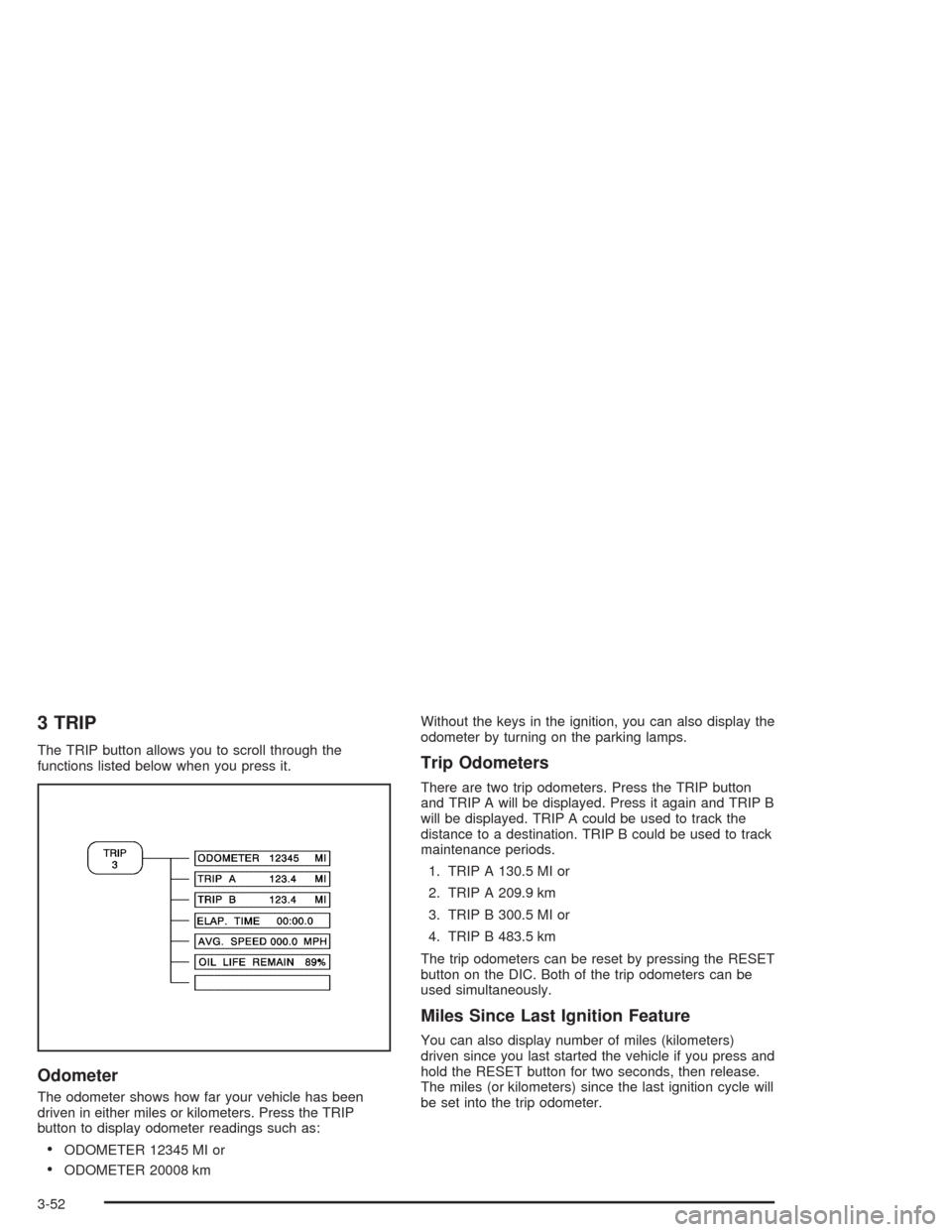
3 TRIP
The TRIP button allows you to scroll through the
functions listed below when you press it.
Odometer
The odometer shows how far your vehicle has been
driven in either miles or kilometers. Press the TRIP
button to display odometer readings such as:
•ODOMETER 12345 MI or
•ODOMETER 20008 kmWithout the keys in the ignition, you can also display the
odometer by turning on the parking lamps.
Trip Odometers
There are two trip odometers. Press the TRIP button
and TRIP A will be displayed. Press it again and TRIP B
will be displayed. TRIP A could be used to track the
distance to a destination. TRIP B could be used to track
maintenance periods.
1. TRIP A 130.5 MI or
2. TRIP A 209.9 km
3. TRIP B 300.5 MI or
4. TRIP B 483.5 km
The trip odometers can be reset by pressing the RESET
button on the DIC. Both of the trip odometers can be
used simultaneously.
Miles Since Last Ignition Feature
You can also display number of miles (kilometers)
driven since you last started the vehicle if you press and
hold the RESET button for two seconds, then release.
The miles (or kilometers) since the last ignition cycle will
be set into the trip odometer.
3-52
Page 168 of 384
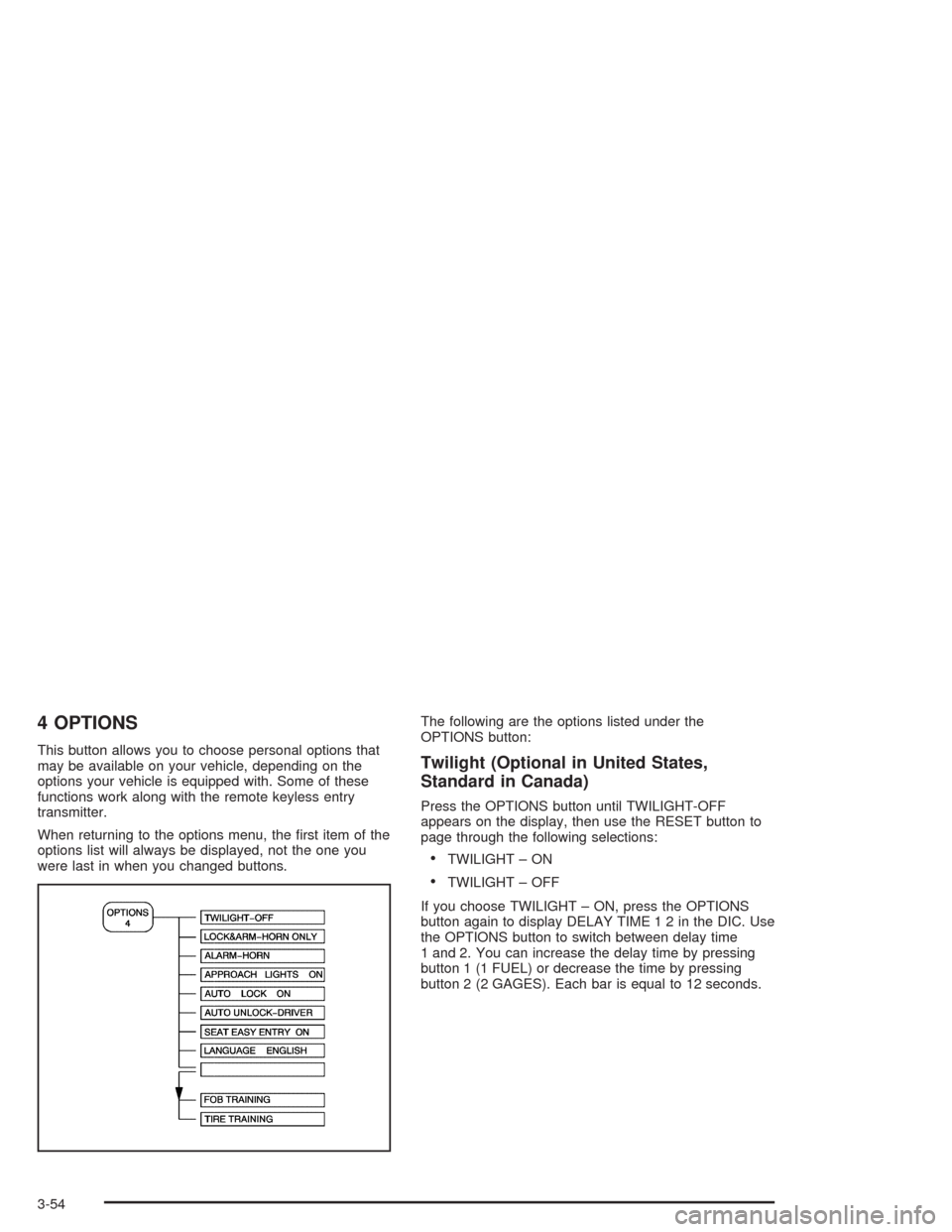
4 OPTIONS
This button allows you to choose personal options that
may be available on your vehicle, depending on the
options your vehicle is equipped with. Some of these
functions work along with the remote keyless entry
transmitter.
When returning to the options menu, the first item of the
options list will always be displayed, not the one you
were last in when you changed buttons.The following are the options listed under the
OPTIONS button:Twilight (Optional in United States,
Standard in Canada)
Press the OPTIONS button until TWILIGHT-OFF
appears on the display, then use the RESET button to
page through the following selections:
•TWILIGHT – ON
•TWILIGHT – OFF
If you choose TWILIGHT – ON, press the OPTIONS
button again to display DELAY TIME 1 2 in the DIC. Use
the OPTIONS button to switch between delay time
1 and 2. You can increase the delay time by pressing
button 1 (1 FUEL) or decrease the time by pressing
button 2 (2 GAGES). Each bar is equal to 12 seconds.
3-54
Page 169 of 384
Lock and Arm
Press the OPTIONS button until LOCK & ARM appears
on the display, then use the RESET button to page
through the following selections:
•LOCK & ARM – OFF
•LOCK & ARM – HORN ONLY
•LOCK & ARM – LIGHTS ONLY
•LOCK & ARM – HORN & LIGHTS
If you choose LOCK & ARM – OFF, you will receive no
security feedback when locking or unlocking your
vehicle.
If you choose LOCK & ARM – HORN ONLY, only the
horn will chirp to let you know when your alarm system
has armed when locking your vehicle.
If you choose LOCK & ARM – LIGHTS ONLY, only your
exterior lamps will flash to let you know when your
alarm system has armed when locking your vehicle.
If you choose LOCK & ARM – HORN & LIGHTS,
the horn will chirp and the exterior lamps will flash briefly
to let you know the system has armed when locking
your vehicle.
Alarm
Press the OPTIONS button until ALARM appears on the
display, then use the RESET button to page through
the following selections:
•ALARM-HORN
•ALARM HORN & LIGHTS
If you choose ALARM-HORN, the horn will sound during
an alarm.
If you choose ALARM HORN & LIGHTS, the horn will
sound and the interior and exterior lamps will flash
during an alarm.
Approach Lights
Press the OPTIONS button until APPROACH LIGHTS
appears on the display, then use the RESET button
to page through the following choices:
•APPROACH LIGHTS ON
•APPROACH LIGHTS OFF
If you choose APPROACH LIGHTS ON, the fog lamps,
front turn signal, rear back-up and courtesy lamps
will come on for 30 seconds when you press UNLOCK
on the remote keyless entry transmitter. This will
occur only when it is dark outside.
APPROACH LIGHTS OFF turns off this option.
SeeRemote Keyless Entry System on page 2-5for
more information.
3-55
Page 170 of 384
Auto Lock
Press the OPTIONS button until AUTO LOCK appears
on the display, then use the RESET button to page
through the following choices:
•AUTO LOCK ON
•AUTO LOCK OFF
If you choose AUTO LOCK ON, both doors will
automatically lock when the vehicle exceeds 10 mph
(16 km/h) in a manual transmission. In a vehicle with an
automatic transmission, both doors will automatically
lock when you move the shift lever out of PARK (P).
Choose AUTO LOCK OFF to turn this option off.
Auto Unlock
The AUTO UNLOCK will be available only if AUTO
LOCK is set to ON as described previously.
Press the OPTIONS button until AUTO UNLOCK
appears on the display, then use the RESET button to
page through the following choices:
•AUTO UNLOCK DRIVER
•AUTO UNLOCK BOTH
•AUTO UNLOCK OFF
If you choose AUTO UNLOCK DRIVER, the driver’s
door will automatically unlock when you turn the vehicle
off and pull the key out of the ignition.Choose AUTO UNLOCK BOTH, and both doors will
automatically unlock when you turn the vehicle off and
pull the key out of the ignition.
AUTO UNLOCK OFF turns off this option.
Easy Entry
The easy entry feature will only be available if the
vehicle is equipped with the memory option.
Press the OPTIONS button until SEAT EASY ENTRY
appears on the display, then use the RESET button
to page through the following choices:
•SEAT EASY ENTRY ON
•SEAT EASY ENTRY OFF
If you choose SEAT EASY ENTRY ON, when you turn
the ignition off and remove the key, the seat will
automatically move back and the telescopic steering
wheel (if equipped) will return to its full-forward position
for an easy exit or an easy entrance when returning
to the vehicle.
The seat will only return to the forward position if you
unlock the door with the keyless entry transmitter
or press the appropriate MEMORY button.
SEAT EASY ENTRY OFF turns off this option.
3-56
Page 171 of 384
Languages
You can select which language the DIC will display its
messages. Press the OPTIONS button until the
word LANGUAGES appears on the display, then use
the RESET button to page through the following choices:
•LANGUAGE ENGLISH
•LANGUAGE FRENCH
•LANGUAGE GERMAN
•LANGUAGE SPANISH
Blank Page
There is a blank page at the end of the OPTIONS
menu. When the blank page is displayed, you
can access the following items:
FOB TRAINING:This option allows you to match the
RKE transmitter(s) to your vehicle. You can access this
option by pressing and holding RESET for three
seconds while you are on the blank page at the end of
the OPTIONS menu. The message FOB TRAINING
will be displayed. See “Matching Transmitter(s) To Your
Vehicle” underRemote Keyless Entry System
Operation on page 2-6
.TIRE TRAINING (Except Z06):The Tire Pressure
Monitor (TPM) operates with battery-powered sensors
that are located inside the valve stems on each tire.
Each sensor has a unique ID code so the vehicle knows
the tire location of the sensor. When the vehicle
reaches a speed of greater than 15 mph (24 km/h), the
sensors begin to send the tire pressure readings to
a receiver inside the vehicle. These readings are
displayed when using the GAGES button on the DIC. If
you are unable to display your tire pressures while
the vehicle speed is greater than 15 mph (24 km/h), you
may need to have your sensor ID codes learned by
the vehicle. See your dealer.
3-57
Page 177 of 384
{CAUTION:
When the LOW TIRE PRESSURE or FLAT TIRE
message is displayed on the Driver Information
Center, your vehicle’s handling capabilities will
be reduced during severe maneuvers. If you
drive too fast, you could lose control of your
vehicle. You or others could be injured. Don’t
drive over 55 mph (90 km/h) when the LOW
TIRE PRESSURE or FLAT TIRE message is
displayed. Drive cautiously and check your tire
pressures as soon as you can.MAXIMUM SPEED 80 MPH (129 km/h):You will hear
four chimes when this message is displayed. To
acknowledge the warning, press RESET. After you
press RESET, a message will reappear every
10 minutes until this condition changes.
This message indicates that a malfunction is present in
the selective real time damping system. The vehicle
speed will be limited to 80 mph (129 km/h) when
the shock absorber system has failed and the shocks
are in their full soft mode. Have your vehicle serviced as
soon as possible.
PULL KEY – WAIT 10 SEC (Manual Transmission
Only):If this message comes on, the steering column
lock system has detected a problem while disengaging
the steering column lock. This message may occur when
the ignition key is removed and reinserted before the
steering column lock system fully locks or unlocks
the steering column. To acknowledge that you have read
this message, and to clear it from the display, remove
the ignition key and wait 10 seconds before reinserting
the key into the ignition. If you attempt to operate
your vehicle without removing the key for 10 seconds,
the vehicle’s fuel system will shut off when you
reach 1.5 mph (2.4 km/h). If the message stays on after
removing the key and waiting 10 seconds, have your
vehicle taken to an authorized dealer as soon as
possible for diagnosis and repair.
3-63
Page 208 of 384
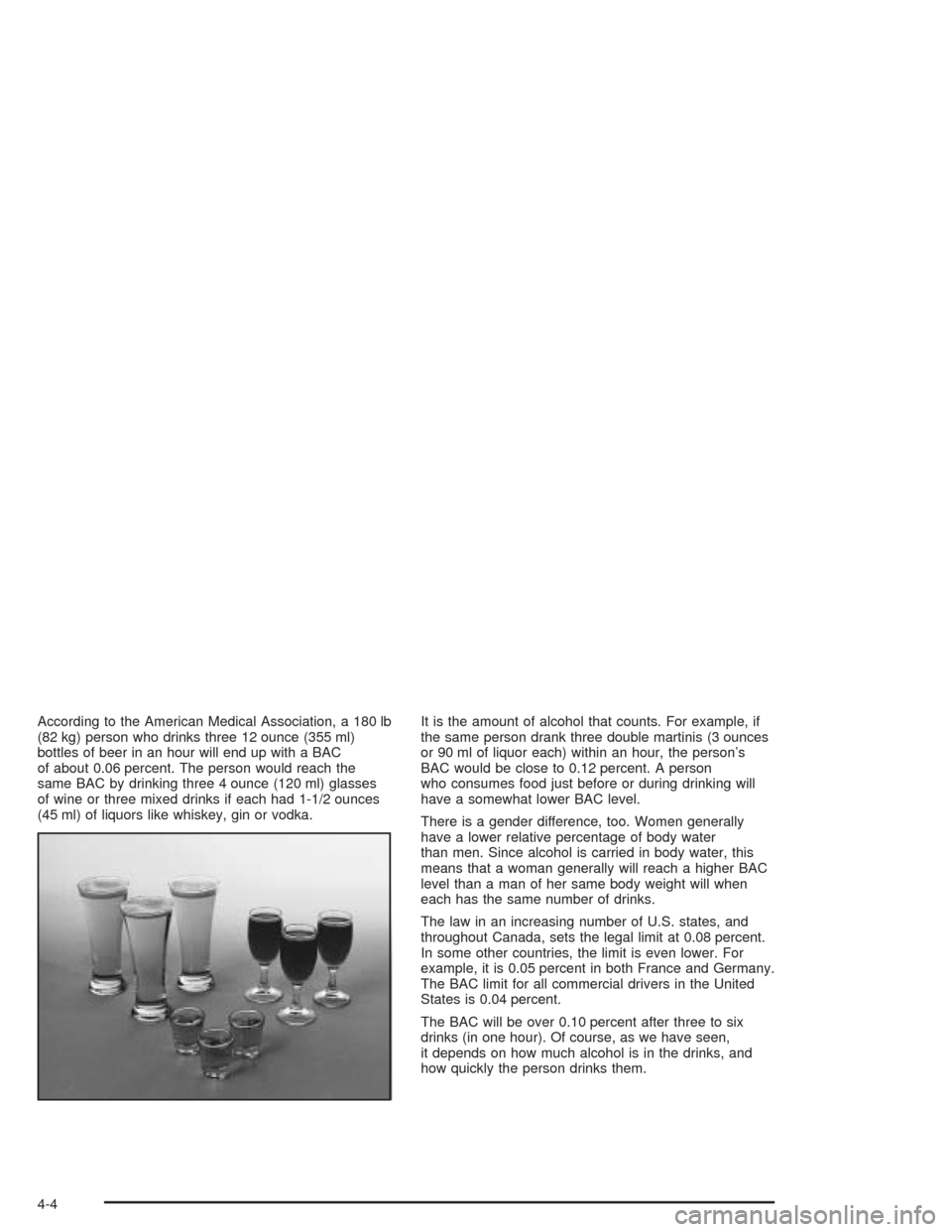
According to the American Medical Association, a 180 lb
(82 kg) person who drinks three 12 ounce (355 ml)
bottles of beer in an hour will end up with a BAC
of about 0.06 percent. The person would reach the
same BAC by drinking three 4 ounce (120 ml) glasses
of wine or three mixed drinks if each had 1-1/2 ounces
(45 ml) of liquors like whiskey, gin or vodka.It is the amount of alcohol that counts. For example, if
the same person drank three double martinis (3 ounces
or 90 ml of liquor each) within an hour, the person’s
BAC would be close to 0.12 percent. A person
who consumes food just before or during drinking will
have a somewhat lower BAC level.
There is a gender difference, too. Women generally
have a lower relative percentage of body water
than men. Since alcohol is carried in body water, this
means that a woman generally will reach a higher BAC
level than a man of her same body weight will when
each has the same number of drinks.
The law in an increasing number of U.S. states, and
throughout Canada, sets the legal limit at 0.08 percent.
In some other countries, the limit is even lower. For
example, it is 0.05 percent in both France and Germany.
The BAC limit for all commercial drivers in the United
States is 0.04 percent.
The BAC will be over 0.10 percent after three to six
drinks (in one hour). Of course, as we have seen,
it depends on how much alcohol is in the drinks, and
how quickly the person drinks them.
4-4
Page 259 of 384
How to Reset the CHANGE OIL SOON
Message
The GM Oil Life System calculates when to change
your engine oil and filter based on vehicle use. Anytime
your oil is changed, reset the system so it can
calculate when the next oil change is required. If a
situation occurs where you change your oil prior to a
CHANGE OIL SOON message being turned on,
reset the system.
To reset the CHANGE OIL SOON message after an oil
change, do the following:
1. Turn the ignition to ON, with the engine off.
2. Press the TRIP button so the OIL LIFE percentage
is displayed.
3. Press RESET and hold for two seconds. OIL LIFE
REMAIN 100% will appear.
4. Turn the key to OFF.
If the CHANGE OIL SOON message comes back on
when you start your vehicle, the engine oil life system
has not reset. Repeat the procedure.
What to Do with Used Oil
Used engine oil contains certain elements that may be
unhealthy for your skin and could even cause cancer.
Do not let used oil stay on your skin for very long. Clean
your skin and nails with soap and water, or a good
hand cleaner. Wash or properly dispose of clothing or
rags containing used engine oil. See the manufacturer’s
warnings about the use and disposal of oil products.
Used oil can be a threat to the environment. If you
change your own oil, be sure to drain all the oil from the
filter before disposal. Never dispose of oil by putting it
in the trash, pouring it on the ground, into sewers, or into
streams or bodies of water. Instead, recycle it by
taking it to a place that collects used oil. If you have a
problem properly disposing of your used oil, ask
your dealer, a service station or a local recycling center
for help.
5-17
Page 277 of 384
Power Steering Fluid
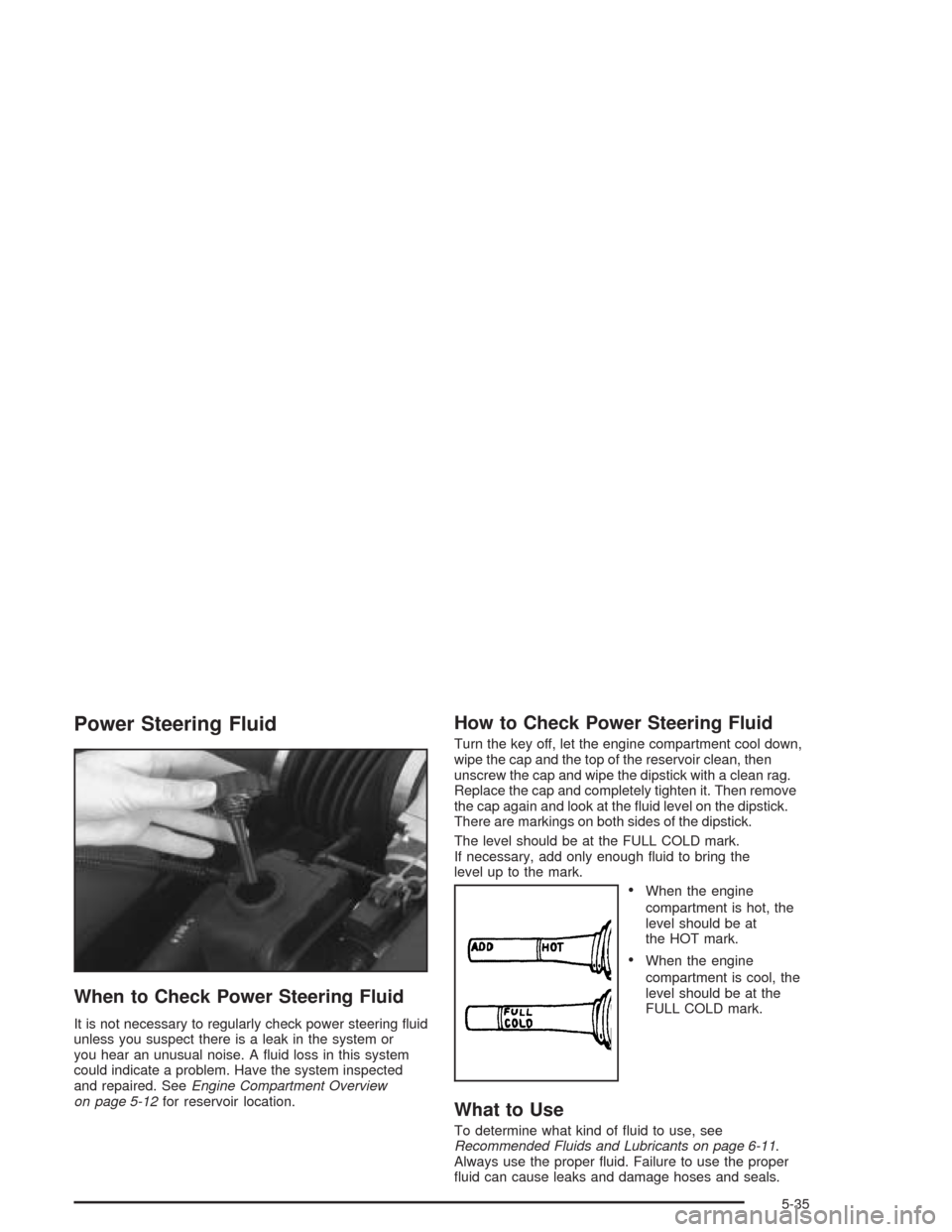
When to Check Power Steering Fluid
It is not necessary to regularly check power steering fluid
unless you suspect there is a leak in the system or
you hear an unusual noise. A fluid loss in this system
could indicate a problem. Have the system inspected
and repaired. SeeEngine Compartment Overview
on page 5-12for reservoir location.
How to Check Power Steering Fluid
Turn the key off, let the engine compartment cool down,
wipe the cap and the top of the reservoir clean, then
unscrew the cap and wipe the dipstick with a clean rag.
Replace the cap and completely tighten it. Then remove
the cap again and look at the fluid level on the dipstick.
There are markings on both sides of the dipstick.
The level should be at the FULL COLD mark.
If necessary, add only enough fluid to bring the
level up to the mark.
•When the engine
compartment is hot, the
level should be at
the HOT mark.
•When the engine
compartment is cool, the
level should be at the
FULL COLD mark.
What to Use
To determine what kind of fluid to use, see
Recommended Fluids and Lubricants on page 6-11.
Always use the proper fluid. Failure to use the proper
fluid can cause leaks and damage hoses and seals.
5-35
Page 349 of 384
Maintenance Footnotes
†The U.S. Environmental Protection Agency or the
California Air Resources Board has determined that the
failure to perform this maintenance item will not nullify
the emission warranty or limit recall liability prior to
the completion of the vehicle’s useful life. We, however,
urge that all recommended maintenance services be
performed at the indicated intervals and the
maintenance be recorded.
(a)Visually inspect brake lines and hoses for proper
hook-up, binding, leaks, cracks, chang, etc. Inspect
disc brake pads for wear and rotors for surface
condition. Inspect other brake parts, including calipers,
parking brake, etc.
(b)Visually inspect front and rear suspension and
steering system for damaged, loose or missing parts or
signs of wear. Inspect power steering lines and
hoses for proper hook-up, binding, leaks, cracks,
chang, etc.
(c)Visually inspect hoses and have them replaced if
they are cracked, swollen or deteriorated. Inspect all
pipes, ttings and clamps; replace with genuine GM parts
as needed. To help ensure proper operation, a pressure
test of the cooling system and pressure cap and cleaning
the outside of the radiator and air conditioning condenser
is recommended at least once a year.(d)Visually inspect wiper blades for wear or cracking.
Replace blade inserts that appear worn or damaged
or that streak or miss areas of the windshield.
(e)Make sure the safety belt reminder light and all your
belts, buckles, latch plates, retractors and anchorages
are working properly. Look for any other loose or
damaged safety belt system parts. If you see anything
that might keep a safety belt system from doing its
job, have it repaired. Have any torn or frayed safety belts
replaced. Also look for any opened or broken air bag
coverings, and have them repaired or replaced. (The air
bag system does not need regular maintenance.)
(f)Lubricate all key lock cylinders and body door
hinges.Lubricate all hinges and latches, including those
for the hood, rear compartment, console door and
any folding seat hardware. More frequent lubrication
may be required when exposed to a corrosive
environment. Applying silicone grease on weatherstrips
with a clean cloth will make them last longer, seal
better and not stick or squeak.
(g)A uid loss in any vehicle system could indicate a
problem. Have the system inspected and repaired
and the uid level checked. Add uid if needed.
6-7