ignition CHEVROLET CORVETTE 2004 5.G Repair Manual
[x] Cancel search | Manufacturer: CHEVROLET, Model Year: 2004, Model line: CORVETTE, Model: CHEVROLET CORVETTE 2004 5.GPages: 384, PDF Size: 2.46 MB
Page 201 of 384
Unlocking the Theft-Deterrent Feature
After a Power Loss
Enter your secret code as follows; pause no more than
15 seconds between steps:
1. Turn the ignition on. LOC will appear on the
display.
2. Press MN and 000 will appear on the display.
3. Press MN again to make the last two digits agree
with your code.
4. Press HR to make the first one or two digits agree
with your code.
5. Press AM FM after you have confirmed that the
code matches the secret code you have written
down. SEC will appear on the display, indicating the
radio is now operable and secure.
If you enter the wrong code eight times, INOP will
appear on the display. You will have to wait an hour
with the ignition on before you can try again. When you
try again, you will only have three chances, eight
tries per chance, to enter the correct code before INOP
appears.
If you lose or forget your code, contact your dealer.
Disabling the Theft-Deterrent Feature
Enter your secret code as follows; pause no more than
15 seconds between steps:
1. Turn the ignition on.
2. Turn the radio off.
3. Press and hold the 1 and 4 pushbuttons at the
same time until SEC appears on the display.
4. Press MN and 000 will appear on the display.
5. Press MN again to make the last two digits agree
with your code.
6. Press HR to make the first one or two digits agree
with your code.
7. Press AM FM after you have confirmed that the
code matches the secret code you have written
down. --- will appear on the display, indicating that
the radio is no longer secured.
If the code entered is incorrect, SEC will appear on the
display. The radio will remain secured until the correct
code is entered.
When battery power is removed and later applied to a
secured radio, the radio will not turn on and LOC
will appear on the display.
To unlock a secured radio, see “Unlocking the
Theft-Deterrent Feature After a Power Loss” earlier in
this section.
3-87
Page 202 of 384
Radio Reception
AM
The range for most AM stations is greater than for FM,
especially at night. The longer range, however, can
cause stations to interfere with each other. AM can pick
up noise from things like storms and power lines. Try
reducing the treble to reduce this noise.
FM
FM stereo will give you the best sound, but FM signals
will reach only about 10 to 40 miles (16 to 65 km).
Tall buildings or hills can interfere with FM signals,
causing the sound to come and go.
Care of Your Cassette Tape Player
A tape player that is not cleaned regularly can cause
reduced sound quality, ruined cassettes, or a damaged
mechanism. Cassette tapes should be stored in their
cases away from contaminants, direct sunlight, and
extreme heat. If they are not, they may not operate
properly or may cause failure of the tape player.
The tape player should be cleaned regularly after every
50 hours of use. The radio may display CLN to
indicate that the tape player has been used for 50 hours
without resetting the tape clean timer. If this message
appears on the display, the cassette tape playerneeds to be cleaned. It will still play tapes, but it should
be cleaned as soon as possible to prevent damage
to the tapes and player. If there is a reduction in sound
quality, try a known good cassette to see if the tape
or the tape player is at fault. If this other cassette has no
improvement in sound quality, clean the tape player.
For best results, use a scrubbing action, non-abrasive
cleaning cassette with pads which scrub the tape
head as the hubs of the cleaner cassette turn. The
recommended cleaning cassette is available through
your dealer.
The cut tape detection feature of the cassette tape
player may identify the cleaning cassette as a damaged
tape, in error. To prevent the cleaning cassette from
being ejected, use the following steps:
1. Turn the ignition on.
2. Turn the radio off.
3. Press and hold the TAPE AUX button for five
seconds. The tape symbol on the display will
flash for two seconds.
4. Insert the scrubbing action cleaning cassette.
5. Eject the cleaning cassette after the manufacturer’s
recommended cleaning time.
After the cleaning cassette is ejected, the cut tape
detection feature will be active again.
3-88
Page 204 of 384
Power Antenna Mast Care
(Convertible)
The power antenna will look its best and work well if it
is cleaned from time to time. To clean the antenna mast,
do the following:
1. Turn on the ignition and radio to raise the antenna.
2. Dampen a clean cloth with mineral spirits or
equivalent solvent.
3. Wipe the cloth over the mast sections, removing
any dirt.
4. Wipe dry with a clean cloth.
5. Make the antenna go up and down by turning the
radio or ignition off and on.
6. Repeat if necessary.
Notice:If you lubricate the power antenna, you
may damage it. Always follow the cleaning
instructions listed in this manual to keep the power
antenna working properly.Notice:Before entering an automatic car wash,
turn off your radio to make the power antenna
go down. This will prevent the mast from possible
damage. If the antenna does not go down when you
turn the radio off, it may be damaged or need to
be cleaned. In either case, lower the antenna
by hand by carefully pressing the antenna down.
If the mast portion of the antenna is damaged, replace it.
See your dealer for a replacement kit and follow the
instructions in the kit.
Integrated Windshield and Rear
Window Antennas (Coupe)
The antennas in your vehicle are located in the
windshield and the rear window. The front connector is
at the top of the windshield and the rear antenna is
incorporated in the rear window defogger grid.
Notice:Do not apply aftermarket glass tinting with
metallic lm. The metallic lm in some tinting
materials will interfere with or distort the incoming
radio reception. Any damage caused to your
backglass antenna due to metallic tinting materials
will not be covered by your warranty.
3-90
Page 216 of 384
Competitive Driving Mode
The driver can select this optional handling mode by
pressing the ACTIVE HANDLING button on the console
for more than five seconds. A chime will sound and
COMPETITIVE DRIVING will be displayed in the DIC.
Competitive Driving mode allows the driver to have
full control of the rear wheels while the Active Handling
System helps steer the vehicle by selective brake
application. The instrument cluster light will not be on.
The Traction Control System will not be operating.
Adjust your driving accordingly.
When you press the ACTIVE HANDLING button again,
or turn the ignition to ACC, the Active Handling and
Traction Control Systems will be on. The TRAC/ACT
HNDLG-ON message will be displayed temporarily in the
DIC and a chime will be heard.
Limited-Slip Rear Axle
Your limited-slip rear axle can give you additional
traction on snow, mud, ice, sand or gravel. It works like a
standard axle most of the time, but when one of the rear
wheels has no traction and the other does, this feature
will allow the wheel with traction to move the vehicle.
Selective Ride Control
You may have a ride control system on your vehicle
called Selective Ride Control. The system provides the
following performance benefits:
•Reduced Impact Harshness
•Improved Road Isolation
•Improved High-Speed Stability
•Improved Handling Response
•Better Control of Body Ride Motions
4-12
Page 231 of 384
If you drive regularly in steep country, or if you are
planning to visit there, here are some tips that can make
your trips safer and more enjoyable.
•Keep your vehicle in good shape. Check all fluid
levels and also the brakes, tires, cooling system
and transmission. These parts can work hard
on mountain roads.
•Know how to go down hills. The most important
thing to know is this: let your engine do some of
the slowing down. Shift to a lower gear when you go
down a steep or long hill.
{CAUTION:
If you do not shift down, your brakes could get
so hot that they would not work well. You
would then have poor braking or even none
going down a hill. You could crash. Shift down
to let your engine assist your brakes on a
steep downhill slope.
{CAUTION:
Coasting downhill in NEUTRAL (N) or with the
ignition off is dangerous. Your brakes will have
to do all the work of slowing down. They could
get so hot that they would not work well. You
would then have poor braking or even none
going down a hill. You could crash. Always
have your engine running and your vehicle in
gear when you go downhill.
•Know how to go uphill. You may want to shift down to
a lower gear. The lower gears help cool your engine
and transmission, and you can climb the hill better.
•Stay in your own lane when driving on two-lane
roads in hills or mountains. Do not swing wide
or cut across the center of the road. Drive at speeds
that let you stay in your own lane.
•As you go over the top of a hill, be alert. There
could be something in your lane, like a stalled car or
an accident.
•You may see highway signs on mountains that
warn of special problems. Examples are long
grades, passing or no-passing zones, a falling rocks
area or winding roads. Be alert to these and take
appropriate action.
4-27
Page 259 of 384
How to Reset the CHANGE OIL SOON
Message
The GM Oil Life System calculates when to change
your engine oil and filter based on vehicle use. Anytime
your oil is changed, reset the system so it can
calculate when the next oil change is required. If a
situation occurs where you change your oil prior to a
CHANGE OIL SOON message being turned on,
reset the system.
To reset the CHANGE OIL SOON message after an oil
change, do the following:
1. Turn the ignition to ON, with the engine off.
2. Press the TRIP button so the OIL LIFE percentage
is displayed.
3. Press RESET and hold for two seconds. OIL LIFE
REMAIN 100% will appear.
4. Turn the key to OFF.
If the CHANGE OIL SOON message comes back on
when you start your vehicle, the engine oil life system
has not reset. Repeat the procedure.
What to Do with Used Oil
Used engine oil contains certain elements that may be
unhealthy for your skin and could even cause cancer.
Do not let used oil stay on your skin for very long. Clean
your skin and nails with soap and water, or a good
hand cleaner. Wash or properly dispose of clothing or
rags containing used engine oil. See the manufacturer’s
warnings about the use and disposal of oil products.
Used oil can be a threat to the environment. If you
change your own oil, be sure to drain all the oil from the
filter before disposal. Never dispose of oil by putting it
in the trash, pouring it on the ground, into sewers, or into
streams or bodies of water. Instead, recycle it by
taking it to a place that collects used oil. If you have a
problem properly disposing of your used oil, ask
your dealer, a service station or a local recycling center
for help.
5-17
Page 284 of 384
1. Check the other vehicle. It must have a 12-volt
battery with a negative ground system.
Notice:If the other vehicle’s system is not a 12-volt
system with a negative ground, both vehicles can
be damaged. Only use vehicles with 12-volt systems
with negative grounds to jump start your vehicle.
2. Get the vehicles close enough so the jumper cables
can reach, but be sure the vehicles are not touching
each other. If they are, it could cause a ground
connection you do not want. You would not be able
to start your vehicle, and the bad grounding
could damage the electrical systems.
To avoid the possibility of the vehicles rolling, set
the parking brake firmly on both vehicles involved in
the jump start procedure. Put an automatic
transmission in PARK (P) or a manual transmission
in NEUTRAL before setting the parking brakes.Notice:If you leave your radio or other accessories
on during the jump starting procedure, they could
be damaged. The repairs would not be covered
by your warranty. Always turn off your radio and
other accessories when jump starting your vehicle.
3. Turn off the ignition on both vehicles. Unplug
unnecessary accessories plugged into the cigarette
lighter or in the accessory power outlet. Turn off
the radio and all lamps that are not needed. This will
avoid sparks and help save both batteries. And it
could save your radio!
4. Open the hoods and locate the batteries. Find the
positive (+) and negative (−) terminal locations on
each vehicle. SeeEngine Compartment Overview
on page 5-12for more information on location.
{CAUTION:
An electric fan can start up even when the
engine is not running and can injure you. Keep
hands, clothing and tools away from any
underhood electric fan.
5-42
Page 336 of 384
Fuse Usage
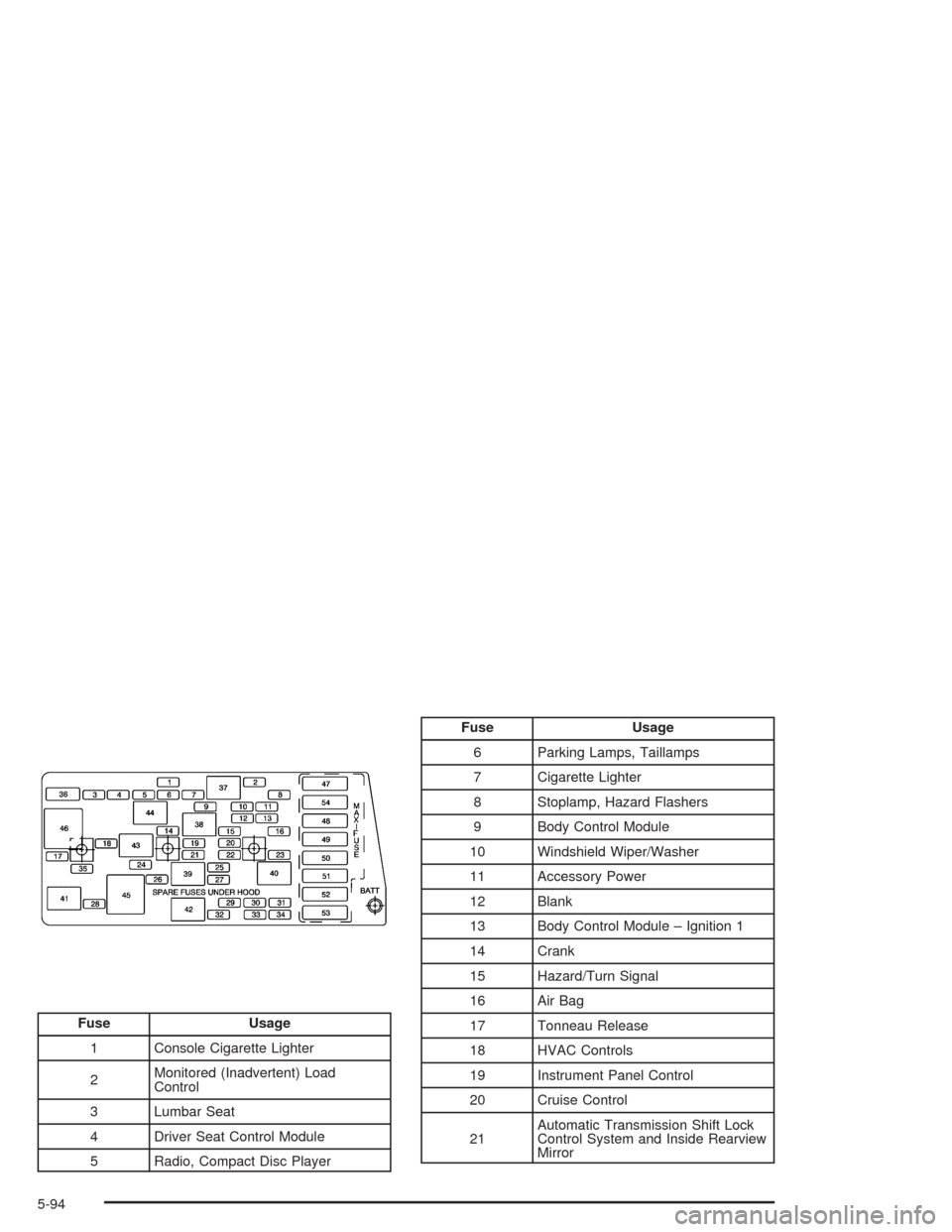
1 Console Cigarette Lighter
2Monitored (Inadvertent) Load
Control
3 Lumbar Seat
4 Driver Seat Control Module
5 Radio, Compact Disc Player
Fuse Usage
6 Parking Lamps, Taillamps
7 Cigarette Lighter
8 Stoplamp, Hazard Flashers
9 Body Control Module
10 Windshield Wiper/Washer
11 Accessory Power
12 Blank
13 Body Control Module – Ignition 1
14 Crank
15 Hazard/Turn Signal
16 Air Bag
17 Tonneau Release
18 HVAC Controls
19 Instrument Panel Control
20 Cruise Control
21Automatic Transmission Shift Lock
Control System and Inside Rearview
Mirror
5-94
Page 337 of 384
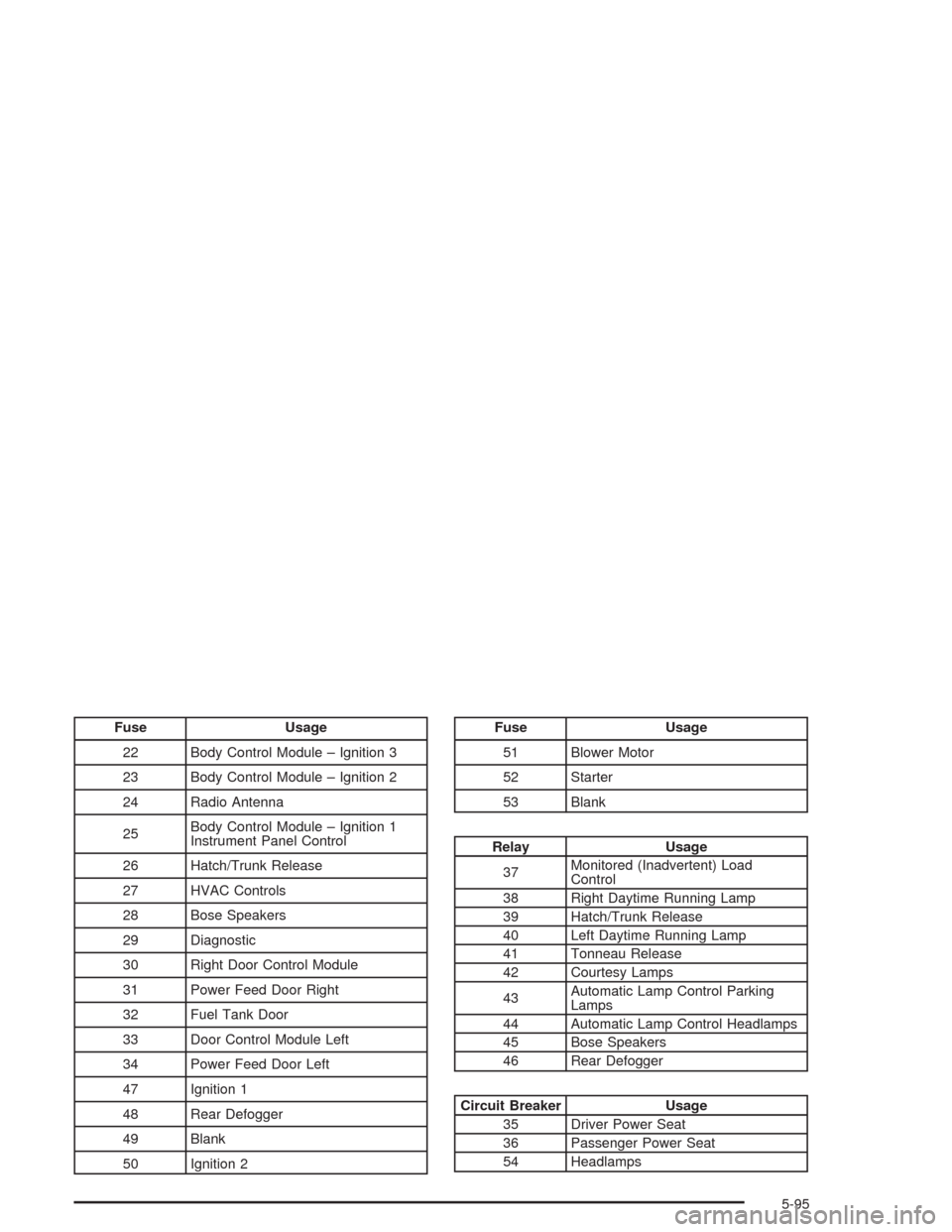
Fuse Usage
22 Body Control Module – Ignition 3
23 Body Control Module – Ignition 2
24 Radio Antenna
25Body Control Module – Ignition 1
Instrument Panel Control
26 Hatch/Trunk Release
27 HVAC Controls
28 Bose Speakers
29 Diagnostic
30 Right Door Control Module
31 Power Feed Door Right
32 Fuel Tank Door
33 Door Control Module Left
34 Power Feed Door Left
47 Ignition 1
48 Rear Defogger
49 Blank
50 Ignition 2Fuse Usage
51 Blower Motor
52 Starter
53 Blank
Relay Usage
37Monitored (Inadvertent) Load
Control
38 Right Daytime Running Lamp
39 Hatch/Trunk Release
40 Left Daytime Running Lamp
41 Tonneau Release
42 Courtesy Lamps
43Automatic Lamp Control Parking
Lamps
44 Automatic Lamp Control Headlamps
45 Bose Speakers
46 Rear Defogger
Circuit Breaker Usage
35 Driver Power Seat
36 Passenger Power Seat
54 Headlamps
5-95
Page 339 of 384
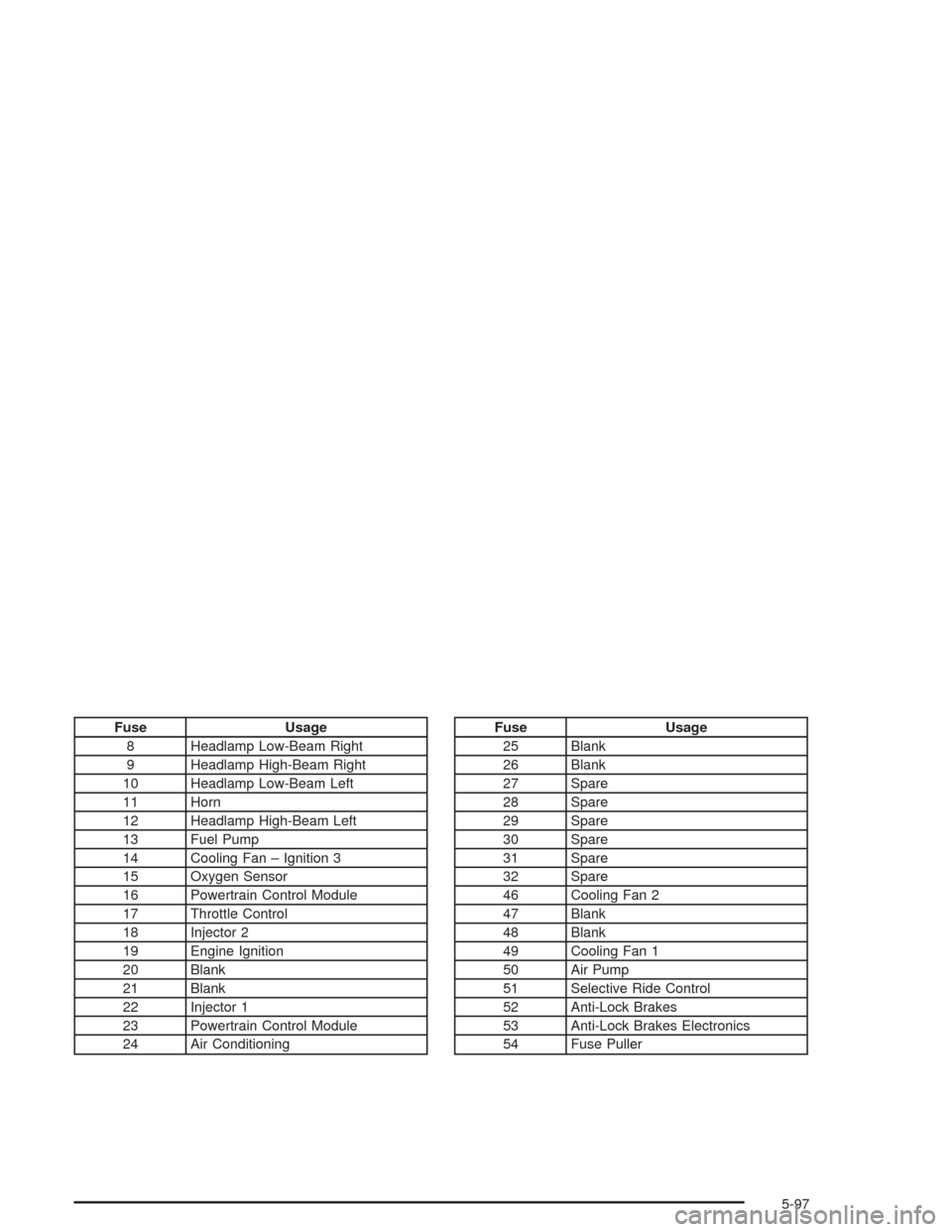
Fuse Usage
8 Headlamp Low-Beam Right
9 Headlamp High-Beam Right
10 Headlamp Low-Beam Left
11 Horn
12 Headlamp High-Beam Left
13 Fuel Pump
14 Cooling Fan – Ignition 3
15 Oxygen Sensor
16 Powertrain Control Module
17 Throttle Control
18 Injector 2
19 Engine Ignition
20 Blank
21 Blank
22 Injector 1
23 Powertrain Control Module
24 Air ConditioningFuse Usage
25 Blank
26 Blank
27 Spare
28 Spare
29 Spare
30 Spare
31 Spare
32 Spare
46 Cooling Fan 2
47 Blank
48 Blank
49 Cooling Fan 1
50 Air Pump
51 Selective Ride Control
52 Anti-Lock Brakes
53 Anti-Lock Brakes Electronics
54 Fuse Puller
5-97