display CHEVROLET CORVETTE 2004 5.G Manual PDF
[x] Cancel search | Manufacturer: CHEVROLET, Model Year: 2004, Model line: CORVETTE, Model: CHEVROLET CORVETTE 2004 5.GPages: 384, PDF Size: 2.46 MB
Page 259 of 384
How to Reset the CHANGE OIL SOON
Message
The GM Oil Life System calculates when to change
your engine oil and filter based on vehicle use. Anytime
your oil is changed, reset the system so it can
calculate when the next oil change is required. If a
situation occurs where you change your oil prior to a
CHANGE OIL SOON message being turned on,
reset the system.
To reset the CHANGE OIL SOON message after an oil
change, do the following:
1. Turn the ignition to ON, with the engine off.
2. Press the TRIP button so the OIL LIFE percentage
is displayed.
3. Press RESET and hold for two seconds. OIL LIFE
REMAIN 100% will appear.
4. Turn the key to OFF.
If the CHANGE OIL SOON message comes back on
when you start your vehicle, the engine oil life system
has not reset. Repeat the procedure.
What to Do with Used Oil
Used engine oil contains certain elements that may be
unhealthy for your skin and could even cause cancer.
Do not let used oil stay on your skin for very long. Clean
your skin and nails with soap and water, or a good
hand cleaner. Wash or properly dispose of clothing or
rags containing used engine oil. See the manufacturer’s
warnings about the use and disposal of oil products.
Used oil can be a threat to the environment. If you
change your own oil, be sure to drain all the oil from the
filter before disposal. Never dispose of oil by putting it
in the trash, pouring it on the ground, into sewers, or into
streams or bodies of water. Instead, recycle it by
taking it to a place that collects used oil. If you have a
problem properly disposing of your used oil, ask
your dealer, a service station or a local recycling center
for help.
5-17
Page 268 of 384
Coolant Surge Tank Pressure Cap
Notice:If the pressure cap is not tightly installed,
coolant loss and possible engine damage may
occur. Be sure the cap is properly and tightly
secured.
SeeEngine Compartment Overview on page 5-12for
information on location.
Engine Overheating
You will find an engine coolant temperature gage on the
instrument panel cluster and a COOLANT OVER
TEMP message on the Driver Information Center (DIC).
SeeEngine Coolant Temperature Gage on page 3-41
andDIC Warnings and Messages on page 3-58.
Overheated Engine Protection
Operating Mode
If an overheated engine condition exists and the
messages COOLANT OVER TEMP and REDUCED
ENGINE POWER are displayed, along with the Check
Engine light, an overheat protection mode which
alternates firing groups of cylinders helps prevent engine
damage. In this mode, you will notice a loss in power
and engine performance. This operating mode
allows your vehicle to be driven to a safe place in an
emergency; you may drive up to 50 miles (80 km).
Notice:After driving in the overheated engine
protection operating mode, to avoid engine damage,
allow the engine to cool before attempting any
repair. The engine oil will be severely degraded.
Repair the cause of coolant loss, change the oil and
reset the oil life system. SeeEngine Oil on
page 5-13.
5-26
Page 305 of 384
When to Check
Check your tires once a month or more.
How to Check
Use a good quality pocket-type gage to check tire
pressure. You can’t tell if your tires are properly inflated
simply by looking at them. Radial tires may look
properly inflated even when they are underinflated.
Remove the valve cap from the tire valve stem. Press
the tire gage firmly onto the valve to get a pressure
measurement. If the cold tire inflation pressure matches
the recommended pressure on the tire and loading
information label, no further adjustment is necessary. If
the inflation pressure is low, add air until you reach
the recommended amount.
If you overfill the tire, release air by pushing on the
metal stem in the center of the tire valve. Recheck the
tire pressure with the tire gage.Be sure to put the valve caps back on the valve stems.
They help prevent leaks by keeping out dirt and
moisture.
If your vehicle is equipped with the Tire Pressure
Monitor, you can check tire inflation pressures while
driving. After you’ve reached a speed of 15 mph
(24 kmh) or more, press and release the GAGES button
on the Driver Information Center (DIC) until the front
tire pressures are displayed. Then, press and release
the GAGES button for the rear tire pressures. If the
display doesn’t show tire pressure, or if the SERVICE
TIRE MON SYS message appears see your dealer
for service. For more information, seeTire Pressure
Monitor Operation (Except Z06) on page 5-64andDriver
Information Center (DIC) on page 3-48.
5-63
Page 307 of 384
If a tire pressure message appears on the Driver
Information Center, stop as soon as you can. Have the
tire pressures checked and set to those shown on
your Tire-Loading Information label. SeeInation - Tire
Pressure on page 5-62.
{CAUTION:
When the LOW TIRE PRESSURE or FLAT TIRE
message is displayed on the Driver Information
Center, your vehicle’s handling capabilities will
be reduced during severe maneuvers. If you
drive too fast, you could lose control of your
vehicle. You or others could be injured. Don’t
drive over 55 mph (90 km/h) when the LOW
TIRE PRESSURE or FLAT TIRE message is
displayed. Drive cautiously, and check your
tire pressures as soon as you can.
Tire Rotation
The tires on your vehicle are different sizes front to rear.
Due to this, your tires should not be rotated. Each tire
and wheel should be used only in the position it is in.
When It Is Time for New Tires
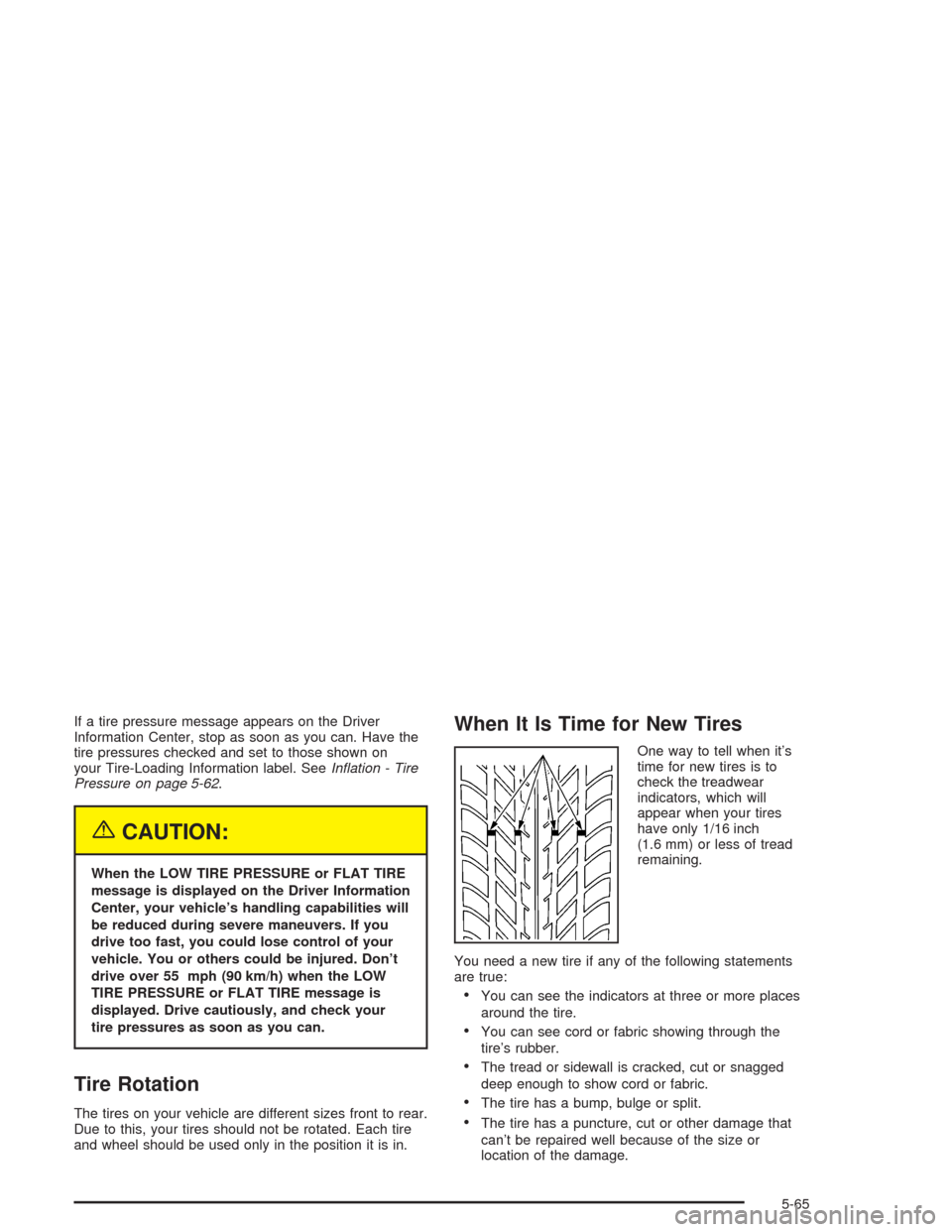
One way to tell when it’s
time for new tires is to
check the treadwear
indicators, which will
appear when your tires
have only 1/16 inch
(1.6 mm) or less of tread
remaining.
You need a new tire if any of the following statements
are true:
•You can see the indicators at three or more places
around the tire.
•You can see cord or fabric showing through the
tire’s rubber.
•The tread or sidewall is cracked, cut or snagged
deep enough to show cord or fabric.
•The tire has a bump, bulge or split.
•The tire has a puncture, cut or other damage that
can’t be repaired well because of the size or
location of the damage.
5-65
Page 314 of 384
{CAUTION:
Getting under a vehicle when it is jacked up is
dangerous. If the vehicle slips off the jack, you
could be badly injured or killed. Never get
under a vehicle when it is supported only
by a jack.
{CAUTION:
Raising your vehicle with the jack improperly
positioned can damage the vehicle and even
make the vehicle fall. To help avoid personal
injury and vehicle damage, be sure to place
the jack in the proper location before raising
the vehicle.If you ever use a jack to lift your Corvette, such as to
display it at a show, follow the instructions that
came with the jack, and be sure to use the correct lifting
points to avoid damaging your vehicle.
Notice:Lifting your vehicle improperly can damage
your vehicle and result in costly repairs not
covered by your warranty. To lift your vehicle
properly, follow the advice in this part.
To help prevent vehicle damage:
Be sure to place a block or pad between the
jack and the vehicle.
Make sure the jack you’re using spans at least
two crossmember ribs.
Lift only in the areas shown in the following
pictures.
For additional information, see your dealer and the
Chevrolet Corvette service manual.
5-72
Page 374 of 384
Customer Assistance Information (cont.)
Customer Assistance for Text
Telephone (TTY) Users............................... 7-4
Customer Assistance Offices........................... 7-4
Customer Satisfaction Procedure..................... 7-2
GM Mobility Program for Persons with
Disabilities................................................ 7-5
Reporting Safety Defects to General Motors....7-11
Reporting Safety Defects to the Canadian
Government............................................7-11
Reporting Safety Defects to the United
States Government...................................7-10
Roadside Assistance Program......................... 7-6
Service Publications Ordering Information........7-11
D
Daytime Running Lamps..................................3-15
Defensive Driving............................................. 4-2
Defogging and Defrosting.................................3-30
Disabling the Theft-Deterrent Feature.................3-87
Disarming the System.....................................2-17
Doing Your Own Service Work........................... 5-4
Door
Locks.......................................................... 2-9
Power Door Locks.......................................2-10
Downshifting (Manual Transmission)..................2-30Driver
Position, Safety Belt.....................................1-12
Driver Information Center (DIC).........................3-48
DIC Controls and Displays............................3-49
DIC Warnings and Messages........................3-58
Other Messages..........................................3-68
Driving
At Night.....................................................4-19
City...........................................................4-23
Defensive..................................................... 4-2
Drunken....................................................... 4-3
Freeway.....................................................4-24
Hill and Mountain Roads..............................4-26
In Rain and on Wet Roads...........................4-20
Winter........................................................4-28
Driving On Snow or Ice...................................4-29
Driving Through Deep Standing Water...............4-22
Driving Through Flowing Water.........................4-22
Dual Automatic Climate Control System.............3-23
E
Electrical System
Add-On Equipment......................................5-92
Fuses and Circuit Breakers...........................5-93
Headlamp Wiring.........................................5-92
Power Windows and Other Power Options......5-92
4
Page 376 of 384
Fuses
Fuses and Circuit Breakers...........................5-93
Windshield Wiper.........................................5-92
G
Gage
Check Gages Warning Light..........................3-46
Engine Coolant Temperature.........................3-41
Engine Oil Pressure.....................................3-44
Fuel..........................................................3-46
Speedometer..............................................3-34
Tachometer.................................................3-34
Voltmeter Gage...........................................3-37
Gasoline
Octane........................................................ 5-5
Specifications............................................... 5-5
Glove Box.....................................................2-40
GM Mobility Program for Persons with
Disabilities.................................................... 7-5
H
Hatch/Trunk...................................................2-11
Hatch/Trunk Lid Release..................................2-12
Hazard Warning Flashers................................... 3-4Headlamp High/Low-Beam Changer.................... 3-8
Headlamp Wiring............................................5-92
Headlamps....................................................5-48
Bulb Replacement.......................................5-48
Halogen Bulbs............................................5-48
Headlamps Doors...........................................3-14
Headlamps on Reminder................................... 3-8
Head-Up Display (HUD)...................................3-18
Highway Hypnosis...........................................4-26
Hill and Mountain Roads..................................4-26
Hood
Checking Things Under................................5-10
Release.....................................................5-11
Hood, Carbon Fiber........................................5-89
Horn............................................................... 3-5
How to Add Coolant to the Coolant
Surge Tank.................................................5-31
How to Add Fluid............................................5-22
How to Check and Add Fluid............................5-23
How to Check Lubricant...................................5-47
How to Check Power Steering Fluid..................5-35
How to Remove and Replace the Floor Mats......2-41
How to Use This Manual...................................... ii
How to Wear Safety Belts Properly...................1-11
Hydraulic Clutch.............................................5-22
Hydroplaning..................................................4-22
6