cruise control CHEVROLET CORVETTE 2006 6.G Owners Manual
[x] Cancel search | Manufacturer: CHEVROLET, Model Year: 2006, Model line: CORVETTE, Model: CHEVROLET CORVETTE 2006 6.GPages: 426, PDF Size: 2.48 MB
Page 91 of 426
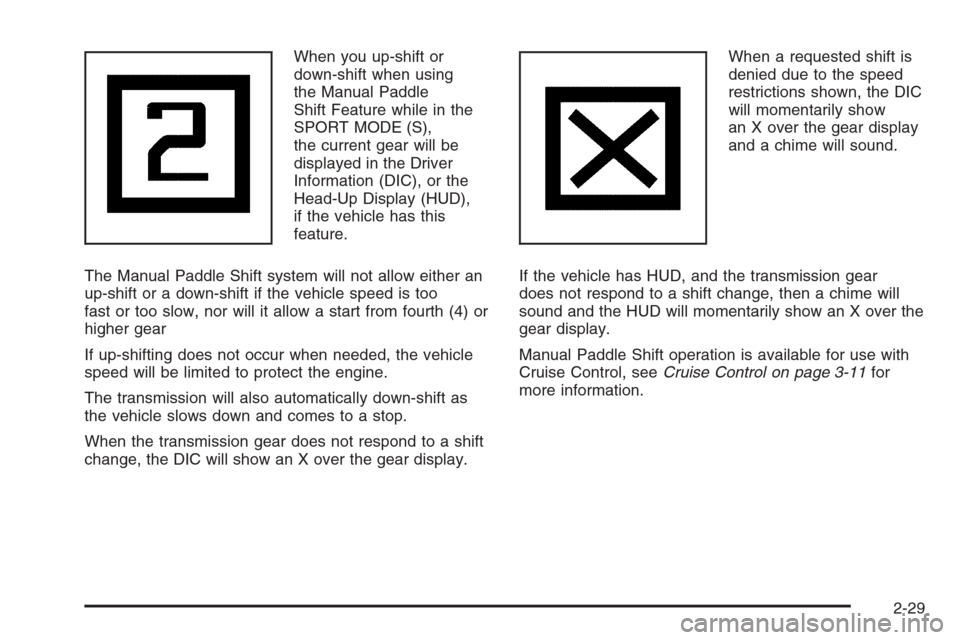
When you up-shift or
down-shift when using
the Manual Paddle
Shift Feature while in the
SPORT MODE (S),
the current gear will be
displayed in the Driver
Information (DIC), or the
Head-Up Display (HUD),
if the vehicle has this
feature.
The Manual Paddle Shift system will not allow either an
up-shift or a down-shift if the vehicle speed is too
fast or too slow, nor will it allow a start from fourth (4) or
higher gear
If up-shifting does not occur when needed, the vehicle
speed will be limited to protect the engine.
The transmission will also automatically down-shift as
the vehicle slows down and comes to a stop.
When the transmission gear does not respond to a shift
change, the DIC will show an X over the gear display.When a requested shift is
denied due to the speed
restrictions shown, the DIC
will momentarily show
an X over the gear display
and a chime will sound.
If the vehicle has HUD, and the transmission gear
does not respond to a shift change, then a chime will
sound and the HUD will momentarily show an X over the
gear display.
Manual Paddle Shift operation is available for use with
Cruise Control, seeCruise Control on page 3-11for
more information.
2-29
Page 137 of 426
Instrument Panel Overview...............................3-4
Hazard Warning Flashers................................3-6
Other Warning Devices...................................3-6
Horn .............................................................3-6
Tilt Wheel.....................................................3-6
Turn Signal/Multifunction Lever.........................3-8
Turn and Lane-Change Signals (Auto Signal).....3-8
Headlamp High/Low-Beam Changer..................3-9
Flash-to-Pass.................................................3-9
Windshield Wipers..........................................3-9
Windshield Washer.......................................3-10
Cruise Control..............................................3-11
Exterior Lamps.............................................3-15
Wiper Activated Headlamps............................3-16
Headlamps on Reminder................................3-16
Daytime Running Lamps (DRL).......................3-16
Fog Lamps ..................................................3-17
Twilight Sentinel
®..........................................3-18
Exterior Lighting Battery Saver........................3-19
Instrument Panel Brightness...........................3-19
Courtesy Lamps...........................................3-19
Entry/Exit Lighting.........................................3-19
Reading Lamps............................................3-20
Battery Run-Down Protection..........................3-20
Head-Up Display (HUD).................................3-20
Accessory Power Outlet(s).............................3-24
Ashtray(s) and Cigarette Lighter......................3-25Climate Controls............................................3-25
Dual Automatic Climate Control System...........3-25
Outlet Adjustment.........................................3-30
Passenger Compartment Air Filter...................3-31
Warning Lights, Gages, and Indicators............3-32
Instrument Panel Cluster................................3-33
Speedometer and Odometer...........................3-34
Tachometer.................................................3-34
Safety Belt Reminder Light.............................3-34
Airbag Readiness Light..................................3-34
Passenger Airbag Status Indicator...................3-35
Voltmeter Gage............................................3-37
One-to-Four Shift Light
(Manual Transmission)...............................3-38
Brake System Warning Light..........................3-38
Anti-Lock Brake System Warning Light.............3-39
Traction Control System (TCS) Warning Light . . .3-40
Active Handling System Light.........................3-40
Engine Coolant Temperature Gage..................3-41
Tire Pressure Light.......................................3-42
Malfunction Indicator Lamp.............................3-42
Engine Oil Pressure Gage.............................3-45
Security Light...............................................3-46
Fog Lamp Light............................................3-46
Lights On Reminder......................................3-46
Highbeam On Light.......................................3-46
Fuel Gage...................................................3-47
Section 3 Instrument Panel
3-1
Page 141 of 426
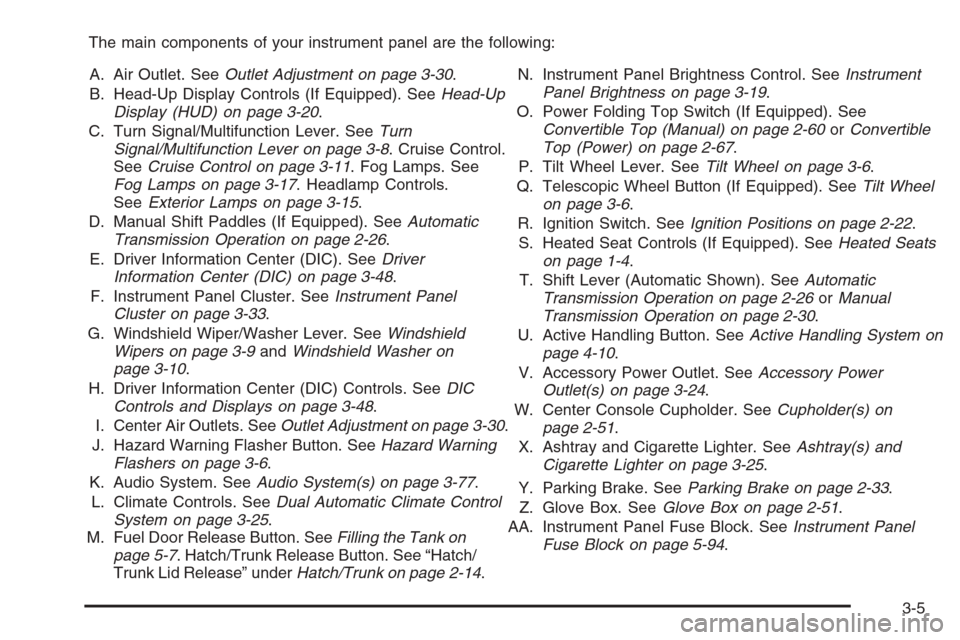
The main components of your instrument panel are the following:
A. Air Outlet. SeeOutlet Adjustment on page 3-30.
B. Head-Up Display Controls (If Equipped). SeeHead-Up
Display (HUD) on page 3-20.
C. Turn Signal/Multifunction Lever. SeeTurn
Signal/Multifunction Lever on page 3-8. Cruise Control.
SeeCruise Control on page 3-11. Fog Lamps. See
Fog Lamps on page 3-17. Headlamp Controls.
SeeExterior Lamps on page 3-15.
D. Manual Shift Paddles (If Equipped). SeeAutomatic
Transmission Operation on page 2-26.
E. Driver Information Center (DIC). SeeDriver
Information Center (DIC) on page 3-48.
F. Instrument Panel Cluster. SeeInstrument Panel
Cluster on page 3-33.
G. Windshield Wiper/Washer Lever. SeeWindshield
Wipers on page 3-9andWindshield Washer on
page 3-10.
H. Driver Information Center (DIC) Controls. SeeDIC
Controls and Displays on page 3-48.
I. Center Air Outlets. SeeOutlet Adjustment on page 3-30.
J. Hazard Warning Flasher Button. SeeHazard Warning
Flashers on page 3-6.
K. Audio System. SeeAudio System(s) on page 3-77.
L. Climate Controls. SeeDual Automatic Climate Control
System on page 3-25.
M. Fuel Door Release Button. SeeFilling the Tank on
page 5-7. Hatch/Trunk Release Button. See “Hatch/
Trunk Lid Release” underHatch/Trunk on page 2-14.N. Instrument Panel Brightness Control. SeeInstrument
Panel Brightness on page 3-19.
O. Power Folding Top Switch (If Equipped). See
Convertible Top (Manual) on page 2-60orConvertible
Top (Power) on page 2-67.
P. Tilt Wheel Lever. SeeTilt Wheel on page 3-6.
Q. Telescopic Wheel Button (If Equipped). SeeTilt Wheel
on page 3-6.
R. Ignition Switch. SeeIgnition Positions on page 2-22.
S. Heated Seat Controls (If Equipped). SeeHeated Seats
on page 1-4.
T. Shift Lever (Automatic Shown). SeeAutomatic
Transmission Operation on page 2-26orManual
Transmission Operation on page 2-30.
U. Active Handling Button. SeeActive Handling System on
page 4-10.
V. Accessory Power Outlet. SeeAccessory Power
Outlet(s) on page 3-24.
W. Center Console Cupholder. SeeCupholder(s) on
page 2-51.
X. Ashtray and Cigarette Lighter. SeeAshtray(s) and
Cigarette Lighter on page 3-25.
Y. Parking Brake. SeeParking Brake on page 2-33.
Z. Glove Box. SeeGlove Box on page 2-51.
AA. Instrument Panel Fuse Block. SeeInstrument Panel
Fuse Block on page 5-94.
3-5
Page 144 of 426
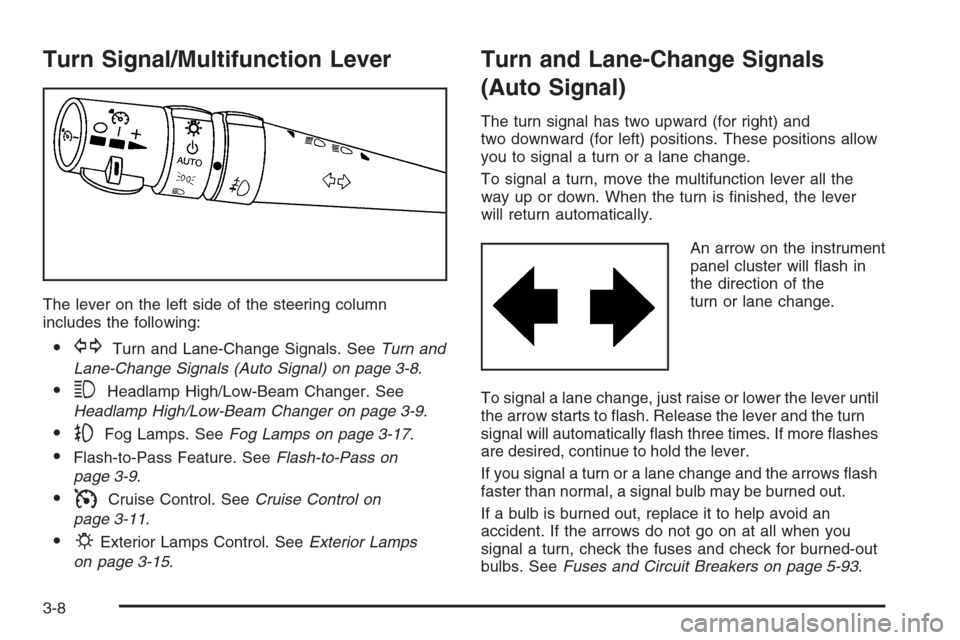
Turn Signal/Multifunction Lever
The lever on the left side of the steering column
includes the following:
GTurn and Lane-Change Signals. SeeTurn and
Lane-Change Signals (Auto Signal) on page 3-8.
3Headlamp High/Low-Beam Changer. See
Headlamp High/Low-Beam Changer on page 3-9.
-Fog Lamps. SeeFog Lamps on page 3-17.
Flash-to-Pass Feature. SeeFlash-to-Pass on
page 3-9.
ICruise Control. SeeCruise Control on
page 3-11.
PExterior Lamps Control. SeeExterior Lamps
on page 3-15.
Turn and Lane-Change Signals
(Auto Signal)
The turn signal has two upward (for right) and
two downward (for left) positions. These positions allow
you to signal a turn or a lane change.
To signal a turn, move the multifunction lever all the
way up or down. When the turn is nished, the lever
will return automatically.
An arrow on the instrument
panel cluster will ash in
the direction of the
turn or lane change.
To signal a lane change, just raise or lower the lever until
the arrow starts to ash. Release the lever and the turn
signal will automatically ash three times. If more ashes
are desired, continue to hold the lever.
If you signal a turn or a lane change and the arrows ash
faster than normal, a signal bulb may be burned out.
If a bulb is burned out, replace it to help avoid an
accident. If the arrows do not go on at all when you
signal a turn, check the fuses and check for burned-out
bulbs. SeeFuses and Circuit Breakers on page 5-93.
3-8
Page 147 of 426
Cruise Control
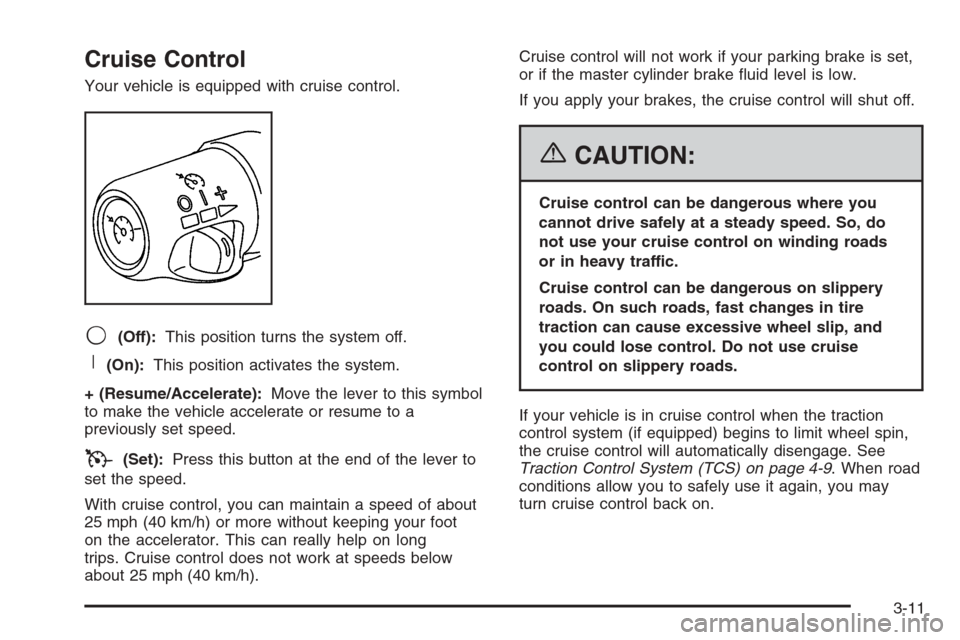
Your vehicle is equipped with cruise control.
9(Off):This position turns the system off.
R(On):This position activates the system.
+ (Resume/Accelerate):Move the lever to this symbol
to make the vehicle accelerate or resume to a
previously set speed.
T(Set):Press this button at the end of the lever to
set the speed.
With cruise control, you can maintain a speed of about
25 mph (40 km/h) or more without keeping your foot
on the accelerator. This can really help on long
trips. Cruise control does not work at speeds below
about 25 mph (40 km/h).Cruise control will not work if your parking brake is set,
or if the master cylinder brake uid level is low.
If you apply your brakes, the cruise control will shut off.
{CAUTION:
Cruise control can be dangerous where you
cannot drive safely at a steady speed. So, do
not use your cruise control on winding roads
or in heavy traffic.
Cruise control can be dangerous on slippery
roads. On such roads, fast changes in tire
traction can cause excessive wheel slip, and
you could lose control. Do not use cruise
control on slippery roads.
If your vehicle is in cruise control when the traction
control system (if equipped) begins to limit wheel spin,
the cruise control will automatically disengage. See
Traction Control System (TCS) on page 4-9. When road
conditions allow you to safely use it again, you may
turn cruise control back on.
3-11
Page 148 of 426
Setting Cruise Control
{CAUTION:
If you leave your cruise control on when you
are not using cruise, you might hit a button
and go into cruise when you do not want to.
You could be startled and even lose control.
Keep the cruise control switch off until you
want to use cruise control.
1. Move the cruise control switch to on.
2. Get up to the speed you want.
3. Press in the set button at the end of the lever and
release it.
4. Take your foot off the accelerator pedal.
When the cruise control is engaged, the CRUISE SET
TO XX MPH message will display on the Driver
Information Center (DIC). SeeOther Messages on
page 3-67.
Resuming a Set Speed
Suppose you set your cruise control at a desired
speed and then you apply the brake. This, of course,
disengages the cruise control. But you don’t need
to reset it.
Once you’re going about 25 mph (40 km/h) or more, you
can move the cruise control switch briey from on to
resume/accelerate.
You’ll go right back up to your chosen speed and stay
there.
If you hold the switch at resume/accelerate the vehicle
will keep going faster until you release the switch or
apply the brake. So unless you want to go faster, don’t
hold the switch at resume/accelerate.
3-12
Page 149 of 426
Increasing Speed While Using
Cruise Control
There are two ways to go to a higher speed:
Use the accelerator pedal to get to the higher speed.
Press the set button at the end of the lever, then
release the button and the accelerator pedal. You’ll
now cruise at the higher speed. If the accelerator
pedal is held longer than 60 seconds, cruise control
will turn off.
Move the cruise switch from on to resume/
accelerate. Hold it there until you get up to the speed
you want, and then release the switch. To increase
your speed in very small amounts, move the switch
briey to resume/accelerate. Each time you do this,
your vehicle will go about 1 mph (1.6 km/h) faster.
Reducing Speed While Using
Cruise Control
Press and hold the set button until you reach the
lower speed you want, then release it.
To slow down in very small amounts, briey press
the set button. Each time you do this, you’ll go
about 1 mph (1.6 km/h) slower.
Passing Another Vehicle While Using
Cruise Control
Use the accelerator pedal to increase your speed.
When you take your foot off the pedal, your vehicle will
slow down to the cruise control speed you set earlier.
Using Cruise Control on Hills
How well your cruise control will work on hills depends
upon your speed, load and the steepness of the
hills. When going up steep hills, you may want to step
on the accelerator pedal to maintain your speed.
When going downhill, you may have to brake or shift to
a lower gear to keep your speed down. Of course,
applying the brake takes you out of cruise control. Many
drivers nd this to be too much trouble and don’t use
cruise control on steep hills.
3-13
Page 150 of 426
Cruise Control in Sport (S) and Manual
Paddle Shift Gear Selection
When your vehicle is in Sport (S) and the manual
paddle shift controls are not being used, cruise control
will operate in the same manner as Drive (D).
When your vehicle is in Sport (S) and the manual
paddle shift controls are being used, cruise control will
operate as follows:
If cruise control is active and a gear is selected with
the manual paddle shift controls, the vehicle will
maintain vehicle speed in the driver selected gear
and will not automatically up-shift or down-shift
the transmission while the driver’s gear selection
is active.
If driving in hilly terrain, cruise control may not be
able to maintain vehicle speed if an up-shift or
down-shift is not selected by the driver. While
driving on hilly terrain and cruise control is active
with a manual paddle shift gear selection, the driver
must select the proper gear for the terrain or
select Drive (D) on the gear range selector for full
automatic transmission operation.
Ending Cruise Control
To end a cruise control session, step lightly on the
brake pedal. If your vehicle has a manual transmission,
lightly tapping the clutch will also end a cruise control
session.
Move the cruise control switch to off to turn the system
completely off.
When cruise control is disengaged, the CRUISE
DISENGAGED message will display on the Driver
Information Center (DIC). SeeDIC Warnings and
Messages on page 3-53.
Erasing Speed Memory
When you turn off the cruise control or the ignition, your
cruise control set speed memory is erased.
3-14
Page 192 of 426
CLOSE TRUNK TO MOVE TOP:This message will
display and a chime will sound if the trunk is open while
you are trying to operate the convertible top. Make
sure the trunk is closed before operating the convertible
top. SeeConvertible Top (Manual) on page 2-60or
Convertible Top (Power) on page 2-67.
COMPETITIVE DRIVING MODE:When the Competitive
Driving mode is selected, this message will be
displayed in the DIC and a short chime will sound.
The instrument panel cluster light will not be on when
the Competitive Driving mode is selected. The Traction
Control System will not be operating while in the
Competitive Driving mode. You should adjust your
driving accordingly. SeeRacing or Other Competitive
Driving on page 4-18for more information.
COOLANT OVER TEMPERATURE:You will hear a
chime when this message is displayed. To acknowledge
the warning, press the RESET button. After you press
the RESET button, a message will be displayed and
you will hear a chime every minute until this condition
changes. If you do not press the RESET button,
the message will remain on the digital display until the
condition changes.If the engine coolant exceeds 255°F (124°C), this
message is displayed. If you have been operating your
vehicle under normal driving conditions, you should
pull off the road, stop your vehicle and turn off the
engine as soon as possible. You can monitor the coolant
temperature with the GAGES button on the DIC or
the engine coolant gage on the instrument panel cluster.
SeeEngine Overheating on page 5-32.
CRUISE DISENGAGED:This message will momentarily
appear when you disengage the cruise control system
by stepping on the brake on an automatic transmission
vehicle or the clutch on a manual transmission vehicle
or by turning off the cruise control switch. SeeCruise
Control on page 3-11for more information.
ENGINE DRAG CONTROL ACTIVE:This message
displays when engine drag control is active. When
driving in a lower gear in rainy, snowy or icy conditions,
and then letting up on the accelerator or downshifting,
the rear wheels may begin to slip and this message
appears. This message will stay on for a few seconds
following the engine drag control event.
ENGINE OVERHEATED – STOP ENGINE:This
message will appear along with a continuous chime when
the engine has overheated. Stop and turn the engine off
immediately to avoid severe engine damage. SeeEngine
Overheating on page 5-32.
3-56
Page 203 of 426
Other Messages
Here are more messages that you can receive on your
Driver Information Center (DIC). To acknowledge a
message and read another message that may have
come on at the same time, press the RESET button.
ACCESSORY MODE ON
BATTERY VOLTAGE HIGH
SeeVoltmeter Gage on page 3-37.
BATTERY VOLTAGE LOW
SeeVoltmeter Gage on page 3-37.
CHECK WASHER FLUID
SeeWindshield Washer Fluid on page 5-41.
CRUISE SET TO XXX MPH (XXX km/h)
SeeCruise Control on page 3-11.
DRIVER DOOR AJAR
FOB AUTOLEARN WAIT XX MINUTES
See “Matching Transmitter(s) to Your Vehicle”
underKeyless Access System Operation on
page 2-5.
FOB BATTERY LOW
See “Battery Replacement” underKeyless Access
System Operation on page 2-5.
HATCH AJAR (Coupe)
INTRUSION SENSOR OFF, if your vehicle has
this feature
INTRUSION SENSOR ON, if your vehicle has
this feature
KNOWN FOB
See “Matching Transmitter(s) to Your Vehicle”
underKeyless Access System Operation on
page 2-5.
MAXIMUM NUMBER OF FOBS LEARNED
See “Matching Transmitter(s) to Your Vehicle” under
Keyless Access System Operation on page 2-5.
OFF–ACCESSORY TO LEARN
See “Matching Transmitter(s) to Your Vehicle”
underKeyless Access System Operation on
page 2-5.
PASSENGER DOOR AJAR
READY FOR FOB #X
See “Matching Transmitter(s) to Your Vehicle”
underKeyless Access System Operation on
page 2-5.
TONNEAU AJAR (Convertible)
TRUNK AJAR (Convertible)
UPSHIFT NOW
SeeManual Transmission Operation on page 2-30.
3-67