phone CHEVROLET CORVETTE 2007 6.G User Guide
[x] Cancel search | Manufacturer: CHEVROLET, Model Year: 2007, Model line: CORVETTE, Model: CHEVROLET CORVETTE 2007 6.GPages: 488, PDF Size: 2.62 MB
Page 222 of 488
MAXIMUM SPEED 80 MPH (129 km/h)
This message displays when a malfunction is
present in the Selective Ride Control system. The
vehicle speed will be limited to a value determined
by the vehicle when the shock absorber system
has failed and the shocks are in their full soft
mode. Have your vehicle serviced by your dealer
as soon as possible.
To acknowledge the message, press the RESET
button. The message reappears every 10 minutes
until this condition changes.
NO FOBS DETECTED
This message displays if the vehicle does not
detect the presence of a keyless access transmitter
when you have attempted to start the vehicle
or a vehicle door has just closed. The following
conditions may cause this message to appear:
Driver-added equipment plugged into the
accessory power outlet on the center console
is causing interference. Examples of these
devices are cell phones and cell phone
chargers, two-way radios, power inverters, or
similar items. Try moving the keyless access
transmitter away from these devices when
starting the vehicle. In addition, PDA devices
and remote garage and gate openers may also
generate Electromagnetic Interference (EMI)
that may interfere with the keyless access
transmitter. Do not carry the keyless access
transmitter in the same pocket or bag as these
devices.
The vehicle is experiencing Electromagnetic
Interference (EMI). Some locations, such as
airports, automatic toll booths, and some gas
stations have EMI elds which may interfere
with the keyless access transmitter.
222
Page 245 of 488
While your vehicle is parked:
Familiarize yourself with all of its controls.
Familiarize yourself with its operation.
Set up your audio system by presetting your
favorite radio stations, setting the tone, and
adjusting the speakers. Then, when driving
conditions permit, you can tune to your favorite
radio stations using the presets and steering
wheel controls if the vehicle has them.
Notice:Before adding any sound equipment
to your vehicle, such as an audio system,
CD player, CB radio, mobile telephone,
or two-way radio, make sure that it can be
added by checking with your dealer/retailer.
Also, check federal rules covering mobile radio
and telephone units. If sound equipment can
be added, it is very important to do it properly.
Added sound equipment may interfere with
the operation of your vehicle’s engine, radio,
or other systems, and even damage them.
Your vehicle’s systems may interfere with
the operation of sound equipment that
has been added.Your vehicle has a feature called Retained
Accessory Power (RAP). With RAP, the audio
system can be played even after the ignition
is turned off. SeeRetained Accessory Power
(RAP) on page 91for more information.
Setting the Time
With the ignition on and the radio off, press
the H or the M button to enter clock mode.
Press and hold H until the correct hour appears
on the display. Press and hold M until the
correct minute appears on the display.
To change the time default setting from 12 hour
to 24 hour, press either the H or the M button
to enter the clock mode. Press the tune knob
to select between the 12 or 24 hour display format.
The clock mode automatically times out with
the changed display format set as the current
default setting.
245
Page 251 of 488
SCAN:Scan the stations within a category by
performing the following:
1. Press the CAT button. The last selected
category displays.
2. Turn the
O/eknob to select the category.
3. Once the desired category is displayed, press
and hold either the left
tor rightuSCAN
arrow until a beep sounds and SCAN
CATEGORY displays. The radio begins
scanning the stations in the category.
4. Press either the left
tor rightuSCAN arrow
to stop scanning.
If both category and TRAF (traffic) are on, the
radio scans for stations with the selected category
and traffic announcements.
BAND (AF Alternate Frequency):Alternate
frequency allows the radio to switch to a
stronger station in the same category. To turn
alternate frequency on, press and hold BAND for
four seconds. AF ON displays. The radio goes
to stations with a stronger frequency.
To turn alternate frequency off, press and hold
BAND again for four seconds. AF OFF displays.
The radio does not switch to other stations.
This function does not apply for XM™ Satellite
Radio Service.
RDS Messages
ALERT!:Alert warns of local or national
emergencies. When an alert announcement
comes on the current radio station, ALERT!
displays. You will hear the announcement, even
if the volume is low or a CD is playing. If a CD is
playing, play stops during the announcement.
Alert announcements cannot be turned off.
ALERT! is not affected by tests of the emergency
broadcast system. This feature is not supported by
all RDS stations.
4(Information):If the current station has a
message, INFO (information) displays. Press
the
4button to see the message. The message
can display the artist, song title, call in phone
numbers, etc.
If the entire message is not displayed, parts of
the message appears every three seconds.
To scroll through the message, press and
release the
4button.
251
Page 270 of 488
To scan presets, press and hold either the downx
or upwarrow for four seconds until PRESET
SCAN displays and a beep sounds. The radio goes
to a station, plays for a few seconds, then goes to
the next station. Press either the down
xor upw
arrow again to stop scanning.
When a CD is playing, press the down
xor upw
arrow to go to the previous or next track.
To scan the current CD, press and hold either the
down
xor upwarrow for more than two seconds.
The CD goes to the next track, plays the rst
10 seconds, then goes to the next track. Press
either the down
xor upwarrow again to stop
scanning.
To scan all of the CDs loaded, press and hold
either the down
xor upwarrow for more than
four seconds. The CD goes to the next CD, plays
the rst 10 seconds of each track, then goes to the
next CD. Press either the down
xor upwarrow
again to stop scanning.
+−(Volume):Press the + (plus) or−(minus)
button to increase or to decrease the volume.1–6 (Preset Pushbuttons):Press this button
to play stations that are programmed on the
radio preset pushbuttons. The radio only seeks
preset stations with a strong signal that are in
the selected band.
Radio Reception
You may experience frequency interference and
static during normal radio reception if items
such as cellphone chargers, vehicle convenience
accessories, and external electronic devices
are plugged into the accessory power outlet.
If there is interference or static, unplug the item
from the accessory power outlet.
AM
The range for most AM stations is greater than for
FM, especially at night. The longer range can
cause station frequencies to interfere with each
other. For better radio reception, most AM
radio stations will boost the power levels during
the day, and then reduce these levels during
the night. Static can also occur when things like
storms and power lines interfere with radio
reception. When this happens, try reducing the
treble on your radio.
270
Page 296 of 488
Driving too fast through large water puddles or
even going through some car washes can cause
problems, too. The water may affect your
brakes. Try to avoid puddles. But if you cannot,
try to slow down before you hit them.
Hydroplaning
Hydroplaning is dangerous. So much water can
build up under your tires that they can actually ride
on the water. This can happen if the road is wet
enough and you are going fast enough. When your
vehicle is hydroplaning, it has little or no contact
with the road.
Hydroplaning does not happen often. But it can
if your tires do not have much tread or if the
pressure in one or more is low. It can happen if
a lot of water is standing on the road. If you
can see reections from trees, telephone poles,
or other vehicles, and raindrops dimple the
water’s surface, there could be hydroplaning.
Hydroplaning usually happens at higher speeds.
There just is not a hard and fast rule about
hydroplaning. The best advice is to slow down
when it is raining.
Driving Through Deep Standing Water
Notice:If you drive too quickly through deep
puddles or standing water, water can come
in through the engine’s air intake and badly
damage the engine. Never drive through water
that is slightly lower than the underbody of your
vehicle. If you cannot avoid deep puddles or
standing water, drive through them very slowly.
Driving Through Flowing Water
{CAUTION:
Flowing or rushing water creates strong
forces. If you try to drive through owing
water, as you might at a low water
crossing, your vehicle can be carried away.
As little as six inches of owing water
can carry away a smaller vehicle. If this
happens, you and other vehicle occupants
could drown. Do not ignore police warning
signs, and otherwise be very cautious
about trying to drive through owing water.
296
Page 324 of 488
Fuels in Foreign Countries
If you plan on driving in another country outside
the United States or Canada, the proper fuel
might be hard to nd. Never use leaded gasoline
or any other fuel not recommended in the
previous text on fuel. Costly repairs caused by
use of improper fuel would not be covered
by your warranty.
To check the fuel availability, ask an auto club,
or contact a major oil company that does business
in the country where you will be driving.
Filling the Tank
{CAUTION:
Fuel vapor burns violently and a fuel re
can cause bad injuries. To help avoid
injuries to you and others, read and follow
all the instructions on the pump island.
Turn off your engine when you are
refueling. Do not smoke if you are near
fuel or refueling your vehicle. Do not use
cellular phones. Keep sparks, ames,
and smoking materials away from fuel.
Do not leave the fuel pump unattended
when refueling your vehicle. This is
against the law in some places. Do not
re-enter the vehicle while pumping fuel.
Keep children away from the fuel pump;
never let children pump fuel.
324
Page 327 of 488
Filling a Portable Fuel Container
{CAUTION:
Never ll a portable fuel container while
it is in your vehicle. Static electricity
discharge from the container can ignite
the gasoline vapor. You can be badly
burned and your vehicle damaged if
this occurs. To help avoid injury to you
and others:
Dispense gasoline only into approved
containers.
Do not ll a container while it is inside
a vehicle, in a vehicle’s trunk, pickup
bed, or on any surface other than the
ground.
CAUTION: (Continued)
CAUTION: (Continued)
Bring the ll nozzle in contact with
the inside of the ll opening before
operating the nozzle. Contact should
be maintained until the lling is
complete.
Do not smoke while pumping
gasoline.
Do not use a cellular phone while
pumping gasoline.
327
Page 385 of 488
If a tire goes at, you won’t need to stop on the side
of the road to change the tire. You can just keep on
driving. The shorter the distance you drive and the
slower the speed, the greater the chance that the
tire will not have to be replaced. If you drive on a
deated EMT for 25 miles (40 km) or less and at
speeds of 55 mph (90 km/h) or less, there is a
good chance that the tire can be repaired. The
tire can operate effectively with no air pressure
for up to 100 miles (160 km) at speeds up to
55 mph (90 km/h), but the tire would then have to
be replaced. When a tire is lled with air, it provides
a cushion between the road and the wheel.
Because you won’t have this cushion when driving
on a deated tire, try to avoid potholes that could
damage your wheel and require replacement of it.
Some road hazards can damage a tire beyond
repair. This damage could occur even before
you’ve driven on the tire in a deated condition.
When a tire has been damaged, or if you’ve driven
any distance on a deated EMT, check with an
authorized Goodyear EMT Service Center to
determine whether the tire can be repaired or
should be replaced. To maintain your vehicle’s
extended mobility feature, all replacement
tires must be Extended Mobility Tires.As soon as possible, contact the nearest
authorized GM or Goodyear EMT servicing facility
for inspection and repair or replacement. To locate
the nearest GM or Goodyear EMT servicing facility,
call Roadside Assistance. For phone numbers
and Roadside Assistance details seeRoadside
Assistance Program on page 458. You may also
contact Goodyear, for the nearest authorized EMT
servicing facility, by calling 1-800-789-9878.
{CAUTION:
Extended mobility tires are constructed
differently than other tires and could
explode during improper service. You or
others could be injured or killed if you
attempt to repair, replace, dismount, or
mount a extended mobility tire. Let only
an authorized EMT Service Center repair,
replace, dismount and mount extended
mobility tires.
385
Page 451 of 488
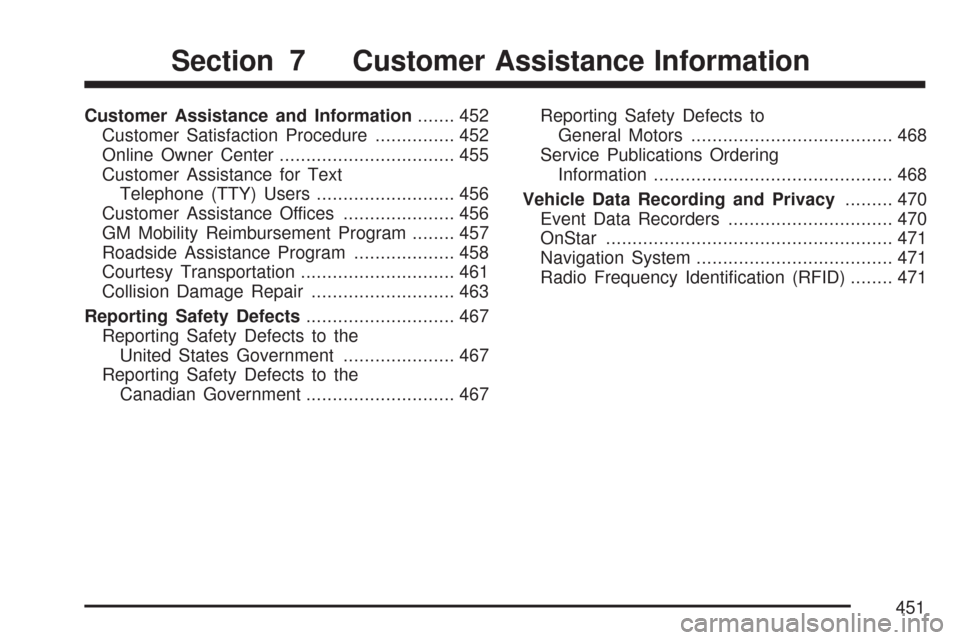
Customer Assistance and Information....... 452
Customer Satisfaction Procedure............... 452
Online Owner Center................................. 455
Customer Assistance for Text
Telephone (TTY) Users.......................... 456
Customer Assistance Offices..................... 456
GM Mobility Reimbursement Program........ 457
Roadside Assistance Program................... 458
Courtesy Transportation............................. 461
Collision Damage Repair........................... 463
Reporting Safety Defects............................ 467
Reporting Safety Defects to the
United States Government..................... 467
Reporting Safety Defects to the
Canadian Government............................ 467Reporting Safety Defects to
General Motors...................................... 468
Service Publications Ordering
Information............................................. 468
Vehicle Data Recording and Privacy......... 470
Event Data Recorders............................... 470
OnStar...................................................... 471
Navigation System..................................... 471
Radio Frequency Identication (RFID)........ 471
Section 7 Customer Assistance Information
451
Page 453 of 488
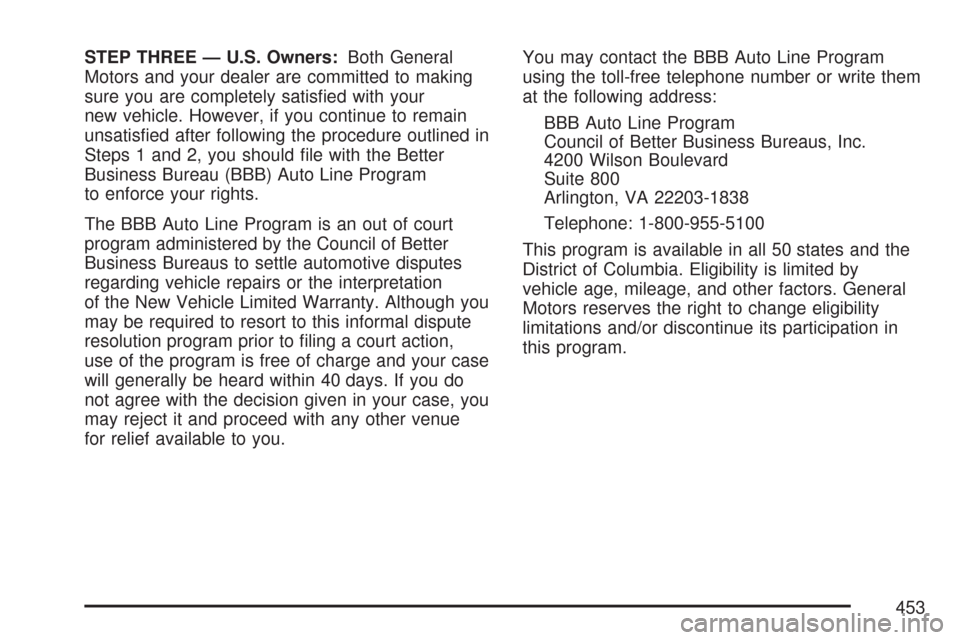
STEP THREE — U.S. Owners:Both General
Motors and your dealer are committed to making
sure you are completely satised with your
new vehicle. However, if you continue to remain
unsatised after following the procedure outlined in
Steps 1 and 2, you should le with the Better
Business Bureau (BBB) Auto Line Program
to enforce your rights.
The BBB Auto Line Program is an out of court
program administered by the Council of Better
Business Bureaus to settle automotive disputes
regarding vehicle repairs or the interpretation
of the New Vehicle Limited Warranty. Although you
may be required to resort to this informal dispute
resolution program prior to ling a court action,
use of the program is free of charge and your case
will generally be heard within 40 days. If you do
not agree with the decision given in your case, you
may reject it and proceed with any other venue
for relief available to you.You may contact the BBB Auto Line Program
using the toll-free telephone number or write them
at the following address:
BBB Auto Line Program
Council of Better Business Bureaus, Inc.
4200 Wilson Boulevard
Suite 800
Arlington, VA 22203-1838
Telephone: 1-800-955-5100
This program is available in all 50 states and the
District of Columbia. Eligibility is limited by
vehicle age, mileage, and other factors. General
Motors reserves the right to change eligibility
limitations and/or discontinue its participation in
this program.
453