service reset CHEVROLET CORVETTE 2007 6.G User Guide
[x] Cancel search | Manufacturer: CHEVROLET, Model Year: 2007, Model line: CORVETTE, Model: CHEVROLET CORVETTE 2007 6.GPages: 488, PDF Size: 2.62 MB
Page 267 of 488
XM Radio Messages
If your vehicle has XM™ Satellite Radio Service, the radio can display some of the screen messages as
shown in the XM™ Radio Message table. If any of these messages do display, follow the information
and/or instructions provided in the table.
Radio Display Message Condition Action Required
XL (Explicit Language
Channels)XL on the radio display,
after the channel name,
indicates content with
explicit language.These channels, or any others, can be blocked at a
customer’s request, by calling 1-800-852-XMXM (9696).
Updating Updating encryption code The encryption code in the receiver is being updated, and
no action is required. This process should take no longer
than 30 seconds.
No Signal Loss of signal The system is functioning correctly, but the vehicle is in a
location that is blocking the XM™ signal. When you move
into an open area, the signal should return.
Loading XM Acquiring channel audio
(after 4 second delay)The audio system is acquiring and processing audio and
text data. No action is needed. This message should
disappear shortly.
CH Off Air Channel not in service This channel is not currently in service. Tune to another
channel.
CH Unavail Channel no longer
availableThis previously assigned channel is no longer assigned.
Tune to another station. If this station was one of the
presets, choose another station for that preset button.
No Info Artist Name/Feature
not availableNo artist information is available at this time on this channel.
The system is working properly.
267
Page 283 of 488
Adding non-dealer accessories can affect your
vehicle’s performance. SeeAccessories and
Modications on page 319for more information.
Active Handling System
The Active Handling System is a computer
controlled system that helps the driver maintain
directional control of the vehicle in difficult driving
conditions. This is accomplished by selectively
applying any one of the vehicle’s brakes.
When you rst start your vehicle during cold winter
weather and begin to drive away, the message
ACTIVE HANDLING WARMING UP may be
displayed in the DIC. This is normal. You can
acknowledge this message by pressing the RESET
button. The Active Handling System performance
is affected until the message, ACTIVE HANDLING
READY, is displayed in the DIC.
The ACTIVE HANDLING CALIBRATING message
may be displayed in the DIC and the instrument
panel cluster light will be on after exceeding
18 mph (30 km/h) for 10 seconds. The Active
Handling System is off until the ACTIVE
HANDLING READY message is displayed.
This could take up to 15 minutes.The ACTIVE HANDLING message will come on
when the system is operating. SeeDIC Warnings
and Messages on page 214for more information.
You may also feel or hear the system working.
This is normal.
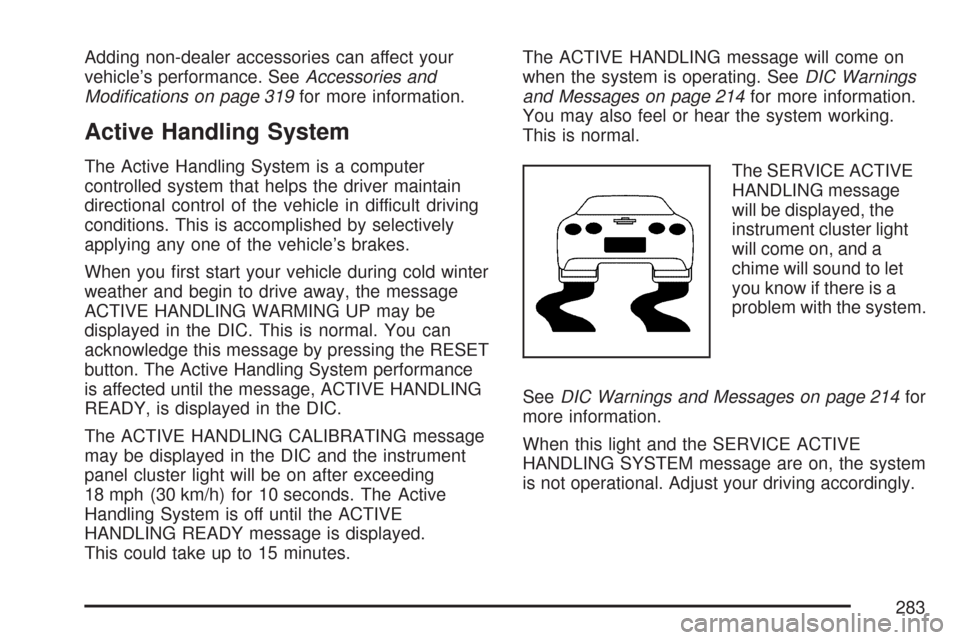
The SERVICE ACTIVE
HANDLING message
will be displayed, the
instrument cluster light
will come on, and a
chime will sound to let
you know if there is a
problem with the system.
SeeDIC Warnings and Messages on page 214for
more information.
When this light and the SERVICE ACTIVE
HANDLING SYSTEM message are on, the system
is not operational. Adjust your driving accordingly.
283
Page 341 of 488
When the system has calculated that oil life has
been diminished, it will indicate that an oil change
is necessary. A CHANGE ENGINE OIL message
will come on. Change your oil as soon as possible
within the next 600 miles (1 000 km). It is
possible that, if you are driving under the best
conditions, the oil life system may not indicate
that an oil change is necessary for over a
year. However, your engine oil and lter must
be changed at least once a year and at this
time the system must be reset. Your dealer
has GM-trained service people who will perform
this work using genuine GM parts and reset
the system. It is also important to check your
oil regularly and keep it at the proper level.
If the system is ever reset accidentally, you
must change your oil at 3,000 miles (5 000 km)
since your last oil change. Remember to reset
the oil life system whenever the oil is changed.How to Reset the Engine Oil Life
System
The Engine Oil Life System calculates when to
change your engine oil and lter based on vehicle
use. Anytime your oil is changed, reset the
system so it can calculate when the next oil
change is required. If a situation occurs where
you change your oil prior to a CHANGE ENGINE
OIL message being turned on, reset the system.
To reset the CHANGE ENGINE OIL message
after an oil change, do the following:
1. Press the TRIP button so the OIL LIFE
percentage is displayed.
2. Press RESET and hold for two seconds.
OIL LIFE REMAINING 100% will appear.
If the CHANGE ENGINE OIL message comes
back on when you start your vehicle, the engine
oil life system has not reset. Repeat the procedure.
341
Page 352 of 488
If you no longer have the overheat warning,
you can drive. Just to be safe, drive slower for
about 10 minutes. If the warning does not
come back on, you can drive normally.
If the warning continues and you are not
stopped, pull over, stop, and park your vehicle
right away.
If there is still no sign of steam, you can idle the
engine for three minutes while you are parked.
If you still have the warning, turn off the engine
and get everyone out of the vehicle until it
cools down. Also, see “Overheated Engine
Protection Operating Mode” later in this section.
You may decide not to lift the hood but to get
service help right away.Overheated Engine Protection
Operating Mode
If an overheated engine condition exists and the
messages COOLANT OVER TEMPERATURE
and REDUCED ENGINE POWER are displayed,
along with the Check Engine light, an overheat
protection mode which alternates ring groups of
cylinders helps prevent engine damage. In
this mode, you will notice a loss in power and
engine performance. This operating mode allows
your vehicle to be driven to a safe place in an
emergency; you may drive up to 50 miles (80 km).
Notice:After driving in the overheated
engine protection operating mode, to avoid
engine damage, allow the engine to cool before
attempting any repair. The engine oil will be
severely degraded. Repair the cause of coolant
loss, change the oil and reset the oil life
system. SeeEngine Oil on page 333.
352
Page 433 of 488
If you want to purchase service information, see
Service Publications Ordering Information on
page 468.
Owner Checks and Services on page 438tells you
what should be checked, when to check it, and
what you can easily do to help keep your vehicle in
good condition.
The proper replacement parts, uids, and
lubricants to use are listed inRecommended
Fluids and Lubricants on page 443andNormal
Maintenance Replacement Parts on page 445.
When your vehicle is serviced, make sure these
are used. All parts should be replaced and all
necessary repairs done before you or anyone else
drives the vehicle. We recommend the use of
genuine GM parts.Scheduled Maintenance
When the CHANGE ENGINE OIL message comes
on, it means that service is required for your
vehicle. Have your vehicle serviced as soon as
possible within the next 600 miles (1 000 km). It is
possible that, if you are driving under the best
conditions, the engine oil life system may
not indicate that vehicle service is necessary for
over a year. However, your engine oil and
lter must be changed at least once a year and at
this time the system must be reset. Your
dealer/retailer has trained service technicians who
will perform this work using genuine parts and
reset the system.
433
Page 434 of 488

If the engine oil life system is ever reset
accidentally, you must service your vehicle within
3,000 miles (5 000 km) since your last service.
Remember to reset the oil life system whenever
the oil is changed. SeeEngine Oil Life System on
page 340for information on the Engine Oil Life
System and resetting the system.
When the CHANGE ENGINE OIL message
appears, certain services, checks, and inspections
are required. Required services are described
in the following for “MaintenanceI” and
“MaintenanceII.” Generally, it is recommended
that your rst service be MaintenanceI, your
second service be MaintenanceII, and that you
alternate MaintenanceIand MaintenanceII
thereafter. However, in some cases,
MaintenanceIImay be required more often.MaintenanceI— Use MaintenanceIif the
message comes on within 10 months since the
vehicle was purchased or MaintenanceII
was performed.
MaintenanceII— Use MaintenanceIIif the
previous service performed was MaintenanceI.
Always use MaintenanceIIwhenever the message
comes on 10 months or more since the last
service or if the message has not come on at all
for one year.
434
Page 435 of 488
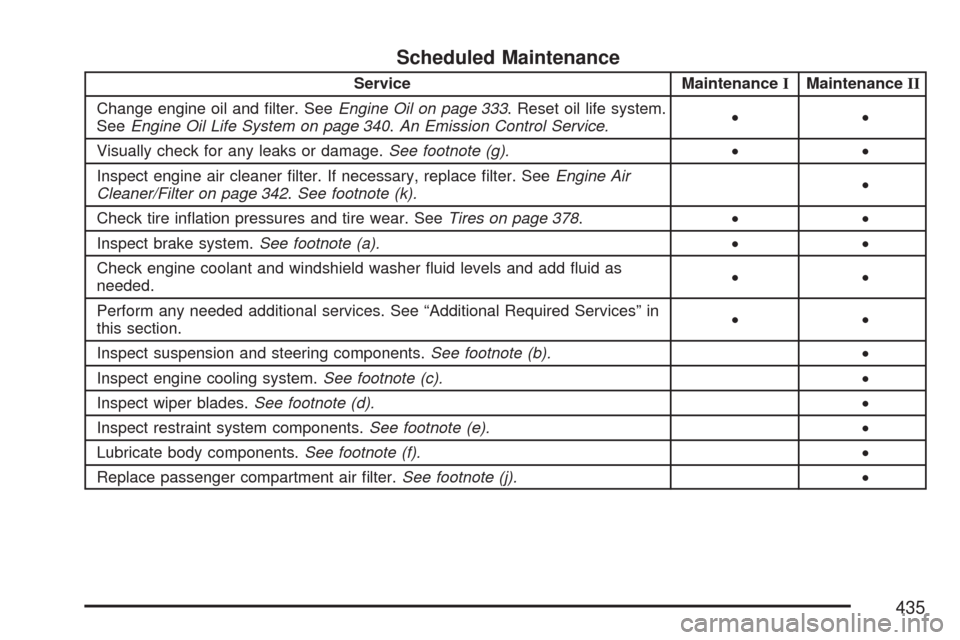
Scheduled Maintenance
Service MaintenanceIMaintenanceII
Change engine oil and lter. SeeEngine Oil on page 333. Reset oil life system.
SeeEngine Oil Life System on page 340.An Emission Control Service.••
Visually check for any leaks or damage.See footnote (g).••
Inspect engine air cleaner lter. If necessary, replace lter. SeeEngine Air
Cleaner/Filter on page 342.See footnote (k).•
Check tire ination pressures and tire wear. SeeTires on page 378.••
Inspect brake system.See footnote (a).••
Check engine coolant and windshield washer uid levels and add uid as
needed.••
Perform any needed additional services. See “Additional Required Services” in
this section.••
Inspect suspension and steering components.See footnote (b).•
Inspect engine cooling system.See footnote (c).•
Inspect wiper blades.See footnote (d).•
Inspect restraint system components.See footnote (e).•
Lubricate body components.See footnote (f).•
Replace passenger compartment air lter.See footnote (j).•
435