mirror CHEVROLET CORVETTE 2007 6.G Owner's Manual
[x] Cancel search | Manufacturer: CHEVROLET, Model Year: 2007, Model line: CORVETTE, Model: CHEVROLET CORVETTE 2007 6.GPages: 488, PDF Size: 2.62 MB
Page 160 of 488
Telescopic Steering Column
If your vehicle has this feature, the telescopic
steering column will allow you to adjust the
distance the steering wheel is from the
instrument panel.
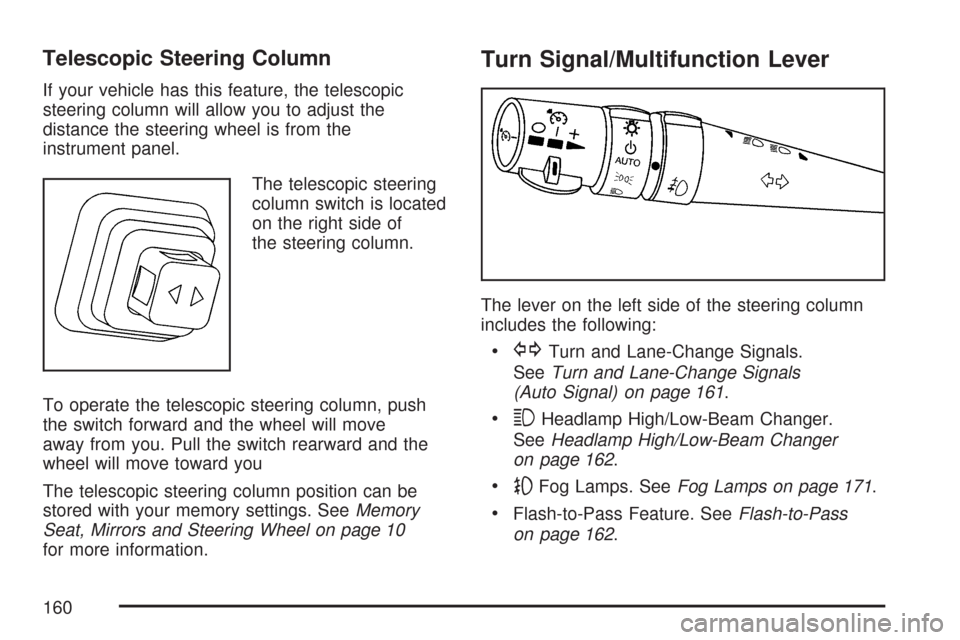
The telescopic steering
column switch is located
on the right side of
the steering column.
To operate the telescopic steering column, push
the switch forward and the wheel will move
away from you. Pull the switch rearward and the
wheel will move toward you
The telescopic steering column position can be
stored with your memory settings. SeeMemory
Seat, Mirrors and Steering Wheel on page 10
for more information.
Turn Signal/Multifunction Lever
The lever on the left side of the steering column
includes the following:
GTurn and Lane-Change Signals.
SeeTurn and Lane-Change Signals
(Auto Signal) on page 161.
3Headlamp High/Low-Beam Changer.
SeeHeadlamp High/Low-Beam Changer
on page 162.
-Fog Lamps. SeeFog Lamps on page 171.
Flash-to-Pass Feature. SeeFlash-to-Pass
on page 162.
160
Page 173 of 488
Turn and hold the knob clockwise to brighten the
lights or counterclockwise to dim them. During
the day, this knob will adjust the instrument panel
brightness and at night will adjust all interior
lighting.
Be sure not to have this knob turned all the way
down with the lamps on during the day. Your
Driver Information Center (DIC) may not be visible.
Courtesy Lamps
When any door or the hatch/trunk lid is opened,
the interior lamps will go on unless it is bright
outside.
You can also turn the courtesy lamps on and off
by pressing the instrument panel brightness knob.
Entry/Exit Lighting
With entry lighting, the interior lamps will come on
when entering the vehicle. The interior lamps
will come on for about 20 seconds when the
engine is off.
You can turn exit and entry lighting off by quickly
turning the courtesy lamps on and off.
Reading Lamps
The inside rearview mirror includes two reading
lamps. The lamps will go on when a door is
opened. When the doors are closed, each lamp
can be turned on individually by pressing the
switch for that lamp.
An ambient light is located in the passenger sun
visor clip. This light stays on while driving to
keep the cabin from being too dark.
Battery Run-Down Protection
This vehicle has a feature to help prevent the
battery from being drained in case any of
the following lamps are left on; the underhood
lamp, if your vehicle has this feature, vanity mirror
lamps, cargo lamps, reading lamps, console or
glove box lamps. If any of these lamps are left on,
they will automatically time-out after about
10 minutes. To reset it, all of the above lamps
must be turned off or the ignition key on.
173
Page 185 of 488
Rear Window Defogger
The rear window defogger uses a warming grid to
remove fog or frost from the rear window.
The rear window defogger will only work when the
engine is running.
=(Rear Window Defogger):Press this button
to turn the rear window defogger on. Be sure
to clear as much snow from the rear window as
possible. An indicator light in the button will come
on to let you know that the rear window defogger
is activated.
The rear window defogger will turn off about
10 minutes after the button is pressed when
traveling less than 30 mph (48 km/h). If turned
on again, the defogger will only run for about
ve minutes before turning off. The defogger can
also be turned off by pressing the button again
or by turning off the engine.Your vehicle has heated outside rearview mirrors.
The mirrors will heat to help clear fog or frost
from the surface of the mirrors when the
rear window defog button is pressed.
If your vehicle has the power convertible top, the
rear window defogger and heated mirrors are
automatically disabled when the power convertible
top is moving or down.
Notice:Do not use anything sharp on the
inside of the rear window. If you do, you could
cut or damage the warming grid, and the
repairs would not be covered by your warranty.
Do not attach a temporary vehicle license,
tape, a decal or anything similar to the
defogger grid.
185
Page 192 of 488
Passenger Airbag Status Indicator
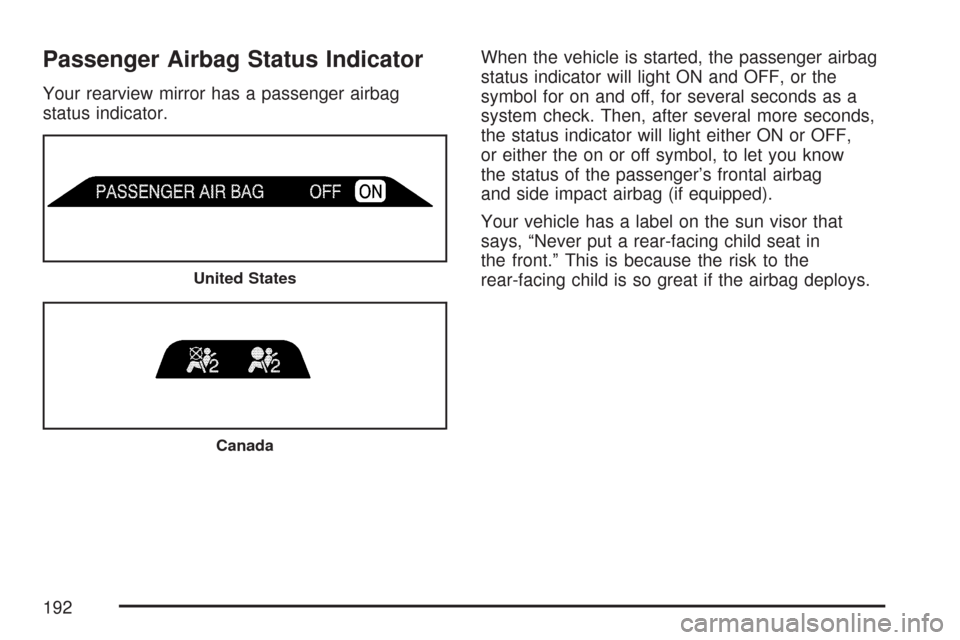
Your rearview mirror has a passenger airbag
status indicator.When the vehicle is started, the passenger airbag
status indicator will light ON and OFF, or the
symbol for on and off, for several seconds as a
system check. Then, after several more seconds,
the status indicator will light either ON or OFF,
or either the on or off symbol, to let you know
the status of the passenger’s frontal airbag
and side impact airbag (if equipped).
Your vehicle has a label on the sun visor that
says, “Never put a rear-facing child seat in
the front.” This is because the risk to the
rear-facing child is so great if the airbag deploys.
United States
Canada
192
Page 227 of 488
When this message is displayed, the computer
controlled systems will not assist the driver
in controlling the vehicle. Have the system repaired
by your dealer as soon as possible. Adjust your
driving accordingly. SeeTraction Control System
(TCS) on page 281for more information.
To acknowledge the message, press the RESET
button.
SERVICE TRANSMISSION
This message displays when there is a problem
with the transmission. See your dealer for service.
SERVICE VEHICLE SOON
This message displays and a chime sounds when
there may be an electrical or another system
problem with your vehicle. Have your vehicle
checked by your dealer if this message keeps
appearing.
SET PARK BRAKE FOR SEAT RECALL
If your vehicle has a manual transmission,
this message displays if you try to recall the
memory positions when the ignition is on and
the parking brake is not set. If the vehicle is on,
you must set the parking brake in order for
the memory positions to recall. SeeMemory
Seat, Mirrors and Steering Wheel on page 10for
more information.
SET PARK BRAKE TO MOVE TOP
If your vehicle has a manual transmission, this
message displays and a chime sounds if you try to
operate the power convertible top without rst
setting the parking brake. Set the parking brake
before trying to operate the power convertible top.
SeeConvertible Top (Manual) on page 139or
Convertible Top (Power) on page 146for
more information.
227
Page 234 of 488
DIC Vehicle Personalization
Many features on your vehicle can be personalized.
This means that the operation of these features can
be set to operate differently depending on who is
driving the vehicle. See “Personal Options” later in
this section for the features that you can
personalize.
The personalization settings for other features are
automatically updated and saved as the driver
adjusts them. These include the following settings
and presets:
The radio presets, tone, volume, fade,
balance, equalization (EQ) settings and source
(radio or CD)
The last climate control setting
The Head-Up Display (HUD) position and
dimming level, if your vehicle has this feature
The instrument panel cluster dimming level and
last selected DIC display
Separate personalization settings are saved for two
different drivers. One of the keyless access
transmitters is assigned to driver 1. The other is
assigned to driver 2. The back of the keyless
access transmitters are labelled 1 or 2 to
correspond to each driver.The current driver’s preferences are recalled when
one of the following occurs:
The lock or unlock button on the keyless
access transmitter, labelled 1 or 2, is pressed.
The appropriate memory button, 1 or 2, located
on the driver’s door is pressed. SeeMemory
Seat, Mirrors and Steering Wheel on
page 10for more information.
A valid keyless access transmitter is detected
upon opening the driver’s door.
If more than one valid keyless access transmitter
is detected upon opening the driver’s door, the
driver preferences for the lowest driver number will
be recalled.
If a keyless access transmitter that is not
labelled 1 or 2 is used, the personalization system
will not recognize the transmitter. The Driver
Information Center (DIC) will not display a current
driver number and the features that are normally
programmed through the DIC will be set to
the default states. Also, if the OPTION button is
pressed, the DIC does not display the menus used
to set personalizations, but instead displays
OPTIONS UNAVAILABLE for a few seconds.
234
Page 236 of 488
Auto Memory Recall (Automatic
Transmission only):If your automatic
transmission vehicle has the memory package,
you may have this option. This option allows
the driver’s seat, the telescopic steering column,
if your vehicle has this feature, and the outside
rearview mirrors to automatically move to
the current driver’s set position when the
engine starts.
Press the OPTION button until AUTO MEMORY
RECALL appears on the display, then press
the RESET button to scroll through the following
modes:
YES
NO (default)
If you choose YES, the driver’s seat, the outside
rearview mirrors and the telescopic steering
column, if your vehicle has this feature, positions
are recalled when you turn the ignition on.
If you choose NO, this option will turn off.
When the mode you want is selected, press the
OPTION button to set your choice and advance to
the next personal option.Auto Exit Recall:If your vehicle has the memory
package, you may have this option. This option
allows the driver’s seat and telescopic steering
column, if your vehicle has this feature, to
automatically move to the current driver’s exit
position when one of the following occurs:
The vehicle is turned off or in Retained
Accessory Power (RAP) or accessory
mode and the driver’s door is opened.
The vehicle is turned off or in RAP and the
unlock button on the keyless access
transmitter is pressed.
In order for the Auto Exit Recall feature to work on
an automatic transmission vehicle, the vehicle
must be in PARK (P). On a manual transmission
vehicle, the parking brake must be set.
Press the OPTION button until AUTO EXIT
RECALL appears on the display, then press the
RESET button to scroll through the following
modes:
YES
NO (default)
236
Page 290 of 488
So here are some tips for passing:
Drive ahead. Look down the road, to the
sides, and to crossroads for situations
that might affect your passing patterns. If you
have any doubt whatsoever about making
a successful pass, wait for a better time.
Watch for traffic signs, pavement markings,
and lines. If you can see a sign up ahead
that might indicate a turn or an intersection,
delay your pass. A broken center line
usually indicates it is all right to pass, providing
the road ahead is clear. Never cross a solid
line on your side of the lane or a double
solid line, even if the road seems empty of
approaching traffic.
Do not get too close to the vehicle you want to
pass while you are awaiting an opportunity. For
one thing, following too closely reduces your
area of vision, especially if you are following a
larger vehicle. Also, you will not have adequate
space if the vehicle ahead suddenly slows or
stops. Keep back a reasonable distance.
When it looks like a chance to pass is coming
up, start to accelerate but stay in the right lane
and do not get too close. Time your move soyou will be increasing speed as the time comes
to move into the other lane. If the way is clear to
pass, you will have a running start that more
than makes up for the distance you would lose
by dropping back. And if something happens to
cause you to cancel your pass, you need only
slow down and drop back again and wait for
another opportunity.
If other vehicles are lined up to pass a slow
vehicle, wait your turn. But take care that
someone is not trying to pass you as you pull
out to pass the slow vehicle. Remember to
glance over your shoulder and check the
blind spot.
Check your vehicle’s mirrors, glance over your
shoulder, and start your left lane change signal
before moving out of the right lane to pass.
When you are far enough ahead of the passed
vehicle to see its front in your vehicle’s inside
mirror, activate the right lane change signal and
move back into the right lane. Remember that
an outside convex mirror makes the vehicle
you just passed seem farther away from you
than it really is.
290
Page 292 of 488
If your vehicle starts to slide, ease your foot off the
accelerator pedal and quickly steer the way you
want the vehicle to go. If you start steering quickly
enough, your vehicle may straighten out. Always
be ready for a second skid if it occurs.
Of course, traction is reduced when water, snow,
ice, gravel, or other material is on the road.
For safety, you will want to slow down and adjust
your driving to these conditions. It is important
to slow down on slippery surfaces because
stopping distance will be longer and vehicle
control more limited.
While driving on a surface with reduced traction, try
your best to avoid sudden steering, acceleration,
or braking, including reducing vehicle speed by
shifting to a lower gear. Any sudden changes could
cause the tires to slide. You may not realize the
surface is slippery until your vehicle is skidding.
Learn to recognize warning clues — such as
enough water, ice, or packed snow on the road
to make a mirrored surface — and slow down
when you have any doubt.
Remember: Any Anti-Lock Brake System (ABS)
helps avoid only the braking skid.Racing or Other Competitive Driving
See your warranty book before using your
vehicle for racing or other competitive driving.
Notice:If you use your vehicle for racing or
other competitive driving, the engine may
use more oil than it would with normal
use. Low oil levels can damage the engine.
For information on how to add oil, see
Engine Oil on page 333.
Z06 Only: Be sure to check the oil level often
during racing or other competitive driving
and keep the level at or near the upper mark
that shows the proper operating range on
the engine oil dipstick.
Except Z06: Be sure to check the oil level
often during racing or other competitive driving
and keep the level at or near 1 quart (1 L)
above the upper mark that shows the proper
operating range on the engine oil dipstick.
After the competitive driving, remove excess
oil so that the level on the dipstick is not
above the upper mark that shows the proper
operating range.
292
Page 293 of 488
Vehicles with the Z51 performance package
have greaseable outer ends on both of the rear
toe-links. Under normal use, lubrication should
be performed as described in the maintenance
schedule. SeeScheduled Maintenance on
page 433andRecommended Fluids and
Lubricants on page 443. If you use the vehicle
for racing, lubrication should be performed at the
end of each racing day. See your dealer/retailer
for lubrication and make sure any needed
repairs are made at once. Proper procedures for
performing these services can be found in the
service manual. SeeService Publications
Ordering Information on page 468.Driving at Night
Night driving is more dangerous than day driving.
One reason is that some drivers are likely to
be impaired — by alcohol or drugs, with night
vision problems, or by fatigue.
Here are some tips on night driving.
Drive defensively.
Do not drink and drive.
Adjust the inside rearview mirror to reduce
the glare from headlamps behind you.
Since you cannot see as well, slow down
and keep more space between you and
other vehicles.
Slow down, especially on higher speed roads.
Your vehicle’s headlamps can light up only so
much road ahead.
In remote areas, watch for animals.
If you are tired, pull off the road in a safe
place and rest.
293