steering CHEVROLET CORVETTE 2007 6.G Owner's Manual
[x] Cancel search | Manufacturer: CHEVROLET, Model Year: 2007, Model line: CORVETTE, Model: CHEVROLET CORVETTE 2007 6.GPages: 488, PDF Size: 2.62 MB
Page 160 of 488
Telescopic Steering Column
If your vehicle has this feature, the telescopic
steering column will allow you to adjust the
distance the steering wheel is from the
instrument panel.
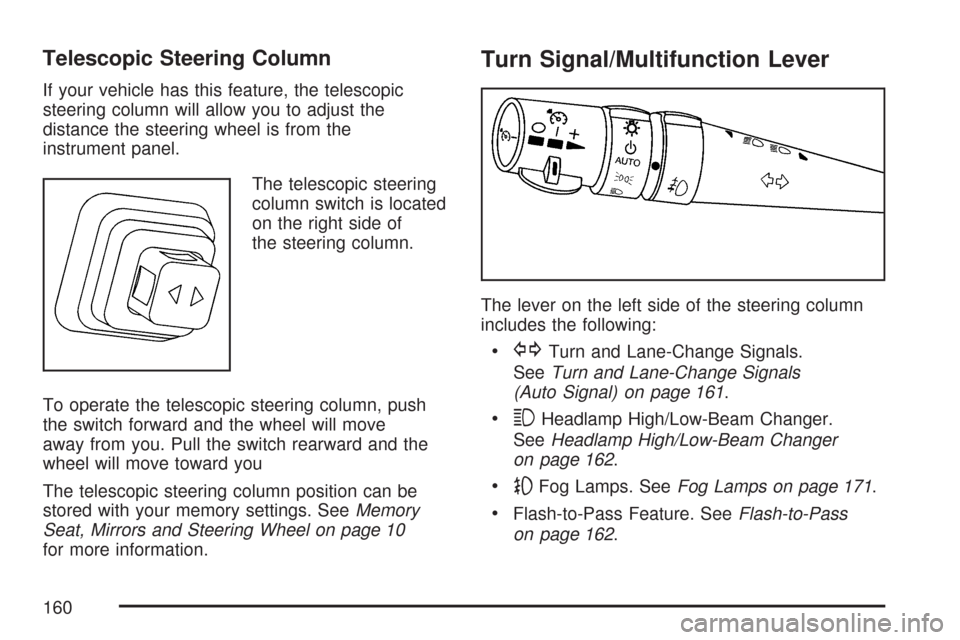
The telescopic steering
column switch is located
on the right side of
the steering column.
To operate the telescopic steering column, push
the switch forward and the wheel will move
away from you. Pull the switch rearward and the
wheel will move toward you
The telescopic steering column position can be
stored with your memory settings. SeeMemory
Seat, Mirrors and Steering Wheel on page 10
for more information.
Turn Signal/Multifunction Lever
The lever on the left side of the steering column
includes the following:
GTurn and Lane-Change Signals.
SeeTurn and Lane-Change Signals
(Auto Signal) on page 161.
3Headlamp High/Low-Beam Changer.
SeeHeadlamp High/Low-Beam Changer
on page 162.
-Fog Lamps. SeeFog Lamps on page 171.
Flash-to-Pass Feature. SeeFlash-to-Pass
on page 162.
160
Page 162 of 488
Headlamp High/Low-Beam Changer
To change the headlamps from low beam to
high, push the turn signal lever all the way forward.
To change from high to low beam, pull the lever
rearward.
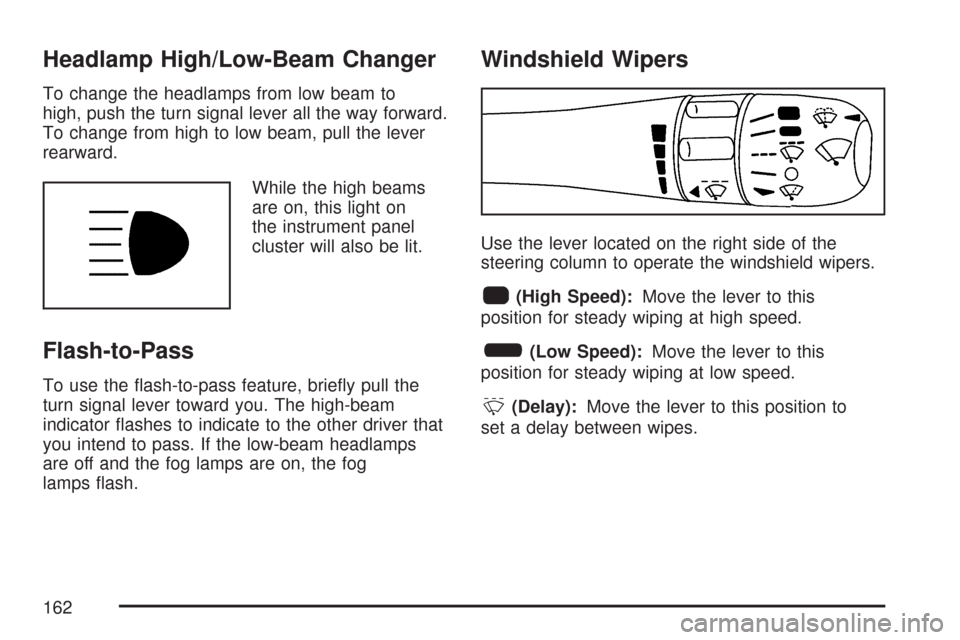
While the high beams
are on, this light on
the instrument panel
cluster will also be lit.
Flash-to-Pass
To use the ash-to-pass feature, briey pull the
turn signal lever toward you. The high-beam
indicator ashes to indicate to the other driver that
you intend to pass. If the low-beam headlamps
are off and the fog lamps are on, the fog
lamps ash.
Windshield Wipers
Use the lever located on the right side of the
steering column to operate the windshield wipers.
1(High Speed):Move the lever to this
position for steady wiping at high speed.
6(Low Speed):Move the lever to this
position for steady wiping at low speed.
&(Delay):Move the lever to this position to
set a delay between wipes.
162
Page 163 of 488
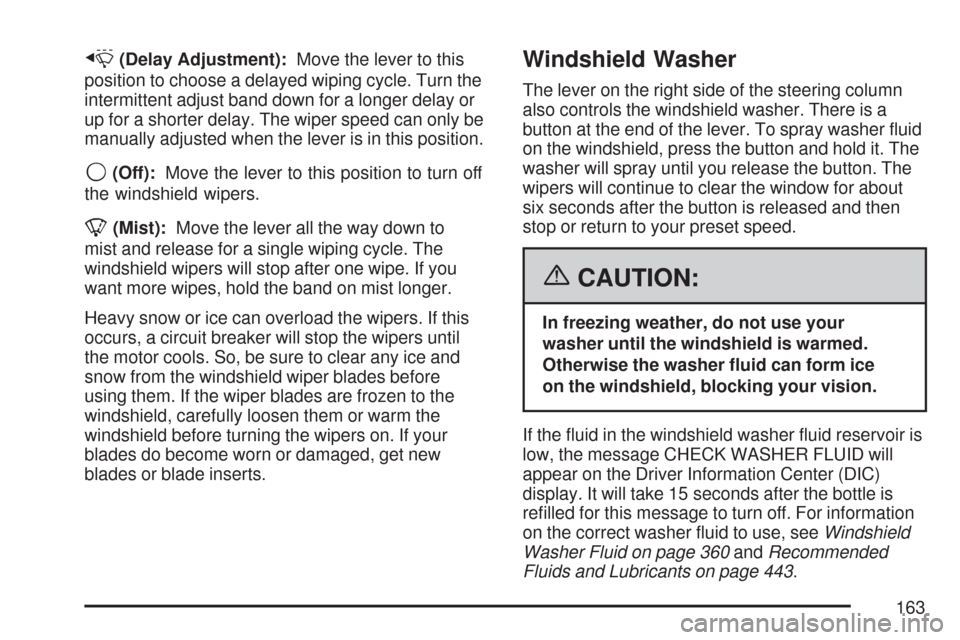
x(Delay Adjustment):Move the lever to this
position to choose a delayed wiping cycle. Turn the
intermittent adjust band down for a longer delay or
up for a shorter delay. The wiper speed can only be
manually adjusted when the lever is in this position.
9(Off):Move the lever to this position to turn off
the windshield wipers.
8(Mist):Move the lever all the way down to
mist and release for a single wiping cycle. The
windshield wipers will stop after one wipe. If you
want more wipes, hold the band on mist longer.
Heavy snow or ice can overload the wipers. If this
occurs, a circuit breaker will stop the wipers until
the motor cools. So, be sure to clear any ice and
snow from the windshield wiper blades before
using them. If the wiper blades are frozen to the
windshield, carefully loosen them or warm the
windshield before turning the wipers on. If your
blades do become worn or damaged, get new
blades or blade inserts.
Windshield Washer
The lever on the right side of the steering column
also controls the windshield washer. There is a
button at the end of the lever. To spray washer uid
on the windshield, press the button and hold it. The
washer will spray until you release the button. The
wipers will continue to clear the window for about
six seconds after the button is released and then
stop or return to your preset speed.
{CAUTION:
In freezing weather, do not use your
washer until the windshield is warmed.
Otherwise the washer uid can form ice
on the windshield, blocking your vision.
If the uid in the windshield washer uid reservoir is
low, the message CHECK WASHER FLUID will
appear on the Driver Information Center (DIC)
display. It will take 15 seconds after the bottle is
relled for this message to turn off. For information
on the correct washer uid to use, seeWindshield
Washer Fluid on page 360andRecommended
Fluids and Lubricants on page 443.
163
Page 168 of 488
Exterior Lamps
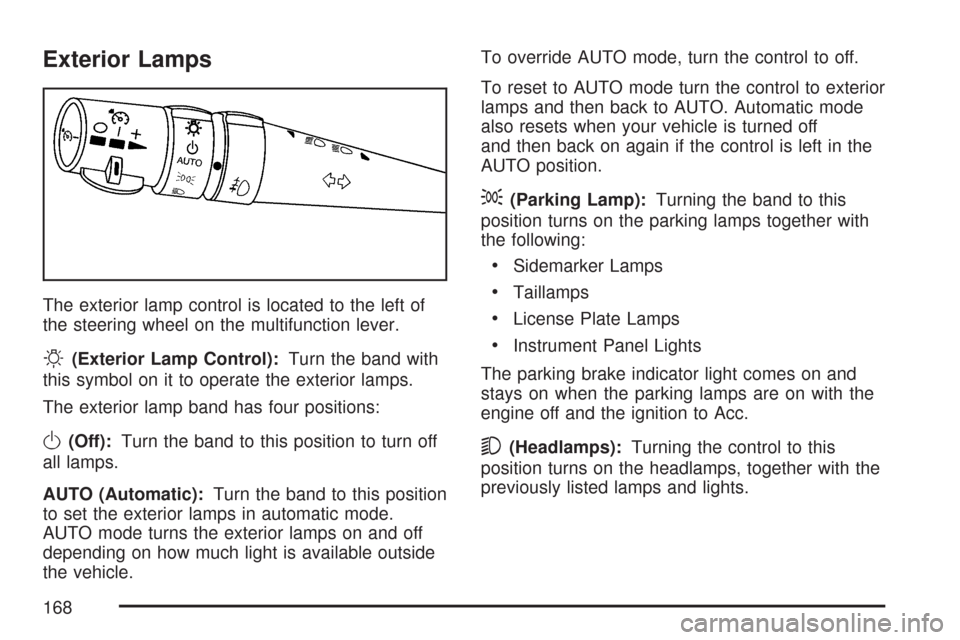
The exterior lamp control is located to the left of
the steering wheel on the multifunction lever.
O(Exterior Lamp Control):Turn the band with
this symbol on it to operate the exterior lamps.
The exterior lamp band has four positions:
O(Off):Turn the band to this position to turn off
all lamps.
AUTO (Automatic):Turn the band to this position
to set the exterior lamps in automatic mode.
AUTO mode turns the exterior lamps on and off
depending on how much light is available outside
the vehicle.To override AUTO mode, turn the control to off.
To reset to AUTO mode turn the control to exterior
lamps and then back to AUTO. Automatic mode
also resets when your vehicle is turned off
and then back on again if the control is left in the
AUTO position.
;(Parking Lamp):Turning the band to this
position turns on the parking lamps together with
the following:
Sidemarker Lamps
Taillamps
License Plate Lamps
Instrument Panel Lights
The parking brake indicator light comes on and
stays on when the parking lamps are on with the
engine off and the ignition to Acc.
5(Headlamps):Turning the control to this
position turns on the headlamps, together with the
previously listed lamps and lights.
168
Page 176 of 488
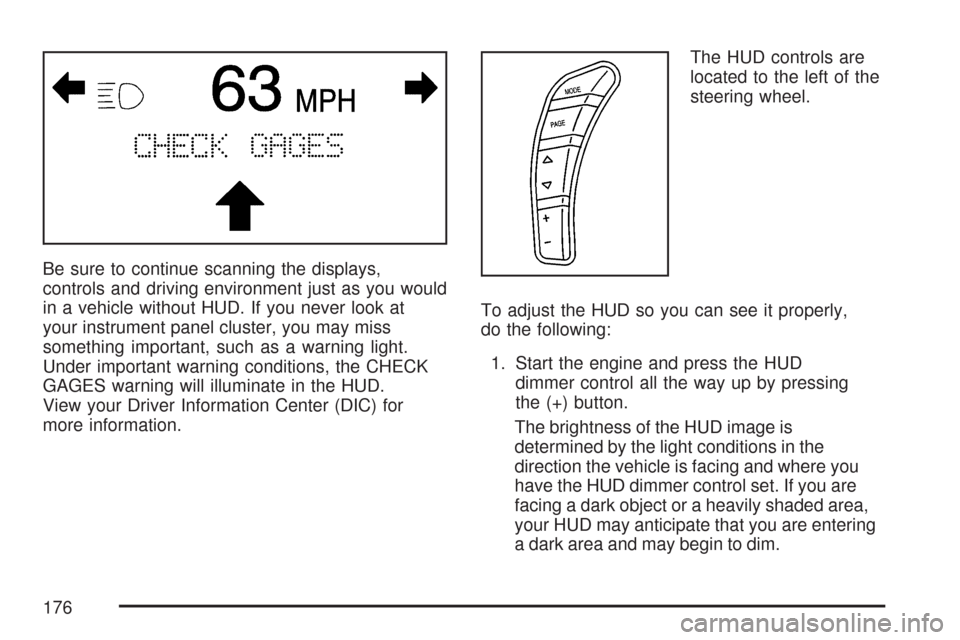
Be sure to continue scanning the displays,
controls and driving environment just as you would
in a vehicle without HUD. If you never look at
your instrument panel cluster, you may miss
something important, such as a warning light.
Under important warning conditions, the CHECK
GAGES warning will illuminate in the HUD.
View your Driver Information Center (DIC) for
more information.The HUD controls are
located to the left of the
steering wheel.
To adjust the HUD so you can see it properly,
do the following:
1. Start the engine and press the HUD
dimmer control all the way up by pressing
the (+) button.
The brightness of the HUD image is
determined by the light conditions in the
direction the vehicle is facing and where you
have the HUD dimmer control set. If you are
facing a dark object or a heavily shaded area,
your HUD may anticipate that you are entering
a dark area and may begin to dim.
176
Page 207 of 488
Here are ve things that some owners ask about.
All these things are normal and do not indicate
that anything is wrong with the fuel gage.
At the gas station, the gas pump shuts off
before the gage reads the full symbol.
It takes more (or less) fuel to ll up than the
gage reads. For example, the gage reads
half full, but it took more (or less) than half
of the tank’s capacity to t it.
The gage pointer may move while cornering,
braking or speeding up.
The gage may not indicate the tank is empty
when the ignition is turned off.
The gage reading may change slightly within
the rst several minutes after starting the
vehicle.
SeeDIC Controls and Displays on page 208for
more information.
Driver Information Center (DIC)
The Driver Information Center (DIC) gives you
the status of many of your vehicle’s systems.
It is also used to display driver personalization
features and warning/status messages. The
DIC display is located on the instrument panel
cluster below the speedometer and tachometer,
directly above the steering column. The DIC
buttons are located on the instrument panel,
to the right of the instrument panel cluster.
The DIC comes on when the ignition is turned on.
After displaying CORVETTE BY CHEVROLET,
the DIC will display the current driver and
the information that was last displayed before
the engine was turned off.
207
Page 227 of 488
When this message is displayed, the computer
controlled systems will not assist the driver
in controlling the vehicle. Have the system repaired
by your dealer as soon as possible. Adjust your
driving accordingly. SeeTraction Control System
(TCS) on page 281for more information.
To acknowledge the message, press the RESET
button.
SERVICE TRANSMISSION
This message displays when there is a problem
with the transmission. See your dealer for service.
SERVICE VEHICLE SOON
This message displays and a chime sounds when
there may be an electrical or another system
problem with your vehicle. Have your vehicle
checked by your dealer if this message keeps
appearing.
SET PARK BRAKE FOR SEAT RECALL
If your vehicle has a manual transmission,
this message displays if you try to recall the
memory positions when the ignition is on and
the parking brake is not set. If the vehicle is on,
you must set the parking brake in order for
the memory positions to recall. SeeMemory
Seat, Mirrors and Steering Wheel on page 10for
more information.
SET PARK BRAKE TO MOVE TOP
If your vehicle has a manual transmission, this
message displays and a chime sounds if you try to
operate the power convertible top without rst
setting the parking brake. Set the parking brake
before trying to operate the power convertible top.
SeeConvertible Top (Manual) on page 139or
Convertible Top (Power) on page 146for
more information.
227
Page 234 of 488
DIC Vehicle Personalization
Many features on your vehicle can be personalized.
This means that the operation of these features can
be set to operate differently depending on who is
driving the vehicle. See “Personal Options” later in
this section for the features that you can
personalize.
The personalization settings for other features are
automatically updated and saved as the driver
adjusts them. These include the following settings
and presets:
The radio presets, tone, volume, fade,
balance, equalization (EQ) settings and source
(radio or CD)
The last climate control setting
The Head-Up Display (HUD) position and
dimming level, if your vehicle has this feature
The instrument panel cluster dimming level and
last selected DIC display
Separate personalization settings are saved for two
different drivers. One of the keyless access
transmitters is assigned to driver 1. The other is
assigned to driver 2. The back of the keyless
access transmitters are labelled 1 or 2 to
correspond to each driver.The current driver’s preferences are recalled when
one of the following occurs:
The lock or unlock button on the keyless
access transmitter, labelled 1 or 2, is pressed.
The appropriate memory button, 1 or 2, located
on the driver’s door is pressed. SeeMemory
Seat, Mirrors and Steering Wheel on
page 10for more information.
A valid keyless access transmitter is detected
upon opening the driver’s door.
If more than one valid keyless access transmitter
is detected upon opening the driver’s door, the
driver preferences for the lowest driver number will
be recalled.
If a keyless access transmitter that is not
labelled 1 or 2 is used, the personalization system
will not recognize the transmitter. The Driver
Information Center (DIC) will not display a current
driver number and the features that are normally
programmed through the DIC will be set to
the default states. Also, if the OPTION button is
pressed, the DIC does not display the menus used
to set personalizations, but instead displays
OPTIONS UNAVAILABLE for a few seconds.
234
Page 236 of 488
Auto Memory Recall (Automatic
Transmission only):If your automatic
transmission vehicle has the memory package,
you may have this option. This option allows
the driver’s seat, the telescopic steering column,
if your vehicle has this feature, and the outside
rearview mirrors to automatically move to
the current driver’s set position when the
engine starts.
Press the OPTION button until AUTO MEMORY
RECALL appears on the display, then press
the RESET button to scroll through the following
modes:
YES
NO (default)
If you choose YES, the driver’s seat, the outside
rearview mirrors and the telescopic steering
column, if your vehicle has this feature, positions
are recalled when you turn the ignition on.
If you choose NO, this option will turn off.
When the mode you want is selected, press the
OPTION button to set your choice and advance to
the next personal option.Auto Exit Recall:If your vehicle has the memory
package, you may have this option. This option
allows the driver’s seat and telescopic steering
column, if your vehicle has this feature, to
automatically move to the current driver’s exit
position when one of the following occurs:
The vehicle is turned off or in Retained
Accessory Power (RAP) or accessory
mode and the driver’s door is opened.
The vehicle is turned off or in RAP and the
unlock button on the keyless access
transmitter is pressed.
In order for the Auto Exit Recall feature to work on
an automatic transmission vehicle, the vehicle
must be in PARK (P). On a manual transmission
vehicle, the parking brake must be set.
Press the OPTION button until AUTO EXIT
RECALL appears on the display, then press the
RESET button to scroll through the following
modes:
YES
NO (default)
236
Page 237 of 488
If you choose YES, when you turn the ignition off
and open the driver’s door or press the unlock
button on the keyless access transmitter, the seat
and the telescopic steering wheel, if your
vehicle has this feature, will return to their stored
exit positions for an easy exit or an easy
entrance when returning to the vehicle.
The seat and steering wheel will only return to the
stored driving position if you press the appropriate
memory button or activate the auto memory
recall feature.
If you choose NO, this option will turn off.
When the mode you want is selected, press the
OPTION button to set your choice and advance to
the next personal option.
Approach Lights:This option briey turns on the
parking lamps, the front fog lamps and the
back-up lamps during low light periods when the
keyless access transmitter is used to unlock
the vehicle.Press the OPTION button until APPROACH
LIGHTS appears on the display, then press the
RESET button to scroll through the following
modes:
OFF
ON (default)
If you choose OFF, this option will turn off.
If you choose ON, the parking lamps, the front fog
lamps, and the back-up lamps will come on for
20 seconds during low light periods when all of the
following occurs:
You press the unlock button on the keyless
access transmitter.
Both of the doors are closed.
The vehicle is off or in RAP.
The lamps remain on for 20 seconds or until a door
is opened, the lock button on the keyless access
transmitter is pressed or the vehicle is no longer off
or in RAP.
SeeKeyless Access System on page 72for more
information.
When the mode you want is selected, press the
OPTION button to set your choice and advance to
the next personal option.
237