service CHEVROLET CORVETTE 2007 6.G Service Manual
[x] Cancel search | Manufacturer: CHEVROLET, Model Year: 2007, Model line: CORVETTE, Model: CHEVROLET CORVETTE 2007 6.GPages: 488, PDF Size: 2.62 MB
Page 268 of 488
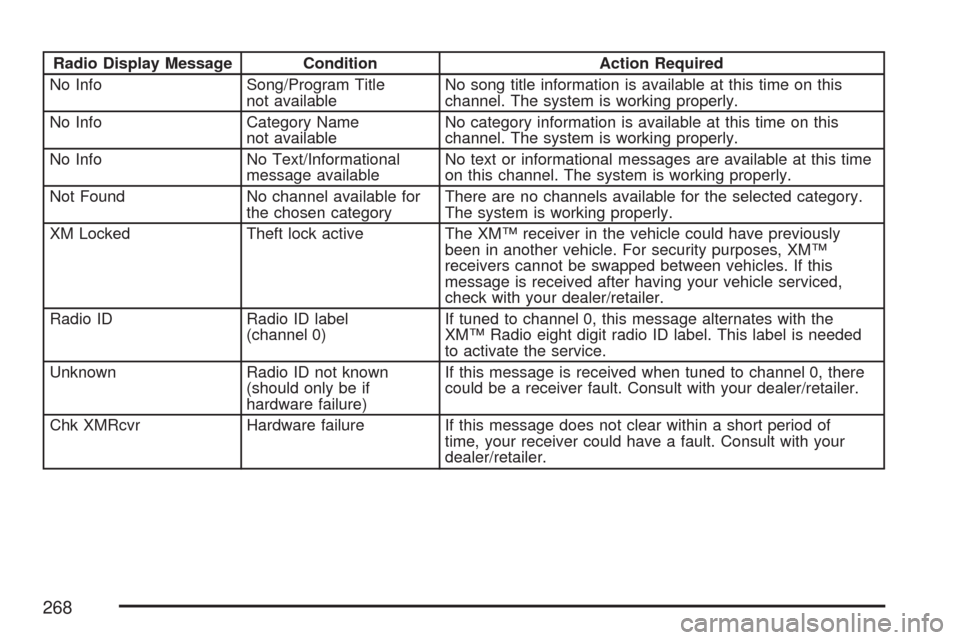
Radio Display Message Condition Action Required
No Info Song/Program Title
not availableNo song title information is available at this time on this
channel. The system is working properly.
No Info Category Name
not availableNo category information is available at this time on this
channel. The system is working properly.
No Info No Text/Informational
message availableNo text or informational messages are available at this time
on this channel. The system is working properly.
Not Found No channel available for
the chosen categoryThere are no channels available for the selected category.
The system is working properly.
XM Locked Theft lock active The XM™ receiver in the vehicle could have previously
been in another vehicle. For security purposes, XM™
receivers cannot be swapped between vehicles. If this
message is received after having your vehicle serviced,
check with your dealer/retailer.
Radio ID Radio ID label
(channel 0)If tuned to channel 0, this message alternates with the
XM™ Radio eight digit radio ID label. This label is needed
to activate the service.
Unknown Radio ID not known
(should only be if
hardware failure)If this message is received when tuned to channel 0, there
could be a receiver fault. Consult with your dealer/retailer.
Chk XMRcvr Hardware failure If this message does not clear within a short period of
time, your receiver could have a fault. Consult with your
dealer/retailer.
268
Page 271 of 488
FM Stereo
FM stereo will give the best sound, but FM signals
will reach only about 10 to 40 miles (16 to 65 km).
Tall buildings or hills can interfere with FM
signals, causing the sound to fade in and out.
XM™ Satellite Radio Service
If your vehicle as the XM™ Satellite Radio
Service, this type of radio service gives
digital radio reception from coast-to-coast in the
48 contiguous United States, and in Canada.
Just as with FM, tall buildings or hills can interfere
with satellite radio signals, causing the sound
to fade in and out. In addition, traveling or standing
under heavy foliage, bridges, garages, or tunnels
may cause loss of the XM™ signal for a period
of time. The radio may display NO SIGNAL
to indicate interference.
Care of Your CDs
Handle CDs carefully. Store them in their original
cases or other protective cases and away from
direct sunlight and dust. The CD player scans
the bottom surface of the disc. If the surface of
a CD is damaged, such as cracked, broken,
or scratched, the CD does not play properly or
not at all. If the surface of a CD is soiled, take
a soft, lint free cloth or dampen a clean, soft cloth
in a mild, neutral detergent solution mixed with
water, and clean it. Make sure the wiping process
starts from the center to the edge.
Do not touch the bottom side of a CD while
handling it; this could damage the surface.
Pick up CDs by grasping the outer edges or
the edge of the hole and the outer edge.
271
Page 272 of 488
Care of the CD Player
Do not use CD lens cleaners for CD players
because the lens of the CD optics can become
contaminated by lubricants.
Diversity Antenna System
The AM-FM antenna is a hidden self tuning
system. It optimizes the AM and FM signals
relative to the vehicle’s position and radio station
source. No maintenance or adjustments are
needed.
XM™ Satellite Radio Antenna
System
If your vehicle has the XM™ Satellite Radio
Service, it will have an XM™ Satellite Radio
antenna. This type of antenna is located on
the roof or on the trunk lid of your vehicle.
Keep this antenna clear of snow and ice build
up for clear radio reception.
272
Page 282 of 488
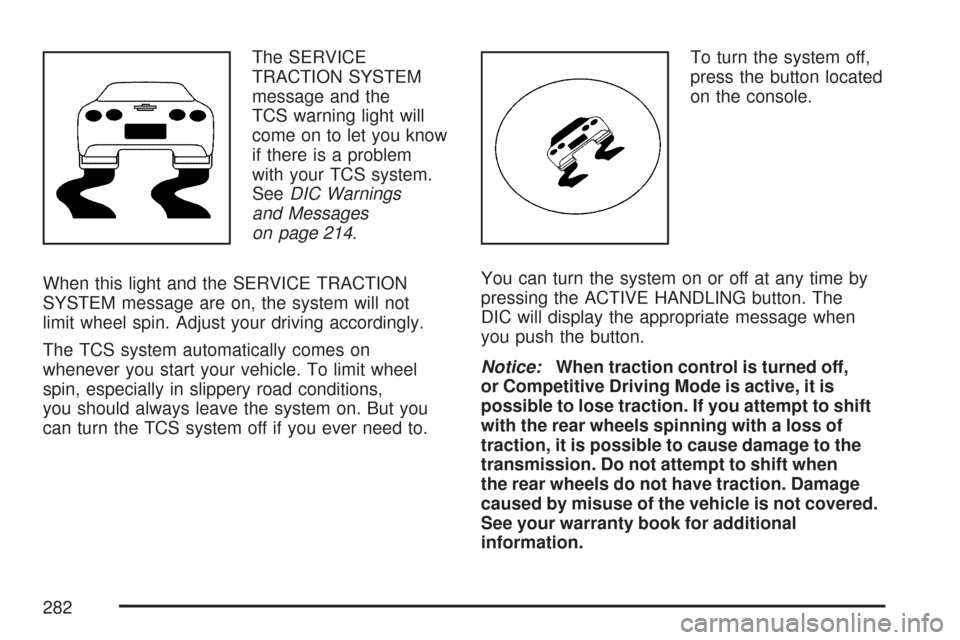
The SERVICE
TRACTION SYSTEM
message and the
TCS warning light will
come on to let you know
if there is a problem
with your TCS system.
SeeDIC Warnings
and Messages
on page 214.
When this light and the SERVICE TRACTION
SYSTEM message are on, the system will not
limit wheel spin. Adjust your driving accordingly.
The TCS system automatically comes on
whenever you start your vehicle. To limit wheel
spin, especially in slippery road conditions,
you should always leave the system on. But you
can turn the TCS system off if you ever need to.To turn the system off,
press the button located
on the console.
You can turn the system on or off at any time by
pressing the ACTIVE HANDLING button. The
DIC will display the appropriate message when
you push the button.
Notice:When traction control is turned off,
or Competitive Driving Mode is active, it is
possible to lose traction. If you attempt to shift
with the rear wheels spinning with a loss of
traction, it is possible to cause damage to the
transmission. Do not attempt to shift when
the rear wheels do not have traction. Damage
caused by misuse of the vehicle is not covered.
See your warranty book for additional
information.
282
Page 283 of 488
Adding non-dealer accessories can affect your
vehicle’s performance. SeeAccessories and
Modications on page 319for more information.
Active Handling System
The Active Handling System is a computer
controlled system that helps the driver maintain
directional control of the vehicle in difficult driving
conditions. This is accomplished by selectively
applying any one of the vehicle’s brakes.
When you rst start your vehicle during cold winter
weather and begin to drive away, the message
ACTIVE HANDLING WARMING UP may be
displayed in the DIC. This is normal. You can
acknowledge this message by pressing the RESET
button. The Active Handling System performance
is affected until the message, ACTIVE HANDLING
READY, is displayed in the DIC.
The ACTIVE HANDLING CALIBRATING message
may be displayed in the DIC and the instrument
panel cluster light will be on after exceeding
18 mph (30 km/h) for 10 seconds. The Active
Handling System is off until the ACTIVE
HANDLING READY message is displayed.
This could take up to 15 minutes.The ACTIVE HANDLING message will come on
when the system is operating. SeeDIC Warnings
and Messages on page 214for more information.
You may also feel or hear the system working.
This is normal.
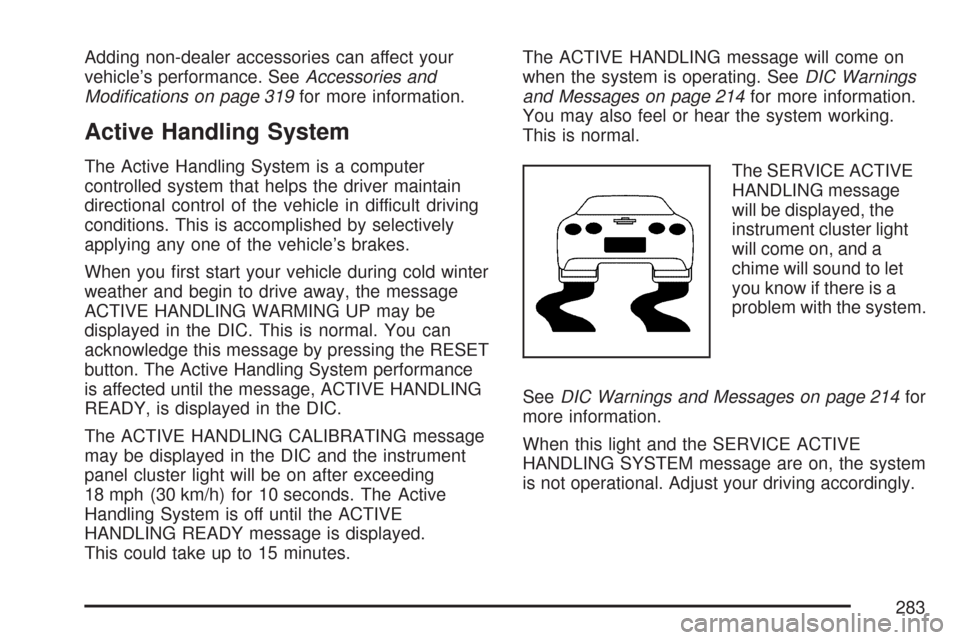
The SERVICE ACTIVE
HANDLING message
will be displayed, the
instrument cluster light
will come on, and a
chime will sound to let
you know if there is a
problem with the system.
SeeDIC Warnings and Messages on page 214for
more information.
When this light and the SERVICE ACTIVE
HANDLING SYSTEM message are on, the system
is not operational. Adjust your driving accordingly.
283
Page 284 of 488
The Active Handling System comes on
automatically whenever you start your vehicle.
To help maintain directional control of the vehicle,
you should always leave the system on. You
can turn the system off if you ever need to.
If you turn the Active Handling System off, the
Traction Control System will also be turned off.
Adjust your driving accordingly.
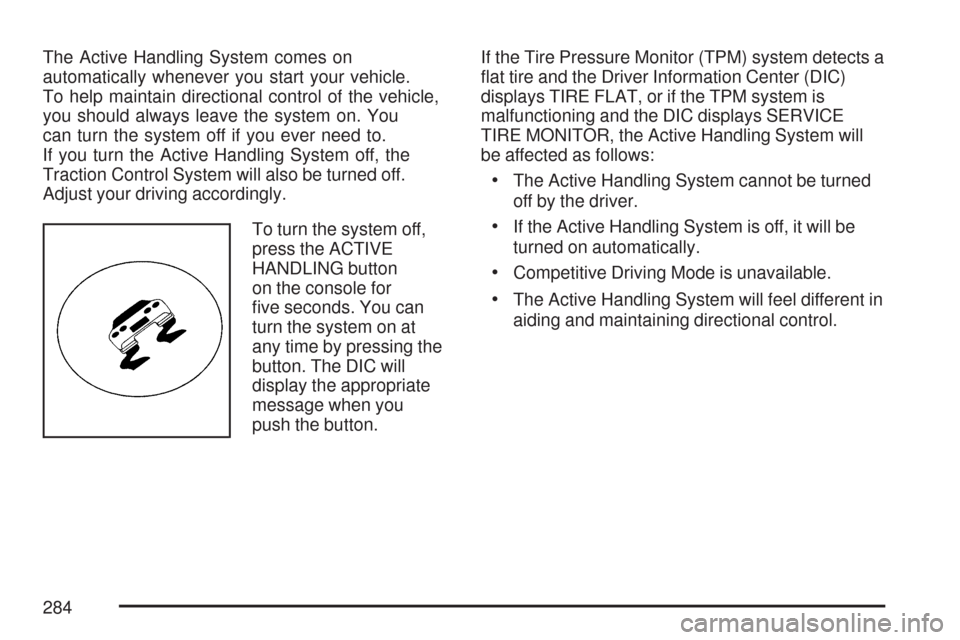
To turn the system off,
press the ACTIVE
HANDLING button
on the console for
ve seconds. You can
turn the system on at
any time by pressing the
button. The DIC will
display the appropriate
message when you
push the button.If the Tire Pressure Monitor (TPM) system detects a
at tire and the Driver Information Center (DIC)
displays TIRE FLAT, or if the TPM system is
malfunctioning and the DIC displays SERVICE
TIRE MONITOR, the Active Handling System will
be affected as follows:
The Active Handling System cannot be turned
off by the driver.
If the Active Handling System is off, it will be
turned on automatically.
Competitive Driving Mode is unavailable.
The Active Handling System will feel different in
aiding and maintaining directional control.
284
Page 286 of 488
Selective Ride Control
You may have a ride control system on your
vehicle called Magnetic Selective Ride Control.
The system provides the following performance
benets:
Reduced Impact Harshness
Improved Road Isolation
Improved High-Speed Stability
Improved Handling Response
Better Control of Body Ride Motions
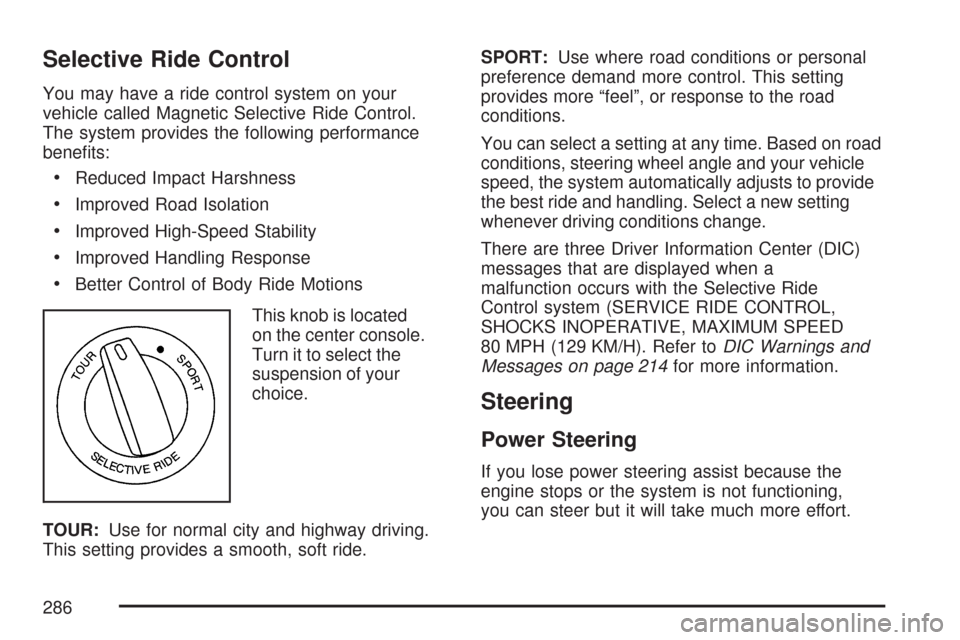
This knob is located
on the center console.
Turn it to select the
suspension of your
choice.
TOUR:Use for normal city and highway driving.
This setting provides a smooth, soft ride.SPORT:Use where road conditions or personal
preference demand more control. This setting
provides more “feel”, or response to the road
conditions.
You can select a setting at any time. Based on road
conditions, steering wheel angle and your vehicle
speed, the system automatically adjusts to provide
the best ride and handling. Select a new setting
whenever driving conditions change.
There are three Driver Information Center (DIC)
messages that are displayed when a
malfunction occurs with the Selective Ride
Control system (SERVICE RIDE CONTROL,
SHOCKS INOPERATIVE, MAXIMUM SPEED
80 MPH (129 KM/H). Refer toDIC Warnings and
Messages on page 214for more information.
Steering
Power Steering
If you lose power steering assist because the
engine stops or the system is not functioning,
you can steer but it will take much more effort.
286
Page 293 of 488
Vehicles with the Z51 performance package
have greaseable outer ends on both of the rear
toe-links. Under normal use, lubrication should
be performed as described in the maintenance
schedule. SeeScheduled Maintenance on
page 433andRecommended Fluids and
Lubricants on page 443. If you use the vehicle
for racing, lubrication should be performed at the
end of each racing day. See your dealer/retailer
for lubrication and make sure any needed
repairs are made at once. Proper procedures for
performing these services can be found in the
service manual. SeeService Publications
Ordering Information on page 468.Driving at Night
Night driving is more dangerous than day driving.
One reason is that some drivers are likely to
be impaired — by alcohol or drugs, with night
vision problems, or by fatigue.
Here are some tips on night driving.
Drive defensively.
Do not drink and drive.
Adjust the inside rearview mirror to reduce
the glare from headlamps behind you.
Since you cannot see as well, slow down
and keep more space between you and
other vehicles.
Slow down, especially on higher speed roads.
Your vehicle’s headlamps can light up only so
much road ahead.
In remote areas, watch for animals.
If you are tired, pull off the road in a safe
place and rest.
293
Page 300 of 488
Before Leaving on a Long Trip
Make sure you are ready. Try to be well rested.
If you must start when you are not fresh — such
as after a day’s work — do not plan to make
too many miles that rst part of the journey.
Wear comfortable clothing and shoes you can
easily drive in.
Is your vehicle ready for a long trip? If you keep it
serviced and maintained, it is ready to go. If it
needs service, have it done before starting out.
Of course, you will nd experienced and able
service experts in GM dealerships all across
North America. They will be ready and willing to
help if you need it.Here are some things you can check before a trip:Windshield Washer Fluid:Is the reservoir
full? Are all windows clean inside and outside?
Wiper Blades:Are they in good shape?
Fuel, Engine Oil, Other Fluids:Have you
checked all levels?
Lamps:Are they all working? Are the
lenses clean?
Tires:They are vitally important to a safe,
trouble-free trip. Is the tread good enough
for long-distance driving? Are the tires
all inated to the recommended pressure?
Weather Forecasts:What is the weather
outlook along your route? Should you
delay your trip a short time to avoid a major
storm system?
Maps:Do you have up-to-date maps?
300
Page 301 of 488
Highway Hypnosis
Is there actually such a condition as highway
hypnosis? Or is it just plain falling asleep at the
wheel? Call it highway hypnosis, lack of
awareness, or whatever.
There is something about an easy stretch of road
with the same scenery, along with the hum of the
tires on the road, the drone of the engine, and the
rush of the wind against the vehicle that can make
you sleepy. Do not let it happen to you! If it does,
your vehicle can leave the road in less than a
second, and you could crash and be injured.What can you do about highway hypnosis?
First, be aware that it can happen.
Then here are some tips:
Make sure your vehicle is well ventilated, with
a comfortably cool interior.
Keep your eyes moving. Scan the road ahead
and to the sides. Check your rearview mirrors
and your instruments frequently.
If you get sleepy, pull off the road into a rest,
service, or parking area and take a nap, get
some exercise, or both. For safety, treat
drowsiness on the highway as an emergency.
301