maintenance CHEVROLET CORVETTE 2010 6.G User Guide
[x] Cancel search | Manufacturer: CHEVROLET, Model Year: 2010, Model line: CORVETTE, Model: CHEVROLET CORVETTE 2010 6.GPages: 472, PDF Size: 11.44 MB
Page 212 of 472
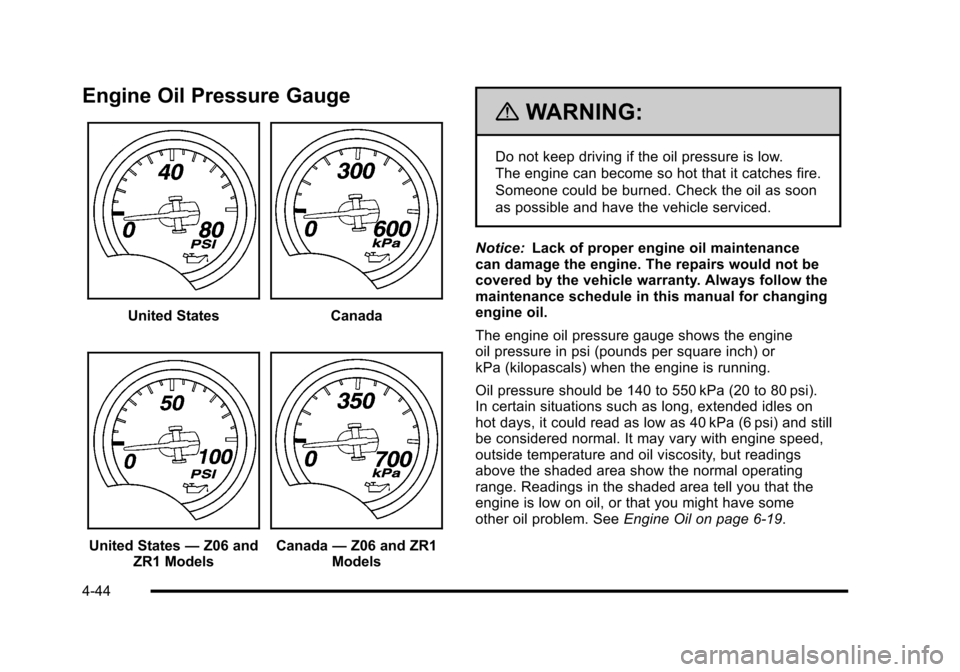
Engine Oil Pressure Gauge
United StatesCanada
United States—Z06 and
ZR1 Models Canada —Z06 and ZR1
Models
{WARNING:
Do not keep driving if the oil pressure is low.
The engine can become so hot that it catches fire.
Someone could be burned. Check the oil as soon
as possible and have the vehicle serviced.
Notice: Lack of proper engine oil maintenance
can damage the engine. The repairs would not be
covered by the vehicle warranty. Always follow the
maintenance schedule in this manual for changing
engine oil.
The engine oil pressure gauge shows the engine
oil pressure in psi (pounds per square inch) or
kPa (kilopascals) when the engine is running.
Oil pressure should be 140 to 550 kPa (20 to 80 psi).
In certain situations such as long, extended idles on
hot days, it could read as low as 40 kPa (6 psi) and still
be considered normal. It may vary with engine speed,
outside temperature and oil viscosity, but readings
above the shaded area show the normal operating
range. Readings in the shaded area tell you that the
engine is low on oil, or that you might have some
other oil problem. See Engine Oil on page 6‑19.
4-44
Page 220 of 472
Press and hold the RESET button to reset to
0.0 km/h (mph).
Engine Oil Life : Press the TRIP button until the engine
oil life is displayed, such as OIL LIFE REMAINING 89%.
This is an estimate of the engine oil's remaining useful
life. It will show 100% when the system is reset after
an oil change. It will alert you to change the oil on a
schedule consistent with your driving conditions.
When the remaining oil life is low, the system will alert
you with the message CHANGE ENGINE OIL.
Remember, you must reset the engine oil life system
yourself after each oil change. It will not reset itself.
To reset the system, see Engine Oil Life System
on
page 6‑25. Be careful not to reset the engine oil life
system accidentally at any time other than when the oil
has just been changed. It cannot be reset accurately
until the next oil change.
See Scheduled Maintenance
on page 7‑3andEngine
Oilon page 6‑19for more information.
OPTION Button
The OPTION button allows you to access the
PERSONAL OPTIONS menu and customize the
personalization settings on your vehicle. See DIC
Vehicle Personalization
on page 4‑71for more
information.
RESET Button
The RESET button, used along with other buttons, will
reset system functions and turn off or acknowledge
messages on the DIC.
DIC Warnings and Messages
Messages are displayed on the DIC to notify the driver
that the status of the vehicle has changed and that
some action may be needed by the driver to correct the
condition. Multiple messages may appear one after
another. You can scroll through the messages that
may have been sent at the same time. The DIC is
continuously updated with the vehicle performance
status.
Some messages may not require immediate action, but
you can press the RESET button to acknowledge that
you received the messages and to clear them from the
display.
Some messages cannot be cleared from the DIC
display because they are more urgent. These
messages require action before they can be cleared.
You should take any messages that appear on the
display seriously and remember that clearing the
messages will only make the messages disappear,
not correct the problem.
The following are the possible messages that can be
displayed and some information about them.
4-52
Page 222 of 472
BUCKLE PASSENGER
This message reminds you to buckle the passenger's
safety belt.
This message displays and a sound will be heard when
the ignition is on, the driver's safety belt is buckled, the
passenger's safety belt is unbuckled with the passenger
airbag enabled, and the vehicle is in motion. You should
have the passenger buckle their safety belt.
The reminder will be repeated if the ignition is on, the
vehicle is in motion, the driver is buckled and the
passenger is still unbuckled, and the passenger airbag
is enabled. If the passenger's safety belt is already
buckled, this message will not come on.
BUCKLE SEATBELT
This message reminds you to buckle the driver's
safety belt.
This message displays and a sound will be heard when
the ignition is on, the driver's safety belt is unbuckled,
and the vehicle is in motion. You should buckle your
safety belt.
If the driver remains unbuckled when the ignition is
on and the vehicle is in motion, the reminder will be
repeated. If the driver's safety belt is already buckled,
this message will not come on. This message is an additional reminder to the safety
belt reminder light in the instrument panel cluster.
See
Safety Belt Reminders
on page 4‑32for more
information.
CHANGE BRAKE PADS
On vehicles with electronic brake pad wear sensors,
this message will be displayed when the pads are worn.
See your dealer/retailer for service.
CHANGE ENGINE OIL
This message displays when the life of the engine
oil has expired. See Scheduled Maintenanceon
page 7‑3. After an oil change, the engine oil life
system must be reset. See “Engine Oil Life”under
DIC Operation and Displays
on page 4‑47. Also, see
Engine Oilon page 6‑19and Engine Oil Life Systemon page 6‑25for more information.
CHECK BRAKE FLUID
This message displays, a sound will be heard, and the
brake system warning light on the instrument panel
cluster turns on if the ignition is on to inform the driver
that the brake fluid level is low. See Brake System
Warning Light
on page 4‑36. Have the brake system
serviced by your dealer/retailer as soon as possible.
See Brakes on page 6‑43.
4-54
Page 277 of 472
XM™Satellite Radio Service
XM Satellite Radio Service gives digital radio reception
from coast-to-coast in the 48 contiguous United States,
and in Canada. Just as with FM, tall buildings or hills
can interfere with satellite radio signals, causing the
sound to fade in and out. In addition, traveling or
standing under heavy foliage, bridges, garages,
or tunnels may cause loss of the XM signal for a
period of time.
Cellular Phone Usage
Cellular phone usage may cause interference
with the vehicle's radio. This interference may occur
when making or receiving phone calls, charging the
phone's battery, or simply having the phone on. This
interference causes an increased level of static while
listening to the radio. If static is received while listening
to the radio, unplug the cellular phone and turn it off.
Diversity Antenna System
The AM-FM antenna is a hidden self tuning system.
It optimizes the AM and FM signals relative to
the vehicle's position and radio station source.
No maintenance or adjustments are needed.
XM™ Satellite Radio Antenna
System
For vehicles with XM Satellite Radio Service, the
antenna is located on the roof or on the trunk lid of the
vehicle. Keep the antenna clear of obstructions for clear
radio reception.
4-109
Page 298 of 472
After conversion to the high performance brake fluid,
follow the brake fluid service recommendations outlined
by the fluid manufacturer. Do not use silicone or
DOT‐5 brake fluids.
If the vehicle is a Z06, ZR1, or Grand Sport model, it
has greaseable outer ends on both of the rear toe‐links.
Under normal use, lubrication should be performed as
described in the maintenance schedule. See Scheduled
Maintenance
on page 7‑3and Recommended Fluids
and Lubricantson page 7‑10. If using the vehicle for
racing, lubrication should be performed at the end of
each racing day. See your dealer/retailer for lubrication
and make sure any needed repairs are made at once.
Proper procedures for performing these services can be
found in the service manual. See Service Publications
Ordering Information on page 8‑16.
If the vehicle is used for racing or other competitive
driving, the rear axle fluid temperatures may be higher
than would occur in normal driving. We recommend that
the rear axle fluid be drained and refilled with new fluid
after every 24 hours of racing or competitive driving.
See Recommended Fluids and Lubricants
on
page 7‑10for what fluid to use.
ZR1 Brake Burnish Procedure
Notice: These procedures are specific to the ZR1
with ceramic brake rotors. These procedures should
not be run on other Corvette models as damage
may result.
Notice: The new vehicle break‐in period should be
completed before performing the brake burnish
procedure or damage may occur to the powertrain/
engine. See New Vehicle Break-In on page 3‑21.
When performed as instructed, these procedures will
not damage the brakes. During the burnishing
procedure, the brake pads will smoke and produce an
odor. The braking force and pedal travel may increase.
After the procedure is complete, the brake pads may
appear white at the rotor contact.
5-20
Page 314 of 472
Section 6 Service and Appearance Care
Run-Flat Tires . . . . . . . . . . . . . . . . . . . . . . . . . . . . . . . . . 6-69
Inflation - Tire Pressure . . . . . . . . . . . . . . . . . . . . . . . . 6-70
High-Speed Operation . . . . . . . . . . . . . . . . . . . . . . . . . 6-72
Tire Pressure Monitor System . . . . . . . . . . . . . . . . . 6-72
Tire Pressure Monitor Operation . . . . . . . . . . . . . . . 6-74
Tire Inspection and Rotation . . . . . . . . . . . . . . . . . . . 6-76
When It Is Time for New Tires . . . . . . . . . . . . . . . . . 6-76
Buying New Tires . . . . . . . . . . . . . . . . . . . . . . . . . . . . . . 6-77
Different Size Tires and Wheels . . . . . . . . . . . . . . . 6-79
Uniform Tire Quality Grading . . . . . . . . . . . . . . . . . . . 6-79
Wheel Alignment and Tire Balance . . . . . . . . . . . . 6-81
Wheel Replacement . . . . . . . . . . . . . . . . . . . . . . . . . . . 6-81
Tire Chains . . . . . . . . . . . . . . . . . . . . . . . . . . . . . . . . . . . . 6-84
Lifting the Vehicle . . . . . . . . . . . . . . . . . . . . . . . . . . . . . . 6-84
If a Tire Goes Flat . . . . . . . . . . . . . . . . . . . . . . . . . . . . . 6-89
Appearance Care . . . . . . . . . . . . . . . . . . . . . . . . . . . . . . . . . 6-90
Interior Cleaning . . . . . . . . . . . . . . . . . . . . . . . . . . . . . . 6-90
Fabric/Carpet . . . . . . . . . . . . . . . . . . . . . . . . . . . . . . . . . . 6-91
Coated Moldings . . . . . . . . . . . . . . . . . . . . . . . . . . . . . . . 6-92
Leather . . . . . . . . . . . . . . . . . . . . . . . . . . . . . . . . . . . . . . . . 6-92
Instrument Panel, Vinyl, and Other Plastic Surfaces . . . . . . . . . . . . . . . . . . . . . . . . . . . . . . . . . . . . . 6-93
Cargo Cover and Convenience Net . . . . . . . . . . . . 6-93
Care of Safety Belts . . . . . . . . . . . . . . . . . . . . . . . . . . . 6-93
Weatherstrips . . . . . . . . . . . . . . . . . . . . . . . . . . . . . . . . . . 6-93
Washing Your Vehicle . . . . . . . . . . . . . . . . . . . . . . . . . 6-94 Cleaning Exterior Lamps/Lenses . . . . . . . . . . . . . . 6-94
Finish Care . . . . . . . . . . . . . . . . . . . . . . . . . . . . . . . . . . . . 6-95
Windshield and Wiper Blades . . . . . . . . . . . . . . . . . . 6-96
Removable Roof Panel . . . . . . . . . . . . . . . . . . . . . . . . 6-96
Convertible Top . . . . . . . . . . . . . . . . . . . . . . . . . . . . . . . . 6-97
Aluminum or Chrome-Plated Wheels
and Trim . . . . . . . . . . . . . . . . . . . . . . . . . . . . . . . . . . . . . 6-97
Tires . . . . . . . . . . . . . . . . . . . . . . . . . . . . . . . . . . . . . . . . . . . 6-98
Finish Damage . . . . . . . . . . . . . . . . . . . . . . . . . . . . . . . . 6-98
Underbody Maintenance . . . . . . . . . . . . . . . . . . . . . . . 6-98
Fiberglass Springs (Composite Springs) . . . . . . . 6-99
Chemical Paint Spotting . . . . . . . . . . . . . . . . . . . . . . . 6-99
Vehicle Identification . . . . . . . . . . . . . . . . . . . . . . . . . . . . . 6-99
Vehicle Identification Number (VIN) . . . . . . . . . . . . 6-99
Service Parts Identification Label . . . . . . . . . . . . . 6-100
Electrical System . . . . . . . . . . . . . . . . . . . . . . . . . . . . . . . . 6-100
Add-On Electrical Equipment . . . . . . . . . . . . . . . . . 6-100
Headlamp Wiring . . . . . . . . . . . . . . . . . . . . . . . . . . . . . 6-100
Windshield Wiper Fuses . . . . . . . . . . . . . . . . . . . . . . 6-100
Power Windows and Other Power Options . . . 6-100
Fuses and Circuit Breakers . . . . . . . . . . . . . . . . . . . 6-101
Instrument Panel Fuse Block . . . . . . . . . . . . . . . . . 6-101
Engine Compartment Fuse Block . . . . . . . . . . . . . 6-104
Capacities and Specifications . . . . . . . . . . . . . . . . . . 6-108
6-2
Page 317 of 472
Doing Your Own Service Work
{WARNING:
You can be injured and the vehicle could be
damaged if you try to do service work on a vehicle
without knowing enough about it.
.Be sure you have sufficient knowledge,
experience, the proper replacement parts,
and tools before attempting any vehicle
maintenance task.
.Be sure to use the proper nuts, bolts, and
other fasteners. English and metric fasteners
can be easily confused. If the wrong fasteners
are used, parts can later break or fall off.
You could be hurt. If doing some of your own service work, use the proper
service manual. It tells you much more about how to
service the vehicle than this manual can. To order
the proper service manual, see
Service Publications
Ordering Information on page 8‑16.
This vehicle has an airbag system. Before attempting
to do your own service work, see Servicing Your
Airbag-Equipped Vehicle on page 2‑58.
Keep a record with all parts receipts and list the
mileage and the date of any service work performed.
See Maintenance Record on page 7‑14.Adding Equipment to the Outside of
the Vehicle
Things added to the outside of the vehicle can affect
the airflow around it. This can cause wind noise and
can affect fuel economy and windshield washer
performance. Check with your dealer/retailer before
adding equipment to the outside of the vehicle.
6-5
Page 318 of 472
Fuel
Use of the recommended fuel is an important part
of the proper maintenance of this vehicle. To help
keep the engine clean and maintain optimum vehicle
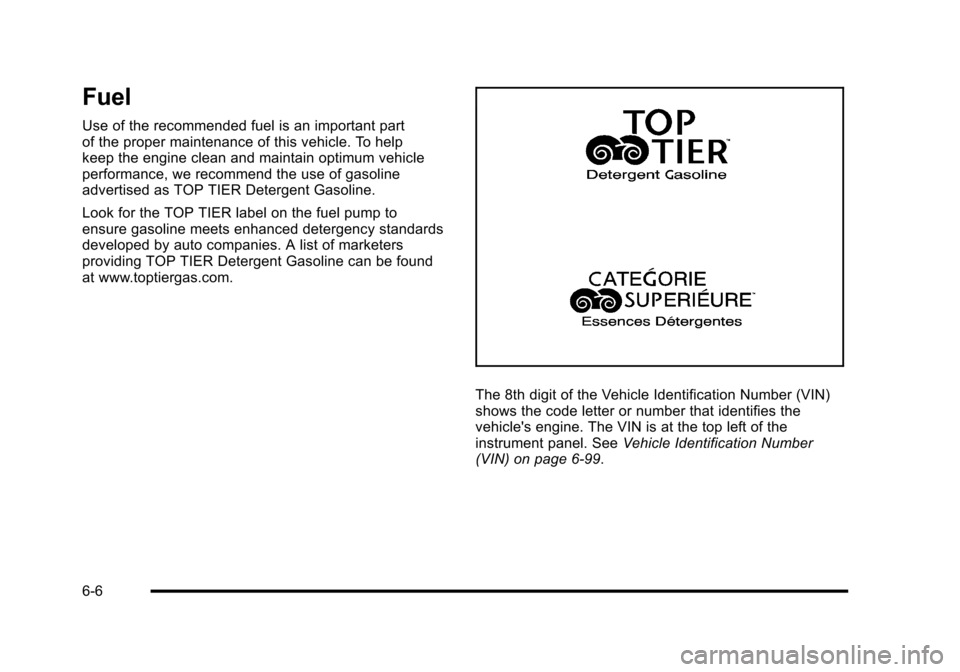
performance, we recommend the use of gasoline
advertised as TOP TIER Detergent Gasoline.
Look for the TOP TIER label on the fuel pump to
ensure gasoline meets enhanced detergency standards
developed by auto companies. A list of marketers
providing TOP TIER Detergent Gasoline can be found
at www.toptiergas.com.
The 8th digit of the Vehicle Identification Number (VIN)
shows the code letter or number that identifies the
vehicle's engine. The VIN is at the top left of the
instrument panel. See Vehicle Identification Number
(VIN) on page 6‑99.
6-6
Page 336 of 472
2. Once the oil has been drained from the engine, remove the engine oil filter and allow the oil to
drain.
3. Re‐install both drain plugs and tighten them to 25 Y (18 lb ft).
4. Replace the oil filter and tighten it to 30 Y
(22 lb ft). See Maintenance Replacement Parts
on
page 7‑12for the correct filter.
5. Oil is filled through the opening in the top of the external engine oil tank. Remove the oil fill cap.
6. Add 9.9 L (10.5 quarts) of oil to the oil tank. See Capacities and Specifications on page 6‑108.
7. Install the oil fill cap and insert the dipstick, if removed.
8. Start the engine and let it run at idle for at least 15 seconds. This will circulate the fresh engine oil
through the lubrication system.
9. Shut off the engine and check the oil level as described under “Checking Engine Oil (ZO6, ZR1,
and Grand Sport).”
What Kind of Engine Oil to Use
Look for three things:
.GM4718M
This vehicle's engine requires a special oil
meeting GM Standard GM4718M. Oils meeting
this standard may be identified as synthetic.
However, not all synthetic oils will meet this
GM standard. Use only an oil that meets GM
Standard GM4718M.
Notice: Using oils that do not have the GM4718M
Standard designation can cause engine damage not
covered by the vehicle warranty.
.SAE 5W-30
SAE 5W-30 is best for the vehicle. These numbers
on an oil container show its viscosity, or thickness.
Do not use other viscosity oils such as
SAE 20W-50.
.American Petroleum Institute (API) starburst
symbol
6-24
Page 339 of 472
What to Do with Used Oil
Used engine oil contains certain elements that can be
unhealthy for your skin and could even cause cancer.
Do not let used oil stay on your skin for very long. Clean
your skin and nails with soap and water, or a good hand
cleaner. Wash or properly dispose of clothing or rags
containing used engine oil. See the manufacturer's
warnings about the use and disposal of oil products.
Used oil can be a threat to the environment. If you
change your own oil, be sure to drain all the oil from the
filter before disposal. Never dispose of oil by putting it in
the trash, pouring it on the ground, into sewers, or into
streams or bodies of water. Recycle it by taking it to a
place that collects used oil.
Engine Air Cleaner/Filter
See Engine Compartment Overviewon page 6‑14for
the location of the engine air cleaner/filter.
Notice: If you spray water into the engine air
cleaner/filter intake and water enters the engine
air cleaner/filter housing, you could damage your
vehicle's engine. The repairs would not be covered
by your warranty. Do not spray water into the
engine air cleaner/filter intake and/or housing. If you are cleaning the vehicle with the hood open, take
care not to spray water directly near the filter opening of
the air cleaner, as shown in the illustration, as this could
damage the vehicle's engine.
When to Inspect the Engine Air Cleaner/
Filter
Inspect the air cleaner/filter at the Maintenance
II
intervals and replace them at the first oil change after
each 80 000 km (50,000 mile) interval. See Scheduled
Maintenance
on page 7‑3for more information. If you
are driving in dusty/dirty conditions, inspect the filter at
each engine oil change.
How to Inspect the Engine Air Cleaner/
Filter
To inspect the air cleaner/filter, remove the filter from
the vehicle and lightly shake the filter to release loose
dust and dirt. If the filter remains caked with dirt, a new
filter is required.
6-27