phone CHEVROLET CORVETTE 2010 6.G Owner's Manual
[x] Cancel search | Manufacturer: CHEVROLET, Model Year: 2010, Model line: CORVETTE, Model: CHEVROLET CORVETTE 2010 6.GPages: 472, PDF Size: 11.44 MB
Page 273 of 472
Voice Pass-Thru
Voice Pass‐Thru allows access to the voice recognition
commands on the cell phone. See the cell phone
manufacturers user guide to see if the cell phone
supports this feature. This feature can be used to
verbally access contacts stored in the cell phone. 1. Press and hold
b gfor two seconds. The system
responds with “Ready”followed by a tone.
2. Say “Bluetooth”. The system responds with
“Bluetooth ready” followed by a tone.
3. Say “Voice”. The system responds with
“OK, accessing
.The cell phone's normal prompt messages will
go through its cycle according to the phone's
operating instructions.
Dual Tone Multi-Frequency
(DTMF) Tones
The in‐vehicle Bluetooth system can send numbers and
numbers stored as name tags during a call. This is used
when calling a menu driven phone system. Account
numbers can be programmed into the phonebook for
retrieval during menu driven calls.
Sending a Number During a Call
1. Pressb g. The system responds with “Ready”
followed by a tone.
2. Say “Dial”. The system responds with “Say a
number to send tones” followed by a tone.
3. Say the number to send.
.If the system clearly recognizes the number it
responds with “OK, Sending Number” and the
dial tones are sent and the call continues.
.If the system is not sure it recognized the
number properly, it responds “Dial Number,
Please say yes or no?” followed by a tone.
If the number is correct, say “Yes”. The system
responds with “OK, Sending Number” and the
dial tones are sent and the call continues.
4-105
Page 274 of 472
Sending a Stored Name Tag During a Call
1. Pressbg. The system responds with “Ready”
followed by a tone.
2. Say “Send name tag.” The system responds with
“Say a name tag to send tones” followed by a tone.
3. Say the name tag to send.
.If the system clearly recognizes the name tag it
responds with “OK, Sending
the dial tones are sent and the call continues.
.If the system is not sure it recognized the name
tag properly, it responds “Dial
Please say yes or no?” followed by a tone.
If the name tag is correct, say “Yes”. The
system responds with “OK, Sending
continues.
Clearing the System
Unless information is deleted out of the in‐vehicle
Bluetooth system, it will be retained indefinitely. This
includes all saved name tags in the phonebook and
phone pairing information. For information on how to
delete this information, see the above sections on
Deleting a Paired Phone and Deleting Name Tags.
Other Information
The Bluetooth®word mark and logos are owned by the
Bluetooth®SIG, Inc. and any use of such marks by
General Motors is under license. Other trademarks and
trade names are those of their respective owners.
See Bluetooth
®on page 4‑96for FCC information.
Theft-Deterrent Feature
THEFTLOCK®is designed to discourage theft of the
vehicle's radio by learning a portion of the Vehicle
Identification Number (VIN). The radio does not operate
and LOCKED displays if the radio is stolen or moved to
a different vehicle.
When the when the ignition is in the off position, a
blinking red light on the upper left side of the radio
indicates that THEFTLOCK
®is armed.
4-106
Page 275 of 472
Audio Steering Wheel Controls
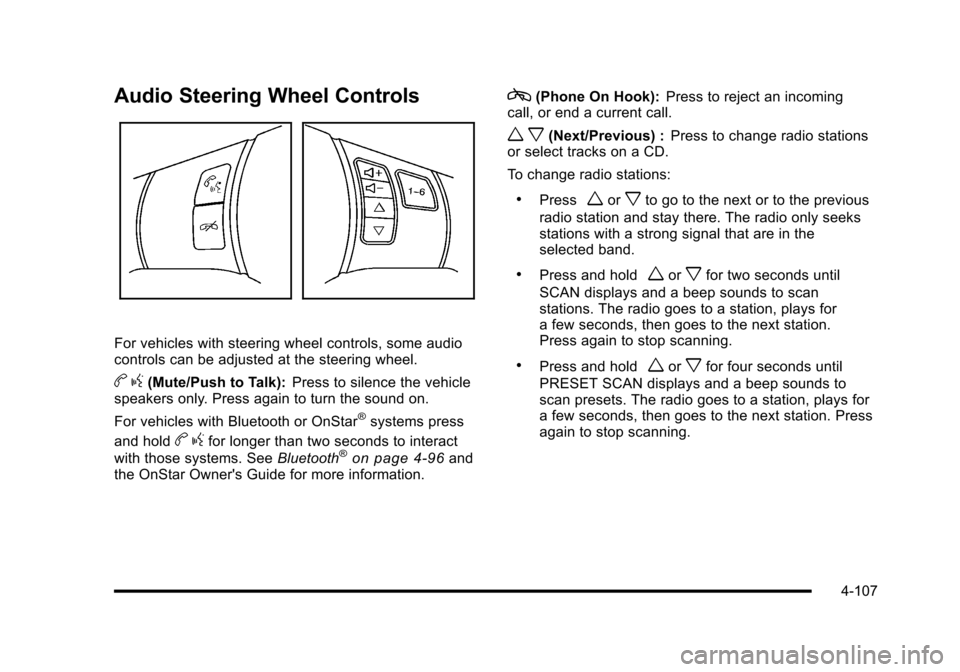
For vehicles with steering wheel controls, some audio
controls can be adjusted at the steering wheel.
b g(Mute/Push to Talk): Press to silence the vehicle
speakers only. Press again to turn the sound on.
For vehicles with Bluetooth or OnStar
®systems press
and hold
b gfor longer than two seconds to interact
with those systems. See Bluetooth®on page 4‑96and
the OnStar Owner's Guide for more information.
c(Phone On Hook): Press to reject an incoming
call, or end a current call.
w x(Next/Previous) : Press to change radio stations
or select tracks on a CD.
To change radio stations:
.Pressworxto go to the next or to the previous
radio station and stay there. The radio only seeks
stations with a strong signal that are in the
selected band.
.Press and holdworxfor two seconds until
SCAN displays and a beep sounds to scan
stations. The radio goes to a station, plays for
a few seconds, then goes to the next station.
Press again to stop scanning.
.Press and holdworxfor four seconds until
PRESET SCAN displays and a beep sounds to
scan presets. The radio goes to a station, plays for
a few seconds, then goes to the next station. Press
again to stop scanning.
4-107
Page 276 of 472
To select tracks on a CD:
.Pressworxto go to the next or to the previous
track when a CD is playing.
.Press and holdworxfor more than
two seconds to scan the current CD. The CD
goes to the next track, plays the first 10 seconds,
then goes to the next track. Press again to stop
scanning.
.Press and holdworxfor more than
four seconds to scan all of the CDs loaded. The
CD goes to the next CD, plays the first 10 seconds
of each track, then goes to the next CD. Press
again to stop scanning.
+
e−e(Volume): Press to increase or to decrease
the radio volume.
1 to 6 (Preset Pushbuttons) : Press to play stations
that are programmed on the radio preset pushbuttons.
Radio Reception
Frequency interference and static can occur during
normal radio reception if items such as cell phone
chargers, vehicle convenience accessories, and
external electronic devices are plugged into the
accessory power outlet. If there is interference or static,
unplug the item from the accessory power outlet.
AM
The range for most AM stations is greater than for FM,
especially at night. The longer range can cause station
frequencies to interfere with each other. For better radio
reception, most AM radio stations boost the power
levels during the day, and then reduce these levels
during the night. Static can also occur when things like
storms and power lines interfere with radio reception.
When this happens, try reducing the treble on the radio.
FM Stereo
FM signals only reach about 10 to 40 miles
(16 to 65 km). Although the radio has a built-in electronic
circuit that automatically works to reduce interference,
some static can occur, especially around tall buildings
or hills, causing the sound to fade in and out.
4-108
Page 277 of 472
XM™Satellite Radio Service
XM Satellite Radio Service gives digital radio reception
from coast-to-coast in the 48 contiguous United States,
and in Canada. Just as with FM, tall buildings or hills
can interfere with satellite radio signals, causing the
sound to fade in and out. In addition, traveling or
standing under heavy foliage, bridges, garages,
or tunnels may cause loss of the XM signal for a
period of time.
Cellular Phone Usage
Cellular phone usage may cause interference
with the vehicle's radio. This interference may occur
when making or receiving phone calls, charging the
phone's battery, or simply having the phone on. This
interference causes an increased level of static while
listening to the radio. If static is received while listening
to the radio, unplug the cellular phone and turn it off.
Diversity Antenna System
The AM-FM antenna is a hidden self tuning system.
It optimizes the AM and FM signals relative to
the vehicle's position and radio station source.
No maintenance or adjustments are needed.
XM™ Satellite Radio Antenna
System
For vehicles with XM Satellite Radio Service, the
antenna is located on the roof or on the trunk lid of the
vehicle. Keep the antenna clear of obstructions for clear
radio reception.
4-109
Page 321 of 472
Fuels in Foreign Countries
If you plan on driving in another country outside the
United States or Canada, the proper fuel might be hard
to find. Never use leaded gasoline or any other fuel
not recommended in the previous text on fuel. Costly
repairs caused by use of improper fuel would not be
covered by the vehicle warranty.
To check the fuel availability, ask an auto club,
or contact a major oil company that does business
in the country where you will be driving.
Filling the Tank
{WARNING:
Fuel vapor burns violently and a fuel fire can
cause bad injuries. To help avoid injuries to you
and others, read and follow all the instructions
on the fuel pump island. Turn off the engine
when refueling. Do not smoke near fuel or when
refueling the vehicle. Do not use cellular phones.
Keep sparks, flames, and smoking materials away
from fuel. Do not leave the fuel pump unattended
when refueling the vehicle. This is against the law (Continued)
WARNING: (Continued)
in some places. Do not re-enter the vehicle while
pumping fuel. Keep children away from the fuel
pump; never let children pump fuel.
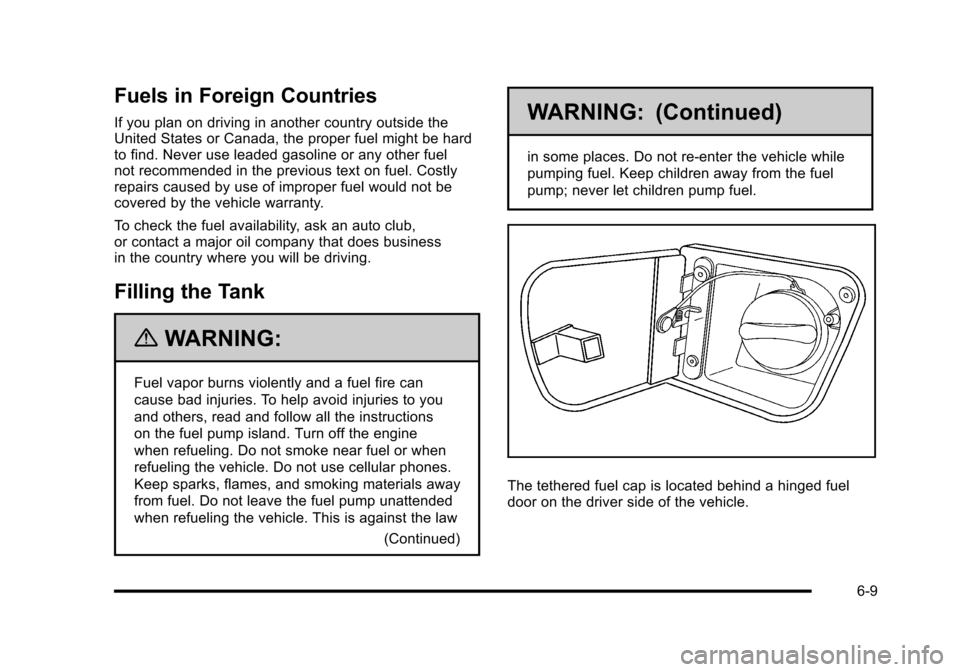
The tethered fuel cap is located behind a hinged fuel
door on the driver side of the vehicle.
6-9
Page 324 of 472
Filling a Portable Fuel Container
{WARNING:
Never fill a portable fuel container while it is in
the vehicle. Static electricity discharge from the
container can ignite the fuel vapor. You can be
badly burned and the vehicle damaged if this
occurs. To help avoid injury to you and others:
.Dispense fuel only into approved containers.
.Do not fill a container while it is inside a
vehicle, in a vehicle's trunk, pickup bed,
or on any surface other than the ground.
.Bring the fill nozzle in contact with the inside
of the fill opening before operating the nozzle.
Contact should be maintained until the filling is
complete.
.Do not smoke while pumping fuel.
.Do not use a cellular phone while
pumping fuel.
Checking Things Under
the Hood
{WARNING:
An electric fan under the hood can start up and
injure you even when the engine is not running.
Keep hands, clothing, and tools away from any
underhood electric fan.
{WARNING:
Things that burn can get on hot engine parts and
start a fire. These include liquids like fuel, oil,
coolant, brake fluid, windshield washer and other
fluids, and plastic or rubber. You or others could
be burned. Be careful not to drop or spill things
that will burn onto a hot engine.
6-12
Page 382 of 472
To locate the nearest GM or run-flat servicing facility,
call Roadside Assistance. For phone numbers and
Roadside Service details see Roadside Assistance
Program
on page 8‑7.
{WARNING:
Run-flat tires are constructed differently than other
tires and could explode during improper service.
You or others could be injured or killed if you
attempt to repair, replace, dismount, or mount
a run-flat tire. Let only an authorized run-flat
service center repair, replace, dismount, and
mount run-flat tires.
The valve stems on your run-flat tires have sensors that
are part of the Tire Pressure Monitor System (TPMS).
See Tire Pressure Monitor System
on page 6‑72.
These sensors contain batteries which are designed
to last for 10 years under normal driving conditions. See
your dealer/retailer if you ever need to have a wheel
replaced, or if the sensors ever need replacement.
Notice: Using liquid sealants can damage the tire
valves and tire pressure monitor sensors in the
vehicle's run-flat tires. This damage would not be
covered by warranty. Do not use liquid sealants in
the vehicle's run-flat tires.
Inflation - Tire Pressure
Tires need the correct amount of air pressure to
operate effectively.
Notice:Do not let anyone tell you that
under‐inflation or over‐inflation is all right.
It is not. If your tires do not have enough air
(under‐inflation), you can get the following:
.Too much flexing
.Too much heat
.Tire overloading
.Premature or irregular wear
.Poor handling
.Reduced fuel economy
If your tires have too much air (over‐inflation),
you can get the following:
.Unusual wear
.Poor handling
.Rough ride
.Needless damage from road hazards
6-70
Page 439 of 472
Section 8 Customer Assistance Information
Customer Assistance and Information. . . . . . . . . . . 8-2
Customer Satisfaction Procedure . . . . . . . . . . . . . . . 8-2
Online Owner Center . . . . . . . . . . . . . . . . . . . . . . . . . . . . 8-5
Customer Assistance for Text Telephone (TTY) Users . . . . . . . . . . . . . . . . . . . . . . . . . . . . . . . . . . . . . . . . . 8-6
Customer Assistance Offices . . . . . . . . . . . . . . . . . . . 8-6
GM Mobility Reimbursement Program . . . . . . . . . . . 8-7
Roadside Assistance Program . . . . . . . . . . . . . . . . . . 8-7
Scheduling Service Appointments . . . . . . . . . . . . . 8-10
Courtesy Transportation Program . . . . . . . . . . . . . . 8-10
Collision Damage Repair . . . . . . . . . . . . . . . . . . . . . . 8-12 Reporting Safety Defects
. . . . . . . . . . . . . . . . . . . . . . . . 8-15
Reporting Safety Defects to the United States Government . . . . . . . . . . . . . . . . . . . . . . . . . . . . . . . . . 8-15
Reporting Safety Defects to the Canadian Government . . . . . . . . . . . . . . . . . . . . . . . . . . . . . . . . . 8-16
Reporting Safety Defects to General Motors . . . 8-16
Service Publications Ordering Information . . . . . 8-16
Vehicle Data Recording and Privacy . . . . . . . . . . . . . 8-18
Event Data Recorders . . . . . . . . . . . . . . . . . . . . . . . . . 8-18
OnStar
®. . . . . . . . . . . . . . . . . . . . . . . . . . . . . . . . . . . . . . . 8-19
Navigation System . . . . . . . . . . . . . . . . . . . . . . . . . . . . . 8-19
Radio Frequency Identification (RFID) . . . . . . . . . 8-20
Radio Frequency Statement . . . . . . . . . . . . . . . . . . . 8-20
8-1
Page 441 of 472
STEP THREE—U.S. Owners : Both General Motors
and your dealer are committed to making sure you are
completely satisfied with your new vehicle. However,
if you continue to remain unsatisfied after following the
procedure outlined in Steps One and Two, you can file
with the Better Business Bureau (BBB) Auto Line
Program to enforce your rights.
The BBB Auto Line Program is an out of court program
administered by the Council of Better Business Bureaus
to settle automotive disputes regarding vehicle repairs
or the interpretation of the New Vehicle Limited
Warranty. Although you may be required to resort to
this informal dispute resolution program prior to filing a
court action, use of the program is free of charge and
your case will generally be heard within 40 days. If you
do not agree with the decision given in your case, you
may reject it and proceed with any other venue for relief
available to you. You may contact the BBB Auto Line Program using the
toll-free telephone number or write them at the following
address:
BBB Auto Line Program
Council of Better Business Bureaus, Inc.
4200 Wilson Boulevard
Suite 800
Arlington, VA 22203-1838
Telephone: 1-800-955-5100
dr.bbb.org/goauto
This program is available in all 50 states and the
District of Columbia. Eligibility is limited by vehicle age,
mileage, and other factors. General Motors reserves the
right to change eligibility limitations and/or discontinue
its participation in this program.
8-3