trunk CHEVROLET CORVETTE 2010 6.G Owner's Manual
[x] Cancel search | Manufacturer: CHEVROLET, Model Year: 2010, Model line: CORVETTE, Model: CHEVROLET CORVETTE 2010 6.GPages: 472, PDF Size: 11.44 MB
Page 164 of 472
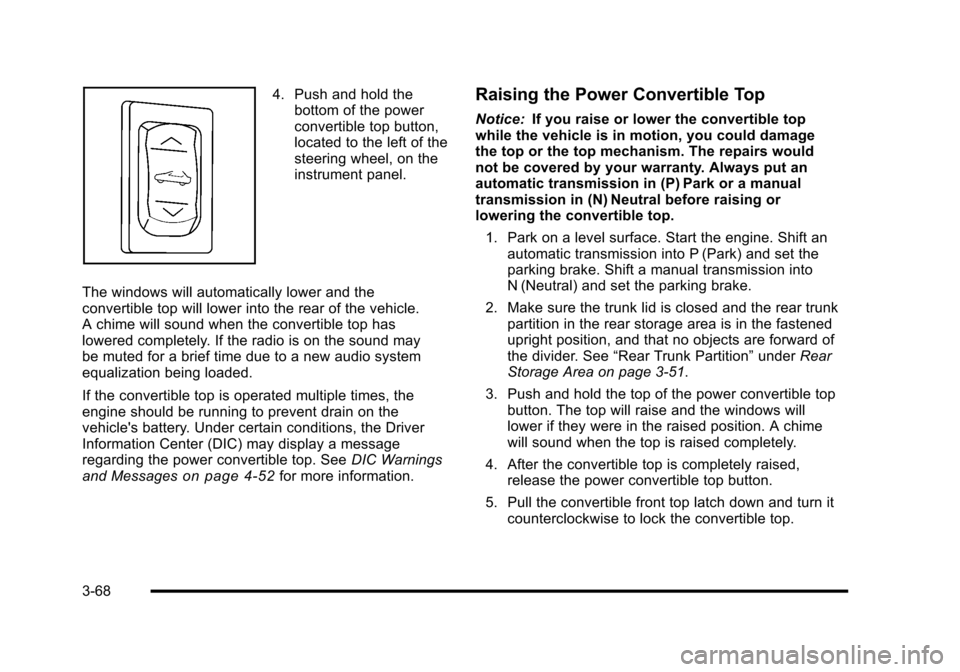
4. Push and hold the bottom of the power
convertible top button,
located to the left of the
steering wheel, on the
instrument panel.
The windows will automatically lower and the
convertible top will lower into the rear of the vehicle.
A chime will sound when the convertible top has
lowered completely. If the radio is on the sound may
be muted for a brief time due to a new audio system
equalization being loaded.
If the convertible top is operated multiple times, the
engine should be running to prevent drain on the
vehicle's battery. Under certain conditions, the Driver
Information Center (DIC) may display a message
regarding the power convertible top. See DIC Warnings
and Messages
on page 4‑52for more information.
Raising the Power Convertible Top
Notice: If you raise or lower the convertible top
while the vehicle is in motion, you could damage
the top or the top mechanism. The repairs would
not be covered by your warranty. Always put an
automatic transmission in (P) Park or a manual
transmission in (N) Neutral before raising or
lowering the convertible top.
1. Park on a level surface. Start the engine. Shift an automatic transmission into P (Park) and set the
parking brake. Shift a manual transmission into
N (Neutral) and set the parking brake.
2. Make sure the trunk lid is closed and the rear trunk partition in the rear storage area is in the fastened
upright position, and that no objects are forward of
the divider. See “Rear Trunk Partition” underRear
Storage Area on page 3‑51.
3. Push and hold the top of the power convertible top button. The top will raise and the windows will
lower if they were in the raised position. A chime
will sound when the top is raised completely.
4. After the convertible top is completely raised, release the power convertible top button.
5. Pull the convertible front top latch down and turn it counterclockwise to lock the convertible top.
3-68
Page 166 of 472
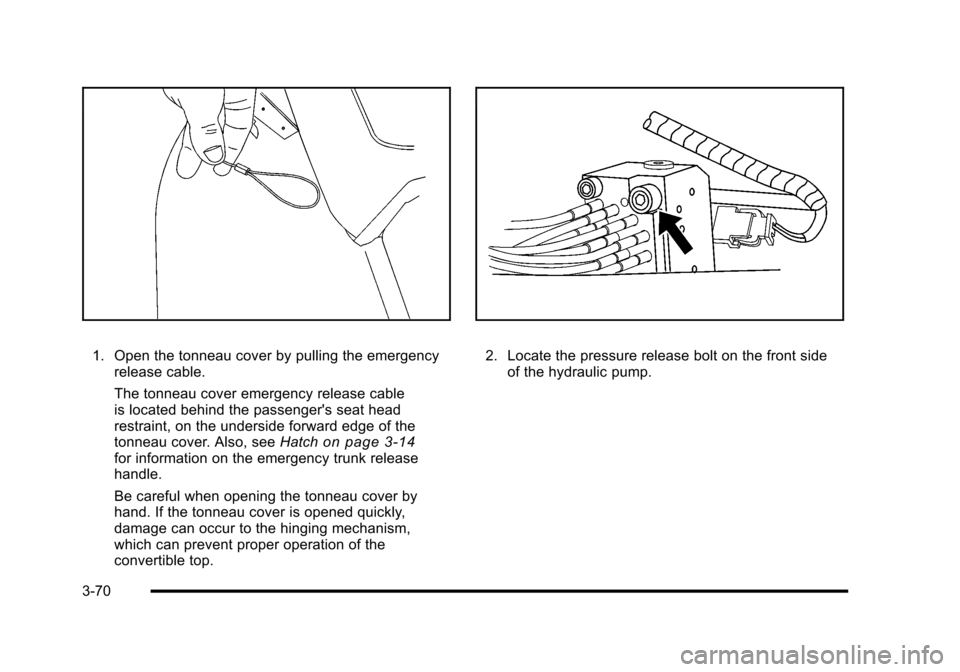
1. Open the tonneau cover by pulling the emergency release cable.
The tonneau cover emergency release cable
is located behind the passenger's seat head
restraint, on the underside forward edge of the
tonneau cover. Also, see Hatch
on page 3‑14for information on the emergency trunk release
handle.
Be careful when opening the tonneau cover by
hand. If the tonneau cover is opened quickly,
damage can occur to the hinging mechanism,
which can prevent proper operation of the
convertible top.
2. Locate the pressure release bolt on the front side
of the hydraulic pump.
3-70
Page 183 of 472
Exterior Lighting Battery Saver
If the manual parking lamps or headlamps have been
left on, the exterior lamps will turn off as soon as the
ignition is turned off or Retained Accessory Power
(RAP) is active. This protects against draining the
battery in case you have accidentally left the headlamps
or parking lamps on. The battery saver does not work if
the headlamps are turned on after the ignition switch is
turned to off.
If you need to leave the lamps on, use the exterior lamp
control to turn the lamps back on.
Instrument Panel Brightness
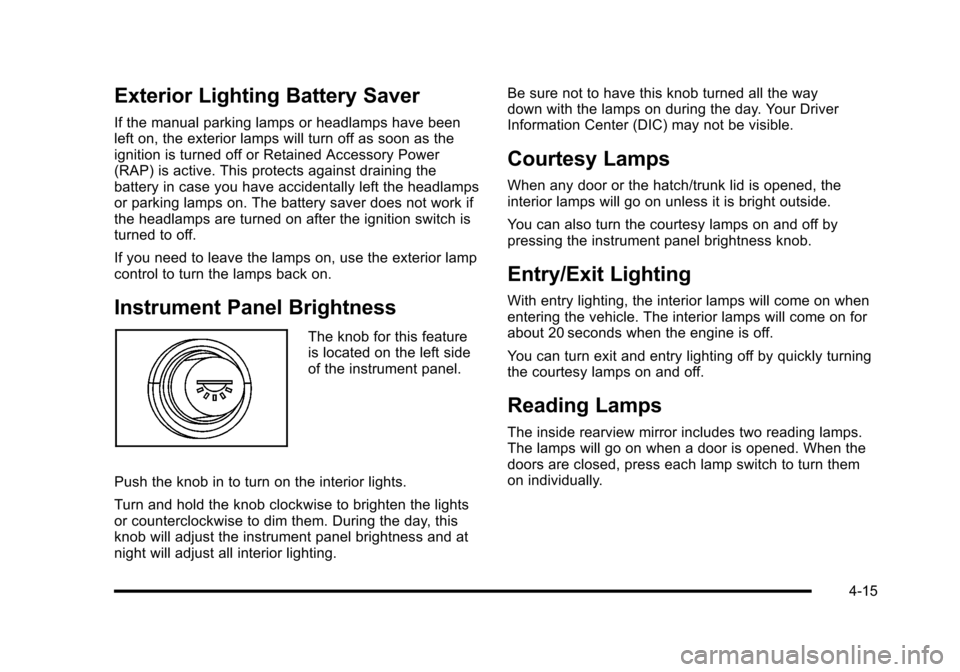
The knob for this feature
is located on the left side
of the instrument panel.
Push the knob in to turn on the interior lights.
Turn and hold the knob clockwise to brighten the lights
or counterclockwise to dim them. During the day, this
knob will adjust the instrument panel brightness and at
night will adjust all interior lighting. Be sure not to have this knob turned all the way
down with the lamps on during the day. Your Driver
Information Center (DIC) may not be visible.
Courtesy Lamps
When any door or the hatch/trunk lid is opened, the
interior lamps will go on unless it is bright outside.
You can also turn the courtesy lamps on and off by
pressing the instrument panel brightness knob.
Entry/Exit Lighting
With entry lighting, the interior lamps will come on when
entering the vehicle. The interior lamps will come on for
about 20 seconds when the engine is off.
You can turn exit and entry lighting off by quickly turning
the courtesy lamps on and off.
Reading Lamps
The inside rearview mirror includes two reading lamps.
The lamps will go on when a door is opened. When the
doors are closed, press each lamp switch to turn them
on individually.
4-15
Page 221 of 472
ABS (Antilock Brake System) ACTIVE
This message displays when the Antilock Brake System
(ABS) is adjusting brake pressure to help avoid a
braking skid.
Slippery road conditions may exist if this message
is displayed, so adjust your driving accordingly. The
message stays on for a few seconds after the system
stops adjusting brake pressure. See Antilock Brake
System (ABS)
on page 5‑5for more information.
ACTIVE HANDLING
This message displays when the Active Handling
System is operating. The Active Handling System is a
computer controlled system that assists the driver in
controlling the vehicle in difficult driving conditions.
You may feel or hear the system working and see the
ACTIVE HANDLING message displayed in the DIC.
This message stays on for a few seconds following the
active handling event. This is normal when the system
is operating. See Active Handling System
on page 5‑8andBraking on page 5‑4.
ACTIVE HANDLING READY
This message displays when the functional check
of the Active Handling System has been completed.
See Active Handling System
on page 5‑8for more
information.
ATTACH TRUNK PARTITION
If the vehicle has a power convertible top, this message
displays and a sound will be heard if the trunk partition
is not in place. Open the hatch/trunk and make sure the
trunk partition is secure and no objects are on the trunk
partition. See Rear Storage Area
on page 3‑51for
more information.
BATTERY SAVER ACTIVE
This message displays when the vehicle has
detected that the battery voltage is dropping beyond
a reasonable point. The battery saver system starts
reducing certain features of the vehicle that you may
be able to notice. At the point that features are disabled,
this message is displayed. It means that the vehicle
is trying to save the charge in the battery. Turn off
unnecessary accessories to allow the battery to
recharge.
4-53
Page 223 of 472
CHECK COOLANT LEVEL
This message displays when the engine coolant level is
low. Have the cooling system serviced by your dealer/
retailer as soon as possible. See Engine Coolant
on
page 6‑34.
CHECK GAS CAP
This message displays if the fuel cap has not been fully
tightened. Check the fuel cap to make sure that it is on
properly. Once tightened, it takes at least one overnight
park to reset or clear this message. If both the CHECK
GAS CAP message and the malfunction indicator lamp
in the instrument panel cluster are on, you may need to
see your dealer/retailer for service. See Malfunction
Indicator Lamp
on page 4‑41for more information.
CHECK OIL LEVEL
On some vehicles, this message displays and two
chimes sound if the oil level in the vehicle is low. Once
the vehicle senses a change in the engine oil level, the
light remains off.
If this message appears after starting the engine, the
engine oil level may be too low. You may need to add
oil. See Engine Overheating on page 6‑38.
To acknowledge the message, press the RESET button.
The message reappears every 10 minutes until this
condition changes.
CLOSE TRUNK TO MOVE TOP
This message displays and a sound will be heard if
the trunk is open while you are trying to operate the
convertible top. Make sure the trunk is closed before
operating the convertible top. See Convertible Top
(Manual)
on page 3‑59or Convertible Top (Power)on
page 3‑66.
COMPETITIVE DRIVING MODE
This message displays and a sound will be heard
when the Competitive Driving mode is selected.
The instrument panel cluster light will be on when
the Competitive Driving mode is selected. If your
vehicle is equipped with a manual transmission,
Launch Control is available when this mode selected.
The Traction Control System (TCS) will not be operating
while in the Competitive Driving mode. Adjust your
driving accordingly. This system is available on all
models except ZR1. See Competitive Driving Mode
on
page 5‑9, including the “Launch Control” information,
and Racing or Other Competitive Drivingon page 5‑19for more information.
4-55
Page 238 of 472
Other Messages
Here are more messages that you can receive on your
Driver Information Center (DIC). To acknowledge a
message and read another message that may have
come on at the same time, press the RESET button.
.ACCESSORY MODE ON
.BATTERY VOLTAGE HIGH
See Voltmeter Gauge on page 4‑35.
.BATTERY VOLTAGE LOW
See Voltmeter Gauge on page 4‑35.
.CHECK WASHER FLUID
See Windshield Washer Fluid on page 6‑42.
.CRUISE SET TO XXX MPH (XXX km/h)
See Cruise Control on page 4‑7.
.DRIVER DOOR AJAR
.FOB AUTOLEARN WAIT XX MINUTES
See “Matching Transmitter(s) to Your Vehicle”
under Keyless Access System Operation
on
page 3‑5.
.FOB BATTERY LOW
See “Battery Replacement” underKeyless Access
System Operation on page 3‑5.
.HATCH AJAR (Coupe)
.INTRUSION SENSOR OFF, if your vehicle has this
feature
.INTRUSION SENSOR ON, if your vehicle has this
feature
.KNOWN FOB
See “Matching Transmitter(s) to Your Vehicle”
under Keyless Access System Operation
on
page 3‑5.
.MAXIMUM NUMBER OF FOBS LEARNED
See “Matching Transmitter(s) to Your Vehicle”
under Keyless Access System Operation
on
page 3‑5.
.OFF–ACCESSORY TO LEARN
See “Matching Transmitter(s) to Your Vehicle”
under Keyless Access System Operation
on
page 3‑5.
.PASSENGER DOOR AJAR
.READY FOR FOB #X
See “Matching Transmitter(s) to Your Vehicle”
under Keyless Access System Operation
on
page 3‑5.
.TONNEAU AJAR (Convertible)
.TRUNK AJAR (Convertible)
.UPSHIFT NOW
See Manual Transmission Operation on page 3‑32.
4-70
Page 243 of 472
If you choose 90 S, the twilight delay time will be set to
90 seconds.
When the mode you want is selected, press the
OPTION button to set your choice and advance to the
next personal option.
Flash at Unlock : This option activates the front and
rear turn signals for two short flashes when the unlock
or hatch/trunk button on the keyless access transmitter
is pressed. This will only occur when the vehicle is off.
Press the OPTION button until FLASH AT UNLOCK
appears on the display, then press the RESET button to
scroll through the following modes:
.YES (default)
.NO
If you choose YES, the front and rear turn signals will
flash twice when you press the unlock button or the
hatch/trunk button on the keyless access transmitter.
If you choose NO, this option will turn off.
When the mode you want is selected, press the
OPTION button to set your choice and advance to
the next personal option. Flash at Lock :
This option activates the front and rear
turn signals for one long flash when the lock button on
the keyless access transmitter is pressed. This will only
occur when the vehicle is off. If the lock button on the
keyless access transmitter is pressed again within
five seconds, the horn will sound regardless of which
setting you have selected.
Press the OPTION button until FLASH AT LOCK
appears on the display, then press the RESET button
to scroll through the following modes:
.YES (default)
.NO
If you choose YES, the front and rear turn signals will
flash once when you press the lock button on the
keyless access transmitter.
If you choose NO, this option will turn off.
When the mode you want is selected, press the
OPTION button to set your choice and advance to
the next personal option.
4-75
Page 277 of 472
XM™Satellite Radio Service
XM Satellite Radio Service gives digital radio reception
from coast-to-coast in the 48 contiguous United States,
and in Canada. Just as with FM, tall buildings or hills
can interfere with satellite radio signals, causing the
sound to fade in and out. In addition, traveling or
standing under heavy foliage, bridges, garages,
or tunnels may cause loss of the XM signal for a
period of time.
Cellular Phone Usage
Cellular phone usage may cause interference
with the vehicle's radio. This interference may occur
when making or receiving phone calls, charging the
phone's battery, or simply having the phone on. This
interference causes an increased level of static while
listening to the radio. If static is received while listening
to the radio, unplug the cellular phone and turn it off.
Diversity Antenna System
The AM-FM antenna is a hidden self tuning system.
It optimizes the AM and FM signals relative to
the vehicle's position and radio station source.
No maintenance or adjustments are needed.
XM™ Satellite Radio Antenna
System
For vehicles with XM Satellite Radio Service, the
antenna is located on the roof or on the trunk lid of the
vehicle. Keep the antenna clear of obstructions for clear
radio reception.
4-109
Page 324 of 472
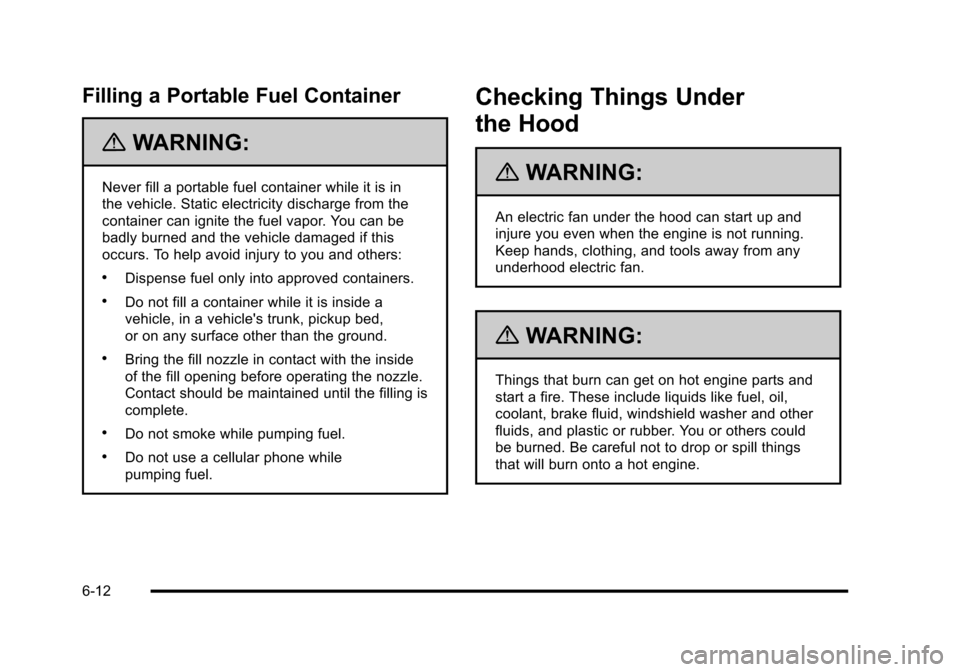
Filling a Portable Fuel Container
{WARNING:
Never fill a portable fuel container while it is in
the vehicle. Static electricity discharge from the
container can ignite the fuel vapor. You can be
badly burned and the vehicle damaged if this
occurs. To help avoid injury to you and others:
.Dispense fuel only into approved containers.
.Do not fill a container while it is inside a
vehicle, in a vehicle's trunk, pickup bed,
or on any surface other than the ground.
.Bring the fill nozzle in contact with the inside
of the fill opening before operating the nozzle.
Contact should be maintained until the filling is
complete.
.Do not smoke while pumping fuel.
.Do not use a cellular phone while
pumping fuel.
Checking Things Under
the Hood
{WARNING:
An electric fan under the hood can start up and
injure you even when the engine is not running.
Keep hands, clothing, and tools away from any
underhood electric fan.
{WARNING:
Things that burn can get on hot engine parts and
start a fire. These include liquids like fuel, oil,
coolant, brake fluid, windshield washer and other
fluids, and plastic or rubber. You or others could
be burned. Be careful not to drop or spill things
that will burn onto a hot engine.
6-12
Page 416 of 472
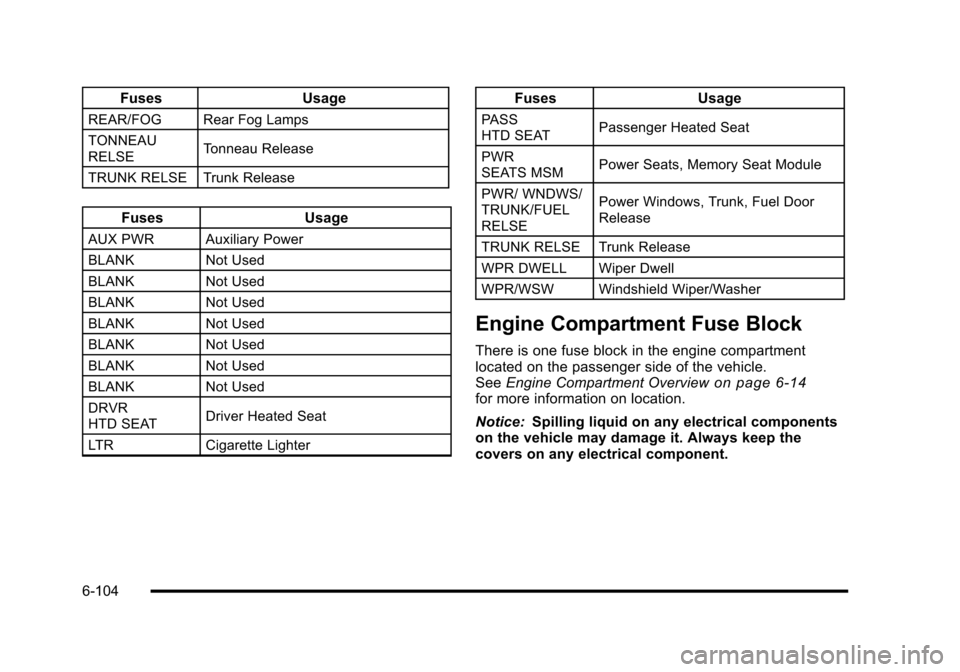
FusesUsage
REAR/FOG Rear Fog Lamps
TONNEAU
RELSE Tonneau Release
TRUNK RELSE Trunk Release
Fuses Usage
AUX PWRAuxiliary Power
BLANK Not Used
BLANK Not Used
BLANK Not Used
BLANK Not Used
BLANK Not Used
BLANK Not Used
BLANK Not Used
DRVR
HTD SEAT Driver Heated Seat
LTR Cigarette Lighter
Fuses Usage
PASS
HTD SEAT Passenger Heated Seat
PWR
SEATS MSM Power Seats, Memory Seat Module
PWR/ WNDWS/
TRUNK/FUEL
RELSE Power Windows, Trunk, Fuel Door
Release
TRUNK RELSE Trunk Release
WPR DWELL Wiper Dwell
WPR/WSW Windshield Wiper/Washer
Engine Compartment Fuse Block
There is one fuse block in the engine compartment
located on the passenger side of the vehicle.
See Engine Compartment Overview
on page 6‑14for more information on location.
Notice: Spilling liquid on any electrical components
on the vehicle may damage it. Always keep the
covers on any electrical component.
6-104