change time CHEVROLET CORVETTE 2011 6.G Owner's Manual
[x] Cancel search | Manufacturer: CHEVROLET, Model Year: 2011, Model line: CORVETTE, Model: CHEVROLET CORVETTE 2011 6.GPages: 428, PDF Size: 6.63 MB
Page 253 of 428
Black plate (23,1)Chevrolet Corvette Owner Manual - 2011
Driving and Operating 9-23
Notice:Cranking the engine for
long periods of time, by pressing
the START button immediately
after cranking has ended, can
overheat and damage the
cranking motor, and drain the
battery. Wait at least 15 seconds
between each try, to allow the
cranking motor to cool down.
The vehicle has a
Computer-Controlled
Cranking System. This feature
assists in starting the engine
and protects components.
Once cranking has been initiated,
the engine continues cranking
for a few seconds or until the vehicle
starts. If the engine does not start,
cranking automatically stops after
15 seconds to prevent cranking
motor damage. To prevent gear
damage, this system also prevents
cranking if the engine is already
running. Notice:
The engine is designed
to work with the electronics in
the vehicle. If electrical parts
or accessories are added, you
could change the way the engine
operates. Before adding electrical
equipment, check with your
dealer. If you do not, the engine
might not perform properly. Any
resulting damage would not be
covered by the vehicle warranty.
Stopping the Engine
If the vehicle has an automatic
transmission, move the shift lever
to P (Park) and press and hold the
Acc. (Off/Accessory) button, located
on the instrument panel, until the
engine shuts off. If the shift lever
is not in P (Park), the engine shuts off and the vehicle goes into the
Accessory Mode. The DIC displays
SHIFT TO PARK. Once the shifter is
moved to P (Park), the vehicle turns
off. If the vehicle has a manual
transmission, it is recommended
that you move the shift lever to
R (Reverse) and set the parking
brake after you turn off the engine
by pressing and holding the Acc.
(Off/Accessory) button.
If the keyless access transmitter is
not detected inside the vehicle when
it is turned to off, the DIC displays
NO FOB
–OFF OR RUN?.
See Key and Lock Messages on
page 5‑42 for more information.
Page 265 of 428
Black plate (35,1)Chevrolet Corvette Owner Manual - 2011
Driving and Operating 9-35
If driving safely on a wet road
and it becomes necessary to slam
on the brakes and continue braking
to avoid a sudden obstacle, a
computer senses that the wheels
are slowing down. If one of the
wheels is about to stop rolling,
the computer will separately work
the brakes at each wheel.
ABS can change the brake pressure
to each wheel, as required, faster
than any driver could. This can help
the driver steer around the obstacle
while braking hard.
As the brakes are applied, the
computer keeps receiving updates
on wheel speed and controls
braking pressure accordingly.
Remember: ABS does not change
the time needed to get a foot up to
the brake pedal or always decreasestopping distance. If you get too
close to the vehicle in front of you,
there will not be enough time to
apply the brakes if that vehicle
suddenly slows or stops. Always
leave enough room up ahead to
stop, even with ABS.
Using ABS
Do not pump the brakes. Just hold
the brake pedal down firmly and let
ABS work. You might hear the ABS
pump or motor operating and feel
the brake pedal pulsate, but this is
normal.
Braking in Emergencies
ABS allows the driver to steer and
brake at the same time. In many
emergencies, steering can help
more than even the very best
braking.
Parking Brake
The parking brake lever is located to
the right of the center console.
To set the parking brake, hold the
brake pedal down. Pull the parking
brake lever up. If the ignition is on,
the brake system warning light will
come on.
To release the parking brake, hold
the brake pedal down. Then push
the release button in as you move
the parking brake lever all the
way down.
Notice:
Driving with the parking
brake on can overheat the brake
system and cause premature
wear or damage to brake system
parts. Make sure that the parking
brake is fully released and the
brake warning light is off before
driving.
Page 273 of 428
Black plate (43,1)Chevrolet Corvette Owner Manual - 2011
Driving and Operating 9-43
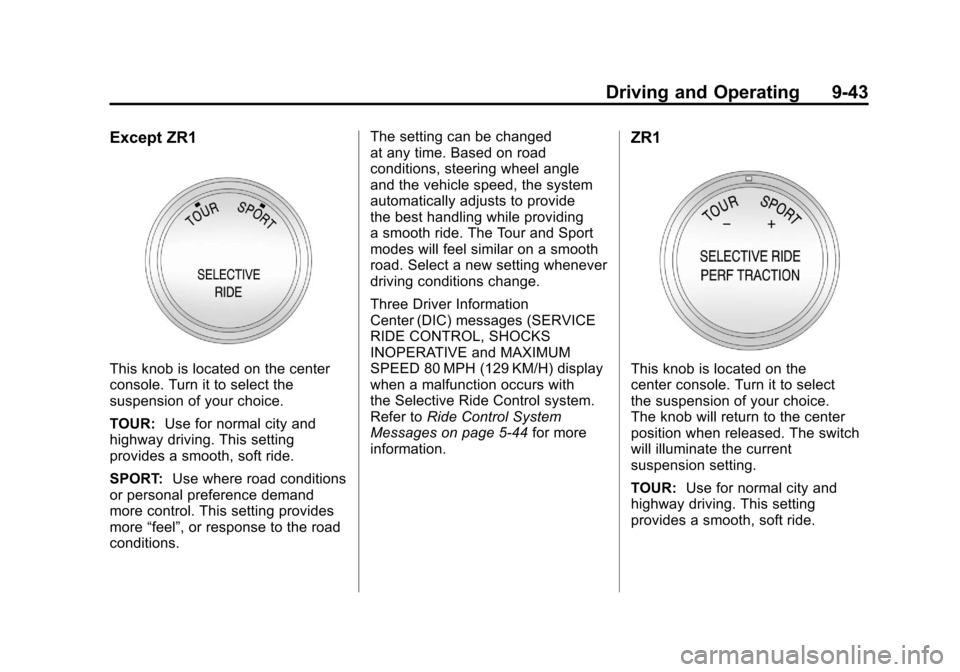
Except ZR1
This knob is located on the center
console. Turn it to select the
suspension of your choice.
TOUR:Use for normal city and
highway driving. This setting
provides a smooth, soft ride.
SPORT: Use where road conditions
or personal preference demand
more control. This setting provides
more “feel”, or response to the road
conditions. The setting can be changed
at any time. Based on road
conditions, steering wheel angle
and the vehicle speed, the system
automatically adjusts to provide
the best handling while providing
a smooth ride. The Tour and Sport
modes will feel similar on a smooth
road. Select a new setting whenever
driving conditions change.
Three Driver Information
Center (DIC) messages (SERVICE
RIDE CONTROL, SHOCKS
INOPERATIVE and MAXIMUM
SPEED 80 MPH (129 KM/H) display
when a malfunction occurs with
the Selective Ride Control system.
Refer to
Ride Control System
Messages on page 5‑44 for more
information.
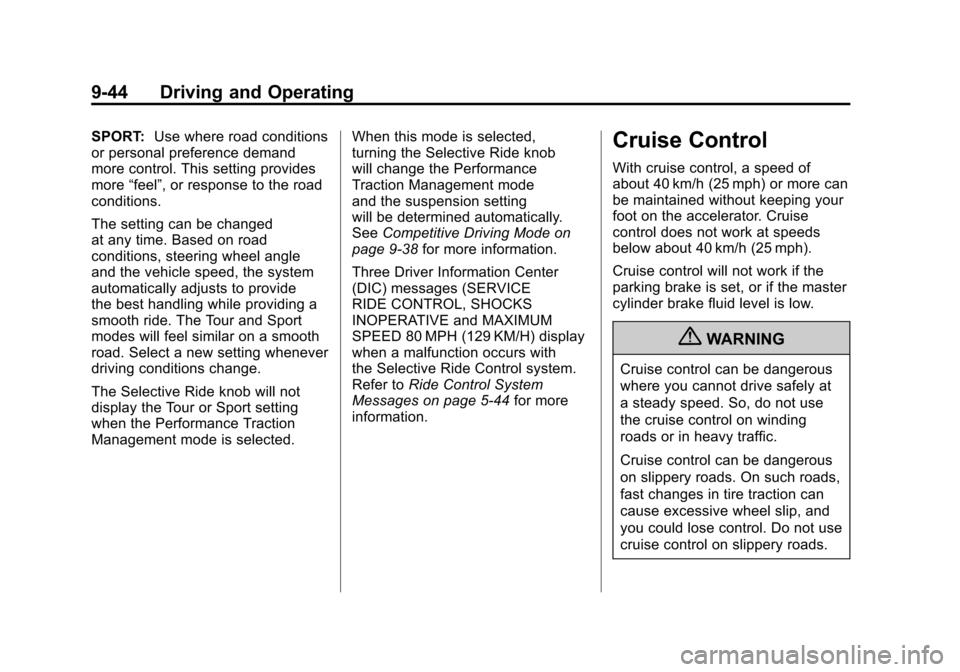
ZR1
This knob is located on the
center console. Turn it to select
the suspension of your choice.
The knob will return to the center
position when released. The switch
will illuminate the current
suspension setting.
TOUR: Use for normal city and
highway driving. This setting
provides a smooth, soft ride.
Page 274 of 428
Black plate (44,1)Chevrolet Corvette Owner Manual - 2011
9-44 Driving and Operating
SPORT:Use where road conditions
or personal preference demand
more control. This setting provides
more “feel”, or response to the road
conditions.
The setting can be changed
at any time. Based on road
conditions, steering wheel angle
and the vehicle speed, the system
automatically adjusts to provide
the best handling while providing a
smooth ride. The Tour and Sport
modes will feel similar on a smooth
road. Select a new setting whenever
driving conditions change.
The Selective Ride knob will not
display the Tour or Sport setting
when the Performance Traction
Management mode is selected. When this mode is selected,
turning the Selective Ride knob
will change the Performance
Traction Management mode
and the suspension setting
will be determined automatically.
See
Competitive Driving Mode on
page 9‑38 for more information.
Three Driver Information Center
(DIC) messages (SERVICE
RIDE CONTROL, SHOCKS
INOPERATIVE and MAXIMUM
SPEED 80 MPH (129 KM/H) display
when a malfunction occurs with
the Selective Ride Control system.
Refer to Ride Control System
Messages on page 5‑44 for more
information.Cruise Control
With cruise control, a speed of
about 40 km/h (25 mph) or more can
be maintained without keeping your
foot on the accelerator. Cruise
control does not work at speeds
below about 40 km/h (25 mph).
Cruise control will not work if the
parking brake is set, or if the master
cylinder brake fluid level is low.
{WARNING
Cruise control can be dangerous
where you cannot drive safely at
a steady speed. So, do not use
the cruise control on winding
roads or in heavy traffic.
Cruise control can be dangerous
on slippery roads. On such roads,
fast changes in tire traction can
cause excessive wheel slip, and
you could lose control. Do not use
cruise control on slippery roads.
Page 299 of 428
Black plate (15,1)Chevrolet Corvette Owner Manual - 2011
Vehicle Care 10-15
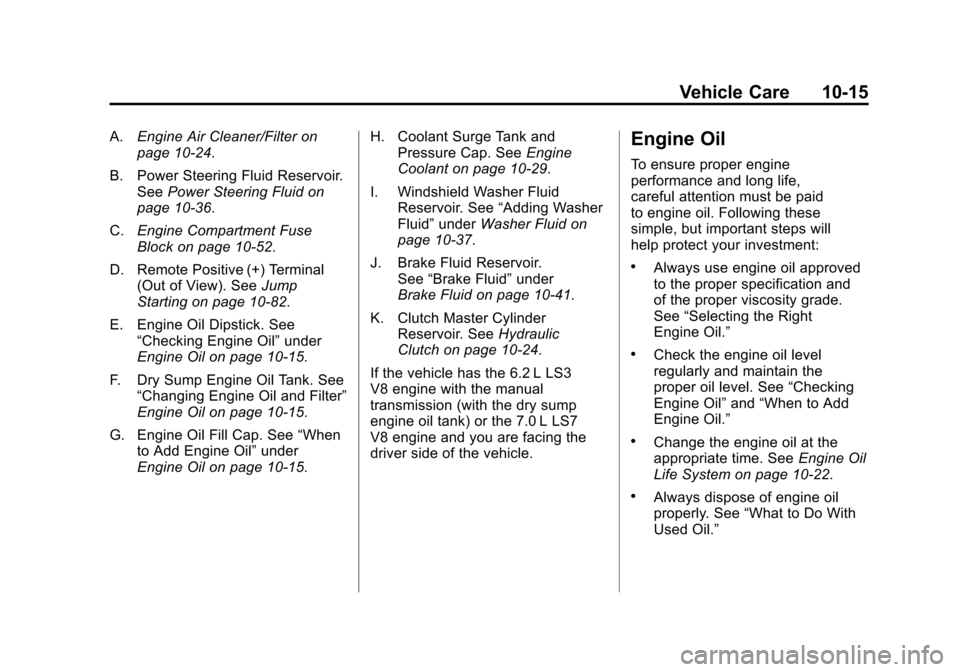
A.Engine Air Cleaner/Filter on
page 10‑24.
B. Power Steering Fluid Reservoir. See Power Steering Fluid on
page 10‑36.
C. Engine Compartment Fuse
Block on page 10‑52.
D. Remote Positive (+) Terminal (Out of View). See Jump
Starting on page 10‑82.
E. Engine Oil Dipstick. See “Checking Engine Oil” under
Engine Oil on page 10‑15.
F. Dry Sump Engine Oil Tank. See “Changing Engine Oil and Filter”
Engine Oil on page 10‑15.
G. Engine Oil Fill Cap. See “When
to Add Engine Oil” under
Engine Oil on page 10‑15. H. Coolant Surge Tank and
Pressure Cap. See Engine
Coolant on page 10‑29.
I. Windshield Washer Fluid Reservoir. See “Adding Washer
Fluid” under Washer Fluid on
page 10‑37.
J. Brake Fluid Reservoir. See “Brake Fluid” under
Brake Fluid on page 10‑41.
K. Clutch Master Cylinder Reservoir. See Hydraulic
Clutch on page 10‑24.
If the vehicle has the 6.2 L LS3
V8 engine with the manual
transmission (with the dry sump
engine oil tank) or the 7.0 L LS7
V8 engine and you are facing the
driver side of the vehicle.Engine Oil
To ensure proper engine
performance and long life,
careful attention must be paid
to engine oil. Following these
simple, but important steps will
help protect your investment:
.Always use engine oil approved
to the proper specification and
of the proper viscosity grade.
See “Selecting the Right
Engine Oil.”
.Check the engine oil level
regularly and maintain the
proper oil level. See “Checking
Engine Oil” and“When to Add
Engine Oil.”
.Change the engine oil at the
appropriate time. See Engine Oil
Life System on page 10‑22.
.Always dispose of engine oil
properly. See “What to Do With
Used Oil.”
Page 306 of 428
Black plate (22,1)Chevrolet Corvette Owner Manual - 2011
10-22 Vehicle Care
Engine Oil Life System
When to Change Engine Oil
This vehicle has a computer that
indicates when to change the
engine oil and filter. This is based
on engine revolutions and engine
temperature, and not on mileage.
Based on driving conditions, the
mileage at which an oil change is
indicated can vary considerably.
For the oil life system to work
properly, the system must be reset
every time the oil is changed.
Z06, ZR1, and Grand Sport models
have a racetrack‐ready dry sump
engine lubrication system. This
high‐performance system operates
differently than a standard engine
lubrication system and requires a
special procedure when changing
the engine oil and filter. SeeEngine
Oil on page 10‑15. When the system has calculated
that oil life has been diminished,
it indicates that an oil change is
necessary. A CHANGE ENGINE
OIL message comes on. Change
the oil as soon as possible within
the next 1 000 km (600 miles). It is
possible that, if driving under the
best conditions, the oil life system
might indicate that an oil change
is not necessary for up to a year.
The engine oil and filter must be
changed at least once a year and,
at this time, the system must be
reset. Your dealer has trained
service people who will perform this
work and reset the system. It is also
important to check the oil regularly
over the course of an oil drain
interval and keep it at the proper
level.
If the system is ever reset
accidentally, the oil must be
changed at 5 000 km (3,000 miles)
since the last oil change.
Remember to reset the oil life
system whenever the oil is changed.
How to Reset the Engine Oil
Life System
Reset the system whenever the
engine oil is changed so that the
system can calculate the next
engine oil change. To reset the
system:
1. Press the TRIP button so
the OIL LIFE percentage is
displayed.
2. Press RESET and hold for two seconds. OIL LIFE
REMAINING 100% will appear.
If the CHANGE ENGINE OIL
message comes back on when the
vehicle is started, the engine oil life
system has not reset. Repeat the
procedure.
Page 323 of 428
Black plate (39,1)Chevrolet Corvette Owner Manual - 2011
Vehicle Care 10-39
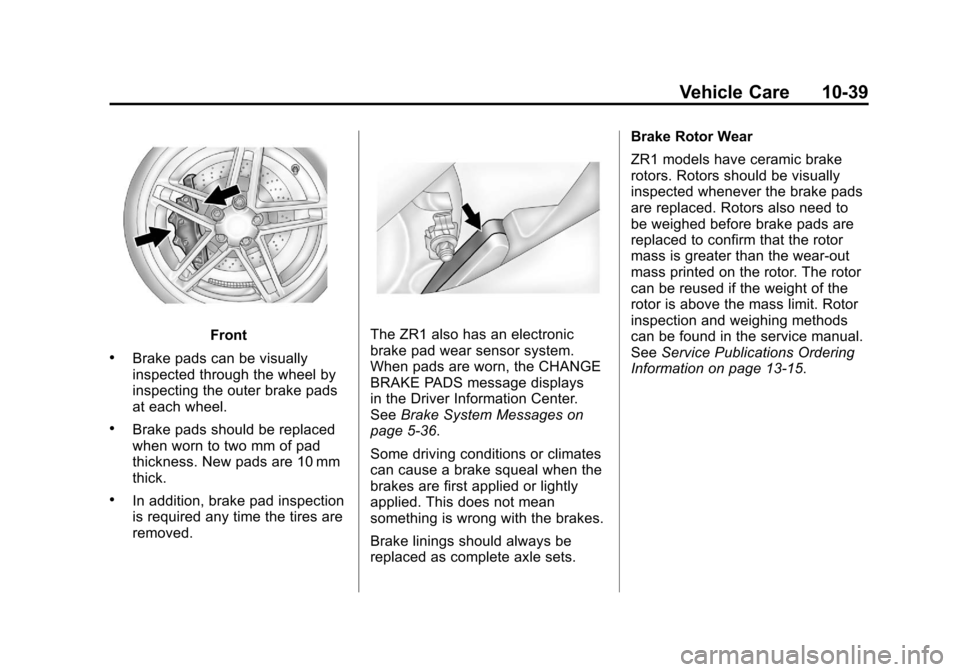
Front
.Brake pads can be visually
inspected through the wheel by
inspecting the outer brake pads
at each wheel.
.Brake pads should be replaced
when worn to two mm of pad
thickness. New pads are 10 mm
thick.
.In addition, brake pad inspection
is required any time the tires are
removed.
The ZR1 also has an electronic
brake pad wear sensor system.
When pads are worn, the CHANGE
BRAKE PADS message displays
in the Driver Information Center.
SeeBrake System Messages on
page 5‑36.
Some driving conditions or climates
can cause a brake squeal when the
brakes are first applied or lightly
applied. This does not mean
something is wrong with the brakes.
Brake linings should always be
replaced as complete axle sets. Brake Rotor Wear
ZR1 models have ceramic brake
rotors. Rotors should be visually
inspected whenever the brake pads
are replaced. Rotors also need to
be weighed before brake pads are
replaced to confirm that the rotor
mass is greater than the wear‐out
mass printed on the rotor. The rotor
can be reused if the weight of the
rotor is above the mass limit. Rotor
inspection and weighing methods
can be found in the service manual.
See
Service Publications Ordering
Information on page 13‑15.
Page 363 of 428
Black plate (79,1)Chevrolet Corvette Owner Manual - 2011
Vehicle Care 10-79
{WARNING
Rust or dirt on a wheel, or on the parts to which it is
fastened, can make wheel
nuts become loose after a
time. The wheel could come
off and cause a crash. When
you change a wheel, remove
any rust or dirt from places
where the wheel attaches to
the vehicle. In an emergency,
you can use a cloth or a paper
towel to do this; but be sure to
use a scraper or wire brush
later, if you need to, to get all
the rust or dirt off.Tightening Wheel Lug Nuts
{WARNING
Never use oil or grease on studs
or the threads of the wheel nuts.
If you do, the wheel nuts might
come loose and the wheel could
fall off, causing a crash.
{WARNING
Incorrect wheel nuts or improperly
tightened wheel nuts can cause
the wheel to become loose and
even come off. This could lead
to a crash. Be sure to use the
correct wheel nuts. If you have
to replace them, be sure to get
new GM original equipment
wheel nuts. Notice:
Improperly tightened
wheel nuts can lead to brake
pulsation and rotor damage.
To avoid expensive brake repairs,
evenly tighten the wheel nuts in
the proper sequence and to the
proper torque specification.
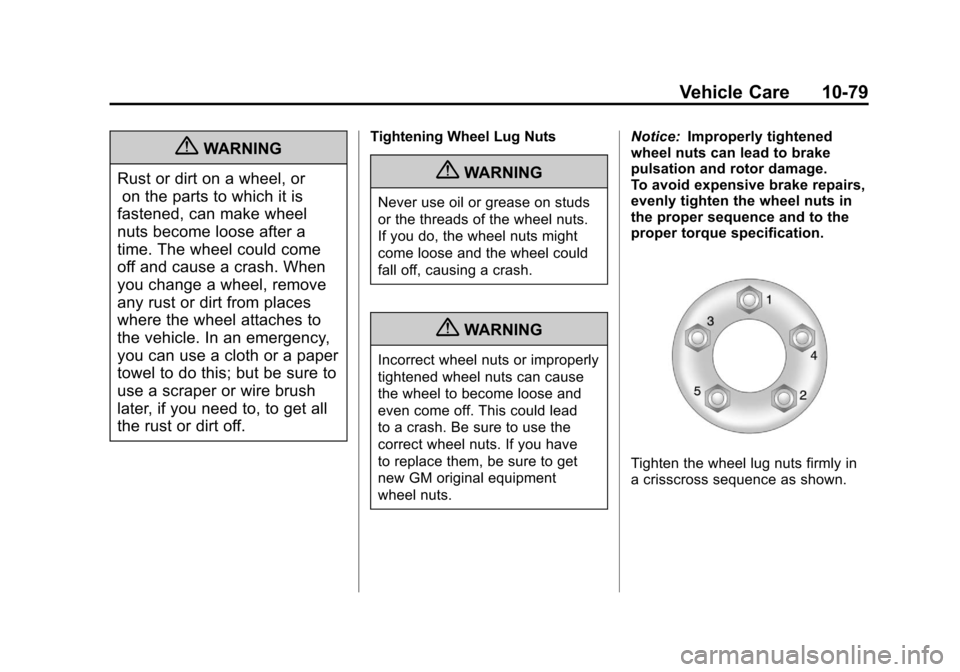
Tighten the wheel lug nuts firmly in
a crisscross sequence as shown.
Page 382 of 428
Black plate (4,1)Chevrolet Corvette Owner Manual - 2011
11-4 Service and Maintenance
.Fuel system inspection for
damage or leaks.
.Exhaust system and nearby heat
shields inspection for loose or
damaged components.
Additional Required Services
At Each Fuel Stop
.Engine oil level check.
SeeEngine Oil on page 10‑15.
.Engine coolant level check.
SeeEngine Coolant on
page 10‑29.
.Windshield washer fluid level
check. See Washer Fluid on
page 10‑37.
Once a Month
.Tire inflation check. See Tire
Pressure on page 10‑66.
.Tire wear inspection. See Tire
Inspection on page 10‑72 and
Tire Rotation on page 10‑72. Once a Year
.See
Starter Switch Check on
page 10‑44.
.See Automatic Transmission
Shift Lock Control Function
Check on page 10‑45.
.See Park Brake and P (Park)
Mechanism Check on
page 10‑45.
.Accelerator pedal check for
damage, high effort, or binding.
Replace if needed.
.Underbody flushing service.
Once Every Two Years
.Clutch hydraulic system drain,
flush, and refill. Service at a
regular service interval every
two years. This service can
be complex; have your dealer
perform this service. See
Hydraulic Clutch on page 10‑24. First Engine Oil Change After
Every 40 000 km/25,000 Miles
.Passenger compartment
air filter replacement (or every
24 months, whichever occurs
first). More frequent replacement
may be needed if you drive
in areas with heavy traffic,
areas with poor air quality,
or areas with high dust levels.
Replacement may also be
needed if you notice reduced
air flow, windows fogging up,
or odors. Your dealer can help
you determine when it is the
right time to replace the filter.
.ZR1 Only: Engine air cleaner
filter replacement. See
Engine
Air Cleaner/Filter on page 10‑24.
Page 404 of 428
Black plate (8,1)Chevrolet Corvette Owner Manual - 2011
13-8 Customer Information
Roadside Assistance
Program (United States
and Canada)
For U.S.‐purchased vehicles,
call1‐800‐243‐8872; (Text
Telephone (TTY): 1‐888‐889‐2438).
For Canadian‐purchased vehicles,
call 1-800-268-6800.
Service is available 24 hours a day,
365 days a year.
Calling for Assistance
When calling Roadside Assistance,
have the following information
ready:
.Your name, home address, and
home telephone number
.Telephone number of your
location
.Location of the vehicle
.Model, year, color, and license
plate number of the vehicle
.Odometer reading, Vehicle
Identification Number (VIN), and
delivery date of the vehicle
.Description of the problem
Coverage
Services are provided up to
5 years/160 000 km (100,000 miles),
whichever comes first.
In the U.S., anyone driving the
vehicle is covered. In Canada, a
person driving the vehicle without
permission from the owner is not
covered.
Roadside Assistance is not a part of
the New Vehicle Limited Warranty.
Chevrolet and General Motors of
Canada Limited reserve the right to
make any changes or discontinue
the Roadside Assistance program
at any time without notification. Chevrolet and General Motors of
Canada Limited reserve the right
to limit services or payment to an
owner or driver if they decide the
claims are made too often, or the
same type of claim is made many
times.
Services Provided
.Emergency Fuel Delivery:
Delivery of enough fuel for the
vehicle to get to the nearest
service station.
.Lock‐Out Service:
Service to
unlock the vehicle if you are
locked out. A remote unlock may
be available if you have OnStar.
For security reasons, the driver
must present identification
before this service is given.
.Emergency Tow From a Public
Road or Highway: Tow to the
nearest Chevrolet dealer for
warranty service, or if the vehicle
was in a crash and cannot be
driven. Assistance is also given
when the vehicle is stuck in the
sand, mud, or snow.