steering CHEVROLET CORVETTE 2011 6.G Owner's Guide
[x] Cancel search | Manufacturer: CHEVROLET, Model Year: 2011, Model line: CORVETTE, Model: CHEVROLET CORVETTE 2011 6.GPages: 428, PDF Size: 6.63 MB
Page 124 of 428
Black plate (4,1)Chevrolet Corvette Owner Manual - 2011
5-4 Instruments and Controls
To select tracks on a CD:
.Pressworxto go to the next
or to the previous track when a
CD is playing.
.Press and holdworxfor
more than 2 seconds to scan
the current CD. The CD goes
to the next track, plays the first
10 seconds, then goes to the
next track. Press again to stop
scanning.
.Press and holdworxfor
more than 4 seconds to scan all
of the CDs loaded. The CD goes
to the next CD, plays the first
10 seconds of each track, then
goes to the next CD. Press
again to stop scanning.
+
e−e(Volume): Press to
increase or to decrease the radio
volume.
1 to 6 (Preset Pushbuttons):
Press to play stations that are
programmed on the radio preset
pushbuttons.
Horn
Press near or on the horn symbols
on the steering wheel pad to sound
the horn.
Windshield Wiper/Washer
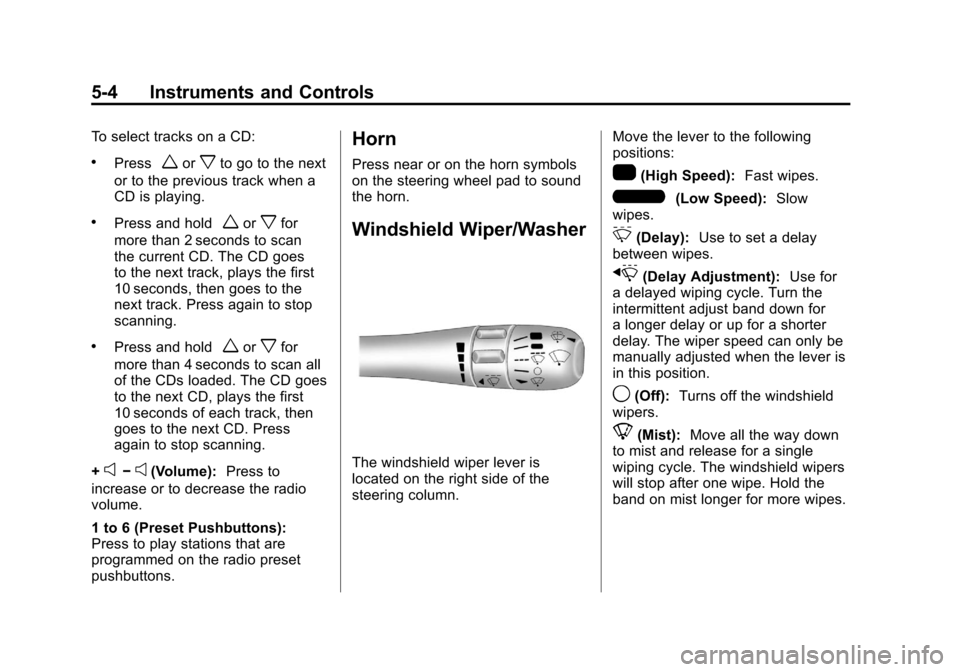
The windshield wiper lever is
located on the right side of the
steering column. Move the lever to the following
positions:
1(High Speed):
Fast wipes.
6(Low Speed):Slow
wipes.
&(Delay): Use to set a delay
between wipes.
x(Delay Adjustment): Use for
a delayed wiping cycle. Turn the
intermittent adjust band down for
a longer delay or up for a shorter
delay. The wiper speed can only be
manually adjusted when the lever is
in this position.
9(Off): Turns off the windshield
wipers.
8(Mist): Move all the way down
to mist and release for a single
wiping cycle. The windshield wipers
will stop after one wipe. Hold the
band on mist longer for more wipes.
Page 125 of 428
Black plate (5,1)Chevrolet Corvette Owner Manual - 2011
Instruments and Controls 5-5
Heavy snow or ice can overload
the wipers. If this occurs, a circuit
breaker will stop the wipers until the
motor cools. Clear all ice and snow
from the wiper blades before using
them. If frozen to the windshield,
carefully loosen them or thaw them.
Damaged wiper blades should
be replaced. SeeWiper Blade
Replacement on page 10‑46.
Windshield Washer
The lever on the right side of the
steering column also controls the
windshield washer. There is a
button at the end of the lever.
To spray washer fluid on the
windshield, press the button and
hold it. The washer will spray until
you release the button. The wipers
will continue to clear the window for
about six seconds after the button
is released and then stop or return
to your preset speed.
{WARNING
In freezing weather, do not
use your washer until the
windshield is warmed. Otherwise
the washer fluid can form ice on
the windshield, blocking your
vision.
If the fluid in the windshield washer
fluid reservoir is low, the message
CHECK WASHER FLUID will
appear on the Driver Information
Center (DIC) display. It will take
15 seconds after the bottle is
refilled for this message to turn
off. For information on the correct
washer fluid to use, see Washer
Fluid on page 10‑37 and
Recommended Fluids and
Lubricants on page 11‑6.
Compass
Compass Operation
With the compass feature on, each
time the vehicle is started, the
compass will take a few seconds
to adjust and display the current
compass heading. For example,
NE is displayed for north-east.
Compass Calibration
PressPonce to turn the compass
display on or off.
If after several seconds the display
does not show a compass heading,
there may be a strong magnetic
field interfering with the compass.
Interference can be caused by a
magnetic antenna mount, note
pad holder or similar object. If the
letter C or CAL appears in the
compass window, the compass
needs calibration.
Page 140 of 428
Black plate (20,1)Chevrolet Corvette Owner Manual - 2011
5-20 Instruments and Controls
.Make sure to fuel the vehicle
with quality fuel. Poor fuel quality
causes the engine not to run as
efficiently as designed and may
cause: stalling after start-up,
stalling when the vehicle is
changed into gear, misfiring,
hesitation on acceleration,
or stumbling on acceleration.
These conditions might go away
once the engine is warmed up.
If one or more of these
conditions occurs, change
the fuel brand used. It will
require at least one full tank
of the proper fuel to turn the
light off.
SeeRecommended Fuel on
page 9‑48.
If none of the above have made
the light turn off, your dealer can
check the vehicle. The dealer
has the proper test equipment
and diagnostic tools to fix any
mechanical or electrical problems
that might have developed.Emissions Inspection and
Maintenance Programs
Some state/provincial and
local governments may have
programs to inspect the on-vehicle
emission control equipment For
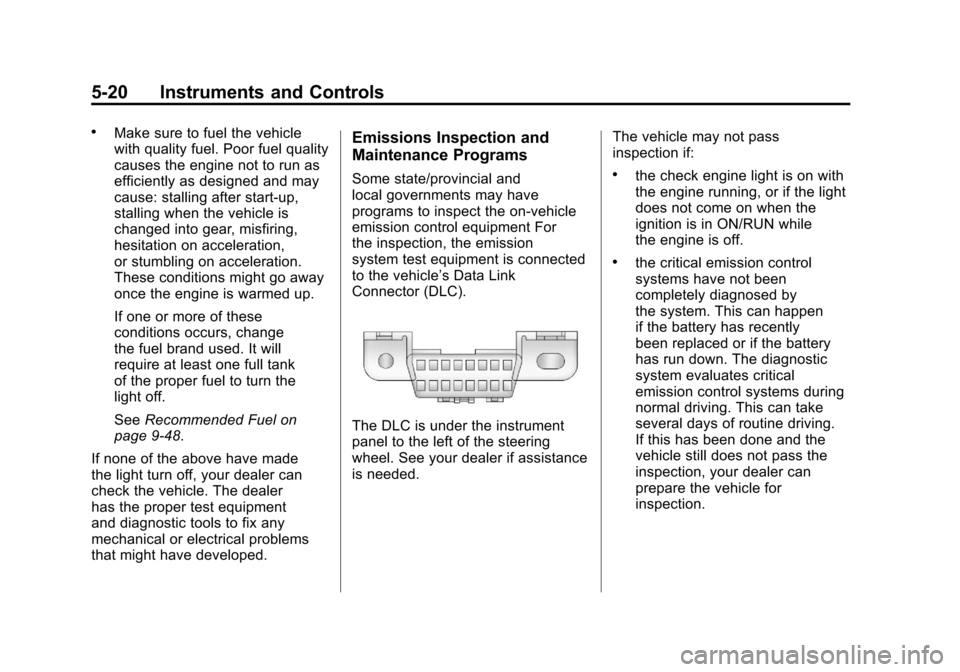
the inspection, the emission
system test equipment is connected
to the vehicle’s Data Link
Connector (DLC).
The DLC is under the instrument
panel to the left of the steering
wheel. See your dealer if assistance
is needed. The vehicle may not pass
inspection if:
.the check engine light is on with
the engine running, or if the light
does not come on when the
ignition is in ON/RUN while
the engine is off.
.the critical emission control
systems have not been
completely diagnosed by
the system. This can happen
if the battery has recently
been replaced or if the battery
has run down. The diagnostic
system evaluates critical
emission control systems during
normal driving. This can take
several days of routine driving.
If this has been done and the
vehicle still does not pass the
inspection, your dealer can
prepare the vehicle for
inspection.
Page 153 of 428
Black plate (33,1)Chevrolet Corvette Owner Manual - 2011
Instruments and Controls 5-33
Within each mode, the display, can
be further customized by pressing
the PAGE button. Pressing this
button in each mode will turn off
and on the following:
.Street Mode—No tachometer,
circular tachometer, and linear
tachometer.
.Track Modes 1 and 2 —No
minor gauge, coolant
temperature, transmission
oil temperature, engine oil
temperature, engine oil
pressure, and boost gauge.
While in Track Mode 1 or 2, the
maximum G value achieved
during the current ignition cycle
can be displayed by pressing
and holding the PAGE button.
The maximum G display will be
shown until the PAGE button is
released. The maximum G value
display will be identical to the
normal G value display, except
the maximum G gauge digits (X.XX G) and corresponding
G gauge bar will overwrite the
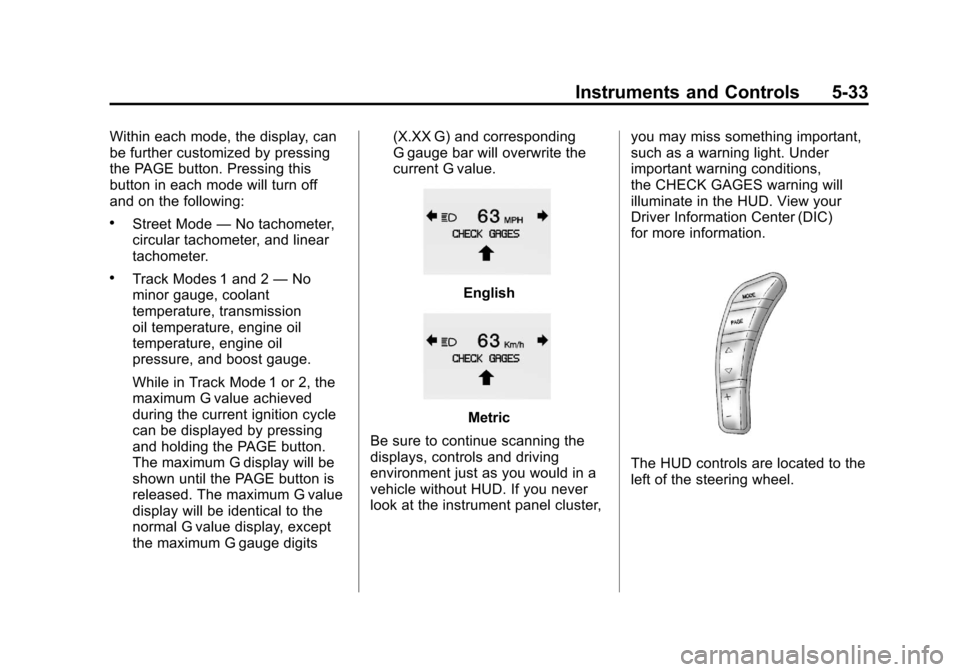
current G value.English
Metric
Be sure to continue scanning the
displays, controls and driving
environment just as you would in a
vehicle without HUD. If you never
look at the instrument panel cluster, you may miss something important,
such as a warning light. Under
important warning conditions,
the CHECK GAGES warning will
illuminate in the HUD. View your
Driver Information Center (DIC)
for more information.
The HUD controls are located to the
left of the steering wheel.
Page 174 of 428
Black plate (54,1)Chevrolet Corvette Owner Manual - 2011
5-54 Instruments and Controls
If this message is displayed during
normal vehicle operation on flat
roads, the vehicle may need
service. See your dealer for an
inspection.
If driving in a performance or
competitive manner, the use of
(S) Sport Automatic Mode or
(S) Sport Manual Paddle Shift
gear selection is recommended.
SeeAutomatic Transmission on
page 9‑28 for more information.
To acknowledge the message, press
the RESET button. The message
reappears every 10 minutes until
this condition changes. If you do
not press the RESET button, the
message remains on the display
until the condition changes.
UPSHIFT NOW
See Manual Transmission on
page 9‑32.
Vehicle Reminder
Messages
ACCESSORY MODE ON
This message displays when the
vehicle is in accessory mode.
ICE POSSIBLE
This message displays when
the outside air temperature is
cold enough to create icy road
conditions. Adjust your driving
accordingly.
OPTIONS UNAVAILABLE
This message displays for a
few seconds if a keyless access
transmitter that is not labelled 1 or 2
is used and you try to personalize
the features on the vehicle by
pressing the OPTION button.
The personalization system will
not recognize the transmitter and
the DIC will not display the current
driver number or the menus
used to set personalizations. The personalization features will
then be set to the default states.
See
Vehicle Personalization on
page 5‑55 for more information.
SET PARK BRAKE FOR SEAT
RECALL
If the vehicle has a manual
transmission, this message
displays if you try to recall the
memory positions when the ignition
is on and the parking brake is not
set. If the vehicle is on, you must
set the parking brake in order for
the memory positions to recall.
See“Memory Seat, Mirrors and
Steering Wheel” underPower Seat
Adjustment on page 3‑3 for more
information.
Washer Fluid Messages
CHECK WASHER FLUID
See Washer Fluid on page 10‑37.
Page 175 of 428
Black plate (55,1)Chevrolet Corvette Owner Manual - 2011
Instruments and Controls 5-55
Vehicle
Personalization
Many features on your vehicle can
be personalized. This means that
the operation of these features
can be set to operate differently
depending on who is driving the
vehicle. See“Personal Options”
later in this section for the features
that you can personalize.
The personalization settings for
other features are automatically
updated and saved as the driver
adjusts them. These include the
following settings and presets:
.The radio presets, tone, volume,
fade, balance, equalization (EQ)
settings and source (radio
or CD)
.The last climate control setting
.The Head-Up Display (HUD)
position and dimming level,
if your vehicle has this feature
.The instrument panel cluster
dimming level and last selected
DIC display
Separate personalization settings
are saved for two different drivers.
One of the keyless access
transmitters is assigned to driver 1.
The other is assigned to driver 2.
The back of the keyless access
transmitters are labelled 1 or 2 to
correspond to each driver.
The current driver's preferences are
recalled when one of the following
occurs:
.The lock or unlock button on the
keyless access transmitter,
labelled 1 or 2, is pressed.
.The appropriate memory
button, 1 or 2, located on
the driver's door is pressed.
See “Memory Seat, Mirrors and
Steering Wheel” underPower
Seat Adjustment on page 3‑3
for more information.
.A valid keyless access
transmitter is detected upon
opening the driver's door.
If more than one valid keyless
access transmitter is detected upon
opening the driver's door, the driver
preferences for the lowest driver
number will be recalled.
If a keyless access transmitter
that is not labelled 1 or 2 is used,
the personalization system will not
recognize the transmitter. The Driver
Information Center (DIC) will not
display a current driver number
and the features that are normally
programmed through the DIC will be
set to the default states. Also, if the
OPTION button is pressed, the DIC
does not display the menus used to
set personalizations, but instead
displays OPTIONS UNAVAILABLE
for a few seconds.
Page 177 of 428
Black plate (57,1)Chevrolet Corvette Owner Manual - 2011
Instruments and Controls 5-57
Auto Memory Recall (Automatic
Transmission only):If your
automatic transmission vehicle
has the memory package, you may
have this option. This option allows
the driver's seat, the telescopic
steering column, if your vehicle
has this feature, and the outside
rearview mirrors to automatically
move to the current driver's set
position when the engine starts.
Press the OPTION button until
AUTO MEMORY RECALL appears
on the display, then press the
RESET button to scroll through the
following modes:
.YES
.NO (default)
If you choose YES, the driver's seat,
the outside rearview mirrors and the
telescopic steering column, if your
vehicle has this feature, positions
are recalled when you turn the
ignition on.
If you choose NO, this option will
turn off. When the mode you want is
selected, press the OPTION button
to set your choice and advance to
the next personal option.
Auto Exit Recall:
If your vehicle
has the memory package, you may
have this option. This option allows
the driver's seat and telescopic
steering column, if your vehicle has
this feature, to automatically move
to the current driver's exit position
when one of the following occurs:
.The vehicle is turned off or in
Retained Accessory Power
(RAP) or accessory mode and
the driver's door is opened.
.The vehicle is turned off or in
RAP and the unlock button on
the keyless access transmitter is
pressed.
In order for the Auto Exit Recall
feature to work on an automatic
transmission vehicle, the vehicle
must be in P (Park). On a manual
transmission vehicle, the parking
brake must be set. Press the OPTION button until
AUTO EXIT RECALL appears on
the display, then press the RESET
button to scroll through the following
modes:
.YES
.NO (default)
If you choose YES, when you turn
the ignition off and open the driver's
door or press the unlock button
on the keyless access transmitter,
the seat and the telescopic steering
wheel, if your vehicle has this
feature, will return to their stored
exit positions for an easy exit or an
easy entrance when returning to the
vehicle.
The seat and steering wheel will
only return to the stored driving
position if you press the appropriate
memory button or activate the auto
memory recall feature.
If you choose NO, this option will
turn off.
Page 191 of 428
Black plate (1,1)Chevrolet Corvette Owner Manual - 2011
Lighting 6-1
Lighting
Exterior Lighting
Exterior Lamp Controls . . . . . . . . 6-1
Exterior Lamps OffReminder . . . . . . . . . . . . . . . . . . . . 6-2
Headlamp High/Low-Beam Changer . . . . . . . . . . . . . . . . . . . . . 6-2
Flash-to-Pass . . . . . . . . . . . . . . . . . 6-2
Daytime Running Lamps (DRL) . . . . . . . . . . . . . . . . 6-2
Twilight Sentinel . . . . . . . . . . . . . . 6-3
Hazard Warning Flashers . . . . . 6-4
Turn and Lane-Change Signals (Auto Signal) . . . . . . . . . . . . . . . . 6-4
Fog Lamps . . . . . . . . . . . . . . . . . . . . 6-5
Interior Lighting
Instrument Panel Illumination Control . . . . . . . . . . . . . . . . . . . . . . 6-5
Courtesy Lamps . . . . . . . . . . . . . . 6-6
Reading Lamps . . . . . . . . . . . . . . . 6-6
Lighting Features
Entry/Exit Lighting . . . . . . . . . . . . . 6-6
Battery Power Protection . . . . . . 6-7
Exterior Lighting Battery Saver . . . . . . . . . . . . . . . . . . . . . . . . 6-7
Exterior Lighting
Exterior Lamp Controls
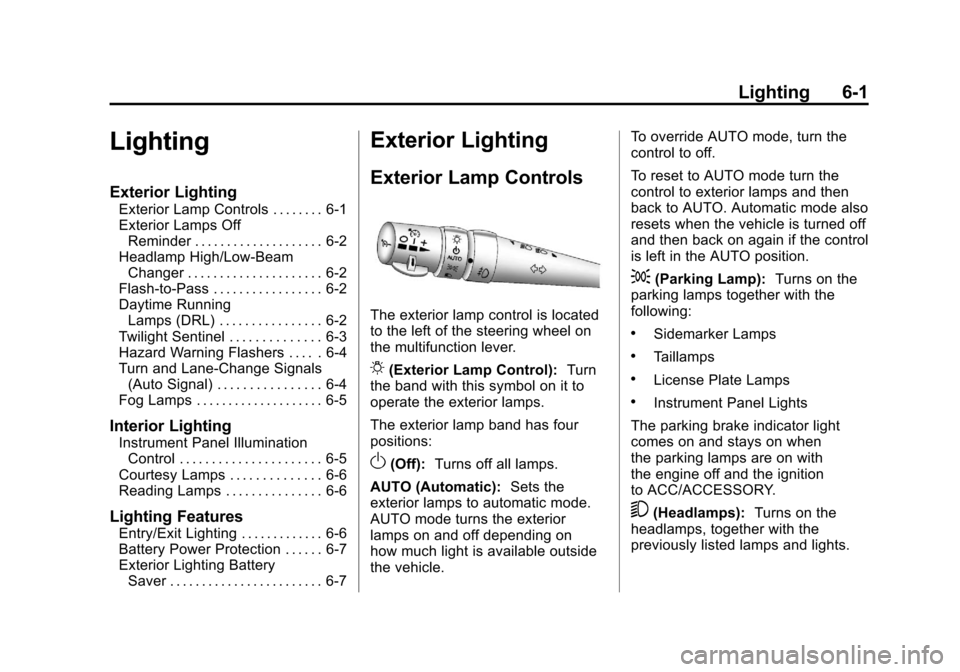
The exterior lamp control is located
to the left of the steering wheel on
the multifunction lever.
O(Exterior Lamp Control): Turn
the band with this symbol on it to
operate the exterior lamps.
The exterior lamp band has four
positions:
O(Off): Turns off all lamps.
AUTO (Automatic): Sets the
exterior lamps to automatic mode.
AUTO mode turns the exterior
lamps on and off depending on
how much light is available outside
the vehicle. To override AUTO mode, turn the
control to off.
To reset to AUTO mode turn the
control to exterior lamps and then
back to AUTO. Automatic mode also
resets when the vehicle is turned off
and then back on again if the control
is left in the AUTO position.
;(Parking Lamp):
Turns on the
parking lamps together with the
following:
.Sidemarker Lamps
.Taillamps
.License Plate Lamps
.Instrument Panel Lights
The parking brake indicator light
comes on and stays on when
the parking lamps are on with
the engine off and the ignition
to ACC/ACCESSORY.
5(Headlamps): Turns on the
headlamps, together with the
previously listed lamps and lights.
Page 205 of 428
Black plate (7,1)Chevrolet Corvette Owner Manual - 2011
Infotainment System 7-7
Finding a Station
BAND:Press to switch between
FM1, FM2, AM, XM1 or XM2.
O e(Tune): Turn to select radio
stations.
tSEEKu: Press to go to the
previous or to the next station and
stay there.
The radio only stops at stations with
a strong signal.
tSCANu: Press and holdtorufor 2 seconds until
FREQUENCY SCAN displays.
The radio goes to a station, plays
for a few seconds, then goes on
to the next station. Press
toru
again to stop scanning. To scan preset stations:
Press and hold
torufor
four seconds until PRESET
SCAN displays. The radio goes to
the next preset station, plays for a
few seconds, then goes to the next
preset station. Press
toruagain
or one of the pushbuttons to stop
scanning presets.
The radio only scans stations with a
strong signal.
1–6 (Preset Pushbuttons):
Press to play stations that are
programmed to the radio preset
pushbuttons.
Storing Radio Stations
Drivers are encouraged to store
radio station while the vehicle is
parked, see Defensive Driving on
page 9‑2. Tune to stored radio
stations using the presets, favorites
button, and steering wheel controls,
if the vehicle has this feature.
Up to 30 stations (6 FM1, 6 FM2,
and 6 AM, 6 XM1 and 6 XM2),
and equalization settings for each
station can be programmed on the
six numbered pushbuttons.
To set presets:
1. Tune to a radio station.
2. Press AUTO EQ to select the equalization.
3. Press and hold one of the six numbered pushbuttons until the
radio beeps once.
4. Repeat the steps for each pushbutton.
Page 207 of 428
Black plate (9,1)Chevrolet Corvette Owner Manual - 2011
Infotainment System 7-9
SCAN:To scan the stations within
a category:
1. Press CAT. The last selected
category displays.
2. Turn the
O eknob to select a
category.
3. Press and hold
toruuntil
a beep sounds and SCAN
CATEGORY displays. The radio
begins scanning the stations in
the category.
4. Press
toruto stop scanning.
Storing XM Channels
Drivers are encouraged to store
XM channels while the vehicle is
parked, see Defensive Driving on
page 9‑2. Tune to stored radio
stations using the presets, favorites
button, and steering wheel controls,
if the vehicle has this feature.
Up to 30 stations (6 FM1, 6 FM2,
and 6 AM, 6 XM1 and 6 XM2),
and equalization settings for each
station can be programmed on the
six numbered pushbuttons.
To set presets:
1. Tune to a channel.
2. Press AUTO EQ to select the equalization.
3. Press and hold one of the six numbered pushbuttons until the
radio beeps once.
4. Repeat the steps for each pushbutton.
XM Radio Messages
XL (Explicit Language
Channels): These channels,
or any others, can be blocked by
calling 1-800-929-2100 in the U.S.
and 1-877-438-9677 in Canada.
Updating: The encryption code in
the receiver is being updated, and
no action is required. This process
should take no longer than
30 seconds.
No Signal: The system is
functioning correctly, but the
vehicle is in a location that is
blocking the XM signal. When
the vehicle is moved into an open
area, the signal should return.
Loading XM: The audio system
is acquiring and processing audio
and text data. No action is needed.
This message should disappear
shortly.
CH Off Air: This channel is not
currently in service. Tune in to
another channel.