battery CHEVROLET CORVETTE 2011 6.G Owners Manual
[x] Cancel search | Manufacturer: CHEVROLET, Model Year: 2011, Model line: CORVETTE, Model: CHEVROLET CORVETTE 2011 6.GPages: 428, PDF Size: 6.63 MB
Page 7 of 428
Black plate (1,1)Chevrolet Corvette Owner Manual - 2011
In Brief 1-1
In Brief
Instrument Panel
Instrument Panel . . . . . . . . . . . . . . 1-2
Initial Drive Information
Initial Drive Information . . . . . . . . 1-4
Remote Keyless Entry (RKE)System . . . . . . . . . . . . . . . . . . . . . . 1-4
Door Locks . . . . . . . . . . . . . . . . . . . 1-5
Trunk Release . . . . . . . . . . . . . . . . 1-6
Windows . . . . . . . . . . . . . . . . . . . . . . 1-6
Seat Adjustment . . . . . . . . . . . . . . 1-6
Memory Features . . . . . . . . . . . . . 1-8
Safety Belt . . . . . . . . . . . . . . . . . . . 1-10
Sensing System for Passenger Airbag . . . . . . . . . . 1-10
Mirror Adjustment . . . . . . . . . . . . 1-11
Steering Wheel Adjustment . . . . . . . . . . . . . . . . . 1-11 Interior Lighting . . . . . . . . . . . . . . 1-12
Exterior Lighting . . . . . . . . . . . . . 1-13
Windshield Wiper/Washer . . . . 1-13
Climate Controls . . . . . . . . . . . . . 1-14
Transmission . . . . . . . . . . . . . . . . 1-15
Vehicle Features
Radio(s) . . . . . . . . . . . . . . . . . . . . . 1-16
Satellite Radio . . . . . . . . . . . . . . . 1-17
Portable Audio Devices . . . . . . 1-17
Bluetooth
®. . . . . . . . . . . . . . . . . . . 1-18
Steering Wheel Controls . . . . . 1-18
Cruise Control . . . . . . . . . . . . . . . 1-19
Navigation System . . . . . . . . . . . 1-19
Driver Information Center (DIC) . . . . . . . . . . . . . . . 1-19
Power Outlets . . . . . . . . . . . . . . . 1-20
Roof Panel . . . . . . . . . . . . . . . . . . 1-20
Convertible . . . . . . . . . . . . . . . . . . 1-21
Performance and Maintenance
Traction Control
System (TCS) . . . . . . . . . . . . . . 1-21
Towing . . . . . . . . . . . . . . . . . . . . . . . 1-21
Tire Pressure Monitor . . . . . . . . 1-22
Z06, Z16, and ZR1 Features . . . . . . . . . . . . . . . . . . . 1-22
Engine Oil Life System . . . . . . 1-23
Driving for Better Fuel Economy . . . . . . . . . . . . . . . . . . . 1-23
Battery . . . . . . . . . . . . . . . . . . . . . . . 1-24
Roadside Assistance Program . . . . . . . . . . . . . . . . . . . . 1-24
OnStar
®. . . . . . . . . . . . . . . . . . . . . 1-25
Page 11 of 428
Black plate (5,1)Chevrolet Corvette Owner Manual - 2011
In Brief 1-5
Door Locks
From the outside, press theQorK
button on the keyless access
transmitter.
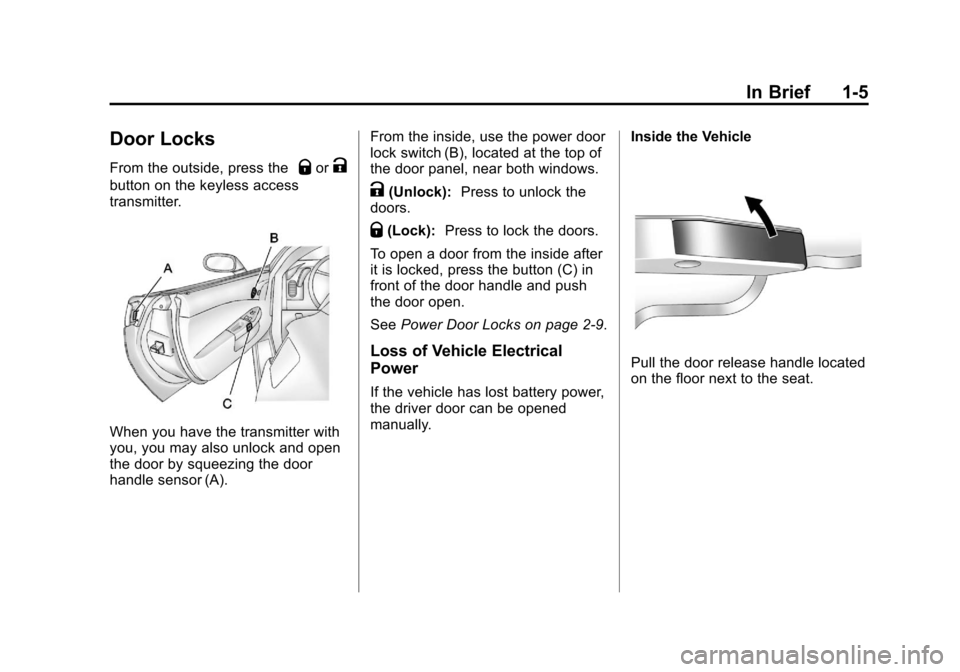
When you have the transmitter with
you, you may also unlock and open
the door by squeezing the door
handle sensor (A).From the inside, use the power door
lock switch (B), located at the top of
the door panel, near both windows.
K(Unlock):
Press to unlock the
doors.
Q(Lock): Press to lock the doors.
To open a door from the inside after
it is locked, press the button (C) in
front of the door handle and push
the door open.
See Power Door Locks on page 2‑9.
Loss of Vehicle Electrical
Power
If the vehicle has lost battery power,
the driver door can be opened
manually. Inside the Vehicle
Pull the door release handle located
on the floor next to the seat.
Page 25 of 428
Black plate (19,1)Chevrolet Corvette Owner Manual - 2011
In Brief 1-19
Cruise Control
The cruise controls are located at
the end of the multifunction lever.
9:Turns the system off.
R:Turns the system on.
+:Use to make the vehicle
accelerate or resume a previously
set speed.
T: Press the button at the end of
the lever to set the speed.
See Cruise Control on page 9‑44.
Navigation System
The vehicle's navigation system
(if equipped) provides detailed maps
of most major freeways and roads
throughout the United States and
Canada. After a destination has
been set, the system provides
turn-by-turn instructions for reaching
the destination. In addition, the
system can help locate a variety
of points of interest (POI), such
as banks, airports, restaurants,
and more.
See the Navigation System manual
for more information.
Driver Information
Center (DIC)
The DIC display is located at the
bottom of the instrument panel
cluster. It shows the status of
many vehicle systems and enables
access to the personalization menu.
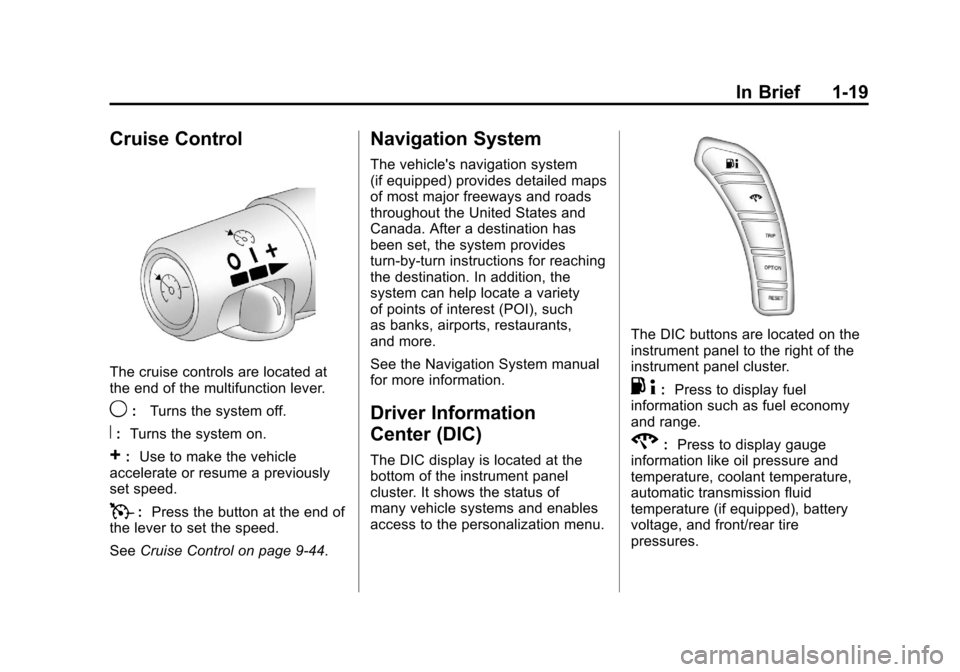
The DIC buttons are located on the
instrument panel to the right of the
instrument panel cluster.
.4:Press to display fuel
information such as fuel economy
and range.
2: Press to display gauge
information like oil pressure and
temperature, coolant temperature,
automatic transmission fluid
temperature (if equipped), battery
voltage, and front/rear tire
pressures.
Page 28 of 428
Black plate (22,1)Chevrolet Corvette Owner Manual - 2011
1-22 In Brief
Tire Pressure Monitor
This vehicle may have a Tire
Pressure Monitor System (TPMS).
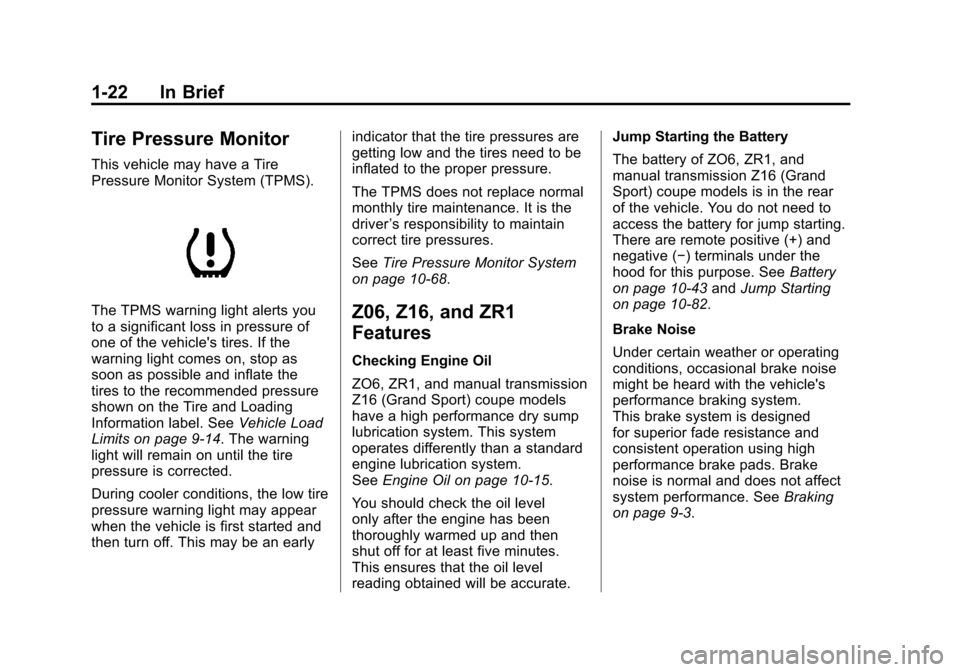
The TPMS warning light alerts you
to a significant loss in pressure of
one of the vehicle's tires. If the
warning light comes on, stop as
soon as possible and inflate the
tires to the recommended pressure
shown on the Tire and Loading
Information label. SeeVehicle Load
Limits on page 9‑14. The warning
light will remain on until the tire
pressure is corrected.
During cooler conditions, the low tire
pressure warning light may appear
when the vehicle is first started and
then turn off. This may be an early indicator that the tire pressures are
getting low and the tires need to be
inflated to the proper pressure.
The TPMS does not replace normal
monthly tire maintenance. It is the
driver
’s responsibility to maintain
correct tire pressures.
See Tire Pressure Monitor System
on page 10‑68.Z06, Z16, and ZR1
Features
Checking Engine Oil
ZO6, ZR1, and manual transmission
Z16 (Grand Sport) coupe models
have a high performance dry sump
lubrication system. This system
operates differently than a standard
engine lubrication system.
See Engine Oil on page 10‑15.
You should check the oil level
only after the engine has been
thoroughly warmed up and then
shut off for at least five minutes.
This ensures that the oil level
reading obtained will be accurate. Jump Starting the Battery
The battery of ZO6, ZR1, and
manual transmission Z16 (Grand
Sport) coupe models is in the rear
of the vehicle. You do not need to
access the battery for jump starting.
There are remote positive (+) and
negative (−) terminals under the
hood for this purpose. See
Battery
on page 10‑43 andJump Starting
on page 10‑82.
Brake Noise
Under certain weather or operating
conditions, occasional brake noise
might be heard with the vehicle's
performance braking system.
This brake system is designed
for superior fade resistance and
consistent operation using high
performance brake pads. Brake
noise is normal and does not affect
system performance. See Braking
on page 9‑3.
Page 30 of 428
Black plate (24,1)Chevrolet Corvette Owner Manual - 2011
1-24 In Brief
.Replace the vehicle's tires with
the same TPC Spec number
molded into the tire's sidewall
near the size.
.Follow recommended scheduled
maintenance.
Premium Fuel
This vehicle's engine was designed
to use premium unleaded gasoline.
See Recommended Fuel on
page 9‑48.
Battery
This vehicle has a maintenance free
battery. See Battery on page 10‑43
and Jump Starting on page 10‑82.
For ZO6, ZR1, and manual
transmission Z16 (Grand Sport)
coupe models the battery is
located in the rear hatch/trunk
area. Access to the battery is
not necessary to jump start the
vehicle. There are positive (+) and
negative (−) terminals in the engine
compartment.
Roadside Assistance
Program
U.S.: 1-800-243-8872
TTY Users: 1-888-889-2438
Canada: 1-800-268-6800
As the owner of a new Chevrolet,
you are automatically enrolled in
the Roadside Assistance program.
This program provides technically
trained advisors who are available
24 hours a day, 365 days a year,
to give minor repair information or
make towing arrangements.
For more information see Roadside
Assistance Program (United States
and Canada) on page 13‑8 or
Roadside Assistance Program
(Mexico) on page 13‑10. Roadside Assistance and OnStar
If you have a current OnStar
subscription, press theQbutton
and the current GPS location will
be sent to an OnStar advisor who
will assess your problem, contact
Roadside Assistance, and relay
your exact location to get the help
you need.
Online Owner Center
The Online Owner Center is a
complimentary service that includes
online service reminders, vehicle
maintenance tips, online owner
manual, special privileges,
and more.
Sign up today at:
www.chevyownercenter.com
(U.S.) or www.gm.ca (Canada).
Page 32 of 428
Black plate (26,1)Chevrolet Corvette Owner Manual - 2011
1-26 In Brief
The OnStar system can record
and transmit vehicle information.
This information is automatically
sent to an OnStar call center when
Qis pressed,]is pressed, or if
the airbags or ACR system deploy.
This information usually includes
the vehicle's GPS location and,
in the event of a crash, additional
information regarding the crash that
the vehicle was involved in (e.g. the
direction from which the vehicle was
hit). When the virtual advisor feature
of OnStar hands-free calling is
used, the vehicle also sends OnStar
the vehicle's GPS location so they
can provide services where it is
located.
Location information about the
vehicle is only available if the GPS
satellite signals are unobstructed
and available. The vehicle must have a working
electrical system, including
adequate battery power, for the
OnStar equipment to operate.
There are other problems OnStar
cannot control that may prevent
OnStar from providing OnStar
service at any particular time or
place. Some examples are damage
to important parts of the vehicle in
a crash, hills, tall buildings, tunnels,
weather or wireless phone network
congestion.
OnStar Steering Wheel
Controls
This vehicle may have a Talk/Mute
button that can be used to interact
with OnStar hands-free calling.
See
Steering Wheel Controls on
page 5‑3 for more information. On some vehicles, the mute button
can be used to dial numbers into
voice mail systems, or to dial phone
extensions. See the OnStar Owner's
Guide for more information.
Your Responsibility
Increase the volume of the radio if
the OnStar advisor cannot be heard.
If the light next to the OnStar
buttons is red, the system may
not be functioning properly.
Press
Qand request a vehicle
diagnostic. If the light appears clear
(no light is appearing), your OnStar
subscription has expired and all
services have been deactivated.
Press
Qto confirm that the OnStar
equipment is active.
Page 35 of 428
Black plate (3,1)Chevrolet Corvette Owner Manual - 2011
Keys, Doors and Windows 2-3
Notice:If you ever lose your
transmitter(s) and/or key, it
could be difficult to get into your
vehicle. You may even have to
damage your vehicle to get in.
Be sure you have a spare
transmitter and/or key.
If you are locked out of the vehicle,
contact Roadside Assistance.
See Roadside Assistance Program
(United States and Canada) on
page 13‑8 orRoadside Assistance
Program (Mexico) on page 13‑10.
Remote Keyless Entry
(RKE) System
See Radio Frequency Statement on
page 13‑19 for information
regarding Part 15 of the Federal
Communications Commission
(FCC) rules and Industry Canada
Standards RSS-210/220/310. If there is a decrease in the RKE
operating range:
.Check the distance.
The transmitter may be
too far from the vehicle.
.Check the location. Other
vehicles or objects may be
blocking the signal.
.Check the transmitter's battery.
See
“Battery Replacement” later
in this section.
.If the transmitter is still not
working correctly, see your
dealer or a qualified technician
for service.
Remote Keyless Entry
(RKE) System Operation
The Keyless Access System
transmitter functions work up to
30 m (100 feet) away from the
vehicle.
Keyless Unlocking
Press the door handle sensor to
unlock and open the doors if the
keyless access transmitter is within
range. See Door Locks on page 2‑8
and “Passive Door Unlock” under
Vehicle Personalization on
page 5‑55 for additional information.
Page 39 of 428
Black plate (7,1)Chevrolet Corvette Owner Manual - 2011
Keys, Doors and Windows 2-7
13. A beep sounds onceprogramming in complete.
The DIC displays READY
FOR FOB #2.
To program additional
transmitters, take transmitter 1
out of the transmitter pocket
and place transmitter 2 in
the pocket. Up to four
transmitters can be
programmed. The DIC then
displays MAXIMUM NUMBER
OF FOBS LEARNED and exits
the programming mode.
Press Acc. on the ignition
switch to complete the process.
14. Press Acc. on the ignition switch if programming is
complete.
15. Press
Kon each newly
programmed transmitter to
complete the process.
Starting the Vehicle with a Low
Transmitter Battery
If the transmitter battery is weak,
the DIC may display NO FOBS
DETECTED when trying to start the
vehicle. To start the vehicle, place
the transmitter in the glove box
transmitter pocket with the buttons
facing the passenger side. Then,
with the vehicle in P (Park) for an
automatic transmission, press the
brake pedal and
/. If the vehicle
has a manual transmission, press
the clutch and
/. Replace the
transmitter battery as soon as
possible. Change the transmitter
battery if the DIC displays
FOB BATTERY LOW.
Battery Replacement
Notice: When replacing the
battery, do not touch any of
the circuitry on the transmitter.
Static from your body could
damage the transmitter.
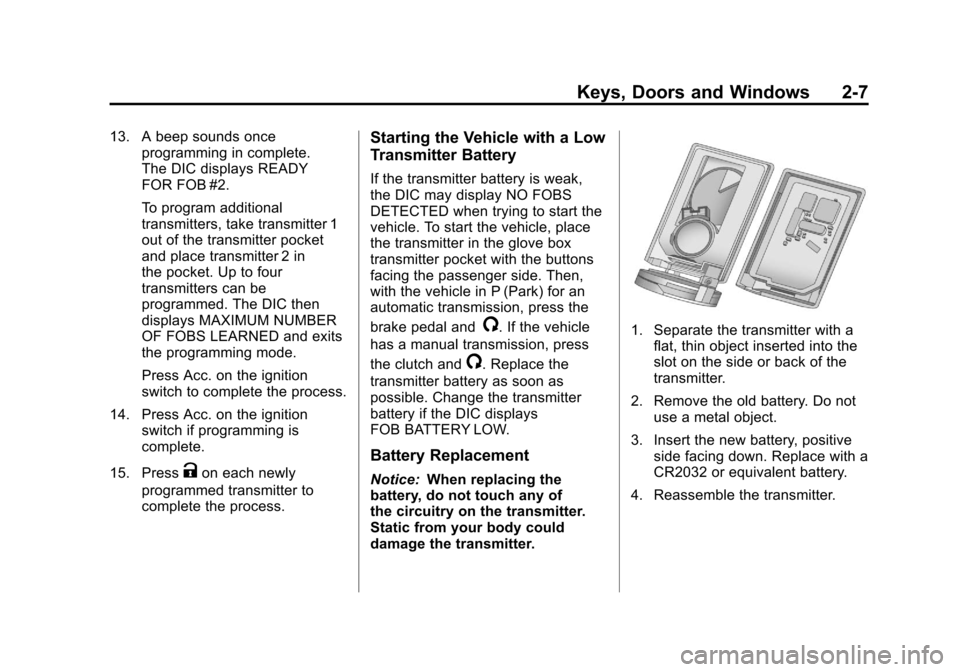
1. Separate the transmitter with a
flat, thin object inserted into the
slot on the side or back of the
transmitter.
2. Remove the old battery. Do not use a metal object.
3. Insert the new battery, positive side facing down. Replace with a
CR2032 or equivalent battery.
4. Reassemble the transmitter.
Page 43 of 428
Black plate (11,1)Chevrolet Corvette Owner Manual - 2011
Keys, Doors and Windows 2-11
WARNING (Continued)
.Adjust the Climate Control
system to a setting that
brings in only outside air
and set the fan speed to the
highest setting. See Climate
Control System in the Index.
.If the vehicle is equipped with
a power liftgate, disable the
power liftgate function.
For more information about
carbon monoxide, see Engine
Exhaust on page 9‑26.
Notice: Closing the hatch/trunk
lid forcefully or from the sides
can cause damage to the glass,
the defogger or the weather
stripping. Be sure objects will fit
in the hatch/trunk area before
closing the hatch/trunk lid. When
closing the hatch/trunk lid, gently
pull down from the center. Notice:
Do not store heavy or
sharp objects in the rear storage
compartments located in the
hatch/trunk area. The objects
could damage the underbody.
Hatch/Trunk Lid Release
There are several ways to release
the hatch/trunk lid. If your vehicle
has an automatic transmission,
the shift lever must be in P (Park).
For manual transmission vehicles,
the parking brake must be set
when the ignition is started for
the hatch/trunk release to operate.
The parking brake does not need
to be set when the ignition is off for
the hatch/trunk release to operate.
See Parking Brake on page 9‑35.
V(Hatch/Trunk) : Press this
button, located on the instrument
panel to the left of the steering
wheel. The theft-deterrent alarm
system must not be armed.
}(Hatch/Trunk) : Press this
button on the keyless access
transmitter. See Remote Keyless
Entry (RKE) System on page 2‑3.
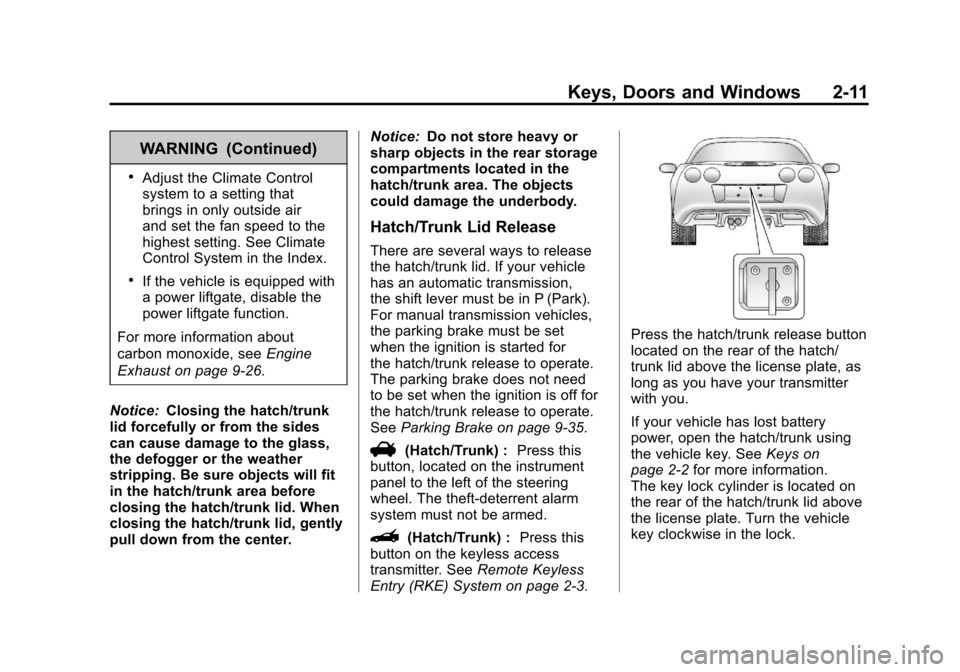
Press the hatch/trunk release button
located on the rear of the hatch/
trunk lid above the license plate, as
long as you have your transmitter
with you.
If your vehicle has lost battery
power, open the hatch/trunk using
the vehicle key. See Keys on
page 2‑2 for more information.
The key lock cylinder is located on
the rear of the hatch/trunk lid above
the license plate. Turn the vehicle
key clockwise in the lock.
Page 45 of 428
Black plate (13,1)Chevrolet Corvette Owner Manual - 2011
Keys, Doors and Windows 2-13
Arming the System
To arm the system:
.PressQon the keyless access
transmitter.
.Open the door and lock the
door with the power door lock
switch. The security light should
flash. Remove the keyless
access transmitter from inside
the vehicle and close the door.
The security light stops flashing
and stays on. After 30 seconds,
the light should turn off.
The vehicle can be programmed
to automatically lock the doors
and arm the theft-deterrent
system when you exit the
vehicle. See Vehicle
Personalization on page 5‑55.
If a door or the hatch/trunk is
opened without using the keyless
access transmitter, the alarm
goes off. The horn sounds for
two minutes, then goes off to save battery power. The vehicle will not
start without a keyless access
transmitter present.
The theft-deterrent system does not
arm if the driver door is locked with
the power door lock switch after the
doors are closed.
If the keyless access transmitter is
removed from the vehicle while a
passenger is in it, have them lock
the doors after they are closed.
The alarm will not arm, so the
passenger will not set it off.
Testing the Alarm
To test the system:
1. Make sure the trunk lid/hatch is
latched.
2. Lower the window on the driver door.
3. Manually arm the system.
4. Close the doors and wait 30 seconds. 5. Reach through the open window
and manually pull the release
lever on the floor.
6. Press the unlock button on the transmitter to turn off the alarm.
If the alarm does not sound, check
to see if the horn works. The horn
fuse may be blown. See Fuses and
Circuit Breakers on page 10‑51.
If the horn works, but the alarm
does not go off, see your dealer.
Disarming the System
Press the unlock button on the
keyless access transmitter or
squeeze the door handle sensor
while the transmitter is near the
vehicle to unlock a door. Unlocking
a door any other way sets off the
alarm. If the alarm sounds, press
the unlock button on the keyless
access transmitter to disarm it.
Do not leave the key or device that
disarms or deactivates the theft
deterrent system in the vehicle.