oil temperature CHEVROLET CORVETTE 2011 6.G Owners Manual
[x] Cancel search | Manufacturer: CHEVROLET, Model Year: 2011, Model line: CORVETTE, Model: CHEVROLET CORVETTE 2011 6.GPages: 428, PDF Size: 6.63 MB
Page 5 of 428

Black plate (5,1)Chevrolet Corvette Owner Manual - 2011
Introduction v
Vehicle Symbol Chart
Here are some additional symbols
that may be found on the vehicle
and what they mean. For more
information on the symbol, refer
to the Index.
9:Airbag Readiness Light
#:Air Conditioning
!:Antilock Brake System (ABS)
g:Audio Steering Wheel Controls
or OnStar®
$: Brake System Warning Light
":Charging System
I:Cruise Control
B: Engine Coolant Temperature
O:Exterior Lamps
#:Fog Lamps
.: Fuel Gauge
+:Fuses
3: Headlamp High/Low-Beam
Changer
j: LATCH System Child
Restraints
*: Malfunction Indicator Lamp
::Oil Pressure
}:Power
/:Remote Vehicle Start
>:Safety Belt Reminders
7:Tire Pressure Monitor
F:Traction Control
M:Windshield Washer Fluid
Page 25 of 428
Black plate (19,1)Chevrolet Corvette Owner Manual - 2011
In Brief 1-19
Cruise Control
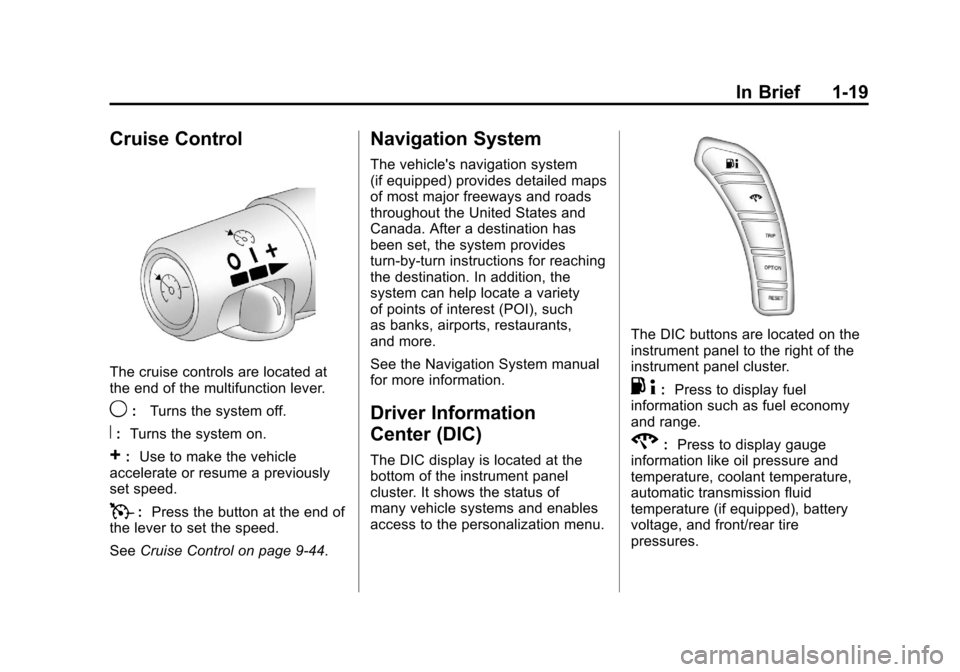
The cruise controls are located at
the end of the multifunction lever.
9:Turns the system off.
R:Turns the system on.
+:Use to make the vehicle
accelerate or resume a previously
set speed.
T: Press the button at the end of
the lever to set the speed.
See Cruise Control on page 9‑44.
Navigation System
The vehicle's navigation system
(if equipped) provides detailed maps
of most major freeways and roads
throughout the United States and
Canada. After a destination has
been set, the system provides
turn-by-turn instructions for reaching
the destination. In addition, the
system can help locate a variety
of points of interest (POI), such
as banks, airports, restaurants,
and more.
See the Navigation System manual
for more information.
Driver Information
Center (DIC)
The DIC display is located at the
bottom of the instrument panel
cluster. It shows the status of
many vehicle systems and enables
access to the personalization menu.
The DIC buttons are located on the
instrument panel to the right of the
instrument panel cluster.
.4:Press to display fuel
information such as fuel economy
and range.
2: Press to display gauge
information like oil pressure and
temperature, coolant temperature,
automatic transmission fluid
temperature (if equipped), battery
voltage, and front/rear tire
pressures.
Page 121 of 428
Black plate (1,1)Chevrolet Corvette Owner Manual - 2011
Instruments and Controls 5-1
Instruments and
Controls
Controls
Steering Wheel Adjustment . . . 5-2
Steering Wheel Controls . . . . . . 5-3
Horn . . . . . . . . . . . . . . . . . . . . . . . . . . 5-4
Windshield Wiper/Washer . . . . . 5-4
Compass . . . . . . . . . . . . . . . . . . . . . 5-5
Clock . . . . . . . . . . . . . . . . . . . . . . . . . 5-6
Power Outlets . . . . . . . . . . . . . . . . . 5-6
Cigarette Lighter . . . . . . . . . . . . . . 5-7
Ashtrays . . . . . . . . . . . . . . . . . . . . . . 5-8
Warning Lights, Gauges, and
Indicators
Warning Lights, Gauges, andIndicators . . . . . . . . . . . . . . . . . . . . 5-8
Instrument Cluster . . . . . . . . . . . . 5-9
Speedometer . . . . . . . . . . . . . . . . 5-11
Odometer . . . . . . . . . . . . . . . . . . . . 5-11
Tachometer . . . . . . . . . . . . . . . . . . 5-11
Fuel Gauge . . . . . . . . . . . . . . . . . . 5-11
Boost Gauge (ZR1) . . . . . . . . . . 5-12
Engine Oil Pressure Gauge . . . . . . . . . . . . . . . . . . . . . . 5-13 Engine Coolant Temperature
Gauge . . . . . . . . . . . . . . . . . . . . . . 5-15
Voltmeter Gauge . . . . . . . . . . . . . 5-15
Safety Belt Reminders . . . . . . . 5-16
Airbag Readiness Light . . . . . . 5-16
Passenger Airbag Status Indicator . . . . . . . . . . . . . . . . . . . . 5-17
Malfunction Indicator Lamp . . . . . . . . . . . . . 5-18
Brake System Warning Light . . . . . . . . . . . . . . . . . . . . . . . 5-21
Antilock Brake System (ABS) Warning Light . . . . . . . . . . . . . . 5-22
One-to-Four Shift Light (Manual Transmission) . . . . . 5-22
Active Handling System Light . . . . . . . . . . . . . . . . . . . . . . . 5-23
Traction Control System (TCS) Warning Light . . . . . . . 5-23
Tire Pressure Light . . . . . . . . . . 5-24
Security Light . . . . . . . . . . . . . . . . 5-24
High-Beam on Light . . . . . . . . . 5-25
Front Fog Lamp Light . . . . . . . . 5-25
Lamps on Reminder . . . . . . . . . 5-25
Information Displays
Driver Information Center (DIC) . . . . . . . . . . . . . . . 5-25
Head-Up Display (HUD) . . . . . 5-31
Vehicle Messages
Vehicle Messages . . . . . . . . . . . 5-35
Battery Voltage and Charging Messages . . . . . . . . . . . . . . . . . . 5-35
Brake System Messages . . . . 5-36
Convertible Top Messages . . . 5-37
Cruise Control Messages . . . . 5-38
Door Ajar Messages . . . . . . . . . 5-39
Engine Cooling System Messages . . . . . . . . . . . . . . . . . . 5-39
Engine Oil Messages . . . . . . . . 5-40
Engine Power Messages . . . . 5-41
Fuel System Messages . . . . . . 5-41
Key and Lock Messages . . . . . 5-42
Lamp Messages . . . . . . . . . . . . . 5-44
Ride Control System Messages . . . . . . . . . . . . . . . . . . 5-44
Safety Belt Messages . . . . . . . 5-49
Anti-Theft Alarm System Messages . . . . . . . . . . . . . . . . . . 5-50
Service Vehicle Messages . . . 5-50
Starting the Vehicle Messages . . . . . . . . . . . . . . . . . . 5-50
Tire Messages . . . . . . . . . . . . . . . 5-51
Transmission Messages . . . . . 5-53
Vehicle Reminder Messages . . . . . . . . . . . . . . . . . . 5-54
Washer Fluid Messages . . . . . 5-54
Page 134 of 428
Black plate (14,1)Chevrolet Corvette Owner Manual - 2011
5-14 Instruments and Controls
Metric—Z06 and ZR1 Models
{WARNING
Do not keep driving if the oil
pressure is low. The engine can
become so hot that it catches fire.
Someone could be burned. Check
the oil as soon as possible and
have the vehicle serviced.
Notice: Lack of proper engine
oil maintenance can damage the
engine. The repairs would not be
covered by the vehicle warranty.
Always follow the maintenance
schedule for changing engine oil.
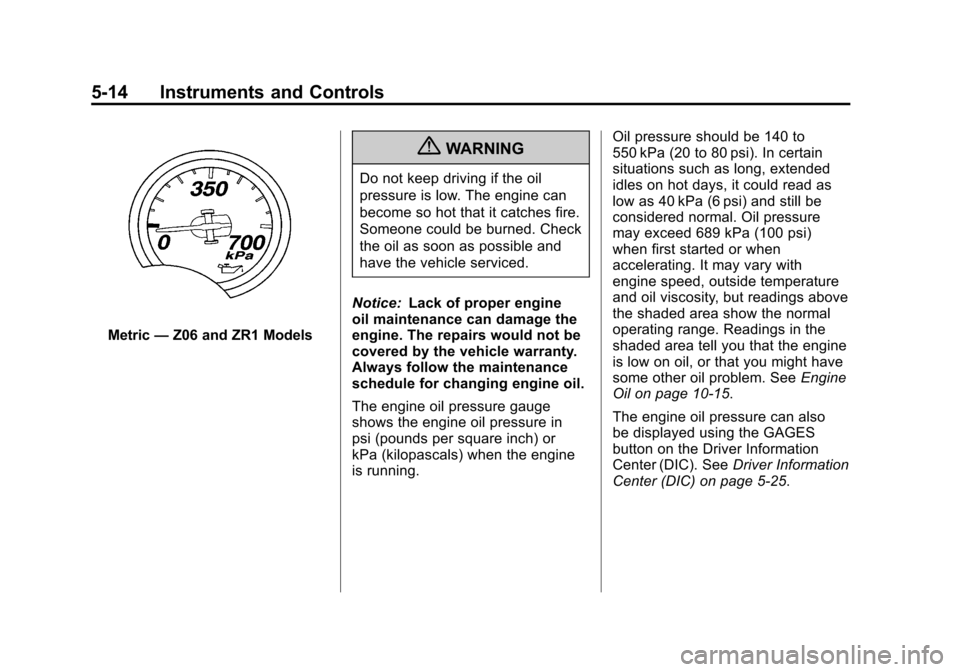
The engine oil pressure gauge
shows the engine oil pressure in
psi (pounds per square inch) or
kPa (kilopascals) when the engine
is running. Oil pressure should be 140 to
550 kPa (20 to 80 psi). In certain
situations such as long, extended
idles on hot days, it could read as
low as 40 kPa (6 psi) and still be
considered normal. Oil pressure
may exceed 689 kPa (100 psi)
when first started or when
accelerating. It may vary with
engine speed, outside temperature
and oil viscosity, but readings above
the shaded area show the normal
operating range. Readings in the
shaded area tell you that the engine
is low on oil, or that you might have
some other oil problem. See
Engine
Oil on page 10‑15.
The engine oil pressure can also
be displayed using the GAGES
button on the Driver Information
Center (DIC). See Driver Information
Center (DIC) on page 5‑25.
Page 146 of 428
Black plate (26,1)Chevrolet Corvette Owner Manual - 2011
5-26 Instruments and Controls
DIC Operation and Displays
Depending on the features on the
vehicle, the drive gear may display
on the DIC. See“Manual Paddle
Shift” under Automatic Transmission
on page 9‑28 and“Head-Up
Display (HUD)” in the index of
the Navigation system manual
for more information.
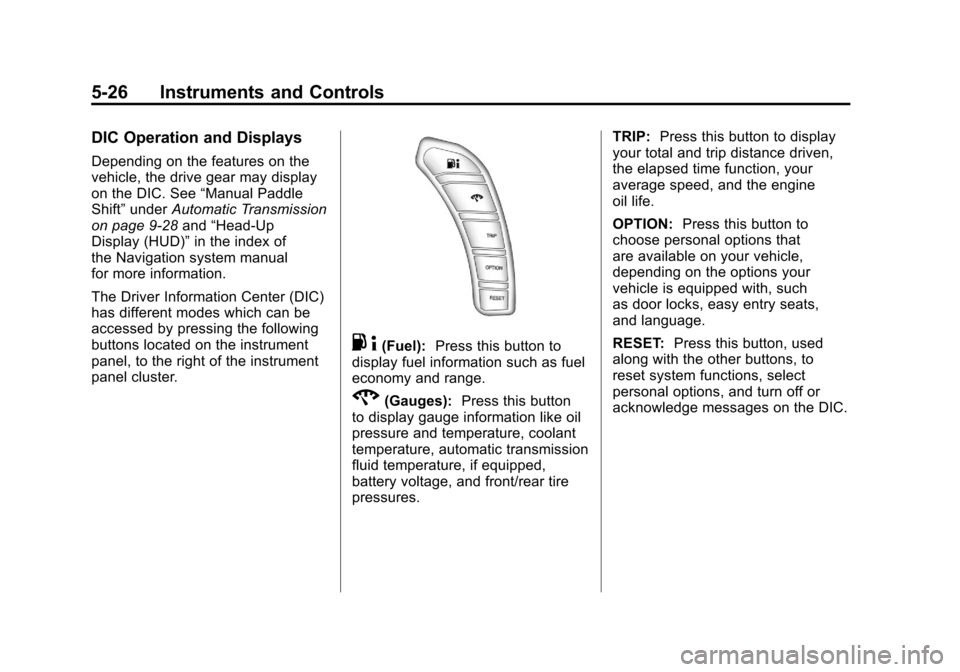
The Driver Information Center (DIC)
has different modes which can be
accessed by pressing the following
buttons located on the instrument
panel, to the right of the instrument
panel cluster.
. 4(Fuel): Press this button to
display fuel information such as fuel
economy and range.
2(Gauges): Press this button
to display gauge information like oil
pressure and temperature, coolant
temperature, automatic transmission
fluid temperature, if equipped,
battery voltage, and front/rear tire
pressures. TRIP:
Press this button to display
your total and trip distance driven,
the elapsed time function, your
average speed, and the engine
oil life.
OPTION: Press this button to
choose personal options that
are available on your vehicle,
depending on the options your
vehicle is equipped with, such
as door locks, easy entry seats,
and language.
RESET: Press this button, used
along with the other buttons, to
reset system functions, select
personal options, and turn off or
acknowledge messages on the DIC.
Page 148 of 428
Black plate (28,1)Chevrolet Corvette Owner Manual - 2011
5-28 Instruments and Controls
GAGES Button
The gauges button displays
oil pressure, oil temperature,
coolant temperature, transmission
fluid temperature for automatic
transmission vehicles only, battery
voltage, and tire pressure
information.
Oil Pressure:This display shows
the oil pressure.
Press the gauges button to display
the oil pressure, such as:
.OIL PRESSURE 276 kPa or
.OIL PRESSURE 40 PSI
Oil Temperature: This display
shows the oil temperature.
Press the gauges button again to
display the oil temperature, such as:
.OIL TEMPERATURE 112°C or
.OIL TEMPERATURE 234°F If the oil temperature is low,
the display will show OIL
TEMPERATURE LOW. If the oil
temperature is high, the display will
show OIL TEMPERATURE HIGH.
Coolant Temperature:
This
display shows the engine coolant
temperature.
Press the gauges button again to
display the coolant temperature,
such as:
.COOLANT
TEMPERATURE 51°C or
.COOLANT
TEMPERATURE 123°F
If the coolant temperature is low,
the display will show COOLANT
TEMPERATURE LOW. If the
coolant temperature is high, the
display will show COOLANT
TEMPERATURE HIGH. Transmission Fluid
Temperature:
If you have an
automatic transmission vehicle,
this display shows the automatic
transmission fluid temperature.
Press the gauges button again to
display the automatic transmission
fluid temperature, such as:
.TRANS FLUID TEMP 51°C or
.TRANS FLUID TEMP 123°F
If the transmission fluid temperature
is low, the display will show
TRANS FLUID TEMP LOW. If the
transmission fluid temperature is
high, the display will show TRANS
FLUID TEMP HIGH.
Page 151 of 428
Black plate (31,1)Chevrolet Corvette Owner Manual - 2011
Instruments and Controls 5-31
Head-Up Display (HUD)
{WARNING
If the HUD image is too bright,
or too high in your field of view, it
may take you more time to see
things you need to see when it is
dark outside. Be sure to keep the
HUD image dim and placed low in
your field of view.
For vehicles with the Head-Up
Display (HUD), you can see some
of the driver information that
appears on the instrument panel
cluster. The information may be displayed
in English or metric units and
appears as an image focused
out toward the front of the vehicle.
The HUD consists of the following
information:
.Speedometer
.Turn Signal Indicators
.High-Beam Indicator Symbol
.Tachometer
.Manual Paddle Shift Gear
Indicator (If Equipped)
These displays on the HUD are
for use when using the manual
paddle shift controls to shift the
transmission. See
“Manual
Paddle Shift” inAutomatic
Transmission on page 9‑28.
.Shift Light
This light is used for
performance driving to
indicate that the vehicle's
best performance level has
been reached to shift the transmission into the next higher
gear. An arrow pointing up will
light up on the display just prior
to reaching the engine fuel
cut-off mode. This cut-off is
about 6,500 RPM for the
LS3 engine, 6,600 RPM for
the LS9 & ZR1 engines and
7,000 RPM for the LS7 engine.
.Check Gauges Warning
.Engine Coolant Temperature
Gauge
.Transmission Fluid Temperature
Gauge, (Automatic Transmission
Vehicles Only)
.Engine Oil Temperature Gauge
.Engine Oil Pressure Gauge
.G-Force Gauge
.Boost Gauge (If Equipped)
.Audio Functions, Street
Mode Only
.Navigation, Only with Navigation
Radio, Turn-by-Turn Guidance
Page 153 of 428
Black plate (33,1)Chevrolet Corvette Owner Manual - 2011
Instruments and Controls 5-33
Within each mode, the display, can
be further customized by pressing
the PAGE button. Pressing this
button in each mode will turn off
and on the following:
.Street Mode—No tachometer,
circular tachometer, and linear
tachometer.
.Track Modes 1 and 2 —No
minor gauge, coolant
temperature, transmission
oil temperature, engine oil
temperature, engine oil
pressure, and boost gauge.
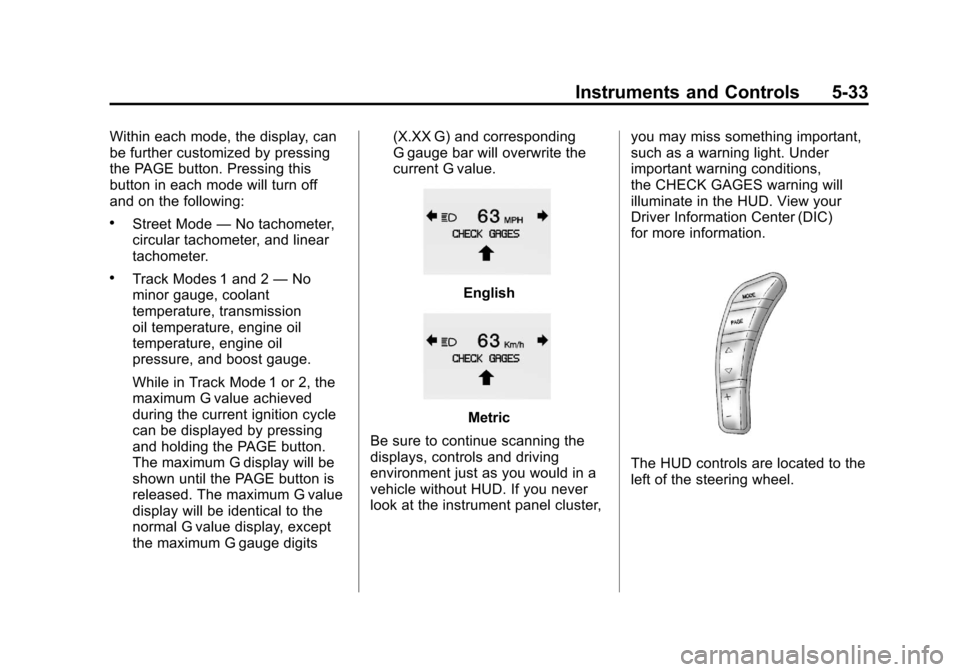
While in Track Mode 1 or 2, the
maximum G value achieved
during the current ignition cycle
can be displayed by pressing
and holding the PAGE button.
The maximum G display will be
shown until the PAGE button is
released. The maximum G value
display will be identical to the
normal G value display, except
the maximum G gauge digits (X.XX G) and corresponding
G gauge bar will overwrite the
current G value.English
Metric
Be sure to continue scanning the
displays, controls and driving
environment just as you would in a
vehicle without HUD. If you never
look at the instrument panel cluster, you may miss something important,
such as a warning light. Under
important warning conditions,
the CHECK GAGES warning will
illuminate in the HUD. View your
Driver Information Center (DIC)
for more information.
The HUD controls are located to the
left of the steering wheel.
Page 160 of 428
Black plate (40,1)Chevrolet Corvette Owner Manual - 2011
5-40 Instruments and Controls
ENGINE OVERHEATED–
STOP ENGINE
This message displays and a sound
will be heard when the engine
has overheated. Stop and turn the
engine off immediately to avoid
severe engine damage. See Engine
Overheating on page 10‑34.
ENGINE PROTECTION
REDUCE ENGINE RPM
This message displays if the
engine oil temperature exceeds
160°C (320°F). Check the engine
coolant temperature and engine oil
level. If the engine is too hot, see
Engine Overheating on page 10‑34.
The vehicle may need service, so
see your dealer.
You can monitor the oil temperature
with the gauges button on the DIC.
See Driver Information Center (DIC)
on page 5‑25.
Multiple chimes sound when
this message is displayed. This
message remains displayed and
active until the issue is resolved.
HOT ENGINE AIR
CONDITIONING OFF
This message displays when
the engine coolant becomes
hotter than the normal operating
temperature. To avoid added strain
on a hot engine, the air conditioning
compressor is automatically turned
off. When the coolant temperature
returns to normal, the A/C operation
automatically resumes. You can
continue to drive the vehicle. If this
message continues to appear, have
the system repaired by your dealer
as soon as possible to avoid
compressor damage.
Engine Oil Messages
CHANGE ENGINE OIL
This message displays when the
life of the engine oil has expired.
See Scheduled Maintenance on
page 11‑2. After an oil change, the engine oil life system must be reset.
See
“Engine Oil Life” underDriver
Information Center (DIC) on
page 5‑25. Also, see Engine Oil on
page 10‑15 andEngine Oil Life
System on page 10‑22 for more
information.
CHECK OIL LEVEL
On some vehicles, this message
displays and two chimes sound if
the oil level in the vehicle is low.
Once the vehicle senses a change
in the engine oil level, the light
remains off.
If this message appears after
starting the engine, the engine oil
level may be too low. You may need
to add oil. See Engine Overheating
on page 10‑34.
To acknowledge the message, press
the RESET button. The message
reappears every 10 minutes until
this condition changes.
Page 161 of 428
Black plate (41,1)Chevrolet Corvette Owner Manual - 2011
Instruments and Controls 5-41
LOW OIL PRESSURE
This message displays if low
oil pressure levels occur. If this
message appears while the engine
is running, stop the engine and do
not operate it until the cause of low
oil pressure is corrected. Severe
damage to the engine can result.
A sound will be heard when this
message is displayed. SeeEngine
Oil on page 10‑15.
Engine Power Messages
ENGINE DRAG CONTROL
ACTIVE
This message displays when
engine drag control is active.
When driving in a lower gear in
rainy, snowy, or icy conditions and
then letting up on the accelerator
or downshifting, the rear wheels
may begin to slip and this message
displays. This message stays on for
a few seconds following the engine
drag control event.
REDUCED ENGINE POWER
If this message displays and the
check engine light comes on,
a noticeable reduction in the
vehicle's performance may occur.
If the REDUCED ENGINE POWER
message is displayed, but there
is no reduction in performance,
proceed to your destination. The
performance may be reduced the
next time the vehicle is driven.
The vehicle may be driven at a
reduced speed while the REDUCED
ENGINE POWER message is
displayed, but acceleration and
speed may be reduced. Anytime
the check engine light stays on,
the vehicle should be taken to
your dealer as soon as possible
for diagnosis and repair. See
Malfunction Indicator Lamp on
page 5‑18 for more information.
Multiple chimes sound when this
message is displayed. To acknowledge the message, press
the RESET button. The message
reappears every five minutes until
this condition changes.
If the REDUCED ENGINE
POWER message is displayed in
combination with the COOLANT
OVER TEMPERATURE message,
see
Engine Overheating on
page 10‑34.
Fuel System Messages
CHECK GAS CAP
This message displays if the fuel
cap has not been fully tightened.
Check the fuel cap to make
sure that it is on properly. Once
tightened, it takes at least one
overnight park to reset or clear this
message. If both the CHECK GAS
CAP message and the malfunction
indicator lamp in the instrument
panel cluster are on, you may need
to see your dealer for service.
See Malfunction Indicator Lamp on
page 5‑18 for more information.