power steering CHEVROLET CORVETTE 2011 6.G Owners Manual
[x] Cancel search | Manufacturer: CHEVROLET, Model Year: 2011, Model line: CORVETTE, Model: CHEVROLET CORVETTE 2011 6.GPages: 428, PDF Size: 6.63 MB
Page 5 of 428

Black plate (5,1)Chevrolet Corvette Owner Manual - 2011
Introduction v
Vehicle Symbol Chart
Here are some additional symbols
that may be found on the vehicle
and what they mean. For more
information on the symbol, refer
to the Index.
9:Airbag Readiness Light
#:Air Conditioning
!:Antilock Brake System (ABS)
g:Audio Steering Wheel Controls
or OnStar®
$: Brake System Warning Light
":Charging System
I:Cruise Control
B: Engine Coolant Temperature
O:Exterior Lamps
#:Fog Lamps
.: Fuel Gauge
+:Fuses
3: Headlamp High/Low-Beam
Changer
j: LATCH System Child
Restraints
*: Malfunction Indicator Lamp
::Oil Pressure
}:Power
/:Remote Vehicle Start
>:Safety Belt Reminders
7:Tire Pressure Monitor
F:Traction Control
M:Windshield Washer Fluid
Page 7 of 428
Black plate (1,1)Chevrolet Corvette Owner Manual - 2011
In Brief 1-1
In Brief
Instrument Panel
Instrument Panel . . . . . . . . . . . . . . 1-2
Initial Drive Information
Initial Drive Information . . . . . . . . 1-4
Remote Keyless Entry (RKE)System . . . . . . . . . . . . . . . . . . . . . . 1-4
Door Locks . . . . . . . . . . . . . . . . . . . 1-5
Trunk Release . . . . . . . . . . . . . . . . 1-6
Windows . . . . . . . . . . . . . . . . . . . . . . 1-6
Seat Adjustment . . . . . . . . . . . . . . 1-6
Memory Features . . . . . . . . . . . . . 1-8
Safety Belt . . . . . . . . . . . . . . . . . . . 1-10
Sensing System for Passenger Airbag . . . . . . . . . . 1-10
Mirror Adjustment . . . . . . . . . . . . 1-11
Steering Wheel Adjustment . . . . . . . . . . . . . . . . . 1-11 Interior Lighting . . . . . . . . . . . . . . 1-12
Exterior Lighting . . . . . . . . . . . . . 1-13
Windshield Wiper/Washer . . . . 1-13
Climate Controls . . . . . . . . . . . . . 1-14
Transmission . . . . . . . . . . . . . . . . 1-15
Vehicle Features
Radio(s) . . . . . . . . . . . . . . . . . . . . . 1-16
Satellite Radio . . . . . . . . . . . . . . . 1-17
Portable Audio Devices . . . . . . 1-17
Bluetooth
®. . . . . . . . . . . . . . . . . . . 1-18
Steering Wheel Controls . . . . . 1-18
Cruise Control . . . . . . . . . . . . . . . 1-19
Navigation System . . . . . . . . . . . 1-19
Driver Information Center (DIC) . . . . . . . . . . . . . . . 1-19
Power Outlets . . . . . . . . . . . . . . . 1-20
Roof Panel . . . . . . . . . . . . . . . . . . 1-20
Convertible . . . . . . . . . . . . . . . . . . 1-21
Performance and Maintenance
Traction Control
System (TCS) . . . . . . . . . . . . . . 1-21
Towing . . . . . . . . . . . . . . . . . . . . . . . 1-21
Tire Pressure Monitor . . . . . . . . 1-22
Z06, Z16, and ZR1 Features . . . . . . . . . . . . . . . . . . . 1-22
Engine Oil Life System . . . . . . 1-23
Driving for Better Fuel Economy . . . . . . . . . . . . . . . . . . . 1-23
Battery . . . . . . . . . . . . . . . . . . . . . . . 1-24
Roadside Assistance Program . . . . . . . . . . . . . . . . . . . . 1-24
OnStar
®. . . . . . . . . . . . . . . . . . . . . 1-25
Page 9 of 428

Black plate (3,1)Chevrolet Corvette Owner Manual - 2011
In Brief 1-3
A.Air Vents on page 8‑6.
B. Head-Up Display (HUD) on
page 5‑31 (If Equipped).
C. Turn and Lane‐Change Lever. See Turn and Lane-Change
Signals (Auto Signal) on
page 6‑4.
Cruise Control on page 9‑44.
Fog Lamps on page 6‑5.
Exterior Lamp Controls on
page 6‑1.
D. Manual Shift Paddles (If Equipped). See Automatic
Transmission on page 9‑28.
E. Driver Information Center (DIC)
on page 5‑25.
F. Instrument Cluster on page 5‑9.
G. Windshield Wiper/Washer on
page 5‑4.
H. Driver Information Center (DIC) Buttons. See Driver Information
Center (DIC) on page 5‑25.
I. Hazard Warning Flashers on
page 6‑4. J.
AM-FM Radio on page 7‑5.
K. Dual Automatic Climate Control
System on page 8‑1.
L. Fuel Door Release Button. See Filling the Tank on page 9‑51.
Hatch/Trunk Release Button.
See “Hatch/Trunk Lid Release”
under Hatch on page 2‑10.
M. Instrument Panel Illumination
Control on page 6‑5.
N. Data Link Connector (DLC). See Malfunction Indicator Lamp
on page 5‑18.
O. Power Folding Top Switch (If Equipped). See Convertible
Top on page 2‑22.
P. Bluetooth on page 7‑18
(If Equipped).
Steering Wheel Controls on
page 5‑3 (If Equipped).
Q. Steering Wheel Adjustment on
page 5‑2.
R. Horn on page 5‑4. S. Telescopic Wheel Button
(If Equipped). See Steering
Wheel Adjustment on page 5‑2.
T. Ignition Positions on page 9‑20.
U. Heated Front Seats on page 3‑8
(If Equipped).
V. Shift Lever (Automatic Shown). See Automatic Transmission on
page 9‑28 orManual
Transmission on page 9‑32.
W. Active Handling System on
page 9‑37.
X. Power Outlets on page 5‑6.
Y. Selective Ride Control on
page 9‑42.
Z. Cupholders on page 4‑1.
AA. Ashtrays on page 5‑8.
Cigarette Lighter on page 5‑7.
AB. Parking Brake on page 9‑35.
AC. Glove Box on page 4‑1.
AD. Instrument Panel Fuse Block on
page 10‑55.
Page 12 of 428
Black plate (6,1)Chevrolet Corvette Owner Manual - 2011
1-6 In Brief
Trunk Release
Opening and Closing the
Hatch/Trunk
There are three ways to open the
hatch/trunk:
.Touch the button located above
the license plate. The Keyless
Access transmitter must be
within three feet of the button.
.Press theVbutton located to
the left of the steering wheel.
.Press the}button on the
Keyless Access transmitter.
For more information see Hatch on
page 2‑10.
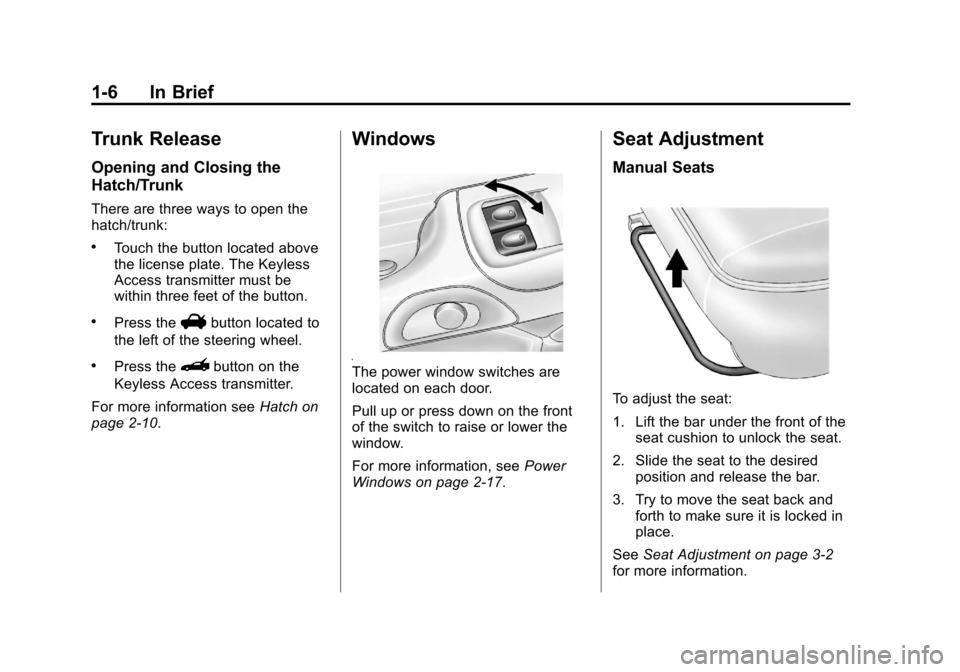
Windows
The power window switches are
located on each door.
Pull up or press down on the front
of the switch to raise or lower the
window.
For more information, see Power
Windows on page 2‑17.
Seat Adjustment
Manual Seats
To adjust the seat:
1. Lift the bar under the front of the seat cushion to unlock the seat.
2. Slide the seat to the desired position and release the bar.
3. Try to move the seat back and forth to make sure it is locked in
place.
See Seat Adjustment on page 3‑2
for more information.
Page 15 of 428
Black plate (9,1)Chevrolet Corvette Owner Manual - 2011
In Brief 1-9
Storing Memory Positions
To save into memory:
1. Adjust the driver seat, bothoutside mirrors, and the
telescopic steering column.
2. Press and hold “1”until
two beeps sound.
3. Repeat for a second driver position using “2.”
To recall a memory position:
.On vehicles with an automatic
transmission, press and release
“1” or“2.”
If the vehicle is in P (Park), a
single beep sounds and the
memory position is recalled after
a brief delay.
If the vehicle is not in P (Park),
three beeps sound and the
memory position is not recalled.
.On vehicles with a manual
transmission, when the vehicle
is on, the parking brake must be
set to recall a memory position.
Press and release “1”or“2.”
A single beep sounds and the
memory position is recalled after
a brief delay.
If the vehicle is on and the
parking brake is not set,
three beeps sound and the
memory position is not recalled.
See “Memory Seat, Mirrors, and
Steering Wheel” underPower Seat
Adjustment on page 3‑3 for more
information.
Easy Exit Driver Seat
The easy exit driver seat feature
can move the seat rearward and the
telescopic steering column out of
the way to allow extra room to exit
the vehicle.
B: Press to save and recall the
easy exit seat position. To save into memory:
1. Recall the desired driving
position by pressing “1.”
2. Adjust the seat and the telescopic steering column
to the desired exit position.
3. Press and hold Buntil
two beeps sound.
4. Repeat for a second driver position using “2.”
To recall an exit position, press
and release B. The vehicle must
be in P (Park) for an automatic
transmission or the parking
brake must be set for a manual
transmission. A single beep sounds.
The seat and telescopic steering
column will move to the position
previously stored for the identified
driver.
See “Memory Seat, Mirrors, and
Steering Wheel” underPower Seat
Adjustment on page 3‑3 for more
information.
Page 17 of 428
Black plate (11,1)Chevrolet Corvette Owner Manual - 2011
In Brief 1-11
Mirror Adjustment
Exterior Mirrors
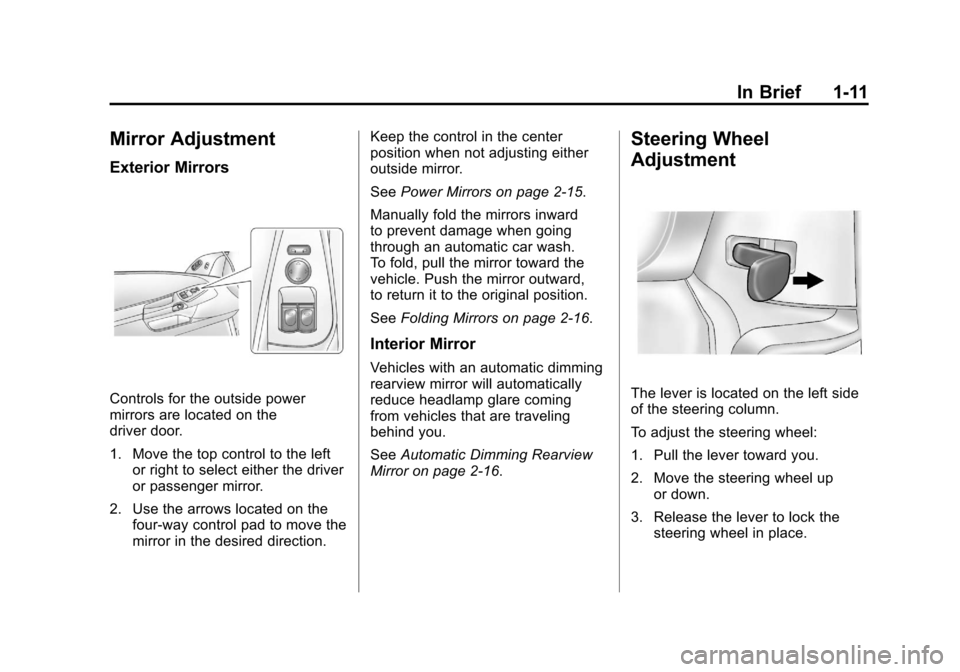
Controls for the outside power
mirrors are located on the
driver door.
1. Move the top control to the leftor right to select either the driver
or passenger mirror.
2. Use the arrows located on the four-way control pad to move the
mirror in the desired direction. Keep the control in the center
position when not adjusting either
outside mirror.
See
Power Mirrors on page 2‑15.
Manually fold the mirrors inward
to prevent damage when going
through an automatic car wash.
To fold, pull the mirror toward the
vehicle. Push the mirror outward,
to return it to the original position.
See Folding Mirrors on page 2‑16.
Interior Mirror
Vehicles with an automatic dimming
rearview mirror will automatically
reduce headlamp glare coming
from vehicles that are traveling
behind you.
SeeAutomatic Dimming Rearview
Mirror on page 2‑16.
Steering Wheel
Adjustment
The lever is located on the left side
of the steering column.
To adjust the steering wheel:
1. Pull the lever toward you.
2. Move the steering wheel up
or down.
3. Release the lever to lock the steering wheel in place.
Page 18 of 428
Black plate (12,1)Chevrolet Corvette Owner Manual - 2011
1-12 In Brief
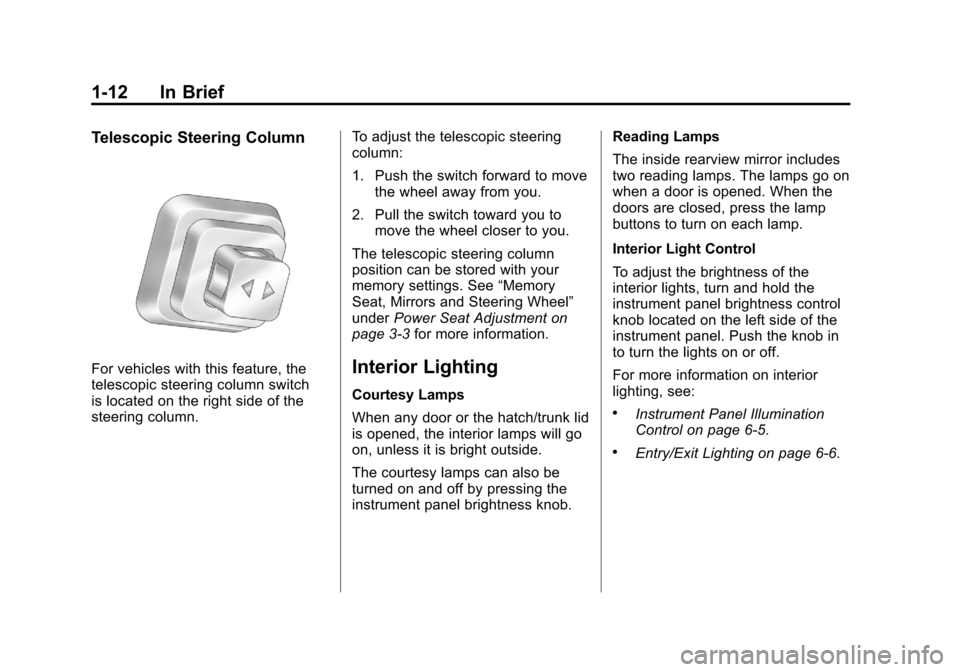
Telescopic Steering Column
For vehicles with this feature, the
telescopic steering column switch
is located on the right side of the
steering column.To adjust the telescopic steering
column:
1. Push the switch forward to move
the wheel away from you.
2. Pull the switch toward you to move the wheel closer to you.
The telescopic steering column
position can be stored with your
memory settings. See “Memory
Seat, Mirrors and Steering Wheel”
under Power Seat Adjustment on
page 3‑3 for more information.Interior Lighting
Courtesy Lamps
When any door or the hatch/trunk lid
is opened, the interior lamps will go
on, unless it is bright outside.
The courtesy lamps can also be
turned on and off by pressing the
instrument panel brightness knob. Reading Lamps
The inside rearview mirror includes
two reading lamps. The lamps go on
when a door is opened. When the
doors are closed, press the lamp
buttons to turn on each lamp.
Interior Light Control
To adjust the brightness of the
interior lights, turn and hold the
instrument panel brightness control
knob located on the left side of the
instrument panel. Push the knob in
to turn the lights on or off.
For more information on interior
lighting, see:.Instrument Panel Illumination
Control on page 6‑5.
.Entry/Exit Lighting on page 6‑6.
Page 26 of 428
Black plate (20,1)Chevrolet Corvette Owner Manual - 2011
1-20 In Brief
TRIP:Press to display your total
and trip distance driven, the elapsed
time function, your average speed,
and the engine oil life.
OPTION: Press to choose personal
options that are available on your
vehicle, depending on the options
your vehicle is equipped with, such
as door locks, easy entry seats, and
language.
RESET: Press, along with the other
buttons, to reset system functions,
select personal options, and turn
off or acknowledge messages on
the DIC.
For more information, see Driver
Information Center (DIC) on
page 5‑25.Vehicle Personalization
Some vehicle features can be
programmed by using the DIC
buttons on the left side of the
steering wheel. The features that
can be programmed include:
.Units
.Memory Features
.Lighting Features
.Lock and Unlock Feedback
.Door Lock and Unlock Settings
.Language
.Personalization Name
See Vehicle Personalization on
page 5‑55.
Power Outlets
The accessory power outlet can be
used to plug in electrical equipment,
such as a cell phone or MP3 player.
The accessory power outlet is
located inside the center console
storage compartment, on the
forward left side.
Remove the cover to access and
replace when not in use.
See Power Outlets on page 5‑6.
Roof Panel
On vehicles with a removable
roof panel, there are three release
latches. Two are located on the front
of the roof panel and the other is
located on the back of the roof
panel. See “Removing the Roof
Panel” underRoof Panel on
page 2‑18.
Page 32 of 428
Black plate (26,1)Chevrolet Corvette Owner Manual - 2011
1-26 In Brief
The OnStar system can record
and transmit vehicle information.
This information is automatically
sent to an OnStar call center when
Qis pressed,]is pressed, or if
the airbags or ACR system deploy.
This information usually includes
the vehicle's GPS location and,
in the event of a crash, additional
information regarding the crash that
the vehicle was involved in (e.g. the
direction from which the vehicle was
hit). When the virtual advisor feature
of OnStar hands-free calling is
used, the vehicle also sends OnStar
the vehicle's GPS location so they
can provide services where it is
located.
Location information about the
vehicle is only available if the GPS
satellite signals are unobstructed
and available. The vehicle must have a working
electrical system, including
adequate battery power, for the
OnStar equipment to operate.
There are other problems OnStar
cannot control that may prevent
OnStar from providing OnStar
service at any particular time or
place. Some examples are damage
to important parts of the vehicle in
a crash, hills, tall buildings, tunnels,
weather or wireless phone network
congestion.
OnStar Steering Wheel
Controls
This vehicle may have a Talk/Mute
button that can be used to interact
with OnStar hands-free calling.
See
Steering Wheel Controls on
page 5‑3 for more information. On some vehicles, the mute button
can be used to dial numbers into
voice mail systems, or to dial phone
extensions. See the OnStar Owner's
Guide for more information.
Your Responsibility
Increase the volume of the radio if
the OnStar advisor cannot be heard.
If the light next to the OnStar
buttons is red, the system may
not be functioning properly.
Press
Qand request a vehicle
diagnostic. If the light appears clear
(no light is appearing), your OnStar
subscription has expired and all
services have been deactivated.
Press
Qto confirm that the OnStar
equipment is active.
Page 36 of 428
Black plate (4,1)Chevrolet Corvette Owner Manual - 2011
2-4 Keys, Doors and Windows
Keyless Locking
The doors lock after
several seconds if all doors
are closed and at least one
keyless access transmitter
has been removed from the
interior of the vehicle. To customize
whether the doors automatically
lock when exiting the vehicle,
see“Passive Door Locking”
under Vehicle Personalization on
page 5‑55 for additional information.
Keyless Trunk Opening
Press the hatch/trunk release
button located on the rear of
the hatch/trunk lid above the
license plate to open the trunk
if the keyless access transmitter
is within range. See Hatch on
page 2‑10 for additional information. There are other conditions that
can affect the performance of the
transmitter. See
Remote Keyless
Entry (RKE) System on page 2‑3.
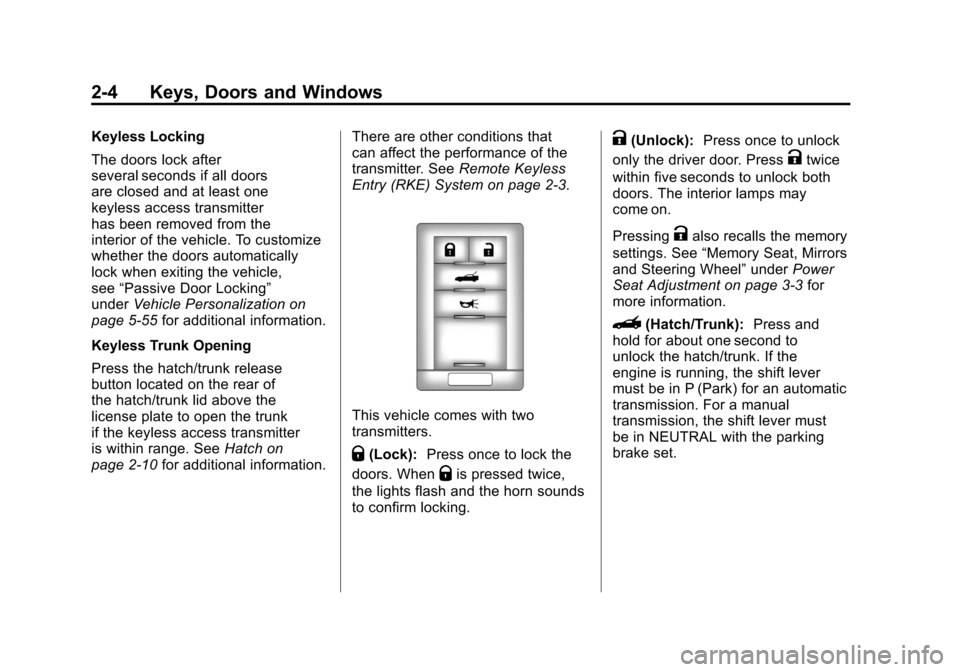
This vehicle comes with two
transmitters.
Q(Lock): Press once to lock the
doors. When
Qis pressed twice,
the lights flash and the horn sounds
to confirm locking.
K(Unlock): Press once to unlock
only the driver door. Press
Ktwice
within five seconds to unlock both
doors. The interior lamps may
come on.
Pressing
Kalso recalls the memory
settings. See “Memory Seat, Mirrors
and Steering Wheel” underPower
Seat Adjustment on page 3‑3 for
more information.
}(Hatch/Trunk): Press and
hold for about one second to
unlock the hatch/trunk. If the
engine is running, the shift lever
must be in P (Park) for an automatic
transmission. For a manual
transmission, the shift lever must
be in NEUTRAL with the parking
brake set.