display CHEVROLET CORVETTE 2012 6.G Repair Manual
[x] Cancel search | Manufacturer: CHEVROLET, Model Year: 2012, Model line: CORVETTE, Model: CHEVROLET CORVETTE 2012 6.GPages: 434, PDF Size: 6.96 MB
Page 174 of 434
Black plate (64,1)Chevrolet Corvette Owner Manual - 2012
5-64 Instruments and Controls
If you choose NO, this option will
turn off.
If a customized name or greeting is
not programmed, the DIC display
will show Driver 1 or Driver 2 to
correspond with either the
number on the back of the RKE
transmitter (1 or 2) being used or to
the memory button (1 or 2) that is
pressed.
PERSONALIZE NAME is the last
option available to program in the
PERSONAL OPTIONS menu.
Pressing the OPTION button after
this setting will exit you from the
PERSONAL OPTIONS menu.
The last item you were in prior to
entering PERSONAL OPTIONS will
then display on the DIC.Universal Remote
System
SeeRadio Frequency Statement on
page 13‑21 for information
regarding Part 15 of the Federal
Communications Commission (FCC)
rules and Industry Canada
Standards RSS-210/220/310.
The FCC Grant of Equipment
Authorization Certificate number is
KOBFTE05A.
The Canadian Registration
ID number is 3521A-FTE05A.
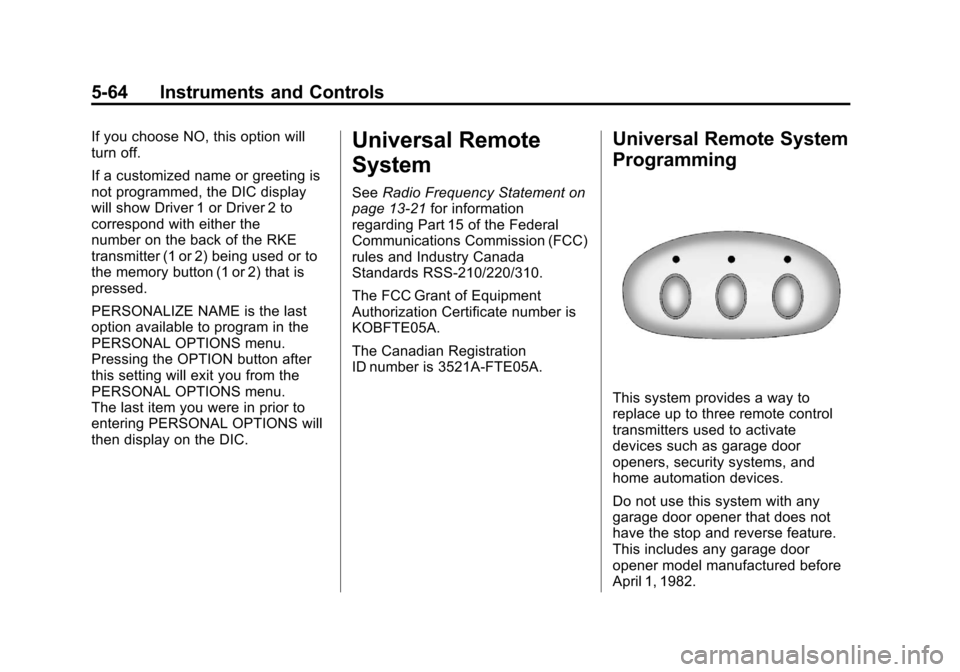
Universal Remote System
Programming
This system provides a way to
replace up to three remote control
transmitters used to activate
devices such as garage door
openers, security systems, and
home automation devices.
Do not use this system with any
garage door opener that does not
have the stop and reverse feature.
This includes any garage door
opener model manufactured before
April 1, 1982.
Page 183 of 434
Black plate (3,1)Chevrolet Corvette Owner Manual - 2012
Lighting 6-3
During that delay, the instrument
panel cluster may not be as bright
as usual. Make sure the instrument
panel brightness knob is in the full
bright position. SeeInstrument
Panel Illumination Control on
page 6‑5 for more information.
If it is dark enough outside and
the exterior lamp control is off, a
HEADLAMPS SUGGESTED
message will display on the Driver
Information Center (DIC). See Lamp
Messages on page 5‑45.
Turning the exterior lamp control to
off a second time, or turning on the
headlamps will remove the
HEADLAMPS SUGGESTED
message in the DIC. If the parking
lamps or the fog lamps were turned
on instead, the HEADLAMPS
SUGGESTED message will
continue to be displayed. The regular headlamp system
should be turned on when needed.
To turn off the DRL, turn the exterior
lamp control to the off position or
shift into P (Park). The DRL will stay
off until the control is toggled again
or the vehicle is shifted out of
P (Park).
This procedure applies only to
vehicles first sold in the United
States.
Twilight Sentinel
Twilight Sentinel®is an automatic
headlamp system. When activated,
this feature turns your headlamps
and parking lamps on and off by
sensing how dark it is outside.
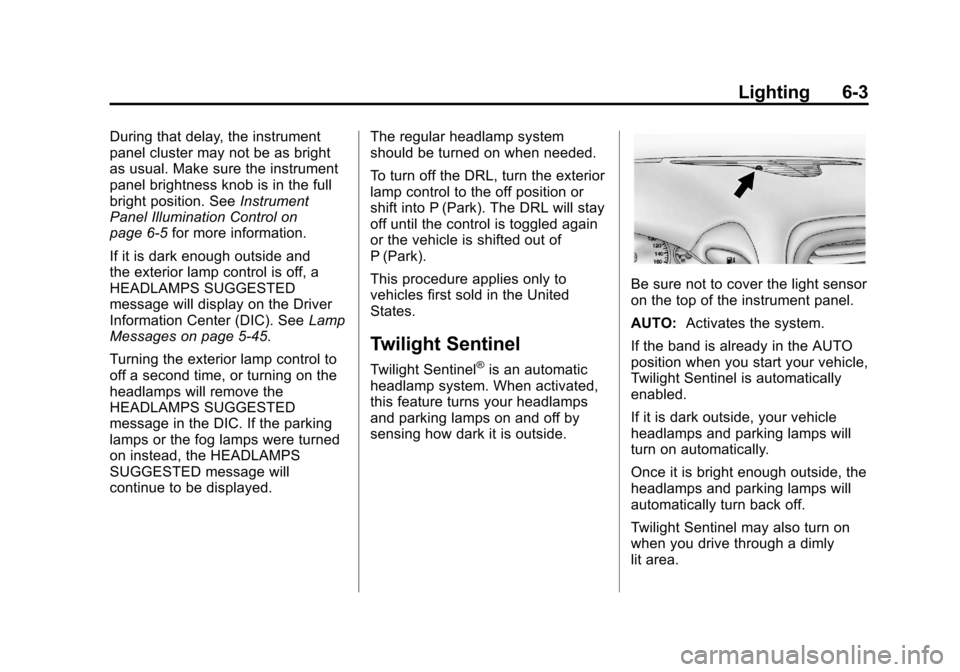
Be sure not to cover the light sensor
on the top of the instrument panel.
AUTO: Activates the system.
If the band is already in the AUTO
position when you start your vehicle,
Twilight Sentinel is automatically
enabled.
If it is dark outside, your vehicle
headlamps and parking lamps will
turn on automatically.
Once it is bright enough outside, the
headlamps and parking lamps will
automatically turn back off.
Twilight Sentinel may also turn on
when you drive through a dimly
lit area.
Page 188 of 434
Black plate (2,1)Chevrolet Corvette Owner Manual - 2012
7-2 Infotainment System
Navigation/Radio System
For vehicles with a navigation radio
system, see the separate Navigation
System Manual.
Theft-Deterrent Feature
TheftLock®is designed to
discourage theft of the vehicle's
radio by learning a portion of the
Vehicle Identification Number (VIN).
The radio does not operate and
LOCKED displays if the radio
is stolen or moved to a different
vehicle.
When the when the ignition is in the
off position, a blinking red light on
the upper left side of the radio
indicates that TheftLock
®is armed.
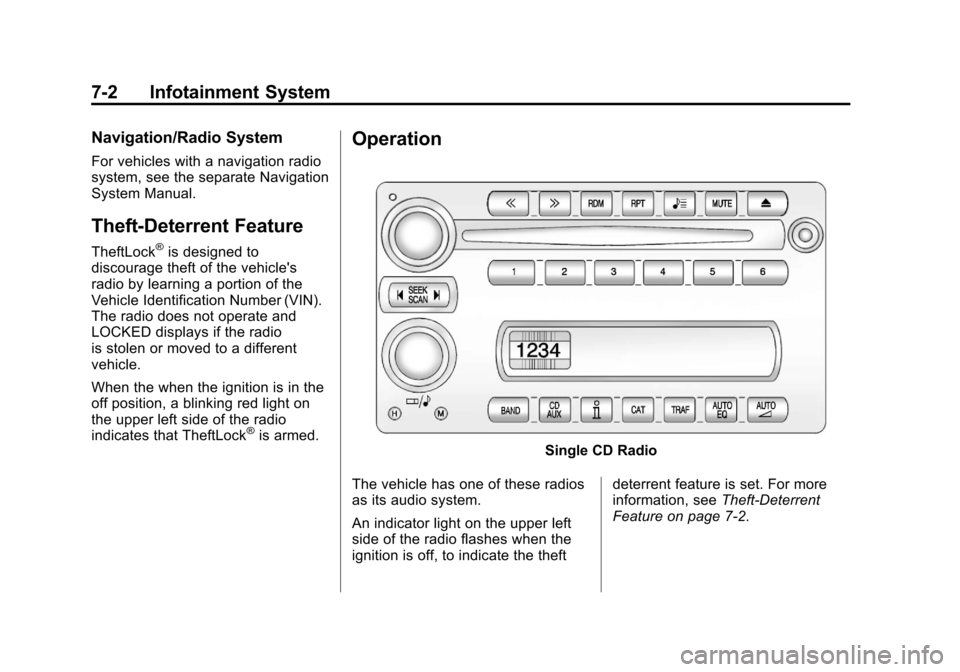
Operation
Single CD Radio
The vehicle has one of these radios
as its audio system.
An indicator light on the upper left
side of the radio flashes when the
ignition is off, to indicate the theft deterrent feature is set. For more
information, see
Theft-Deterrent
Feature on page 7‑2.
Page 189 of 434
Black plate (3,1)Chevrolet Corvette Owner Manual - 2012
Infotainment System 7-3
Playing the Radio
Top Knob (Power/Volume):Press
to turn the system on and off. Turn
to increase or decrease the volume.
MUTE: Press to silence the
system. Press again to turn the
sound on.
This button is not available on the
Six-Disc CD Radio.
V(Information): Press until the
desired display is shown, then
hold for two seconds until the radio
beeps once to change the default
display. The selected display is
now the default.
For RDS:
Press
Vto change the display.
The display options are station
name, RDS station frequency,
PTY, and the name of the
program (if available).
Audio Settings
Press and holdO/ewhen no
tone or speaker control is displayed
to adjust all tone and speaker
controls to the middle position.
AUDIO SETTINGS CENTERED
displays.
Adjusting the Tone
(Bass/Treble)
O/e(Bass/Treble): To adjust
the bass or treble:
Press and release
O/euntil
BASS or TREBLE displays.
.Turn theO/eknob to
increase or to decrease the
level.
.Press and hold theO/eknob
until the level changes to the
middle position.
Adjusting the Speakers
(Balance/Fade)
O/e(Balance/Fade): To adjust
the Balance:
Press and release
O/euntil
BALANCE displays.
.Turn theO/eknob to move
the sound toward the right or the
left speakers.
.Press and hold theO/eknob
until the level changes to the
middle position.
To adjust the Fade:
Press and release
O/euntil
FADE displays
.Turn theO/eknob to move
the sound toward the front or the
rear speakers.
.Press and hold theO/eknob
until the level changes to the
middle position.
Page 190 of 434
Black plate (4,1)Chevrolet Corvette Owner Manual - 2012
7-4 Infotainment System
AUTO EQ (Automatic
Equalization):The radio saves
separate AUTO EQ settings for
each preset and source.
For vehicles without the Bose sound
system:
.Press AUTO EQ to select
equalization settings designed
for CLASSICAL, POP, ROCK,
JAZZ, TALK, and COUNTRY.
.Selecting CUSTOM or changing
bass or treble, returns the EQ to
the manual bass and treble
settings.
For vehicles with the Bose sound
system:
.Press AUTO EQ to select
equalization settings from
EQ1 through EQ6.
.Selecting CUSTOM or changing
bass or treble, returns the EQ to
the manual bass and treble
settings. AUTO
n(Automatic Volume):
Automatic volume automatically
adjusts the audio system to make
up for road and wind noise, by
increasing the volume as vehicle
speed increases.
For vehicles without the Bose sound
system:
1. Set the volume at the desired level.
2. Press AUTO
nto
select AUTO VOLUME MIN
(minimum), AUTO VOLUME
MED (medium), or AUTO
VOLUME MAX (maximum).
Each higher setting provides
more volume compensation at
faster vehicle speeds.
3. Press AUTO
nuntil AUTO
VOLUME OFF displays to turn
automatic volume off. For vehicles with the Bose sound
system:
Vehicles with the Bose sound
system include Bose AudioPilot
®
noise compensation technology.
AudioPilot continuously adjusts
the audio system equalization to
compensate for background noise.
This feature is most effective at
lower radio volume settings where
background noise can affect how
well the audio is heard. At higher
volume settings, there may be little
or no adjustments by AudioPilot. For
additional information on AudioPilot,
visit bose.com/audiopilot.
To use AudioPilot:
1. Set the volume at the desired
level.
2. Press AUTO
nuntil AUTO
VOLUME ON displays.
3. Press AUTO
nuntil AUTO
VOLUME OFF displays to turn
off AudioPilot.
Page 191 of 434
Black plate (5,1)Chevrolet Corvette Owner Manual - 2012
Infotainment System 7-5
Radio Messages
CAL ERR (Calibration Error):
Displays if the radio is no longer
configured properly for the vehicle.
The vehicle must be returned to
your dealer for service.
LOC (Locked):Displays when the
TheftLock system has locked up.
The vehicle must be returned to
your dealer for service.
If any error occurs repeatedly or
cannot be corrected, contact
your dealer.
Radio
AM-FM Radio
Radio Data System (RDS)
RDS features are available for use
only on FM stations that broadcast
RDS information. The station name
or call letters display while the radio
is tuned to an RDS station.
This system relies upon receiving
specific information from these
stations and works only when the
information is available. In rare
cases, a radio station can broadcast
incorrect information that causes the
radio features to work improperly.
If this happens, contact the radio
station. With RDS, the radio can:
.Seek to stations broadcasting
the selected type of
programming.
.Receive announcements
concerning local and national
emergencies.
.Display messages from radio
stations.
.Seek to stations with traffic
announcements.
.Provide the time of day.
.Provide a program type (PTY)
for current programming.
.Provide the name of the program
being broadcast.
Page 192 of 434

Black plate (6,1)Chevrolet Corvette Owner Manual - 2012
7-6 Infotainment System
RDS Messages
ALERT!:Alert warns of local or
national emergencies. When an
alert announcement comes on the
current radio station, ALERT!
displays. The announcement is
heard, even if the volume is
low or a CD is playing. If a CD is
playing, play stops during the
announcement. Alert
announcements cannot be
turned off.
ALERT! is not affected by tests of
the emergency broadcast system.
This feature is not supported by all
RDS stations.
V(Information): If the current
station has a message, INFO
displays. Press
Vto see the
message. The message can display
the artist, song title, call in phone
numbers, etc.
If the entire message is not
displayed, parts of the message
appears every three seconds. To
scroll through the message, press
and release
V. A new group of words
displays after every press of the
button. Once the complete message
has displayed, INFO disappears
from the display until another new
message is received. The last
message can be displayed by
pressing this button. The last
message is displayed until a new
message is received or the radio is
tuned to a different station.
NO INFO displays when a message
is not available from a station. TRAF (Traffic):
TA (traffic) displays
when the station broadcasts traffic
announcements.
Press TRAF and the radio seeks to
a station that broadcasts traffic
announcements. When a station is
found, the radio stops seeking and
TA displays. NO TRAFFIC INFO
displays if a station that broadcasts
traffic announcements cannot be
found.
Press TRAF to turn off the traffic
announcements if TA is on the
display.
The radio plays the traffic
announcement even if the volume is
low. The radio interrupts the play of
a CD if the last tuned station
broadcasts traffic announcements.
Page 193 of 434
Black plate (7,1)Chevrolet Corvette Owner Manual - 2012
Infotainment System 7-7
Finding a Station
BAND:Press to switch between
FM1, FM2, or AM.
O/e(Tune): Turn to select radio
stations.
tSEEKu: Press to go to the
previous or to the next station and
stay there.
The radio only stops at stations with
a strong signal.
tSCANu: Press and holdt
orufor two seconds until
FREQUENCY SCAN displays. The
radio goes to a station, plays for a
few seconds, then goes on to the
next station. Press
toruagain to
stop scanning. To scan preset stations:
Press and hold
torufor
four seconds until PRESET SCAN
displays. The radio goes to the next
preset station, plays for a few
seconds, then goes to the next
preset station. Press
toruagain
or press one of the pushbuttons to
stop scanning presets.
The radio only scans stations with
a strong signal.
1–6 (Preset Pushbuttons):
Press to play stations that are
programmed to the radio preset
pushbuttons.
Storing Radio Stations
Drivers are encouraged to store
radio station while the vehicle is
parked. See Defensive Driving on
page 9‑3. Tune to stored radio
stations using the presets, favorites
button, and steering wheel controls,
if the vehicle has this feature.
Up to 30 stations (six FM1, six FM2,
six AM, six M1, and six XM2), and
equalization settings for each
station can be programmed on the
six numbered pushbuttons.
To set presets:
1. Turn the radio on.
2. Press BAND to select FM1, FM2, AM, XM1, or XM2.
3. Tune in the desired station.
4. Press AUTO EQ to select the equalization.
5. Press and hold one of the six numbered pushbuttons until
the radio beeps once.
6. Repeat the steps for each pushbutton.
Page 194 of 434
Black plate (8,1)Chevrolet Corvette Owner Manual - 2012
7-8 Infotainment System
Satellite Radio
XM™Satellite Radio Service
XM is a satellite radio service based
in the 48 contiguous United States
and 10 Canadian provinces. XM
Satellite Radio has a wide variety of
programming and commercial-free
music, coast to coast, and in
digital-quality sound. A service fee
is required to receive the XM
service. If XM Service needs to be
reactivated, the radio will display
"No Subscription Please Renew" on
channel XM1. For more information,
contact XM at www.xmradio.com or
1-800-929-2100 in the U.S., and
www.xmradio.ca or
1-877-438-9677 in Canada.
Finding an XM Channel
BAND: Press to switch between
FM1, FM2, AM, XM1, or XM2.
O/e(Tune): Turn to manually
select an XM channel.
tSEEKu: Press to go to the
previous or to the next XM channel.
tSCANu: Press and holdt
orufor two seconds until
FREQUENCY SCAN displays. The
radio goes to a channel, plays for a
few seconds, then goes on to the
next station. Press
toruagain
to stop scanning.
To scan preset stations:
Press and hold
torufor
four seconds until PRESET SCAN
displays. The radio goes to the next
preset station, plays for a few
seconds, then goes to the next
preset station. Press
toruagain
or press one of the pushbuttons to
stop scanning presets. 1–6 (Preset Pushbuttons):
Press to play channels that are
programmed to the radio preset
pushbuttons.
Finding a Category (CAT)
Station
To select an XM station by category:
1. Press the CAT button. The last
selected category displays.
2. Turn the
O/eknob to select
a category.
3. Press
toruto go to a
category's station. SEEKING
CATEGORY displays.
4. To go to another station within that category, press the CAT
button to display the category,
then press
toruto go to
another station.
If the radio cannot find the desired
category, NONE displays and the
radio returns to the last station
tuned.
Page 195 of 434
Black plate (9,1)Chevrolet Corvette Owner Manual - 2012
Infotainment System 7-9
SCAN:To scan the stations within
a category:
1. Press CAT. The last selected
category displays.
2. Turn the
O/eknob to select
a category.
3. Press and hold
toruuntil a
beep sounds and SCAN
CATEGORY displays. The radio
begins scanning the stations in
the category.
4. Press
toruto stop scanning.
Storing XM Channels
Drivers are encouraged to store
XM channels while the vehicle is
parked. See Defensive Driving on
page 9‑3. Tune to stored radio
stations using the presets, favorites
button, and steering wheel controls,
if the vehicle has this feature.
Up to 30 stations (six FM1, six FM2,
and six AM, six XM1 and six XM2),
and equalization settings for each
station can be programmed on the
six numbered pushbuttons.
To set presets:
1. Tune to a channel.
2. Press AUTO EQ to select the equalization.
3. Press and hold one of the six numbered pushbuttons until
the radio beeps once.
4. Repeat the steps for each pushbutton.
XM Radio Messages
XL (Explicit Language
Channels): These channels, or any
others, can be blocked by calling
1-800-929-2100 in the U.S. and
1-877-438-9677 in Canada.
Updating: The encryption code in
the receiver is being updated, and
no action is required. This process
should take no longer than
30 seconds.
No Signal: The system is
functioning correctly, but the vehicle
is in a location that is blocking the
XM signal. When the vehicle is
moved into an open area, the signal
should return.
Loading XM: The audio system is
acquiring and processing audio and
text data. No action is needed. This
message should disappear shortly.