key fob CHEVROLET CORVETTE 2012 6.G Owners Manual
[x] Cancel search | Manufacturer: CHEVROLET, Model Year: 2012, Model line: CORVETTE, Model: CHEVROLET CORVETTE 2012 6.GPages: 434, PDF Size: 6.96 MB
Page 37 of 434
Black plate (5,1)Chevrolet Corvette Owner Manual - 2012
Keys, Doors, and Windows 2-5
Programming with a Recognized
Transmitter
A new transmitter can be
programmed to the vehicle when
there is one recognized transmitter.
For vehicles sold in Canada, two
recognized transmitters are required
to program a new transmitter.
1. The vehicle must be off.
2. Both the recognized and newtransmitters must be with you.
3. Insert the vehicle key into the key cylinder located above the
license plate.
4. Open the hatch/trunk.
5. Turn the key five times within five seconds.
6. The DIC displays READY FOR FOB #2, 3 or 4.
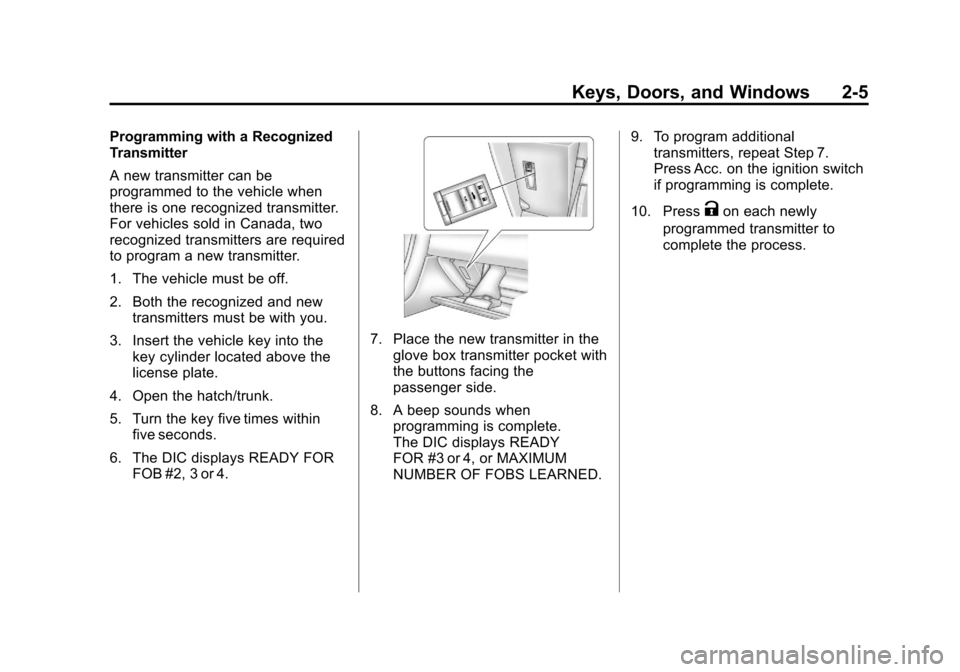
7. Place the new transmitter in theglove box transmitter pocket with
the buttons facing the
passenger side.
8. A beep sounds when programming is complete.
The DIC displays READY
FOR #3 or 4, or MAXIMUM
NUMBER OF FOBS LEARNED. 9. To program additional
transmitters, repeat Step 7.
Press Acc. on the ignition switch
if programming is complete.
10. Press
Kon each newly
programmed transmitter to
complete the process.
Page 38 of 434
Black plate (6,1)Chevrolet Corvette Owner Manual - 2012
2-6 Keys, Doors, and Windows
Programming without a
Recognized Transmitter
This procedure requires three
10-minute cycles to complete the
programming process. United
States owners are permitted to
program a new transmitter to
their vehicle when a recognized
transmitter is not available. The
Canadian immobilizer standard
requires that Canadian owners see
their dealer for programming new
transmitters when two recognized
transmitters are not available.
1. The vehicle must be off.
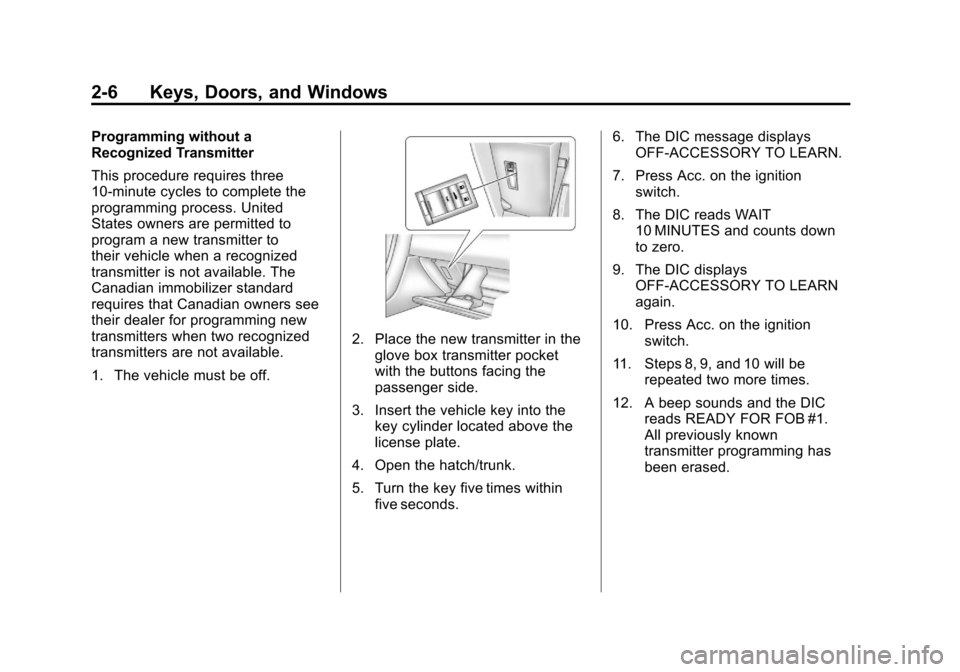
2. Place the new transmitter in theglove box transmitter pocket
with the buttons facing the
passenger side.
3. Insert the vehicle key into the key cylinder located above the
license plate.
4. Open the hatch/trunk.
5. Turn the key five times within five seconds. 6. The DIC message displays
OFF-ACCESSORY TO LEARN.
7. Press Acc. on the ignition switch.
8. The DIC reads WAIT 10 MINUTES and counts down
to zero.
9. The DIC displays OFF-ACCESSORY TO LEARN
again.
10. Press Acc. on the ignition switch.
11. Steps 8, 9, and 10 will be repeated two more times.
12. A beep sounds and the DIC reads READY FOR FOB #1.
All previously known
transmitter programming has
been erased.
Page 39 of 434
Black plate (7,1)Chevrolet Corvette Owner Manual - 2012
Keys, Doors, and Windows 2-7
13. A beep sounds onceprogramming in complete.
The DIC displays READY
FOR FOB #2.
To program additional
transmitters, take transmitter 1
out of the transmitter pocket
and place transmitter 2 in the
pocket. Up to four transmitters
can be programmed. The DIC
then displays MAXIMUM
NUMBER OF FOBS
LEARNED and exits the
programming mode.
Press Acc. on the ignition
switch to complete the process.
14. Press Acc. on the ignition switch if programming is
complete.
15. Press
Kon each newly
programmed transmitter to
complete the process.
Starting the Vehicle with a Low
Transmitter Battery
If the transmitter battery is weak,
the DIC may display NO FOBS
DETECTED when trying to start the
vehicle. To start the vehicle, place
the transmitter in the glove box
transmitter pocket with the buttons
facing the passenger side. Then,
with the vehicle in P (Park) for an
automatic transmission, press the
brake pedal and
/. If the vehicle
has a manual transmission, press
the clutch and
/. Replace the
transmitter battery as soon as
possible. Change the transmitter
battery if the DIC displays FOB
BATTERY LOW.
Battery Replacement
Notice: When replacing the
battery, do not touch any of the
circuitry on the transmitter. Static
from your body could damage the
transmitter.
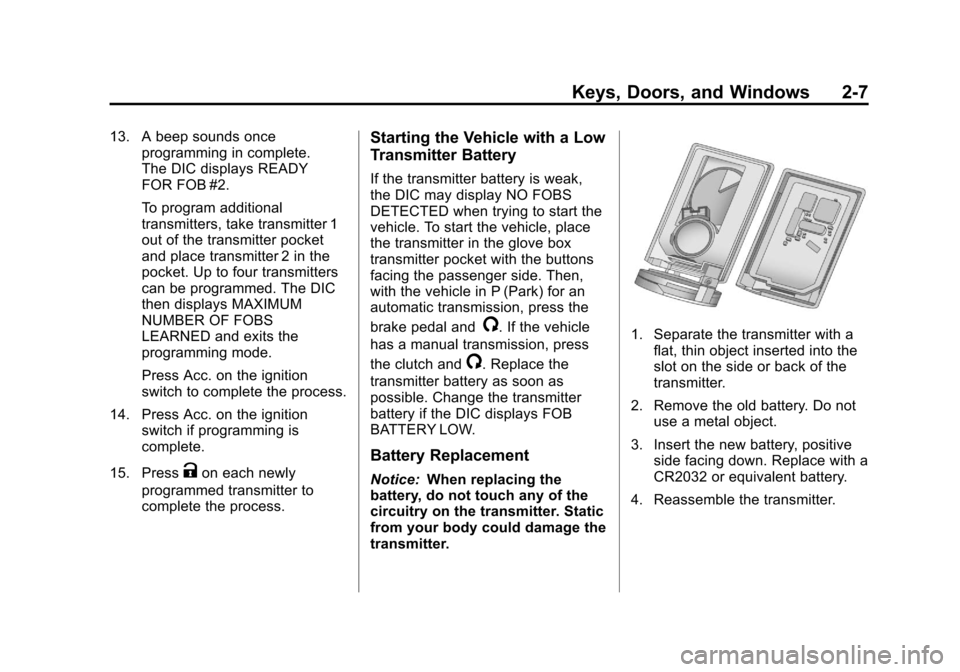
1. Separate the transmitter with a
flat, thin object inserted into the
slot on the side or back of the
transmitter.
2. Remove the old battery. Do not use a metal object.
3. Insert the new battery, positive side facing down. Replace with a
CR2032 or equivalent battery.
4. Reassemble the transmitter.
Page 47 of 434
Black plate (15,1)Chevrolet Corvette Owner Manual - 2012
Keys, Doors, and Windows 2-15
Immobilizer
SeeRadio Frequency Statement on
page 13‑21 for information
regarding Part 15 of the Federal
Communications Commission (FCC)
rules and Industry Canada
Standards RSS-GEN/210/220/310.
Immobilizer Operation
The vehicle has a passive
theft-deterrent system.
The system is automatically armed
when the ignition is turned off.
The immobilization system is
disarmed when the ignition is turned
to OFF/ACCESSORY or START and
a valid transmitter is found in the
vehicle.
You do not have to manually arm
or disarm the system.
The security light comes on if
there is a problem with arming or
disarming the theft-deterrent
system. The system has one or more RKE
transmitters that are matched to an
immobilizer control unit in the
vehicle. Only a correctly matched
RKE transmitter starts the vehicle.
The vehicle may not start if the
RKE transmitter is damaged.
If the engine does not start and the
security light comes on, there may
be a problem with the immobilizer
system. Press the START button
again.
If the vehicle does not start and the
RKE transmitter appears to be
undamaged, try another RKE
transmitter. Or, place the transmitter
in the transmitter pocket. See
“NO
FOBS DETECTED” underKey and
Lock Messages on page 5‑43 for
additional information. Check the
fuse. See Fuses and Circuit
Breakers on page 10‑51. If the
engine still does not start with the
other transmitter, the vehicle needs
service. If the engine does start, the
first transmitter may be faulty. See your dealer or have a new RKE
transmitter programmed to the
vehicle.
The immobilizer system can learn
new or replacement RKE
transmitters. Up to four RKE
transmitters can be programmed for
the vehicle. To program additional
transmitters, see
“Matching
transmitter(s) to Your Vehicle” under
Remote Keyless Entry (RKE)
System Operation on page 2‑3.
Do not leave the key or device
that disarms or deactivates the
theft-deterrent system in the vehicle.
Page 153 of 434
Black plate (43,1)Chevrolet Corvette Owner Manual - 2012
Instruments and Controls 5-43
Fuel System Messages
CHECK GAS CAP
This message displays if the fuel
cap has not been fully tightened.
Check the fuel cap to make sure
that it is on properly. Once
tightened, it takes at least one
overnight park to reset or clear this
message. If both the CHECK GAS
CAP message and the malfunction
indicator lamp in the instrument
panel cluster are on, you may
need to see your dealer for service.
SeeMalfunction Indicator Lamp on
page 5‑19 for more information.
LOW FUEL
This message displays when the
fuel tank is less than 10 percent full
and the display is turned off.
A sound will be heard when this
message is displayed. Refill the fuel
tank as soon as possible. See Fuel
Gauge on page 5‑13.
SERVICE FUEL SYSTEM
This message displays if the
Powertrain Control Module (PCM)
has detected a problem within the
fuel system. Have the vehicle
serviced by your dealer. This
message also displays when the
cluster is not getting fuel information
from the PCM.
Key and Lock Messages
FOB AUTOLEARN WAIT
XX MINUTES
See “Matching Transmitter(s) to
Your Vehicle” underRemote
Keyless Entry (RKE) System
Operation on page 2‑3.
FOB BATTERY LOW
See “Battery Replacement” under
Remote Keyless Entry (RKE)
System Operation on page 2‑3.
KNOWN FOB
See “Matching Transmitter(s) to
Your Vehicle” underRemote
Keyless Entry (RKE) System
Operation on page 2‑3.
MAXIMUM NUMBER OF FOBS
LEARNED
See “Matching Transmitter(s) to
Your Vehicle” underRemote
Keyless Entry (RKE) System
Operation on page 2‑3.
NO FOBS DETECTED
This message displays if the vehicle
does not detect the presence of a
Remote Keyless Entry (RKE)
transmitter when you have
attempted to start the vehicle or a
vehicle door has just closed.
Page 154 of 434
Black plate (44,1)Chevrolet Corvette Owner Manual - 2012
5-44 Instruments and Controls
The following conditions may
cause this message to appear.
.Driver-added equipment plugged
into the accessory power outlet
on the center console is causing
interference. Examples of these
devices are cell phones and cell
phone chargers, two-way radios,
power inverters, or similar items.
Try moving the RKE transmitter
away from these devices when
starting the vehicle. In addition,
PDA devices and remote garage
and gate openers may also
generate Electromagnetic
Interference (EMI) that may
interfere with the RKE
transmitter. Do not carry the
RKE transmitter in the same
pocket or bag as these devices.
.The vehicle is experiencing
Electromagnetic
Interference (EMI). Some
locations, such as airports,
automatic toll booths, and some
gas stations have EMI fields
which may interfere with the
RKE transmitter.
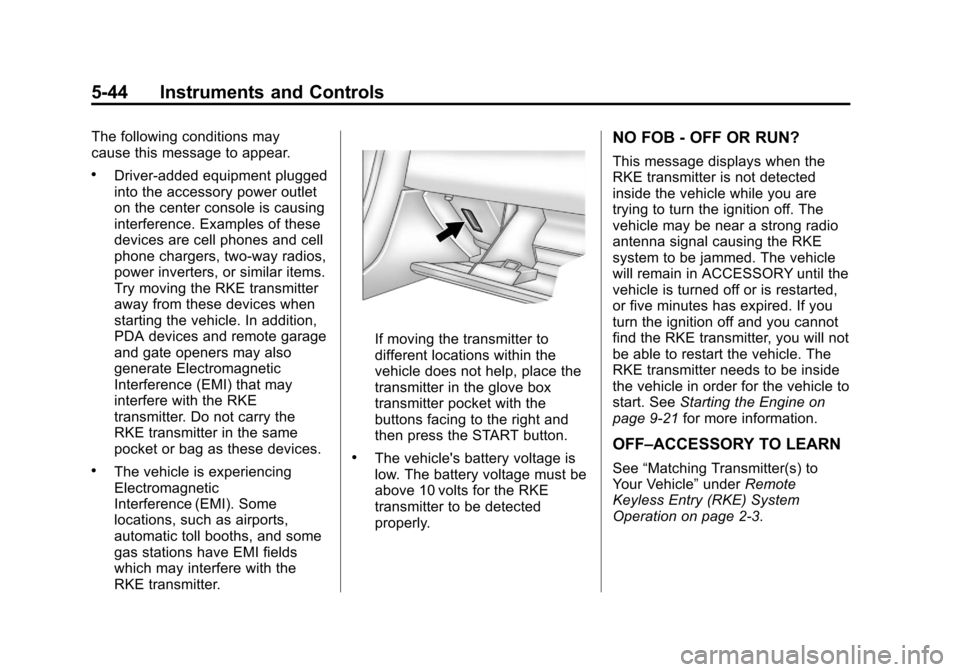
If moving the transmitter to
different locations within the
vehicle does not help, place the
transmitter in the glove box
transmitter pocket with the
buttons facing to the right and
then press the START button.
.The vehicle's battery voltage is
low. The battery voltage must be
above 10 volts for the RKE
transmitter to be detected
properly.
NO FOB - OFF OR RUN?
This message displays when the
RKE transmitter is not detected
inside the vehicle while you are
trying to turn the ignition off. The
vehicle may be near a strong radio
antenna signal causing the RKE
system to be jammed. The vehicle
will remain in ACCESSORY until the
vehicle is turned off or is restarted,
or five minutes has expired. If you
turn the ignition off and you cannot
find the RKE transmitter, you will not
be able to restart the vehicle. The
RKE transmitter needs to be inside
the vehicle in order for the vehicle to
start. SeeStarting the Engine on
page 9‑21 for more information.
OFF–ACCESSORY TO LEARN
See“Matching Transmitter(s) to
Your Vehicle” underRemote
Keyless Entry (RKE) System
Operation on page 2‑3.
Page 155 of 434
Black plate (45,1)Chevrolet Corvette Owner Manual - 2012
Instruments and Controls 5-45
READY FOR FOB #X
See“Matching Transmitter(s) to
Your Vehicle” underRemote
Keyless Entry (RKE) System
Operation on page 2‑3.
Lamp Messages
HEADLAMPS SUGGESTED
This message displays if it is dark
enough outside and the headlamps
and the Twilight Sentinel
®controls
are off. This message informs the
driver that turning on the exterior
lamps is recommended. It has
become dark enough outside to
require the headlamps and/or
other exterior lamps.
TURN SIGNAL ON
This message displays and a
sound will be heard if a turn signal
is left on for 1.2 km (three-quarters
of a mile). Move the turn signal/
multifunction lever to the off
position. To acknowledge this message,
press the RESET button.
Ride Control System
Messages
ACTIVE HANDLING
This message displays when the
Active Handling System is
operating. The Active Handling
System is a computer controlled
system that assists the driver in
controlling the vehicle in difficult
driving conditions. You may feel or
hear the system working and see
the ACTIVE HANDLING message
displayed in the DIC. This message
stays on for a few seconds following
the active handling event. This is
normal when the system is
operating. See
Active Handling
System on page 9‑38 andBraking
on page 9‑4.
ACTIVE HANDLING READY
This message displays when the
functional check of the Active
Handling System has been
completed. See Active Handling
System on page 9‑38 for more
information.
COMPETITIVE DRIVING MODE
This message displays and a sound
will be heard when the Competitive
Driving mode is selected. The
instrument panel cluster light will be
on when the Competitive Driving
mode is selected. If your vehicle
is equipped with a manual
transmission, Launch Control is
available when this mode is
selected. The Traction Control
System (TCS) will not be operating
while in the Competitive Driving
mode. Adjust your driving
accordingly. This system is available
on all models except ZR1and Z06.
See Competitive Driving Mode on
page 9‑39, including the “Launch
Control” information.
Page 241 of 434
Black plate (21,1)Chevrolet Corvette Owner Manual - 2012
Driving and Operating 9-21
Starting the Engine
Move the shift lever to P (Park) or
N (Neutral) for an automatic
transmission. For a manual
transmission the vehicle can be
started in Neutral or any other gear
as long as the clutch pedal is
pressed. To restart a vehicle with a
manual transmission when you are
already moving, use the Neutral
position only. To restart a vehicle
with an automatic transmission
when you are already moving, use
N (Neutral).
Notice:Do not try to shift to
P (Park) if the vehicle is moving.
If you do, you could damage the
transmission. Shift to P (Park)
only when the vehicle is stopped.
The RKE transmitter must be inside
the vehicle for the ignition to work. Cell phone chargers can interfere
with the operation of the Keyless
Access System. Battery chargers
should not be plugged in when
starting or turning off the engine.
To start the vehicle, do the following:
1. For vehicles with an automatic
transmission, with your foot on
the brake pedal, press the
START button located on the
instrument panel. For vehicles
with a manual transmission, you
must also press in the clutch
pedal while pressing the
START button.
If there is not an RKE transmitter
in the vehicle or if there is
something causing interference
with it, the DIC will display
NO FOBS DETECTED.
See Key and Lock Messages on
page 5‑43 for more information. 2. When the engine begins
cranking, let go of the button and
the engine cranks automatically
until it starts. If the battery in the
RKE transmitter is weak, the
DIC displays FOB BATTERY
LOW. You can still drive the
vehicle.
See “Battery Replacement”
under Remote Keyless Entry
(RKE) System Operation on
page 2‑3 for more information.
If the fob battery is dead, you
need to insert the fob into the
fob slot to enable engine
starting. See “NO FOBS
DETECTED” underKey and
Lock Messages on page 5‑43.
3. Do not race the engine immediately after starting it.
Operate the engine and
transmission gently until the oil
warms up and lubricates all
moving parts.
Page 242 of 434
Black plate (22,1)Chevrolet Corvette Owner Manual - 2012
9-22 Driving and Operating
4. If the engine does not start andno DIC message is displayed,
wait 15 seconds before trying
again to let the cranking motor
cool down.
If the engine does not start after
5-10 seconds, especially in very
cold weather (below −18°C
or 0°F), it could be flooded with
too much gasoline. Try pushing
the accelerator pedal all the way
to the floor while cranking for up
to 15 seconds maximum. Wait at
least 15 seconds between each
try, to allow the cranking motor
to cool down. When the engine
starts, let go of the accelerator.
If the vehicle starts briefly but
then stops again, repeat these
steps. This clears the extra
gasoline from the engine.
Notice: Cranking the engine for
long periods of time, by pressing
the START button immediately
after cranking has ended, can
overheat and damage the
cranking motor, and drain the battery. Wait at least 15 seconds
between each try, to allow the
cranking motor to cool down.
The vehicle has a
Computer-Controlled Cranking
System. This feature assists in
starting the engine and protects
components. Once cranking has
been initiated, the engine continues
cranking for a few seconds or until
the vehicle starts. If the engine does
not start, cranking automatically
stops after 15 seconds to prevent
cranking motor damage. To prevent
gear damage, this system also
prevents cranking if the engine is
already running.
Notice:
The engine is designed to
work with the electronics in the
vehicle. If electrical parts or
accessories are added, you could
change the way the engine
operates. Before adding electrical
equipment, check with your
dealer. If you do not, the engine
might not perform properly. Any
resulting damage would not be
covered by the vehicle warranty.Stopping the Engine
If the vehicle has an automatic
transmission, move the shift lever to
P (Park) and press and hold the
Acc. (Off/Accessory) button, located
on the instrument panel, until the
engine shuts off. If the shift lever is
not in P (Park), the engine shuts off
and the vehicle goes into the
accessory mode. The DIC displays
SHIFT TO PARK. Once the shifter is
moved to P (Park), the vehicle turns
off. If the vehicle has a manual
transmission, it is recommended
that you move the shift lever to
R (Reverse) and set the parking
brake after you turn off the
engine by pressing and holding
the Acc. (Off/Accessory) button.
If the RKE transmitter is not
detected inside the vehicle when it
is turned to off, the DIC displays
NO FOB –OFF OR RUN?.
See Key and Lock Messages on
page 5‑43 for more information.
Page 413 of 434
Black plate (21,1)Chevrolet Corvette Owner Manual - 2012
Customer Information 13-21
GM will not access this data or
share it with others except: with the
consent of the vehicle owner or,
if the vehicle is leased, with the
consent of the lessee; in response
to an official request by police or
similar government office; as part of
GM's defense of litigation through
the discovery process; or, as
required by law. Data that GM
collects or receives may also be
used for GM research needs or may
be made available to others for
research purposes, where a need is
shown and the data is not tied to a
specific vehicle or vehicle owner.
OnStar®
If the vehicle is equipped with an
active OnStar system, that system
may also record data in crash or
near crash‐like situations. The
OnStar Terms and Conditions
provides information on data
collection and use and is available
at www.onstar.com (U.S.) or
www.onstar.ca (Canada), or
by pressing the
Qbutton andspeaking to an advisor. See
OnStar
Overview on page 14‑1 for more
information.
Navigation System
If the vehicle has a navigation
system, use of the system may
result in the storage of destinations,
addresses, telephone numbers, and
other trip information. Refer to the
navigation manual for information on
stored data and for deletion
instructions.
Radio Frequency
Identification (RFID)
RFID technology is used in some
vehicles for functions such as tire
pressure monitoring and ignition
system security, as well as in
connection with conveniences such
as key fobs for remote door locking/
unlocking and starting, and
in-vehicle transmitters for garage
door openers. RFID technology in
GM vehicles does not use or record personal information or link with any
other GM system containing
personal information.
Radio Frequency
Statement
This vehicle has systems that
operate on a radio frequency that
comply with Part 15 of the Federal
Communications Commission (FCC)
rules and with Industry Canada
Standards RSS‐GEN/210/220/310.
Operation is subject to the following
two conditions:
1. The device may not cause
harmful interference.
2. The device must accept any interference received, including
interference that may cause
undesired operation of the
device.
Changes or modifications to any of
these systems by other than an
authorized service facility could void
authorization to use this equipment.