roof CHEVROLET CORVETTE 2012 6.G Owners Manual
[x] Cancel search | Manufacturer: CHEVROLET, Model Year: 2012, Model line: CORVETTE, Model: CHEVROLET CORVETTE 2012 6.GPages: 434, PDF Size: 6.96 MB
Page 1 of 434

Black plate (1,1)Chevrolet Corvette Owner Manual - 2012
2012 Chevrolet Corvette Owner ManualM
In Brief. . . . . . . . . . . . . . . . . . . . . . . . 1-1
Instrument Panel . . . . . . . . . . . . . . 1-2
Initial Drive Information . . . . . . . . 1-4
Vehicle Features . . . . . . . . . . . . . 1-17
Performance and Maintenance . . . . . . . . . . . . . . . . 1-21
Keys, Doors, and Windows . . . . . . . . . . . . . . . . . . . . 2-1
Keys and Locks . . . . . . . . . . . . . . . 2-2
Doors . . . . . . . . . . . . . . . . . . . . . . . . . 2-11
Vehicle Security . . . . . . . . . . . . . . 2-13
Exterior Mirrors . . . . . . . . . . . . . . . 2-16
Interior Mirrors . . . . . . . . . . . . . . . . 2-17
Windows . . . . . . . . . . . . . . . . . . . . . 2-18
Roof . . . . . . . . . . . . . . . . . . . . . . . . . . 2-20 Seats and Restraints
. . . . . . . . . 3-1
Head Restraints . . . . . . . . . . . . . . . 3-2
Front Seats . . . . . . . . . . . . . . . . . . . . 3-2
Safety Belts . . . . . . . . . . . . . . . . . . . . 3-8
Airbag System . . . . . . . . . . . . . . . . 3-15
Child Restraints . . . . . . . . . . . . . . 3-28
Storage . . . . . . . . . . . . . . . . . . . . . . . 4-1
Storage Compartments . . . . . . . . 4-1
Additional Storage Features . . . 4-3
Instruments and Controls . . . . 5-1
Controls . . . . . . . . . . . . . . . . . . . . . . . 5-2
Warning Lights, Gauges, and Indicators . . . . . . . . . . . . . . . . . . . . 5-8
Information Displays . . . . . . . . . . 5-28
Vehicle Messages . . . . . . . . . . . . 5-36
Vehicle Personalization . . . . . . . 5-55
Universal Remote System . . . . 5-64 Lighting
. . . . . . . . . . . . . . . . . . . . . . . 6-1
Exterior Lighting . . . . . . . . . . . . . . . 6-1
Interior Lighting . . . . . . . . . . . . . . . . 6-5
Lighting Features . . . . . . . . . . . . . . 6-6
Infotainment System . . . . . . . . . 7-1
Introduction . . . . . . . . . . . . . . . . . . . . 7-1
Radio . . . . . . . . . . . . . . . . . . . . . . . . . . 7-5
Audio Players . . . . . . . . . . . . . . . . 7-12
Phone . . . . . . . . . . . . . . . . . . . . . . . . 7-18
Trademarks and License
Agreements . . . . . . . . . . . . . . . . . 7-25
Climate Controls . . . . . . . . . . . . . 8-1
Climate Control Systems . . . . . . 8-1
Air Vents . . . . . . . . . . . . . . . . . . . . . . . 8-6
Maintenance . . . . . . . . . . . . . . . . . . . 8-6
Page 7 of 434
Black plate (1,1)Chevrolet Corvette Owner Manual - 2012
In Brief 1-1
In Brief
Instrument Panel
Instrument Panel . . . . . . . . . . . . . . 1-2
Initial Drive Information
Initial Drive Information . . . . . . . . 1-4
Remote Keyless Entry (RKE)System . . . . . . . . . . . . . . . . . . . . . . 1-4
Door Locks . . . . . . . . . . . . . . . . . . . 1-5
Trunk Release . . . . . . . . . . . . . . . . 1-6
Windows . . . . . . . . . . . . . . . . . . . . . . 1-7
Seat Adjustment . . . . . . . . . . . . . . 1-8
Memory Features . . . . . . . . . . . . . 1-9
Safety Belts . . . . . . . . . . . . . . . . . . 1-11
Passenger Sensing System . . . . . . . . . . . . . . . . . . . . . 1-11
Mirror Adjustment . . . . . . . . . . . . 1-12 Steering Wheel
Adjustment . . . . . . . . . . . . . . . . . 1-12
Interior Lighting . . . . . . . . . . . . . . 1-13
Exterior Lighting . . . . . . . . . . . . . 1-14
Windshield Wiper/Washer . . . . 1-14
Climate Controls . . . . . . . . . . . . . 1-15
Transmission . . . . . . . . . . . . . . . . 1-16Vehicle Features
Radio(s) . . . . . . . . . . . . . . . . . . . . . 1-17
Satellite Radio . . . . . . . . . . . . . . . 1-18
Portable Audio Devices . . . . . . 1-18
Bluetooth
®. . . . . . . . . . . . . . . . . . . 1-18
Steering Wheel Controls . . . . . 1-19
Cruise Control . . . . . . . . . . . . . . . 1-19
Navigation System . . . . . . . . . . . 1-19
Driver Information Center (DIC) . . . . . . . . . . . . . . . 1-20
Power Outlets . . . . . . . . . . . . . . . 1-21
Roof Panel . . . . . . . . . . . . . . . . . . 1-21
Convertible . . . . . . . . . . . . . . . . . . 1-21
Performance and Maintenance
Traction Control System (TCS) . . . . . . . . . . . . . . 1-21
Tire Pressure Monitor . . . . . . . . 1-22
Z06, Z16, and ZR1 Features . . . . . . . . . . . . . . . . . . . 1-22
Engine Oil Life System . . . . . . 1-23
Driving for Better Fuel Economy . . . . . . . . . . . . . . . . . . . 1-24
Battery . . . . . . . . . . . . . . . . . . . . . . . 1-24
Roadside Assistance Program . . . . . . . . . . . . . . . . . . . . 1-25
OnStar
®. . . . . . . . . . . . . . . . . . . . . 1-25
Page 27 of 434
Black plate (21,1)Chevrolet Corvette Owner Manual - 2012
In Brief 1-21
Power Outlets
The accessory power outlet can be
used to plug in electrical equipment,
such as a cell phone or MP3 player.
The accessory power outlet is
located inside the center console
storage compartment, on the
forward left side.
Remove the cover to access and
replace when not in use.
SeePower Outlets on page 5‑6.
Roof Panel
On vehicles with a removable roof
panel, there are three release
latches. Two are located on the front
of the roof panel and the other is
located on the back of the roof
panel. See “Removing the Roof
Panel” underRoof Panel on
page 2‑20. Until you are sure you can remove
the roof panel by yourself, have
someone help you. Once removed,
the roof panel should always be
stored properly in the rear storage
compartment.
For more information:
.See
“Storing the Roof Panel”
under Roof Panel on page 2‑20.
.See“Installing the Roof Panel”
under Roof Panel on page 2‑20.
Convertible
If equipped, the convertible top can
be lowered and stowed under the
tonneau cover behind the rear seat.
For step-by-step instructions, see
Convertible Top on page 2‑24.
Performance and
Maintenance
Traction Control
System (TCS)
The traction control system limits
wheel spin. The system turns on
automatically every time the vehicle
is started.
.To turn off traction control,
press and release the Active
Handling button located on the
console.
iilluminates and the
appropriate DIC message
displays. See Ride Control
System Messages on page 5‑45.
.Press and release the active
handling button again to turn on
traction control.
See Traction Control System (TCS)
on page 9‑36.
Page 33 of 434
Black plate (1,1)Chevrolet Corvette Owner Manual - 2012
Keys, Doors, and Windows 2-1
Keys, Doors, and
Windows
Keys and Locks
Keys . . . . . . . . . . . . . . . . . . . . . . . . . . 2-2
Remote Keyless Entry (RKE)System . . . . . . . . . . . . . . . . . . . . . . 2-3
Remote Keyless Entry (RKE) System Operation . . . . . . . . . . . 2-3
Door Locks . . . . . . . . . . . . . . . . . . . 2-8
Power Door Locks . . . . . . . . . . . 2-10
Automatic Door Locks . . . . . . . 2-10
Lockout Protection . . . . . . . . . . . 2-10
Doors
Hatch . . . . . . . . . . . . . . . . . . . . . . . . 2-11
Vehicle Security
Vehicle Security . . . . . . . . . . . . . . 2-13
Anti-theft Alarm System . . . . . . 2-13
Immobilizer . . . . . . . . . . . . . . . . . . 2-15
Immobilizer Operation . . . . . . . 2-15
Exterior Mirrors
Convex Mirrors . . . . . . . . . . . . . . 2-16
Power Mirrors . . . . . . . . . . . . . . . . 2-16
Folding Mirrors . . . . . . . . . . . . . . . 2-16
Heated Mirrors . . . . . . . . . . . . . . . 2-16
Automatic Dimming Mirror . . . 2-16
Interior Mirrors
Automatic Dimming Rearview Mirror . . . . . . . . . . . . . . . . . . . . . . . 2-17
Windows
Windows . . . . . . . . . . . . . . . . . . . . . 2-18
Power Windows . . . . . . . . . . . . . 2-18
Sun Visors . . . . . . . . . . . . . . . . . . . 2-19
Roof
Roof Panel . . . . . . . . . . . . . . . . . . 2-20
Convertible Top . . . . . . . . . . . . . . 2-24
Page 52 of 434
Black plate (20,1)Chevrolet Corvette Owner Manual - 2012
2-20 Keys, Doors, and Windows
Roof
Roof Panel
On vehicles with a removable roof
panel, follow the procedures when
removing or installing it.
Removing the Roof Panel
{WARNING
Do not try to remove a roof panel
while the vehicle is moving.
Trying to remove the roof panel
while the vehicle is moving could
cause an accident. The panel
could fall into the vehicle and
cause you to lose control, or it
could fly off and strike another
vehicle. You or others could be
injured. Remove the roof panel
only when the vehicle is parked.
Until you are sure you can remove
the panel alone, have someone
help you. Notice:
If you drop or rest a roof
panel on its edges, the roof panel,
paint and/or weatherstripping
may be damaged. Always place
the roof panel in the stowage
receivers after removing it from
the vehicle.
1. Park on a level surface and set the parking brake. Shift an
automatic transmission into
P (Park). Shift a manual
transmission into N (Neutral).
2. Make sure the ignition is off.
3. Lower both sun visors.
4. Open the rear hatch and remove any items that may interfere with
proper storage of the roof panel.
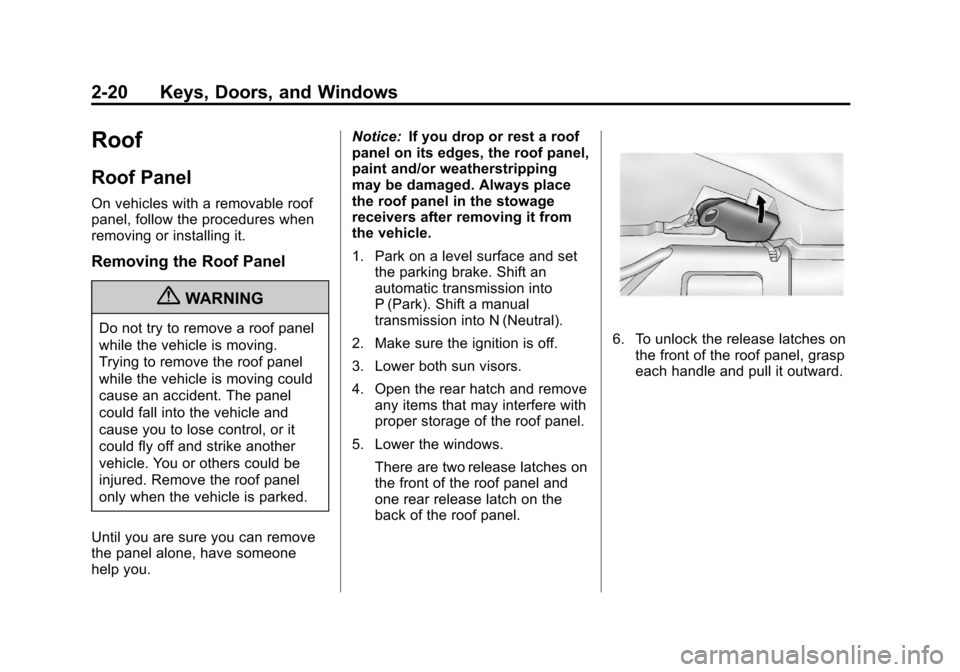
5. Lower the windows. There are two release latches on
the front of the roof panel and
one rear release latch on the
back of the roof panel.6. To unlock the release latches onthe front of the roof panel, grasp
each handle and pull it outward.
Page 53 of 434
Black plate (21,1)Chevrolet Corvette Owner Manual - 2012
Keys, Doors, and Windows 2-21
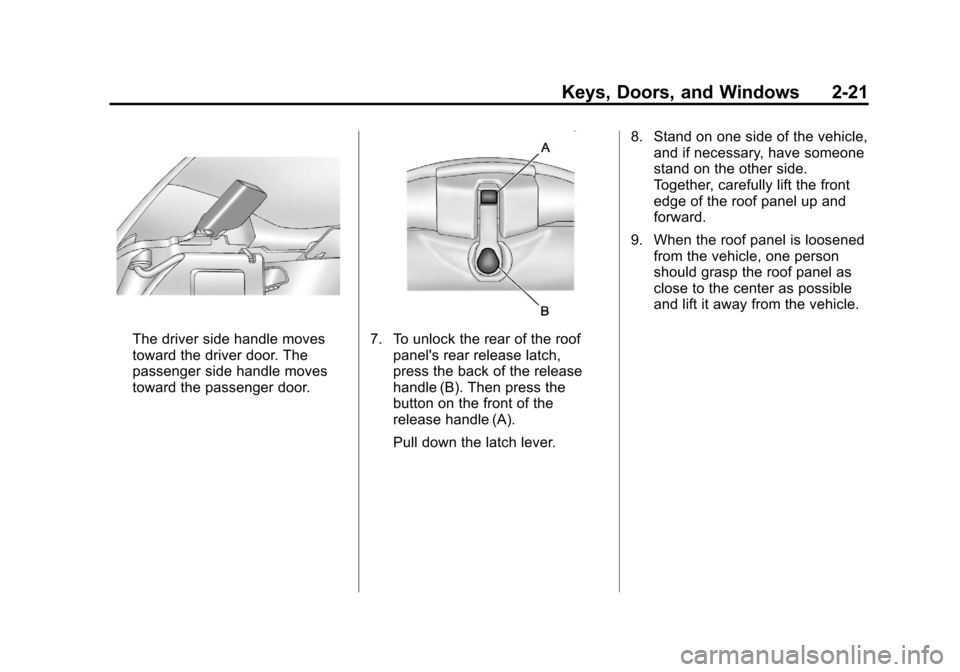
The driver side handle moves
toward the driver door. The
passenger side handle moves
toward the passenger door.7. To unlock the rear of the roofpanel's rear release latch,
press the back of the release
handle (B). Then press the
button on the front of the
release handle (A).
Pull down the latch lever. 8. Stand on one side of the vehicle,
and if necessary, have someone
stand on the other side.
Together, carefully lift the front
edge of the roof panel up and
forward.
9. When the roof panel is loosened from the vehicle, one person
should grasp the roof panel as
close to the center as possible
and lift it away from the vehicle.
Page 54 of 434
Black plate (22,1)Chevrolet Corvette Owner Manual - 2012
2-22 Keys, Doors, and Windows
Storing the Roof Panel
{WARNING
If a roof panel is not stored
properly, it could be thrown about
the vehicle in a crash or sudden
maneuver. People in the vehicle
could be injured. Whenever you
store a roof panel in the vehicle,
always be sure that it is stored
securely in the proper location.
Notice: If you drop or rest a roof
panel on its edges, the roof panel,
paint and/or weatherstripping
may be damaged. Always place
the roof panel in the stowage
receivers after removing it from
the vehicle.
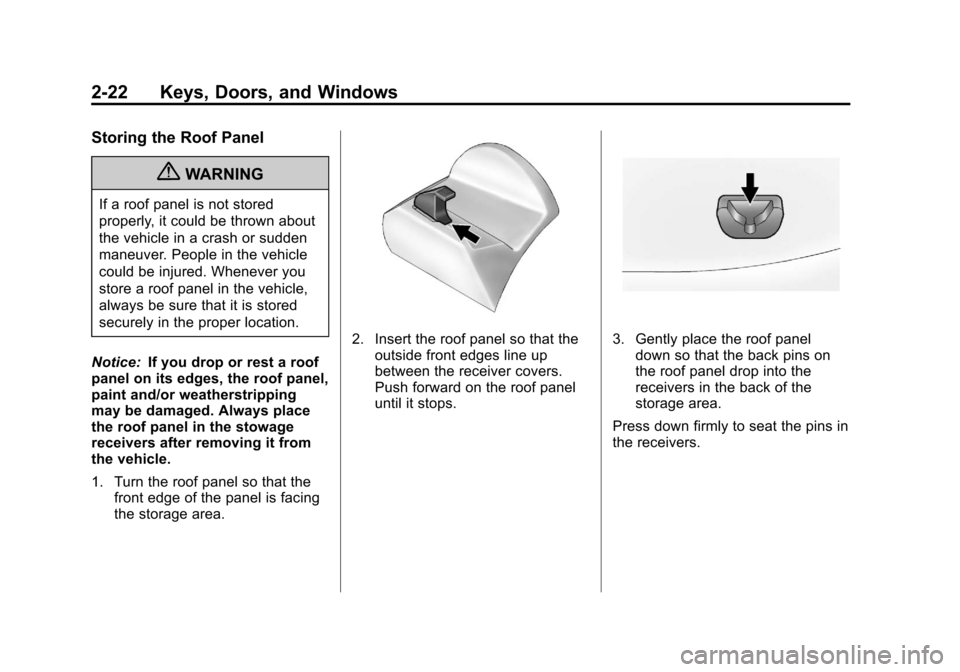
1. Turn the roof panel so that the front edge of the panel is facing
the storage area.
2. Insert the roof panel so that the
outside front edges line up
between the receiver covers.
Push forward on the roof panel
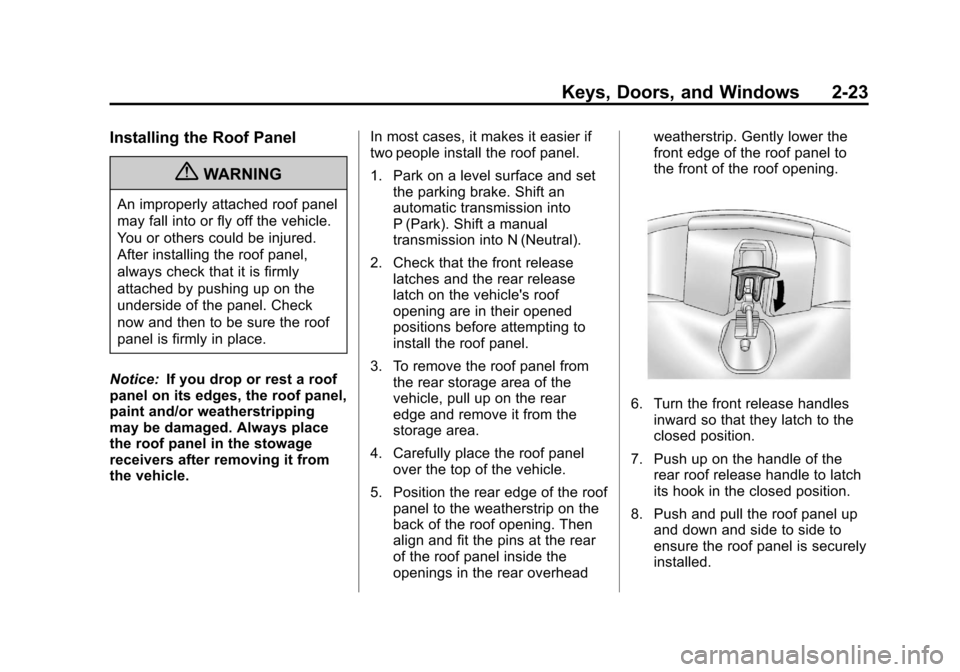
until it stops.3. Gently place the roof paneldown so that the back pins on
the roof panel drop into the
receivers in the back of the
storage area.
Press down firmly to seat the pins in
the receivers.
Page 55 of 434
Black plate (23,1)Chevrolet Corvette Owner Manual - 2012
Keys, Doors, and Windows 2-23
Installing the Roof Panel
{WARNING
An improperly attached roof panel
may fall into or fly off the vehicle.
You or others could be injured.
After installing the roof panel,
always check that it is firmly
attached by pushing up on the
underside of the panel. Check
now and then to be sure the roof
panel is firmly in place.
Notice: If you drop or rest a roof
panel on its edges, the roof panel,
paint and/or weatherstripping
may be damaged. Always place
the roof panel in the stowage
receivers after removing it from
the vehicle. In most cases, it makes it easier if
two people install the roof panel.
1. Park on a level surface and set
the parking brake. Shift an
automatic transmission into
P (Park). Shift a manual
transmission into N (Neutral).
2. Check that the front release latches and the rear release
latch on the vehicle's roof
opening are in their opened
positions before attempting to
install the roof panel.
3. To remove the roof panel from the rear storage area of the
vehicle, pull up on the rear
edge and remove it from the
storage area.
4. Carefully place the roof panel over the top of the vehicle.
5. Position the rear edge of the roof panel to the weatherstrip on the
back of the roof opening. Then
align and fit the pins at the rear
of the roof panel inside the
openings in the rear overhead weatherstrip. Gently lower the
front edge of the roof panel to
the front of the roof opening.
6. Turn the front release handles
inward so that they latch to the
closed position.
7. Push up on the handle of the rear roof release handle to latch
its hook in the closed position.
8. Push and pull the roof panel up and down and side to side to
ensure the roof panel is securely
installed.
Page 56 of 434
Black plate (24,1)Chevrolet Corvette Owner Manual - 2012
2-24 Keys, Doors, and Windows
Removable Roof Panel
Notice:If you use a glass
treatment and/or conditioner that
contains ethyl sulfate on the roof
panel, you could damage the
panel. The repairs would not be
covered by your warranty. Only
use a GM-approved glass cleaner
on the roof panel.
Special care is necessary when
cleaning, removing, and/or storing
the roof panel.
.Flush with water to remove dust
and dirt, then dry the panel.
.Clean a transparent roof panel
with GM Glass Cleaner. Leave
the cleaner on the panel for
one minute, then wipe the panel
with a soft, lint-free cloth. Do not
use glass cleaner on a painted
roof panel.
.Do not use abrasive cleaning
materials on either type of panel.
If water drops are frequently allowed
to dry on the roof panel, impurities
in the water will adhere to the top. These impurities may etch or mar
the finish. When the panel gets wet,
dry it off.
Convertible Top
After a power reconnect such as
battery replacement, the power
windows need to be initialized for
the convertible top to work. See
“Power Window Initialize”
inPower
Windows on page 2‑18.
Manual Operation
For care and cleaning of the
convertible top, see “Cleaning the
Convertible Top” in this section.
High pressure car washes may
cause water to enter the vehicle.
If the vehicle has this feature, the
following procedures explain the
proper operation of the manual
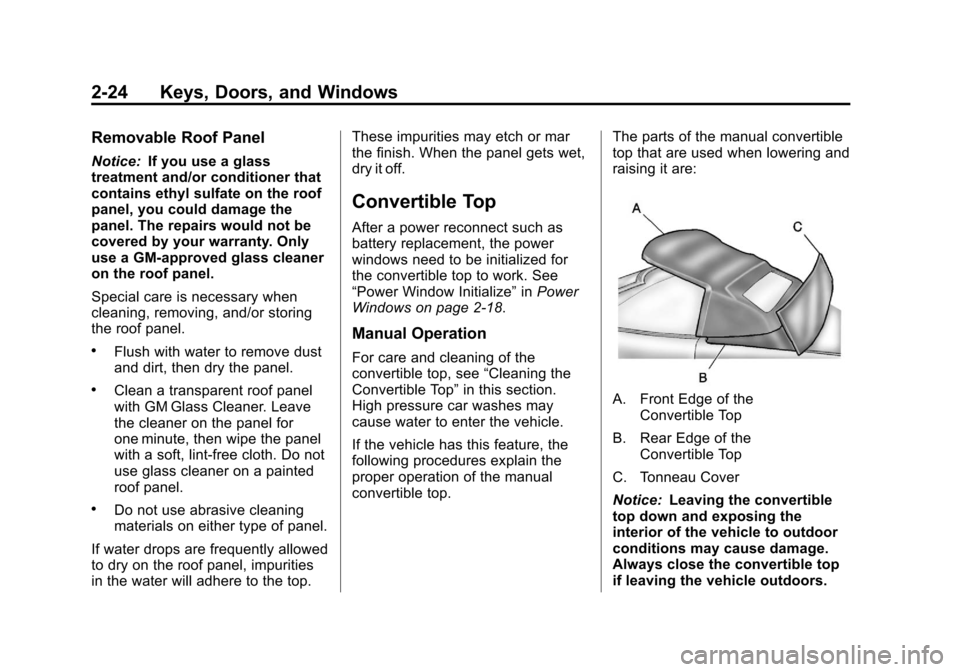
convertible top. The parts of the manual convertible
top that are used when lowering and
raising it are:
A. Front Edge of the
Convertible Top
B. Rear Edge of the Convertible Top
C. Tonneau Cover
Notice: Leaving the convertible
top down and exposing the
interior of the vehicle to outdoor
conditions may cause damage.
Always close the convertible top
if leaving the vehicle outdoors.
Page 109 of 434
Black plate (3,1)Chevrolet Corvette Owner Manual - 2012
Storage 4-3
Center Console Storage
To use this storage area, pull the
cover up on the driver side front
edge of the console and swing it to
the passenger side.
Some vehicles might also have
input jacks for auxiliary audio
devices. SeeAuxiliary Devices on
page 7‑17.
Additional Storage
Features
Cargo Cover
For vehicles with this feature, the
security shade can provide hidden
storage in the rear area of the
vehicle. The shade is also helpful in
blocking the glare from the
removable roof when it is stored in
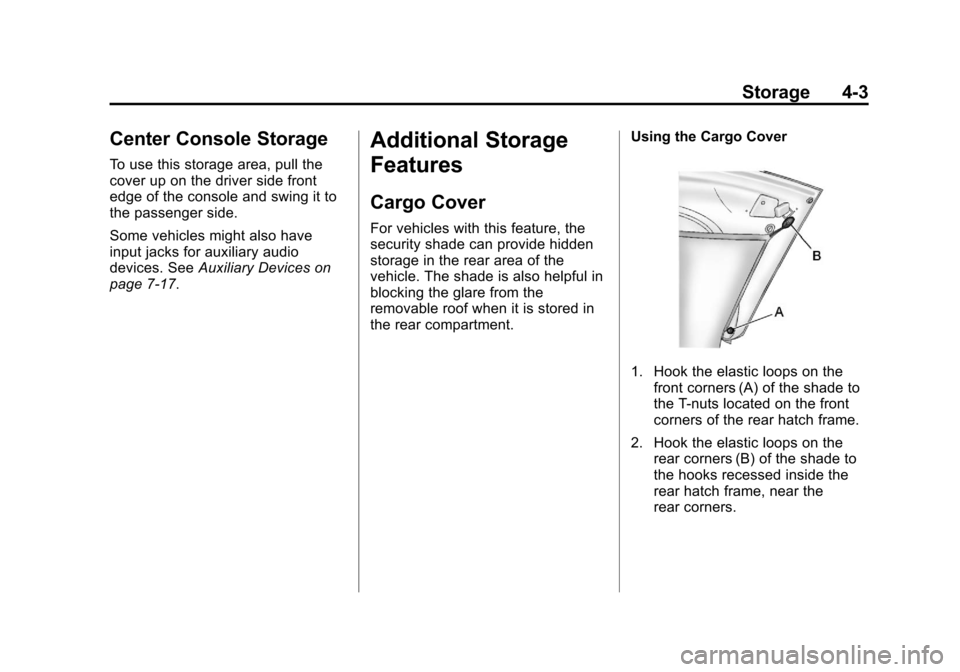
the rear compartment. Using the Cargo Cover
1. Hook the elastic loops on the
front corners (A) of the shade to
the T-nuts located on the front
corners of the rear hatch frame.
2. Hook the elastic loops on the rear corners (B) of the shade to
the hooks recessed inside the
rear hatch frame, near the
rear corners.