trunk CHEVROLET CORVETTE 2012 6.G Owners Manual
[x] Cancel search | Manufacturer: CHEVROLET, Model Year: 2012, Model line: CORVETTE, Model: CHEVROLET CORVETTE 2012 6.GPages: 434, PDF Size: 6.96 MB
Page 7 of 434
Black plate (1,1)Chevrolet Corvette Owner Manual - 2012
In Brief 1-1
In Brief
Instrument Panel
Instrument Panel . . . . . . . . . . . . . . 1-2
Initial Drive Information
Initial Drive Information . . . . . . . . 1-4
Remote Keyless Entry (RKE)System . . . . . . . . . . . . . . . . . . . . . . 1-4
Door Locks . . . . . . . . . . . . . . . . . . . 1-5
Trunk Release . . . . . . . . . . . . . . . . 1-6
Windows . . . . . . . . . . . . . . . . . . . . . . 1-7
Seat Adjustment . . . . . . . . . . . . . . 1-8
Memory Features . . . . . . . . . . . . . 1-9
Safety Belts . . . . . . . . . . . . . . . . . . 1-11
Passenger Sensing System . . . . . . . . . . . . . . . . . . . . . 1-11
Mirror Adjustment . . . . . . . . . . . . 1-12 Steering Wheel
Adjustment . . . . . . . . . . . . . . . . . 1-12
Interior Lighting . . . . . . . . . . . . . . 1-13
Exterior Lighting . . . . . . . . . . . . . 1-14
Windshield Wiper/Washer . . . . 1-14
Climate Controls . . . . . . . . . . . . . 1-15
Transmission . . . . . . . . . . . . . . . . 1-16Vehicle Features
Radio(s) . . . . . . . . . . . . . . . . . . . . . 1-17
Satellite Radio . . . . . . . . . . . . . . . 1-18
Portable Audio Devices . . . . . . 1-18
Bluetooth
®. . . . . . . . . . . . . . . . . . . 1-18
Steering Wheel Controls . . . . . 1-19
Cruise Control . . . . . . . . . . . . . . . 1-19
Navigation System . . . . . . . . . . . 1-19
Driver Information Center (DIC) . . . . . . . . . . . . . . . 1-20
Power Outlets . . . . . . . . . . . . . . . 1-21
Roof Panel . . . . . . . . . . . . . . . . . . 1-21
Convertible . . . . . . . . . . . . . . . . . . 1-21
Performance and Maintenance
Traction Control System (TCS) . . . . . . . . . . . . . . 1-21
Tire Pressure Monitor . . . . . . . . 1-22
Z06, Z16, and ZR1 Features . . . . . . . . . . . . . . . . . . . 1-22
Engine Oil Life System . . . . . . 1-23
Driving for Better Fuel Economy . . . . . . . . . . . . . . . . . . . 1-24
Battery . . . . . . . . . . . . . . . . . . . . . . . 1-24
Roadside Assistance Program . . . . . . . . . . . . . . . . . . . . 1-25
OnStar
®. . . . . . . . . . . . . . . . . . . . . 1-25
Page 9 of 434

Black plate (3,1)Chevrolet Corvette Owner Manual - 2012
In Brief 1-3
A.Air Vents on page 8‑6.
B. Head‐Up Display Controls (If Equipped). See Head-Up
Display (HUD) on page 5‑32.
C. Turn and Lane‐Change Lever. See Turn and Lane-Change
Signals on page 6‑4.
Cruise Control on page 9‑45.
Fog Lamps on page 6‑5.
Exterior Lamp Controls on
page 6‑1.
D. Manual Shift Paddles (If Equipped). See Automatic
Transmission on page 9‑27.
E. Driver Information Center (DIC)
on page 5‑28.
F. Instrument Cluster on page 5‑9.
G. Windshield Wiper/Washer on
page 5‑4.
H. Driver Information Center (DIC) Buttons. See Driver Information
Center (DIC) on page 5‑28. I.
Hazard Warning Flashers on
page 6‑4.
J. Infotainment on page 7‑1.
K. Dual Automatic Climate Control
System on page 8‑1.
L. Fuel Door Release Button. See Filling the Tank on page 9‑51.
Hatch/Trunk Release Button.
See “Hatch/Trunk Lid Release”
under Hatch on page 2‑11.
M. Instrument Panel Illumination
Control on page 6‑5.
N. Power Folding Top Switch (If Equipped). See Convertible
Top on page 2‑24.
O. Data Link Connector (DLC) (Out of View). See Malfunction
Indicator Lamp on page 5‑19.
P. Bluetooth Controls (If Equipped). See Bluetooth on
page 7‑18.
Steering Wheel Controls on
page 5‑3 (If Equipped). Q.
Steering Wheel Adjustment on
page 5‑2.
R. Horn on page 5‑4.
S. Telescopic Steering Column Control (If Equipped). See
Steering Wheel Adjustment on
page 5‑2.
T. Ignition Positions on page 9‑19.
U. Heated Front Seats on page 3‑8
(If Equipped).
V. Shift Lever (Automatic Shown). See Automatic Transmission on
page 9‑27 orManual
Transmission on page 9‑32.
W. Active Handling System on
page 9‑38.
X. Power Outlets on page 5‑6.
Y. Selective Ride Control on
page 9‑43 (If Equipped).
Z. Parking Brake on page 9‑36.
Page 10 of 434
Black plate (4,1)Chevrolet Corvette Owner Manual - 2012
1-4 In Brief
Initial Drive
Information
This section provides a brief
overview about some of the
important features that may or may
not be on your specific vehicle.
For more detailed information, refer
to each of the features which can be
found later in this owner manual.
Remote Keyless Entry
(RKE) System
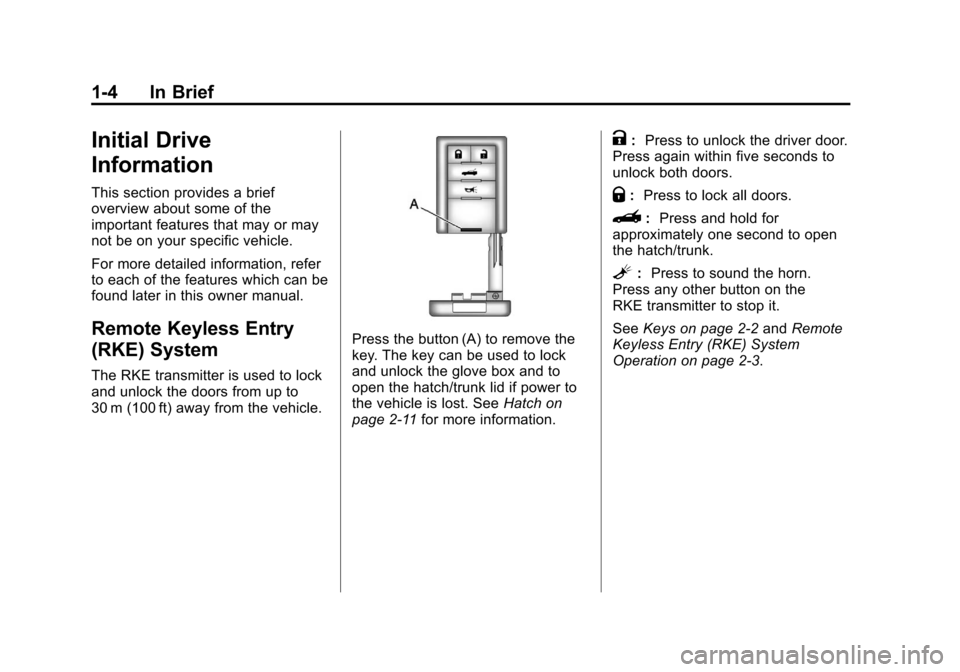
The RKE transmitter is used to lock
and unlock the doors from up to
30 m (100 ft) away from the vehicle.
Press the button (A) to remove the
key. The key can be used to lock
and unlock the glove box and to
open the hatch/trunk lid if power to
the vehicle is lost. SeeHatch on
page 2‑11 for more information.
K:Press to unlock the driver door.
Press again within five seconds to
unlock both doors.
Q: Press to lock all doors.
}: Press and hold for
approximately one second to open
the hatch/trunk.
L: Press to sound the horn.
Press any other button on the
RKE transmitter to stop it.
See Keys on page 2‑2 andRemote
Keyless Entry (RKE) System
Operation on page 2‑3.
Page 12 of 434
Black plate (6,1)Chevrolet Corvette Owner Manual - 2012
1-6 In Brief
Outside the Vehicle
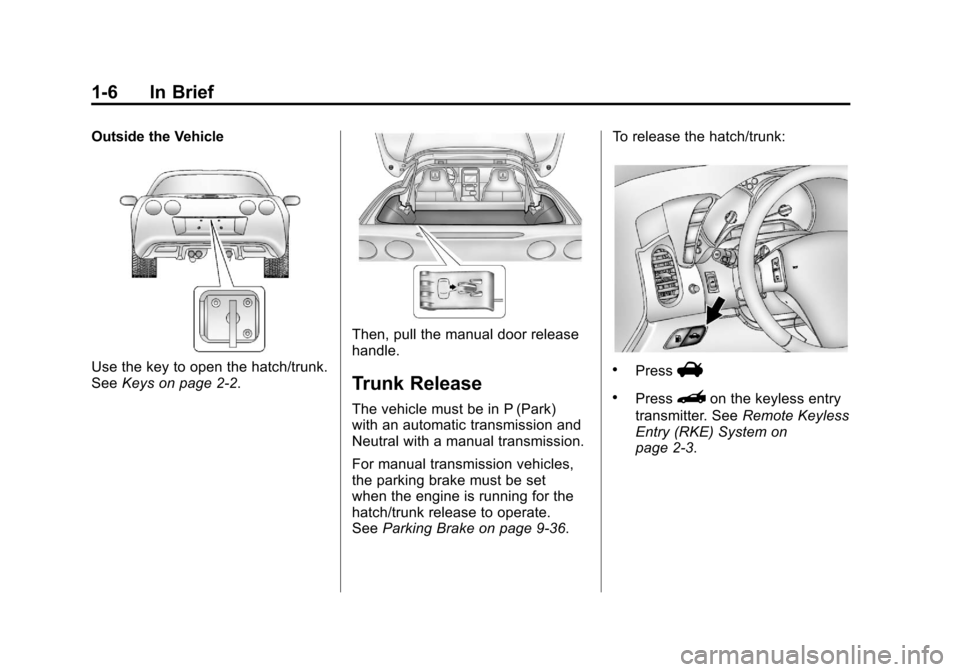
Use the key to open the hatch/trunk.
SeeKeys on page 2‑2.
Then, pull the manual door release
handle.
Trunk Release
The vehicle must be in P (Park)
with an automatic transmission and
Neutral with a manual transmission.
For manual transmission vehicles,
the parking brake must be set
when the engine is running for the
hatch/trunk release to operate.
SeeParking Brake on page 9‑36. To release the hatch/trunk:
.PressV
.Press}on the keyless entry
transmitter. See Remote Keyless
Entry (RKE) System on
page 2‑3.
Page 13 of 434
Black plate (7,1)Chevrolet Corvette Owner Manual - 2012
In Brief 1-7
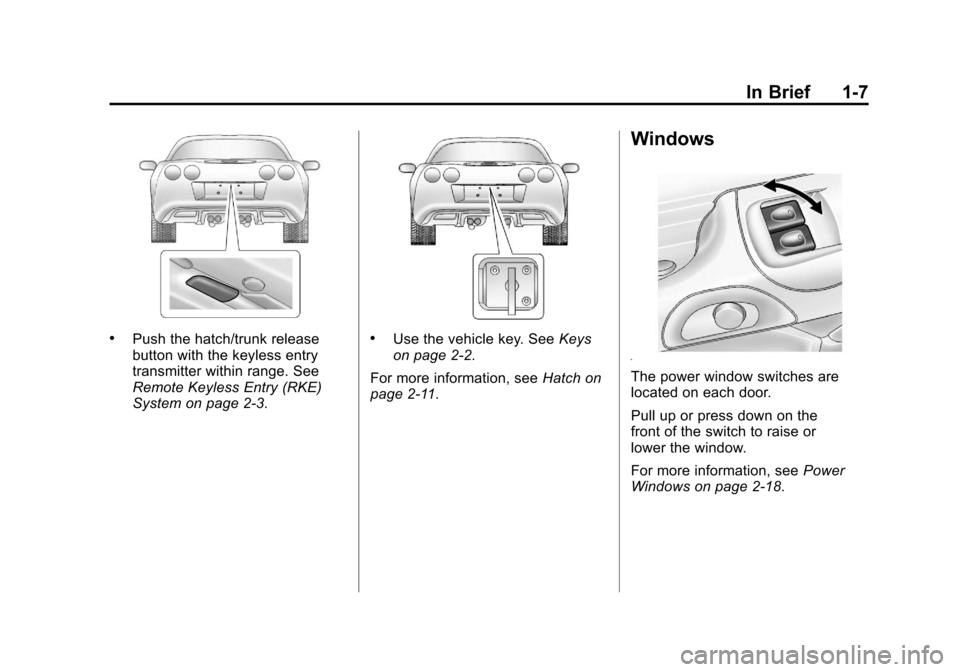
.Push the hatch/trunk release
button with the keyless entry
transmitter within range. See
Remote Keyless Entry (RKE)
System on page 2‑3..Use the vehicle key. SeeKeys
on page 2‑2.
For more information, see Hatch on
page 2‑11.
Windows
The power window switches are
located on each door.
Pull up or press down on the
front of the switch to raise or
lower the window.
For more information, see Power
Windows on page 2‑18.
Page 19 of 434
Black plate (13,1)Chevrolet Corvette Owner Manual - 2012
In Brief 1-13
Telescopic Steering Column
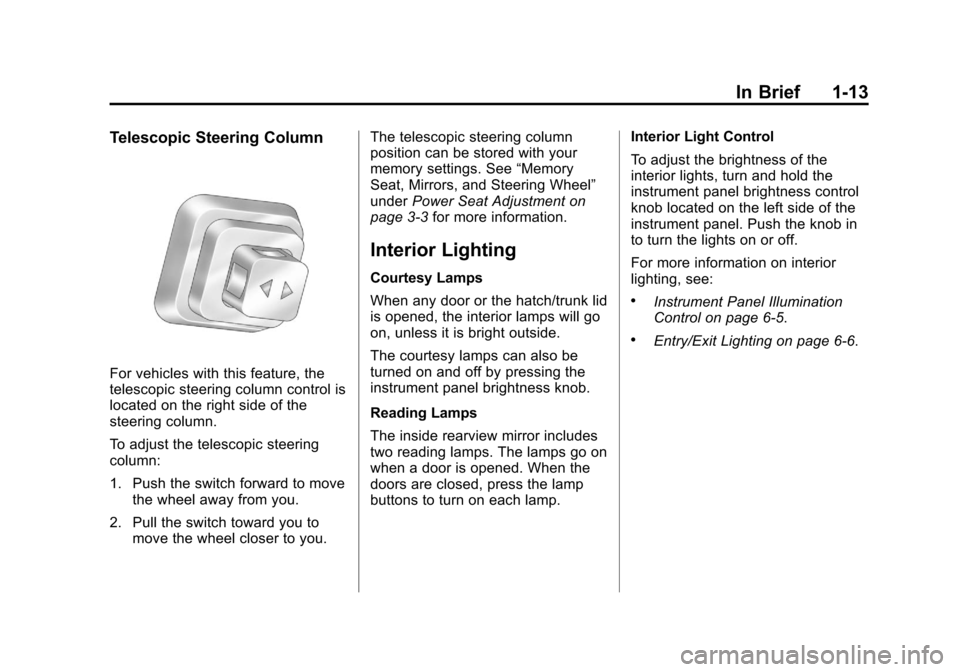
For vehicles with this feature, the
telescopic steering column control is
located on the right side of the
steering column.
To adjust the telescopic steering
column:
1. Push the switch forward to movethe wheel away from you.
2. Pull the switch toward you to move the wheel closer to you. The telescopic steering column
position can be stored with your
memory settings. See
“Memory
Seat, Mirrors, and Steering Wheel”
under Power Seat Adjustment on
page 3‑3 for more information.
Interior Lighting
Courtesy Lamps
When any door or the hatch/trunk lid
is opened, the interior lamps will go
on, unless it is bright outside.
The courtesy lamps can also be
turned on and off by pressing the
instrument panel brightness knob.
Reading Lamps
The inside rearview mirror includes
two reading lamps. The lamps go on
when a door is opened. When the
doors are closed, press the lamp
buttons to turn on each lamp. Interior Light Control
To adjust the brightness of the
interior lights, turn and hold the
instrument panel brightness control
knob located on the left side of the
instrument panel. Push the knob in
to turn the lights on or off.
For more information on interior
lighting, see:
.Instrument Panel Illumination
Control on page 6‑5.
.Entry/Exit Lighting on page 6‑6.
Page 30 of 434
Black plate (24,1)Chevrolet Corvette Owner Manual - 2012
1-24 In Brief
Driving for Better Fuel
Economy
Driving habits can affect fuel
mileage. Here are some driving tips
to get the best fuel economy
possible.
.Avoid fast starts and accelerate
smoothly.
.Brake gradually and avoid
abrupt stops.
.Avoid idling the engine for long
periods of time.
.When road and weather
conditions are appropriate, use
cruise control, if equipped.
.Always follow posted speed
limits or drive more slowly when
conditions require.
.Keep vehicle tires properly
inflated.
.Combine several trips into a
single trip.
.Replace the vehicle's tires with
the same TPC Spec number
molded into the tire's sidewall
near the size.
.Follow recommended scheduled
maintenance.
Premium Fuel
This vehicle's engine was designed
to use premium unleaded gasoline.
See Recommended Fuel on
page 9‑48.
Battery
This vehicle has a maintenance free
battery. See Battery on page 10‑43
and Jump Starting on page 10‑82.
For Z06, ZR1, and manual
transmission Z16 (Grand Sport)
coupe models the battery is located
in the rear hatch/trunk area. Access
to the battery is not necessary to
jump start the vehicle. There are
positive (+) and negative (−)
terminals in the engine
compartment.
Page 34 of 434
Black plate (2,1)Chevrolet Corvette Owner Manual - 2012
2-2 Keys, Doors, and Windows
Keys and Locks
Keys
{WARNING
Leaving children in a vehicle with
the Remote Keyless Entry (RKE)
transmitter is dangerous for many
reasons; children or others could
be badly injured or even killed.
They could operate the power
windows or other controls or even
make the vehicle move. The
windows will function with the
RKE transmitter in the vehicle
and they could be seriously
injured or killed if caught in the
path of a closing window. Do not
leave the RKE transmitter in a
vehicle with children.
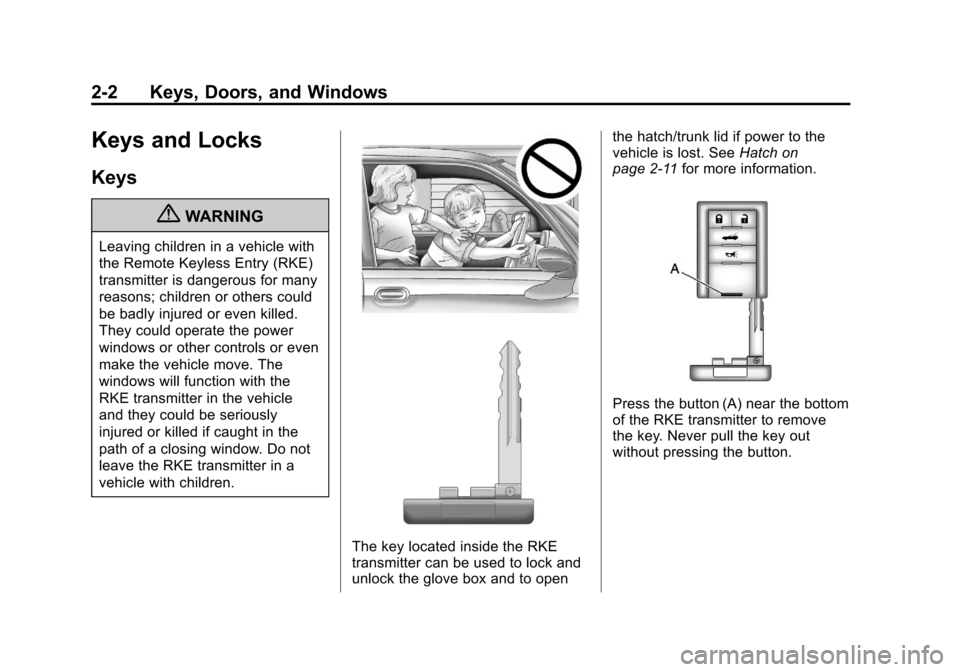
The key located inside the RKE
transmitter can be used to lock and
unlock the glove box and to openthe hatch/trunk lid if power to the
vehicle is lost. See
Hatch on
page 2‑11 for more information.
Press the button (A) near the bottom
of the RKE transmitter to remove
the key. Never pull the key out
without pressing the button.
Page 36 of 434
Black plate (4,1)Chevrolet Corvette Owner Manual - 2012
2-4 Keys, Doors, and Windows
Keyless Trunk Opening
Press the hatch/trunk release button
located on the rear of the hatch/
trunk lid above the license plate
to open the trunk if the RKE
transmitter is within range.
SeeHatch on page 2‑11 for
additional information.
There are other conditions that can
affect the performance of the
transmitter. See Remote Keyless
Entry (RKE) System on page 2‑3.
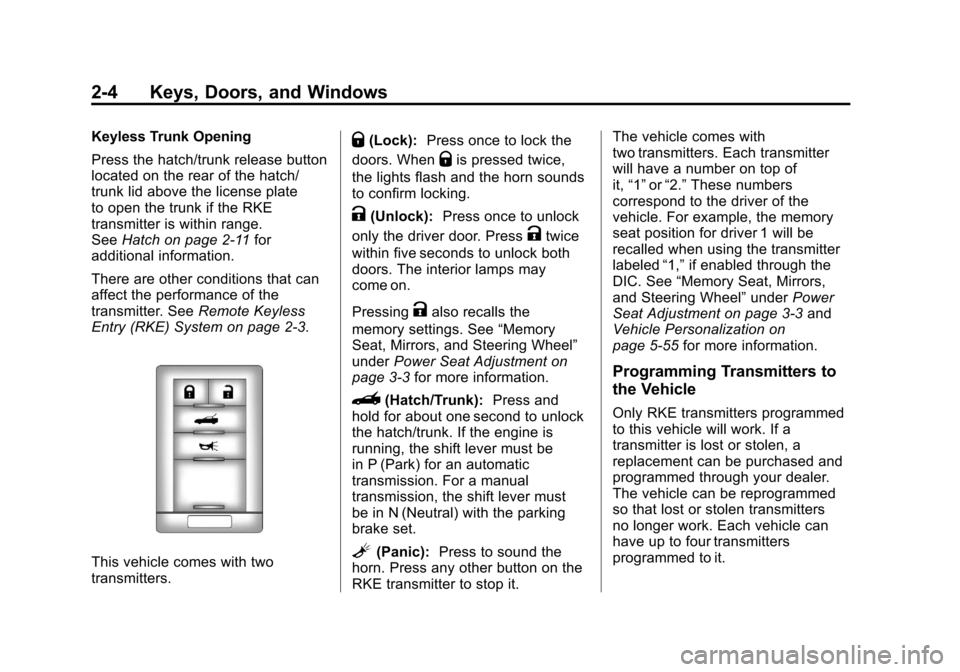
This vehicle comes with two
transmitters.
Q(Lock): Press once to lock the
doors. When
Qis pressed twice,
the lights flash and the horn sounds
to confirm locking.
K(Unlock): Press once to unlock
only the driver door. Press
Ktwice
within five seconds to unlock both
doors. The interior lamps may
come on.
Pressing
Kalso recalls the
memory settings. See “Memory
Seat, Mirrors, and Steering Wheel”
under Power Seat Adjustment on
page 3‑3 for more information.
}(Hatch/Trunk): Press and
hold for about one second to unlock
the hatch/trunk. If the engine is
running, the shift lever must be
in P (Park) for an automatic
transmission. For a manual
transmission, the shift lever must
be in N (Neutral) with the parking
brake set.
L(Panic): Press to sound the
horn. Press any other button on the
RKE transmitter to stop it. The vehicle comes with
two transmitters. Each transmitter
will have a number on top of
it,
“1” or“2.” These numbers
correspond to the driver of the
vehicle. For example, the memory
seat position for driver 1 will be
recalled when using the transmitter
labeled “1,”if enabled through the
DIC. See “Memory Seat, Mirrors,
and Steering Wheel” underPower
Seat Adjustment on page 3‑3 and
Vehicle Personalization on
page 5‑55 for more information.
Programming Transmitters to
the Vehicle
Only RKE transmitters programmed
to this vehicle will work. If a
transmitter is lost or stolen, a
replacement can be purchased and
programmed through your dealer.
The vehicle can be reprogrammed
so that lost or stolen transmitters
no longer work. Each vehicle can
have up to four transmitters
programmed to it.
Page 37 of 434
Black plate (5,1)Chevrolet Corvette Owner Manual - 2012
Keys, Doors, and Windows 2-5
Programming with a Recognized
Transmitter
A new transmitter can be
programmed to the vehicle when
there is one recognized transmitter.
For vehicles sold in Canada, two
recognized transmitters are required
to program a new transmitter.
1. The vehicle must be off.
2. Both the recognized and newtransmitters must be with you.
3. Insert the vehicle key into the key cylinder located above the
license plate.
4. Open the hatch/trunk.
5. Turn the key five times within five seconds.
6. The DIC displays READY FOR FOB #2, 3 or 4.
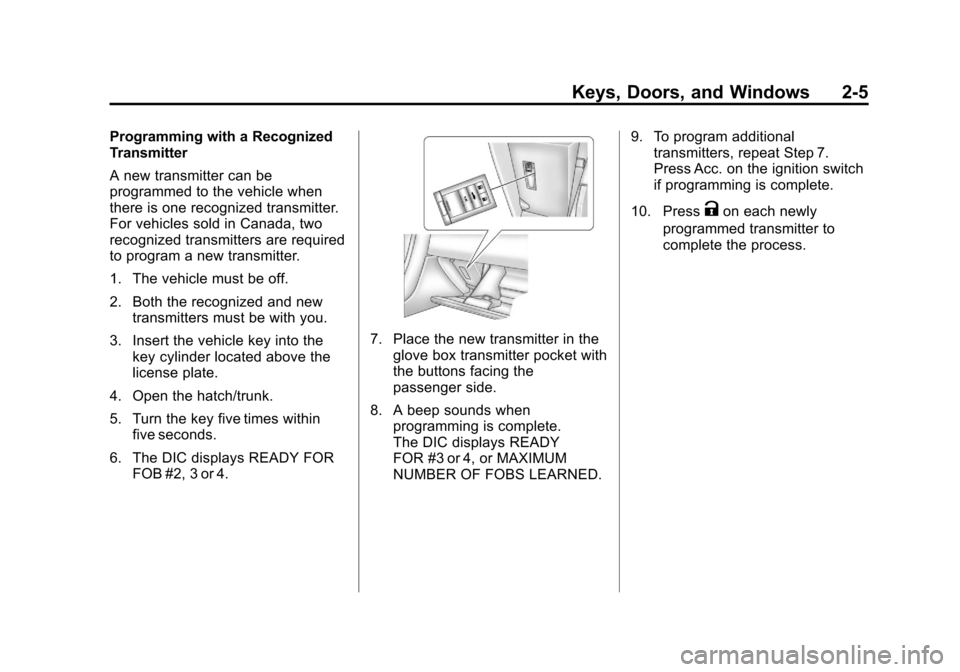
7. Place the new transmitter in theglove box transmitter pocket with
the buttons facing the
passenger side.
8. A beep sounds when programming is complete.
The DIC displays READY
FOR #3 or 4, or MAXIMUM
NUMBER OF FOBS LEARNED. 9. To program additional
transmitters, repeat Step 7.
Press Acc. on the ignition switch
if programming is complete.
10. Press
Kon each newly
programmed transmitter to
complete the process.