battery CHEVROLET CORVETTE 2013 6.G User Guide
[x] Cancel search | Manufacturer: CHEVROLET, Model Year: 2013, Model line: CORVETTE, Model: CHEVROLET CORVETTE 2013 6.GPages: 414, PDF Size: 6.97 MB
Page 52 of 414
Black plate (22,1)Chevrolet Corvette Owner Manual - 2013 - crc2 - 11/8/12
2-22 Keys, Doors, and Windows
Convertible Top
After a power reconnect such as
battery replacement, the power
windows need to be initialized for
the convertible top to work. See
“Power Window Initialize”inPower
Windows on page 2‑17.
Manual Operation
For care and cleaning of the
convertible top, see “Cleaning the
Convertible Top” in this section.
High-pressure car washes may
cause water to enter the vehicle.
If the vehicle has this feature, the
following procedures explain the
proper operation of the manual
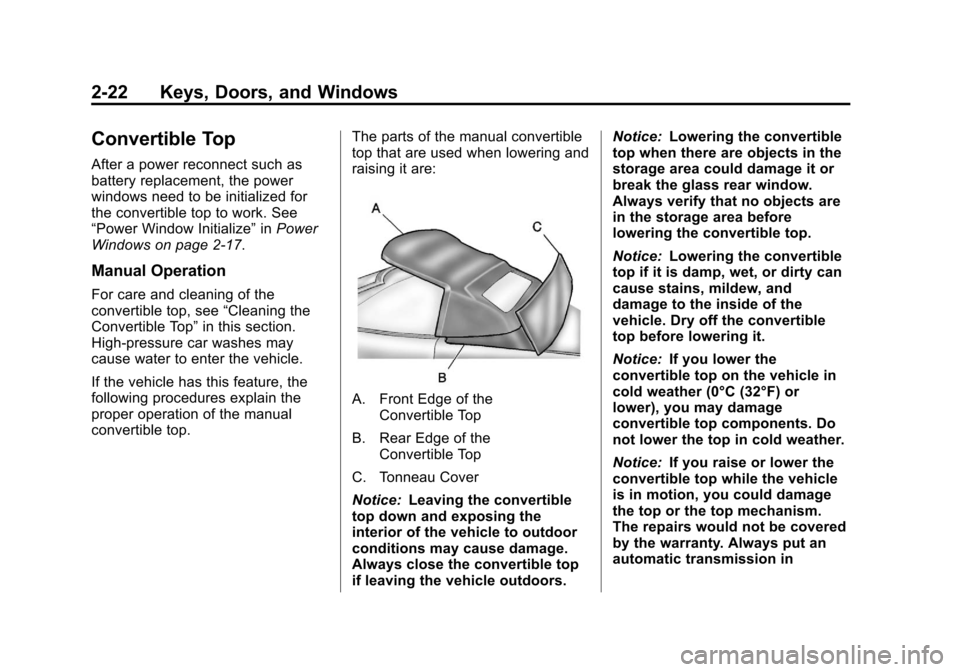
convertible top. The parts of the manual convertible
top that are used when lowering and
raising it are:
A. Front Edge of the
Convertible Top
B. Rear Edge of the Convertible Top
C. Tonneau Cover
Notice: Leaving the convertible
top down and exposing the
interior of the vehicle to outdoor
conditions may cause damage.
Always close the convertible top
if leaving the vehicle outdoors. Notice:
Lowering the convertible
top when there are objects in the
storage area could damage it or
break the glass rear window.
Always verify that no objects are
in the storage area before
lowering the convertible top.
Notice: Lowering the convertible
top if it is damp, wet, or dirty can
cause stains, mildew, and
damage to the inside of the
vehicle. Dry off the convertible
top before lowering it.
Notice: If you lower the
convertible top on the vehicle in
cold weather (0°C (32°F) or
lower), you may damage
convertible top components. Do
not lower the top in cold weather.
Notice: If you raise or lower the
convertible top while the vehicle
is in motion, you could damage
the top or the top mechanism.
The repairs would not be covered
by the warranty. Always put an
automatic transmission in
Page 54 of 414
Black plate (24,1)Chevrolet Corvette Owner Manual - 2013 - crc2 - 11/8/12
2-24 Keys, Doors, and Windows
If battery power has not been
lost, continue to Step 9.
If battery power has been lost,
the tonneau cover (C) can be
opened using the manual
release cable.
The tonneau cover manual
release cable is located
underneath the carpeting behind
the passenger seat head
restraint, on the underside
forward edge of the tonneau
cover. To access the cable, lift
and pull back the carpeting.
Notice: If you lower the
convertible top into the storage
compartment and the rear edge of
the top is not in the full-down position, you could damage the
top. Always verify that the rear
edge of the convertible top is in
the full-down position before
lowering the top into the storage
compartment.
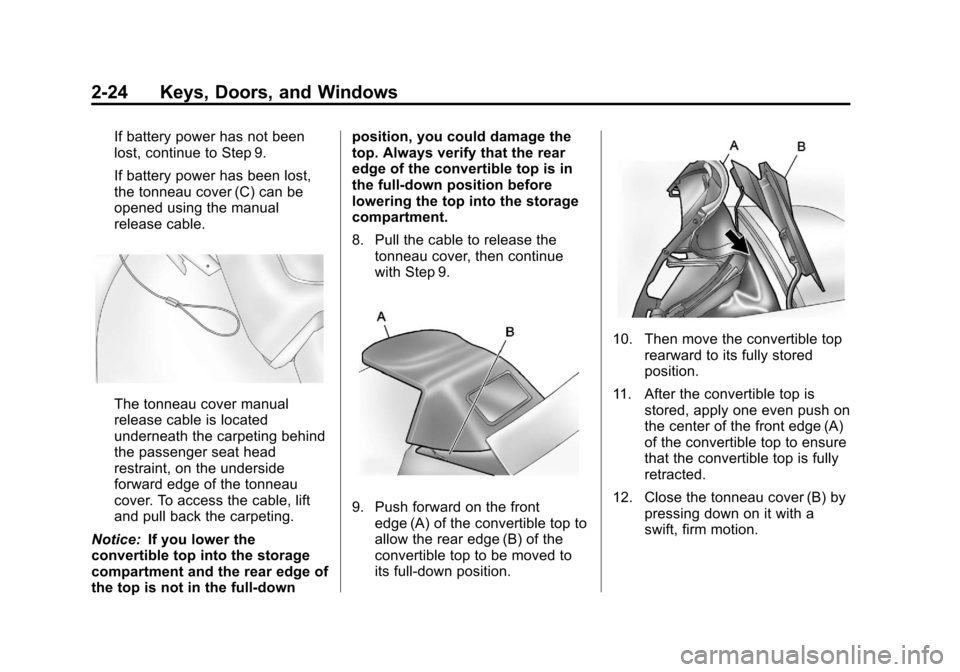
8. Pull the cable to release the
tonneau cover, then continue
with Step 9.
9. Push forward on the frontedge (A) of the convertible top to
allow the rear edge (B) of the
convertible top to be moved to
its full-down position.
10. Then move the convertible top rearward to its fully stored
position.
11. After the convertible top is stored, apply one even push on
the center of the front edge (A)
of the convertible top to ensure
that the convertible top is fully
retracted.
12. Close the tonneau cover (B) by pressing down on it with a
swift, firm motion.
Page 55 of 414
Black plate (25,1)Chevrolet Corvette Owner Manual - 2013 - crc2 - 11/8/12
Keys, Doors, and Windows 2-25
Raising the Manual
Convertible Top
1. Park on a level surface. Shift anautomatic transmission into
P (Park) and set the parking
brake. Shift a manual
transmission into Neutral and set
the parking brake.
2. Lower both windows.
3. Make sure the ignition is off.4. Tilt the driver seat forward and press the tonneau cover release
button. After pressing the
release button, the driver and
passenger door glass will retract
to the full-down position.
If battery power has been lost,
see Step 7 under “Lowering the
Manual Convertible Top” in this
section.
After pressing the release
button, the driver and passenger
door glass should retract to the
full-down position, if they have
not already been lowered.
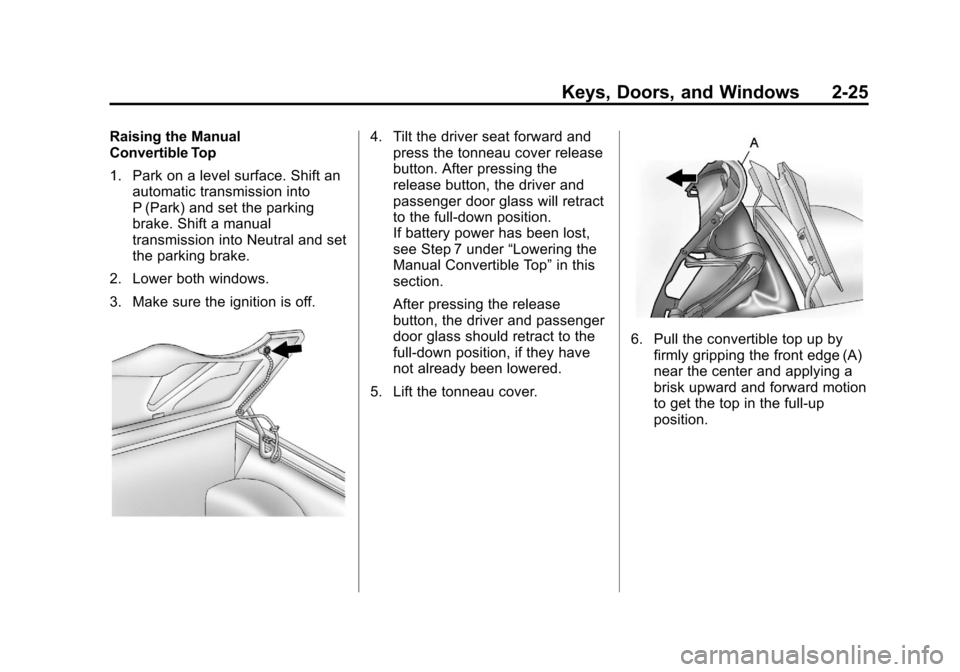
5. Lift the tonneau cover.
6. Pull the convertible top up by firmly gripping the front edge (A)
near the center and applying a
brisk upward and forward motion
to get the top in the full-up
position.
Page 57 of 414
Black plate (27,1)Chevrolet Corvette Owner Manual - 2013 - crc2 - 11/8/12
Keys, Doors, and Windows 2-27
Lowering the Power
Convertible Top
1. Park on a level surface. Start theengine. Shift an automatic
transmission into P (Park) and
set the parking brake. Shift a
manual transmission into Neutral
and set the parking brake.
2. Make sure the trunk is closed, the rear trunk partition in the rear
storage area is in the fastened
upright position, and no objects
are forward of the divider. See
“Rear Trunk Partition” inRear
Storage on page 4‑1.
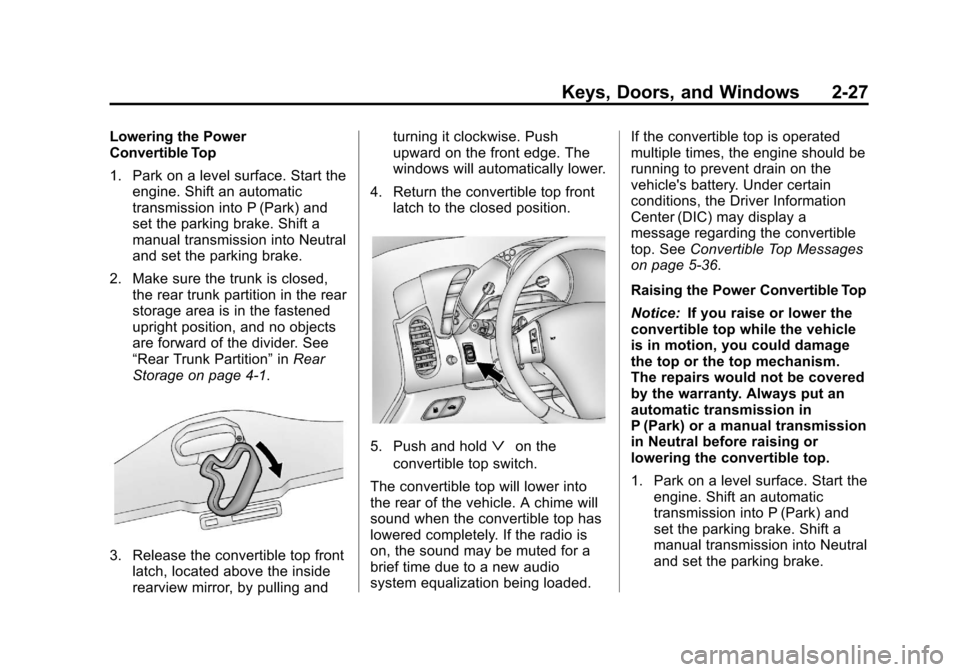
3. Release the convertible top front latch, located above the inside
rearview mirror, by pulling and turning it clockwise. Push
upward on the front edge. The
windows will automatically lower.
4. Return the convertible top front latch to the closed position.
5. Push and holdªon the
convertible top switch.
The convertible top will lower into
the rear of the vehicle. A chime will
sound when the convertible top has
lowered completely. If the radio is
on, the sound may be muted for a
brief time due to a new audio
system equalization being loaded. If the convertible top is operated
multiple times, the engine should be
running to prevent drain on the
vehicle's battery. Under certain
conditions, the Driver Information
Center (DIC) may display a
message regarding the convertible
top. See
Convertible Top Messages
on page 5‑36.
Raising the Power Convertible Top
Notice: If you raise or lower the
convertible top while the vehicle
is in motion, you could damage
the top or the top mechanism.
The repairs would not be covered
by the warranty. Always put an
automatic transmission in
P (Park) or a manual transmission
in Neutral before raising or
lowering the convertible top.
1. Park on a level surface. Start the engine. Shift an automatic
transmission into P (Park) and
set the parking brake. Shift a
manual transmission into Neutral
and set the parking brake.
Page 59 of 414
Black plate (29,1)Chevrolet Corvette Owner Manual - 2013 - crc2 - 11/8/12
Keys, Doors, and Windows 2-29
Be careful when opening the
tonneau cover by hand. If the
tonneau cover is opened quickly,
damage can occur to the hinging
mechanism, which can prevent
proper operation of the
convertible top.
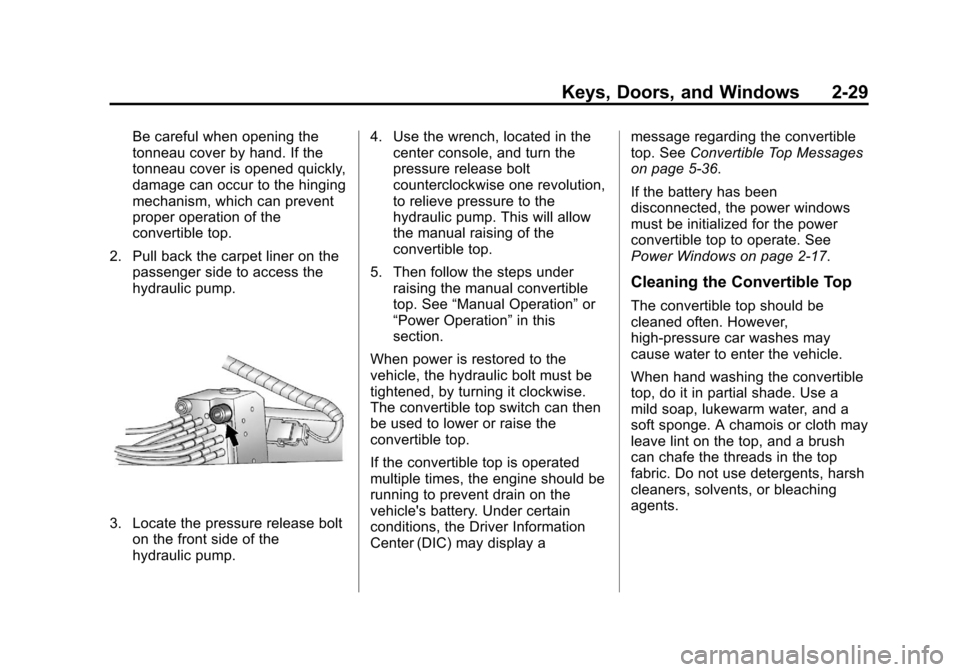
2. Pull back the carpet liner on the passenger side to access the
hydraulic pump.
3. Locate the pressure release bolton the front side of the
hydraulic pump. 4. Use the wrench, located in the
center console, and turn the
pressure release bolt
counterclockwise one revolution,
to relieve pressure to the
hydraulic pump. This will allow
the manual raising of the
convertible top.
5. Then follow the steps under raising the manual convertible
top. See “Manual Operation” or
“Power Operation” in this
section.
When power is restored to the
vehicle, the hydraulic bolt must be
tightened, by turning it clockwise.
The convertible top switch can then
be used to lower or raise the
convertible top.
If the convertible top is operated
multiple times, the engine should be
running to prevent drain on the
vehicle's battery. Under certain
conditions, the Driver Information
Center (DIC) may display a message regarding the convertible
top. See
Convertible Top Messages
on page 5‑36.
If the battery has been
disconnected, the power windows
must be initialized for the power
convertible top to operate. See
Power Windows on page 2‑17.
Cleaning the Convertible Top
The convertible top should be
cleaned often. However,
high-pressure car washes may
cause water to enter the vehicle.
When hand washing the convertible
top, do it in partial shade. Use a
mild soap, lukewarm water, and a
soft sponge. A chamois or cloth may
leave lint on the top, and a brush
can chafe the threads in the top
fabric. Do not use detergents, harsh
cleaners, solvents, or bleaching
agents.
Page 84 of 414
Black plate (24,1)Chevrolet Corvette Owner Manual - 2013 - crc2 - 11/8/12
3-24 Seats and Restraints
Additional Factors Affecting
System Operation
Safety belts help keep the
passenger in position on the seat
during vehicle maneuvers and
braking, which helps the passenger
sensing system maintain the
passenger airbag status. See
“Safety Belts”and“Child Restraints”
in the Index for additional
information about the importance of
proper restraint use.
If the shoulder portion of the belt is
pulled out all the way, the child
restraint locking feature will be
engaged. This may unintentionally
cause the passenger sensing
system to turn the airbag(s) off for
some adult size occupants. If this
happens, let the belt go back all the
way and start again.
A thick layer of additional material,
such as a blanket or cushion,
or aftermarket equipment such as
seat covers, seat heaters, and seat
massagers can affect how well the
passenger sensing system operates. We recommend that you
not use seat covers or other
aftermarket equipment except when
approved by GM for your specific
vehicle. See
Adding Equipment to
the Airbag-Equipped Vehicle on
page 3‑25 for more information
about modifications that can affect
how the system operates.
{WARNING
Stowing of articles under the
passenger seat or between the
passenger seat cushion and
seatback may interfere with the
proper operation of the passenger
sensing system.
Servicing the
Airbag-Equipped Vehicle
Airbags affect how the vehicle
should be serviced. There are parts
of the airbag system in several
places around the vehicle. Your
dealer and the service manual have
information about servicing the vehicle and the airbag system. To
purchase a service manual, see
Service Publications Ordering
Information on page 13‑16.
{WARNING
For up to 10 seconds after the
vehicle is turned off and the
battery is disconnected, an airbag
can still inflate during improper
service. You can be injured if you
are close to an airbag when it
inflates. Avoid yellow connectors.
They are probably part of the
airbag system. Be sure to follow
proper service procedures, and
make sure the person performing
work for you is qualified to do so.
Page 101 of 414
Black plate (1,1)Chevrolet Corvette Owner Manual - 2013 - crc2 - 11/8/12
Storage 4-1
Storage
Storage Compartments
Glove Box . . . . . . . . . . . . . . . . . . . . 4-1
Cupholders . . . . . . . . . . . . . . . . . . . 4-1
Rear Storage . . . . . . . . . . . . . . . . . 4-1
Center Console Storage . . . . . . 4-2
Additional Storage Features
Cargo Cover . . . . . . . . . . . . . . . . . . 4-2
Convenience Net . . . . . . . . . . . . . 4-3
Storage
Compartments
Glove Box
Open the glove box by lifting up on
the lever. Use the key to lock and
unlock the lighted glove box.
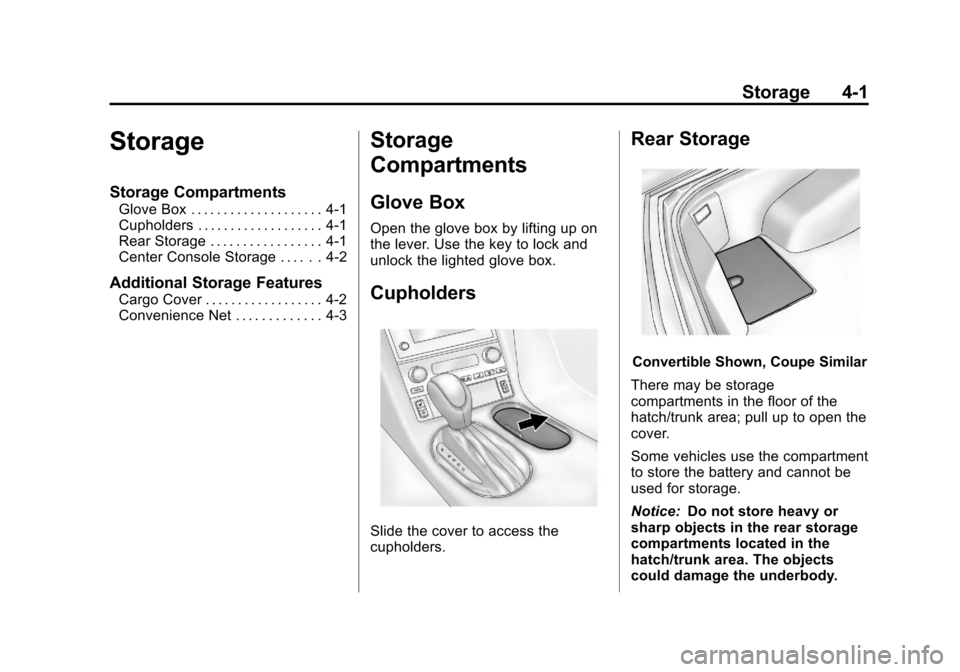
Cupholders
Slide the cover to access the
cupholders.
Rear Storage
Convertible Shown, Coupe Similar
There may be storage
compartments in the floor of the
hatch/trunk area; pull up to open the
cover.
Some vehicles use the compartment
to store the battery and cannot be
used for storage.
Notice: Do not store heavy or
sharp objects in the rear storage
compartments located in the
hatch/trunk area. The objects
could damage the underbody.
Page 105 of 414
Black plate (1,1)Chevrolet Corvette Owner Manual - 2013 - crc2 - 11/8/12
Instruments and Controls 5-1
Instruments and
Controls
Controls
Steering Wheel Adjustment . . . 5-2
Steering Wheel Controls . . . . . . 5-3
Horn . . . . . . . . . . . . . . . . . . . . . . . . . . 5-4
Windshield Wiper/Washer . . . . . 5-4
Compass . . . . . . . . . . . . . . . . . . . . . 5-5
Clock . . . . . . . . . . . . . . . . . . . . . . . . . 5-6
Power Outlets . . . . . . . . . . . . . . . . . 5-6
Cigarette Lighter . . . . . . . . . . . . . . 5-7
Ashtrays . . . . . . . . . . . . . . . . . . . . . . 5-7
Warning Lights, Gauges, and
Indicators
Warning Lights, Gauges, andIndicators . . . . . . . . . . . . . . . . . . . . 5-8
Instrument Cluster . . . . . . . . . . . . 5-9
Speedometer . . . . . . . . . . . . . . . . 5-12
Odometer . . . . . . . . . . . . . . . . . . . . 5-12
Tachometer . . . . . . . . . . . . . . . . . . 5-12
Fuel Gauge . . . . . . . . . . . . . . . . . . 5-12
Boost Gauge (ZR1) . . . . . . . . . . 5-13
Engine Oil Pressure Gauge . . . . . . . . . . . . . . . . . . . . . . 5-14 Engine Coolant Temperature
Gauge . . . . . . . . . . . . . . . . . . . . . . 5-15
Voltmeter Gauge . . . . . . . . . . . . . 5-16
Safety Belt Reminders . . . . . . . 5-16
Airbag Readiness Light . . . . . . 5-16
Passenger Airbag Status Indicator . . . . . . . . . . . . . . . . . . . . 5-17
Malfunction Indicator Lamp . . . . . . . . . . . . . 5-18
Brake System Warning Light . . . . . . . . . . . . . . . . . . . . . . . 5-20
Antilock Brake System (ABS) Warning Light . . . . . . . . . . . . . . 5-21
One-to-Four Shift Light (Manual Transmission) . . . . . 5-21
Traction Off Light . . . . . . . . . . . . 5-22
StabiliTrak
®OFF Light . . . . . . . 5-22
Active Handling System Light . . . . . . . . . . . . . . . . . . . . . . . 5-23
Tire Pressure Light . . . . . . . . . . 5-23
Security Light . . . . . . . . . . . . . . . . 5-24
High-Beam On Light . . . . . . . . . 5-24
Front Fog Lamp Light . . . . . . . . 5-24
Lamps On Reminder . . . . . . . . . 5-25
Information Displays
Driver Information Center (DIC) . . . . . . . . . . . . . . . 5-25
Head-Up Display (HUD) . . . . . 5-30
Vehicle Messages
Vehicle Messages . . . . . . . . . . . 5-34
Battery Voltage and Charging Messages . . . . . . . . . . . . . . . . . . 5-34
Brake System Messages . . . . 5-35
Convertible Top Messages . . . 5-36
Cruise Control Messages . . . . 5-37
Door Ajar Messages . . . . . . . . . 5-37
Engine Cooling System Messages . . . . . . . . . . . . . . . . . . 5-38
Engine Oil Messages . . . . . . . . 5-39
Engine Power Messages . . . . 5-39
Fuel System Messages . . . . . . 5-40
Key and Lock Messages . . . . . 5-40
Lamp Messages . . . . . . . . . . . . . 5-42
Ride Control System Messages . . . . . . . . . . . . . . . . . . 5-42
Safety Belt Messages . . . . . . . 5-46
Service Vehicle Messages . . . 5-47
Starting the Vehicle Messages . . . . . . . . . . . . . . . . . . 5-47
Tire Messages . . . . . . . . . . . . . . . 5-48
Transmission Messages . . . . . 5-50
Vehicle Reminder Messages . . . . . . . . . . . . . . . . . . 5-51
Washer Fluid Messages . . . . . 5-51
Vehicle Personalization
Vehicle Personalization . . . . . . 5-51
Page 110 of 414
Black plate (6,1)Chevrolet Corvette Owner Manual - 2013 - crc2 - 11/8/12
5-6 Instruments and Controls
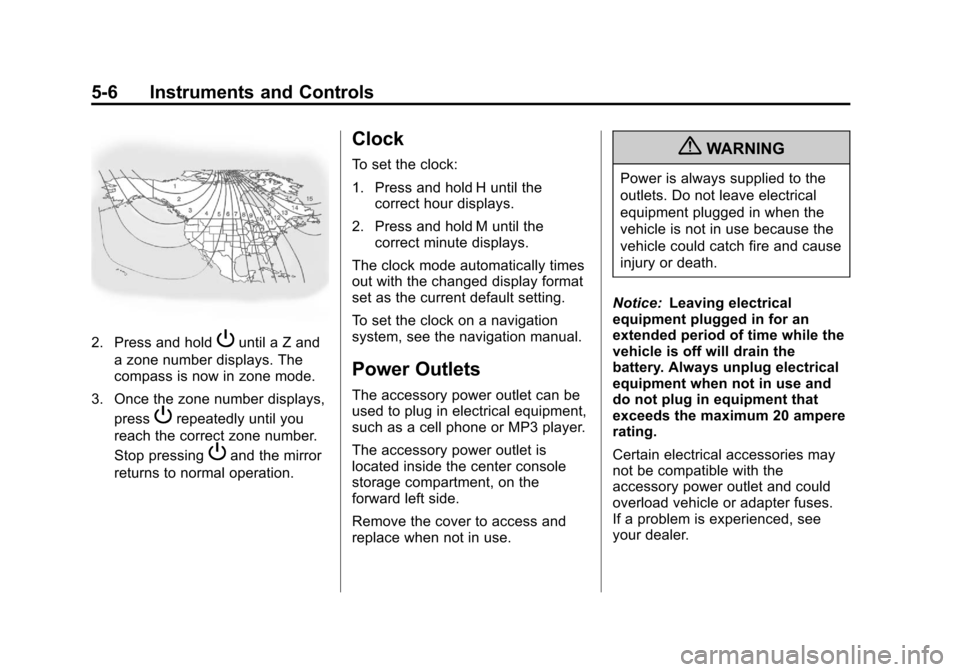
2. Press and holdPuntil a Z and
a zone number displays. The
compass is now in zone mode.
3. Once the zone number displays, press
Prepeatedly until you
reach the correct zone number.
Stop pressing
Pand the mirror
returns to normal operation.
Clock
To set the clock:
1. Press and hold H until the correct hour displays.
2. Press and hold M until the correct minute displays.
The clock mode automatically times
out with the changed display format
set as the current default setting.
To set the clock on a navigation
system, see the navigation manual.
Power Outlets
The accessory power outlet can be
used to plug in electrical equipment,
such as a cell phone or MP3 player.
The accessory power outlet is
located inside the center console
storage compartment, on the
forward left side.
Remove the cover to access and
replace when not in use.
{WARNING
Power is always supplied to the
outlets. Do not leave electrical
equipment plugged in when the
vehicle is not in use because the
vehicle could catch fire and cause
injury or death.
Notice: Leaving electrical
equipment plugged in for an
extended period of time while the
vehicle is off will drain the
battery. Always unplug electrical
equipment when not in use and
do not plug in equipment that
exceeds the maximum 20 ampere
rating.
Certain electrical accessories may
not be compatible with the
accessory power outlet and could
overload vehicle or adapter fuses.
If a problem is experienced, see
your dealer.
Page 120 of 414
Black plate (16,1)Chevrolet Corvette Owner Manual - 2013 - crc2 - 11/8/12
5-16 Instruments and Controls
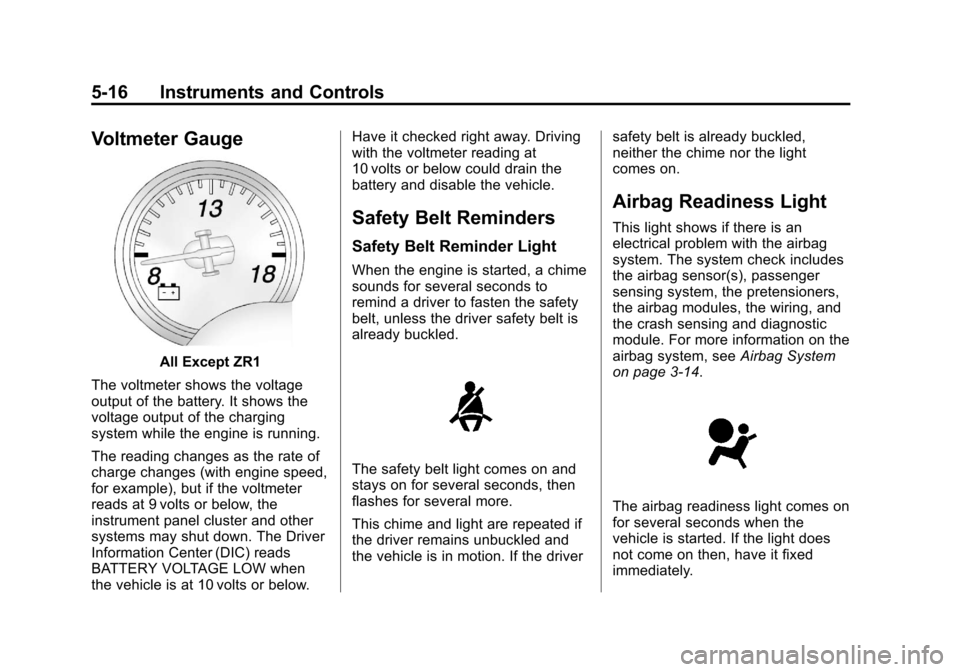
Voltmeter Gauge
All Except ZR1
The voltmeter shows the voltage
output of the battery. It shows the
voltage output of the charging
system while the engine is running.
The reading changes as the rate of
charge changes (with engine speed,
for example), but if the voltmeter
reads at 9 volts or below, the
instrument panel cluster and other
systems may shut down. The Driver
Information Center (DIC) reads
BATTERY VOLTAGE LOW when
the vehicle is at 10 volts or below. Have it checked right away. Driving
with the voltmeter reading at
10 volts or below could drain the
battery and disable the vehicle.
Safety Belt Reminders
Safety Belt Reminder Light
When the engine is started, a chime
sounds for several seconds to
remind a driver to fasten the safety
belt, unless the driver safety belt is
already buckled.
The safety belt light comes on and
stays on for several seconds, then
flashes for several more.
This chime and light are repeated if
the driver remains unbuckled and
the vehicle is in motion. If the driver
safety belt is already buckled,
neither the chime nor the light
comes on.
Airbag Readiness Light
This light shows if there is an
electrical problem with the airbag
system. The system check includes
the airbag sensor(s), passenger
sensing system, the pretensioners,
the airbag modules, the wiring, and
the crash sensing and diagnostic
module. For more information on the
airbag system, see
Airbag System
on page 3‑14.
The airbag readiness light comes on
for several seconds when the
vehicle is started. If the light does
not come on then, have it fixed
immediately.