check engine CHEVROLET CORVETTE 2013 6.G User Guide
[x] Cancel search | Manufacturer: CHEVROLET, Model Year: 2013, Model line: CORVETTE, Model: CHEVROLET CORVETTE 2013 6.GPages: 414, PDF Size: 6.97 MB
Page 134 of 414
Black plate (30,1)Chevrolet Corvette Owner Manual - 2013 - crc2 - 11/8/12
5-30 Instruments and Controls
RESET Button
The RESET button, used along with
other buttons, will reset system
functions and turn off or
acknowledge messages on the DIC.
Head-Up Display (HUD)
{WARNING
If the HUD image is too bright,
or too high in your field of view, it
may take you more time to see
things you need to see when it is
dark outside. Be sure to keep the
HUD image dim and placed low in
your field of view.
For vehicles with the Head-Up
Display (HUD), you can see some
of the driver information that
appears on the instrument panel
cluster. The information may be displayed in
English or metric units and appears
as an image focused out toward the
front of the vehicle. The HUD
consists of the following information:
.Speedometer
.Turn Signal Indicators
.High-Beam Indicator Symbol
.Tachometer
.Manual Paddle Shift Gear
Indicator (If Equipped)
These displays on the HUD are
for use when using the manual
paddle shift controls to shift the
transmission. See
“Manual
Paddle Shift” inAutomatic
Transmission on page 9‑25.
.Shift Light
This light is used for
performance driving to indicate
that the vehicle's best
performance level has been
reached to shift the transmission
into the next higher gear. An
arrow pointing up will light up on the display just prior to reaching
the engine fuel cut-off mode.
This cut-off is about 6,500 rpm
for the LS3 engine, 6,600 rpm
for the LS9 & ZR1 engines, and
7,000 rpm for the LS7 engine.
.Check Gauges Warning
.Engine Coolant Temperature
Gauge
.Transmission Fluid Temperature
Gauge, (Automatic Transmission
Vehicles Only)
.Engine Oil Temperature Gauge
.Engine Oil Pressure Gauge
.G-Force Gauge
.Boost Gauge (If Equipped)
.Audio Functions, Street
Mode Only
.Navigation, Only with Navigation
Radio, Turn-by-Turn Guidance.
Street Mode Only
Page 136 of 414
Black plate (32,1)Chevrolet Corvette Owner Manual - 2013 - crc2 - 11/8/12
5-32 Instruments and Controls
Within each mode, the display, can
be further customized by pressing
the PAGE button. Pressing this
button in each mode will turn off and
on the following:
.Street Mode—No tachometer,
circular tachometer, and linear
tachometer.
.Track Modes 1 and 2 —No
minor gauge, coolant
temperature, transmission oil
temperature (Automatic
Transmission only), engine oil
temperature, engine oil
pressure, and boost gauge.
While in Track Mode 1 or 2, the
maximum G value achieved
during the current ignition cycle
can be displayed by pressing
and holding the PAGE button.
The maximum G display will be
shown until the PAGE button is
released. The maximum G value
display will be identical to the
normal G value display,
except the maximum G gauge digits (X.XX G) and
corresponding G gauge bar will
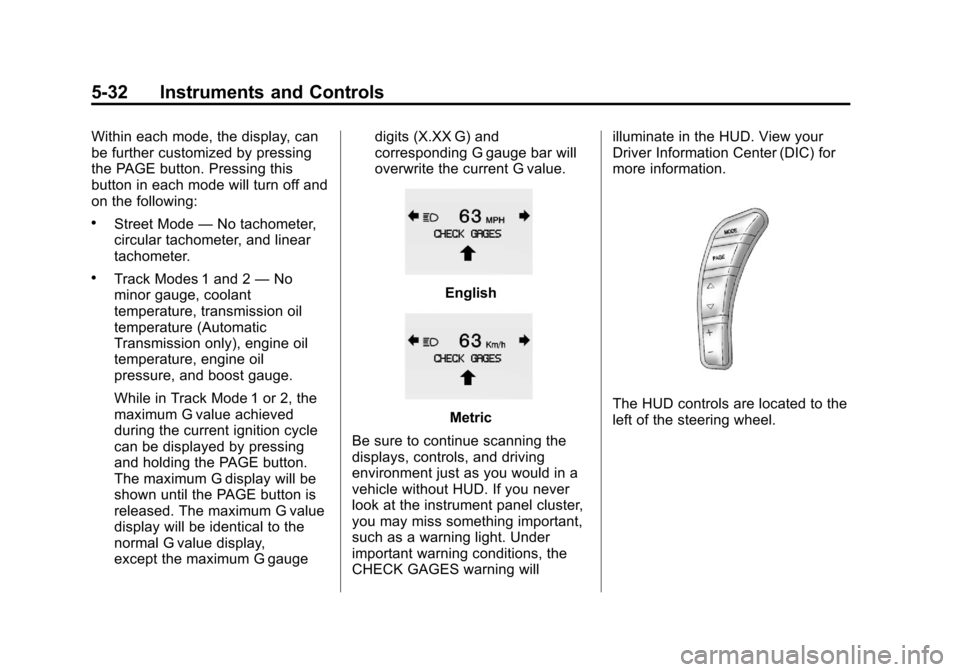
overwrite the current G value.English
Metric
Be sure to continue scanning the
displays, controls, and driving
environment just as you would in a
vehicle without HUD. If you never
look at the instrument panel cluster,
you may miss something important,
such as a warning light. Under
important warning conditions, the
CHECK GAGES warning will illuminate in the HUD. View your
Driver Information Center (DIC) for
more information.The HUD controls are located to the
left of the steering wheel.
Page 139 of 414
Black plate (35,1)Chevrolet Corvette Owner Manual - 2013 - crc2 - 11/8/12
Instruments and Controls 5-35
If you must drive a short distance
with the message on, be certain to
turn off the vehicle's accessories,
such as the radio and air
conditioner.
Multiple chimes sound when this
message is displayed.
To acknowledge the message, press
the RESET button. The message
reappears every 10 minutes until
this condition changes.
Brake System Messages
ABS (Antilock Brake System)
ACTIVE
This message displays when the
Antilock Brake System (ABS) is
adjusting brake pressure to help
avoid a braking skid.
Slippery road conditions may exist if
this message is displayed, so adjust
your driving accordingly. The
message stays on for a few
seconds after the system stopsadjusting brake pressure. See
Antilock Brake System (ABS) on
page 9‑32
for more information.
CHANGE BRAKE PADS
On vehicles with electronic brake
pad wear sensors, this message will
be displayed when the pads are
worn. See your dealer for service.
CHECK BRAKE FLUID
This message displays, a sound will
be heard, and the brake system
warning light on the instrument
panel cluster turns on if the ignition
is on to inform the driver that the
brake fluid level is low. See Brake
System Warning Light on
page 5‑20. Have the brake system
serviced by your dealer as soon as
possible. See Brakes on
page 10‑32.
SERVICE ANTILOCK BRAKES
If this message displays while you
are driving, stop as soon as
possible and turn the ignition off.
Then start the engine again to reset the system. If the message stays
on, or comes back on again while
you are driving, the vehicle is in
need of service. See your dealer.
If the antilock brake system (ABS)
warning light is on and the regular
brake system warning light is not
on, you still have brakes, but do not
have ABS. If the regular brake
system warning light is also on, you
do not have ABS and there is a
problem with the brakes. See
Antilock Brake System (ABS)
Warning Light on page 5‑21
and
Brake System Warning Light on
page 5‑20.
If this message is displayed, the
Traction Control System (TCS) and
the Active Handling System will also
be disabled. The DIC will scroll
three messages: SERVICE
ANTILOCK BRAKES, SERVICE
TRACTION SYSTEM, and
SERVICE ACTIVE HANDLING, and
the instrument panel cluster lights
will come on along with a sound.
When the service message is
displayed, the computer controlled
Page 142 of 414
Black plate (38,1)Chevrolet Corvette Owner Manual - 2013 - crc2 - 11/8/12
5-38 Instruments and Controls
Engine Cooling System
Messages
CHECK COOLANT LEVEL
This message displays when the
engine coolant level is low. Have
the cooling system serviced by your
dealer as soon as possible. See
Engine Coolant on page 10‑26.
COOLANT OVER
TEMPERATURE
This message displays and a sound
will be heard if the engine coolant
exceeds 124°C (255°F). If you have
been operating the vehicle under
normal driving conditions, pull off
the road, stop the vehicle, and turn
off the engine as soon as possible.
You can monitor the coolant
temperature with the gauges button
on the DIC or the engine coolant
temperature gauge on theinstrument panel cluster. See
Engine Overheating on page 10‑29,
Driver Information Center (DIC) on
page 5‑25, and
Engine Coolant
Temperature Gauge on page 5‑15.
To acknowledge the message, press
the RESET button. The message
and sound will come back on until
this condition changes. If you do not
press the RESET button, the
message remains on until the
condition changes.ENGINE OVERHEATED– STOP
ENGINE
This message displays and a sound
will be heard when the engine has
overheated. Stop and turn the
engine off immediately to avoid
severe engine damage. See Engine
Overheating on page 10‑29.
ENGINE PROTECTION
REDUCE ENGINE RPM
This message displays if the engine
oil temperature exceeds 160°C
(320°F). Check the engine coolant
temperature and engine oil level.
If the engine is too hot, see Engine
Overheating on page 10‑29. The
vehicle may need service, so see
your dealer.
You can monitor the oil temperature
with the gauges button on the DIC.
See Driver Information Center (DIC)
on page 5‑25.
Multiple chimes sound when this
message is displayed. This
message remains displayed and
active until the issue is resolved.
Page 143 of 414
Black plate (39,1)Chevrolet Corvette Owner Manual - 2013 - crc2 - 11/8/12
Instruments and Controls 5-39
HOT ENGINE AIR
CONDITIONING OFF
This message displays when the
engine coolant becomes hotter than
the normal operating temperature.
To avoid added strain on a hot
engine, the air conditioning
compressor is automatically turned
off. When the coolant temperature
returns to normal, the A/C operation
automatically resumes. You can
continue to drive the vehicle. If this
message continues to appear, have
the system repaired by your dealer
as soon as possible to avoid
compressor damage.
Engine Oil Messages
CHANGE ENGINE OIL
This message displays when the life
of the engine oil has expired. See
Maintenance Schedule on
page 11‑3. After an oil change, the
engine oil life system must be reset.See
“Engine Oil Life” underDriver
Information Center (DIC) on
page 5‑25. Also, see Engine Oil on
page 10‑13 andEngine Oil Life
System on page 10‑19 for more
information.
CHECK OIL LEVEL
On some vehicles, this message
displays and two chimes sound if
the oil level in the vehicle is low.
Once the vehicle senses a change
in the engine oil level, the light
remains off.
If this message appears after
starting the engine, the engine oil
level may be too low. You may need
to add oil. See Engine Overheating
on page 10‑29.
To acknowledge the message, press
the RESET button. The message
reappears every 10 minutes until
this condition changes.
LOW OIL PRESSURE
This message displays if low oil
pressure levels occur. If this
message appears while the engine
is running, stop the engine and do
not operate it until the cause of low
oil pressure is corrected. Severe
damage to the engine can result.
A sound will be heard when this
message is displayed. See Engine
Oil on page 10‑13.
Engine Power Messages
ENGINE DRAG CONTROL
ACTIVE
This message displays when engine
drag control is active. When driving
in a lower gear in rainy, snowy,
or icy conditions and then letting up
on the accelerator or downshifting,
the rear wheels may begin to slip
and this message displays. This
message stays on for a few
seconds following the engine drag
control event.
Page 144 of 414
Black plate (40,1)Chevrolet Corvette Owner Manual - 2013 - crc2 - 11/8/12
5-40 Instruments and Controls
REDUCED ENGINE POWER
If this message displays and the
check engine light comes on, a
noticeable reduction in the vehicle's
performance may occur. If the
REDUCED ENGINE POWER
message is displayed, but there is
no reduction in performance,
proceed to your destination. The
performance may be reduced the
next time the vehicle is driven.
The vehicle may be driven at a
reduced speed while the REDUCED
ENGINE POWER message is
displayed, but acceleration and
speed may be reduced. Anytime the
check engine light stays on, the
vehicle should be taken to your
dealer as soon as possible for
diagnosis and repair. See
Malfunction Indicator Lamp on
page 5‑18for more information.
Multiple chimes sound when this
message is displayed. To acknowledge the message, press
the RESET button. The message
reappears every five minutes until
this condition changes.
If the REDUCED ENGINE POWER
message is displayed in
combination with the COOLANT
OVER TEMPERATURE message,
see
Engine Overheating on
page 10‑29.
Fuel System Messages
CHECK GAS CAP
This message displays if the fuel
cap has not been fully tightened.
Check the fuel cap to make sure
that it is on properly. Once
tightened, it takes at least one
overnight park to reset or clear this
message. If both the CHECK GAS
CAP message and the malfunction
indicator lamp in the instrument
panel cluster are on, you may need
to see your dealer for service. See
Malfunction Indicator Lamp on
page 5‑18 for more information.
LOW FUEL
This message displays when the
fuel tank is less than 10 percent full
and the display is turned off.
A sound will be heard when this
message is displayed. Refill the fuel
tank as soon as possible. See Fuel
Gauge on page 5‑12.
SERVICE FUEL SYSTEM
This message displays if the
Powertrain Control Module (PCM)
has detected a problem within the
fuel system. Have the vehicle
serviced by your dealer. This
message also displays when the
cluster is not getting fuel information
from the PCM.
Key and Lock Messages
FOB AUTOLEARN WAIT
XX MINUTES
See “Matching Transmitter(s) to
Your Vehicle” underRemote
Keyless Entry (RKE) System
Operation on page 2‑3.
Page 151 of 414
Black plate (47,1)Chevrolet Corvette Owner Manual - 2013 - crc2 - 11/8/12
Instruments and Controls 5-47
The reminder will be repeated if the
ignition is on, the vehicle is in
motion, the driver is buckled, the
passenger is still unbuckled, and the
passenger airbag is enabled. If the
passenger's safety belt is already
buckled, this message will not
come on.
BUCKLE SEATBELT
This message reminds you to
buckle the driver's safety belt.
This message displays and a sound
will be heard when the ignition is on,
the driver's safety belt is unbuckled,
and the vehicle is in motion. You
should buckle your safety belt.
If the driver remains unbuckled
when the ignition is on and the
vehicle is in motion, the reminder
will be repeated. If the driver's
safety belt is already buckled, this
message will not come on.This message is an additional
reminder to the safety belt reminder
light in the instrument panel cluster.
See
Safety Belt Reminders on
page 5‑16 for more information.
Service Vehicle Messages
SERVICE AIR CONDITIONING
This message displays when the
electronic sensors that control the
air conditioning and heating
systems are no longer working.
Have the climate control system
serviced by your dealer if you notice
a drop in heating and air
conditioning efficiency.
SERVICE ELECTRICAL
SYSTEM
This message displays if an
electrical problem has occurred
within the Powertrain Control
Module (PCM). Have the vehicle
serviced by your dealer.
SERVICE VEHICLE SOON
This message displays and a sound
will be heard when there may be an
electrical or another system problem
with the vehicle. Have your vehicle
checked by your dealer if this
message keeps appearing.
Starting the Vehicle
Messages
PRESS BRAKE TO START
ENGINE (Automatic
Transmission Only)
This message displays if you try to
start the engine by pressing the
keyless ignition start button without
having the brake pressed. The
brake needs to be pressed when
starting the engine. See Ignition
Positions on page 9‑18 for more
information.
Page 154 of 414
Black plate (50,1)Chevrolet Corvette Owner Manual - 2013 - crc2 - 11/8/12
5-50 Instruments and Controls
Information label. SeeRun-Flat
Tires on page 10‑53, Vehicle Load
Limits on page 9‑12, Tire Pressure
on page 10‑60, and Tire Pressure
Monitor System on page 10‑62. The
DIC also shows the tire pressure
values. See Driver Information
Center (DIC) on page 5‑25.
To acknowledge the message, press
the RESET button. A message
reappears every 10 minutes until the
condition is corrected.
Transmission Messages
SERVICE TRANSMISSION
This message displays when there
is a problem with the transmission.
See your dealer for service.
SHIFT TO PARK
If the vehicle has an automatic
transmission, this message displays
if the vehicle is not in P (Park) when
the engine is being turned off. The
vehicle will be in ACCESSORY.
Once the shift lever is moved to
P (Park), the vehicle will turn off. The vehicle will remain in
ACCESSORY, without the 20 minute
time-out period, until the shift lever
is moved to P (Park) or until the
driver presses the pushbutton to
restart the vehicle. See
Ignition
Positions on page 9‑18 for more
information.
TRANSMISSION HOT IDLE
ENGINE
This message displays and four
chimes sound if the transmission
fluid temperature rises above 132°C
(270°F) or rises rapidly. The
transmission may shift gears or
apply the torque converter clutch to
reduce the fluid temperature. Driving
aggressively or driving on long hills
can cause the transmission fluid
temperature to be higher than
normal. If this message appears,
you may continue to drive at a
slower speed. Monitor the
transmission fluid temperature and
allow it to cool to at least 110°C
(230°F). The transmission fluid
temperature can be monitored with the gauges button on the DIC. See
“DIC Operation and Displays”
under
Driver Information Center (DIC) on
page 5‑25 andAutomatic
Transmission Fluid on page 10‑20.
Also check the engine coolant
temperature. If it is also hot, see
Engine Overheating on page 10‑29.
If this message is displayed during
normal vehicle operation on flat
roads, the vehicle may need
service. See your dealer for an
inspection.
If driving in a performance or
competitive manner, the use of
(S) Sport Automatic Mode or
(S) Sport Manual Paddle Shift gear
selection is recommended. See
Automatic Transmission on
page 9‑25 for more information.
To acknowledge the message, press
the RESET button. The message
reappears every 10 minutes until
this condition changes. If you do not
press the RESET button, the
message remains on the display
until the condition changes.
Page 210 of 414
Black plate (6,1)Chevrolet Corvette Owner Manual - 2013 - crc2 - 11/8/12
8-6 Climate Controls
Air Vents
Use the tab located on the air
outlets to change the direction of the
airflow.
Operation Tips
.Clear away any ice, snow,
or leaves from the air inlets at
the base of the windshield that
may block the flow of air into the
vehicle.
.Use of non-GM approved hood
deflectors may adversely affect
the performance of the system.
.Keep the area around the base
of the instrument panel console
and air path under the seats
clear of objects to help circulate
the air inside of the vehicle more
effectively.
Maintenance
Passenger Compartment
Air Filter
The passenger compartment air
filter removes certain particles from
the air including pollen and dust
particles. Reductions in airflow,
which may occur more often in
dusty areas, indicate that the filter
may need to be replaced. See
Maintenance Schedule on
page 11‑3.
Notice:Driving without a
passenger compartment air filter
in place can cause water and
small particles, like paper and
leaves, to be pulled into your
climate control system which may
cause damage to it. Make sure
you always replace the old filter
with a new one. The passenger compartment air
filter is located on the passenger
side of the engine compartment
near the battery. See
Engine
Compartment Overview on
page 10‑8.
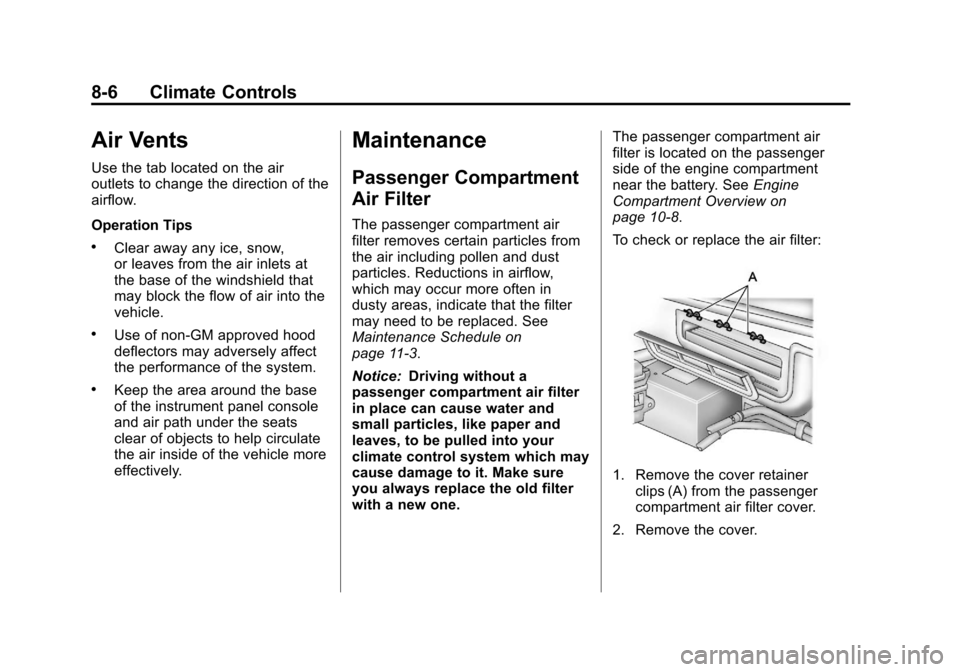
To check or replace the air filter:
1. Remove the cover retainer clips (A) from the passenger
compartment air filter cover.
2. Remove the cover.
Page 218 of 414
Black plate (6,1)Chevrolet Corvette Owner Manual - 2013 - crc2 - 11/8/12
9-6 Driving and Operating
Remember: Antilock brakes help
avoid only the braking skid.
Racing or Other
Competitive Driving
Racing or competitive driving may
affect the vehicle warranty. See the
warranty book before using the
vehicle for racing or other
competitive driving.
Notice:If you use the vehicle for
racing or other competitive
driving, the engine may use more
oil than it would with normal use.
Low oil levels can damage the
engine. For information on how to
add oil, see Engine Oil on
page 10‑13.
Z06, ZR1, manual transmission
Grand Sport Coupe and 427
Convertible only: Be sure to
check the oil level often during
racing or other competitive
driving and keep the level at or
near the upper mark that shows
the proper operating range on the
engine oil dipstick. Except Z06, ZR1, manual
transmission Grand Sport Coupe
and 427 Convertible : Be sure to
check the oil level often during
racing or other competitive
driving and keep the level at or
near 1 L (1 qt) above the upper
mark that shows the proper
operating range on the engine oil
dipstick. After the competitive
driving, remove excess oil so that
the level on the dipstick is not
above the upper mark that shows
the proper operating range.
Z06, ZR1, manual transmission
Grand Sport Coupe and 427
Convertible Only: For racing or
competitive driving, it is
recommended that the brake fluid
be replaced with a high performance
brake fluid that has a dry boiling
point greater than 279°C (534°F).
After conversion to the high
performance brake fluid, follow the
brake fluid service
recommendations outlined by the
fluid manufacturer. Do not use
silicone or DOT-5 brake fluids.
Z06, ZR1, and manual transmission
Grand Sport Coupe Only: For racing
or competitive driving, it is
recommended that the loading of
the vehicle be limited to the driver
only, with no other cargo, and that
tires be inflated to 180 kPa (26 psi)
for a maximum speed of 230 km/h
(143 mph).
If the vehicle is a Z06, ZR1,
or manual transmission Grand Sport
Coupe and 427 Convertible model,
it has greaseable outer ends on
both of the rear toe-links. Under
normal use, lubrication should be
performed as described in the
maintenance schedule. See
Maintenance Schedule on
page 11‑3
andRecommended
Fluids and Lubricants on
page 11‑12. If using the vehicle for
racing, lubrication should be
performed at the end of each racing
day. See your dealer for lubrication
and make sure any needed repairs
are made at once. Proper
procedures for performing these