remote start CHEVROLET CORVETTE 2013 6.G User Guide
[x] Cancel search | Manufacturer: CHEVROLET, Model Year: 2013, Model line: CORVETTE, Model: CHEVROLET CORVETTE 2013 6.GPages: 414, PDF Size: 6.97 MB
Page 191 of 414
Black plate (13,1)Chevrolet Corvette Owner Manual - 2013 - crc2 - 11/8/12
Infotainment System 7-13
A CD in the player stays in the
player when the ignition is turned
off. When the ignition or radio is
turned on, the CD starts to play
where it stopped, if it was the last
selected audio source.
Loading a CD
Insert the CD partway into the slot,
label side up, until the player pulls
the CD in. The CD begins playing
automatically.
The CD symbol displays when a CD
is inserted, and the track number
displays when each new track starts
to play.
M(Load):Press to load a CD into
the CD player.
To insert a CD:
1. Press
M.
2. Load a CD and insert the CD partway into the slot, label side
up when INSERT CD displays.
The player pulls the CD in.
Playing a CD
O/e(Tune): Turn to go to the
next or previous track.
{(Reverse): Press and hold to
reverse within the current track.
|(Fast Forward): Press and hold
to fast forward through the current
track.
tSEEKu: Press the left arrow
to go to the start of the current track
if more than eight seconds have
played. Press the right arrow to go
to the start of the next track. If either
arrow is held or pressed more than
once, the player continues moving
backward or forward through
the CD.
tSCANu: To scan one CD,
press and hold either arrow for more
than two seconds until SCAN
displays and a beep sounds. The
radio goes to the next track, plays
for 10 seconds, then goes to the
next track. Press either arrow again
to stop scanning. AUTO EQ (Automatic
Equalization):
Press to select the
equalization setting while playing a
CD. The equalization is stored when
a CD is played. For more
information on AUTO EQ, see
“AUTO EQ” previously in this
section.
BAND: Press to listen to the radio
when a CD is playing. The inactive
CD remains inside the radio for
future listening.
CD AUX (Auxiliary): Press to play
a CD when listening to the radio.
CD displays when a CD is in the
player. If your system has a remote
playback device, pressing this
button a second time allows the
remote device to play.
X(Eject): Press to eject a CD
from the CD Radio.
RPT (Repeat): Press to hear a
track or an entire CD over again.
Page 230 of 414
Black plate (18,1)Chevrolet Corvette Owner Manual - 2013 - crc2 - 11/8/12
9-18 Driving and Operating
{WARNING
ZR1s, 427 convertibles and Z06s
with RPO CFZ, contain parts
made from carbon fiber.
When damaged, the exposed
edges can be very sharp.
A person could be injured by
these sharp edges. Use caution
when washing the vehicle,
coming in contact with,
or removing damaged carbon
fiber parts. See your dealer for
replacement.
Under normal operation, these
components will occasionally
contact some road surfaces (speed
bumps, driveway ramps, etc.). This
can be heard inside the vehicle as a
scraping noise. This is normal and
does not indicate a problem.
Use care when approaching bumps
or objects on road surfaces and
avoid them when possible.
Ignition Positions
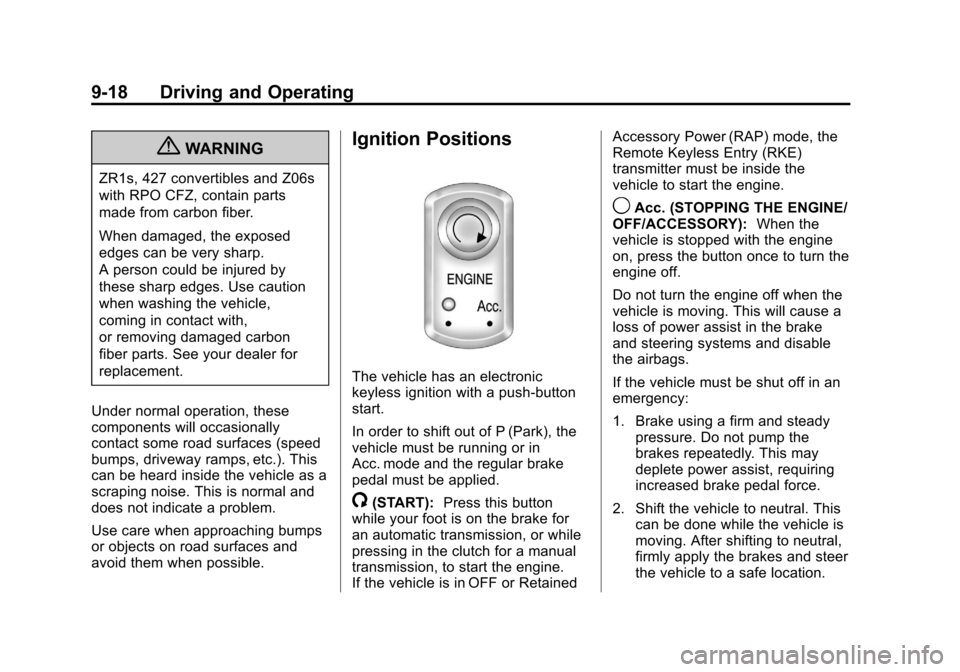
The vehicle has an electronic
keyless ignition with a push-button
start.
In order to shift out of P (Park), the
vehicle must be running or in
Acc. mode and the regular brake
pedal must be applied.
/(START): Press this button
while your foot is on the brake for
an automatic transmission, or while
pressing in the clutch for a manual
transmission, to start the engine.
If the vehicle is in OFF or Retained Accessory Power (RAP) mode, the
Remote Keyless Entry (RKE)
transmitter must be inside the
vehicle to start the engine.
9Acc. (STOPPING THE ENGINE/
OFF/ACCESSORY): When the
vehicle is stopped with the engine
on, press the button once to turn the
engine off.
Do not turn the engine off when the
vehicle is moving. This will cause a
loss of power assist in the brake
and steering systems and disable
the airbags.
If the vehicle must be shut off in an
emergency:
1. Brake using a firm and steady pressure. Do not pump the
brakes repeatedly. This may
deplete power assist, requiring
increased brake pedal force.
2. Shift the vehicle to neutral. This can be done while the vehicle is
moving. After shifting to neutral,
firmly apply the brakes and steer
the vehicle to a safe location.
Page 232 of 414
Black plate (20,1)Chevrolet Corvette Owner Manual - 2013 - crc2 - 11/8/12
9-20 Driving and Operating
Starting the Engine
Move the shift lever to P (Park) or
N (Neutral) for an automatic
transmission. For a manual
transmission the vehicle can be
started in Neutral or any other gear
as long as the clutch pedal is
pressed. To restart a vehicle with a
manual transmission when you are
already moving, use the Neutral
position only. To restart a vehicle
with an automatic transmission
when you are already moving, use
N (Neutral).
Notice:Do not try to shift to
P (Park) if the vehicle is moving.
If you do, you could damage the
transmission. Shift to P (Park)
only when the vehicle is stopped.
The RKE transmitter must be inside
the vehicle for the ignition to work.
Cell phone chargers can interfere
with the operation of the Keyless
Access System. Battery chargers
should not be plugged in when
starting or turning off the engine. To start the vehicle, do the following:
1. For vehicles with an automatic
transmission, with your foot on
the brake pedal, press the
START button located on the
instrument panel. For vehicles
with a manual transmission, you
must also press in the clutch
pedal while pressing the START
button.
If there is not an RKE transmitter
in the vehicle or if there is
something causing interference
with it, the DIC will display
NO FOBS DETECTED. See Key
and Lock Messages on
page 5‑40 for more information.
2. When the engine begins cranking, let go of the button and
the engine cranks automatically
until it starts. If the battery in the
RKE transmitter is weak, the
DIC displays FOB BATTERY
LOW. You can still drive the
vehicle. See
“Battery Replacement”
under Remote Keyless Entry
(RKE) System Operation on
page 2‑3 for more information.
If the fob battery is dead, you
need to insert the fob into the
fob slot to enable engine
starting. See “NO FOBS
DETECTED” underKey and
Lock Messages on page 5‑40.
3. Do not race the engine immediately after starting it.
Operate the engine and
transmission gently until the oil
warms up and lubricates all
moving parts.
4. If the engine does not start and no DIC message is displayed,
wait 15 seconds before trying
again to let the cranking motor
cool down.
If the engine does not start after
five to 10 seconds, especially in
very cold weather (below −18°C
or 0°F), it could be flooded with
too much gasoline. Try pushing
the accelerator pedal all the way
Page 273 of 414
Black plate (11,1)Chevrolet Corvette Owner Manual - 2013 - crc2 - 11/8/12
Vehicle Care 10-11
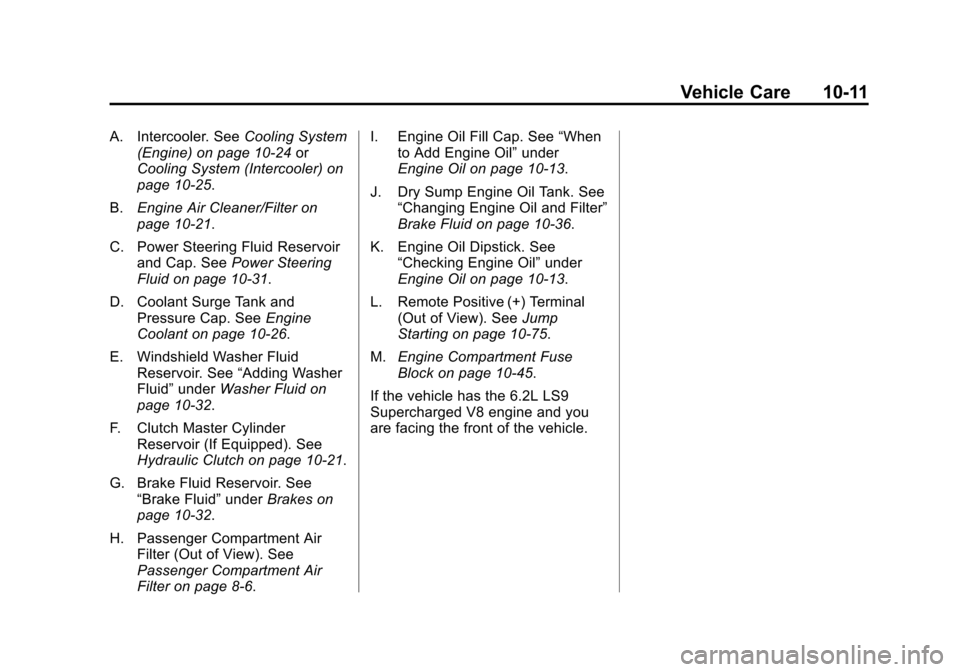
A. Intercooler. SeeCooling System
(Engine) on page 10‑24 or
Cooling System (Intercooler) on
page 10‑25.
B. Engine Air Cleaner/Filter on
page 10‑21.
C. Power Steering Fluid Reservoir and Cap. See Power Steering
Fluid on page 10‑31.
D. Coolant Surge Tank and Pressure Cap. See Engine
Coolant on page 10‑26.
E. Windshield Washer Fluid Reservoir. See “Adding Washer
Fluid” under Washer Fluid on
page 10‑32.
F. Clutch Master Cylinder Reservoir (If Equipped). See
Hydraulic Clutch on page 10‑21.
G. Brake Fluid Reservoir. See “Brake Fluid” underBrakes on
page 10‑32.
H. Passenger Compartment Air Filter (Out of View). See
Passenger Compartment Air
Filter on page 8‑6. I. Engine Oil Fill Cap. See
“When
to Add Engine Oil” under
Engine Oil on page 10‑13.
J. Dry Sump Engine Oil Tank. See “Changing Engine Oil and Filter”
Brake Fluid on page 10‑36.
K. Engine Oil Dipstick. See “Checking Engine Oil” under
Engine Oil on page 10‑13.
L. Remote Positive (+) Terminal (Out of View). See Jump
Starting on page 10‑75.
M. Engine Compartment Fuse
Block on page 10‑45.
If the vehicle has the 6.2L LS9
Supercharged V8 engine and you
are facing the front of the vehicle.
Page 275 of 414
Black plate (13,1)Chevrolet Corvette Owner Manual - 2013 - crc2 - 11/8/12
Vehicle Care 10-13
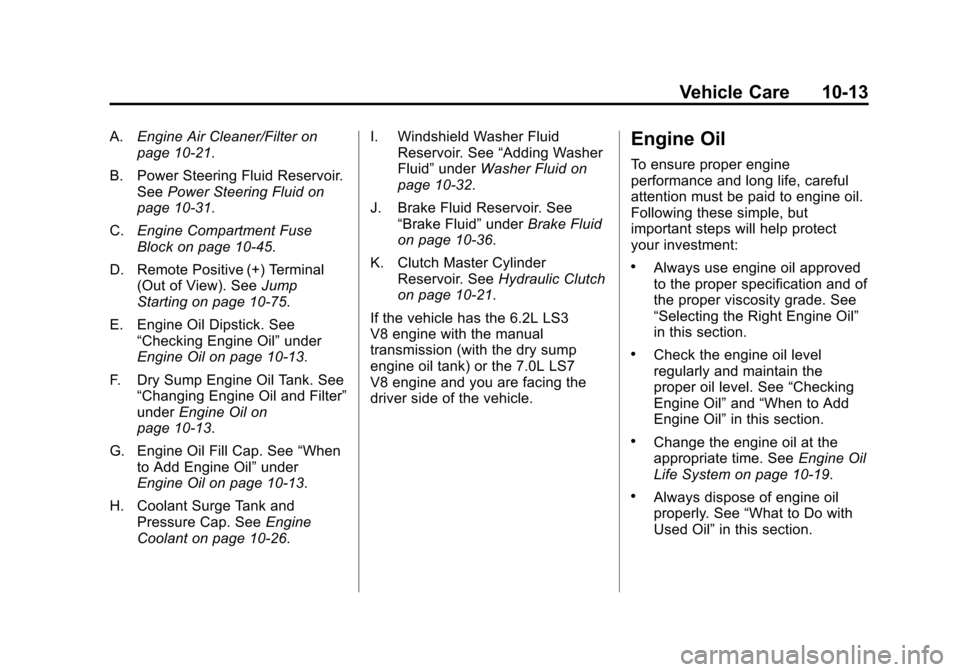
A.Engine Air Cleaner/Filter on
page 10‑21.
B. Power Steering Fluid Reservoir. See Power Steering Fluid on
page 10‑31.
C. Engine Compartment Fuse
Block on page 10‑45.
D. Remote Positive (+) Terminal (Out of View). See Jump
Starting on page 10‑75.
E. Engine Oil Dipstick. See “Checking Engine Oil” under
Engine Oil on page 10‑13.
F. Dry Sump Engine Oil Tank. See “Changing Engine Oil and Filter”
under Engine Oil on
page 10‑13.
G. Engine Oil Fill Cap. See “When
to Add Engine Oil” under
Engine Oil on page 10‑13.
H. Coolant Surge Tank and Pressure Cap. See Engine
Coolant on page 10‑26. I. Windshield Washer Fluid
Reservoir. See “Adding Washer
Fluid” under Washer Fluid on
page 10‑32.
J. Brake Fluid Reservoir. See “Brake Fluid” underBrake Fluid
on page 10‑36.
K. Clutch Master Cylinder Reservoir. See Hydraulic Clutch
on page 10‑21.
If the vehicle has the 6.2L LS3
V8 engine with the manual
transmission (with the dry sump
engine oil tank) or the 7.0L LS7
V8 engine and you are facing the
driver side of the vehicle.Engine Oil
To ensure proper engine
performance and long life, careful
attention must be paid to engine oil.
Following these simple, but
important steps will help protect
your investment:
.Always use engine oil approved
to the proper specification and of
the proper viscosity grade. See
“Selecting the Right Engine Oil”
in this section.
.Check the engine oil level
regularly and maintain the
proper oil level. See “Checking
Engine Oil” and“When to Add
Engine Oil” in this section.
.Change the engine oil at the
appropriate time. See Engine Oil
Life System on page 10‑19.
.Always dispose of engine oil
properly. See “What to Do with
Used Oil” in this section.
Page 338 of 414
Black plate (76,1)Chevrolet Corvette Owner Manual - 2013 - crc2 - 11/8/12
10-76 Vehicle Care
Notice:If any accessories are left
on or plugged in during the jump
starting procedure, they could be
damaged. The repairs would not
be covered by the vehicle
warranty. Whenever possible,
turn off or unplug all accessories
on either vehicle when jump
starting the vehicle.
3. Turn off the ignition on both
vehicles. Unplug unnecessary
accessories plugged into the
cigarette lighter or the accessory
power outlet. Turn off the radio
and all lamps that are not
needed. This will avoid sparks
and help save both batteries.
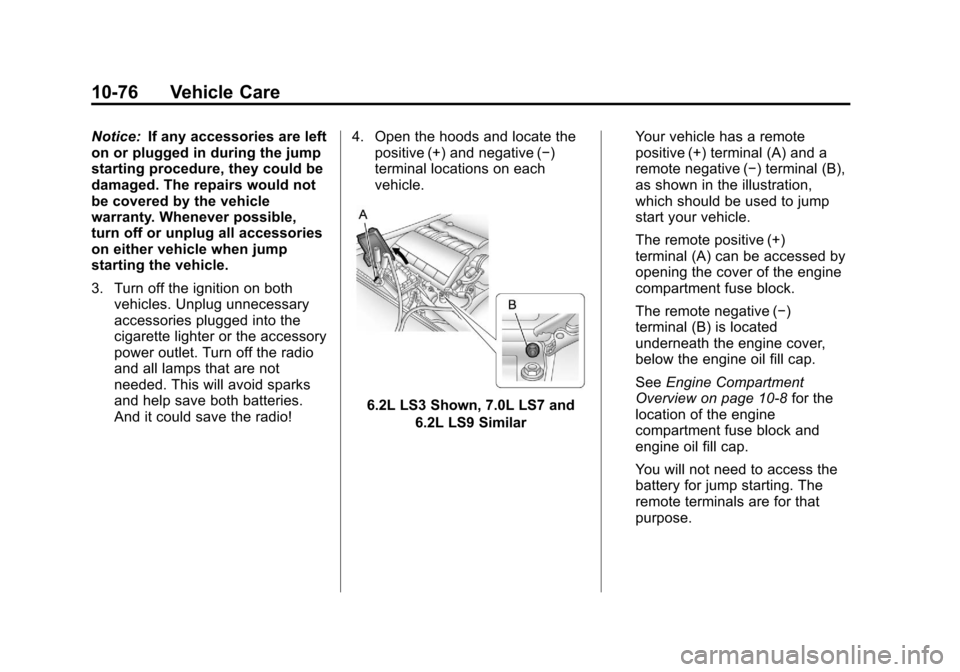
And it could save the radio! 4. Open the hoods and locate the
positive (+) and negative (−)
terminal locations on each
vehicle.
6.2L LS3 Shown, 7.0L LS7 and
6.2L LS9 Similar Your vehicle has a remote
positive (+) terminal (A) and a
remote negative (−) terminal (B),
as shown in the illustration,
which should be used to jump
start your vehicle.
The remote positive (+)
terminal (A) can be accessed by
opening the cover of the engine
compartment fuse block.
The remote negative (−)
terminal (B) is located
underneath the engine cover,
below the engine oil fill cap.
See
Engine Compartment
Overview on page 10‑8 for the
location of the engine
compartment fuse block and
engine oil fill cap.
You will not need to access the
battery for jump starting. The
remote terminals are for that
purpose.
Page 339 of 414
Black plate (77,1)Chevrolet Corvette Owner Manual - 2013 - crc2 - 11/8/12
Vehicle Care 10-77
{WARNING
An electric fan can start up even
when the engine is not running
and can injure you. Keep hands,
clothing and tools away from any
underhood electric fan.
{WARNING
Using an open flame near a
battery can cause battery gas to
explode. People have been hurt
doing this, and some have been
blinded. Use a flashlight if you
need more light.
Be sure the battery has enough
water. You do not need to add
water to the battery installed in
your new vehicle. But if a battery
has filler caps, be sure the right
amount of fluid is there. If it is low,(Continued)
WARNING (Continued)
add water to take care of that
first. If you do not, explosive gas
could be present.
Battery fluid contains acid that
can burn you. Do not get it on
you. If you accidentally get it in
your eyes or on your skin, flush
the place with water and get
medical help immediately.
{WARNING
Fans or other moving engine
parts can injure you badly. Keep
your hands away from moving
parts once the engine is running. 5. Check that the jumper cables do
not have loose or missing
insulation. If they do, you could
get a shock. The vehicles could
be damaged too.
Before you connect the cables,
here are some basic things you
should know. Positive (+) will go
to positive (+) or to a remote
positive (+) terminal if the vehicle
has one. Negative (−) will go to a
heavy, unpainted metal engine
part or to a remote negative (−)
terminal if the vehicle has one.
Do not connect positive (+) to
negative (−) or you will get a
short that would damage the
battery and maybe other parts
too. And do not connect the
negative (−) cable to the
negative (−) terminal on the dead
battery because this can cause
sparks.
Page 340 of 414
Black plate (78,1)Chevrolet Corvette Owner Manual - 2013 - crc2 - 11/8/12
10-78 Vehicle Care
6. Connect the red positive (+)cable to the positive (+) terminal
of the dead battery. Use a
remote positive (+) terminal if the
vehicle has one.
7. Do not let the other end touch metal. Connect it to the
positive (+) terminal of the good
battery. Use a remote
positive (+) terminal if the vehicle
has one.
8. Now connect the black negative (−) cable to the
negative (−) terminal of the good
battery. Use a remote
negative (−) terminal if the
vehicle has one.
Do not let the other end touch
anything until the next step. The
other end of the negative (−)
cable does not go to the dead
battery. It goes to a heavy,
unpainted metal engine part or
to a remote negative (−) terminal
on the vehicle with the dead
battery. 9. Connect the other end of the
negative (−) cable at least 45 cm
(18 inches) away from the dead
battery, but not near engine
parts that move. The electrical
connection is just as good there,
and the chance of sparks getting
back to the battery is much less.
Your vehicle has a remote
negative (−) terminal for this
purpose.
10. Now start the vehicle with the good battery and run the
engine for a while.
11. Try to start the vehicle that had the dead battery. If it will not
start after a few tries, it
probably needs service. Notice:
If the jumper cables are
connected or removed in the
wrong order, electrical shorting
may occur and damage the
vehicle. The repairs would not be
covered by the vehicle warranty.
Always connect and remove the
jumper cables in the correct
order, making sure that the
cables do not touch each other or
other metal.
Jumper Cable Removal
Reverse the sequence exactly when
removing the jumper cables.
You may need to initialize the power
windows. See “Power Window
Initialize” underPower Windows on
page 2‑17.
Page 385 of 414
Black plate (11,1)Chevrolet Corvette Owner Manual - 2013 - crc2 - 11/8/12
Customer Information 13-11
.Model, year, color, and license
plate number of the vehicle.
.Odometer reading, Vehicle
Identification Number (VIN), and
delivery date of the vehicle.
.Description of the problem.
Coverage
Services are provided up to 5 years/
160 000 km (100,000 mi), whichever
comes first.
In the U.S., anyone driving the
vehicle is covered. In Canada, a
person driving the vehicle without
permission from the owner is not
covered.
Roadside Assistance is not a part of
the New Vehicle Limited Warranty.
Chevrolet and General Motors of
Canada Limited reserve the right to
make any changes or discontinue
the Roadside Assistance program at
any time without notification.Chevrolet and General Motors of
Canada Limited reserve the right to
limit services or payment to an
owner or driver if they decide the
claims are made too often, or the
same type of claim is made many
times.
Services Provided
.Emergency Fuel Delivery:
Delivery of enough fuel for the
vehicle to get to the nearest
service station.
.Lock-Out Service:
Service to
unlock the vehicle if you are
locked out. A remote unlock may
be available if you have OnStar.
For security reasons, the driver
must present identification
before this service is given.
.Emergency Tow from a Public
Road or Highway: Tow to the
nearest Chevrolet dealer for
warranty service, or if the vehicle
was in a crash and cannot be
driven. Assistance is also given
when the vehicle is stuck in the
sand, mud, or snow.
.Flat Tire Change: Service to
change a flat tire with the spare
tire. The spare tire, if equipped,
must be in good condition and
properly inflated. It is the owner's
responsibility for the repair or
replacement of the tire if it is not
covered by the warranty.
.Battery Jump Start: Service to
jump start a dead battery.
Services Not Included in
Roadside Assistance
.Impound towing caused by
violation of any laws.
.Legal fines.
.Mounting, dismounting,
or changing of snow tires,
chains, or other traction devices.
.Towing or services for vehicles
driven on a non-public road or
highway.
Page 394 of 414
Black plate (20,1)Chevrolet Corvette Owner Manual - 2013 - crc2 - 11/8/12
13-20 Customer Information
Radio Frequency
Identification (RFID)
RFID technology is used in some
vehicles for functions such as tire
pressure monitoring and ignition
system security, as well as in
connection with conveniences such
as Remote Keyless Entry (RKE)
transmitters for remote door locking/
unlocking and starting, and
in-vehicle transmitters for garage
door openers. RFID technology in
GM vehicles does not use or record
personal information or link with any
other GM system containing
personal information.
Radio Frequency
Statement
This vehicle has systems that
operate on a radio frequency that
comply with Part 15 of the Federal
Communications Commission (FCC)
rules and with Industry Canada
Standards RSS‐GEN/210/220/310.Operation is subject to the following
two conditions:
1. The device may not cause
harmful interference.
2. The device must accept any interference received, including
interference that may cause
undesired operation of the
device.
Changes or modifications to any of
these systems by other than an
authorized service facility could void
authorization to use this equipment.