sensor CHEVROLET CORVETTE 2013 6.G User Guide
[x] Cancel search | Manufacturer: CHEVROLET, Model Year: 2013, Model line: CORVETTE, Model: CHEVROLET CORVETTE 2013 6.GPages: 414, PDF Size: 6.97 MB
Page 173 of 414
Black plate (3,1)Chevrolet Corvette Owner Manual - 2013 - crc2 - 11/8/12
Lighting 6-3
instrument panel cluster may not be
as bright as usual. Make sure the
instrument panel brightness knob is
in the full bright position. See
Instrument Panel Illumination
Control on page 6‑6for more
information.
If it is dark enough outside and the
exterior lamp control is off, a
HEADLAMPS SUGGESTED
message will display on the Driver
Information Center (DIC). See Lamp
Messages on page 5‑42.
Turning the exterior lamp control to
off a second time, or turning on the
headlamps will remove the
HEADLAMPS SUGGESTED
message in the DIC. If the parking
lamps or the fog lamps were turned
on instead, the HEADLAMPS
SUGGESTED message will
continue to be displayed.
The regular headlamp system
should be turned on when needed.
To turn off the DRL, turn the exterior
lamp control to the off position or
shift into P (Park). The DRL will stay off until the control is toggled again
or the vehicle is shifted out of
P (Park).
This procedure applies only to
vehicles first sold in the United
States.
Twilight Sentinel
Twilight Sentinel®is an automatic
headlamp system. When activated,
this feature turns your headlamps
and parking lamps on and off by
sensing how dark it is outside.
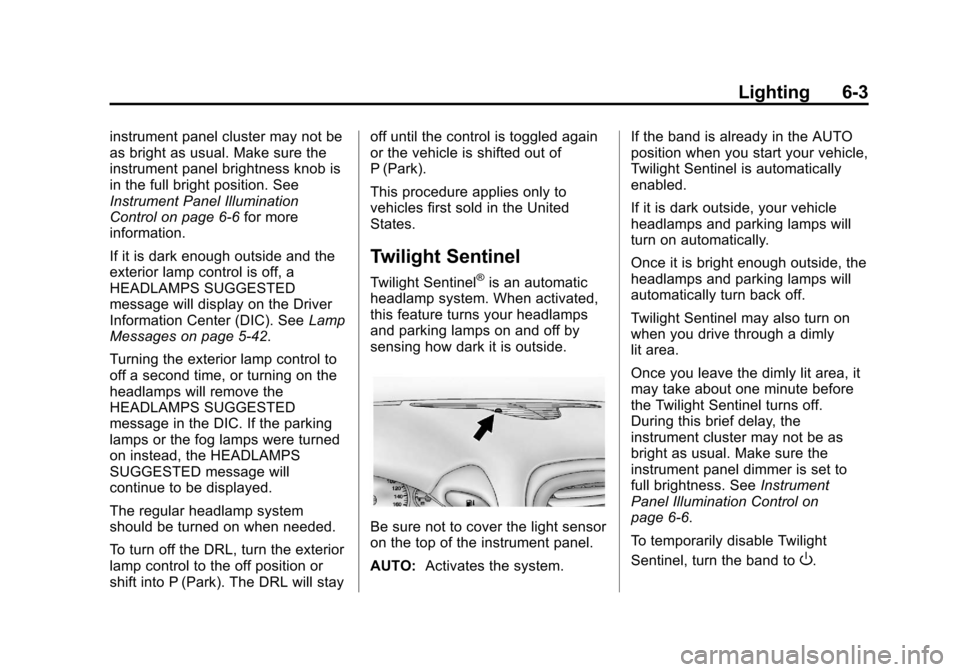
Be sure not to cover the light sensor
on the top of the instrument panel.
AUTO: Activates the system. If the band is already in the AUTO
position when you start your vehicle,
Twilight Sentinel is automatically
enabled.
If it is dark outside, your vehicle
headlamps and parking lamps will
turn on automatically.
Once it is bright enough outside, the
headlamps and parking lamps will
automatically turn back off.
Twilight Sentinel may also turn on
when you drive through a dimly
lit area.
Once you leave the dimly lit area, it
may take about one minute before
the Twilight Sentinel turns off.
During this brief delay, the
instrument cluster may not be as
bright as usual. Make sure the
instrument panel dimmer is set to
full brightness. See
Instrument
Panel Illumination Control on
page 6‑6.
To temporarily disable Twilight
Sentinel, turn the band to
O.
Page 206 of 414
Black plate (2,1)Chevrolet Corvette Owner Manual - 2013 - crc2 - 11/8/12
8-2 Climate Controls
When the vehicle is first started, the
display shows the driver's
temperature setting, the outside
temperature, the fan speed, and the
air delivery, for about 10 seconds.
The outside temperature is shown in
the center of the display. The digital
display will show the readings in
Fahrenheit or Celsius. See
“Personal Options”underVehicle
Personalization on page 5‑51 for
information on changing your
display.
Automatic Operation
AUTO (Automatic): Press the
AUTO button to place the entire
system in the automatic mode.
When automatic operation is active,
the system automatically controls
the inside temperature, the air
delivery mode, and the fan speed.
After a 10 second display of the
current settings, the word AUTO,
the driver's temperature setting and
the outside temperature will be
shown. The system operates to
reach the set temperature as quickly as possible. The AUTO control
system works best with the windows
up and the removable roof installed
or the convertible top up.
1. Press the AUTO button.
2. Adjust the temperature to a
comfortable setting between
16°C (60°F) and 32°C (90°F).
Choosing the coldest or warmest
temperature setting will not
cause the system to heat or cool
any faster. A setting of 23°C
(73°F) is suggested.
In cold weather, the system will
start at reduced fan speeds to
avoid blowing cold air into your
vehicle until warmer air is
available. The system starts out
blowing air at the floor but may
change modes automatically as
the vehicle warms up to maintain
the chosen temperature setting.
The length of time needed for
warm up depends on the outside
temperature and the length of
time that has elapsed since the
vehicle was last driven. 3. Wait for the system to regulate.
This may take from 10 to
30 minutes. Then adjust the
temperature, if necessary.
Do not cover the solar sensor
located in the center of the
instrument panel, near the
windshield. For more information on
the solar sensor, see “Sensors”later
in this section.
Manual Operation
Driver Power/Temperature: Press
the driver temperature knob to turn
the climate control system off. This
is the only setting that completely
shuts off the fan. The digital display
shows only the outside temperature.
The driver and the passenger set
temperature and the air intake mode
can still be adjusted when the
climate control is off.
Passenger Power/Temperature:
Press the passenger temperature
knob to turn the passenger's climate
control system on or off. Turn the
knob to increase or decrease the
temperature for the passenger. If the
Page 208 of 414
Black plate (4,1)Chevrolet Corvette Owner Manual - 2013 - crc2 - 11/8/12
8-4 Climate Controls
^(Air Conditioning Off):Press to
turn the air conditioning compressor
off. Press AUTO to return to
automatic operation. When in
AUTO, the air conditioning
compressor comes on automatically,
as needed.
Air conditioning does not operate at
temperatures below about 2°C to
4°C (35°F to 40°F). In temperatures
above 4°C (40°F), the air
conditioning cannot be turned off in
defrost and defog, as it helps to
remove moisture from the vehicle.
It also helps to keep the windows
clear.
You may notice a slight change in
engine performance when the air
conditioning compressor shuts off
and turns on again. This is normal.
The system is designed to make
adjustments to help with fuel
economy while still maintaining the
selected temperature.
On hot days, open the windows to
let hot inside air escape; then close
them. This helps to reduce the time it takes for the vehicle to cool down.
It also helps the system to operate
more efficiently.
For quick cool down on hot days
press the AUTO button and adjust
the temperature to a cool,
comfortable setting. To achieve
maximum cool down, do the
following:
1. Select
Hmode.
2. Press
?.
3. Select the a/c on.
4. Select the coolest temperature.
5. Select the highest fan speed.
Using these settings together for
long periods of time may cause the
air inside of your vehicle to become
too dry. To prevent this from
happening, after the air in the
vehicle has cooled, turn the
recirculation mode off.
The air conditioning system
removes moisture from the air, so a
small amount of water might drip under the vehicle while idling or
after turning off the engine. This is
normal.
?(Recirculation):
Press to turn
the recirculation mode on or off. An
indicator light comes on to show
that recirculation is on. This mode
prevents outside air from entering
your vehicle. It can be used to
prevent outside air and odors from
entering your vehicle and to help
cool the air inside your vehicle more
quickly. Recirculation mode is not
available in defrost or defog mode.
Sensors
The solar sensor on the vehicle
monitors the solar heat and uses
the information to maintain the
selected temperature when
operating in AUTO mode by
automatically adjusting the
temperature, fan speed, and air
delivery system. The system may
also supply cooler air to the side of
the vehicle facing the sun. The
recirculation mode will also be
activated, as necessary. Do not
Page 209 of 414
Black plate (5,1)Chevrolet Corvette Owner Manual - 2013 - crc2 - 11/8/12
Climate Controls 8-5
cover the solar sensor located on
the top of the instrument panel near
the windshield or the system will not
work properly.
There is also a sensor located
behind the front bumper. This
sensor reads the outside air
temperature and helps to maintain
the temperature inside the vehicle.
Any cover on the front of the vehicle
could give a false reading in the
temperature.
If the outside temperature goes up,
the displayed temperature will not
change until:
.The vehicle's speed is above
19 km/h (12 mph) for
five minutes.
.The vehicle's speed is above
52 km/h (32 mph) for two and
one‐half minutes.
These delays prevent false
readings. If the temperature goes
down, the outside temperature will
be shown when you start the
vehicle. If it has been turned off for less than three hours, the
temperature will be recalled from the
previous vehicle operation.
There is also an inside temperature
sensor located to the left of the
ignition switch. The automatic
climate control system uses this
sensor to receive information, so if
you block or cover it, the system will
not function properly.
Rear Window Defogger
The rear window defogger uses a
warming grid to remove fog or frost
from the rear window.
The rear window defogger only
works when the engine is running.
=(Rear Window Defogger):
Press to turn the rear window
defogger on or off. Be sure to clear
as much snow from the rear window
as possible. An indicator light
comes on to show that the rear
window defogger is on.
The rear window defogger turns off
about 10 minutes after the button is
pressed when traveling less than 48 km/h (30 mph). If turned on
again, the defogger only runs for
about five minutes before turning
off. The defogger can also be turned
off by turning off the engine.
The vehicle has heated outside
rearview mirrors. The mirrors will
heat to help clear fog or frost from
the surface of the mirrors when the
rear window defogger button is
pressed.
For vehicles with a power
convertible top, the rear window
defogger and heated mirrors are
automatically disabled when the
power convertible top is moving
or down.
Notice:
Do not use anything
sharp on the inside of the rear
window. If you do, you could cut
or damage the warming grid, and
the repairs would not be covered
by the vehicle warranty. Do not
attach a temporary vehicle
license, tape, a decal, or anything
similar to the defogger grid.
Page 284 of 414
Black plate (22,1)Chevrolet Corvette Owner Manual - 2013 - crc2 - 11/8/12
10-22 Vehicle Care
air cleaner, as shown in the
illustration, as this could damage
the vehicle's engine.
When to Inspect the Engine Air
Cleaner/Filter
Inspect the air cleaner/filter at the
scheduled maintenance intervals
and replace them at the first oil
change after each 80 000 km
(50,000 mi) interval. See
Maintenance Schedule on
page 11‑3. If driving in dusty/dirty
conditions, inspect the filter at each
engine oil change.
How to Inspect the Engine Air
Cleaner/Filter
To inspect the air cleaner/filter,
remove the filter from the vehicle
and lightly shake the filter to release
loose dust and dirt. If the filter
remains covered with dirt, a new
filter is required.
To inspect or replace the engine air
cleaner/filter:
1. Open the hood. SeeHood on
page 10‑7.
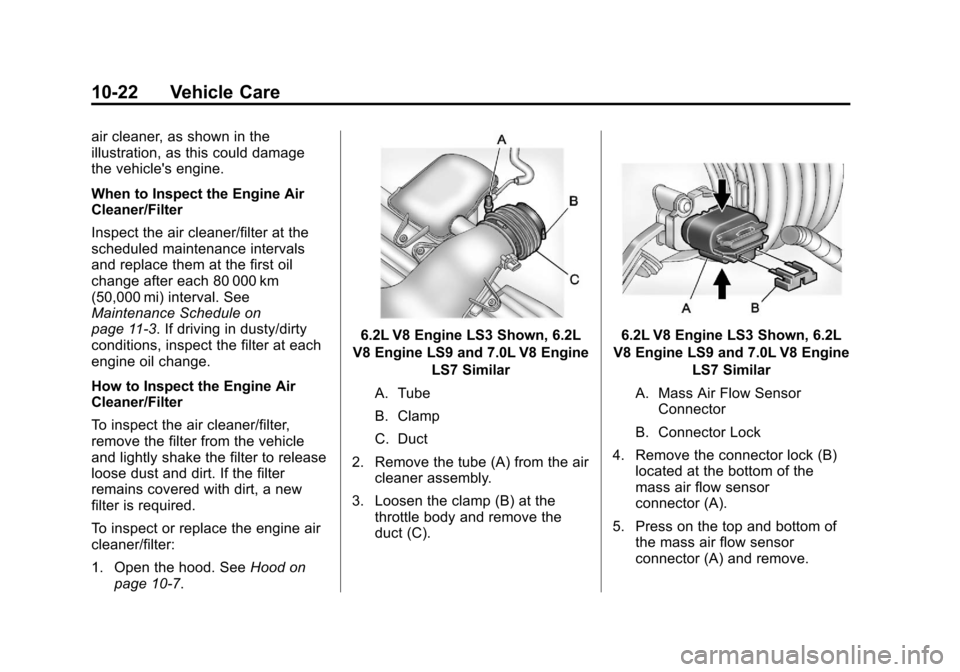
6.2L V8 Engine LS3 Shown, 6.2L
V8 Engine LS9 and 7.0L V8 Engine LS7 Similar
A. Tube
B. Clamp
C. Duct
2. Remove the tube (A) from the air cleaner assembly.
3. Loosen the clamp (B) at the throttle body and remove the
duct (C).6.2L V8 Engine LS3 Shown, 6.2L
V8 Engine LS9 and 7.0L V8 Engine LS7 Similar
A. Mass Air Flow Sensor Connector
B. Connector Lock
4. Remove the connector lock (B) located at the bottom of the
mass air flow sensor
connector (A).
5. Press on the top and bottom of the mass air flow sensor
connector (A) and remove.
Page 296 of 414
Black plate (34,1)Chevrolet Corvette Owner Manual - 2013 - crc2 - 11/8/12
10-34 Vehicle Care
.Brake pads can be visually
inspected through the wheel by
inspecting the outer brake pads
at each wheel.
.Brake pads should be replaced
when worn to 2 mm of pad
thickness. New pads are 10 mm
thick.
.In addition, brake pad inspection
is required any time the tires are
removed.
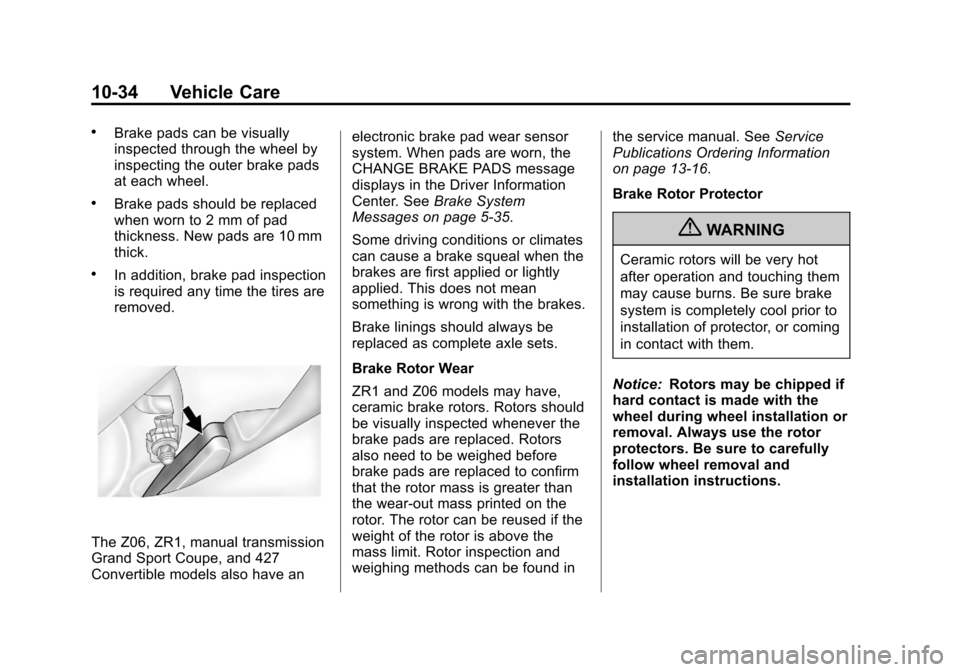
The Z06, ZR1, manual transmission
Grand Sport Coupe, and 427
Convertible models also have anelectronic brake pad wear sensor
system. When pads are worn, the
CHANGE BRAKE PADS message
displays in the Driver Information
Center. See
Brake System
Messages on page 5‑35.
Some driving conditions or climates
can cause a brake squeal when the
brakes are first applied or lightly
applied. This does not mean
something is wrong with the brakes.
Brake linings should always be
replaced as complete axle sets.
Brake Rotor Wear
ZR1 and Z06 models may have,
ceramic brake rotors. Rotors should
be visually inspected whenever the
brake pads are replaced. Rotors
also need to be weighed before
brake pads are replaced to confirm
that the rotor mass is greater than
the wear-out mass printed on the
rotor. The rotor can be reused if the
weight of the rotor is above the
mass limit. Rotor inspection and
weighing methods can be found in the service manual. See
Service
Publications Ordering Information
on page 13‑16.
Brake Rotor Protector
{WARNING
Ceramic rotors will be very hot
after operation and touching them
may cause burns. Be sure brake
system is completely cool prior to
installation of protector, or coming
in contact with them.
Notice: Rotors may be chipped if
hard contact is made with the
wheel during wheel installation or
removal. Always use the rotor
protectors. Be sure to carefully
follow wheel removal and
installation instructions.
Page 308 of 414
Black plate (46,1)Chevrolet Corvette Owner Manual - 2013 - crc2 - 11/8/12
10-46 Vehicle Care
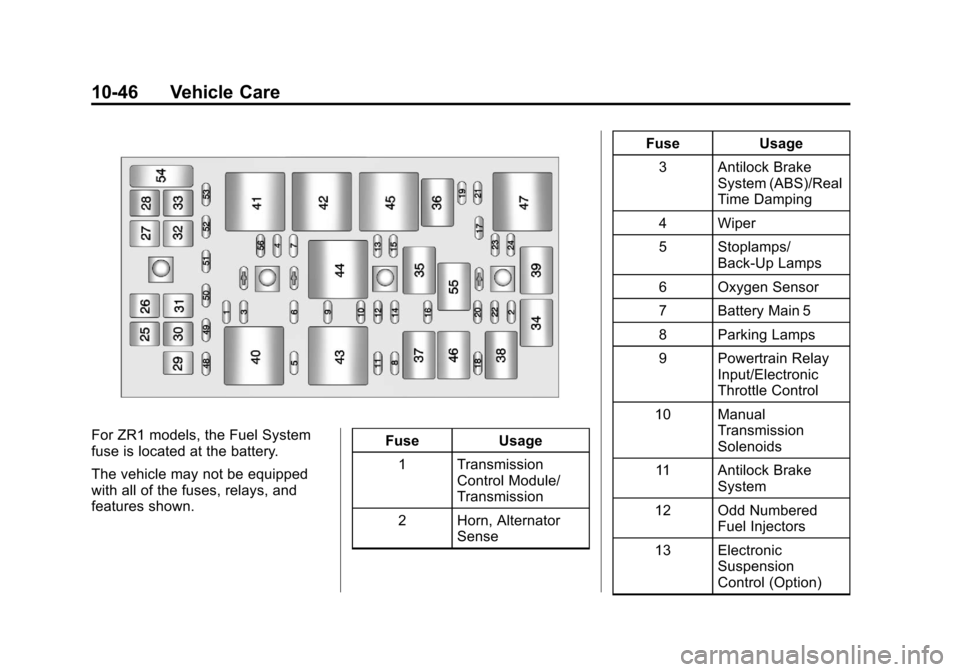
For ZR1 models, the Fuel System
fuse is located at the battery.
The vehicle may not be equipped
with all of the fuses, relays, and
features shown.Fuse Usage
1 Transmission Control Module/
Transmission
2 Horn, Alternator Sense Fuse Usage
3 Antilock Brake System (ABS)/Real
Time Damping
4 Wiper
5 Stoplamps/ Back-Up Lamps
6 Oxygen Sensor
7 Battery Main 5
8 Parking Lamps
9 Powertrain Relay Input/Electronic
Throttle Control
10 Manual Transmission
Solenoids
11 Antilock Brake System
12 Odd Numbered Fuel Injectors
13 Electronic Suspension
Control (Option)
Page 309 of 414
Black plate (47,1)Chevrolet Corvette Owner Manual - 2013 - crc2 - 11/8/12
Vehicle Care 10-47
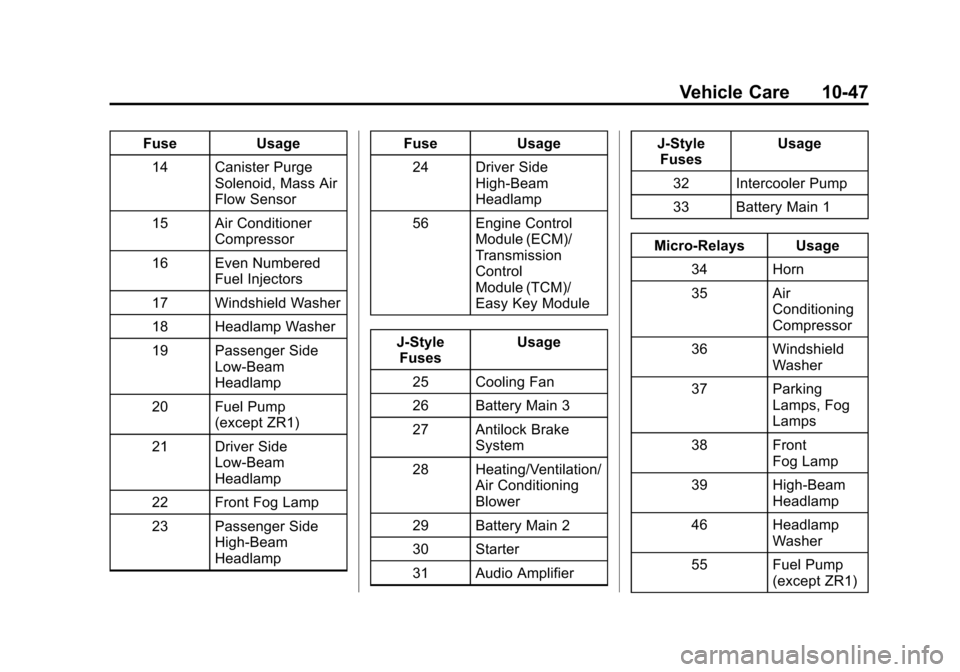
FuseUsage
14 Canister Purge Solenoid, Mass Air
Flow Sensor
15 Air Conditioner Compressor
16 Even Numbered Fuel Injectors
17 Windshield Washer
18 Headlamp Washer
19 Passenger Side Low-Beam
Headlamp
20 Fuel Pump (except ZR1)
21 Driver Side Low-Beam
Headlamp
22 Front Fog Lamp
23 Passenger Side High-Beam
Headlamp Fuse
Usage
24 Driver Side High-Beam
Headlamp
56 Engine Control Module (ECM)/
Transmission
Control
Module (TCM)/
Easy Key Module
J-Style Fuses Usage
25 Cooling Fan
26 Battery Main 3
27 Antilock Brake System
28 Heating/Ventilation/ Air Conditioning
Blower
29 Battery Main 2
30 Starter
31 Audio Amplifier J-Style
Fuses Usage
32 Intercooler Pump
33 Battery Main 1
Micro-Relays Usage 34 Horn
35 Air Conditioning
Compressor
36 Windshield Washer
37 Parking Lamps, Fog
Lamps
38 Front Fog Lamp
39 High-Beam Headlamp
46 Headlamp Washer
55 Fuel Pump (except ZR1)
Page 312 of 414
Black plate (50,1)Chevrolet Corvette Owner Manual - 2013 - crc2 - 11/8/12
10-50 Vehicle Care
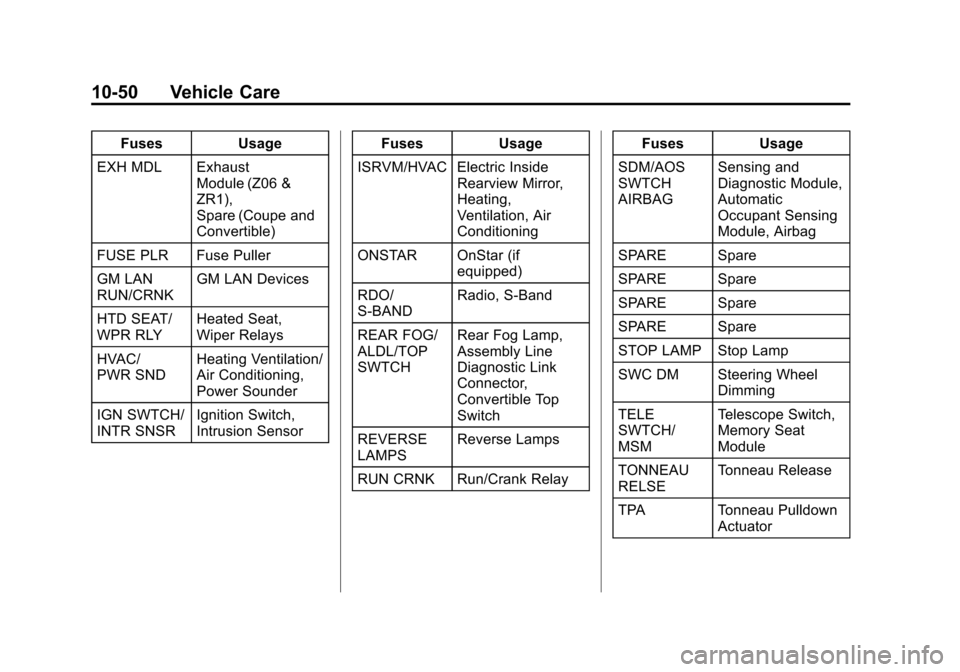
FusesUsage
EXH MDL Exhaust Module (Z06 &
ZR1),
Spare (Coupe and
Convertible)
FUSE PLR Fuse Puller
GM LAN
RUN/CRNK GM LAN Devices
HTD SEAT/
WPR RLY Heated Seat,
Wiper Relays
HVAC/
PWR SND Heating Ventilation/
Air Conditioning,
Power Sounder
IGN SWTCH/
INTR SNSR Ignition Switch,
Intrusion Sensor Fuses
Usage
ISRVM/HVAC Electric Inside Rearview Mirror,
Heating,
Ventilation, Air
Conditioning
ONSTAR OnStar (if equipped)
RDO/
S-BAND Radio, S-Band
REAR FOG/
ALDL/TOP
SWTCH Rear Fog Lamp,
Assembly Line
Diagnostic Link
Connector,
Convertible Top
Switch
REVERSE
LAMPS Reverse Lamps
RUN CRNK Run/Crank Relay Fuses
Usage
SDM/AOS
SWTCH
AIRBAG Sensing and
Diagnostic Module,
Automatic
Occupant Sensing
Module, Airbag
SPARE Spare
SPARE Spare
SPARE Spare
SPARE Spare
STOP LAMP Stop Lamp
SWC DM Steering Wheel Dimming
TELE
SWTCH/
MSM Telescope Switch,
Memory Seat
Module
TONNEAU
RELSE Tonneau Release
TPA Tonneau Pulldown Actuator
Page 316 of 414
Black plate (54,1)Chevrolet Corvette Owner Manual - 2013 - crc2 - 11/8/12
10-54 Vehicle Care
possible, contact the nearest
authorized GM or run-flat servicing
facility for inspection and repair or
replacement.
When driving on a deflated run-flat
tire, avoid potholes and other road
hazards that could damage the tire
and/or wheel beyond repair. When a
tire has been damaged, or if driven
any distance while deflated, check
with an authorized run-flat tire
service center to determine whether
the tire can be repaired or should be
replaced. To maintain the run-flat
feature, all replacement tires must
be run-flat tires.
To locate the nearest GM or run-flat
servicing facility, call Customer
Assistance.
The valve stems on run-flat tires
have sensors that are part of the
TPMS. SeeTire Pressure Monitor
System on page 10‑62. These
sensors contain batteries that are
designed to last for 10 years under normal driving conditions. See your
dealer for wheel or sensor
replacement.
Notice:
Using liquid sealants can
damage the tire valves and tire
pressure monitor sensors in the
run-flat tires. This damage is not
covered by the vehicle warranty.
Do not use liquid sealants in
run-flat tires.
Low-Profile Tires
Low‐Profile Performance Tire
The original equipment tires on
this vehicle are classified as
low‐profile performance tires.
These tires are designed for
very responsive driving on wet
or dry pavement, however, may
produce more road noise and
tend to wear faster. Notice:
Low‐profile tires are
more susceptible to damage
from road hazards or curb
impact than standard profile
tires. Tire and/or wheel
assembly damage can occur
when coming into contact
with road hazards like,
potholes, or sharp edged
objects, or when sliding into a
curb. The warranty does not
cover this type of damage.
Keep tires set to the correct
inflation pressure and, when
possible, avoid contact with
curbs, potholes, and other
road hazards.