trunk CHEVROLET CORVETTE 2013 6.G Owner's Manual
[x] Cancel search | Manufacturer: CHEVROLET, Model Year: 2013, Model line: CORVETTE, Model: CHEVROLET CORVETTE 2013 6.GPages: 414, PDF Size: 6.97 MB
Page 102 of 414
Black plate (2,1)Chevrolet Corvette Owner Manual - 2013 - crc2 - 11/8/12
4-2 Storage
Rear Trunk Partition
For vehicles with the power
convertible top option only, there is
a trunk partition to keep cargo from
getting in the way of the convertible
top. The trunk partition must be in
place for the convertible top to
move. If the trunk partition is not
properly in place, a message will
display. SeeConvertible Top
Messages on page 5‑36.
The trunk partition is a flat carpeted
board with a horizontal flap that can
be attached to the top of the trunk to
divide the storage compartment.
It can be stored flat when not in use.
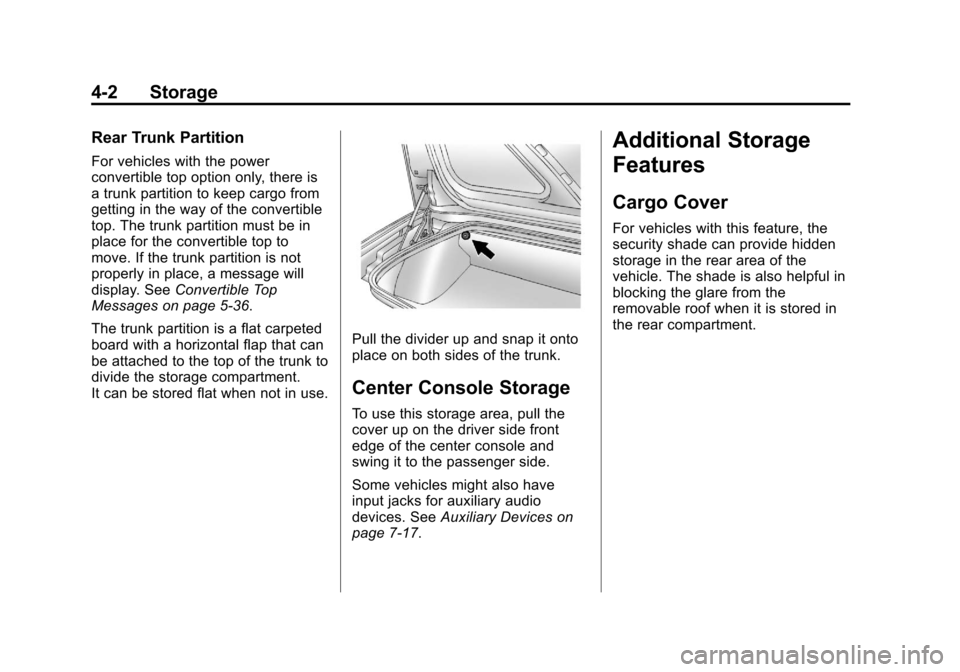
Pull the divider up and snap it onto
place on both sides of the trunk.
Center Console Storage
To use this storage area, pull the
cover up on the driver side front
edge of the center console and
swing it to the passenger side.
Some vehicles might also have
input jacks for auxiliary audio
devices. See Auxiliary Devices on
page 7‑17.
Additional Storage
Features
Cargo Cover
For vehicles with this feature, the
security shade can provide hidden
storage in the rear area of the
vehicle. The shade is also helpful in
blocking the glare from the
removable roof when it is stored in
the rear compartment.
Page 140 of 414
Black plate (36,1)Chevrolet Corvette Owner Manual - 2013 - crc2 - 11/8/12
5-36 Instruments and Controls
systems will not assist the driver.
Have the system repaired by your
dealer as soon as possible. Adjust
your driving accordingly.
To acknowledge these messages,
press the RESET button.
Convertible Top
Messages
ATTACH TRUNK PARTITION
If the vehicle has a power
convertible top, this message
displays and a sound will be heard if
the trunk partition is not in place.
Open the hatch/trunk and make
sure the trunk partition is secure
and no objects are on the trunk
partition. SeeRear Storage on
page 4‑1 for more information.
CLOSE TRUNK TO MOVE TOP
This message displays and a sound
will be heard if the trunk is open
while you are trying to operate the
convertible top. Make sure the trunk is closed before operating the
convertible top. See
Convertible Top
on page 2‑22.
SET PARK BRAKE TO
MOVE TOP
If the vehicle has a manual
transmission, this message displays
and a sound will be heard if you try
to operate the power convertible top
without first setting the parking
brake. Set the parking brake before
trying to operate the power
convertible top. See Convertible Top
on page 2‑22 for more information.
SHIFT TO PARK OR SET PARK
BRAKE FOR TOP
If the vehicle has an automatic
transmission, this message displays
and a sound will be heard if you try
to operate the power convertible top
without first shifting into P (Park) or
setting the parking brake. Either
shift the vehicle into P (Park) or set
the parking brake before trying to operate the power convertible top.
See
Convertible Top on page 2‑22
for more information.
TOO COLD TO MOVE TOP
This message displays and a sound
will be heard when the power
convertible top button is pressed
and the power convertible top pump
motor temperature is below −20°C
(−4°F). Wait for the power
convertible top pump motor to warm
up before using the power
convertible top.
TOP MOTOR OVER
TEMPERATURE
This message displays and a sound
will be heard when the power
convertible top button is pressed
and the power convertible top pump
motor temperature is over 105°C
(221°F). Wait for the power
convertible top pump motor to cool
down before using the power
convertible top.
Page 141 of 414
Black plate (37,1)Chevrolet Corvette Owner Manual - 2013 - crc2 - 11/8/12
Instruments and Controls 5-37
TOP NOT SECURE
This message displays and a sound
will be heard when the power
convertible top button is released
before the top open or close
operation is complete or if the top is
closed without the header latch
engaged. Press and hold the
convertible top button to fully open
or close the top, and make sure that
the header latch is engaged after
the top is closed.
UNLATCH HEADER TO
MOVE TOP
This message displays and a sound
will be heard if you try to lower the
convertible top without first
unlocking the top. Move the latch
handle to unlock the convertible top.
SeeConvertible Top on page 2‑22.
Cruise Control Messages
CRUISE DISENGAGED
This message displays briefly when
you disengage the cruise control
system by stepping on the brake on an automatic transmission vehicle or
the clutch on a manual transmission
vehicle, or by turning off the cruise
control switch. See
Cruise Control
on page 9‑42 for more information.
CRUISE SET TO XXX MPH
(XXX km/h)
SeeCruise Control on page 9‑42.
Door Ajar Messages
DRIVER DOOR AJAR
This message displays if the driver
door is not closed properly. Make
sure that the door is closed
completely.
HATCH AJAR (Coupe)
This message displays when the
hatch is not closed completely.
Make sure that the hatch is closed
completely. See Hatch on page 2‑10
for more information.
PASSENGER DOOR AJAR
This message displays if the
passenger door is not closed
properly. Make sure that the door is
closed completely.
TONNEAU AJAR (Convertible)
This message displays when the
convertible top is not closed
completely. Make sure that the top
is closed completely. See
Convertible Top on page 2‑22 for
more information.
TRUNK AJAR (Convertible)
This message displays when the
trunk is not closed completely. Make
sure that the trunk is closed
completely. See Hatch on page 2‑10
for more information.
Page 159 of 414
Black plate (55,1)Chevrolet Corvette Owner Manual - 2013 - crc2 - 11/8/12
Instruments and Controls 5-55
If you choose ON, the parking
lamps, the high-beam headlamps,
and the back-up lamps will come on
for 20 seconds during low light
periods when all of the following
occur:
.You press the unlock button on
the RKE transmitter.
.Both of the doors are closed.
.The vehicle is off or in RAP.
The lamps remain on for 20 seconds
or until a door is opened, the lock
button on the RKE transmitter is
pressed, or the vehicle is no longer
off or in RAP.
See Remote Keyless Entry (RKE)
System on page 2‑2 for more
information.
When the mode you want is
selected, press the OPTION button
to set your choice and advance to
the next personal option.
Twilight Delay: This option allows
you to set the amount of time you
want the parking lamps and
high-beam headlamps to remain on after you exit the vehicle. This will
occur when the vehicle is off or in
RAP and the headlamps are on due
to the automatic headlamp system.
The parking lamps and high-beam
headlamps will remain on until the
driver selected time expires, the
exterior lamp control is activated,
or the vehicle is no longer off or
in RAP.
Press the OPTION button until
TWILIGHT DELAY appears on the
display, then press the RESET
button to scroll through the following
modes:
.OFF
.15 S
.30 S (default)
.90 S
If you choose OFF, this option will
turn off.
If you choose 15 S, the twilight
delay time will be set to 15 seconds.
If you choose 30 S, the twilight
delay time will be set to 30 seconds. If you choose 90 S, the twilight
delay time will be set to 90 seconds.
When the mode you want is
selected, press the OPTION button
to set your choice and advance to
the next personal option.
Flash at Unlock:
This option
activates the front and rear turn
signals for two short flashes when
the unlock or hatch/trunk button on
the RKE transmitter is pressed. This
will only occur when the vehicle
is off.
Press the OPTION button until
FLASH AT UNLOCK appears on the
display, then press the RESET
button to scroll through the following
modes:.YES (default)
.NO
If you choose YES, the front and
rear turn signals will flash twice
when you press the unlock button or
the hatch/trunk button on the RKE
transmitter.
Page 176 of 414
Black plate (6,1)Chevrolet Corvette Owner Manual - 2013 - crc2 - 11/8/12
6-6 Lighting
Interior Lighting
Instrument Panel
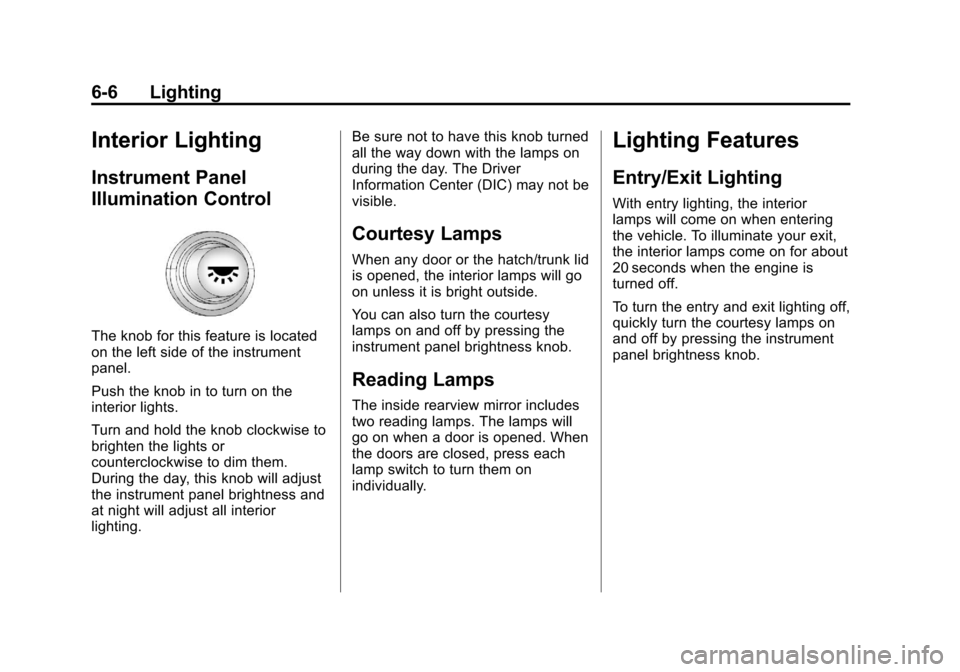
Illumination Control
The knob for this feature is located
on the left side of the instrument
panel.
Push the knob in to turn on the
interior lights.
Turn and hold the knob clockwise to
brighten the lights or
counterclockwise to dim them.
During the day, this knob will adjust
the instrument panel brightness and
at night will adjust all interior
lighting.Be sure not to have this knob turned
all the way down with the lamps on
during the day. The Driver
Information Center (DIC) may not be
visible.
Courtesy Lamps
When any door or the hatch/trunk lid
is opened, the interior lamps will go
on unless it is bright outside.
You can also turn the courtesy
lamps on and off by pressing the
instrument panel brightness knob.
Reading Lamps
The inside rearview mirror includes
two reading lamps. The lamps will
go on when a door is opened. When
the doors are closed, press each
lamp switch to turn them on
individually.
Lighting Features
Entry/Exit Lighting
With entry lighting, the interior
lamps will come on when entering
the vehicle. To illuminate your exit,
the interior lamps come on for about
20 seconds when the engine is
turned off.
To turn the entry and exit lighting off,
quickly turn the courtesy lamps on
and off by pressing the instrument
panel brightness knob.
Page 190 of 414
Black plate (12,1)Chevrolet Corvette Owner Manual - 2013 - crc2 - 11/8/12
7-12 Infotainment System
Diversity Antenna System
The AM-FM antenna is a hidden
self-tuning system. It optimizes the
AM and FM signals relative to the
vehicle's position and radio station
source. No maintenance or
adjustments are needed.
Satellite Radio Antenna
For vehicles with XM Satellite Radio
Service, the antenna is located on
the roof or on the trunk lid of the
vehicle. Keep the antenna clear of
obstructions for clear radio
reception.
Audio Players
CD Player
Care of the CD Player
Do not add labels to a CD; it could
get caught in the CD player. Use a
marking pen to write on the top of
the CD if a description is needed.
Do not use CD lens cleaners; they
could damage the CD player.
Notice:If a label is added to a
CD, more than one CD is inserted
into the slot at a time, or an
attempt is made to play scratched
or damaged CDs, the CD player
could be damaged. While using
the CD player, use only CDs in
good condition without any label,
load one CD at a time, and keep
the CD player and the loading slot
free of foreign materials, liquids,
and debris.
If an error displays, see “CD
Messages” later in this section.
Care of CDs
Store CDs in their original cases or
other protective cases and away
from direct sunlight and dust. The
CD player scans the bottom of the
disc. If the bottom of a CD is
damaged it may not play properly or
at all. Do not touch the bottom of a
CD while handling it. Pick up CDs
by grasping the outer edges or the
edge of the hole and the outer edge.
If the surface of a CD is dirty, take a
soft, lint-free cloth or dampen a
clean, soft cloth in a mild, neutral
detergent solution mixed with water,
and clean it. Make sure the wiping
process starts from the center to
the edge.
Using the CD Player
The CD player can play smaller
8 cm (3 in) single CDs with an
adapter ring.
Page 261 of 414
Black plate (49,1)Chevrolet Corvette Owner Manual - 2013 - crc2 - 11/8/12
Driving and Operating 9-49
nozzle. Clean fuel from painted
surfaces as soon as possible. See
Exterior Care on page 10‑79.
When replacing the fuel cap, turn it
clockwise until it clicks. Make sure
the cap is fully installed. The
diagnostic system can determine if
the fuel cap has been left off or
improperly installed. This would
allow fuel to evaporate into the
atmosphere. SeeMalfunction
Indicator Lamp on page 5‑18.
The CHECK GAS CAP message
displays on the Driver Information
Center (DIC) if the fuel cap is not
properly installed. See Fuel System
Messages on page 5‑40 for more
information.
{WARNING
If a fire starts while you are
refueling, do not remove the
nozzle. Shut off the flow of fuel by
shutting off the pump or by
notifying the station attendant.
Leave the area immediately. Notice:
If you need a new fuel
cap, be sure to get the right type.
Your dealer can get one for you.
If you get the wrong type, it may
not fit properly. This may cause
the malfunction indicator lamp to
light and may damage the fuel
tank and emissions system. See
Malfunction Indicator Lamp on
page 5‑18.
Filling a Portable Fuel
Container
{WARNING
Filling a portable fuel container
while it is in the vehicle can cause
fuel vapors that can ignite either
by static electricity or other
means. You or others could be
badly burned and the vehicle
could be damaged. Always:
.Use approved fuel
containers.
(Continued)
WARNING (Continued)
.Remove the container from
the vehicle, trunk, or pickup
bed before filling.
.Place the container on the
ground.
.Place the nozzle inside the fill
opening of the container
before dispensing fuel, and
keep it in contact with the fill
opening until filling is
complete.
.Fill the container no more
than 95% full to allow for
expansion.
.Do not smoke, light matches,
or use lighters while
pumping fuel.
.Avoid using cell phones or
other electronic devices.
Page 313 of 414
Black plate (51,1)Chevrolet Corvette Owner Manual - 2013 - crc2 - 11/8/12
Vehicle Care 10-51
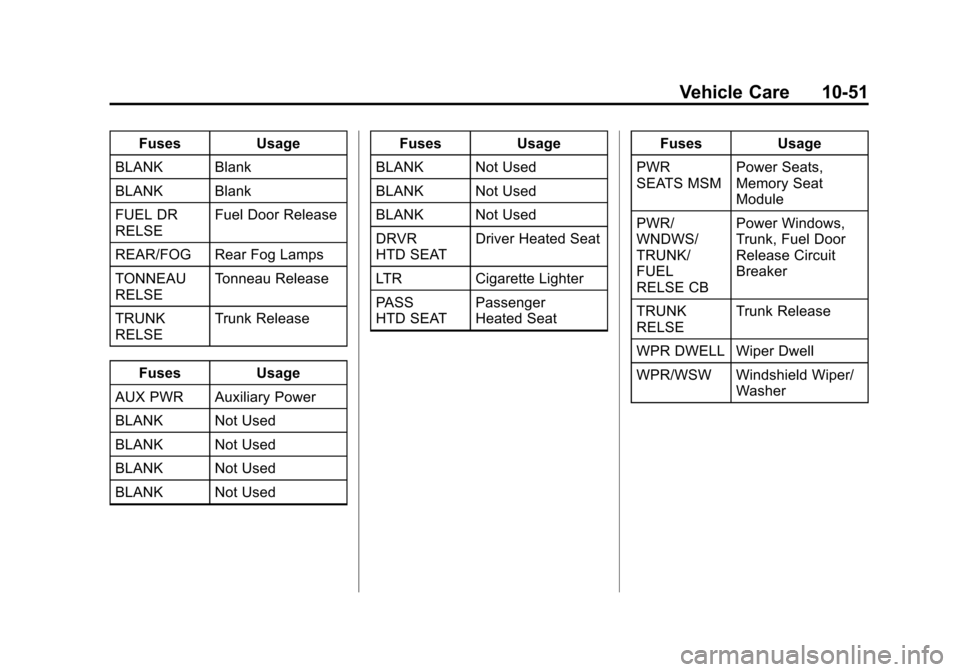
FusesUsage
BLANK Blank
BLANK Blank
FUEL DR
RELSE Fuel Door Release
REAR/FOG Rear Fog Lamps
TONNEAU
RELSE Tonneau Release
TRUNK
RELSE Trunk Release
Fuses Usage
AUX PWR Auxiliary Power
BLANK Not Used
BLANK Not Used
BLANK Not Used
BLANK Not Used Fuses
Usage
BLANK Not Used
BLANK Not Used
BLANK Not Used
DRVR
HTD SEAT Driver Heated Seat
LTR Cigarette Lighter
PASS
HTD SEAT Passenger
Heated Seat Fuses
Usage
PWR
SEATS MSM Power Seats,
Memory Seat
Module
PWR/
WNDWS/
TRUNK/
FUEL
RELSE CB Power Windows,
Trunk, Fuel Door
Release Circuit
Breaker
TRUNK
RELSE Trunk Release
WPR DWELL Wiper Dwell
WPR/WSW Windshield Wiper/ Washer