brake CHEVROLET CORVETTE 2013 6.G Service Manual
[x] Cancel search | Manufacturer: CHEVROLET, Model Year: 2013, Model line: CORVETTE, Model: CHEVROLET CORVETTE 2013 6.GPages: 414, PDF Size: 6.97 MB
Page 230 of 414
Black plate (18,1)Chevrolet Corvette Owner Manual - 2013 - crc2 - 11/8/12
9-18 Driving and Operating
{WARNING
ZR1s, 427 convertibles and Z06s
with RPO CFZ, contain parts
made from carbon fiber.
When damaged, the exposed
edges can be very sharp.
A person could be injured by
these sharp edges. Use caution
when washing the vehicle,
coming in contact with,
or removing damaged carbon
fiber parts. See your dealer for
replacement.
Under normal operation, these
components will occasionally
contact some road surfaces (speed
bumps, driveway ramps, etc.). This
can be heard inside the vehicle as a
scraping noise. This is normal and
does not indicate a problem.
Use care when approaching bumps
or objects on road surfaces and
avoid them when possible.
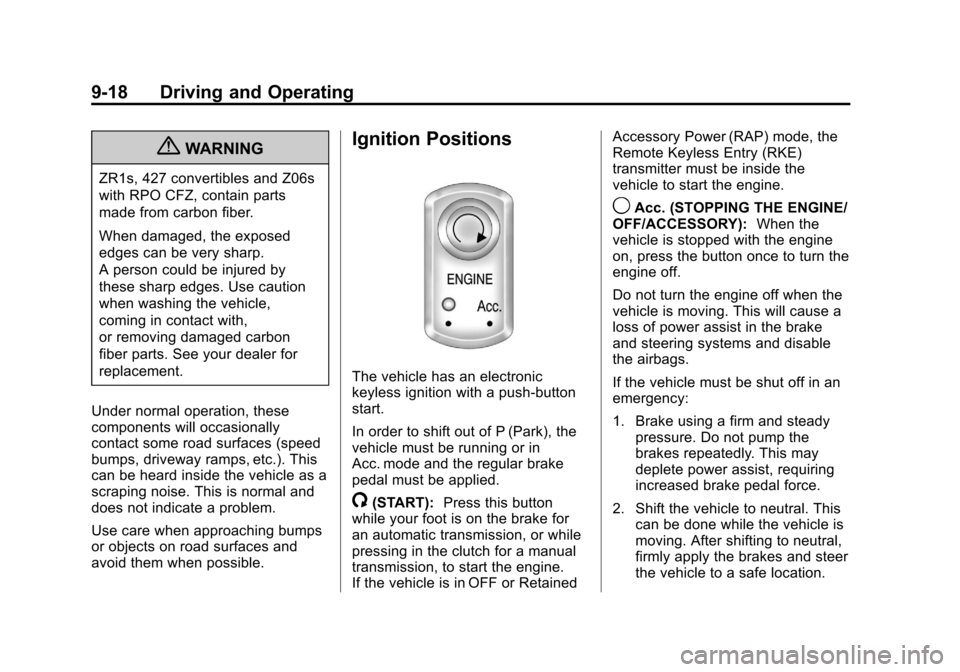
Ignition Positions
The vehicle has an electronic
keyless ignition with a push-button
start.
In order to shift out of P (Park), the
vehicle must be running or in
Acc. mode and the regular brake
pedal must be applied.
/(START): Press this button
while your foot is on the brake for
an automatic transmission, or while
pressing in the clutch for a manual
transmission, to start the engine.
If the vehicle is in OFF or Retained Accessory Power (RAP) mode, the
Remote Keyless Entry (RKE)
transmitter must be inside the
vehicle to start the engine.
9Acc. (STOPPING THE ENGINE/
OFF/ACCESSORY): When the
vehicle is stopped with the engine
on, press the button once to turn the
engine off.
Do not turn the engine off when the
vehicle is moving. This will cause a
loss of power assist in the brake
and steering systems and disable
the airbags.
If the vehicle must be shut off in an
emergency:
1. Brake using a firm and steady pressure. Do not pump the
brakes repeatedly. This may
deplete power assist, requiring
increased brake pedal force.
2. Shift the vehicle to neutral. This can be done while the vehicle is
moving. After shifting to neutral,
firmly apply the brakes and steer
the vehicle to a safe location.
Page 231 of 414
Black plate (19,1)Chevrolet Corvette Owner Manual - 2013 - crc2 - 11/8/12
Driving and Operating 9-19
3. Come to a complete stop. Shiftto P (Park) with an automatic
transmission, or Neutral with a
manual transmission. Turn the
ignition to OFF.
4. Set the parking brake. See Parking Brake on page 9‑33
{WARNING
Turning off the vehicle while
moving may cause loss of power
assist in the brake and steering
systems and disable the airbags.
While driving, only shut the
vehicle off in an emergency.
If the vehicle cannot be pulled over,
and must be shut off while driving,
turn the ignition to ACC/
ACCESSORY.
When the engine is on or the
vehicle is in accessory power mode,
it is recommended that a manual
transmission be placed in
R (Reverse). An automatic
transmission must be placed in P (Park). Then press the Acc. button
to turn the engine off and place the
vehicle in RAP. See
Retained
Accessory Power (RAP) on
page 9‑21 for more information.
If an automatic vehicle is not
correctly placed in P (Park) a SHIFT
TO PARK message will display on
the Driver Information Center (DIC).
For more information, see
Transmission Messages on
page 5‑50.
When the engine is off, press this
button to place the vehicle in
accessory mode. ACCESSORY
MODE ON will display on the Driver
Information Center (DIC). This mode
allows you to use things like the
radio and the power windows while
the engine is off. Use accessory
mode if you must have the vehicle
in motion while the engine is off, for
example, if the vehicle is being
pushed or towed. After being in accessory mode for
about 10 minutes, the vehicle will
automatically enter RAP or OFF,
depending on if the doors are
opened or closed.
Service Only Mode
This power mode is available for
service and diagnostics, and to
verify the proper operation of the
malfunction indicator lamp as may
be required for emission inspection
purposes. With the vehicle off,
pressing and holding the bottom of
the button for more than
five seconds will place the vehicle in
Service Only Mode. The instruments
and audio systems will operate as
they do when the engine is running,
but the vehicle will not be able to be
driven. The engine will not start in
Service Only Mode. Push the button
again to turn the vehicle off.
Page 232 of 414
Black plate (20,1)Chevrolet Corvette Owner Manual - 2013 - crc2 - 11/8/12
9-20 Driving and Operating
Starting the Engine
Move the shift lever to P (Park) or
N (Neutral) for an automatic
transmission. For a manual
transmission the vehicle can be
started in Neutral or any other gear
as long as the clutch pedal is
pressed. To restart a vehicle with a
manual transmission when you are
already moving, use the Neutral
position only. To restart a vehicle
with an automatic transmission
when you are already moving, use
N (Neutral).
Notice:Do not try to shift to
P (Park) if the vehicle is moving.
If you do, you could damage the
transmission. Shift to P (Park)
only when the vehicle is stopped.
The RKE transmitter must be inside
the vehicle for the ignition to work.
Cell phone chargers can interfere
with the operation of the Keyless
Access System. Battery chargers
should not be plugged in when
starting or turning off the engine. To start the vehicle, do the following:
1. For vehicles with an automatic
transmission, with your foot on
the brake pedal, press the
START button located on the
instrument panel. For vehicles
with a manual transmission, you
must also press in the clutch
pedal while pressing the START
button.
If there is not an RKE transmitter
in the vehicle or if there is
something causing interference
with it, the DIC will display
NO FOBS DETECTED. See Key
and Lock Messages on
page 5‑40 for more information.
2. When the engine begins cranking, let go of the button and
the engine cranks automatically
until it starts. If the battery in the
RKE transmitter is weak, the
DIC displays FOB BATTERY
LOW. You can still drive the
vehicle. See
“Battery Replacement”
under Remote Keyless Entry
(RKE) System Operation on
page 2‑3 for more information.
If the fob battery is dead, you
need to insert the fob into the
fob slot to enable engine
starting. See “NO FOBS
DETECTED” underKey and
Lock Messages on page 5‑40.
3. Do not race the engine immediately after starting it.
Operate the engine and
transmission gently until the oil
warms up and lubricates all
moving parts.
4. If the engine does not start and no DIC message is displayed,
wait 15 seconds before trying
again to let the cranking motor
cool down.
If the engine does not start after
five to 10 seconds, especially in
very cold weather (below −18°C
or 0°F), it could be flooded with
too much gasoline. Try pushing
the accelerator pedal all the way
Page 233 of 414
Black plate (21,1)Chevrolet Corvette Owner Manual - 2013 - crc2 - 11/8/12
Driving and Operating 9-21
to the floor while cranking for up
to 15 seconds maximum. Wait at
least 15 seconds between each
try, to allow the cranking motor
to cool down. When the engine
starts, let go of the accelerator.
If the vehicle starts briefly but
then stops again, repeat these
steps. This clears the extra
gasoline from the engine.
Notice: Cranking the engine for
long periods of time, by pressing
the START button immediately
after cranking has ended, can
overheat and damage the
cranking motor, and drain the
battery. Wait at least 15 seconds
between each try, to allow the
cranking motor to cool down.
The vehicle has a
Computer-Controlled Cranking
System. This feature assists in
starting the engine and protects
components. Once cranking has
been initiated, the engine continues
cranking for a few seconds or until
the vehicle starts. If the engine does
not start, cranking automatically stops after 15 seconds to prevent
cranking motor damage. To prevent
gear damage, this system also
prevents cranking if the engine is
already running.
Notice:
If you add electrical parts
or accessories, you could change
the way the engine operates. Any
resulting damage would not be
covered by the vehicle warranty.
See Add-On Electrical Equipment
on page 9‑50.
Stopping the Engine
If the vehicle has an automatic
transmission, move the shift lever to
P (Park) and press and hold the
Acc. (Off/Accessory) button, located
on the instrument panel, until the
engine shuts off. If the shift lever is
not in P (Park), the engine shuts off
and the vehicle goes into the
accessory mode. The DIC displays
SHIFT TO PARK. Once the shifter is
moved to P (Park), the vehicle turns
off. If the vehicle has a manual
transmission, it is recommended
that you move the shift lever to R (Reverse) and set the parking
brake after you turn off the engine
by pressing and holding the Acc.
(Off/Accessory) button.
If the RKE transmitter is not
detected inside the vehicle when it
is turned to off, the DIC displays
NO FOB
–OFF OR RUN?.
See Key and Lock Messages on
page 5‑40 for more information.
Retained Accessory
Power (RAP)
These vehicle accessories can be
used for up to 10 minutes after the
engine is turned off:
.Audio System
.Power Windows
These features continue to work up
to 10 minutes after the engine is
turned off or until either door is
opened. If a door is opened, the
power windows and audio system
will shut off.
Page 234 of 414
Black plate (22,1)Chevrolet Corvette Owner Manual - 2013 - crc2 - 11/8/12
9-22 Driving and Operating
Shifting Into Park
(Automatic Transmission)
1. Hold the brake pedal down andset the parking brake. See
Parking Brake on page 9‑33 for
more information.
2. Move the shift lever into P (Park) by holding in the button on the
lever and pushing the lever all
the way toward the front of the
vehicle.
3. Press the Acc. button (ignition switch) to turn the engine off.
Leaving the Vehicle with the
Engine Running (Automatic
Transmission)
{WARNING
It can be dangerous to leave the
vehicle with the engine running.
It could overheat and catch fire.
It is dangerous to get out of the
vehicle if the shift lever is not fully
in P (Park) with the parking brake
firmly set. The vehicle can roll.
Do not leave the vehicle when the
engine is running. If you have left
the engine running, the vehicle
can move suddenly. You or others
could be injured. To be sure the
vehicle will not move, even when
you are on fairly level ground,
always set the parking brake and
move the shift lever to P (Park).
See Shifting Into Park (Automatic
Transmission) on page 9‑22. If you have to leave the vehicle with
the engine running, be sure the
vehicle is in P (Park) and the
parking brake is firmly set before
you leave it. After you have moved
the shift lever into P (Park), hold
down the regular brake pedal. See if
you can move the shift lever away
from P (Park) without first pushing
the button on the lever. If you can, it
means that the shift lever was not
fully locked into P (Park).
Torque Lock (Automatic
Transmission)
If you are parking on a hill and you
do not shift the transmission into
P (Park) properly, the weight of the
vehicle may put too much force on
the parking pawl in the
transmission. You may find it difficult
to pull the shift lever out of P (Park).
This is called
“torque lock.”
To prevent torque lock, set the
parking brake and then shift into
P (Park) properly before you leave
Page 235 of 414
Black plate (23,1)Chevrolet Corvette Owner Manual - 2013 - crc2 - 11/8/12
Driving and Operating 9-23
the driver seat. To find out how, see
“Shifting Into P (Park)”previously in
this section.
When you are ready to drive, move
the shift lever out of P (Park) before
you release the parking brake.
If torque lock does occur, you may
need to have another vehicle push
yours a little uphill to take some of
the pressure from the transmission
parking pawl, so you can pull the
shift lever out of P (Park).
Shifting out of Park
Shift lock release prevents shifting
out of P (Park) unless the vehicle is
running or in accessory mode and
the brake pedal is applied.
The shift lock release is always
functional except in the case of an
uncharged or low voltage (less than
9‐volt) battery. See Jump Starting
on page 10‑75 for more information. To shift out of P (Park) use the
following:
1. Apply the brake pedal.
2. Release the parking brake. See
Parking Brake on page 9‑33.
3. Press the shift lever button.
4. Move the shift lever to the desired position.
If you still are unable to shift out of
P (Park):
1. Fully release the shift lever button.
2. While holding down the brake pedal, press the shift lever
button again.
3. Move the shift lever to the desired position.
If you still cannot move the shift
lever from P (Park), consult your
dealer or a professional towing
service.
Parking (Manual
Transmission)
Before you get out of the vehicle,
move the shift lever into R (Reverse)
and firmly apply the parking brake.
Once the shift lever has been
placed into R (Reverse) with the
clutch pedal pressed in, you can
turn the ignition off and release the
clutch.
Parking over Things
That Burn
{WARNING
Things that can burn could touch
hot exhaust parts under the
vehicle and ignite. Do not park
over papers, leaves, dry grass,
or other things that can burn.
Page 237 of 414
Black plate (25,1)Chevrolet Corvette Owner Manual - 2013 - crc2 - 11/8/12
Driving and Operating 9-25
Automatic
Transmission
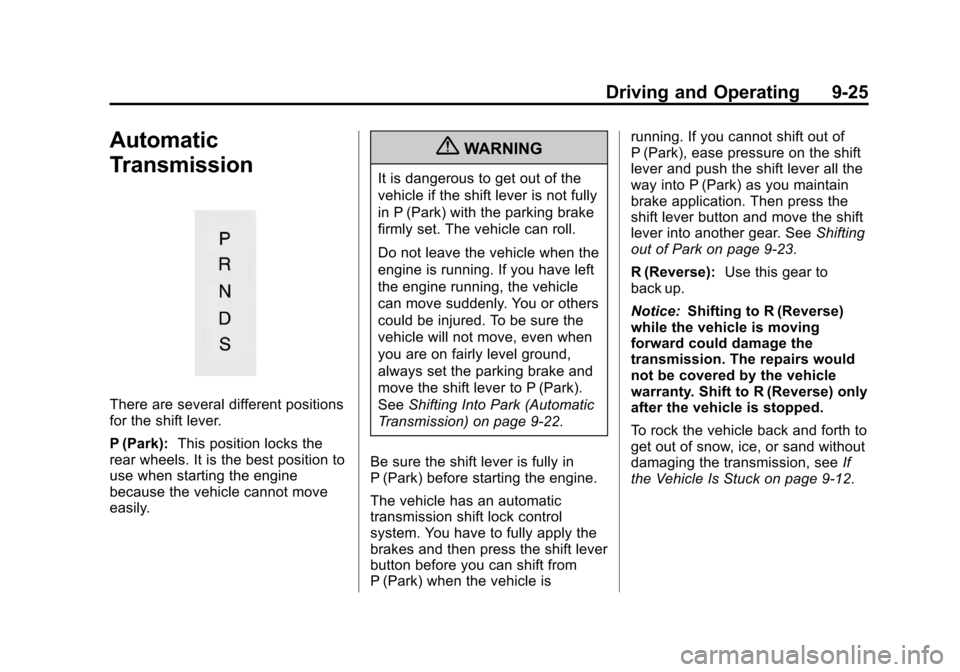
There are several different positions
for the shift lever.
P (Park):This position locks the
rear wheels. It is the best position to
use when starting the engine
because the vehicle cannot move
easily.
{WARNING
It is dangerous to get out of the
vehicle if the shift lever is not fully
in P (Park) with the parking brake
firmly set. The vehicle can roll.
Do not leave the vehicle when the
engine is running. If you have left
the engine running, the vehicle
can move suddenly. You or others
could be injured. To be sure the
vehicle will not move, even when
you are on fairly level ground,
always set the parking brake and
move the shift lever to P (Park).
See Shifting Into Park (Automatic
Transmission) on page 9‑22.
Be sure the shift lever is fully in
P (Park) before starting the engine.
The vehicle has an automatic
transmission shift lock control
system. You have to fully apply the
brakes and then press the shift lever
button before you can shift from
P (Park) when the vehicle is running. If you cannot shift out of
P (Park), ease pressure on the shift
lever and push the shift lever all the
way into P (Park) as you maintain
brake application. Then press the
shift lever button and move the shift
lever into another gear. See
Shifting
out of Park on page 9‑23.
R (Reverse): Use this gear to
back up.
Notice: Shifting to R (Reverse)
while the vehicle is moving
forward could damage the
transmission. The repairs would
not be covered by the vehicle
warranty. Shift to R (Reverse) only
after the vehicle is stopped.
To rock the vehicle back and forth to
get out of snow, ice, or sand without
damaging the transmission, see If
the Vehicle Is Stuck on page 9‑12.
Page 238 of 414
Black plate (26,1)Chevrolet Corvette Owner Manual - 2013 - crc2 - 11/8/12
9-26 Driving and Operating
N (Neutral):In this position, the
engine does not connect with the
wheels. To restart the engine when
the vehicle is already moving, use
N (Neutral) only. If the vehicle needs
towing, see Towing the Vehicle on
page 10‑79.
{WARNING
Shifting into a drive gear while the
engine is running at high speed is
dangerous. Unless your foot is
firmly on the brake pedal, the
vehicle could move very rapidly.
You could lose control and hit
people or objects. Do not shift
into a drive gear while the engine
is running at high speed.
Notice: Shifting out of P (Park) or
N (Neutral) with the engine
running at high speed may
damage the transmission. The
repairs would not be covered by
the vehicle warranty. Be sure the
engine is not running at high
speed when shifting the vehicle. D (Drive):
This position is for
normal driving. It provides the best
fuel economy. If you need more
power for passing, push the pedal
down to achieve the desired level of
acceleration.
Downshifting the transmission in
slippery road conditions could result
in skidding. See “Skidding”under
Loss of Control on page 9‑5.
S (Sport Mode): When in
S (Sport Mode), the transmission will
work as an automatic until you use
the Manual Paddle Shift Controls,
which activates driver manual gear
selection. See Manual Mode on
page 9‑26. While in S (Sport Mode),
the transmission will have more
noticeable upshifts for sportier
vehicle performance.
Manual Mode
Manual Paddle Shift
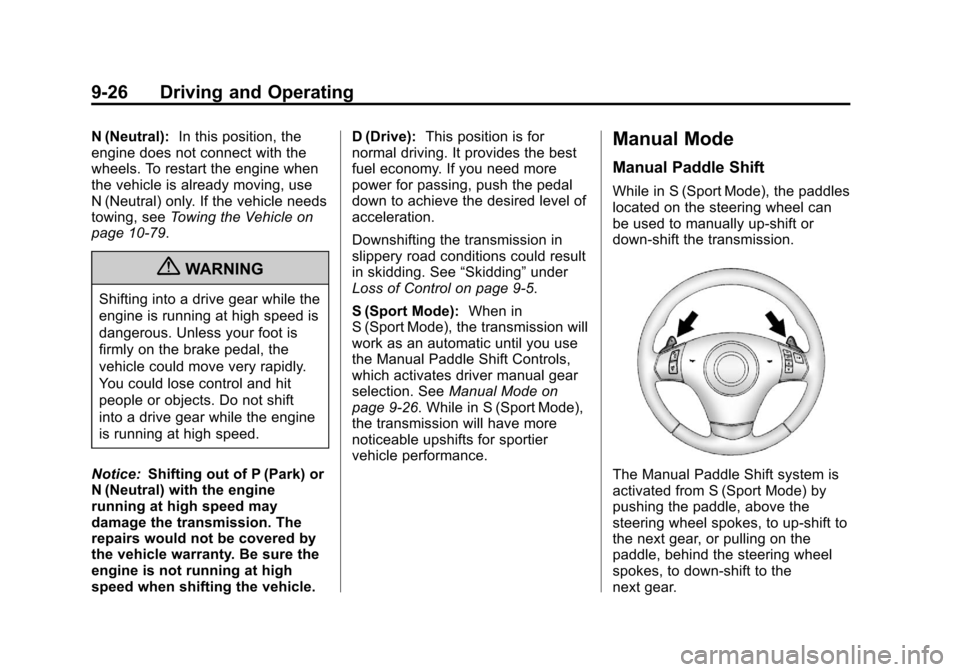
While in S (Sport Mode), the paddles
located on the steering wheel can
be used to manually up-shift or
down-shift the transmission.
The Manual Paddle Shift system is
activated from S (Sport Mode) by
pushing the paddle, above the
steering wheel spokes, to up-shift to
the next gear, or pulling on the
paddle, behind the steering wheel
spokes, to down-shift to the
next gear.
Page 241 of 414
Black plate (29,1)Chevrolet Corvette Owner Manual - 2013 - crc2 - 11/8/12
Driving and Operating 9-29
.Into 3 (Third) gear over 176 km/h
(109 mph).
.Into 2 (Second) gear over
113 km/h (70 mph).
.Into 1 (First) gear over 64 km/h
(40 mph).
If the driver does not request an
upshift as the engine speed
approaches fuel shut off rpm, the
engine speed will be limited to
protect the engine. See Tachometer
on page 5‑12 for more information.
Manual Transmission
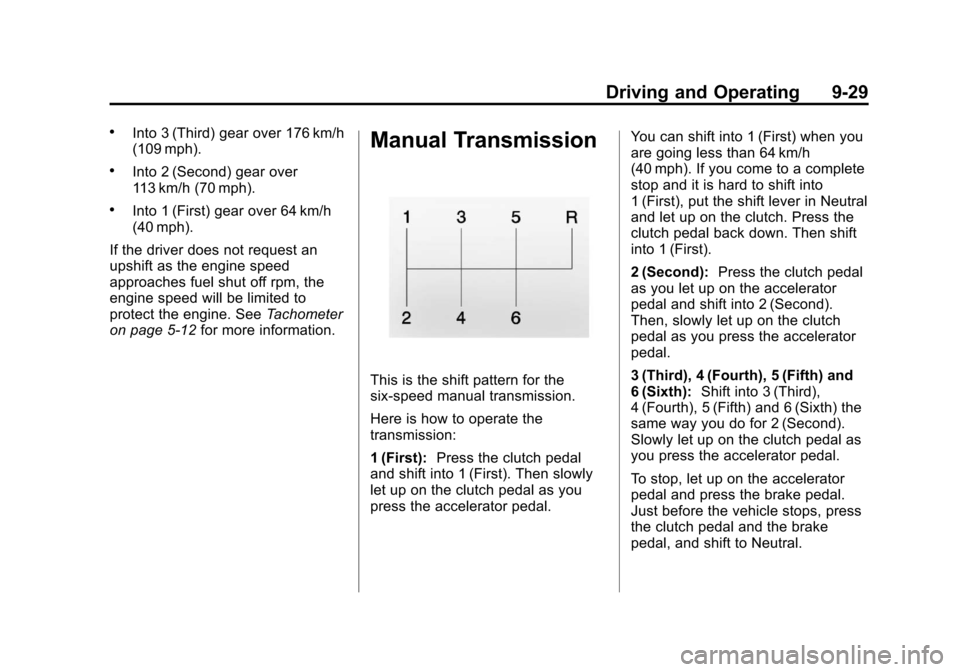
This is the shift pattern for the
six-speed manual transmission.
Here is how to operate the
transmission:
1 (First):Press the clutch pedal
and shift into 1 (First). Then slowly
let up on the clutch pedal as you
press the accelerator pedal. You can shift into 1 (First) when you
are going less than 64 km/h
(40 mph). If you come to a complete
stop and it is hard to shift into
1 (First), put the shift lever in Neutral
and let up on the clutch. Press the
clutch pedal back down. Then shift
into 1 (First).
2 (Second):
Press the clutch pedal
as you let up on the accelerator
pedal and shift into 2 (Second).
Then, slowly let up on the clutch
pedal as you press the accelerator
pedal.
3 (Third), 4 (Fourth), 5 (Fifth) and
6 (Sixth): Shift into 3 (Third),
4 (Fourth), 5 (Fifth) and 6 (Sixth) the
same way you do for 2 (Second).
Slowly let up on the clutch pedal as
you press the accelerator pedal.
To stop, let up on the accelerator
pedal and press the brake pedal.
Just before the vehicle stops, press
the clutch pedal and the brake
pedal, and shift to Neutral.
Page 244 of 414
Black plate (32,1)Chevrolet Corvette Owner Manual - 2013 - crc2 - 11/8/12
9-32 Driving and Operating
Be careful when shifting from
1 (First) to 2 (Second) or
downshifting from 6 (Sixth) to
5 (Fifth). The spring will try to pull
the shift lever toward 4 (Fourth) and
3 (Third). Make sure you move the
lever into 2 (Second) or 5 (Fifth).
If you let the shift lever move in the
direction of the pulling, you may end
up shifting from 1 (First) to 4 (Fourth)
or from 6 (Sixth) to 3 (Third).
If the driver does not upshift as the
engine speed approaches fuel shut
off RPM, the engine speed will be
limited to protect the engine. See
Tachometer on page 5‑12for more
information.Brakes
Antilock Brake
System (ABS)
This vehicle has the Antilock Brake
System (ABS), an advanced
electronic braking system that helps
prevent a braking skid.
When the vehicle begins to drive
away, ABS checks itself.
A momentary motor or clicking noise
might be heard while this test is
going on, and it might even be
noticed that the brake pedal moves
a little. This is normal.
If there is a problem with ABS, this
warning light stays on. See Antilock
Brake System (ABS) Warning Light
on page 5‑21. If driving safely on a wet road and it
becomes necessary to slam on the
brakes and continue braking to
avoid a sudden obstacle, a
computer senses that the wheels
are slowing down. If one of the
wheels is about to stop rolling, the
computer will separately work the
brakes at each wheel.
ABS can change the brake pressure
to each wheel, as required, faster
than any driver could. This can help
you steer around the obstacle while
braking hard.
As the brakes are applied, the
computer keeps receiving updates
on wheel speed and controls
braking pressure accordingly.