instrument panel CHEVROLET CORVETTE 2013 6.G Owners Manual
[x] Cancel search | Manufacturer: CHEVROLET, Model Year: 2013, Model line: CORVETTE, Model: CHEVROLET CORVETTE 2013 6.GPages: 414, PDF Size: 6.97 MB
Page 1 of 414

Black plate (1,1)Chevrolet Corvette Owner Manual - 2013 - crc2 - 11/8/12
2013 Chevrolet Corvette Owner ManualM
In Brief. . . . . . . . . . . . . . . . . . . . . . . . 1-1
Instrument Panel . . . . . . . . . . . . . . 1-2
Initial Drive Information . . . . . . . . 1-4
Vehicle Features . . . . . . . . . . . . . 1-15
Performance and Maintenance . . . . . . . . . . . . . . . . 1-20
Keys, Doors, and Windows . . . . . . . . . . . . . . . . . . . . 2-1
Keys and Locks . . . . . . . . . . . . . . . 2-1
Doors . . . . . . . . . . . . . . . . . . . . . . . . 2-10
Vehicle Security . . . . . . . . . . . . . . 2-12
Exterior Mirrors . . . . . . . . . . . . . . . 2-15
Interior Mirrors . . . . . . . . . . . . . . . . 2-16
Windows . . . . . . . . . . . . . . . . . . . . . 2-16
Roof . . . . . . . . . . . . . . . . . . . . . . . . . . 2-18
Seats and Restraints . . . . . . . . . 3-1
Head Restraints . . . . . . . . . . . . . . . 3-2
Front Seats . . . . . . . . . . . . . . . . . . . . 3-2
Safety Belts . . . . . . . . . . . . . . . . . . . . 3-8
Airbag System . . . . . . . . . . . . . . . . 3-14
Child Restraints . . . . . . . . . . . . . . 3-26 Storage
. . . . . . . . . . . . . . . . . . . . . . . 4-1
Storage Compartments . . . . . . . . 4-1
Additional Storage Features . . . 4-2
Instruments and Controls . . . . 5-1
Controls . . . . . . . . . . . . . . . . . . . . . . . 5-2
Warning Lights, Gauges, and
Indicators . . . . . . . . . . . . . . . . . . . . 5-8
Information Displays . . . . . . . . . . 5-25
Vehicle Messages . . . . . . . . . . . . 5-34
Vehicle Personalization . . . . . . . 5-51
Universal Remote System . . . . 5-60
Lighting . . . . . . . . . . . . . . . . . . . . . . . 6-1
Exterior Lighting . . . . . . . . . . . . . . . 6-1
Interior Lighting . . . . . . . . . . . . . . . . 6-6
Lighting Features . . . . . . . . . . . . . . 6-6
Infotainment System . . . . . . . . . 7-1
Introduction . . . . . . . . . . . . . . . . . . . . 7-1
Radio . . . . . . . . . . . . . . . . . . . . . . . . . . 7-6
Audio Players . . . . . . . . . . . . . . . . 7-12
Phone . . . . . . . . . . . . . . . . . . . . . . . . 7-17
Trademarks and License Agreements . . . . . . . . . . . . . . . . . 7-25 Climate Controls
. . . . . . . . . . . . . 8-1
Climate Control Systems . . . . . . 8-1
Air Vents . . . . . . . . . . . . . . . . . . . . . . . 8-6
Maintenance . . . . . . . . . . . . . . . . . . . 8-6
Driving and Operating . . . . . . . . 9-1
Driving Information . . . . . . . . . . . . . 9-2
Starting and Operating . . . . . . . 9-17
Engine Exhaust . . . . . . . . . . . . . . 9-24
Automatic Transmission . . . . . . 9-25
Manual Transmission . . . . . . . . . 9-29
Brakes . . . . . . . . . . . . . . . . . . . . . . . 9-32
Ride Control Systems . . . . . . . . 9-34
Cruise Control . . . . . . . . . . . . . . . . 9-42
Fuel . . . . . . . . . . . . . . . . . . . . . . . . . . 9-45
Towing . . . . . . . . . . . . . . . . . . . . . . . 9-50
Conversions and Add-Ons . . . 9-50
Vehicle Care . . . . . . . . . . . . . . . . . 10-1
General Information . . . . . . . . . . 10-2
Vehicle Checks . . . . . . . . . . . . . . . 10-6
Headlamp Aiming . . . . . . . . . . . 10-41
Bulb Replacement . . . . . . . . . . 10-41
Electrical System . . . . . . . . . . . . 10-44
Wheels and Tires . . . . . . . . . . . 10-52
Jump Starting . . . . . . . . . . . . . . . 10-75
Page 7 of 414
Black plate (1,1)Chevrolet Corvette Owner Manual - 2013 - crc2 - 11/8/12
In Brief 1-1
In Brief
Instrument Panel
Instrument Panel . . . . . . . . . . . . . . 1-2
Initial Drive Information
Initial Drive Information . . . . . . . . 1-4
Remote Keyless Entry (RKE)System . . . . . . . . . . . . . . . . . . . . . . 1-4
Door Locks . . . . . . . . . . . . . . . . . . . 1-4
Trunk Release . . . . . . . . . . . . . . . . 1-6
Windows . . . . . . . . . . . . . . . . . . . . . . 1-7
Seat Adjustment . . . . . . . . . . . . . . 1-7
Memory Features . . . . . . . . . . . . . 1-9
Safety Belts . . . . . . . . . . . . . . . . . . . 1-9
Passenger Sensing System . . . 1-9
Mirror Adjustment . . . . . . . . . . . . 1-10
Steering Wheel Adjustment . . . . . . . . . . . . . . . . . 1-11
Interior Lighting . . . . . . . . . . . . . . 1-11
Exterior Lighting . . . . . . . . . . . . . 1-12
Windshield Wiper/Washer . . . . 1-12
Climate Controls . . . . . . . . . . . . . 1-13
Transmission . . . . . . . . . . . . . . . . 1-14
Vehicle Features
Radio(s) . . . . . . . . . . . . . . . . . . . . . 1-15
Satellite Radio . . . . . . . . . . . . . . . 1-16 Portable Audio Devices . . . . . . 1-16
Bluetooth
®. . . . . . . . . . . . . . . . . . . 1-16
Steering Wheel Controls . . . . . 1-16
Cruise Control . . . . . . . . . . . . . . . 1-17
Navigation System . . . . . . . . . . . 1-17
Driver Information Center (DIC) . . . . . . . . . . . . . . . 1-18
Power Outlets . . . . . . . . . . . . . . . 1-19
Universal Remote System . . . 1-19
Roof Panel . . . . . . . . . . . . . . . . . . 1-19
Convertible . . . . . . . . . . . . . . . . . . 1-20
Performance and Maintenance
Traction Control System (TCS) . . . . . . . . . . . . . . 1-20
Tire Pressure Monitor . . . . . . . . 1-21
Performance Information (Z06, ZR1, manual transmission
Grand Sport Coupe, and 427
Convertible) . . . . . . . . . . . . . . . . 1-21
Engine Oil Life System . . . . . . 1-22
Driving for Better Fuel Economy . . . . . . . . . . . . . . . . . . . 1-22
Battery . . . . . . . . . . . . . . . . . . . . . . . 1-23
Roadside Assistance Program . . . . . . . . . . . . . . . . . . . . 1-23
OnStar
®. . . . . . . . . . . . . . . . . . . . . 1-23
Website Information . . . . . . . . . 1-23
Page 8 of 414
Black plate (2,1)Chevrolet Corvette Owner Manual - 2013 - crc2 - 11/8/12
1-2 In Brief
Instrument Panel
Page 9 of 414

Black plate (3,1)Chevrolet Corvette Owner Manual - 2013 - crc2 - 11/8/12
In Brief 1-3
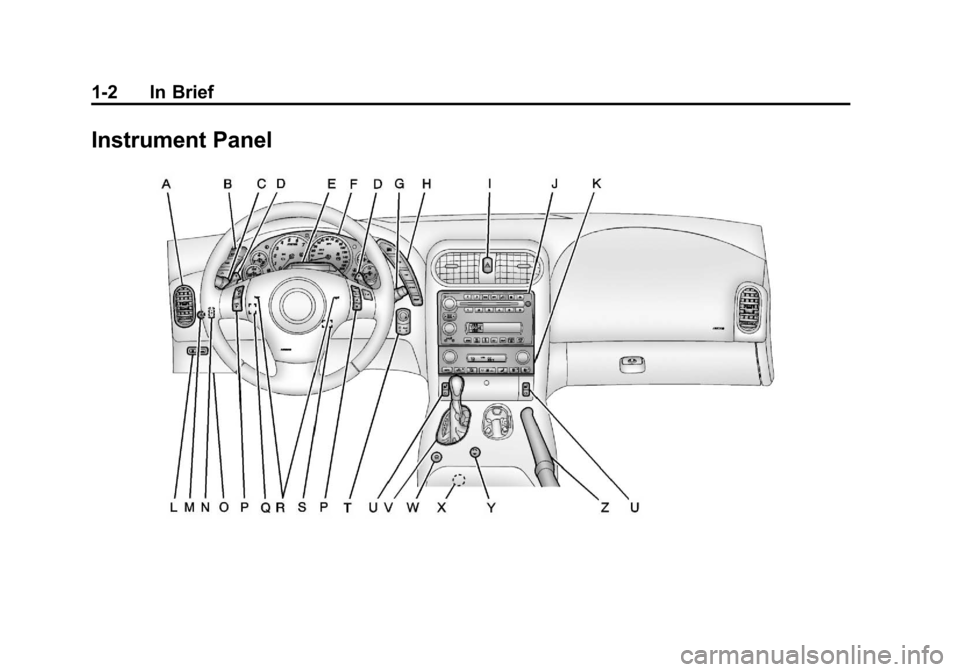
A.Air Vents on page 8‑6.
B. Head-Up Display Controls (If Equipped). See Head-Up
Display (HUD) on page 5‑30.
C. Turn and Lane-Change Lever. See Turn and Lane-Change
Signals on page 6‑4.
Cruise Control on page 9‑42.
Fog Lamps on page 6‑5.
Exterior Lamp Controls on
page 6‑1.
D. Manual Shift Paddles (If Equipped). See Automatic
Transmission on page 9‑25.
E. Driver Information Center (DIC)
on page 5‑25.
F. Instrument Cluster on page 5‑9.
G. Windshield Wiper/Washer on
page 5‑4.
H. Driver Information Center (DIC) Buttons. See Driver Information
Center (DIC) on page 5‑25.
I. Hazard Warning Flashers on
page 6‑4. J.
Infotainment on page 7‑1.
K. Dual Automatic Climate Control
System on page 8‑1.
L. Fuel Door Release Button. See Filling the Tank on page 9‑47.
Hatch/Trunk Release Button.
See “Hatch/Trunk Release”
under Hatch on page 2‑10.
M. Instrument Panel Illumination
Control on page 6‑6.
N. Convertible Top Switch (If Equipped). See Convertible
Top on page 2‑22.
O. Data Link Connector (DLC) (Out of View). See Malfunction
Indicator Lamp on page 5‑18.
P. Bluetooth Controls (If Equipped). See Bluetooth on
page 7‑17.
Steering Wheel Controls on
page 5‑3 (If Equipped).
Q. Steering Wheel Adjustment on
page 5‑2.
R. Horn on page 5‑4. S. Telescopic Steering Column
Control (If Equipped). See
Steering Wheel Adjustment on
page 5‑2.
T. Keyless Ignition. See Ignition
Positions on page 9‑18.
U. Heated Front Seats on page 3‑7
(If Equipped).
V. Shift Lever (Automatic Shown). See Automatic Transmission on
page 9‑25 orManual
Transmission on page 9‑29.
W. Active Handling System on
page 9‑35.
X. Power Outlets on page 5‑6.
Y. Selective Ride Control on
page 9‑40 (If Equipped).
Z. Parking Brake on page 9‑33.
Page 14 of 414
Black plate (8,1)Chevrolet Corvette Owner Manual - 2013 - crc2 - 11/8/12
1-8 In Brief
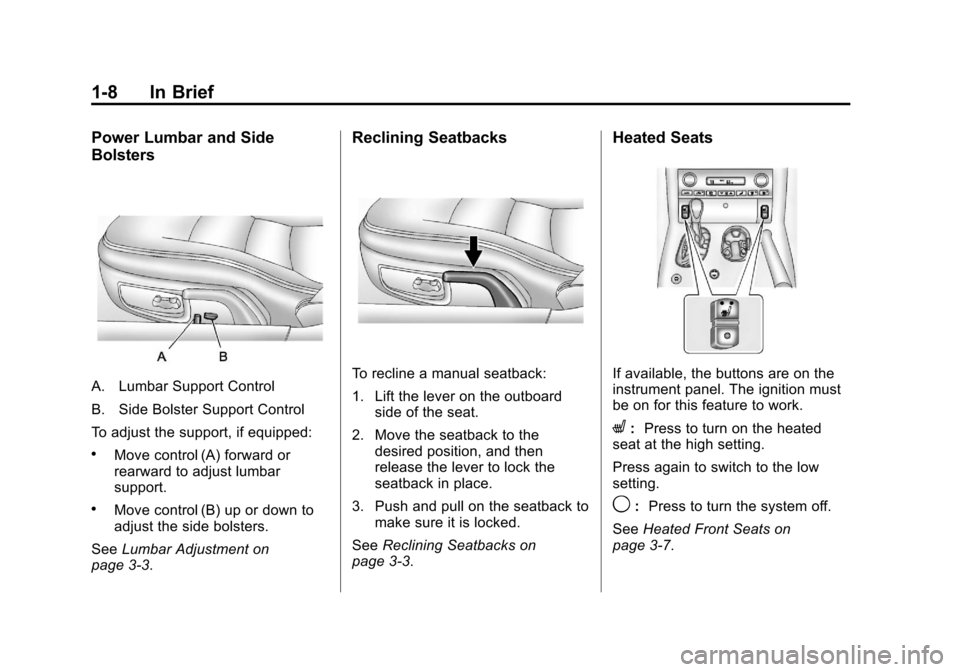
Power Lumbar and Side
Bolsters
A. Lumbar Support Control
B. Side Bolster Support Control
To adjust the support, if equipped:
.Move control (A) forward or
rearward to adjust lumbar
support.
.Move control (B) up or down to
adjust the side bolsters.
See Lumbar Adjustment on
page 3‑3.
Reclining Seatbacks
To recline a manual seatback:
1. Lift the lever on the outboard
side of the seat.
2. Move the seatback to the desired position, and then
release the lever to lock the
seatback in place.
3. Push and pull on the seatback to make sure it is locked.
See Reclining Seatbacks on
page 3‑3.
Heated Seats
If available, the buttons are on the
instrument panel. The ignition must
be on for this feature to work.
L: Press to turn on the heated
seat at the high setting.
Press again to switch to the low
setting.
9: Press to turn the system off.
See Heated Front Seats on
page 3‑7.
Page 17 of 414
Black plate (11,1)Chevrolet Corvette Owner Manual - 2013 - crc2 - 11/8/12
In Brief 1-11
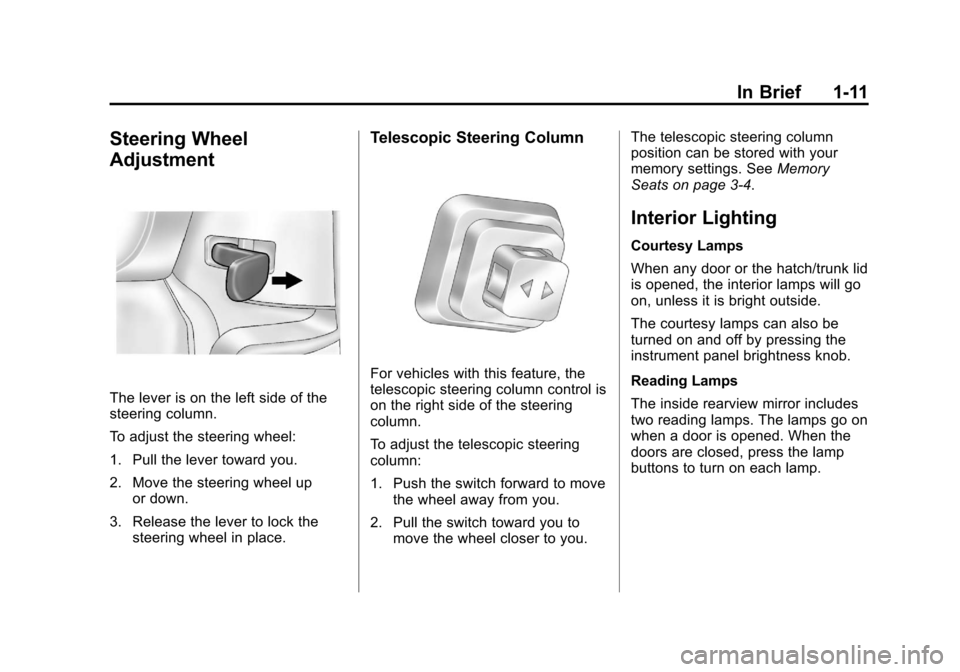
Steering Wheel
Adjustment
The lever is on the left side of the
steering column.
To adjust the steering wheel:
1. Pull the lever toward you.
2. Move the steering wheel upor down.
3. Release the lever to lock the steering wheel in place.
Telescopic Steering Column
For vehicles with this feature, the
telescopic steering column control is
on the right side of the steering
column.
To adjust the telescopic steering
column:
1. Push the switch forward to movethe wheel away from you.
2. Pull the switch toward you to move the wheel closer to you. The telescopic steering column
position can be stored with your
memory settings. See
Memory
Seats on page 3‑4.
Interior Lighting
Courtesy Lamps
When any door or the hatch/trunk lid
is opened, the interior lamps will go
on, unless it is bright outside.
The courtesy lamps can also be
turned on and off by pressing the
instrument panel brightness knob.
Reading Lamps
The inside rearview mirror includes
two reading lamps. The lamps go on
when a door is opened. When the
doors are closed, press the lamp
buttons to turn on each lamp.
Page 18 of 414
Black plate (12,1)Chevrolet Corvette Owner Manual - 2013 - crc2 - 11/8/12
1-12 In Brief
Interior Light Control
The knob for this feature is located
on the left side of the instrument
panel. Push the knob in to turn the
interior lights on. Turn and hold the
knob clockwise to brighten the lights
or counterclockwise to dim them.
For more information on interior
lighting, see:
.Instrument Panel Illumination
Control on page 6‑6.
.Entry/Exit Lighting on page 6‑6.
Exterior Lighting
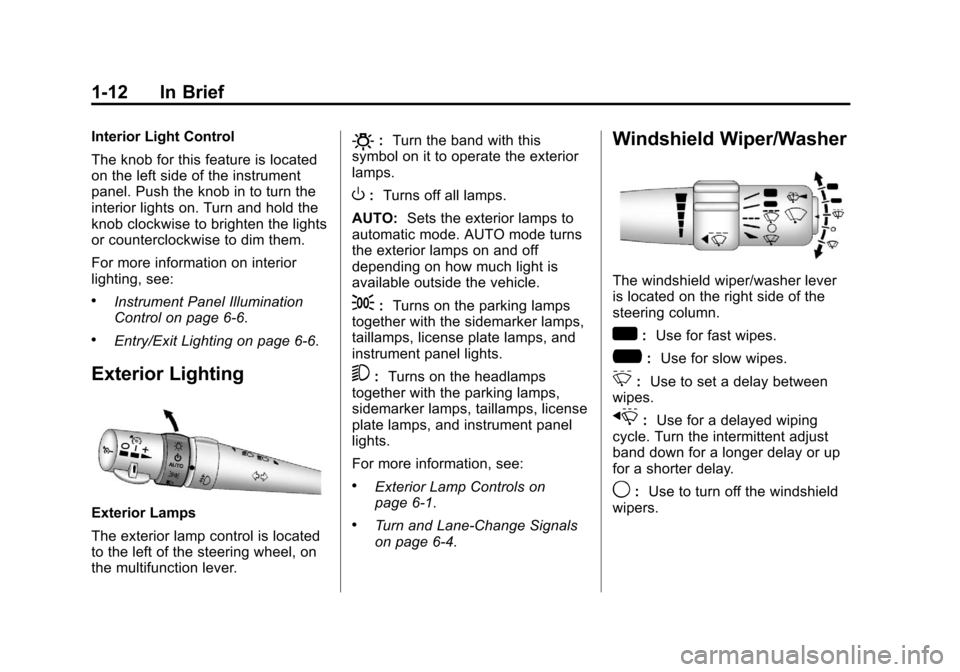
Exterior Lamps
The exterior lamp control is located
to the left of the steering wheel, on
the multifunction lever.
O:Turn the band with this
symbol on it to operate the exterior
lamps.
O: Turns off all lamps.
AUTO: Sets the exterior lamps to
automatic mode. AUTO mode turns
the exterior lamps on and off
depending on how much light is
available outside the vehicle.
;: Turns on the parking lamps
together with the sidemarker lamps,
taillamps, license plate lamps, and
instrument panel lights.
5: Turns on the headlamps
together with the parking lamps,
sidemarker lamps, taillamps, license
plate lamps, and instrument panel
lights.
For more information, see:
.Exterior Lamp Controls on
page 6‑1.
.Turn and Lane-Change Signals
on page 6‑4.
Windshield Wiper/Washer
The windshield wiper/washer lever
is located on the right side of the
steering column.
w: Use for fast wipes.
?: Use for slow wipes.
3:Use to set a delay between
wipes.
x: Use for a delayed wiping
cycle. Turn the intermittent adjust
band down for a longer delay or up
for a shorter delay.
9: Use to turn off the windshield
wipers.
Page 24 of 414
Black plate (18,1)Chevrolet Corvette Owner Manual - 2013 - crc2 - 11/8/12
1-18 In Brief
Driver Information
Center (DIC)
The DIC displays on the instrument
cluster. It shows the status of many
vehicle systems and enables
access to the personalization menu.
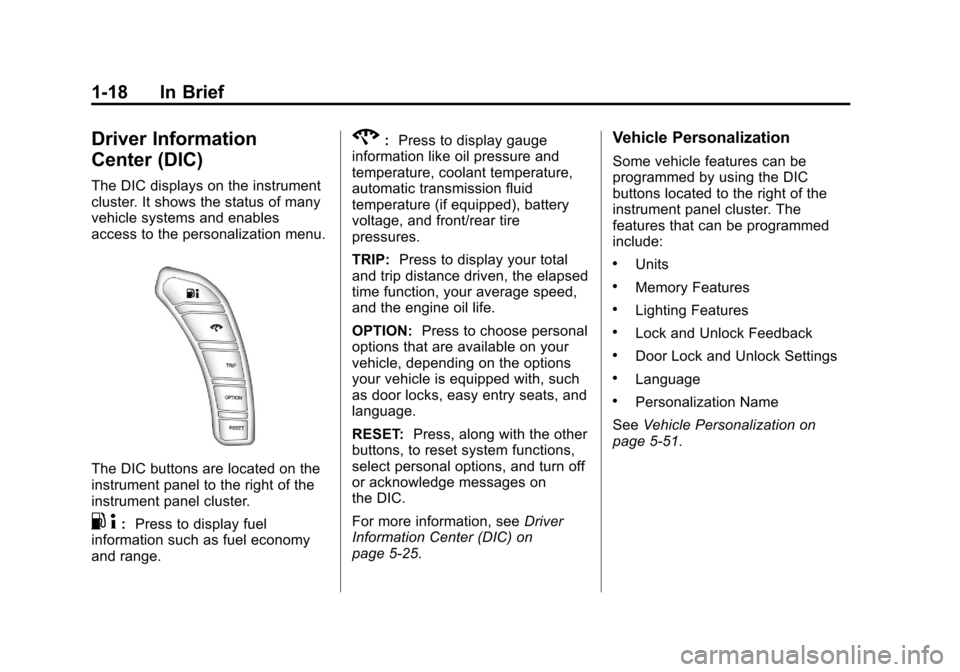
The DIC buttons are located on the
instrument panel to the right of the
instrument panel cluster.
.4:Press to display fuel
information such as fuel economy
and range.
2: Press to display gauge
information like oil pressure and
temperature, coolant temperature,
automatic transmission fluid
temperature (if equipped), battery
voltage, and front/rear tire
pressures.
TRIP: Press to display your total
and trip distance driven, the elapsed
time function, your average speed,
and the engine oil life.
OPTION: Press to choose personal
options that are available on your
vehicle, depending on the options
your vehicle is equipped with, such
as door locks, easy entry seats, and
language.
RESET: Press, along with the other
buttons, to reset system functions,
select personal options, and turn off
or acknowledge messages on
the DIC.
For more information, see Driver
Information Center (DIC) on
page 5‑25.Vehicle Personalization
Some vehicle features can be
programmed by using the DIC
buttons located to the right of the
instrument panel cluster. The
features that can be programmed
include:
.Units
.Memory Features
.Lighting Features
.Lock and Unlock Feedback
.Door Lock and Unlock Settings
.Language
.Personalization Name
See Vehicle Personalization on
page 5‑51.
Page 40 of 414
Black plate (10,1)Chevrolet Corvette Owner Manual - 2013 - crc2 - 11/8/12
2-10 Keys, Doors, and Windows
Doors
Hatch
{WARNING
Exhaust gases can enter the
vehicle if it is driven with the
liftgate, trunk/hatch open, or with
any objects that pass through the
seal between the body and the
trunk/hatch or liftgate. Engine
exhaust contains carbon
monoxide (CO) which cannot be
seen or smelled. It can cause
unconsciousness and even death.
If the vehicle must be driven with
the liftgate or trunk/hatch open:
.Close all of the windows.
.Fully open the air outlets on
or under the instrument
panel.(Continued)
WARNING (Continued)
.Adjust the climate control
system to a setting that
brings in only outside air and
set the fan speed to the
highest setting. See “Climate
Control Systems” in the
Index.
.If the vehicle is equipped with
a power liftgate, disable the
power liftgate function.
For more information about
carbon monoxide, see Engine
Exhaust on page 9‑24.
Hatch/Trunk Release
The vehicle must be in P (Park) with
an automatic transmission and
Neutral with a manual transmission.
For manual transmission vehicles,
the parking brake must be set when
the engine is running for the hatch/
trunk release to operate. See
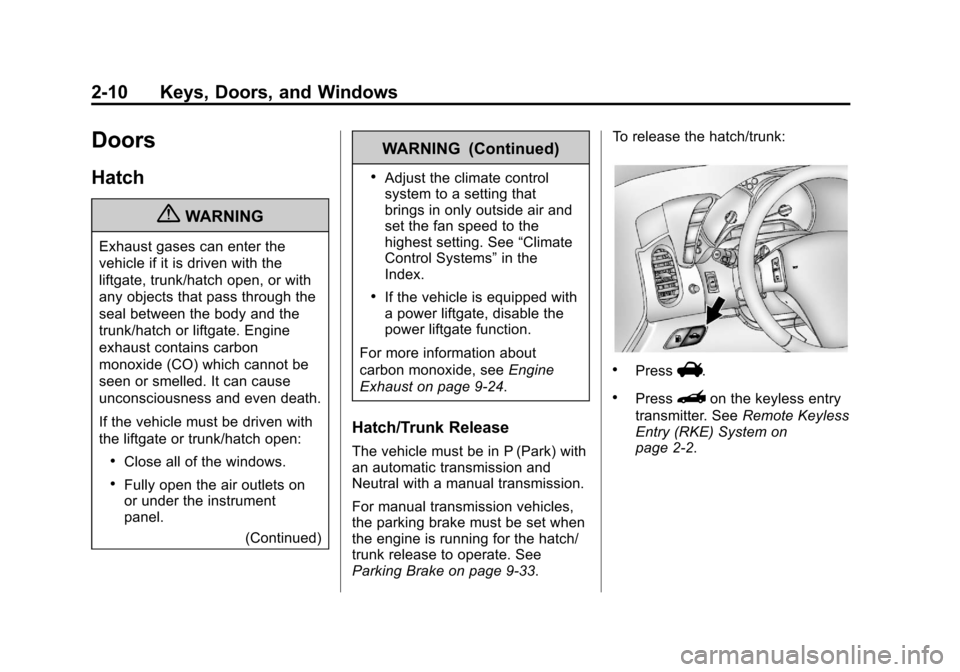
Parking Brake on page 9‑33. To release the hatch/trunk:
.PressV.
.Press}on the keyless entry
transmitter. See Remote Keyless
Entry (RKE) System on
page 2‑2.
Page 67 of 414
Black plate (7,1)Chevrolet Corvette Owner Manual - 2013 - crc2 - 11/8/12
Seats and Restraints 3-7
{WARNING
If either seatback is not locked, it
could move forward in a sudden
stop or crash. That could cause
injury to the person sitting there.
Always push and pull on the
seatbacks to be sure they are
locked.
To return a seatback to the sitting
position, lift up on the latch, raise
the seatback, and push the
seatback rearward. Push and pull
on the seatback to make sure it is
locked in place.
Heated Front Seats
{WARNING
If you cannot feel temperature
change or pain to the skin, the
seat heater may cause burns. To
reduce the risk of burns, people
with such a condition should use
care when using the seat heater,
especially for long periods of
time. Do not place anything on
the seat that insulates against
heat, such as a blanket, cushion,
cover, or similar item. This may
cause the seat heater to
overheat. An overheated seat
heater may cause a burn or may
damage the seat.
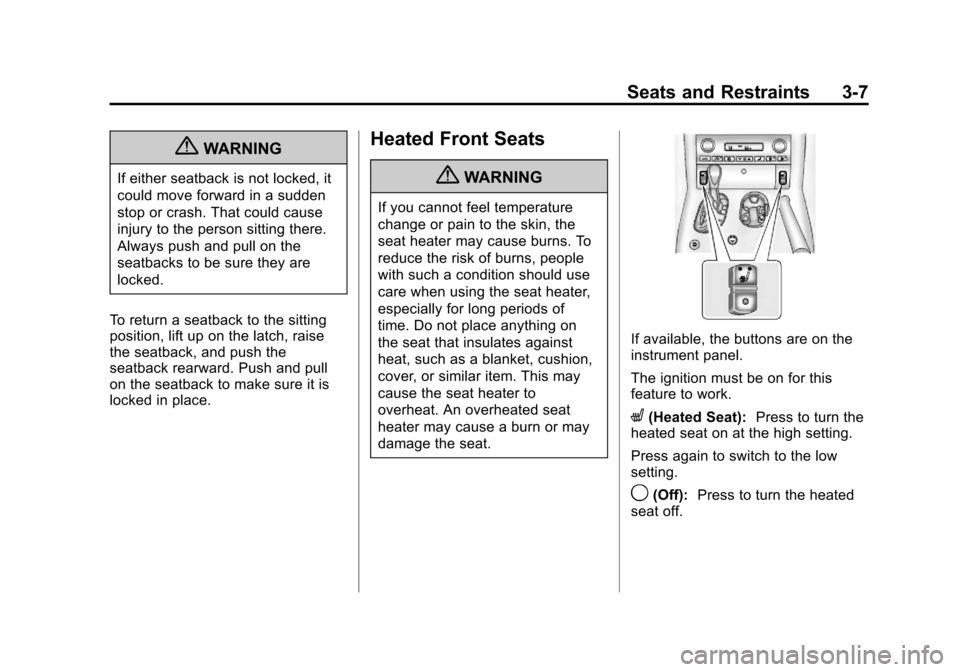
If available, the buttons are on the
instrument panel.
The ignition must be on for this
feature to work.
L(Heated Seat): Press to turn the
heated seat on at the high setting.
Press again to switch to the low
setting.
9(Off): Press to turn the heated
seat off.