air CHEVROLET CORVETTE 2015 7.G Owners Manual
[x] Cancel search | Manufacturer: CHEVROLET, Model Year: 2015, Model line: CORVETTE, Model: CHEVROLET CORVETTE 2015 7.GPages: 393, PDF Size: 5.4 MB
Page 2 of 393

Black plate (1,1)Chevrolet Corvette Owner Manual (GMNA-Localizing-U.S./Canada/Mexico-
7576293) - 2015 - crc - 10/31/14
2015 Chevrolet Corvette Owner ManualM
In Brief. . . . . . . . . . . . . . . . . . . . . . . . 1-1
Instrument Panel . . . . . . . . . . . . . . 1-2
Initial Drive Information . . . . . . . . 1-4
Vehicle Features . . . . . . . . . . . . . 1-17
Performance and Maintenance . . . . . . . . . . . . . . . . 1-19
Keys, Doors, and Windows . . . . . . . . . . . . . . . . . . . . 2-1
Keys and Locks . . . . . . . . . . . . . . . 2-1
Doors . . . . . . . . . . . . . . . . . . . . . . . . 2-14
Vehicle Security . . . . . . . . . . . . . . 2-16
Exterior Mirrors . . . . . . . . . . . . . . . 2-19
Interior Mirrors . . . . . . . . . . . . . . . . 2-21
Windows . . . . . . . . . . . . . . . . . . . . . 2-21
Roof . . . . . . . . . . . . . . . . . . . . . . . . . . 2-24
Seats and Restraints . . . . . . . . . 3-1
Head Restraints . . . . . . . . . . . . . . . 3-2
Front Seats . . . . . . . . . . . . . . . . . . . . 3-2
Safety Belts . . . . . . . . . . . . . . . . . . . . 3-9
Airbag System . . . . . . . . . . . . . . . . 3-15
Child Restraints . . . . . . . . . . . . . . 3-27 Storage
. . . . . . . . . . . . . . . . . . . . . . . 4-1
Storage Compartments . . . . . . . . 4-1
Additional Storage Features . . . 4-4
Instruments and Controls . . . . 5-1
Controls . . . . . . . . . . . . . . . . . . . . . . . 5-2
Warning Lights, Gauges, and
Indicators . . . . . . . . . . . . . . . . . . . . 5-6
Information Displays . . . . . . . . . . 5-26
Vehicle Messages . . . . . . . . . . . . 5-34
Vehicle Personalization . . . . . . . 5-45
Universal Remote System . . . . 5-52
Lighting . . . . . . . . . . . . . . . . . . . . . . . 6-1
Exterior Lighting . . . . . . . . . . . . . . . 6-1
Interior Lighting . . . . . . . . . . . . . . . . 6-5
Lighting Features . . . . . . . . . . . . . . 6-6
Infotainment System . . . . . . . . . 7-1
Introduction . . . . . . . . . . . . . . . . . . . . 7-1
Performance Data Recorder (PDR) . . . . . . . . . . . . . . 7-1 Climate Controls
. . . . . . . . . . . . . 8-1
Climate Control Systems . . . . . . 8-1
Air Vents . . . . . . . . . . . . . . . . . . . . . . . 8-5
Maintenance . . . . . . . . . . . . . . . . . . . 8-5
Driving and Operating . . . . . . . . 9-1
Driving Information . . . . . . . . . . . . . 9-2
Starting and Operating . . . . . . . 9-19
Engine Exhaust . . . . . . . . . . . . . . 9-27
Automatic Transmission . . . . . . 9-28
Manual Transmission . . . . . . . . . 9-32
Brakes . . . . . . . . . . . . . . . . . . . . . . . 9-35
Ride Control Systems . . . . . . . . 9-38
Cruise Control . . . . . . . . . . . . . . . . 9-49
Driver Assistance Systems . . . 9-52
Fuel . . . . . . . . . . . . . . . . . . . . . . . . . . 9-54
Trailer Towing . . . . . . . . . . . . . . . . 9-58
Conversions and Add-Ons . . . 9-58
Vehicle Care . . . . . . . . . . . . . . . . . 10-1
General Information . . . . . . . . . . 10-2
Vehicle Checks . . . . . . . . . . . . . . . 10-5
Headlamp Aiming . . . . . . . . . . . 10-38
Bulb Replacement . . . . . . . . . . 10-38
Electrical System . . . . . . . . . . . . 10-39
Wheels and Tires . . . . . . . . . . . 10-47
Page 4 of 393
Black plate (3,1)Chevrolet Corvette Owner Manual (GMNA-Localizing-U.S./Canada/Mexico-
7576293) - 2015 - crc - 10/31/14
Introduction iii
The names, logos, emblems,
slogans, vehicle model names, and
vehicle body designs appearing in
this manual including, but not limited
to, GM, the GM logo, CHEVROLET,
the CHEVROLET Emblem, and
CORVETTE are trademarks and/or
service marks of General Motors
LLC, its subsidiaries, affiliates,
or licensors.
For vehicles first sold in Canada,
substitute the name“General
Motors of Canada Limited” for
Chevrolet Motor Division wherever it
appears in this manual. This manual describes features that
may or may not be on the vehicle
because of optional equipment that
was not purchased on the vehicle,
model variants, country
specifications, features/applications
that may not be available in your
region, or changes subsequent to
the printing of this owner manual.
Refer to the purchase
documentation relating to your
specific vehicle to confirm the
features.
Keep this manual in the vehicle for
quick reference.
Canadian Vehicle Owners
Propriétaires Canadiens
A French language manual can be
obtained from your dealer, at
www.helminc.com, or from:
On peut obtenir un exemplaire de
ce guide en français auprès du
concessionnaire ou à l'adresse
savant:
Helm, Incorporated
Attention: Customer Service
47911 Halyard Drive
Plymouth, MI 48170
Using this Manual
To quickly locate information about
the vehicle, use the Index in the
back of the manual. It is an
alphabetical list of what is in the
manual and the page number where
it can be found.
Litho in U.S.A.
Part No. 22885403 B Second Printing©2014 General Motors LLC. All Rights Reserved.
Page 5 of 393
Black plate (4,1)Chevrolet Corvette Owner Manual (GMNA-Localizing-U.S./Canada/Mexico-
7576293) - 2015 - crc - 10/31/14
iv Introduction
Danger, Warnings, and
Cautions
Warning messages found on vehicle
labels and in this manual describe
hazards and what to do to avoid or
reduce them.
{Danger
Danger indicates a hazard with a
high level of risk which will result
in serious injury or death.
{Warning
Warning indicates a hazard that
could result in injury or death.
{Caution
Caution indicates a hazard that
could result in property or vehicle
damage.
A circle with a slash through it is a
safety symbol which means“Do
Not,” “Do not do this,” or“Do not let
this happen.”
Symbols
The vehicle has components and
labels that use symbols instead of
text. Symbols are shown along with
the text describing the operation or
information relating to a specific
component, control, message,
gauge, or indicator.
M: This symbol is shown when
you need to see your owner manual
for additional instructions or
information.
*: This symbol is shown when
you need to see a service manual
for additional instructions or
information. Vehicle Symbol Chart
Here are some additional symbols
that may be found on the vehicle
and what they mean. For more
information on the symbol, refer to
the Index.
9:
Airbag Readiness Light
#:Air Conditioning
!:Antilock Brake System (ABS)
%:Audio Steering Wheel Controls
or OnStar®(if equipped)
$: Brake System Warning Light
":Charging System
I:Cruise Control
B: Engine Coolant Temperature
O:Exterior Lamps
.:Fuel Gauge
+:Fuses
3: Headlamp High/Low-Beam
Changer
j: LATCH System Child
Restraints
Page 10 of 393

Black plate (3,1)Chevrolet Corvette Owner Manual (GMNA-Localizing-U.S./Canada/Mexico-
7576293) - 2015 - crc - 10/31/14
In Brief 1-3
1.Air Vents on page 8-5.
2. Turn Signal Lever. See Turn and
Lane-Change Signals on
page 6-5.
Exterior Lamp Controls on
page 6-1.
3. Manual Shift Paddles (If Equipped). See Manual Mode on
page 9-29.
Active Rev Match Paddles (If
Equipped). See Active Rev
Match on page 9-34.
4. Instrument Cluster on page 5-7.
5. Windshield Wiper/Washer on
page 5-2.
6. Instrument Panel Storage Button. See Instrument Panel
Storage on page 4-1.
7. Passenger Airbag Status Indicator. See Passenger
Sensing System on page 3-20.
8. Light Sensor. See Automatic
Headlamp System on page 6-3. 9.
Hazard Warning Flashers on
page 6-4.
10. Infotainment on page 7-1.
11. Power Mirrors on page 2-20.
12. Head-Up Display Controls (If Equipped). See Head-Up
Display (HUD) on page 5-29.
13. Hatch/Trunk Release Button. SeeHatch (Trunk) on
page 2-14.
Intrusion and Inclination
Sensors Disable Switch. See
Vehicle Alarm System on
page 2-16.
14. Data Link Connector (DLC) (Out of View). See Malfunction
Indicator Lamp on page 5-18.
15. Hood Release (Out of View). SeeHood on page 10-6.
16. Cruise Control on page 9-49.
17. Steering Wheel Controls on
page 5-2.
18. Steering Wheel Adjustment on
page 5-2 (Out of View). 19.
Horn on page 5-2.
20. Bluetooth Controls. See Steering Wheel Controls on
page 5-2.
Voice Recognition Controls.
SeeSteering Wheel Controls
on page 5-2.
Driver Information Center (DIC)
Controls. See Driver
Information Center (DIC) on
page 5-26.
21. Keyless Ignition. See Ignition
Positions on page 9-20.
22. Driver and Redundant Passenger Heated and
Ventilated Seat Controls (If
Equipped). See Heated and
Ventilated Front Seats on
page 3-7.
23. Shift Lever (Manual Shown). SeeAutomatic Transmission
on page 9-28 orManual
Transmission on page 9-32.
24. Mode Select Knob. See Competitive Driving Mode on
page 9-44.
Page 17 of 393
Black plate (10,1)Chevrolet Corvette Owner Manual (GMNA-Localizing-U.S./Canada/Mexico-
7576293) - 2015 - crc - 10/31/14
1-10 In Brief
Heated and Ventilated
Seats
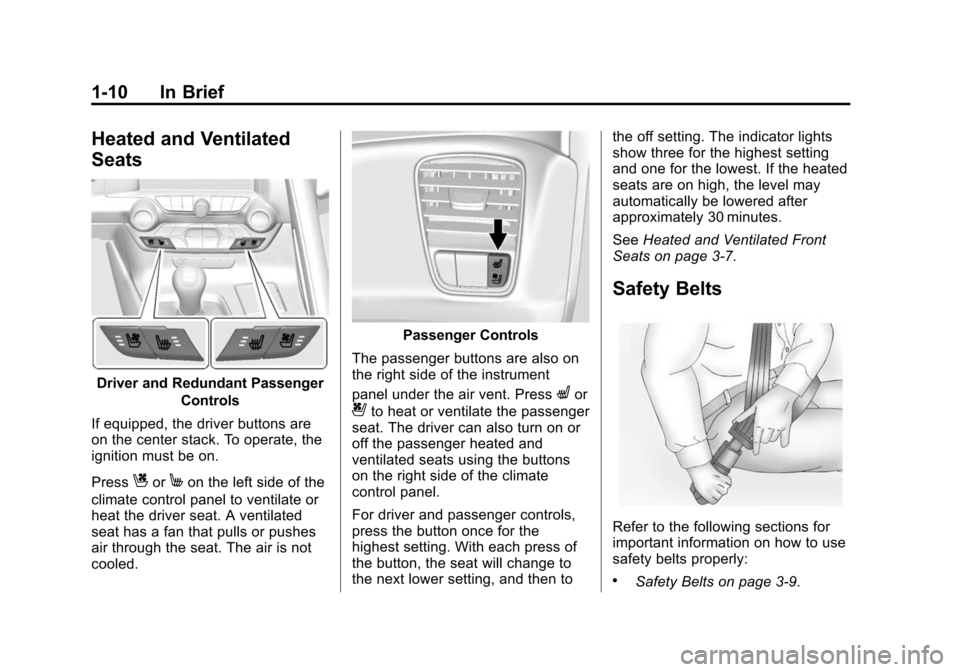
Driver and Redundant PassengerControls
If equipped, the driver buttons are
on the center stack. To operate, the
ignition must be on.
Press
CorMon the left side of the
climate control panel to ventilate or
heat the driver seat. A ventilated
seat has a fan that pulls or pushes
air through the seat. The air is not
cooled.
Passenger Controls
The passenger buttons are also on
the right side of the instrument
panel under the air vent. Press
Lor
{to heat or ventilate the passenger
seat. The driver can also turn on or
off the passenger heated and
ventilated seats using the buttons
on the right side of the climate
control panel.
For driver and passenger controls,
press the button once for the
highest setting. With each press of
the button, the seat will change to
the next lower setting, and then to the off setting. The indicator lights
show three for the highest setting
and one for the lowest. If the heated
seats are on high, the level may
automatically be lowered after
approximately 30 minutes.
See
Heated and Ventilated Front
Seats on page 3-7.
Safety Belts
Refer to the following sections for
important information on how to use
safety belts properly:
.Safety Belts on page 3-9.
Page 18 of 393
Black plate (11,1)Chevrolet Corvette Owner Manual (GMNA-Localizing-U.S./Canada/Mexico-
7576293) - 2015 - crc - 10/31/14
In Brief 1-11
.How to Wear Safety Belts
Properly on page 3-10.
.Lap-Shoulder Belt on page 3-11.
.Lower Anchors and Tethers for
Children (LATCH System) on
page 3-33.
Passenger Sensing
System
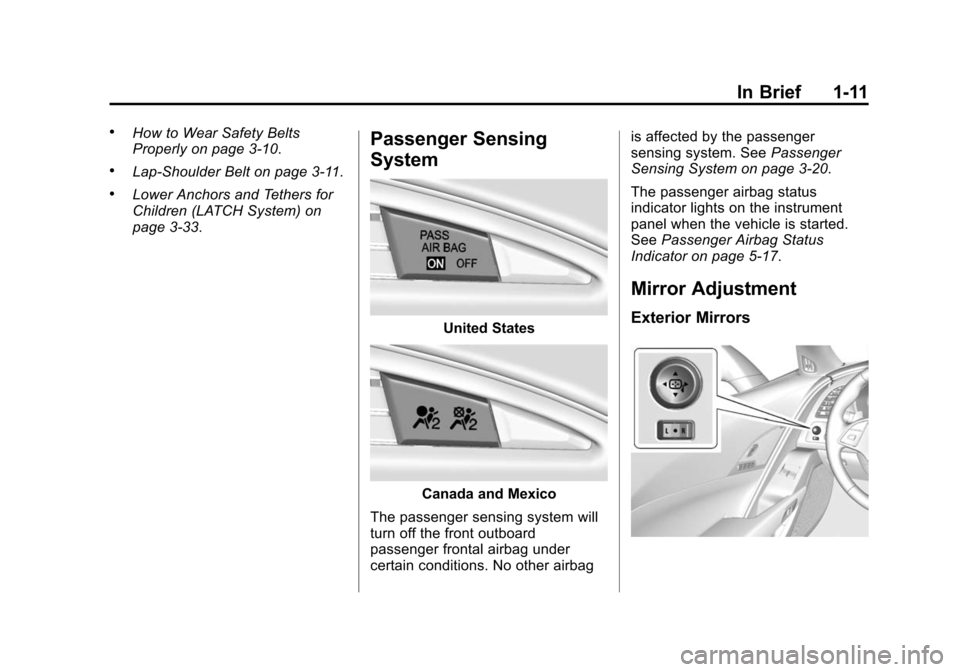
United States
Canada and Mexico
The passenger sensing system will
turn off the front outboard
passenger frontal airbag under
certain conditions. No other airbag is affected by the passenger
sensing system. See
Passenger
Sensing System on page 3-20.
The passenger airbag status
indicator lights on the instrument
panel when the vehicle is started.
See Passenger Airbag Status
Indicator on page 5-17.
Mirror Adjustment
Exterior Mirrors
Page 22 of 393
Black plate (15,1)Chevrolet Corvette Owner Manual (GMNA-Localizing-U.S./Canada/Mexico-
7576293) - 2015 - crc - 10/31/14
In Brief 1-15
Climate Controls
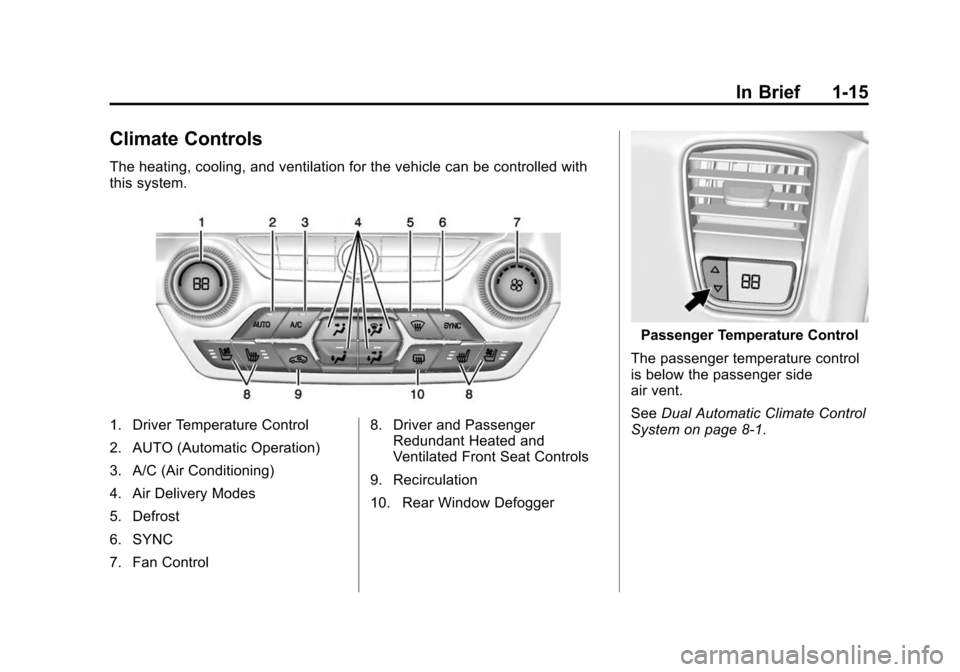
The heating, cooling, and ventilation for the vehicle can be controlled with
this system.
1. Driver Temperature Control
2. AUTO (Automatic Operation)
3. A/C (Air Conditioning)
4. Air Delivery Modes
5. Defrost
6. SYNC
7. Fan Control8. Driver and Passenger
Redundant Heated and
Ventilated Front Seat Controls
9. Recirculation
10. Rear Window Defogger
Passenger Temperature Control
The passenger temperature control
is below the passenger side
air vent.
See Dual Automatic Climate Control
System on page 8-1.
Page 43 of 393
Black plate (14,1)Chevrolet Corvette Owner Manual (GMNA-Localizing-U.S./Canada/Mexico-
7576293) - 2015 - crc - 10/31/14
2-14 Keys, Doors, and Windows
either when your foot is removed
from the brake or the vehicle speed
becomes faster than
13 km/h (8 mph).
Automatic Door Unlock
The vehicle is programmed so that
when the shift lever is moved into
P (Park) for automatic transmission
vehicles or when the ignition is
turned off or is in Retained
Accessory Power (RAP) for manual
transmission vehicles, both doors
will unlock.
With the vehicle stopped and the
engine running, door unlocking can
be programmed through the Driver
Information Center (DIC). This
allows the driver to choose various
unlock settings. For programming
information, seeVehicle
Personalization on page 5-45.
Lockout Protection
If the vehicle is in ACC/
ACCESSORY or ON/RUN/START,
and the power door lock switch is
pressed with the driver door open,
the doors will lock and only the
driver door will unlock.
If the vehicle is off and Unlocked
Door Anti-Lockout is turned on, the
driver door is open, and door
locking is requested using a door
lock switch or the RKE transmitter,
both doors will lock and only the
driver door will unlock. The
Unlocked Door Anti-Lockout feature
can be turned on or off using the
vehicle personalization menus.
See Vehicle Personalization on
page 5-45.
Lockout protection can be manually
overridden with the driver door open
by pressing and holding
Qon the
power door lock switch.
Doors
Hatch (Trunk)
{Warning
Exhaust gases can enter the
vehicle if it is driven with the
liftgate, hatch/trunk open, or with
any objects that pass through the
seal between the body and the
hatch/trunk or liftgate. Engine
exhaust contains carbon
monoxide (CO) which cannot be
seen or smelled. It can cause
unconsciousness and even death.
If the vehicle must be driven with
the liftgate or hatch/trunk open:
.Close all of the windows.
.Fully open the air outlets on
or under the instrument
panel.
(Continued)
Page 44 of 393
Black plate (15,1)Chevrolet Corvette Owner Manual (GMNA-Localizing-U.S./Canada/Mexico-
7576293) - 2015 - crc - 10/31/14
Keys, Doors, and Windows 2-15
Warning (Continued)
.Adjust the climate control
system to a setting that
brings in only outside air and
set the fan speed to the
highest setting. See“Climate
Control Systems” in the
Index.
.If the vehicle is equipped with
a power liftgate, disable the
power liftgate function.
For more information about
carbon monoxide, see Engine
Exhaust on page 9-27.
Hatch/Trunk Release
For automatic transmissions, the
vehicle must be in P (Park).
For manual transmissions, the
vehicle must be off or stationary
with the parking brake set. See
Electric Parking Brake on
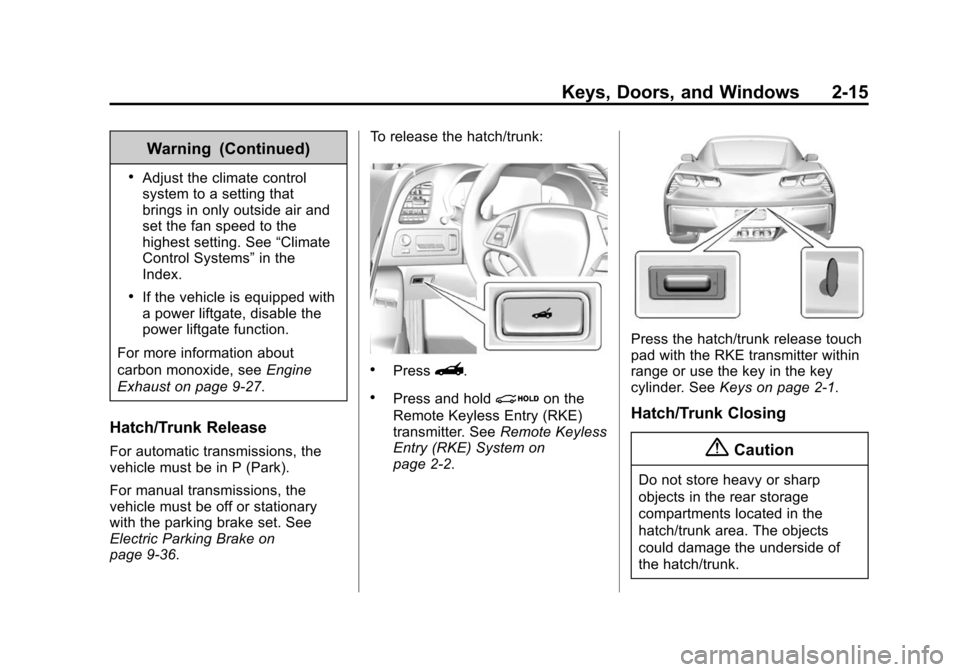
page 9-36. To release the hatch/trunk:
.Press}.
.Press and holdion the
Remote Keyless Entry (RKE)
transmitter. See Remote Keyless
Entry (RKE) System on
page 2-2.
Press the hatch/trunk release touch
pad with the RKE transmitter within
range or use the key in the key
cylinder. See Keys on page 2-1.
Hatch/Trunk Closing
{Caution
Do not store heavy or sharp
objects in the rear storage
compartments located in the
hatch/trunk area. The objects
could damage the underside of
the hatch/trunk.
Page 56 of 393
Black plate (27,1)Chevrolet Corvette Owner Manual (GMNA-Localizing-U.S./Canada/Mexico-
7576293) - 2015 - crc - 10/31/14
Keys, Doors, and Windows 2-27
weatherstrip. Gently lower the
front edge of the roof panel to
the front of the roof opening.
6. Check that the weatherstripping on each side of the roof panel is
under the panel.
7. Make sure the front release handles are in the full open
position.
8. Push the roof firmly downward to engage the pins.
9. Turn the front release handles inward so that they fully latch to
the closed position. It is critical
that the handles fully latch.
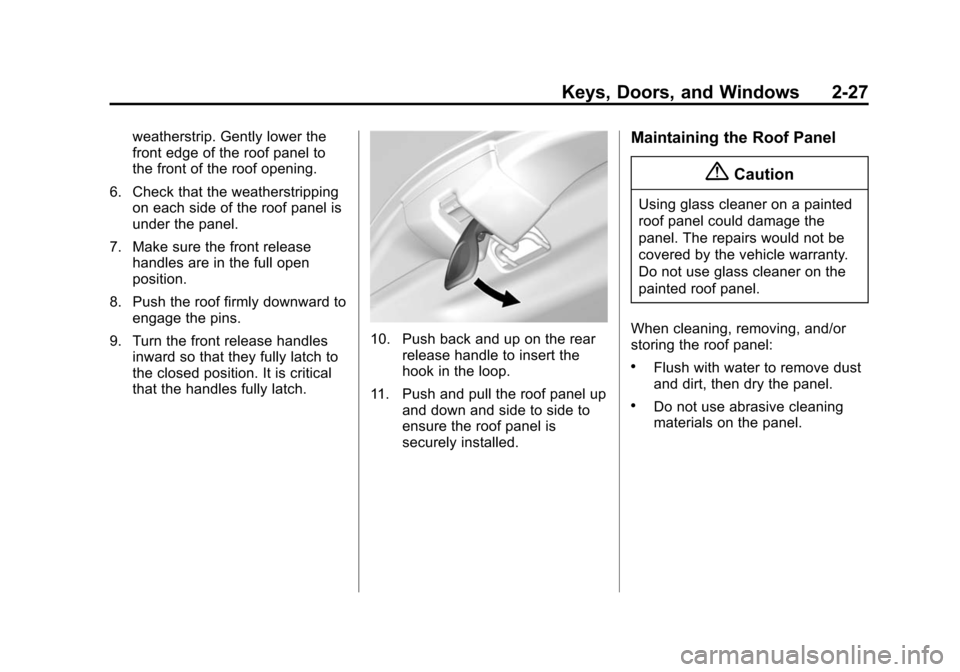
10. Push back and up on the rear
release handle to insert the
hook in the loop.
11. Push and pull the roof panel up and down and side to side to
ensure the roof panel is
securely installed.
Maintaining the Roof Panel
{Caution
Using glass cleaner on a painted
roof panel could damage the
panel. The repairs would not be
covered by the vehicle warranty.
Do not use glass cleaner on the
painted roof panel.
When cleaning, removing, and/or
storing the roof panel:
.Flush with water to remove dust
and dirt, then dry the panel.
.Do not use abrasive cleaning
materials on the panel.