automatic transmission CHEVROLET CORVETTE 2015 7.G User Guide
[x] Cancel search | Manufacturer: CHEVROLET, Model Year: 2015, Model line: CORVETTE, Model: CHEVROLET CORVETTE 2015 7.GPages: 393, PDF Size: 5.4 MB
Page 55 of 393
Black plate (26,1)Chevrolet Corvette Owner Manual (GMNA-Localizing-U.S./Canada/Mexico-
7576293) - 2015 - crc - 10/31/14
2-26 Keys, Doors, and Windows
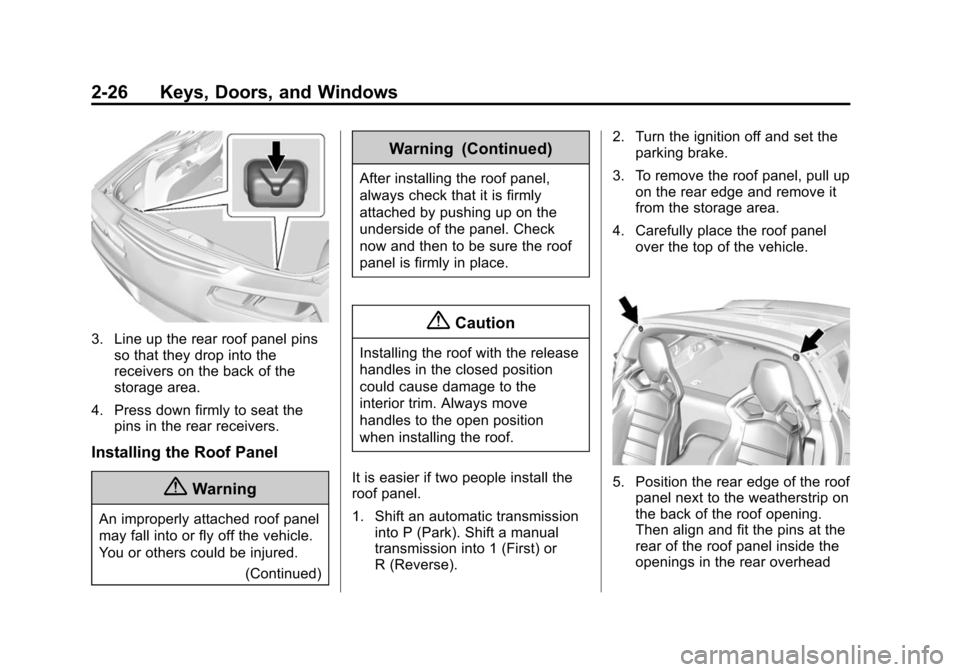
3. Line up the rear roof panel pinsso that they drop into the
receivers on the back of the
storage area.
4. Press down firmly to seat the pins in the rear receivers.
Installing the Roof Panel
{Warning
An improperly attached roof panel
may fall into or fly off the vehicle.
You or others could be injured.
(Continued)
Warning (Continued)
After installing the roof panel,
always check that it is firmly
attached by pushing up on the
underside of the panel. Check
now and then to be sure the roof
panel is firmly in place.
{Caution
Installing the roof with the release
handles in the closed position
could cause damage to the
interior trim. Always move
handles to the open position
when installing the roof.
It is easier if two people install the
roof panel.
1. Shift an automatic transmission into P (Park). Shift a manual
transmission into 1 (First) or
R (Reverse). 2. Turn the ignition off and set the
parking brake.
3. To remove the roof panel, pull up on the rear edge and remove it
from the storage area.
4. Carefully place the roof panel over the top of the vehicle.
5. Position the rear edge of the roofpanel next to the weatherstrip on
the back of the roof opening.
Then align and fit the pins at the
rear of the roof panel inside the
openings in the rear overhead
Page 67 of 393
Black plate (4,1)Chevrolet Corvette Owner Manual (GMNA-Localizing-U.S./Canada/Mexico-
7576293) - 2015 - crc - 10/31/14
3-4 Seats and Restraints
Memory Seats
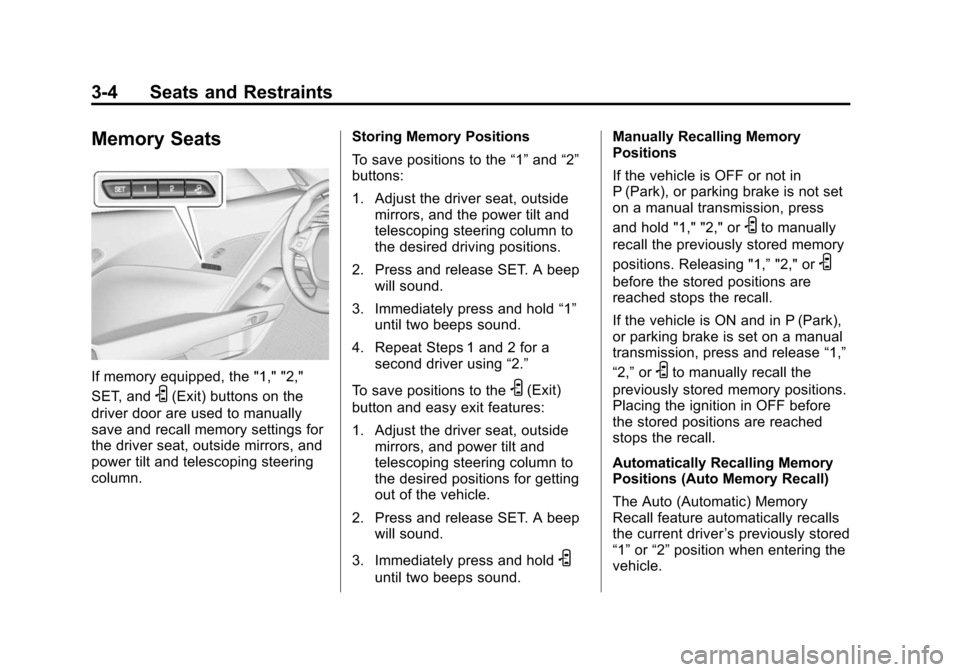
If memory equipped, the "1," "2,"
SET, and
S(Exit) buttons on the
driver door are used to manually
save and recall memory settings for
the driver seat, outside mirrors, and
power tilt and telescoping steering
column. Storing Memory Positions
To save positions to the
“1”and “2”
buttons:
1. Adjust the driver seat, outside mirrors, and the power tilt and
telescoping steering column to
the desired driving positions.
2. Press and release SET. A beep will sound.
3. Immediately press and hold “1”
until two beeps sound.
4. Repeat Steps 1 and 2 for a second driver using “2.”
To save positions to theS(Exit)
button and easy exit features:
1. Adjust the driver seat, outside mirrors, and power tilt and
telescoping steering column to
the desired positions for getting
out of the vehicle.
2. Press and release SET. A beep will sound.
3. Immediately press and hold
S
until two beeps sound. Manually Recalling Memory
Positions
If the vehicle is OFF or not in
P (Park), or parking brake is not set
on a manual transmission, press
and hold "1," "2," or
Sto manually
recall the previously stored memory
positions. Releasing "1,” "2," or
S
before the stored positions are
reached stops the recall.
If the vehicle is ON and in P (Park),
or parking brake is set on a manual
transmission, press and release “1,”
“2,” or
Sto manually recall the
previously stored memory positions.
Placing the ignition in OFF before
the stored positions are reached
stops the recall.
Automatically Recalling Memory
Positions (Auto Memory Recall)
The Auto (Automatic) Memory
Recall feature automatically recalls
the current driver ’s previously stored
“1” or“2” position when entering the
vehicle.
Page 68 of 393
Black plate (5,1)Chevrolet Corvette Owner Manual (GMNA-Localizing-U.S./Canada/Mexico-
7576293) - 2015 - crc - 10/31/14
Seats and Restraints 3-5
Depending upon the Auto Memory
Recall feature enabled in the vehicle
personalization menu, memory“1”
or “2” positions are recalled as
follows:
To activate the recall when the
ignition is off, and “On - Driver Door
Open” is selected in the vehicle
personalization menu:
.PressKon the RKE transmitter
and open the door.
.Press the lock/unlock button on
the outside driver door handle
and open the driver door. The
RKE transmitter must be present
for the recall to activate.
.If the driver door is already
open, press
Kon the RKE
transmitter to activate the recall. To activate the recall at ignition ON,
the transmission must be in P (Park)
or the parking brake set for a
manual transmission, and
“On - At
Ignition On” selected in the vehicle
personalization menu:
.Place the ignition in ON/RUN/
START.
See Vehicle Personalization on
page 5-45.
To stop recall movement, press one
of the memory, power mirror,
or power seat controls, or press the
power tilt and telescoping steering
column control. If On - At Ignition
On is selected in the vehicle
personalization menu, placing the
ignition in OFF stops the recall.
RKE transmitters are not labeled
with a number. If your memory seat
position is stored to "1" or "2" but
this position is not automatically
recalling, then change the stored
position or switch RKE transmitters
with the other driver. Easy Exit Recall
If programmed on in the vehicle
personalization menu, the easy exit
feature automatically moves the
driver seat, power tilt and
telescoping steering column, and
outside mirrors on some vehicles to
the memory positions previously
saved to the
S(Exit) button. See
“Storing Memory Positions” listed
previously. See also Vehicle
Personalization on page 5-45.
Easy exit recall automatically
activates when one of the following
occurs:
.The vehicle is turned off and the
driver door is opened within a
short time.
.The vehicle is turned off with the
driver door open.
To stop recall movement, press one
of the memory, driver seat, outside
mirror, or power tilt and telescope
steering column controls.
Page 134 of 393
Black plate (29,1)Chevrolet Corvette Owner Manual (GMNA-Localizing-U.S./Canada/Mexico-
7576293) - 2015 - crc - 10/31/14
Instruments and Controls 5-29
Head-Up Display (HUD)
{Warning
If the HUD image is too bright,
or too high in your field of view, it
may take you more time to see
things you need to see when it is
dark outside. Be sure to keep the
HUD image dim and placed low in
your field of view.
If equipped with HUD, some
information concerning the
operation of the vehicle is projected
onto the windshield.
The HUD information appears as an
image focused out toward the front
of the vehicle.
{Caution
If you try to use the HUD image
as a parking aid, you may
misjudge the distance and
damage your vehicle. Do not use
the HUD image as a parking aid.
The HUD information can be
displayed in various languages. The
speedometer reading and other
numerical values can be displayed
in either English or metric units.
The language selection is changed
through the radio and the units of
measurement is changed through
the instrument cluster. See Vehicle
Personalization on page 5-45 and
“Settings” underInstrument Cluster
on page 5-7.
The HUD may display different
alerts and information for vehicles
equipped with these features:
.Speedometer
.Tachometer
.Manual Transmission Gear (If
Equipped)
.Manual Paddle Shift Gear
Indicator (If Equipped)
These displays on the HUD are
for use when using the manual
paddle shift controls to shift the
transmission. See “Manual
Paddle Shift” inAutomatic
Transmission on page 9-28.
.Shift Light
This light is used for
performance driving to indicate
that the vehicle's best
performance level has been
reached to shift the transmission
into the next higher gear. An
arrow pointing up will light up on
the display just prior to reaching
the engine fuel cut-off mode.
.G-Force Gauge
.Audio Information
.Upcoming Maneuver from
OnBoard Navigation
Page 143 of 393
Black plate (38,1)Chevrolet Corvette Owner Manual (GMNA-Localizing-U.S./Canada/Mexico-
7576293) - 2015 - crc - 10/31/14
5-38 Instruments and Controls
message remains on, take the
vehicle to your dealer for service.
SeeEngine Oil on page 10-12.
OIL PRESSURE LOW —STOP
ENGINE
This message displays if low oil
pressure levels occur. Stop the
vehicle as soon as safely possible
and do not operate it until the cause
of the low oil pressure has been
corrected. Check the oil as soon as
possible and have the vehicle
serviced by your dealer.
UPSHIFT NOW, ENGINE
PROTECTION ACTIVE
This message indicates the engine
controls have taken action to
prevent an oil starvation condition.
This may reduce the available
engine power, or on automatic
transmission equipped vehicles
force an upshift to a higher gear.
Engine Power Messages
ENGINE POWER IS REDUCED
This message displays when the
vehicle's engine power is reduced.
Reduced engine power can affect
the vehicle's ability to accelerate.
If this message is on, but there is no
reduction in performance, proceed
to your destination. The
performance may be reduced the
next time the vehicle is driven. The
vehicle may be driven at a reduced
speed while this message is on, but
maximum acceleration and speed
may be reduced. Anytime this
message stays on, the vehicle
should be taken to your dealer for
service as soon as possible.
Fuel System Messages
FUEL LEVEL LOW
This message displays when the
vehicle is low on fuel. Refuel as
soon as possible.
Key and Lock Messages
# KEYS PROGRAMMED
This message displays when
programming new keys to the
vehicle.
NO REMOTE DETECTED
This message displays when the
transmitter battery may be weak.
See “Starting the Vehicle with a Low
Transmitter Battery” underRemote
Keyless Entry (RKE) System
Operation on page 2-3.
NO REMOTE KEY WAS
DETECTED PLACE KEY IN
TRANSMITTER POCKET THEN
START YOUR VEHICLE
This message displays when trying
to start the vehicle if an RKE
transmitter is not detected. The
transmitter battery may be weak.
See “Starting the Vehicle with a Low
Transmitter Battery” underRemote
Keyless Entry (RKE) System
Operation on page 2-3.
Page 148 of 393
Black plate (43,1)Chevrolet Corvette Owner Manual (GMNA-Localizing-U.S./Canada/Mexico-
7576293) - 2015 - crc - 10/31/14
Instruments and Controls 5-43
SERVICE VEHICLE SOON
This message is displayed if there is
a problem with the vehicle. Take the
vehicle to your dealer for service.
Starting the Vehicle
Messages
PRESS BRAKE TO START
VEHICLE
This message is displayed when
attempting to start an automatic
transmission equipped vehicle
without first pressing the brake
pedal.
PRESS CLUTCH TO START
This message is displayed when
attempting to start a manual
transmission equipped vehicle
without first pressing the clutch
pedal.
SERVICE KEYLESS START
SYSTEM
This message is displayed if there is
a problem with the pushbutton start
system. Take the vehicle to your
dealer for service.
Tire Messages
SERVICE TIRE MONITOR
SYSTEM
This message displays if there is a
problem with the Tire Pressure
Monitor System (TPMS). SeeTire
Pressure Monitor Operation on
page 10-60.
TIRE LEARNING ACTIVE
This message displays when the
system is learning new tires. See
Tire Pressure Monitor Operation on
page 10-60.
TIRE LOW ADD AIR TO TIRE
This message displays when the
pressure in one or more of the tires
is low. This message also displays LEFT
FRONT, RIGHT FRONT, LEFT
REAR, or RIGHT REAR to indicate
the location of the low tire.
The low tire pressure warning light
will also come on. See
Tire
Pressure Light on page 5-24.
If a tire pressure message appears
on the DIC, stop as soon as you
can. Inflate the tires by adding air
until the tire pressure is equal to the
values shown on the Tire and
Loading Information label. See Tires
on page 10-47, Vehicle Load Limits
on page 9-15, and Tire Pressure on
page 10-57.
You can receive more than one tire
pressure message at a time. The
DIC also shows the tire pressure
values. See Driver Information
Center (DIC) on page 5-26.
Page 154 of 393
Black plate (49,1)Chevrolet Corvette Owner Manual (GMNA-Localizing-U.S./Canada/Mexico-
7576293) - 2015 - crc - 10/31/14
Instruments and Controls 5-49
Chime Volume
This allows the selection of the
chime volume level.
Press + or−to adjust the volume.
Reverse Tilt Mirror
This allows the feature to be turned
on or off.
Select Off, On - Driver and
Passenger, On - Driver, or On -
Passenger.
Lighting
Select and the following may
display:
.Vehicle Locator Lights
.Exit Lighting
Vehicle Locator Lights
This feature will flash the exterior
lamps when
Kon the Remote
Keyless Entry (RKE) transmitter is
pressed to locate the vehicle.
Select Off or On. Exit Lighting
This allows the selection of how
long the exterior lamps stay on
when leaving the vehicle when it is
dark outside.
Select Off, 30 Seconds, 60
Seconds, or 120 Seconds.
Power Door Locks
Select and the following may
display:
.Unlocked Door Anti-Lockout
.Auto Door Unlock
.Delayed Door Lock
Unlocked Door Anti-Lockout
When on, this feature will keep the
driver door from locking when the
door is open. If Off is selected, the
Delayed Door Lock menu will be
available.
Select Off or On. Auto Door Unlock
This allows selection of which of the
doors will automatically unlock when
the vehicle is shifted into P (Park)
with an automatic transmission or
when the vehicle is turned off with a
manual transmission.
Select Off, All Doors, or Driver Door.
Delayed Door Lock
When on, this feature will delay the
locking of the doors. To override the
delay, press the power door lock
switch on the door.
Select Off or On.
Remote Lock, Unlock, Start
Select and the following may
display:
.Remote Unlock Light Feedback
.Remote Lock Feedback
.Remote Door Unlock
.Remote Start Auto Cool Seats
.Remote Start Auto Heat Seats
.Passive Door Unlock
Page 163 of 393
Black plate (2,1)Chevrolet Corvette Owner Manual (GMNA-Localizing-U.S./Canada/Mexico-
7576293) - 2015 - crc - 10/31/14
6-2 Lighting
To override AUTO mode, turn the
control to
O.
To reset to AUTO mode, turn the
control to
Oand then release back
to AUTO. Automatic mode also
resets when the vehicle is turned off
and then back on again if the control
is left in the AUTO position.
;(Parking Lamps): Turns on the
parking lamps including all lamps,
except the headlamps.
The parking lamp indicator light
comes on and stays on when the
parking lamps are on with the
engine off and the ignition to ACC/
ACCESSORY.
5(Headlamps): Turns on the
headlamps together with the parking
lamps and instrument panel lights.
Exterior Lamps Off
Reminder
A warning chime will sound if the
exterior lamp control is left on in
either the headlamp or parking lamp
position and the driver door is
opened with the ignition off.
Headlamp High/
Low-Beam Changer
Push the turn signal lever away
from you and release to turn the
high beams on. To return to low
beams, push the lever again or pull
it toward you and release.
This indicator light turns on in the
instrument cluster when the
high-beam headlamps are on.
Flash-to-Pass
To use the flash-to-pass feature,
briefly pull the turn signal lever
toward you. The high-beam
indicator flashes to indicate to the
other driver that you intend to pass.
Daytime Running
Lamps (DRL)
DRL can make it easier for others to
see the front of your vehicle during
the day. DRL are required on all
vehicles first sold in Canada.
The DRL system makes the
dedicated lamps come on when the
following conditions are met:
.It is still daylight and the ignition
is on.
.The exterior lamp control is in
the AUTO position.
.The transmission is not in
P (Park) or the parking brake
is off.
Page 173 of 393
Black plate (4,1)Chevrolet Corvette Owner Manual (GMNA-Localizing-U.S./Canada/Mexico-
7576293) - 2015 - crc - 10/31/14
7-4 Infotainment System
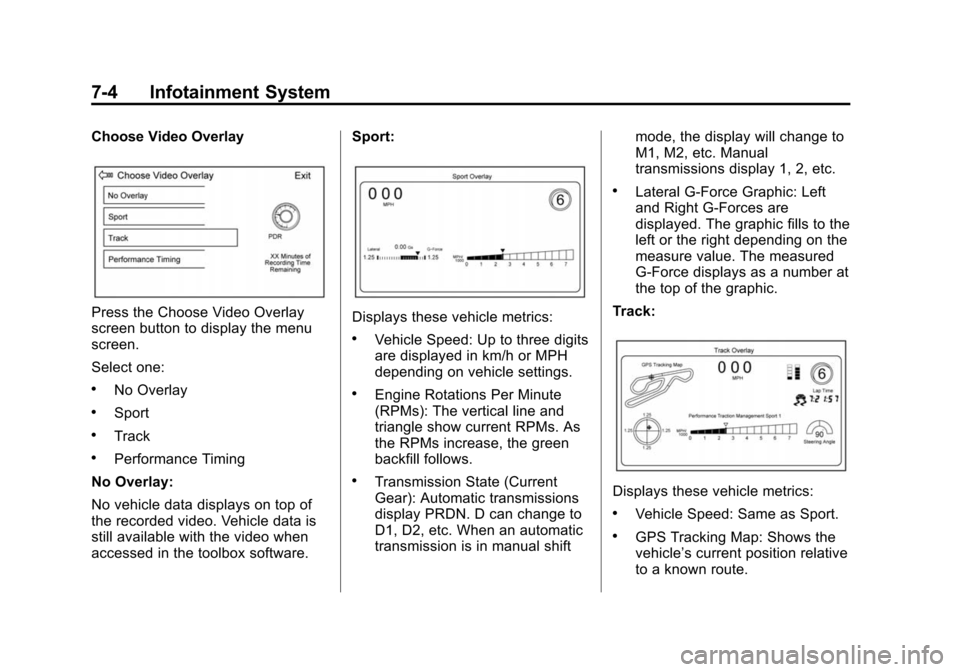
Choose Video Overlay
Press the Choose Video Overlay
screen button to display the menu
screen.
Select one:
.No Overlay
.Sport
.Track
.Performance Timing
No Overlay:
No vehicle data displays on top of
the recorded video. Vehicle data is
still available with the video when
accessed in the toolbox software. Sport:
Displays these vehicle metrics:
.Vehicle Speed: Up to three digits
are displayed in km/h or MPH
depending on vehicle settings.
.Engine Rotations Per Minute
(RPMs): The vertical line and
triangle show current RPMs. As
the RPMs increase, the green
backfill follows.
.Transmission State (Current
Gear): Automatic transmissions
display PRDN. D can change to
D1, D2, etc. When an automatic
transmission is in manual shift
mode, the display will change to
M1, M2, etc. Manual
transmissions display 1, 2, etc.
.Lateral G-Force Graphic: Left
and Right G-Forces are
displayed. The graphic fills to the
left or the right depending on the
measure value. The measured
G-Force displays as a number at
the top of the graphic.
Track:
Displays these vehicle metrics:
.Vehicle Speed: Same as Sport.
.GPS Tracking Map: Shows the
vehicle’s current position relative
to a known route.
Page 182 of 393
Black plate (1,1)Chevrolet Corvette Owner Manual (GMNA-Localizing-U.S./Canada/Mexico-
7576293) - 2015 - crc - 10/31/14
Driving and Operating 9-1
Driving and
Operating
Driving Information
Distracted Driving . . . . . . . . . . . . . 9-2
Defensive Driving . . . . . . . . . . . . . 9-3
Drunk Driving . . . . . . . . . . . . . . . . . 9-3
Control of a Vehicle . . . . . . . . . . . 9-3
Steering . . . . . . . . . . . . . . . . . . . . . . . 9-3
Off-Road Recovery . . . . . . . . . . . . 9-4
Loss of Control . . . . . . . . . . . . . . . . 9-4
Track Events and CompetitiveDriving . . . . . . . . . . . . . . . . . . . . . . . 9-5
Driving on Wet Roads . . . . . . . . 9-11
Hill and Mountain Roads . . . . . 9-12
Winter Driving . . . . . . . . . . . . . . . 9-13
If the Vehicle Is Stuck . . . . . . . . 9-14
Vehicle Load Limits . . . . . . . . . . 9-15
Starting and Operating
New Vehicle Break-In . . . . . . . . 9-19
Front Air Dam . . . . . . . . . . . . . . . 9-20
Carbon Fiber . . . . . . . . . . . . . . . . . 9-20
Ignition Positions . . . . . . . . . . . . 9-20
Starting the Engine . . . . . . . . . . 9-22
Retained Accessory Power (RAP) . . . . . . . . . . . . . . . 9-24 Shifting Into Park . . . . . . . . . . . . 9-24
Shifting out of Park . . . . . . . . . . 9-25
Parking (Manual
Transmission) . . . . . . . . . . . . . . 9-26
Parking over Things
That Burn . . . . . . . . . . . . . . . . . . 9-26
Active Fuel Management
®. . . 9-26
Engine Exhaust
Engine Exhaust . . . . . . . . . . . . . . 9-27
Running the Vehicle While Parked . . . . . . . . . . . . . . . . . . . . . 9-27
Automatic Transmission
Automatic Transmission . . . . . 9-28
Manual Mode . . . . . . . . . . . . . . . . 9-29
Manual Transmission
Manual Transmission . . . . . . . . 9-32
Active Rev Match . . . . . . . . . . . . 9-34
Brakes
Antilock BrakeSystem (ABS) . . . . . . . . . . . . . . 9-35
Electric Parking Brake . . . . . . . 9-36
Brake Assist . . . . . . . . . . . . . . . . . 9-37
Hill Start Assist (HSA) . . . . . . . 9-38
Ride Control Systems
Traction Control/Electronic Stability Control . . . . . . . . . . . . 9-38
Driver Mode Control . . . . . . . . . 9-40
Competitive Driving Mode . . . 9-44
Limited-Slip Differential (Except Z51 and Z06) . . . . . . 9-48
Limited-Slip Differential (Z51 and Z06 Only) . . . . . . . . 9-48
Cruise Control
Cruise Control . . . . . . . . . . . . . . . 9-49
Driver Assistance Systems
Rear VisionCamera (RVC) . . . . . . . . . . . . . 9-52
Fuel
Fuel . . . . . . . . . . . . . . . . . . . . . . . . . 9-54
California FuelRequirements . . . . . . . . . . . . . . 9-55
Fuels in Foreign Countries . . . 9-55
Fuel Additives . . . . . . . . . . . . . . . 9-55
Filling the Tank . . . . . . . . . . . . . . 9-56
Filling a Portable Fuel Container . . . . . . . . . . . . . . . . . . . 9-57
Trailer Towing
General TowingInformation . . . . . . . . . . . . . . . . . 9-58