automatic CHEVROLET CORVETTE 2015 7.G Owners Manual
[x] Cancel search | Manufacturer: CHEVROLET, Model Year: 2015, Model line: CORVETTE, Model: CHEVROLET CORVETTE 2015 7.GPages: 393, PDF Size: 5.4 MB
Page 2 of 393

Black plate (1,1)Chevrolet Corvette Owner Manual (GMNA-Localizing-U.S./Canada/Mexico-
7576293) - 2015 - crc - 10/31/14
2015 Chevrolet Corvette Owner ManualM
In Brief. . . . . . . . . . . . . . . . . . . . . . . . 1-1
Instrument Panel . . . . . . . . . . . . . . 1-2
Initial Drive Information . . . . . . . . 1-4
Vehicle Features . . . . . . . . . . . . . 1-17
Performance and Maintenance . . . . . . . . . . . . . . . . 1-19
Keys, Doors, and Windows . . . . . . . . . . . . . . . . . . . . 2-1
Keys and Locks . . . . . . . . . . . . . . . 2-1
Doors . . . . . . . . . . . . . . . . . . . . . . . . 2-14
Vehicle Security . . . . . . . . . . . . . . 2-16
Exterior Mirrors . . . . . . . . . . . . . . . 2-19
Interior Mirrors . . . . . . . . . . . . . . . . 2-21
Windows . . . . . . . . . . . . . . . . . . . . . 2-21
Roof . . . . . . . . . . . . . . . . . . . . . . . . . . 2-24
Seats and Restraints . . . . . . . . . 3-1
Head Restraints . . . . . . . . . . . . . . . 3-2
Front Seats . . . . . . . . . . . . . . . . . . . . 3-2
Safety Belts . . . . . . . . . . . . . . . . . . . . 3-9
Airbag System . . . . . . . . . . . . . . . . 3-15
Child Restraints . . . . . . . . . . . . . . 3-27 Storage
. . . . . . . . . . . . . . . . . . . . . . . 4-1
Storage Compartments . . . . . . . . 4-1
Additional Storage Features . . . 4-4
Instruments and Controls . . . . 5-1
Controls . . . . . . . . . . . . . . . . . . . . . . . 5-2
Warning Lights, Gauges, and
Indicators . . . . . . . . . . . . . . . . . . . . 5-6
Information Displays . . . . . . . . . . 5-26
Vehicle Messages . . . . . . . . . . . . 5-34
Vehicle Personalization . . . . . . . 5-45
Universal Remote System . . . . 5-52
Lighting . . . . . . . . . . . . . . . . . . . . . . . 6-1
Exterior Lighting . . . . . . . . . . . . . . . 6-1
Interior Lighting . . . . . . . . . . . . . . . . 6-5
Lighting Features . . . . . . . . . . . . . . 6-6
Infotainment System . . . . . . . . . 7-1
Introduction . . . . . . . . . . . . . . . . . . . . 7-1
Performance Data Recorder (PDR) . . . . . . . . . . . . . . 7-1 Climate Controls
. . . . . . . . . . . . . 8-1
Climate Control Systems . . . . . . 8-1
Air Vents . . . . . . . . . . . . . . . . . . . . . . . 8-5
Maintenance . . . . . . . . . . . . . . . . . . . 8-5
Driving and Operating . . . . . . . . 9-1
Driving Information . . . . . . . . . . . . . 9-2
Starting and Operating . . . . . . . 9-19
Engine Exhaust . . . . . . . . . . . . . . 9-27
Automatic Transmission . . . . . . 9-28
Manual Transmission . . . . . . . . . 9-32
Brakes . . . . . . . . . . . . . . . . . . . . . . . 9-35
Ride Control Systems . . . . . . . . 9-38
Cruise Control . . . . . . . . . . . . . . . . 9-49
Driver Assistance Systems . . . 9-52
Fuel . . . . . . . . . . . . . . . . . . . . . . . . . . 9-54
Trailer Towing . . . . . . . . . . . . . . . . 9-58
Conversions and Add-Ons . . . 9-58
Vehicle Care . . . . . . . . . . . . . . . . . 10-1
General Information . . . . . . . . . . 10-2
Vehicle Checks . . . . . . . . . . . . . . . 10-5
Headlamp Aiming . . . . . . . . . . . 10-38
Bulb Replacement . . . . . . . . . . 10-38
Electrical System . . . . . . . . . . . . 10-39
Wheels and Tires . . . . . . . . . . . 10-47
Page 10 of 393

Black plate (3,1)Chevrolet Corvette Owner Manual (GMNA-Localizing-U.S./Canada/Mexico-
7576293) - 2015 - crc - 10/31/14
In Brief 1-3
1.Air Vents on page 8-5.
2. Turn Signal Lever. See Turn and
Lane-Change Signals on
page 6-5.
Exterior Lamp Controls on
page 6-1.
3. Manual Shift Paddles (If Equipped). See Manual Mode on
page 9-29.
Active Rev Match Paddles (If
Equipped). See Active Rev
Match on page 9-34.
4. Instrument Cluster on page 5-7.
5. Windshield Wiper/Washer on
page 5-2.
6. Instrument Panel Storage Button. See Instrument Panel
Storage on page 4-1.
7. Passenger Airbag Status Indicator. See Passenger
Sensing System on page 3-20.
8. Light Sensor. See Automatic
Headlamp System on page 6-3. 9.
Hazard Warning Flashers on
page 6-4.
10. Infotainment on page 7-1.
11. Power Mirrors on page 2-20.
12. Head-Up Display Controls (If Equipped). See Head-Up
Display (HUD) on page 5-29.
13. Hatch/Trunk Release Button. SeeHatch (Trunk) on
page 2-14.
Intrusion and Inclination
Sensors Disable Switch. See
Vehicle Alarm System on
page 2-16.
14. Data Link Connector (DLC) (Out of View). See Malfunction
Indicator Lamp on page 5-18.
15. Hood Release (Out of View). SeeHood on page 10-6.
16. Cruise Control on page 9-49.
17. Steering Wheel Controls on
page 5-2.
18. Steering Wheel Adjustment on
page 5-2 (Out of View). 19.
Horn on page 5-2.
20. Bluetooth Controls. See Steering Wheel Controls on
page 5-2.
Voice Recognition Controls.
SeeSteering Wheel Controls
on page 5-2.
Driver Information Center (DIC)
Controls. See Driver
Information Center (DIC) on
page 5-26.
21. Keyless Ignition. See Ignition
Positions on page 9-20.
22. Driver and Redundant Passenger Heated and
Ventilated Seat Controls (If
Equipped). See Heated and
Ventilated Front Seats on
page 3-7.
23. Shift Lever (Manual Shown). SeeAutomatic Transmission
on page 9-28 orManual
Transmission on page 9-32.
24. Mode Select Knob. See Competitive Driving Mode on
page 9-44.
Page 11 of 393
Black plate (4,1)Chevrolet Corvette Owner Manual (GMNA-Localizing-U.S./Canada/Mexico-
7576293) - 2015 - crc - 10/31/14
1-4 In Brief
25.Electric Parking Brake on
page 9-36.
26. Dual Automatic Climate Control
System on page 8-1.
27. Passenger Temperature Control. See Dual Automatic
Climate Control System on
page 8-1.
Passenger Heated and
Ventilated Seat Controls (If
Equipped). See Heated and
Ventilated Front Seats on
page 3-7.Initial Drive
Information
This section provides a brief
overview about some of the
important features that may or may
not be on your specific vehicle.
For more detailed information, refer
to each of the features which can be
found later in this owner manual.
Remote Keyless Entry
(RKE) System
The Keyless Access system allows
for vehicle entry when the
transmitter is within range. See
Remote Keyless Entry (RKE)
System Operation on page 2-3.
The RKE transmitter is used to lock
and unlock the doors may work up
to 60 m (197 ft) away from the
vehicle.
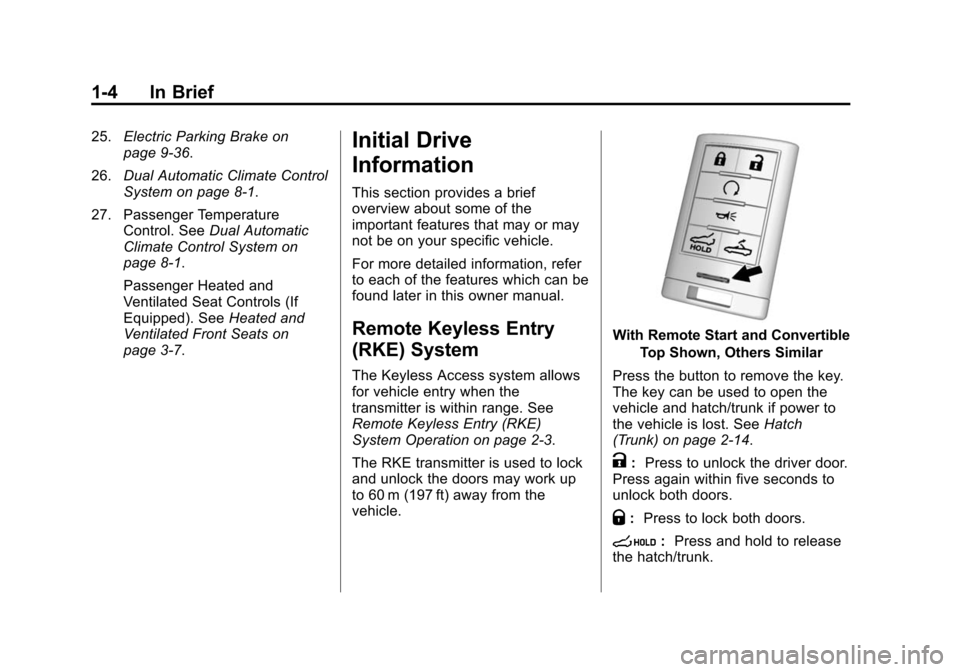
With Remote Start and Convertible
Top Shown, Others Similar
Press the button to remove the key.
The key can be used to open the
vehicle and hatch/trunk if power to
the vehicle is lost. See Hatch
(Trunk) on page 2-14.
K: Press to unlock the driver door.
Press again within five seconds to
unlock both doors.
Q: Press to lock both doors.
s:Press and hold to release
the hatch/trunk.
Page 14 of 393
Black plate (7,1)Chevrolet Corvette Owner Manual (GMNA-Localizing-U.S./Canada/Mexico-
7576293) - 2015 - crc - 10/31/14
In Brief 1-7
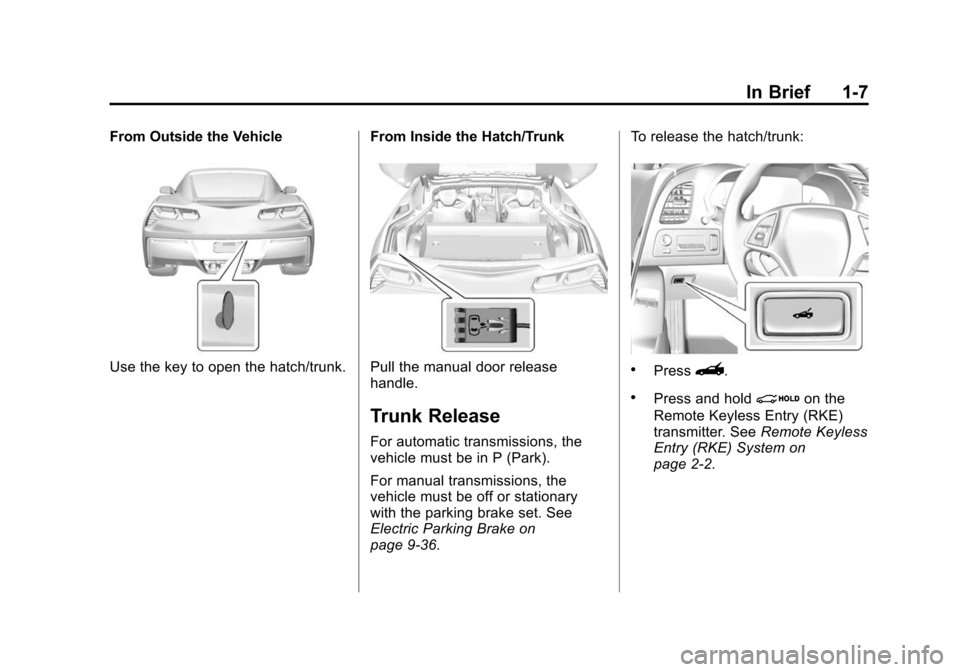
From Outside the Vehicle
Use the key to open the hatch/trunk.From Inside the Hatch/TrunkPull the manual door release
handle.
Trunk Release
For automatic transmissions, the
vehicle must be in P (Park).
For manual transmissions, the
vehicle must be off or stationary
with the parking brake set. See
Electric Parking Brake on
page 9-36.To release the hatch/trunk:
.Press}.
.Press and holdion the
Remote Keyless Entry (RKE)
transmitter. See Remote Keyless
Entry (RKE) System on
page 2-2.
Page 17 of 393
Black plate (10,1)Chevrolet Corvette Owner Manual (GMNA-Localizing-U.S./Canada/Mexico-
7576293) - 2015 - crc - 10/31/14
1-10 In Brief
Heated and Ventilated
Seats
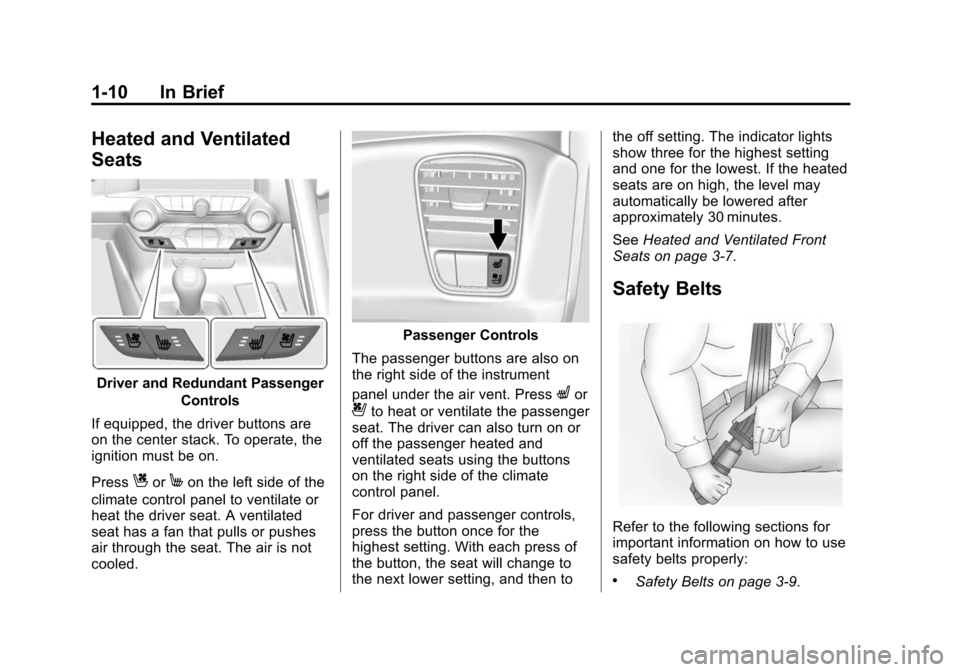
Driver and Redundant PassengerControls
If equipped, the driver buttons are
on the center stack. To operate, the
ignition must be on.
Press
CorMon the left side of the
climate control panel to ventilate or
heat the driver seat. A ventilated
seat has a fan that pulls or pushes
air through the seat. The air is not
cooled.
Passenger Controls
The passenger buttons are also on
the right side of the instrument
panel under the air vent. Press
Lor
{to heat or ventilate the passenger
seat. The driver can also turn on or
off the passenger heated and
ventilated seats using the buttons
on the right side of the climate
control panel.
For driver and passenger controls,
press the button once for the
highest setting. With each press of
the button, the seat will change to
the next lower setting, and then to the off setting. The indicator lights
show three for the highest setting
and one for the lowest. If the heated
seats are on high, the level may
automatically be lowered after
approximately 30 minutes.
See
Heated and Ventilated Front
Seats on page 3-7.
Safety Belts
Refer to the following sections for
important information on how to use
safety belts properly:
.Safety Belts on page 3-9.
Page 19 of 393
Black plate (12,1)Chevrolet Corvette Owner Manual (GMNA-Localizing-U.S./Canada/Mexico-
7576293) - 2015 - crc - 10/31/14
1-12 In Brief
To adjust the mirrors:
1. Press L (Left) or R (Right) toselect the mirror.
2. Press the control pad to adjust the mirror.
3. Return the switch to the center to deselect the mirror.
See Power Mirrors on page 2-20.
If the vehicle has the memory
feature, a preferred mirror position
can be stored. See Memory Seats
on page 3-4.
To fold, pull the mirror toward the
vehicle. Push the mirror outward to
return it to the original position.
Interior Mirror
Adjustment
Adjust the rearview mirror to clearly
view the area behind the vehicle. Manual Rearview Mirror
To avoid glare of the headlamps
from behind, push the tab forward
for daytime and pull it rearward for
nighttime use.
Automatic Dimming Rearview
Mirror
If equipped, the mirror automatically
reduces the glare of the headlamps
from behind. The dimming feature
comes on when the vehicle is
started.
See
Automatic Dimming Rearview
Mirror on page 2-21.
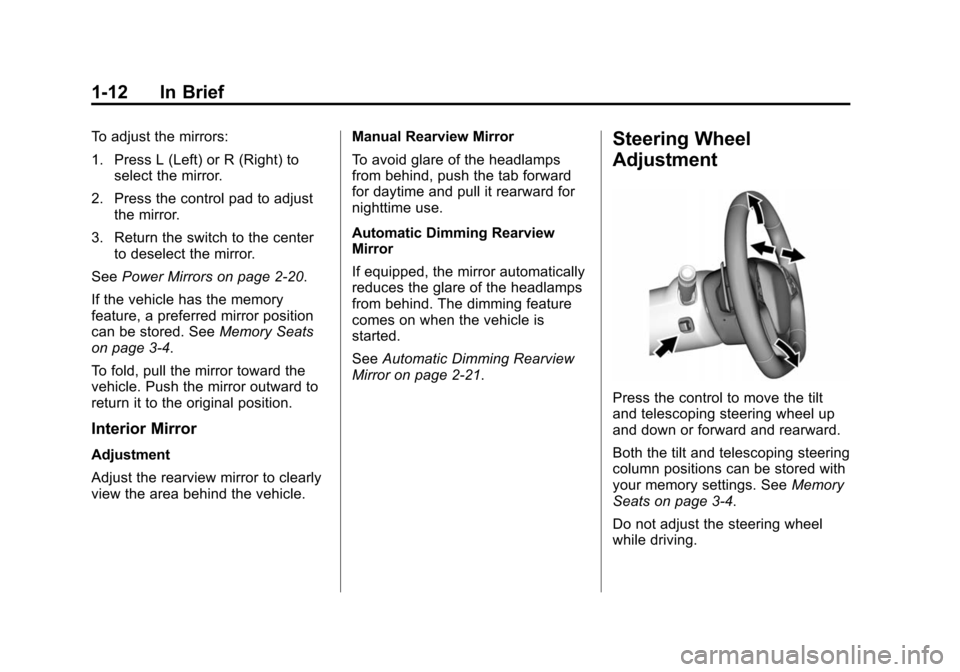
Steering Wheel
Adjustment
Press the control to move the tilt
and telescoping steering wheel up
and down or forward and rearward.
Both the tilt and telescoping steering
column positions can be stored with
your memory settings. See Memory
Seats on page 3-4.
Do not adjust the steering wheel
while driving.
Page 20 of 393
Black plate (13,1)Chevrolet Corvette Owner Manual (GMNA-Localizing-U.S./Canada/Mexico-
7576293) - 2015 - crc - 10/31/14
In Brief 1-13
Interior Lighting
Courtesy Lamps
When any door or the hatch/trunk is
opened, the interior lamps will come
on, unless it is bright outside.
To turn the courtesy lamps on or off,
turn the instrument panel brightness
knob completely clockwise or
counterclockwise.
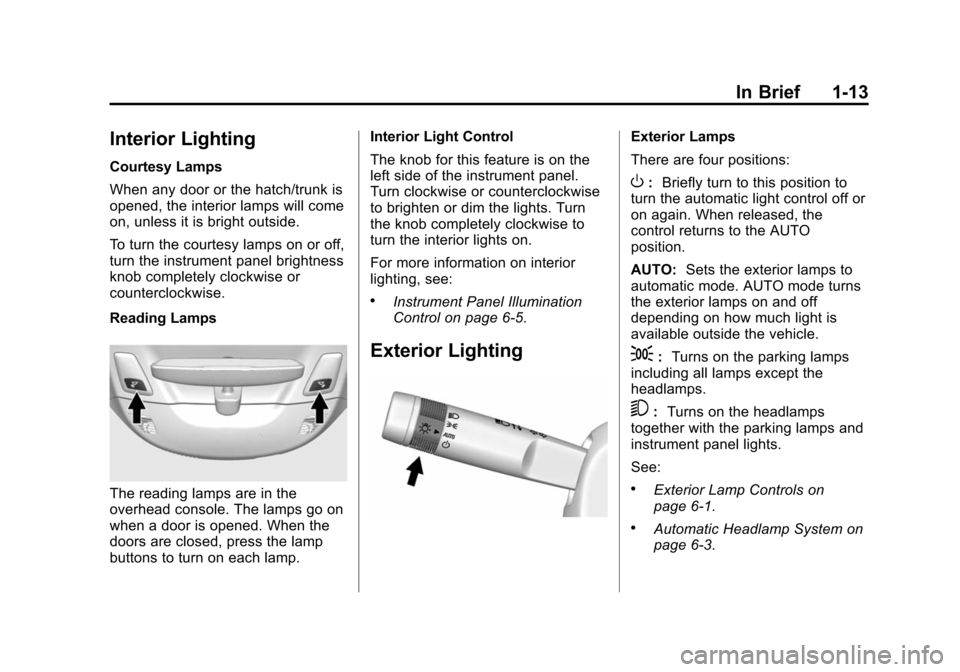
Reading Lamps
The reading lamps are in the
overhead console. The lamps go on
when a door is opened. When the
doors are closed, press the lamp
buttons to turn on each lamp.Interior Light Control
The knob for this feature is on the
left side of the instrument panel.
Turn clockwise or counterclockwise
to brighten or dim the lights. Turn
the knob completely clockwise to
turn the interior lights on.
For more information on interior
lighting, see:
.Instrument Panel Illumination
Control on page 6-5.
Exterior Lighting
Exterior Lamps
There are four positions:
O:
Briefly turn to this position to
turn the automatic light control off or
on again. When released, the
control returns to the AUTO
position.
AUTO: Sets the exterior lamps to
automatic mode. AUTO mode turns
the exterior lamps on and off
depending on how much light is
available outside the vehicle.
;: Turns on the parking lamps
including all lamps except the
headlamps.
5: Turns on the headlamps
together with the parking lamps and
instrument panel lights.
See:
.Exterior Lamp Controls on
page 6-1.
.Automatic Headlamp System on
page 6-3.
Page 22 of 393
Black plate (15,1)Chevrolet Corvette Owner Manual (GMNA-Localizing-U.S./Canada/Mexico-
7576293) - 2015 - crc - 10/31/14
In Brief 1-15
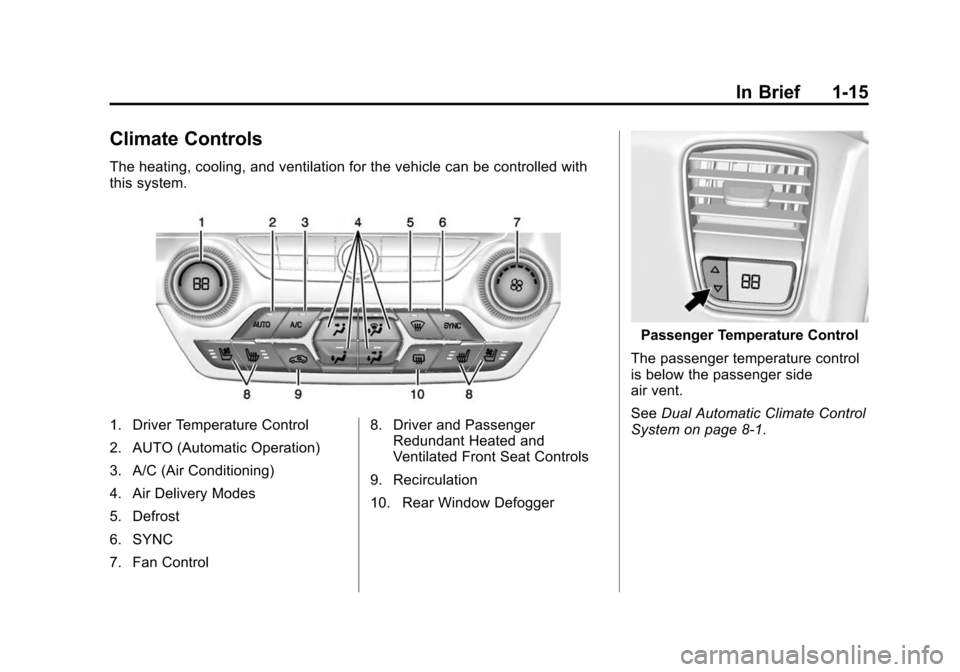
Climate Controls
The heating, cooling, and ventilation for the vehicle can be controlled with
this system.
1. Driver Temperature Control
2. AUTO (Automatic Operation)
3. A/C (Air Conditioning)
4. Air Delivery Modes
5. Defrost
6. SYNC
7. Fan Control8. Driver and Passenger
Redundant Heated and
Ventilated Front Seat Controls
9. Recirculation
10. Rear Window Defogger
Passenger Temperature Control
The passenger temperature control
is below the passenger side
air vent.
See Dual Automatic Climate Control
System on page 8-1.
Page 23 of 393
Black plate (16,1)Chevrolet Corvette Owner Manual (GMNA-Localizing-U.S./Canada/Mexico-
7576293) - 2015 - crc - 10/31/14
1-16 In Brief
Transmission
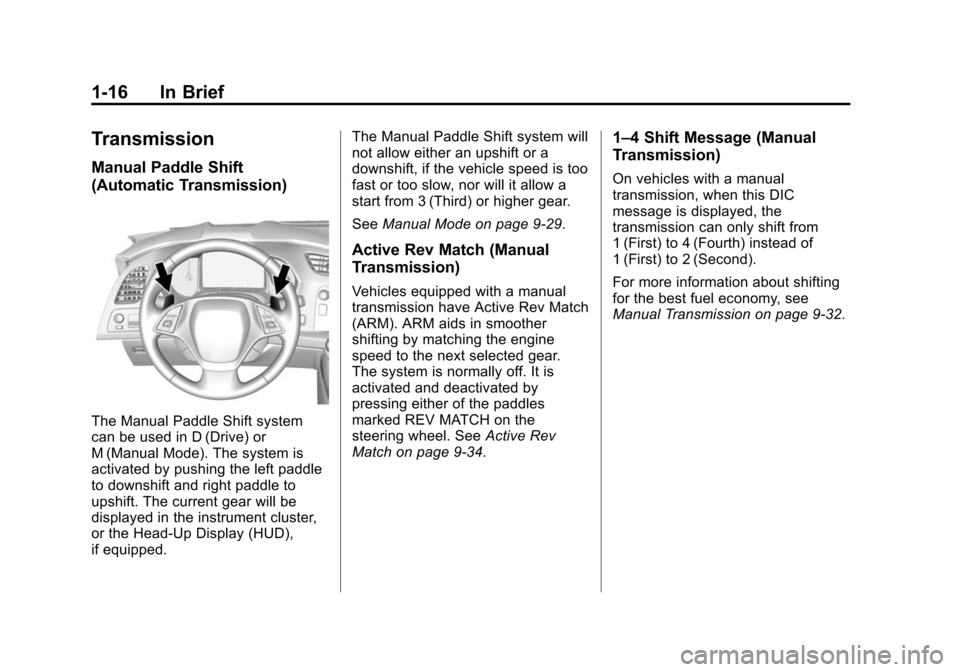
Manual Paddle Shift
(Automatic Transmission)
The Manual Paddle Shift system
can be used in D (Drive) or
M (Manual Mode). The system is
activated by pushing the left paddle
to downshift and right paddle to
upshift. The current gear will be
displayed in the instrument cluster,
or the Head-Up Display (HUD),
if equipped.The Manual Paddle Shift system will
not allow either an upshift or a
downshift, if the vehicle speed is too
fast or too slow, nor will it allow a
start from 3 (Third) or higher gear.
See
Manual Mode on page 9-29.
Active Rev Match (Manual
Transmission)
Vehicles equipped with a manual
transmission have Active Rev Match
(ARM). ARM aids in smoother
shifting by matching the engine
speed to the next selected gear.
The system is normally off. It is
activated and deactivated by
pressing either of the paddles
marked REV MATCH on the
steering wheel. See Active Rev
Match on page 9-34.
1–4 Shift Message (Manual
Transmission)
On vehicles with a manual
transmission, when this DIC
message is displayed, the
transmission can only shift from
1 (First) to 4 (Fourth) instead of
1 (First) to 2 (Second).
For more information about shifting
for the best fuel economy, see
Manual Transmission on page 9-32.
Page 26 of 393
Black plate (19,1)Chevrolet Corvette Owner Manual (GMNA-Localizing-U.S./Canada/Mexico-
7576293) - 2015 - crc - 10/31/14
In Brief 1-19
available to assist you with
programming the Universal Remote
system.
SeeUniversal Remote System on
page 5-52.
Roof Panel
If equipped with a removable roof
panel, there are three release
latches. Two are at the front of the
roof panel and one is at the rear of
the roof panel. See “Removing the
Roof Panel” underRoof Panel on
page 2-24.
Help may be needed to remove the
roof panel. Always store the roof
panel properly in the rear storage
compartment. For more information:
.See
“Storing the Roof Panel”
under Roof Panel on page 2-24.
.See“Installing the Roof Panel”
under Roof Panel on page 2-24.
Convertible
If equipped, the convertible top can
be automatically opened and
closed. For step-by-step
instructions, see Convertible Top on
page 2-28.
Performance and
Maintenance
Traction Control/
Electronic Stability
Control
The traction control system limits
wheel spin. The system turns on
automatically every time the vehicle
is started.
StabiliTrak is a computer controlled
system that helps the driver
maintain directional control of the
vehicle in difficult driving conditions.
This is accomplished by selectively
applying any one of the vehicle’s
brakes. The system turns on
automatically every time the vehicle
is started.
.To turn off traction control,
press and release the TCS/
StabiliTrak
gbutton on the
center console.
iilluminates in
the instrument cluster.