ECU CHEVROLET CORVETTE 2016 7.G Owner's Manual
[x] Cancel search | Manufacturer: CHEVROLET, Model Year: 2016, Model line: CORVETTE, Model: CHEVROLET CORVETTE 2016 7.GPages: 351, PDF Size: 6.02 MB
Page 84 of 351
Chevrolet Corvette Owner Manual (GMNA-Localizing-U.S./Canada/Mexico-
9085364) - 2016 - crc - 9/15/15
Seats and Restraints 83
Keep in mind that an unsecured
child restraint can move around in a
collision or sudden stop and injure
people in the vehicle. Be sure to
properly secure any child restraint in
the vehicle—even when no child is
in it.
In some areas of the United States
and Canada, Certified Child
Passenger Safety Technicians
(CPSTs) are available to inspect
and demonstrate how to correctly
use and install child restraints. In
the U.S., refer to the National
Highway Traffic Safety
Administration (NHTSA) website to
locate the nearest child safety seat
inspection station. For CPST
availability in Canada, check with
Transport Canada or the Provincial
Ministry of Transportation office.Securing the Child Within the
Child Restraint
{Warning
A child can be seriously injured or
killed in a crash if the child is not
properly secured in the child
restraint. Secure the child
properly following the instructions
that came with that child restraint.
Lower Anchors and
Tethers for Children
(LATCH System)
Some child restraints have a LATCH
system. As part of the LATCH
system, your child restraint may
have lower attachments and/or a top
tether. The LATCH system can help
hold the child restraint in place
during driving or in a crash. Some
vehicles have lower and/or top
tether anchors designed to secure a
child restraint with lower
attachments and/or a top tether. Some child restraints with a top
tether are designed to be used
whether the top tether is anchored
or not. Other child restraints require
that the top tether be anchored.
A national or local law may require
that the top tether be anchored.
In Canada, the law requires that
forward-facing child restraints have
a top tether, and that the tether be
attached.
Your vehicle does not have lower
anchors or top tether anchors to
secure a child restraint with the
LATCH system. If a national or local
law requires that your top tether be
anchored, do not use a child
restraint in this vehicle because a
top tether cannot be properly
anchored. You must use the safety
belts to secure your child restraint in
this vehicle, unless a national or
local law requires that the top tether
be anchored. Refer to the child
restraint instructions and
instructions in this manual for
securing a child restraint using the
vehicle's safety belts. See
Securing
Child Restraints 084.
Page 85 of 351
Chevrolet Corvette Owner Manual (GMNA-Localizing-U.S./Canada/Mexico-
9085364) - 2016 - crc - 9/15/15
84 Seats and Restraints
Securing Child Restraints
This vehicle has airbags. In
addition, the vehicle has a
passenger sensing system which is
designed to turn off the front
outboard passenger frontal airbag
under certain conditions. See
Passenger Sensing System071
and Passenger Airbag Status
Indicator 0105 for more information,
including important safety
information.
Never put a rear-facing child seat in
the front. This is because the risk to
the rear-facing child is so great if the
airbag deploys.
{Warning
A child in a rear-facing child
restraint can be seriously injured
or killed if the front outboard
passenger frontal airbag inflates.
This is because the back of the
rear-facing child restraint would
be very close to the inflating
airbag. A child in a forward-facing
(Continued)
Warning (Continued)
child restraint can be seriously
injured or killed if the front
outboard passenger frontal airbag
inflates and the passenger seat is
in a forward position.
Even if the passenger sensing
system has turned off the front
outboard passenger frontal
airbag, no system is fail-safe. No
one can guarantee that an airbag
will not deploy under some
unusual circumstance, even
though it is turned off.
Secure rear-facing child restraints
in a rear seat, even if the airbag
is off. If you secure a
forward-facing child restraint in
the front seat, always move the
front passenger seat as far back
as it will go. It is better to secure
the child restraint in a rear seat.
SeePassenger Sensing System
0 71 for additional information. Rear-facing child restraints should
not be installed in the vehicle, even
if the airbag is off.
Do not secure a child seat in a
position without a top tether anchor
if a national or local law requires
that the top tether be anchored, or if
the instructions that come with the
child restraint say that the top strap
must be anchored.
In Canada, the law requires that
forward-facing child restraints have
a top tether, and that the tether be
attached.
When using the lap-shoulder belt to
secure the child restraint in this
position, follow the instructions that
came with the child restraint and the
following instructions:
1. Move the seat as far back as it will go before securing the
forward-facing child restraint.
When the passenger sensing
system has turned off the front
outboard passenger frontal
airbag, the off indicator on the
passenger airbag status
indicator should light and stay
Page 86 of 351
Chevrolet Corvette Owner Manual (GMNA-Localizing-U.S./Canada/Mexico-
9085364) - 2016 - crc - 9/15/15
Seats and Restraints 85
lit when you start the vehicle.
SeePassenger Airbag Status
Indicator 0105.
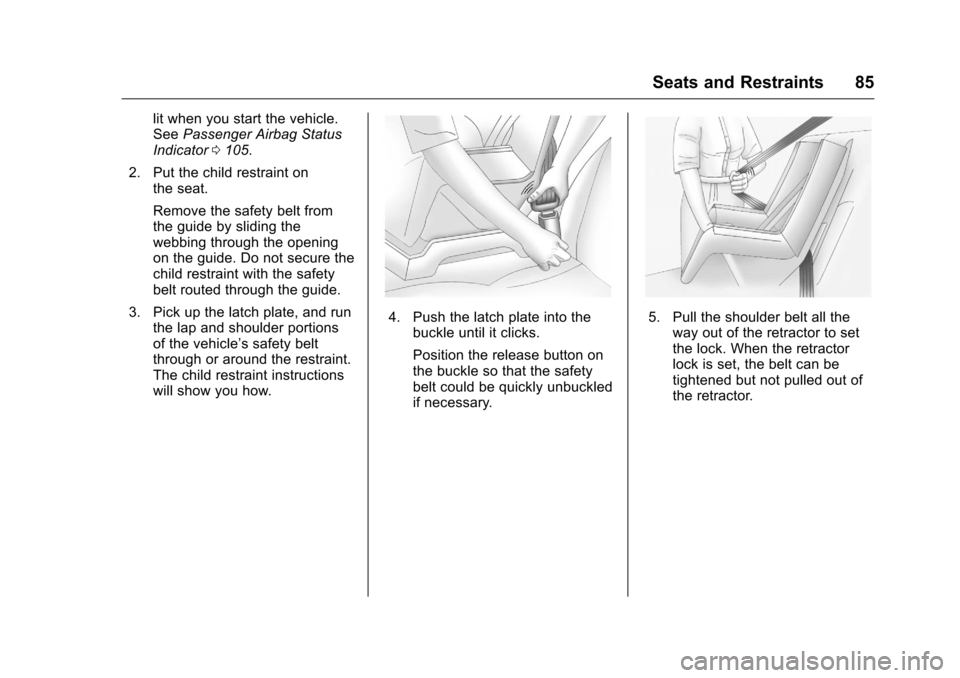
2. Put the child restraint on the seat.
Remove the safety belt from
the guide by sliding the
webbing through the opening
on the guide. Do not secure the
child restraint with the safety
belt routed through the guide.
3. Pick up the latch plate, and run the lap and shoulder portions
of the vehicle’s safety belt
through or around the restraint.
The child restraint instructions
will show you how.
4. Push the latch plate into the
buckle until it clicks.
Position the release button on
the buckle so that the safety
belt could be quickly unbuckled
if necessary.5. Pull the shoulder belt all theway out of the retractor to set
the lock. When the retractor
lock is set, the belt can be
tightened but not pulled out of
the retractor.
Page 87 of 351
Chevrolet Corvette Owner Manual (GMNA-Localizing-U.S./Canada/Mexico-
9085364) - 2016 - crc - 9/15/15
86 Seats and Restraints
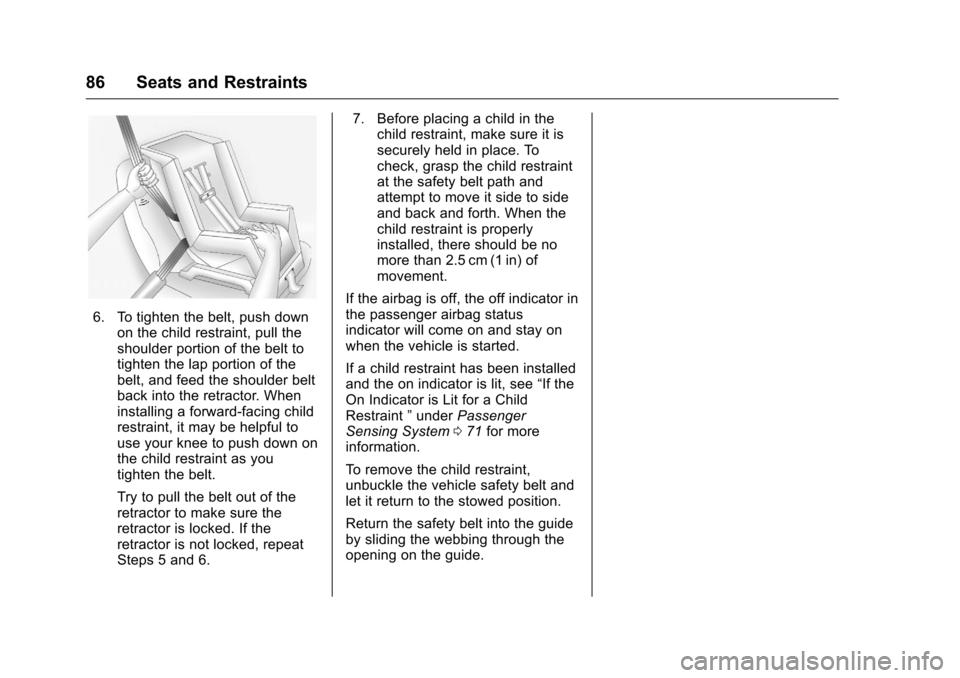
6. To tighten the belt, push downon the child restraint, pull the
shoulder portion of the belt to
tighten the lap portion of the
belt, and feed the shoulder belt
back into the retractor. When
installing a forward-facing child
restraint, it may be helpful to
use your knee to push down on
the child restraint as you
tighten the belt.
Try to pull the belt out of the
retractor to make sure the
retractor is locked. If the
retractor is not locked, repeat
Steps 5 and 6. 7. Before placing a child in the
child restraint, make sure it is
securely held in place. To
check, grasp the child restraint
at the safety belt path and
attempt to move it side to side
and back and forth. When the
child restraint is properly
installed, there should be no
more than 2.5 cm (1 in) of
movement.
If the airbag is off, the off indicator in
the passenger airbag status
indicator will come on and stay on
when the vehicle is started.
If a child restraint has been installed
and the on indicator is lit, see “If the
On Indicator is Lit for a Child
Restraint ”under Passenger
Sensing System 071 for more
information.
To remove the child restraint,
unbuckle the vehicle safety belt and
let it return to the stowed position.
Return the safety belt into the guide
by sliding the webbing through the
opening on the guide.
Page 91 of 351
Chevrolet Corvette Owner Manual (GMNA-Localizing-U.S./Canada/Mexico-
9085364) - 2016 - crc - 9/15/15
90 Storage
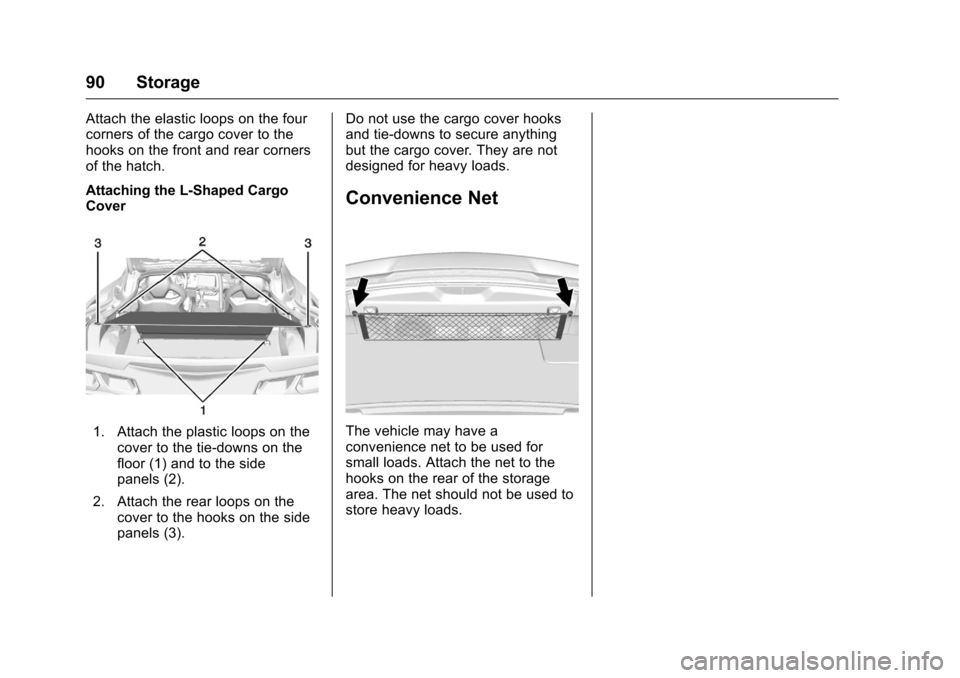
Attach the elastic loops on the four
corners of the cargo cover to the
hooks on the front and rear corners
of the hatch.
Attaching the L-Shaped Cargo
Cover
1. Attach the plastic loops on thecover to the tie-downs on the
floor (1) and to the side
panels (2).
2. Attach the rear loops on the cover to the hooks on the side
panels (3). Do not use the cargo cover hooks
and tie-downs to secure anything
but the cargo cover. They are not
designed for heavy loads.
Convenience Net
The vehicle may have a
convenience net to be used for
small loads. Attach the net to the
hooks on the rear of the storage
area. The net should not be used to
store heavy loads.
Page 92 of 351
Chevrolet Corvette Owner Manual (GMNA-Localizing-U.S./Canada/Mexico-
9085364) - 2016 - crc - 9/15/15
Instruments and Controls 91
Instruments and
Controls
Controls
Steering Wheel Adjustment . . . . 92
Steering Wheel Controls . . . . . . . 92
Horn . . . . . . . . . . . . . . . . . . . . . . . . . . . 92
Windshield Wiper/Washer . . . . . . 92
Compass . . . . . . . . . . . . . . . . . . . . . . 93
Clock . . . . . . . . . . . . . . . . . . . . . . . . . . 94
Power Outlets . . . . . . . . . . . . . . . . . 94
Warning Lights, Gauges, and
Indicators
Warning Lights, Gauges, andIndicators . . . . . . . . . . . . . . . . . . . . 95
Instrument Cluster . . . . . . . . . . . . . 96
Speedometer . . . . . . . . . . . . . . . . . 101
Odometer . . . . . . . . . . . . . . . . . . . . . 101
Trip Odometer . . . . . . . . . . . . . . . . 101
Tachometer . . . . . . . . . . . . . . . . . . . 101
Fuel Gauge . . . . . . . . . . . . . . . . . . . 101
Boost Gauge . . . . . . . . . . . . . . . . . 102
Engine Coolant Temperature Gauge . . . . . . . . . . . . . . . . . . . . . . 103
Safety Belt Reminders . . . . . . . . 104
Airbag Readiness Light . . . . . . . 104
Passenger Airbag Status Indicator . . . . . . . . . . . . . . . . . . . . 105 Charging System Light . . . . . . . 106
Malfunction Indicator Lamp
(Check Engine Light) . . . . . . . . 106
Brake System Warning Light . . . . . . . . . . . . . . . . . . . . . . . . 108
Electric Parking Brake Light . . . . . . . . . . . . . . . . . . . . . . . . 108
Service Electric Parking Brake Light . . . . . . . . . . . . . . . . . . . . . . . . 109
Antilock Brake System (ABS) Warning Light . . . . . . . . . . . . . . . 109
Gear Shifting Light (Canada and Mexico Only) . . . . . . . . . . . 109
Traction Off Light . . . . . . . . . . . . . 110
Traction Control System (TCS)/ Electronic Stability Control
Light . . . . . . . . . . . . . . . . . . . . . . . . 110
Electronic Stability Control (ESC) Off Light . . . . . . . . . . . . . . 110
Engine Coolant Temperature Warning Light . . . . . . . . . . . . . . . 111
Tire Pressure Light . . . . . . . . . . . 111
Engine Oil Pressure Light . . . . . 111
Low Fuel Warning Light . . . . . . . 112
Security Light . . . . . . . . . . . . . . . . . 112
High-Beam On Light . . . . . . . . . . 112
Lamps On Reminder . . . . . . . . . . 113
Cruise Control Light . . . . . . . . . . 113
Door Ajar Light . . . . . . . . . . . . . . . 113
Information Displays
Driver Information Center (DIC) . . . . . . . . . . . . . . . . 113
Head-Up Display (HUD) . . . . . . 115
Vehicle Messages
Vehicle Messages . . . . . . . . . . . . 120
Battery Voltage and Charging Messages . . . . . . . . . . . . . . . . . . . 120
Brake System Messages . . . . . 120
Compass Messages . . . . . . . . . . 121
Convertible Top Messages . . . 121
Cruise Control Messages . . . . . 122
Door Ajar Messages . . . . . . . . . . 122
Engine Cooling System Messages . . . . . . . . . . . . . . . . . . . 123
Engine Oil Messages . . . . . . . . . 123
Engine Power Messages . . . . . 124
Fuel System Messages . . . . . . . 124
Key and Lock Messages . . . . . 124
Lamp Messages . . . . . . . . . . . . . . 125
Ride Control System Messages . . . . . . . . . . . . . . . . . . . 125
Airbag System Messages . . . . 127
Security Messages . . . . . . . . . . . 127
Service Vehicle Messages . . . . 127
Starting the Vehicle Messages . . . . . . . . . . . . . . . . . . . 128
Tire Messages . . . . . . . . . . . . . . . . 128
Transmission Messages . . . . . . 129
Page 113 of 351
Chevrolet Corvette Owner Manual (GMNA-Localizing-U.S./Canada/Mexico-
9085364) - 2016 - crc - 9/15/15
112 Instruments and Controls
Caution (Continued)
and the oil pressure is still low,
have the vehicle serviced. Always
follow the maintenance schedule
for changing engine oil.
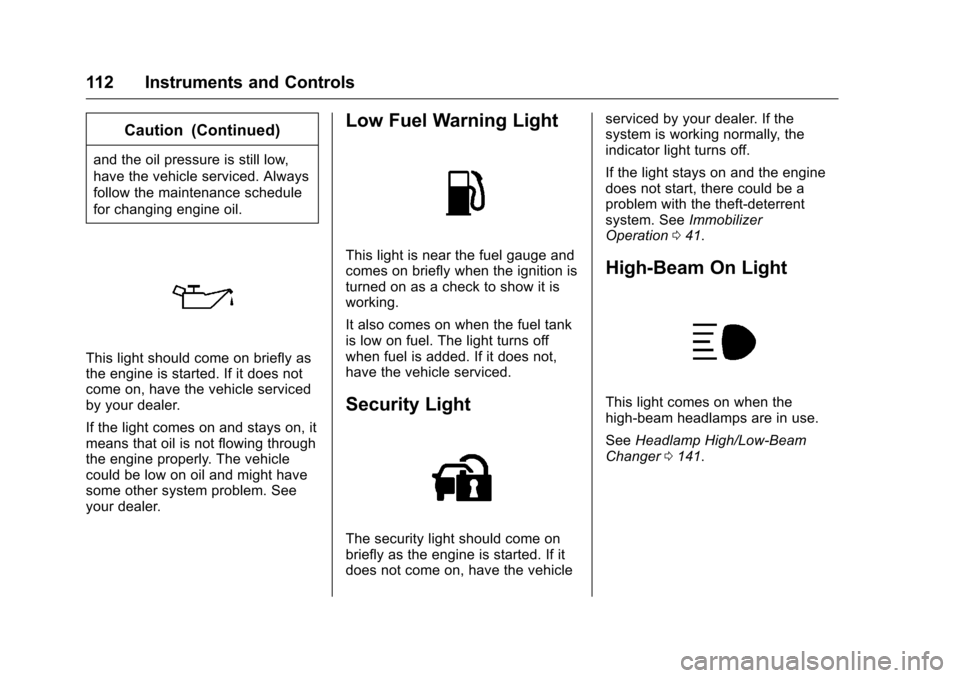
This light should come on briefly as
the engine is started. If it does not
come on, have the vehicle serviced
by your dealer.
If the light comes on and stays on, it
means that oil is not flowing through
the engine properly. The vehicle
could be low on oil and might have
some other system problem. See
your dealer.
Low Fuel Warning Light
This light is near the fuel gauge and
comes on briefly when the ignition is
turned on as a check to show it is
working.
It also comes on when the fuel tank
is low on fuel. The light turns off
when fuel is added. If it does not,
have the vehicle serviced.
Security Light
The security light should come on
briefly as the engine is started. If it
does not come on, have the vehicleserviced by your dealer. If the
system is working normally, the
indicator light turns off.
If the light stays on and the engine
does not start, there could be a
problem with the theft-deterrent
system. See
Immobilizer
Operation 041.
High-Beam On Light
This light comes on when the
high-beam headlamps are in use.
See Headlamp High/Low-Beam
Changer 0141.
Page 114 of 351
Chevrolet Corvette Owner Manual (GMNA-Localizing-U.S./Canada/Mexico-
9085364) - 2016 - crc - 9/15/15
Instruments and Controls 113
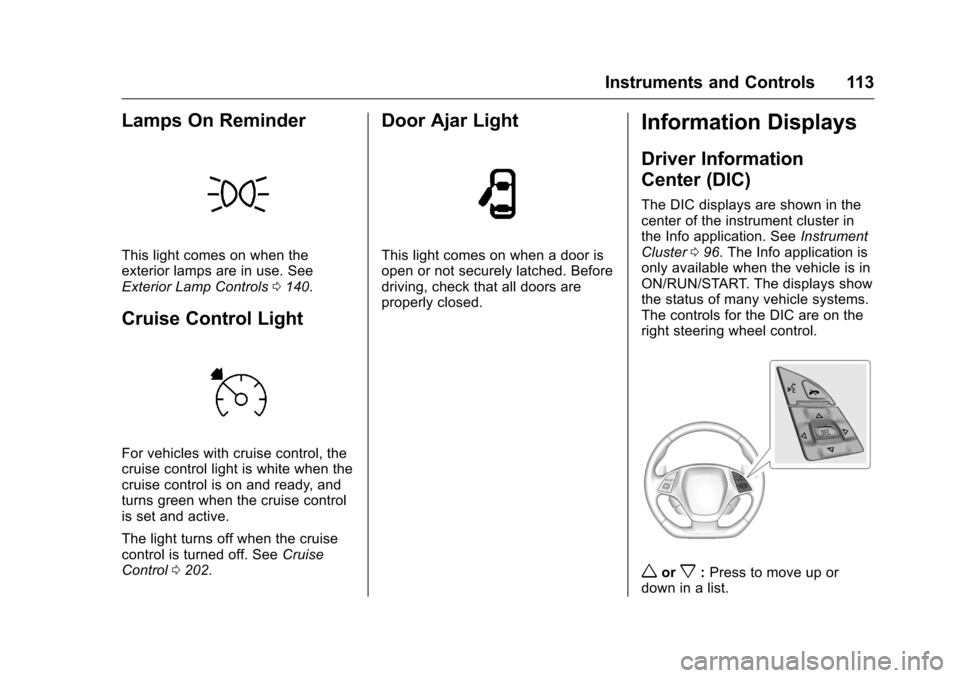
Lamps On Reminder
This light comes on when the
exterior lamps are in use. See
Exterior Lamp Controls0140.
Cruise Control Light
For vehicles with cruise control, the
cruise control light is white when the
cruise control is on and ready, and
turns green when the cruise control
is set and active.
The light turns off when the cruise
control is turned off. See Cruise
Control 0202.
Door Ajar Light
This light comes on when a door is
open or not securely latched. Before
driving, check that all doors are
properly closed.
Information Displays
Driver Information
Center (DIC)
The DIC displays are shown in the
center of the instrument cluster in
the Info application. See Instrument
Cluster 096. The Info application is
only available when the vehicle is in
ON/RUN/START. The displays show
the status of many vehicle systems.
The controls for the DIC are on the
right steering wheel control.
worx: Press to move up or
down in a list.
Page 122 of 351
Chevrolet Corvette Owner Manual (GMNA-Localizing-U.S./Canada/Mexico-
9085364) - 2016 - crc - 9/15/15
Instruments and Controls 121
STEP ON BRAKE TO
RELEASE PARK BRAKE
This message is displayed if you
attempt to release the Electric
Parking Brake without the brake
pedal applied. SeeElectric Parking
Brake 0190.
Compass Messages
Dashes may be displayed if the
vehicle temporarily loses
communication with the Global
Positioning System (GPS).
Convertible Top
Messages
The following messages are for
vehicles with a power
convertible top.
ATTACH TRUNK PARTITION
TO OPERATE TOP
This message displays and a sound
will be heard if the trunk partition is
not in place. Open the hatch/trunk
and make sure the trunk partition is
secure and no objects are on the
trunk partition.
BATTERY VOLTAGE TOO LOW
–TOP DISABLED
This message displays when the
battery voltage is too low to operate
the convertible top.
CLOSE TRUNK TO MOVE TOP
This message displays if the trunk is
open while you are trying to operate
the convertible top. Make sure the
trunk is closed before operating the
convertible top.
FOLDING TOP MOTION
COMPLETE
This message displays when the top
successfully completes an open/
close cycle.
FOLDING TOP NOT SECURE
COMPLETE TOP MOTION
This message occurs if the top is
not secure. Several beeps will
sound. Complete the power open or
power close cycle for the top. If it is
not possible to move the top to a
fully open or fully closed position, make sure that all objects are clear
of the path of the top system
components.
ONLY MANUAL OPERATION
OF TOP POSSIBLE
This message indicates that the
position of the top cannot be fully
determined by the power convertible
top controls. Try moving the top in
the other direction. This message
will also be displayed if a fault is
detected by the convertible top
controls. See
“Manual Movement of
Top” under Convertible Top 049.
REDUCE VEHICLE SPEED TO
OPERATE TOP
This message is displayed when the
vehicle speed exceeds or is
approaching the convertible top
speed cut off.
TEMPERATURE TOO LOW –
TOP DISABLED
This message displays and a sound
will be heard when the power
convertible top button is pressed
and it is too cold to operate the
power convertible top. Move the
Page 123 of 351
Chevrolet Corvette Owner Manual (GMNA-Localizing-U.S./Canada/Mexico-
9085364) - 2016 - crc - 9/15/15
122 Instruments and Controls
vehicle to a warmer location and
wait for the vehicle temperature to
rise. This may take several hours
depending on the initial vehicle
temperature and the temperature of
the new location.
TOP NOT SECURE
This message displays when the
power convertible top is not
completely opened or closed. Press
and hold the convertible top button
until the top is fully opened or
closed. This is indicated by the
FOLDING TOP MOTION
COMPLETE message being
displayed and an audible indicator.
TOP POWERING DOWN
COMPLETE TOP MOTION
This message displays when the
power convertible top can no longer
hold the top in an intermediate
position. Top system components
may move during this time based on
external forces. Keep objects clear
from the normal path of movement
for the top system components.
TOP SYSTEM OVERHEATED,
PLEASE WAIT
This message displays and a sound
will be heard when the power
convertible top button is pressed
and the power convertible top pump
motor temperature is overheated.
Wait for the power convertible top
pump motor to cool down before
using the power convertible top.
VALET SWITCH ACTIVE–TOP
DISABLED
This message displays when Valet
Mode is active.
Cruise Control Messages
CRUISE SET TO XXX
This message displays when the
cruise control is set and shows the
speed it was set to. See Cruise
Control 0202.
Door Ajar Messages
DOOR OPEN
A door open symbol will display on
the DIC showing which door is
open. If the vehicle has been shifted
out of P (Park), a DOOR OPEN
message will also be displayed.
If the shift lever is in M (Manual
Mode), the DOOR OPEN message
will display if the vehicle starts to
move. Close the door completely.
HOOD OPEN
This message will display along with
a hood open symbol when the hood
is open. Close the hood completely.
TRUNK OPEN
This message will display along with
a symbol when the trunk is open.
Close the trunk completely.