trunk CHEVROLET CORVETTE 2016 7.G Owner's Manual
[x] Cancel search | Manufacturer: CHEVROLET, Model Year: 2016, Model line: CORVETTE, Model: CHEVROLET CORVETTE 2016 7.GPages: 351, PDF Size: 6.02 MB
Page 89 of 351
Chevrolet Corvette Owner Manual (GMNA-Localizing-U.S./Canada/Mexico-
9085364) - 2016 - crc - 9/15/15
88 Storage
To open, press the button.
If equipped, the glove box locks
when Valet Mode is enabled. See
Vehicle Personalization0130.
Cupholders
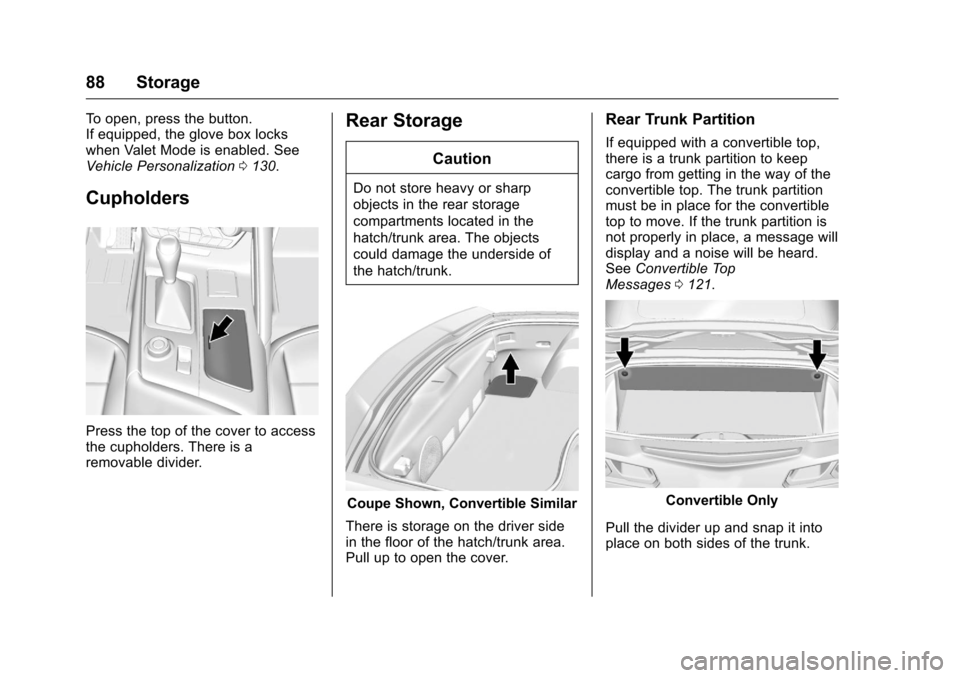
Press the top of the cover to access
the cupholders. There is a
removable divider.
Rear Storage
Caution
Do not store heavy or sharp
objects in the rear storage
compartments located in the
hatch/trunk area. The objects
could damage the underside of
the hatch/trunk.
Coupe Shown, Convertible Similar
There is storage on the driver side
in the floor of the hatch/trunk area.
Pull up to open the cover.
Rear Trunk Partition
If equipped with a convertible top,
there is a trunk partition to keep
cargo from getting in the way of the
convertible top. The trunk partition
must be in place for the convertible
top to move. If the trunk partition is
not properly in place, a message will
display and a noise will be heard.
See Convertible Top
Messages 0121.
Convertible Only
Pull the divider up and snap it into
place on both sides of the trunk.
Page 90 of 351
Chevrolet Corvette Owner Manual (GMNA-Localizing-U.S./Canada/Mexico-
9085364) - 2016 - crc - 9/15/15
Storage 89
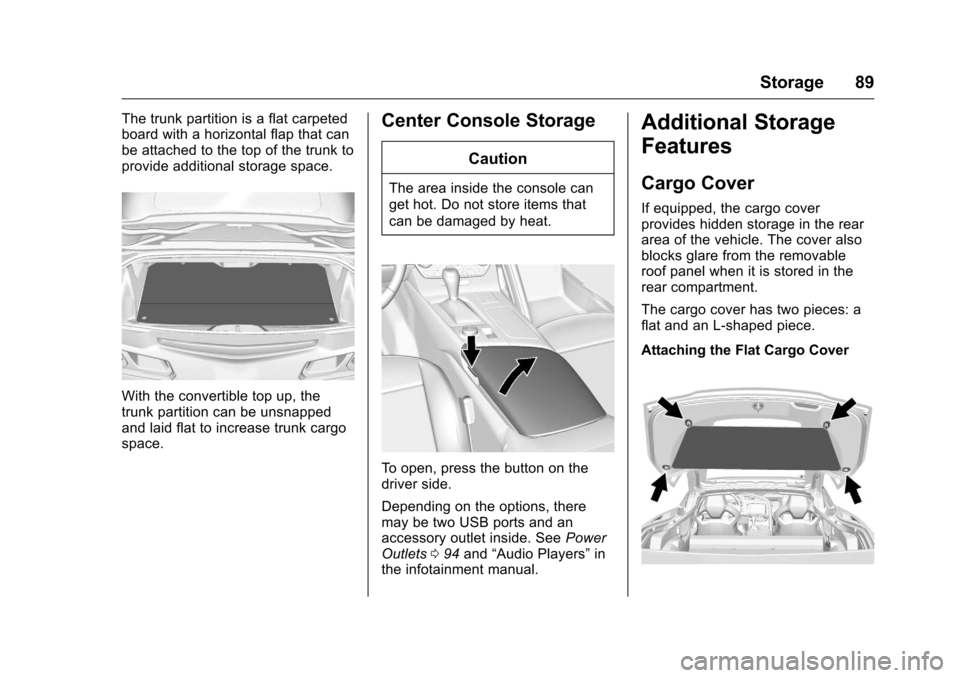
The trunk partition is a flat carpeted
board with a horizontal flap that can
be attached to the top of the trunk to
provide additional storage space.
With the convertible top up, the
trunk partition can be unsnapped
and laid flat to increase trunk cargo
space.
Center Console Storage
Caution
The area inside the console can
get hot. Do not store items that
can be damaged by heat.
To open, press the button on the
driver side.
Depending on the options, there
may be two USB ports and an
accessory outlet inside. SeePower
Outlets 094 and “Audio Players” in
the infotainment manual.
Additional Storage
Features
Cargo Cover
If equipped, the cargo cover
provides hidden storage in the rear
area of the vehicle. The cover also
blocks glare from the removable
roof panel when it is stored in the
rear compartment.
The cargo cover has two pieces: a
flat and an L-shaped piece.
Attaching the Flat Cargo Cover
Page 96 of 351
Chevrolet Corvette Owner Manual (GMNA-Localizing-U.S./Canada/Mexico-
9085364) - 2016 - crc - 9/15/15
Instruments and Controls 95
OFF. Use this power outlet for
plugging in the battery maintainer,
if equipped.
{Warning
Power is always supplied to the
trunk outlet. Do not leave
electrical equipment plugged in
when the vehicle is not in use
because the vehicle could catch
fire and cause injury or death.
Caution
Leaving electrical equipment
plugged in for an extended period
of time while the vehicle is off will
drain the battery. Always unplug
electrical equipment when not in
use and do not plug in equipment
that exceeds the maximum
20 amp rating.Certain electrical accessories may
not be compatible with the
accessory power outlet and could
overload vehicle or adapter fuses.
If a problem is experienced, see
your dealer.
When adding electrical equipment,
be sure to follow the proper
installation instructions included with
the equipment. See
Add-On
Electrical Equipment 0211.
It is recommended that a qualified
technician or dealer be seen for the
proper installation of your
equipment.Caution
Hanging heavy equipment from
the power outlet can cause
damage not covered by the
vehicle warranty. The power
outlets are designed for
accessory power plugs only, such
as cell phone charge cords.
Warning Lights,
Gauges, and
Indicators
Warning lights and gauges can
signal that something is wrong
before it becomes serious enough
to cause an expensive repair or
replacement. Paying attention to the
warning lights and gauges could
prevent injury.
Some warning lights come on briefly
when the engine is started to
indicate they are working. When
one of the warning lights comes on
and stays on while driving, or when
one of the gauges shows there may
be a problem, check the section that
explains what to do. Waiting to do
repairs can be costly and even
dangerous.
Page 122 of 351
Chevrolet Corvette Owner Manual (GMNA-Localizing-U.S./Canada/Mexico-
9085364) - 2016 - crc - 9/15/15
Instruments and Controls 121
STEP ON BRAKE TO
RELEASE PARK BRAKE
This message is displayed if you
attempt to release the Electric
Parking Brake without the brake
pedal applied. SeeElectric Parking
Brake 0190.
Compass Messages
Dashes may be displayed if the
vehicle temporarily loses
communication with the Global
Positioning System (GPS).
Convertible Top
Messages
The following messages are for
vehicles with a power
convertible top.
ATTACH TRUNK PARTITION
TO OPERATE TOP
This message displays and a sound
will be heard if the trunk partition is
not in place. Open the hatch/trunk
and make sure the trunk partition is
secure and no objects are on the
trunk partition.
BATTERY VOLTAGE TOO LOW
–TOP DISABLED
This message displays when the
battery voltage is too low to operate
the convertible top.
CLOSE TRUNK TO MOVE TOP
This message displays if the trunk is
open while you are trying to operate
the convertible top. Make sure the
trunk is closed before operating the
convertible top.
FOLDING TOP MOTION
COMPLETE
This message displays when the top
successfully completes an open/
close cycle.
FOLDING TOP NOT SECURE
COMPLETE TOP MOTION
This message occurs if the top is
not secure. Several beeps will
sound. Complete the power open or
power close cycle for the top. If it is
not possible to move the top to a
fully open or fully closed position, make sure that all objects are clear
of the path of the top system
components.
ONLY MANUAL OPERATION
OF TOP POSSIBLE
This message indicates that the
position of the top cannot be fully
determined by the power convertible
top controls. Try moving the top in
the other direction. This message
will also be displayed if a fault is
detected by the convertible top
controls. See
“Manual Movement of
Top” under Convertible Top 049.
REDUCE VEHICLE SPEED TO
OPERATE TOP
This message is displayed when the
vehicle speed exceeds or is
approaching the convertible top
speed cut off.
TEMPERATURE TOO LOW –
TOP DISABLED
This message displays and a sound
will be heard when the power
convertible top button is pressed
and it is too cold to operate the
power convertible top. Move the
Page 123 of 351
Chevrolet Corvette Owner Manual (GMNA-Localizing-U.S./Canada/Mexico-
9085364) - 2016 - crc - 9/15/15
122 Instruments and Controls
vehicle to a warmer location and
wait for the vehicle temperature to
rise. This may take several hours
depending on the initial vehicle
temperature and the temperature of
the new location.
TOP NOT SECURE
This message displays when the
power convertible top is not
completely opened or closed. Press
and hold the convertible top button
until the top is fully opened or
closed. This is indicated by the
FOLDING TOP MOTION
COMPLETE message being
displayed and an audible indicator.
TOP POWERING DOWN
COMPLETE TOP MOTION
This message displays when the
power convertible top can no longer
hold the top in an intermediate
position. Top system components
may move during this time based on
external forces. Keep objects clear
from the normal path of movement
for the top system components.
TOP SYSTEM OVERHEATED,
PLEASE WAIT
This message displays and a sound
will be heard when the power
convertible top button is pressed
and the power convertible top pump
motor temperature is overheated.
Wait for the power convertible top
pump motor to cool down before
using the power convertible top.
VALET SWITCH ACTIVE–TOP
DISABLED
This message displays when Valet
Mode is active.
Cruise Control Messages
CRUISE SET TO XXX
This message displays when the
cruise control is set and shows the
speed it was set to. See Cruise
Control 0202.
Door Ajar Messages
DOOR OPEN
A door open symbol will display on
the DIC showing which door is
open. If the vehicle has been shifted
out of P (Park), a DOOR OPEN
message will also be displayed.
If the shift lever is in M (Manual
Mode), the DOOR OPEN message
will display if the vehicle starts to
move. Close the door completely.
HOOD OPEN
This message will display along with
a hood open symbol when the hood
is open. Close the hood completely.
TRUNK OPEN
This message will display along with
a symbol when the trunk is open.
Close the trunk completely.
Page 145 of 351
Chevrolet Corvette Owner Manual (GMNA-Localizing-U.S./Canada/Mexico-
9085364) - 2016 - crc - 9/15/15
144 Lighting
Interior Lighting
Instrument Panel
Illumination Control
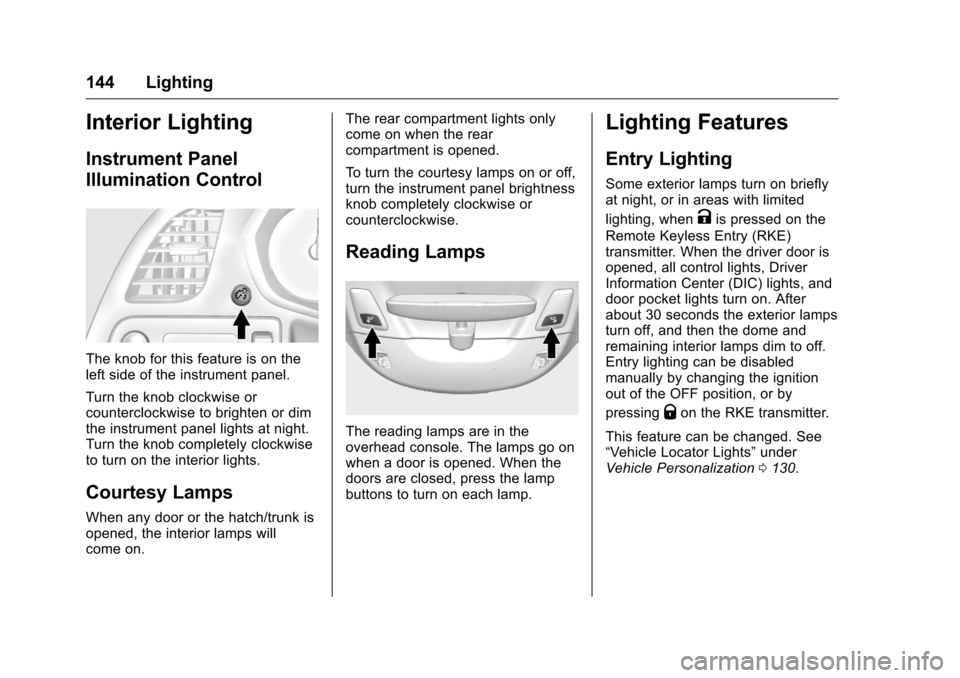
The knob for this feature is on the
left side of the instrument panel.
Turn the knob clockwise or
counterclockwise to brighten or dim
the instrument panel lights at night.
Turn the knob completely clockwise
to turn on the interior lights.
Courtesy Lamps
When any door or the hatch/trunk is
opened, the interior lamps will
come on.The rear compartment lights only
come on when the rear
compartment is opened.
To turn the courtesy lamps on or off,
turn the instrument panel brightness
knob completely clockwise or
counterclockwise.
Reading Lamps
The reading lamps are in the
overhead console. The lamps go on
when a door is opened. When the
doors are closed, press the lamp
buttons to turn on each lamp.
Lighting Features
Entry Lighting
Some exterior lamps turn on briefly
at night, or in areas with limited
lighting, when
Kis pressed on the
Remote Keyless Entry (RKE)
transmitter. When the driver door is
opened, all control lights, Driver
Information Center (DIC) lights, and
door pocket lights turn on. After
about 30 seconds the exterior lamps
turn off, and then the dome and
remaining interior lamps dim to off.
Entry lighting can be disabled
manually by changing the ignition
out of the OFF position, or by
pressing
Qon the RKE transmitter.
This feature can be changed. See
“Vehicle Locator Lights” under
Vehicle Personalization 0130.
Page 211 of 351
Chevrolet Corvette Owner Manual (GMNA-Localizing-U.S./Canada/Mexico-
9085364) - 2016 - crc - 9/15/15
210 Driving and Operating
{Warning
Attempting to refuel without using
the funnel adapter may cause fuel
spillage and damage the capless
fuel system. This could cause a
fire and you or others could be
badly burned and the vehicle
could be damaged.
3. Remove and clean the funnel adapter and return it to the
storage location.
Filling a Portable Fuel
Container
{Warning
Filling a portable fuel container
while it is in the vehicle can cause
fuel vapors that can ignite either
by static electricity or other
means. You or others could be
badly burned and the vehicle
could be damaged. Always:
(Continued)
Warning (Continued)
.Use approved fuel
containers.
. Remove the container from
the vehicle, trunk, or pickup
bed before filling.
. Place the container on the
ground.
. Place the nozzle inside the
fill opening of the container
before dispensing fuel, and
keep it in contact with the fill
opening until filling is
complete.
. Fill the container no more
than 95% full to allow for
expansion.
. Do not smoke, light
matches, or use lighters
while pumping fuel.
. Avoid using cell phones or
other electronic devices.
Trailer Towing
General Towing
Information
The vehicle is neither designed nor
intended to tow a trailer.
Page 284 of 351
Chevrolet Corvette Owner Manual (GMNA-Localizing-U.S./Canada/Mexico-
9085364) - 2016 - crc - 9/15/15
Vehicle Care 283
This option is only functional
when using the air only
hose (7).
11. Press the on/off button (2) to turn the tire sealant and
compressor kit off.
Be careful while handling the
tire sealant and compressor kit
as it could be warm after
usage.
12. Unplug the power plug (8) from the accessory power outlet in
the vehicle.
13. Disconnect the air only hose (7) from the tire valve stem, by
turning it counterclockwise, and
replace the tire valve stem cap.
14. Replace the air only hose (7) and the power plug (8) and
cord back in its original
location.
15. Place the equipment in the original storage location in the
vehicle.
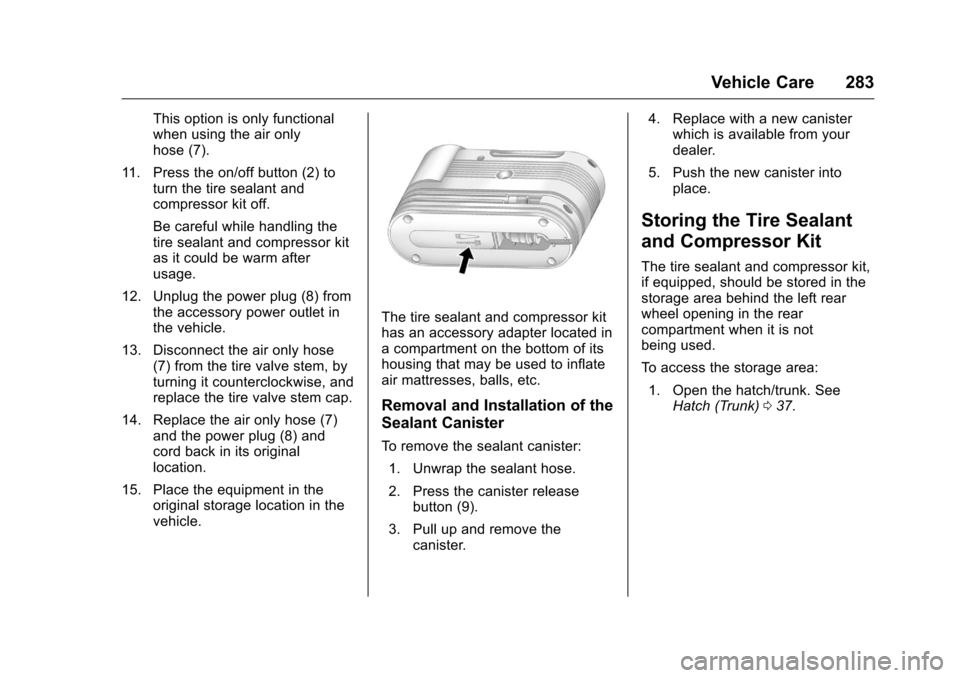
The tire sealant and compressor kit
has an accessory adapter located in
a compartment on the bottom of its
housing that may be used to inflate
air mattresses, balls, etc.
Removal and Installation of the
Sealant Canister
To remove the sealant canister:
1. Unwrap the sealant hose.
2. Press the canister release button (9).
3. Pull up and remove the canister. 4. Replace with a new canister
which is available from your
dealer.
5. Push the new canister into place.
Storing the Tire Sealant
and Compressor Kit
The tire sealant and compressor kit,
if equipped, should be stored in the
storage area behind the left rear
wheel opening in the rear
compartment when it is not
being used.
To access the storage area:
1. Open the hatch/trunk. See Hatch (Trunk) 037.
Page 286 of 351
Chevrolet Corvette Owner Manual (GMNA-Localizing-U.S./Canada/Mexico-
9085364) - 2016 - crc - 9/15/15
Vehicle Care 285
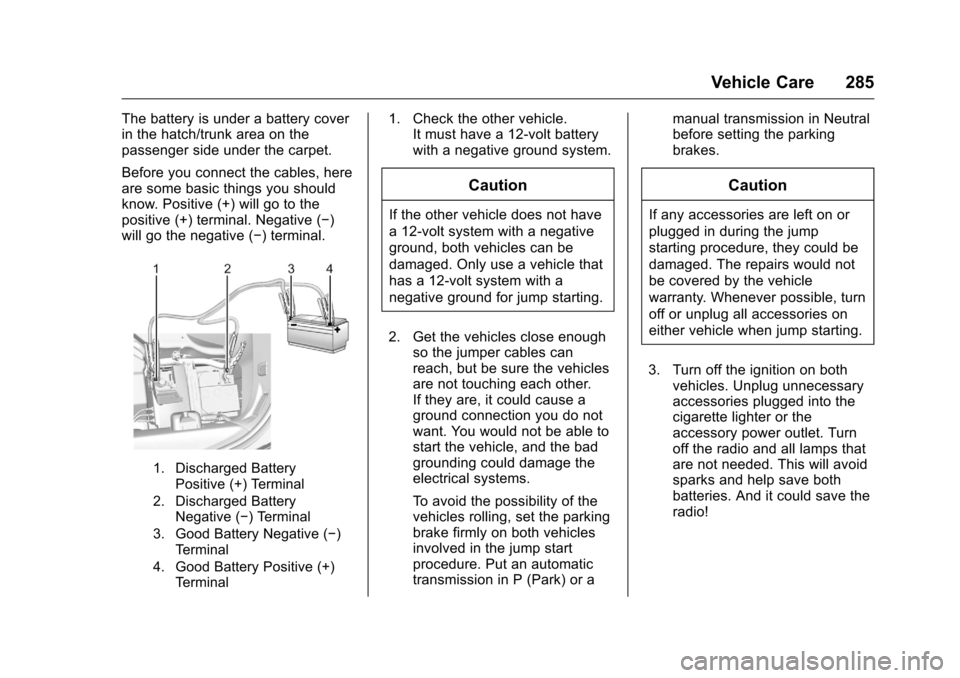
The battery is under a battery cover
in the hatch/trunk area on the
passenger side under the carpet.
Before you connect the cables, here
are some basic things you should
know. Positive (+) will go to the
positive (+) terminal. Negative (−)
will go the negative (−) terminal.
1. Discharged BatteryPositive (+) Terminal
2. Discharged Battery Negative (−) Terminal
3. Good Battery Negative (−) Terminal
4. Good Battery Positive (+) Terminal
1. Check the other vehicle. It must have a 12-volt battery
with a negative ground system.
Caution
If the other vehicle does not have
a 12-volt system with a negative
ground, both vehicles can be
damaged. Only use a vehicle that
has a 12-volt system with a
negative ground for jump starting.
2. Get the vehicles close enough so the jumper cables can
reach, but be sure the vehicles
are not touching each other.
If they are, it could cause a
ground connection you do not
want. You would not be able to
start the vehicle, and the bad
grounding could damage the
electrical systems.
To avoid the possibility of the
vehicles rolling, set the parking
brake firmly on both vehicles
involved in the jump start
procedure. Put an automatic
transmission in P (Park) or a manual transmission in Neutral
before setting the parking
brakes.
Caution
If any accessories are left on or
plugged in during the jump
starting procedure, they could be
damaged. The repairs would not
be covered by the vehicle
warranty. Whenever possible, turn
off or unplug all accessories on
either vehicle when jump starting.
3. Turn off the ignition on both vehicles. Unplug unnecessary
accessories plugged into the
cigarette lighter or the
accessory power outlet. Turn
off the radio and all lamps that
are not needed. This will avoid
sparks and help save both
batteries. And it could save the
radio!
Page 287 of 351
Chevrolet Corvette Owner Manual (GMNA-Localizing-U.S./Canada/Mexico-
9085364) - 2016 - crc - 9/15/15
286 Vehicle Care
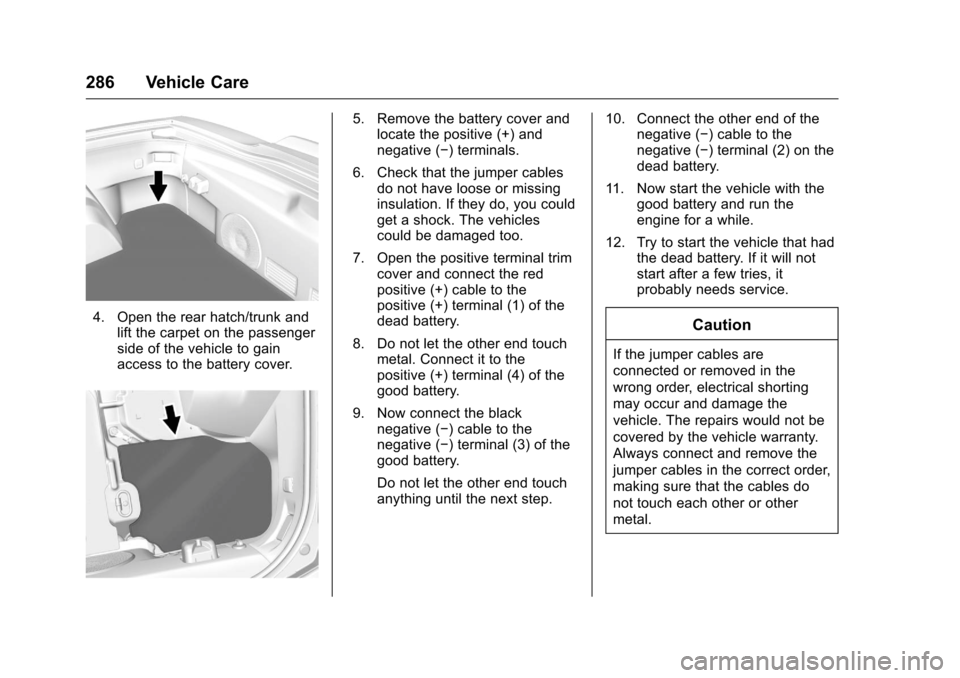
4. Open the rear hatch/trunk andlift the carpet on the passenger
side of the vehicle to gain
access to the battery cover.
5. Remove the battery cover andlocate the positive (+) and
negative (−) terminals.
6. Check that the jumper cables do not have loose or missing
insulation. If they do, you could
get a shock. The vehicles
could be damaged too.
7. Open the positive terminal trim cover and connect the red
positive (+) cable to the
positive (+) terminal (1) of the
dead battery.
8. Do not let the other end touch metal. Connect it to the
positive (+) terminal (4) of the
good battery.
9. Now connect the black negative (−) cable to the
negative (−) terminal (3) of the
good battery.
Do not let the other end touch
anything until the next step. 10. Connect the other end of the
negative (−) cable to the
negative (−) terminal (2) on the
dead battery.
11. Now start the vehicle with the good battery and run the
engine for a while.
12. Try to start the vehicle that had the dead battery. If it will not
start after a few tries, it
probably needs service.
Caution
If the jumper cables are
connected or removed in the
wrong order, electrical shorting
may occur and damage the
vehicle. The repairs would not be
covered by the vehicle warranty.
Always connect and remove the
jumper cables in the correct order,
making sure that the cables do
not touch each other or other
metal.