change time CHEVROLET CORVETTE 2016 7.G Owners Manual
[x] Cancel search | Manufacturer: CHEVROLET, Model Year: 2016, Model line: CORVETTE, Model: CHEVROLET CORVETTE 2016 7.GPages: 351, PDF Size: 6.02 MB
Page 13 of 351
Chevrolet Corvette Owner Manual (GMNA-Localizing-U.S./Canada/Mexico-
9085364) - 2016 - crc - 9/15/15
12 In Brief
Memory Features
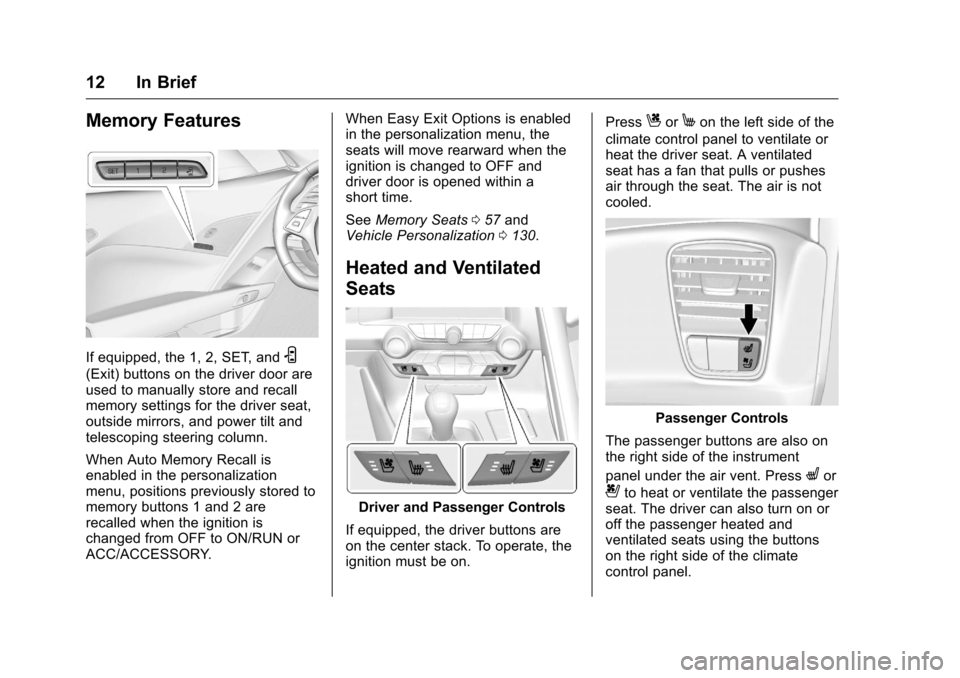
If equipped, the 1, 2, SET, andS
(Exit) buttons on the driver door are
used to manually store and recall
memory settings for the driver seat,
outside mirrors, and power tilt and
telescoping steering column.
When Auto Memory Recall is
enabled in the personalization
menu, positions previously stored to
memory buttons 1 and 2 are
recalled when the ignition is
changed from OFF to ON/RUN or
ACC/ACCESSORY.When Easy Exit Options is enabled
in the personalization menu, the
seats will move rearward when the
ignition is changed to OFF and
driver door is opened within a
short time.
See
Memory Seats 057 and
Vehicle Personalization 0130.
Heated and Ventilated
Seats
Driver and Passenger Controls
If equipped, the driver buttons are
on the center stack. To operate, the
ignition must be on. Press
CorMon the left side of the
climate control panel to ventilate or
heat the driver seat. A ventilated
seat has a fan that pulls or pushes
air through the seat. The air is not
cooled.
Passenger Controls
The passenger buttons are also on
the right side of the instrument
panel under the air vent. Press
Lor
{to heat or ventilate the passenger
seat. The driver can also turn on or
off the passenger heated and
ventilated seats using the buttons
on the right side of the climate
control panel.
Page 23 of 351
Chevrolet Corvette Owner Manual (GMNA-Localizing-U.S./Canada/Mexico-
9085364) - 2016 - crc - 9/15/15
22 In Brief
performance brake pads. Brake
squeal is normal and does not affect
system performance.
Tire Chatter/Hop
When driving at slow speeds and in
very tight turns, the vehicle may
have tire chatter/hop. This condition
is normal and the vehicle does not
require service.
Road Imperfections/Crown Effects
The vehicle's precise steering and
handling make it very responsive to
road surface feedback. A slight pull
may be felt in the steering
depending on the crown of the road
and/or other road surface variations
such as troughs or ruts. This is
normal and the vehicle does not
require service.
Engine Oil Life System
The engine oil life system calculates
engine oil life based on vehicle use
and displays a CHANGE ENGINE
OIL SOON DIC message when it is
necessary to change the engine oiland filter. The oil life system should
be reset to 100% only following an
oil change.
Dry Sump Engine Break-In Oil
Change
If equipped with a dry sump engine,
the initial oil and filter change must
be performed at 800 km/500 mi.
Follow the engine oil life system for
every oil change thereafter.
Resetting the Oil Life System
1. Scroll through the DIC Info Pages menu until the
REMAINING OIL LIFE
percentage is displayed. See
Driver Information Center
(DIC) 0113.
2. Press and hold the SEL button on the DIC while the Oil Life
display is active. The oil life will
change to 100%.
See Engine Oil Life System 0228.
Car Wash Guidelines
Caution
Some automatic car washes can
cause damage to the vehicle,
wheels, or convertible top,
if equipped. Automatic car
washes are not recommended,
due to lack of clearance for the
undercarriage and/or wide rear
tires and wheels. See "Washing
the Vehicle" under Exterior
Care 0288
Driving for Better Fuel
Economy
Driving habits can affect fuel
mileage. Here are some driving tips
to get the best fuel economy
possible:
.
Avoid fast starts and accelerate
smoothly.
. Brake gradually and avoid
abrupt stops.
. Avoid idling the engine for long
periods of time.
Page 33 of 351
Chevrolet Corvette Owner Manual (GMNA-Localizing-U.S./Canada/Mexico-
9085364) - 2016 - crc - 9/15/15
32 Keys, Doors, and Windows
During a remote start, the heated or
ventilated seats, if equipped, may
turn on automatically. SeeHeated
and Ventilated Front Seats 059.
Laws in some local communities
may restrict the use of remote
starters. For example, some laws
may require a person using remote
start to have the vehicle in view.
Check local regulations for any
requirements.
If the vehicle is low on fuel, do not
use the remote start feature. The
vehicle may run out of fuel.
The RKE transmitter range may be
less while the vehicle is running.
Other conditions can affect the
performance of the transmitter. See
Remote Keyless Entry (RKE)
System 025.
Starting the Engine Using Remote
Start
1. Press and release
Qon the
RKE transmitter.
2. Immediately press and hold
/
for at least four seconds or until
the turn signal lamps flash. The lamps flash to confirm the
request to remote start the
vehicle has been received.
During the remote start, the
doors will be locked and the
parking lamps will remain on as
long as the engine is running.
The engine will shut off after
10 minutes unless a time
extension is done.
3. To drive, have the RKE transmitter in the vehicle, press
the brake pedal, and then start
the vehicle.
Extending Engine Run Time
The engine run time can also be
extended by another 10 minutes,
if during the first 10 minutes
Steps 1–2 are repeated while the
engine is still running. An extension
can be requested, 30 seconds after
starting. This provides a total of
20 minutes.
The remote start can only be
extended once per ignition cycle. A maximum of two remote starts,
or a remote start with an extension,
are allowed between ignition cycles.
After two remote starts, the vehicle's
ignition must be changed to ON/
RUN/START and then back to OFF
before the remote start procedure
can be used again.
Canceling a Remote Start
To cancel a remote start, do any of
the following:
.
Press and hold
/until the
parking lamps turn off.
. Turn on the hazard warning
flashers.
. Turn the vehicle on and then
back off.
Conditions in Which Remote Start
Will Not Work
The remote start will not operate if
any of the following occur:
. The ignition is in any mode other
than OFF.
. The transmitter is in the vehicle.
. The hood is not closed.
Page 41 of 351
Chevrolet Corvette Owner Manual (GMNA-Localizing-U.S./Canada/Mexico-
9085364) - 2016 - crc - 9/15/15
40 Keys, Doors, and Windows
.Unlock the vehicle using the
Keyless Access system.
. Start the vehicle.
To avoid setting off the alarm by
accident:
. Lock the vehicle after all
occupants have left the vehicle
and both doors are closed.
. Always unlock a door with the
RKE transmitter or use the
Keyless Access system.
Unlocking the driver door with the
key will not disarm the system or
turn off the alarm.
How to Detect a Tamper
Condition
IfKis pressed on the transmitter
and the horn chirps and the lights
flash three times, a previous alarm
occurred while the system was
armed.
If the alarm has been activated, a
message will appear on the DIC.
See Security Messages 0127.
Inclination Sensor and
Intrusion Sensor
In addition to the standard
theft-deterrent system features, this
system may also have an inclination
sensor and intrusion sensor.
The inclination sensor can set off
the alarm if it senses movement of
the vehicle, such as a change in
vehicle orientation.
The intrusion sensor monitors the
vehicle interior, and can activate the
alarm if it senses unauthorized entry
into the vehicle’s interior. Do not
allow passengers or pets to remain
in the vehicle when the intrusion
sensor is activated.
Before arming the theft-deterrent
system and activating the intrusion
sensor:
.
Make sure both doors and
windows are completely closed.
. Secure any loose items such as
sunshades.
. Make sure there are no
obstructions blocking the
sensors.
Intrusion and Inclination
Sensors Disable Switch
It is recommended that the intrusion
and inclination sensors be
deactivated if pets are left in the
vehicle or the vehicle is being
transported.
With the vehicle turned off, press
d
to the right of the hatch/trunk
release button. The indicator light
will come on momentarily, indicating
that these sensors have been
disabled until the next time the
alarm system is armed.
Immobilizer
See Radio Frequency
Statement 0325.
Page 59 of 351
Chevrolet Corvette Owner Manual (GMNA-Localizing-U.S./Canada/Mexico-
9085364) - 2016 - crc - 9/15/15
58 Seats and Restraints
1, 2, orSbefore the stored
positions are reached stops the
recall.
Automatically Recalling Memory
Positions (Auto Memory Recall)
If programmed on in the vehicle
personalization menu, the Auto
(Automatic) Memory Recall feature
automatically recalls the current
driver ’s previously stored 1 or 2
position when the ignition is
changed from OFF to ON/RUN/
START or ACC/ACCESSORY.
See “Auto Memory Recall” under
“Comfort and Convenience” in
Vehicle Personalization 0130.
To stop recall movement, press one
of the memory, power mirror,
or power seat controls, or press the
power tilt and telescoping steering
column control.
Placing the Ignition in OFF also
stops the recall
If the vehicle driver has changed, in
some vehicles the Driver ID may be
displayed for the first few ignition
cycles. RKE transmitters are not labeled
with a number. If your memory seat
position is stored to 1 or 2 but this
position is not automatically
recalling, then store your positions
to the other button or switch RKE
transmitters with the other driver.
Easy Exit Recall
If programmed on in the vehicle
personalization menu, the easy exit
feature recalls the previously stored
Exit positions when leaving the
vehicle. See
“Storing Memory
Positions” previously in this section.
See also Vehicle
Personalization 0130.
Easy exit recall automatically
activates when one of the following
occurs:
. The vehicle is turned off and the
driver door is opened within a
short time.
. The vehicle is turned off with the
driver door open.
To stop recall movement, press one
of the memory, driver seat, outside
mirror, or power tilt and telescoping
steering column controls. Seat Travel Limit
If the seat is folded forward or
moved rearward into contact with
the carpet, the seat must be
returned to an upright position or
moved forward off the carpet to
regain operation.
Obstructions
If something has blocked the driver
seat and/or power tilt and
telescoping steering column while
recalling a memory position, the
recall may stop. Remove the
obstruction. Then do one of the
following:
.
If automatically or manually
recalling the stored memory
position, press and hold the
appropriate manual control for
two seconds. Try recalling again
by pressing the appropriate
memory button.
. If automatically recalling the
position, try recalling by opening
the driver door and pressing
K
on the RKE transmitter.
Page 60 of 351
Chevrolet Corvette Owner Manual (GMNA-Localizing-U.S./Canada/Mexico-
9085364) - 2016 - crc - 9/15/15
Seats and Restraints 59
.If recalling the exit position,
press and hold the appropriate
manual control for the exit
feature not recalling for
two seconds. Then try recalling
the exit position again.
If the memory position is still not
recalling, see your dealer for
service.
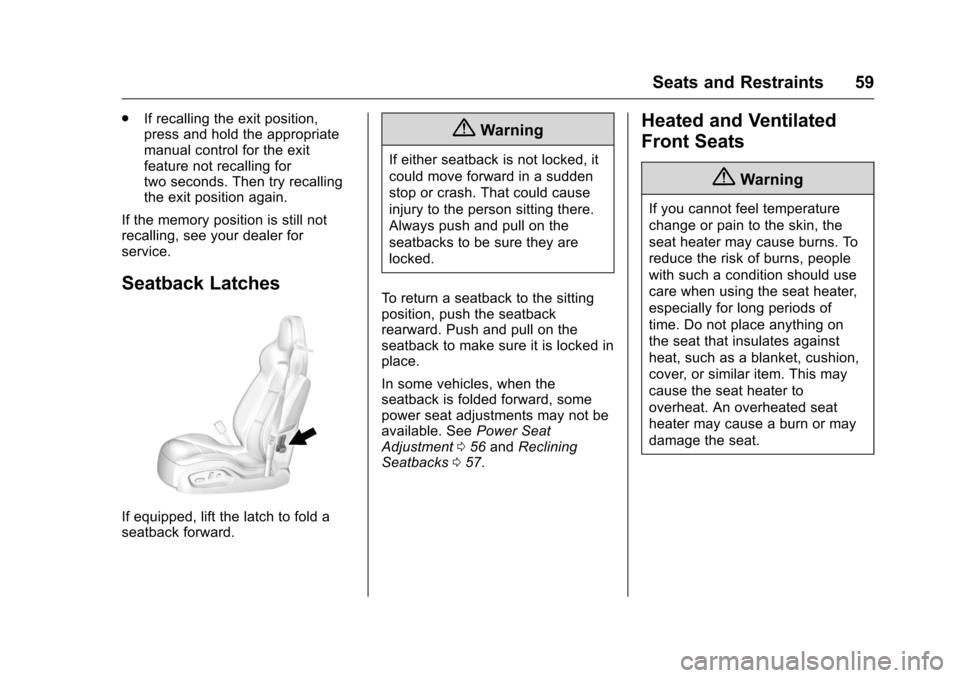
Seatback Latches
If equipped, lift the latch to fold a
seatback forward.
{Warning
If either seatback is not locked, it
could move forward in a sudden
stop or crash. That could cause
injury to the person sitting there.
Always push and pull on the
seatbacks to be sure they are
locked.
To return a seatback to the sitting
position, push the seatback
rearward. Push and pull on the
seatback to make sure it is locked in
place.
In some vehicles, when the
seatback is folded forward, some
power seat adjustments may not be
available. See Power Seat
Adjustment 056 and Reclining
Seatbacks 057.
Heated and Ventilated
Front Seats
{Warning
If you cannot feel temperature
change or pain to the skin, the
seat heater may cause burns. To
reduce the risk of burns, people
with such a condition should use
care when using the seat heater,
especially for long periods of
time. Do not place anything on
the seat that insulates against
heat, such as a blanket, cushion,
cover, or similar item. This may
cause the seat heater to
overheat. An overheated seat
heater may cause a burn or may
damage the seat.
Page 99 of 351
Chevrolet Corvette Owner Manual (GMNA-Localizing-U.S./Canada/Mexico-
9085364) - 2016 - crc - 9/15/15
98 Instruments and Controls
Reconfigurable Instrument
Cluster
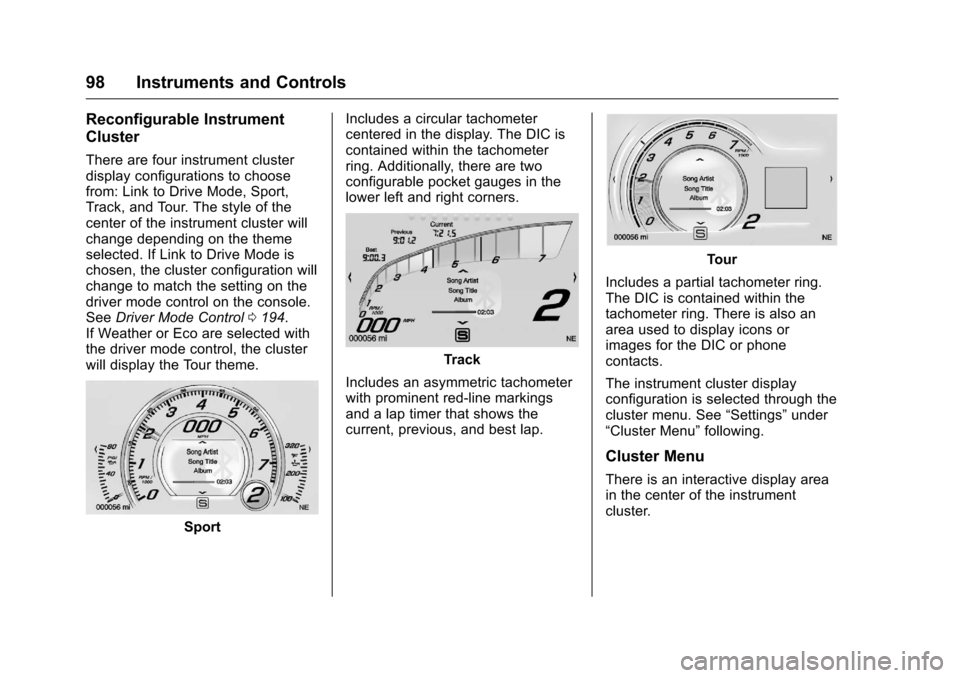
There are four instrument cluster
display configurations to choose
from: Link to Drive Mode, Sport,
Track, and Tour. The style of the
center of the instrument cluster will
change depending on the theme
selected. If Link to Drive Mode is
chosen, the cluster configuration will
change to match the setting on the
driver mode control on the console.
SeeDriver Mode Control 0194.
If Weather or Eco are selected with
the driver mode control, the cluster
will display the Tour theme.
Sport Includes a circular tachometer
centered in the display. The DIC is
contained within the tachometer
ring. Additionally, there are two
configurable pocket gauges in the
lower left and right corners.
Track
Includes an asymmetric tachometer
with prominent red-line markings
and a lap timer that shows the
current, previous, and best lap.
Tour
Includes a partial tachometer ring.
The DIC is contained within the
tachometer ring. There is also an
area used to display icons or
images for the DIC or phone
contacts.
The instrument cluster display
configuration is selected through the
cluster menu. See “Settings”under
“Cluster Menu” following.
Cluster Menu
There is an interactive display area
in the center of the instrument
cluster.
Page 104 of 351
Chevrolet Corvette Owner Manual (GMNA-Localizing-U.S./Canada/Mexico-
9085364) - 2016 - crc - 9/15/15
Instruments and Controls 103
English
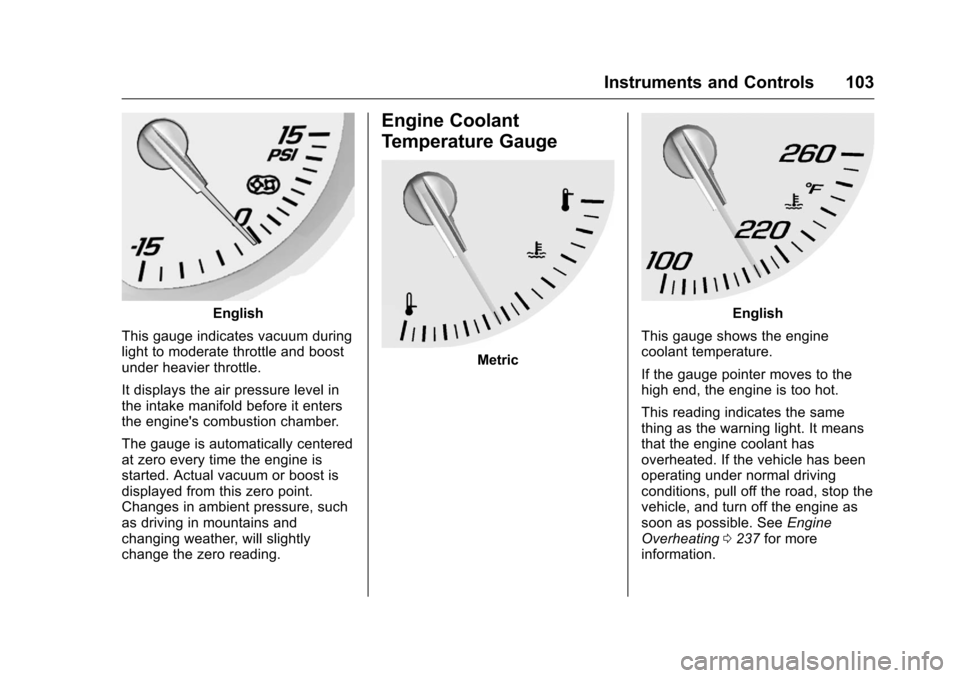
This gauge indicates vacuum during
light to moderate throttle and boost
under heavier throttle.
It displays the air pressure level in
the intake manifold before it enters
the engine's combustion chamber.
The gauge is automatically centered
at zero every time the engine is
started. Actual vacuum or boost is
displayed from this zero point.
Changes in ambient pressure, such
as driving in mountains and
changing weather, will slightly
change the zero reading.
Engine Coolant
Temperature Gauge
Metric
English
This gauge shows the engine
coolant temperature.
If the gauge pointer moves to the
high end, the engine is too hot.
This reading indicates the same
thing as the warning light. It means
that the engine coolant has
overheated. If the vehicle has been
operating under normal driving
conditions, pull off the road, stop the
vehicle, and turn off the engine as
soon as possible. See Engine
Overheating 0237 for more
information.
Page 115 of 351
Chevrolet Corvette Owner Manual (GMNA-Localizing-U.S./Canada/Mexico-
9085364) - 2016 - crc - 9/15/15
114 Instruments and Controls
oorp:Pressoto open
application menus on the left. Press
pto open interaction menus on the
right.
SEL (Select) : Press to open a
menu or select a menu item. Press
and hold to reset values on certain
screens.
DIC Info Pages
The following is the list of all
possible DIC info displays.
Depending on the vehicle, some
may not be available.
Current Speed : Displays the
vehicle speed in either kilometers
per hour (km/h) or miles per
hour (mph).
Trip A or B/Average Fuel
Economy/Average Speed : Trip
displays the current distance
traveled, in either kilometers (km) or
miles (mi), since the trip odometer
was last reset. The trip odometer
can be reset by pressing and
holding SEL while this display is
active. Average Fuel Economy displays the
approximate average liters per
100 kilometers (L/100 km) or miles
per gallon (mpg). This number is
calculated based on the number of
L/100 km (mpg) recorded since the
last time this menu item was reset.
This number reflects only the
approximate average fuel economy
that the vehicle has right now, and
will change as driving conditions
change. The Average Fuel
Economy can be reset by pressing
and holding SEL while this display
is active.
Average Speed displays the
average speed of the vehicle in
kilometers per hour (km/h) or miles
per hour (mph). This average is
calculated based on the various
vehicle speeds recorded since the
last reset of this value. The average
speed can be reset by pressing and
holding SEL while this display is
active.
Fuel Range/Instantaneous Fuel
Economy :
Fuel Range displays the
approximate distance the vehicle
can be driven without refueling.
LOW will be displayed when the vehicle is low on fuel. The fuel
range estimate is based on an
average of the vehicle's fuel
economy over recent driving history
and the amount of fuel remaining in
the fuel tank.
Instantaneous Fuel Economy
displays the current fuel economy in
either liters per 100 kilometers
(L/100 km) or miles per
gallon (mpg). This number reflects
only the approximate fuel economy
that the vehicle has right now and
changes frequently as driving
conditions change.
This display may also show the
number of cylinders the vehicle is
running on. See Active Fuel
Management
®0 181.
Oil Life : Displays an estimate of
the oil's remaining useful life.
If REMAINING OIL LIFE 99% is
displayed, that means 99% of the
current oil life remains.
When the remaining oil life is low,
the CHANGE ENGINE OIL SOON
message will appear on the display.
See Engine Oil Messages 0123.
The oil should be changed as soon
Page 116 of 351
Chevrolet Corvette Owner Manual (GMNA-Localizing-U.S./Canada/Mexico-
9085364) - 2016 - crc - 9/15/15
Instruments and Controls 115
as possible. SeeEngine Oil0223.
In addition to the engine oil life
system monitoring the oil life,
additional maintenance is
recommended in the Maintenance
Schedule. See Maintenance
Schedule 0298.
The Oil Life display must be reset
after each oil change. It will not
reset itself. Do not reset the Oil Life
display accidentally at any time
other than when the oil has just
been changed. It cannot be reset
accurately until the next oil change.
To reset the engine oil life system,
press and hold SEL for several
seconds while the Oil Life display is
active. See Engine Oil Life
System 0228.
Tire Pressure : Displays the
approximate pressures of all four
tires. Tire pressure is displayed in
either kilopascal (kPa) or in pounds
per square inch (psi). If the pressure
is low, the value for that tire is
shown in amber. See Tire Pressure
Monitor System 0265 andTire
Pressure Monitor Operation 0266. Best Average Fuel Economy :
Displays the average fuel economy,
the best fuel economy over the
selected distance, and a bar graph
showing instantaneous fuel
economy. Press
pto change the
selected distance.
Fuel Used/Timer : Displays the
approximate liters (L) or
gallons (gal) of fuel that have been
used since last reset. The fuel used
can be reset by pressing and
holding SEL while this display is
active.
This display can also be used as a
timer. To start/stop the timer, press
pwhile this display is active and
then SEL to start/stop the timer. The
display will show the amount of time
that has passed since the timer was
last reset. To reset the timer to zero,
press and hold SEL or use
pto
access the menu while this display
is active.
ECO Index : Aids the driver in
determining how efficiently they are
driving. This display may also show the
number of cylinders the vehicle is
running on. See
Active Fuel
Management
®0 181.
Speed Limit : Displays sign
information, which comes from a
roadway database in the onboard
navigation.
Engine Hours/Lifetime Revs :
Displays the total number of hours
the engine has run. It also shows
total engine revolutions divided by
10,000.
Head-Up Display (HUD)
{Warning
If the HUD image is too bright,
or too high in your field of view, it
may take you more time to see
things you need to see when it is
dark outside. Be sure to keep the
HUD image dim and placed low in
your field of view.