cruise control CHEVROLET CORVETTE 2016 7.G Owners Manual
[x] Cancel search | Manufacturer: CHEVROLET, Model Year: 2016, Model line: CORVETTE, Model: CHEVROLET CORVETTE 2016 7.GPages: 351, PDF Size: 6.02 MB
Page 4 of 351
Chevrolet Corvette Owner Manual (GMNA-Localizing-U.S./Canada/Mexico-
9085364) - 2016 - crc - 9/15/15
Introduction 3
Danger, Warning, and
Caution
Warning messages found on vehicle
labels and in this manual describe
hazards and what to do to avoid or
reduce them.
{Danger
Danger indicates a hazard with a
high level of risk which will result
in serious injury or death.
{Warning
Warning indicates a hazard that
could result in injury or death.
Caution
Caution indicates a hazard that
could result in property or vehicle
damage.
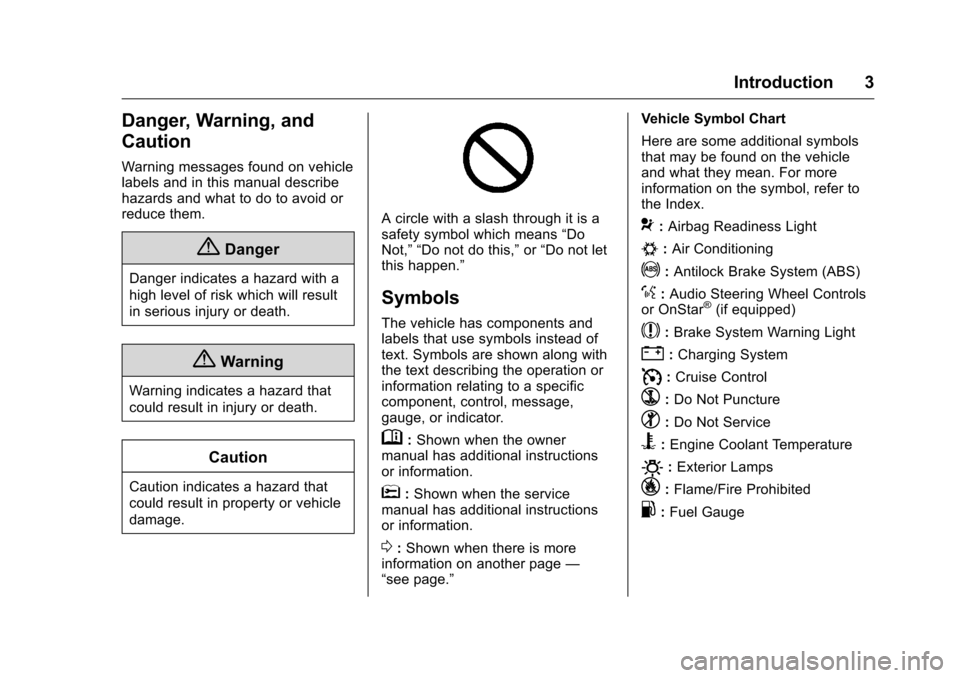
A circle with a slash through it is a
safety symbol which means“Do
Not,” “Do not do this,” or“Do not let
this happen.”
Symbols
The vehicle has components and
labels that use symbols instead of
text. Symbols are shown along with
the text describing the operation or
information relating to a specific
component, control, message,
gauge, or indicator.
M: Shown when the owner
manual has additional instructions
or information.
*: Shown when the service
manual has additional instructions
or information.
0: Shown when there is more
information on another page —
“see page.” Vehicle Symbol Chart
Here are some additional symbols
that may be found on the vehicle
and what they mean. For more
information on the symbol, refer to
the Index.
9:
Airbag Readiness Light
#:Air Conditioning
!:Antilock Brake System (ABS)
%:Audio Steering Wheel Controls
or OnStar®(if equipped)
$: Brake System Warning Light
":Charging System
I: Cruise Control
`:Do Not Puncture
^:Do Not Service
B:Engine Coolant Temperature
O:Exterior Lamps
_: Flame/Fire Prohibited
.:Fuel Gauge
Page 6 of 351
Chevrolet Corvette Owner Manual (GMNA-Localizing-U.S./Canada/Mexico-
9085364) - 2016 - crc - 9/15/15
In Brief 5
In Brief
Instrument Panel
Instrument Panel . . . . . . . . . . . . . . . . 6
Initial Drive Information
Initial Drive Information . . . . . . . . . . 8
Remote Keyless Entry (RKE)System . . . . . . . . . . . . . . . . . . . . . . . . 8
Remote Vehicle Start . . . . . . . . . . . 8
Door Locks . . . . . . . . . . . . . . . . . . . . . 9
Trunk Release . . . . . . . . . . . . . . . . . 10
Windows . . . . . . . . . . . . . . . . . . . . . . . 10
Seat Adjustment . . . . . . . . . . . . . . . 11
Memory Features . . . . . . . . . . . . . . 12
Heated and Ventilated Seats . . . 12
Safety Belts . . . . . . . . . . . . . . . . . . . . 13
Passenger Sensing System . . . 13
Mirror Adjustment . . . . . . . . . . . . . . 14
Steering Wheel Adjustment . . . . 14
Interior Lighting . . . . . . . . . . . . . . . . 15
Exterior Lighting . . . . . . . . . . . . . . . 15
Windshield Wiper/Washer . . . . . . 15
Climate Controls . . . . . . . . . . . . . . . 16
Transmission . . . . . . . . . . . . . . . . . . 17
Vehicle Features
Infotainment System . . . . . . . . . . . 18
Steering Wheel Controls . . . . . . . 18
Cruise Control . . . . . . . . . . . . . . . . . 18
Driver Information Center (DIC) . . . . . . . . . . . . . . . . . 19
Curb View Camera . . . . . . . . . . . . 19
Rear Vision Camera (RVC) . . . . 19
Power Outlets . . . . . . . . . . . . . . . . . 19
Universal Remote System . . . . . 20
Roof Panel . . . . . . . . . . . . . . . . . . . . 20
Convertible . . . . . . . . . . . . . . . . . . . . 20
Performance and Maintenance
Traction Control/Electronic Stability Control . . . . . . . . . . . . . . 20
Tire Pressure Monitor . . . . . . . . . . 21
Performance Vehicle Features . . . . . . . . . . . . . . . . . . . . . 21
Engine Oil Life System . . . . . . . . 22
Car Wash Guidelines . . . . . . . . . . 22
Driving for Better Fuel Economy . . . . . . . . . . . . . . . . . . . . . 22
Roadside Assistance Program . . . . . . . . . . . . . . . . . . . . . . 23
Page 8 of 351
Chevrolet Corvette Owner Manual (GMNA-Localizing-U.S./Canada/Mexico-
9085364) - 2016 - crc - 9/15/15
In Brief 7
1.Air Vents 0156.
2. Turn Signal Lever. See Turn
and Lane-Change
Signals 0143.
Exterior Lamp Controls 0140.
3. Manual Shift Paddles (If Equipped). See Manual
Mode 0184.
Active Rev Match Paddles (If
Equipped). See Active Rev
Match 0188.
4. Instrument Cluster 096.
5. Windshield Wiper/Washer 092.
6. Instrument Panel Storage Button. See Instrument Panel
Storage 087.
7. Passenger Airbag Status Indicator. See Passenger
Sensing System 071.
8. Light Sensor. See Automatic
Headlamp System 0142.
9. Hazard Warning
Flashers 0143.
10. Infotainment 0146. 11. Passenger Temperature
Control. See Dual Automatic
Climate Control System 0152.
Passenger Heated and
Ventilated Seat Controls (If
Equipped). See Heated and
Ventilated Front Seats 059.
12. Driver and Redundant Passenger Heated and
Ventilated Seat Controls (If
Equipped). See Heated and
Ventilated Front Seats 059.
13. Dual Automatic Climate Control
System 0152.
14. Electric Parking Brake 0190.
15. MODE SELECT Knob. See Competitive Driving
Mode 0198.
16. Shift Lever (Manual Shown). SeeAutomatic Transmission
0 182 orManual
Transmission 0187.
17. Keyless Ignition. See Ignition
Positions 0175.
18. Bluetooth Controls. See “Steering Wheel Controls” in
the infotainment manual. Voice Recognition Controls.
See
“Steering Wheel Controls”
in the infotainment manual.
Driver Information Center (DIC)
Controls. See Driver
Information Center (DIC) 0113.
19. Steering Wheel Controls 092.
20. Horn 092.
21. Steering Wheel Adjustment
092 (Out of View).
22. Cruise Control 0202.
23. Hood Release (Out of View). SeeHood 0217.
24. Data Link Connector (DLC) (Out of View). See Malfunction
Indicator Lamp (Check Engine
Light) 0106.
25. Hatch/Trunk Release Button. SeeHatch (Trunk) 037.
Intrusion and Inclination
Sensors Disable Switch. See
Vehicle Alarm System 039.
26. Head-Up Display Controls (If Equipped). See Head-Up
Display (HUD) 0115.
27. Power Mirrors 042.
Page 19 of 351
Chevrolet Corvette Owner Manual (GMNA-Localizing-U.S./Canada/Mexico-
9085364) - 2016 - crc - 9/15/15
18 In Brief
1–4 Shift Message (Manual
Transmission)
On vehicles with a manual
transmission, when this DIC
message is displayed, the
transmission can only shift from
1 (First) to 4 (Fourth).
For more information about shifting
for the best fuel economy, see
Manual Transmission0187.
Vehicle Features
Infotainment System
See the infotainment manual for
information on the radio, audio
players, phone, navigation system,
and voice or speech recognition.
It also includes information on
settings.
Steering Wheel Controls
The infotainment system can be
operated by using the steering
wheel controls. See "Steering
Wheel Controls" in the infotainment
manual.
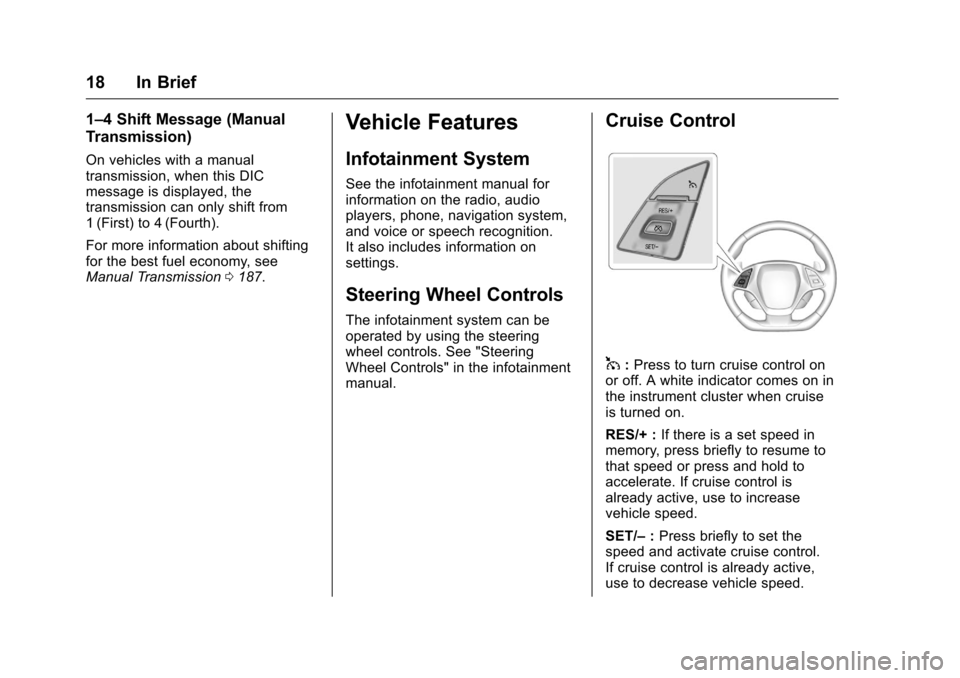
Cruise Control
1:Press to turn cruise control on
or off. A white indicator comes on in
the instrument cluster when cruise
is turned on.
RES/+ : If there is a set speed in
memory, press briefly to resume to
that speed or press and hold to
accelerate. If cruise control is
already active, use to increase
vehicle speed.
SET/– :Press briefly to set the
speed and activate cruise control.
If cruise control is already active,
use to decrease vehicle speed.
Page 20 of 351
Chevrolet Corvette Owner Manual (GMNA-Localizing-U.S./Canada/Mexico-
9085364) - 2016 - crc - 9/15/15
In Brief 19
*:Press to disengage cruise
control without erasing the set
speed from memory.
See Cruise Control 0202.
Driver Information
Center (DIC)
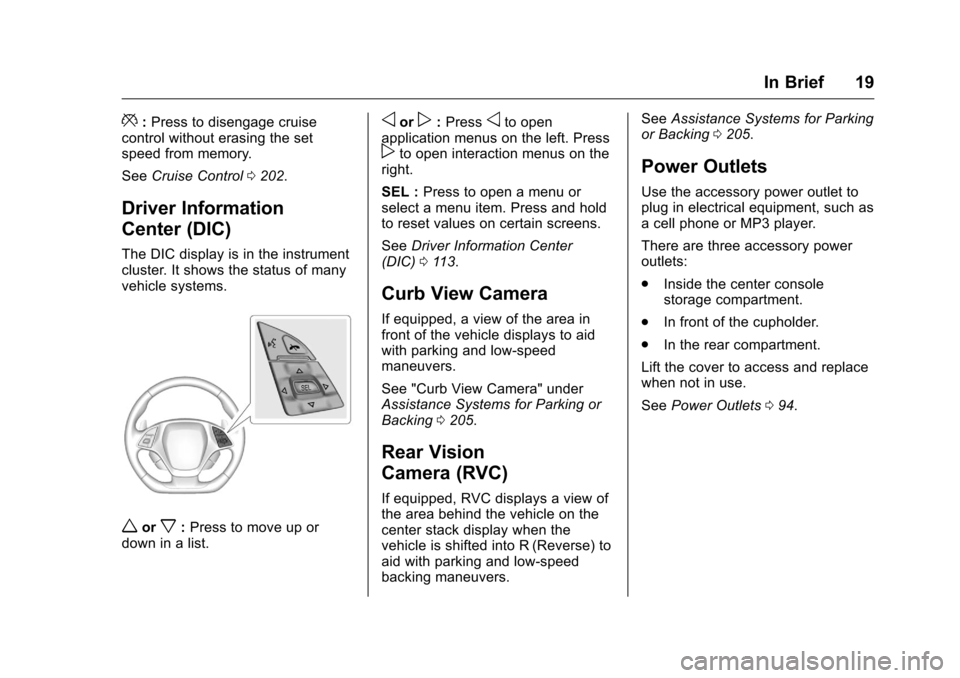
The DIC display is in the instrument
cluster. It shows the status of many
vehicle systems.
worx:Press to move up or
down in a list.
oorp: Pressoto open
application menus on the left. Press
pto open interaction menus on the
right.
SEL : Press to open a menu or
select a menu item. Press and hold
to reset values on certain screens.
See Driver Information Center
(DIC) 0113.
Curb View Camera
If equipped, a view of the area in
front of the vehicle displays to aid
with parking and low-speed
maneuvers.
See "Curb View Camera" under
Assistance Systems for Parking or
Backing 0205.
Rear Vision
Camera (RVC)
If equipped, RVC displays a view of
the area behind the vehicle on the
center stack display when the
vehicle is shifted into R (Reverse) to
aid with parking and low-speed
backing maneuvers. See
Assistance Systems for Parking
or Backing 0205.
Power Outlets
Use the accessory power outlet to
plug in electrical equipment, such as
a cell phone or MP3 player.
There are three accessory power
outlets:
.
Inside the center console
storage compartment.
. In front of the cupholder.
. In the rear compartment.
Lift the cover to access and replace
when not in use.
See Power Outlets 094.
Page 24 of 351
Chevrolet Corvette Owner Manual (GMNA-Localizing-U.S./Canada/Mexico-
9085364) - 2016 - crc - 9/15/15
In Brief 23
.When road and weather
conditions are appropriate, use
cruise control.
. Always follow posted speed
limits or drive more slowly when
conditions require.
. Keep vehicle tires properly
inflated.
. Combine several trips into a
single trip.
. Replace the vehicle's tires with
the same TPC Spec number
molded into the tire's sidewall
near the size.
. Follow recommended scheduled
maintenance.
. Select Eco mode for improved
fuel economy. This will result in
better Active Fuel Management
(AFM) operation. See Active
Fuel Management
®0 181.
. For recommended shift speeds,
see Manual Transmission 0187.
Premium Fuel
Use the recommended fuel. See
Fuel 0206.
Roadside Assistance
Program
U.S.: 1-800-243-8872
TTY Users (U.S. Only):
1-888-889-2438
Canada: 1-800-268-6800
New Chevrolet owners are
automatically enrolled in the
Roadside Assistance Program.
See Roadside Assistance
Program 0319.
Page 92 of 351
Chevrolet Corvette Owner Manual (GMNA-Localizing-U.S./Canada/Mexico-
9085364) - 2016 - crc - 9/15/15
Instruments and Controls 91
Instruments and
Controls
Controls
Steering Wheel Adjustment . . . . 92
Steering Wheel Controls . . . . . . . 92
Horn . . . . . . . . . . . . . . . . . . . . . . . . . . . 92
Windshield Wiper/Washer . . . . . . 92
Compass . . . . . . . . . . . . . . . . . . . . . . 93
Clock . . . . . . . . . . . . . . . . . . . . . . . . . . 94
Power Outlets . . . . . . . . . . . . . . . . . 94
Warning Lights, Gauges, and
Indicators
Warning Lights, Gauges, andIndicators . . . . . . . . . . . . . . . . . . . . 95
Instrument Cluster . . . . . . . . . . . . . 96
Speedometer . . . . . . . . . . . . . . . . . 101
Odometer . . . . . . . . . . . . . . . . . . . . . 101
Trip Odometer . . . . . . . . . . . . . . . . 101
Tachometer . . . . . . . . . . . . . . . . . . . 101
Fuel Gauge . . . . . . . . . . . . . . . . . . . 101
Boost Gauge . . . . . . . . . . . . . . . . . 102
Engine Coolant Temperature Gauge . . . . . . . . . . . . . . . . . . . . . . 103
Safety Belt Reminders . . . . . . . . 104
Airbag Readiness Light . . . . . . . 104
Passenger Airbag Status Indicator . . . . . . . . . . . . . . . . . . . . 105 Charging System Light . . . . . . . 106
Malfunction Indicator Lamp
(Check Engine Light) . . . . . . . . 106
Brake System Warning Light . . . . . . . . . . . . . . . . . . . . . . . . 108
Electric Parking Brake Light . . . . . . . . . . . . . . . . . . . . . . . . 108
Service Electric Parking Brake Light . . . . . . . . . . . . . . . . . . . . . . . . 109
Antilock Brake System (ABS) Warning Light . . . . . . . . . . . . . . . 109
Gear Shifting Light (Canada and Mexico Only) . . . . . . . . . . . 109
Traction Off Light . . . . . . . . . . . . . 110
Traction Control System (TCS)/ Electronic Stability Control
Light . . . . . . . . . . . . . . . . . . . . . . . . 110
Electronic Stability Control (ESC) Off Light . . . . . . . . . . . . . . 110
Engine Coolant Temperature Warning Light . . . . . . . . . . . . . . . 111
Tire Pressure Light . . . . . . . . . . . 111
Engine Oil Pressure Light . . . . . 111
Low Fuel Warning Light . . . . . . . 112
Security Light . . . . . . . . . . . . . . . . . 112
High-Beam On Light . . . . . . . . . . 112
Lamps On Reminder . . . . . . . . . . 113
Cruise Control Light . . . . . . . . . . 113
Door Ajar Light . . . . . . . . . . . . . . . 113
Information Displays
Driver Information Center (DIC) . . . . . . . . . . . . . . . . 113
Head-Up Display (HUD) . . . . . . 115
Vehicle Messages
Vehicle Messages . . . . . . . . . . . . 120
Battery Voltage and Charging Messages . . . . . . . . . . . . . . . . . . . 120
Brake System Messages . . . . . 120
Compass Messages . . . . . . . . . . 121
Convertible Top Messages . . . 121
Cruise Control Messages . . . . . 122
Door Ajar Messages . . . . . . . . . . 122
Engine Cooling System Messages . . . . . . . . . . . . . . . . . . . 123
Engine Oil Messages . . . . . . . . . 123
Engine Power Messages . . . . . 124
Fuel System Messages . . . . . . . 124
Key and Lock Messages . . . . . 124
Lamp Messages . . . . . . . . . . . . . . 125
Ride Control System Messages . . . . . . . . . . . . . . . . . . . 125
Airbag System Messages . . . . 127
Security Messages . . . . . . . . . . . 127
Service Vehicle Messages . . . . 127
Starting the Vehicle Messages . . . . . . . . . . . . . . . . . . . 128
Tire Messages . . . . . . . . . . . . . . . . 128
Transmission Messages . . . . . . 129
Page 114 of 351
Chevrolet Corvette Owner Manual (GMNA-Localizing-U.S./Canada/Mexico-
9085364) - 2016 - crc - 9/15/15
Instruments and Controls 113
Lamps On Reminder
This light comes on when the
exterior lamps are in use. See
Exterior Lamp Controls0140.
Cruise Control Light
For vehicles with cruise control, the
cruise control light is white when the
cruise control is on and ready, and
turns green when the cruise control
is set and active.
The light turns off when the cruise
control is turned off. See Cruise
Control 0202.
Door Ajar Light
This light comes on when a door is
open or not securely latched. Before
driving, check that all doors are
properly closed.
Information Displays
Driver Information
Center (DIC)
The DIC displays are shown in the
center of the instrument cluster in
the Info application. See Instrument
Cluster 096. The Info application is
only available when the vehicle is in
ON/RUN/START. The displays show
the status of many vehicle systems.
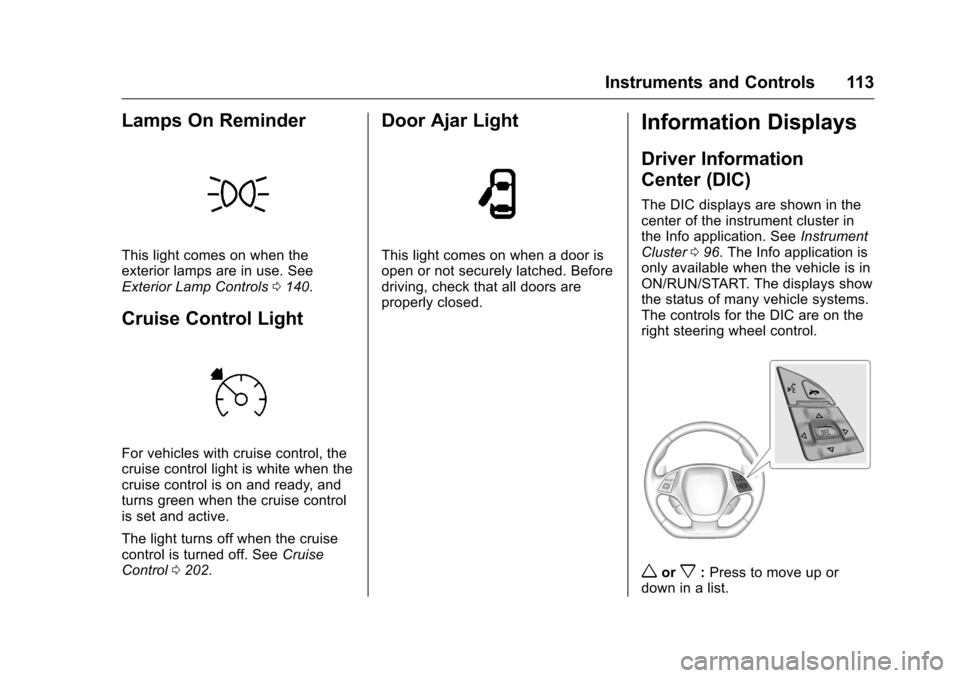
The controls for the DIC are on the
right steering wheel control.
worx: Press to move up or
down in a list.
Page 123 of 351
Chevrolet Corvette Owner Manual (GMNA-Localizing-U.S./Canada/Mexico-
9085364) - 2016 - crc - 9/15/15
122 Instruments and Controls
vehicle to a warmer location and
wait for the vehicle temperature to
rise. This may take several hours
depending on the initial vehicle
temperature and the temperature of
the new location.
TOP NOT SECURE
This message displays when the
power convertible top is not
completely opened or closed. Press
and hold the convertible top button
until the top is fully opened or
closed. This is indicated by the
FOLDING TOP MOTION
COMPLETE message being
displayed and an audible indicator.
TOP POWERING DOWN
COMPLETE TOP MOTION
This message displays when the
power convertible top can no longer
hold the top in an intermediate
position. Top system components
may move during this time based on
external forces. Keep objects clear
from the normal path of movement
for the top system components.
TOP SYSTEM OVERHEATED,
PLEASE WAIT
This message displays and a sound
will be heard when the power
convertible top button is pressed
and the power convertible top pump
motor temperature is overheated.
Wait for the power convertible top
pump motor to cool down before
using the power convertible top.
VALET SWITCH ACTIVE–TOP
DISABLED
This message displays when Valet
Mode is active.
Cruise Control Messages
CRUISE SET TO XXX
This message displays when the
cruise control is set and shows the
speed it was set to. See Cruise
Control 0202.
Door Ajar Messages
DOOR OPEN
A door open symbol will display on
the DIC showing which door is
open. If the vehicle has been shifted
out of P (Park), a DOOR OPEN
message will also be displayed.
If the shift lever is in M (Manual
Mode), the DOOR OPEN message
will display if the vehicle starts to
move. Close the door completely.
HOOD OPEN
This message will display along with
a hood open symbol when the hood
is open. Close the hood completely.
TRUNK OPEN
This message will display along with
a symbol when the trunk is open.
Close the trunk completely.
Page 159 of 351
Chevrolet Corvette Owner Manual (GMNA-Localizing-U.S./Canada/Mexico-
9085364) - 2016 - crc - 9/15/15
158 Driving and Operating
Driving and
Operating
Driving Information
Distracted Driving . . . . . . . . . . . . 159
Defensive Driving . . . . . . . . . . . . . 159
Drunk Driving . . . . . . . . . . . . . . . . . 159
Control of a Vehicle . . . . . . . . . . . 160
Braking . . . . . . . . . . . . . . . . . . . . . . . 160
Steering . . . . . . . . . . . . . . . . . . . . . . 160
Off-Road Recovery . . . . . . . . . . . 161
Loss of Control . . . . . . . . . . . . . . . 161
Track Events and CompetitiveDriving . . . . . . . . . . . . . . . . . . . . . . 162
Driving on Wet Roads . . . . . . . . 168
Hill and Mountain Roads . . . . . 168
Winter Driving . . . . . . . . . . . . . . . . 169
If the Vehicle Is Stuck . . . . . . . . 170
Vehicle Load Limits . . . . . . . . . . . 171
Starting and Operating
New Vehicle Break-In . . . . . . . . . 174
Front Air Dam . . . . . . . . . . . . . . . . 175
Carbon Fiber . . . . . . . . . . . . . . . . . 175
Ignition Positions . . . . . . . . . . . . . 175
Starting the Engine . . . . . . . . . . . 177
Retained Accessory Power (RAP) . . . . . . . . . . . . . . . . 179
Shifting Into Park . . . . . . . . . . . . . 179 Shifting out of Park . . . . . . . . . . . 180
Parking (Manual
Transmission) . . . . . . . . . . . . . . . 180
Parking over Things That Burn . . . . . . . . . . . . . . . . . . . 181
Active Fuel Management
®. . . . 181
Engine Exhaust
Engine Exhaust . . . . . . . . . . . . . . 181
Running the Vehicle While Parked . . . . . . . . . . . . . . . . . . . . . . 182
Automatic Transmission
Automatic Transmission . . . . . . 182
Manual Mode . . . . . . . . . . . . . . . . . 184
Manual Transmission
Manual Transmission . . . . . . . . . 187
Active Rev Match . . . . . . . . . . . . . 188
Brakes
Antilock BrakeSystem (ABS) . . . . . . . . . . . . . . . 189
Electric Parking Brake . . . . . . . . 190
Brake Assist . . . . . . . . . . . . . . . . . . 192
Hill Start Assist (HSA) . . . . . . . . 192
Ride Control Systems
Traction Control/Electronic Stability Control . . . . . . . . . . . . . 192
Driver Mode Control . . . . . . . . . . 194
Competitive Driving Mode . . . . 198 Limited-Slip Differential
(Except Z51 and Z06) . . . . . . . 201
Limited-Slip Differential (Z51 and Z06 Only) . . . . . . . . . 202
Cruise Control
Cruise Control . . . . . . . . . . . . . . . . 202
Driver Assistance Systems
Assistance Systems forParking or Backing . . . . . . . . . . 205
Fuel
Fuel . . . . . . . . . . . . . . . . . . . . . . . . . . 206
California FuelRequirements . . . . . . . . . . . . . . . 207
Fuels in Foreign Countries . . . 208
Fuel Additives . . . . . . . . . . . . . . . . 208
Filling the Tank . . . . . . . . . . . . . . . 208
Filling a Portable Fuel Container . . . . . . . . . . . . . . . . . . . 210
Trailer Towing
General TowingInformation . . . . . . . . . . . . . . . . . . 210
Conversions and Add-Ons
Add-On ElectricalEquipment . . . . . . . . . . . . . . . . . . 211