mirror CHEVROLET CORVETTE 2017 7.G User Guide
[x] Cancel search | Manufacturer: CHEVROLET, Model Year: 2017, Model line: CORVETTE, Model: CHEVROLET CORVETTE 2017 7.GPages: 360, PDF Size: 6.3 MB
Page 60 of 360
Chevrolet Corvette Owner Manual (GMNA-Localizing-U.S./Canada/Mexico-
9956103) - 2017 - crc - 4/28/16
Seats and Restraints 59
1, 2, orSbefore the stored
positions are reached stops the
recall.
Automatically Recalling Memory
Positions (Auto Memory Recall)
If programmed on in the vehicle
personalization menu, the Auto
(Automatic) Memory Recall feature
automatically recalls the current
driver ’s previously stored 1 or 2
position when the ignition is
changed from OFF to ON/RUN/
START or ACC/ACCESSORY.
See “Auto Memory Recall” under
“Comfort and Convenience” in
Vehicle Personalization 0132.
To stop recall movement, press one
of the memory, power mirror,
or power seat controls, or press the
power tilt and telescoping steering
column control.
Placing the ignition in OFF also
stops the recall
If the vehicle driver has changed, in
some vehicles the Driver ID may be
displayed for the first few ignition
cycles. RKE transmitters are not labeled
with a number. If your memory seat
position is stored to 1 or 2 but this
position is not automatically
recalling, then store your positions
to the other button or switch RKE
transmitters with the other driver.
Easy Exit Recall
If programmed on in the vehicle
personalization menu, the easy exit
feature recalls the previously stored
Exit positions when leaving the
vehicle. See
“Storing Memory
Positions” previously in this section.
See also Vehicle
Personalization 0132.
Easy exit recall automatically
activates when one of the following
occurs:
. The vehicle is turned off and the
driver door is opened within a
short time.
. The vehicle is turned off with the
driver door open.
To stop recall movement, press one
of the memory, driver seat, outside
mirror, or power tilt and telescoping
steering column controls. Seat Travel Limit
If the seat is folded forward or
moved rearward into contact with
the carpet, the seat must be
returned to an upright position or
moved forward off the carpet to
regain operation.
Obstructions
If something has blocked the driver
seat and/or power tilt and
telescoping steering column while
recalling a memory position, the
recall may stop. Remove the
obstruction. Then do one of the
following:
.
If automatically or manually
recalling the stored memory
position, press and hold the
appropriate manual control for
two seconds. Try recalling again
by pressing the appropriate
memory button.
. If automatically recalling the
position, try recalling by opening
the driver door and pressing
K
on the RKE transmitter.
Page 135 of 360
Chevrolet Corvette Owner Manual (GMNA-Localizing-U.S./Canada/Mexico-
9956103) - 2017 - crc - 4/28/16
134 Instruments and Controls
Manage Favorites
This allows favorites to be edited.
See“Manage Favorites” in
“Settings” under“Radio” in the
infotainment manual.
Number of Favorites Shown
Press to set the number of favorites
to display.
Select the desired number or select
Auto and the infotainment system
will automatically adjust the number
of favorites shown.
Audible Touch Feedback
This allows Audible Touch
Feedback to be turned on or off.
Select Off or On.
Bose Audio Pilot
This feature adjusts the volume
based on the noise in the vehicle.
See “Bose AudioPilot Noise
Compensation Technology” under
“Infotainment System Settings” in
the infotainment manual.
Select Off or On. Maximum Start Up Volume
This feature sets the maximum
startup volume. If the vehicle is
started and the volume is greater
than this level, the volume is
adjusted to this level.
To set the maximum startup volume,
press + or
−to increase or
decrease.
Vehicle
Select and the following may
display:
. Climate and Air Quality
. Comfort and Convenience
. Lighting
. Power Door Locks
. Remote Lock, Unlock, Start
Climate and Air Quality
Select and the following may
display:
. Auto Fan Max Speed
. Auto Defog
. Auto Rear Defog Auto Fan Max Speed
This feature will set the maximum
auto fan speed.
Select Low, Medium, or High.
Auto Defog
When set to On, the front defog will
automatically react to temperature
and humidity conditions that may
cause fogging.
Select Off or On.
Auto Rear Defog
If equipped, this feature will
automatically turn on the rear defog.
Select Off or On.
Comfort and Convenience
Select and the following may
display:
.
Auto Memory Recall
. Easy Exit Options
. Chime Volume
. Reverse Tilt Mirror
Page 136 of 360
Chevrolet Corvette Owner Manual (GMNA-Localizing-U.S./Canada/Mexico-
9956103) - 2017 - crc - 4/28/16
Instruments and Controls 135
Auto Memory Recall
This feature automatically recalls
the current driver’s previously stored
1 or 2 button positions when the
ignition is changed from off to ON/
RUN or ACC/ACCESSORY. See
Memory Seats 058.
Select Off or On.
Easy Exit Options
This feature automatically recalls
the current driver ’s previously stored
Exit button position when exiting the
vehicle. See Memory Seats 058.
Select Off or On.
Chime Volume
This allows the selection of the
chime volume level.
Press + or −to adjust the volume.
Reverse Tilt Mirror
This allows the feature to be turned
on or off.
Select Off, On - Driver and
Passenger, On - Driver, or On -
Passenger. Lighting
Select and the following may
display:
.
Vehicle Locator Lights
. Exit Lighting
Vehicle Locator Lights
This feature will flash the turn signal
lamps and turn on some of the
exterior lamps when
Kon the
Remote Keyless Entry (RKE)
transmitter is pressed to locate the
vehicle.
Select Off or On.
Exit Lighting
This allows the selection of how
long the exterior lamps stay on
when leaving the vehicle when it is
dark outside.
Select Off, 30 Seconds, 60
Seconds, or 120 Seconds.
Power Door Locks
Select and the following may
display:
. Unlocked Door Anti-Lockout .
Auto Door Unlock
. Delayed Door Lock
Unlocked Door Anti-Lockout
When on, this feature will keep the
driver door from locking when the
door is open. If Off is selected, the
Delayed Door Lock menu will be
available.
Select Off or On.
Auto Door Unlock
This allows selection of which of the
doors will automatically unlock when
the vehicle is shifted into P (Park)
with an automatic transmission or
when the vehicle is turned off with a
manual transmission.
Select Off, All Doors, or Driver Door.
Delayed Door Lock
When on, this feature will delay the
locking of the doors. To override the
delay, press the power door lock
switch on the door.
Select Off or On.
Page 148 of 360
Chevrolet Corvette Owner Manual (GMNA-Localizing-U.S./Canada/Mexico-
9956103) - 2017 - crc - 4/28/16
Lighting 147
the ignition is changed to the OFF
position. The exterior lamps and
dome lamp remain on after the door
is closed for a set amount of time,
then automatically turn off.
The exterior lamps turn off
immediately by turning the exterior
lamp control off.
This feature can be changed. See
Vehicle Personalization0132.
Battery Power Protection
This vehicle has a feature to help
prevent the battery from being
drained in case any of the following
lamps are left on: vanity mirror
lamps, cargo lamps, reading lamps,
or glove box lamps. If any of these
lamps are left on, they will
automatically time-out after about
10 minutes. To reset it, the ignition
must be turned on.
Exterior Lighting Battery
Saver
The exterior lamps turn off about
10 minutes after the ignition is
turned off, if the parking lamps or
headlamps have been manually left
on. This protects against draining
the battery. To restart the 10-minute
timer, turn the exterior lamp control
to the off position and then back to
the parking lamp or headlamp
position.
To keep the lamps on for more than
10 minutes, the ignition must be in
the ACC/ACCESSORY or ON/RUN
position.
Page 157 of 360
Chevrolet Corvette Owner Manual (GMNA-Localizing-U.S./Canada/Mexico-
9956103) - 2017 - crc - 4/28/16
156 Climate Controls
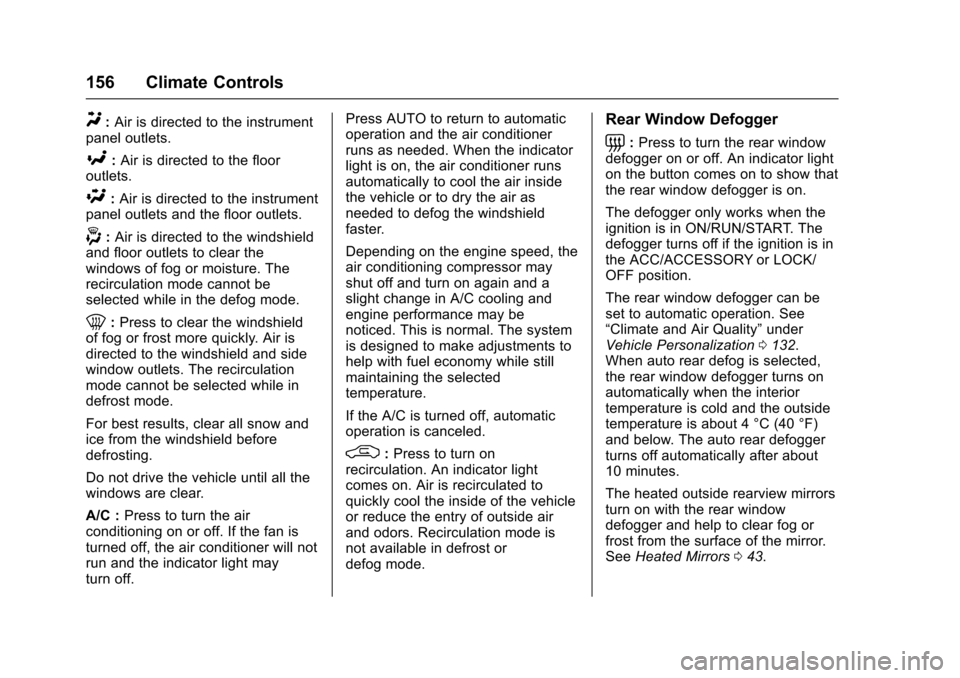
Y:Air is directed to the instrument
panel outlets.
[: Air is directed to the floor
outlets.
\: Air is directed to the instrument
panel outlets and the floor outlets.
-: Air is directed to the windshield
and floor outlets to clear the
windows of fog or moisture. The
recirculation mode cannot be
selected while in the defog mode.
0: Press to clear the windshield
of fog or frost more quickly. Air is
directed to the windshield and side
window outlets. The recirculation
mode cannot be selected while in
defrost mode.
For best results, clear all snow and
ice from the windshield before
defrosting.
Do not drive the vehicle until all the
windows are clear.
A/C : Press to turn the air
conditioning on or off. If the fan is
turned off, the air conditioner will not
run and the indicator light may
turn off. Press AUTO to return to automatic
operation and the air conditioner
runs as needed. When the indicator
light is on, the air conditioner runs
automatically to cool the air inside
the vehicle or to dry the air as
needed to defog the windshield
faster.
Depending on the engine speed, the
air conditioning compressor may
shut off and turn on again and a
slight change in A/C cooling and
engine performance may be
noticed. This is normal. The system
is designed to make adjustments to
help with fuel economy while still
maintaining the selected
temperature.
If the A/C is turned off, automatic
operation is canceled.
/:
Press to turn on
recirculation. An indicator light
comes on. Air is recirculated to
quickly cool the inside of the vehicle
or reduce the entry of outside air
and odors. Recirculation mode is
not available in defrost or
defog mode.
Rear Window Defogger
=: Press to turn the rear window
defogger on or off. An indicator light
on the button comes on to show that
the rear window defogger is on.
The defogger only works when the
ignition is in ON/RUN/START. The
defogger turns off if the ignition is in
the ACC/ACCESSORY or LOCK/
OFF position.
The rear window defogger can be
set to automatic operation. See
“Climate and Air Quality” under
Vehicle Personalization 0132.
When auto rear defog is selected,
the rear window defogger turns on
automatically when the interior
temperature is cold and the outside
temperature is about 4 °C (40 °F)
and below. The auto rear defogger
turns off automatically after about
10 minutes.
The heated outside rearview mirrors
turn on with the rear window
defogger and help to clear fog or
frost from the surface of the mirror.
See Heated Mirrors 043.
Page 158 of 360
Chevrolet Corvette Owner Manual (GMNA-Localizing-U.S./Canada/Mexico-
9956103) - 2017 - crc - 4/28/16
Climate Controls 157
If equipped with a power convertible
top, the rear window defogger and
heated mirrors are automatically
disabled when the power convertible
top is moving or down.
Caution
Using a razor blade or sharp
object on the inside rear window
can damage the antenna or
defogger. Repairs would not be
covered by the vehicle warranty.
Do not stick anything to the rear
window.
z/{:If equipped. press to heat
or ventilate the seat. See Heated
and Ventilated Front Seats 061.
Remote Start Climate Control
Operation (If Equipped) : If remote
start is used to start the vehicle, the
climate control system will come on.
The system uses the driver ’s
previous settings to heat or cool the
inside of the vehicle. The rear
window defogger or heated outside
rearview mirrors, if equipped, may
come on based on cold ambient conditions. The rear defog indicator
light may not come on during a
remote start. The heated or
ventilated seats may turn on if it is
cold or hot outside. See
Remote
Vehicle Start 033 and Heated and
Ventilated Front Seats 061,
if equipped.
Sensors
The interior cabin air temperature
and solar sensor on top of the
instrument panel near the
windshield monitors the solar heat
and measures the initial interior
cabin temperature.
The climate control system uses the
sensor information to adjust the
temperature, fan speed,
recirculation, and air delivery mode
for best comfort.
The humidity and windshield
temperature sensor is on the
windshield glass inside surface near
the rearview mirror. The automatic
climate control system uses this
sensor to receive information to
determine the need for defogging. If any of these sensors are blocked
or covered, the automatic climate
control system may not work
properly.
There is also a sensor behind the
front bumper. This sensor reads the
outside air temperature and helps to
maintain the temperature inside the
vehicle. Any cover on the front of
the vehicle could give a false
reading in the temperature.
Page 165 of 360
Chevrolet Corvette Owner Manual (GMNA-Localizing-U.S./Canada/Mexico-
9956103) - 2017 - crc - 4/28/16
164 Driving and Operating
3. Turn the steering wheel to gostraight down the roadway.
Loss of Control
Skidding
There are three types of skids that
correspond to the vehicle's three
control systems:
.Braking Skid —wheels are not
rolling.
. Steering or Cornering Skid —
too much speed or steering in a
curve causes tires to slip and
lose cornering force.
. Acceleration Skid —too much
throttle causes the driving
wheels to spin.
Defensive drivers avoid most skids
by taking reasonable care suited to
existing conditions, and by not
overdriving those conditions. But
skids are always possible.
If the vehicle starts to slide, follow
these suggestions:
. Ease your foot off the
accelerator pedal and steer the
way you want the vehicle to go. The vehicle may straighten out.
Be ready for a second skid if it
occurs.
. Slow down and adjust your
driving according to weather
conditions. Stopping distance
can be longer and vehicle
control can be affected when
traction is reduced by water,
snow, ice, gravel, or other
material on the road. Learn to
recognize warning clues —such
as enough water, ice, or packed
snow on the road to make a
mirrored surface —and slow
down when you have any doubt.
. Try to avoid sudden steering,
acceleration, or braking,
including reducing vehicle speed
by shifting to a lower gear. Any
sudden changes could cause
the tires to slide.
Remember: Antilock brakes help
avoid only the braking skid.
Track Events and
Competitive Driving
Participating in track events or other
competitive driving without following
the instructions provided may affect
the vehicle warranty. See the
warranty manual before using the
vehicle for racing or other
competitive driving.
Refer to Competitive Driving
Mode 0205.
Be sure to follow all service
procedures before driving the
vehicle at track events or
competitively.
Engine Sound Management
Setting
Caution
Do not place vehicle in Engine
Sound Management –Stealth
mode. Damage could result to
exhaust valve actuators.
Page 177 of 360
Chevrolet Corvette Owner Manual (GMNA-Localizing-U.S./Canada/Mexico-
9956103) - 2017 - crc - 4/28/16
176 Driving and Operating
Winter Driving
Driving on Snow or Ice
Snow or ice between the tires and
the road creates less traction or
grip, so drive carefully. Wet ice can
occur at about 0 °C (32 °F) when
freezing rain begins to fall. Avoid
driving on wet ice or in freezing rain
until roads can be treated.
For Slippery Road Driving:
.Accelerate gently. Accelerating
too quickly causes the wheels to
spin and makes the surface
under the tires slick.
. Turn on Traction Control. See
Traction Control/Electronic
Stability Control 0199.
. The Antilock Brake System
(ABS) improves vehicle stability
during hard stops, but the
brakes should be applied sooner
than when on dry pavement.
See Antilock Brake System
(ABS) 0196.
. Allow greater following distance
and watch for slippery spots. Icy
patches can occur on otherwise clear roads in shaded areas.
The surface of a curve or an
overpass can remain icy when
the surrounding roads are clear.
Avoid sudden steering
maneuvers and braking while
on ice.
. Turn off cruise control.
Blizzard Conditions
Stop the vehicle in a safe place and
signal for help. Stay with the vehicle
unless there is help nearby.
If possible, use Roadside
Assistance. See Roadside
Assistance Program 0328. To get
help and keep everyone in the
vehicle safe:
. Turn on the hazard warning
flashers.
. Tie a red cloth to an outside
mirror.
{Warning
Snow can trap engine exhaust
under the vehicle. This may
cause exhaust gases to get
inside. Engine exhaust contains
carbon monoxide (CO), which
cannot be seen or smelled. It can
cause unconsciousness and even
death.
If the vehicle is stuck in snow:
. Clear snow from the base of
the vehicle, especially any
blocking the exhaust pipe.
. Open a window about 5 cm
(2 in) on the vehicle side
that is away from the wind,
to bring in fresh air.
. Fully open the air outlets on
or under the instrument
panel.
. Adjust the climate control
system to circulate the air
inside the vehicle and set
(Continued)
Page 258 of 360
Chevrolet Corvette Owner Manual (GMNA-Localizing-U.S./Canada/Mexico-
9956103) - 2017 - crc - 4/28/16
Vehicle Care 257
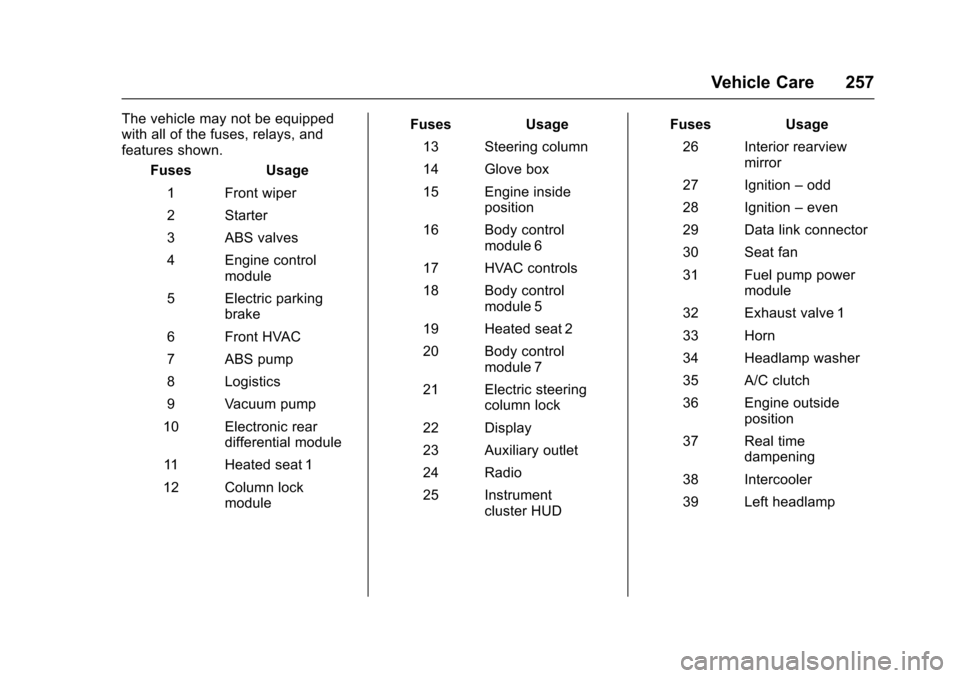
The vehicle may not be equipped
with all of the fuses, relays, and
features shown.Fuses Usage
1 Front wiper
2 Starter
3 ABS valves
4 Engine control module
5 Electric parking brake
6 Front HVAC
7 ABS pump
8 Logistics
9 Vacuum pump
10 Electronic rear differential module
11 Heated seat 1
12 Column lock module Fuses
Usage
13 Steering column
14 Glove box
15 Engine inside position
16 Body control module 6
17 HVAC controls
18 Body control module 5
19 Heated seat 2
20 Body control module 7
21 Electric steering column lock
22 Display
23 Auxiliary outlet
24 Radio
25 Instrument cluster HUD Fuses
Usage
26 Interior rearview mirror
27 Ignition –odd
28 Ignition –even
29 Data link connector
30 Seat fan
31 Fuel pump power module
32 Exhaust valve 1
33 Horn
34 Headlamp washer
35 A/C clutch
36 Engine outside position
37 Real time dampening
38 Intercooler
39 Left headlamp
Page 262 of 360
Chevrolet Corvette Owner Manual (GMNA-Localizing-U.S./Canada/Mexico-
9956103) - 2017 - crc - 4/28/16
Vehicle Care 261
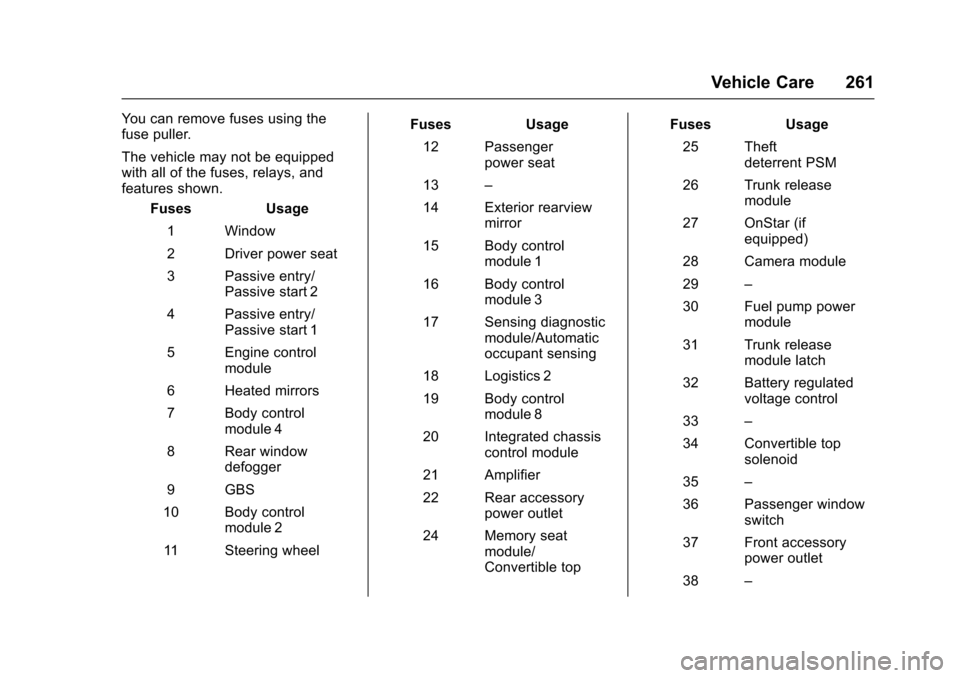
You can remove fuses using the
fuse puller.
The vehicle may not be equipped
with all of the fuses, relays, and
features shown.Fuses Usage
1 Window
2 Driver power seat
3 Passive entry/ Passive start 2
4 Passive entry/ Passive start 1
5 Engine control module
6 Heated mirrors
7 Body control module 4
8 Rear window defogger
9 GBS
10 Body control module 2
11 Steering wheel Fuses Usage
12 Passenger power seat
13 –
14 Exterior rearview mirror
15 Body control module 1
16 Body control module 3
17 Sensing diagnostic module/Automatic
occupant sensing
18 Logistics 2
19 Body control module 8
20 Integrated chassis control module
21 Amplifier
22 Rear accessory power outlet
24 Memory seat module/
Convertible top Fuses Usage
25 Theft deterrent PSM
26 Trunk release module
27 OnStar (if equipped)
28 Camera module
29 –
30 Fuel pump power module
31 Trunk release module latch
32 Battery regulated voltage control
33 –
34 Convertible top solenoid
35 –
36 Passenger window switch
37 Front accessory power outlet
38 –