ECO mode CHEVROLET CORVETTE 2018 Owner's Guide
[x] Cancel search | Manufacturer: CHEVROLET, Model Year: 2018, Model line: CORVETTE, Model: CHEVROLET CORVETTE 2018Pages: 358, PDF Size: 5.46 MB
Page 188 of 358
Chevrolet Corvette Owner Manual (GMNA-Localizing-U.S./Canada/Mexico-
11374030) - 2018 - CRC - 11/8/17
Driving and Operating 187
Downshifting the transmission in
slippery road conditions could result
in skidding. See“Skidding”under
Loss of Control 0159.
The transmission can be shifted like
a manual transmission using the
paddle shift controls while in
D (Drive). See Manual Mode0187.
Caution
A transmission hot message may
display if the automatic
transmission fluid is too hot.
Driving under this condition can
damage the vehicle. Stop and idle
the engine to cool the automatic
transmission fluid. This message
clears when the transmission fluid
has cooled sufficiently.
M : In M (Manual Mode), the
transmission can be shifted like a
manual transmission using the
paddle shift controls. See Manual
Mode 0187.
Manual Mode
Manual Paddle Shift
(Automatic Transmision)
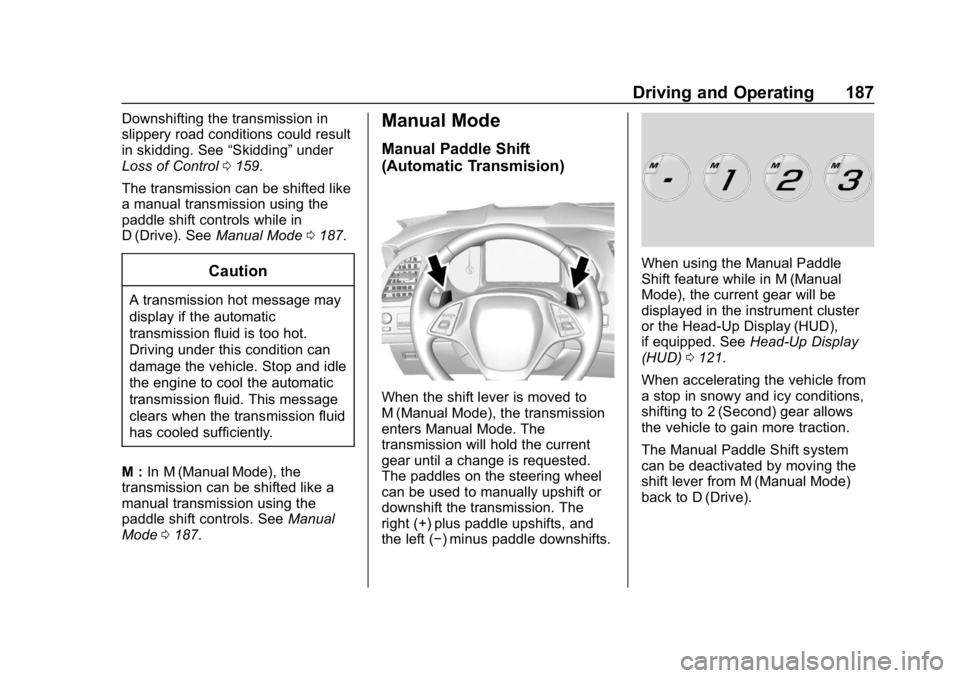
When the shift lever is moved to
M (Manual Mode), the transmission
enters Manual Mode. The
transmission will hold the current
gear until a change is requested.
The paddles on the steering wheel
can be used to manually upshift or
downshift the transmission. The
right (+) plus paddle upshifts, and
the left (−) minus paddle downshifts.
When using the Manual Paddle
Shift feature while in M (Manual
Mode), the current gear will be
displayed in the instrument cluster
or the Head-Up Display (HUD),
if equipped. See Head-Up Display
(HUD) 0121.
When accelerating the vehicle from
a stop in snowy and icy conditions,
shifting to 2 (Second) gear allows
the vehicle to gain more traction.
The Manual Paddle Shift system
can be deactivated by moving the
shift lever from M (Manual Mode)
back to D (Drive).
Page 189 of 358
Chevrolet Corvette Owner Manual (GMNA-Localizing-U.S./Canada/Mexico-
11374030) - 2018 - CRC - 11/8/17
188 Driving and Operating
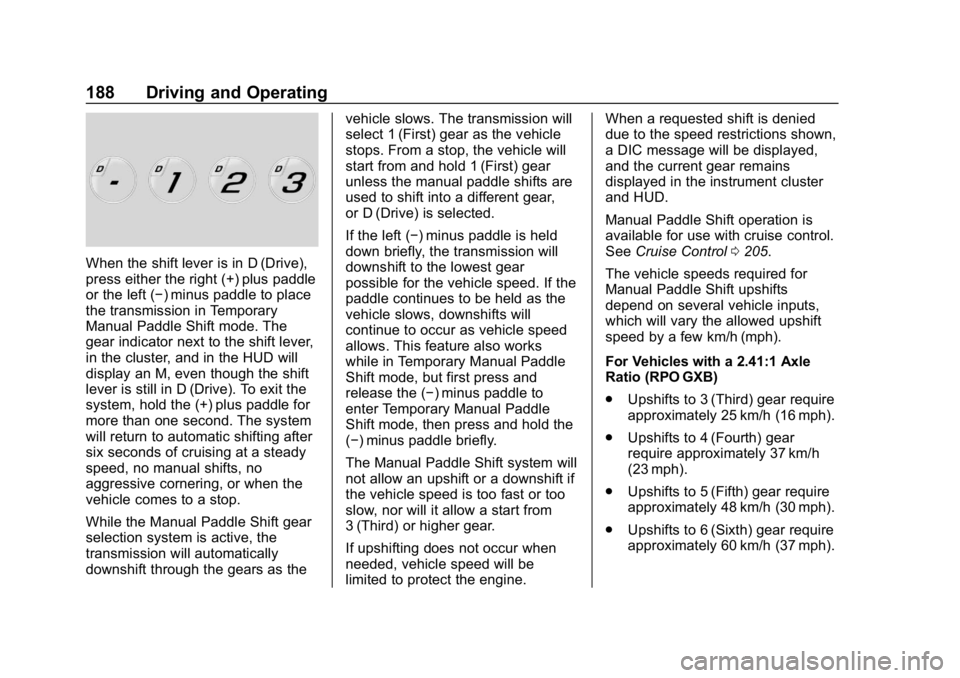
When the shift lever is in D (Drive),
press either the right (+) plus paddle
or the left (−) minus paddle to place
the transmission in Temporary
Manual Paddle Shift mode. The
gear indicator next to the shift lever,
in the cluster, and in the HUD will
display an M, even though the shift
lever is still in D (Drive). To exit the
system, hold the (+) plus paddle for
more than one second. The system
will return to automatic shifting after
six seconds of cruising at a steady
speed, no manual shifts, no
aggressive cornering, or when the
vehicle comes to a stop.
While the Manual Paddle Shift gear
selection system is active, the
transmission will automatically
downshift through the gears as thevehicle slows. The transmission will
select 1 (First) gear as the vehicle
stops. From a stop, the vehicle will
start from and hold 1 (First) gear
unless the manual paddle shifts are
used to shift into a different gear,
or D (Drive) is selected.
If the left (−) minus paddle is held
down briefly, the transmission will
downshift to the lowest gear
possible for the vehicle speed. If the
paddle continues to be held as the
vehicle slows, downshifts will
continue to occur as vehicle speed
allows. This feature also works
while in Temporary Manual Paddle
Shift mode, but first press and
release the (−) minus paddle to
enter Temporary Manual Paddle
Shift mode, then press and hold the
(−) minus paddle briefly.
The Manual Paddle Shift system will
not allow an upshift or a downshift if
the vehicle speed is too fast or too
slow, nor will it allow a start from
3 (Third) or higher gear.
If upshifting does not occur when
needed, vehicle speed will be
limited to protect the engine.When a requested shift is denied
due to the speed restrictions shown,
a DIC message will be displayed,
and the current gear remains
displayed in the instrument cluster
and HUD.
Manual Paddle Shift operation is
available for use with cruise control.
See
Cruise Control 0205.
The vehicle speeds required for
Manual Paddle Shift upshifts
depend on several vehicle inputs,
which will vary the allowed upshift
speed by a few km/h (mph).
For Vehicles with a 2.41:1 Axle
Ratio (RPO GXB)
. Upshifts to 3 (Third) gear require
approximately 25 km/h (16 mph).
. Upshifts to 4 (Fourth) gear
require approximately 37 km/h
(23 mph).
. Upshifts to 5 (Fifth) gear require
approximately 48 km/h (30 mph).
. Upshifts to 6 (Sixth) gear require
approximately 60 km/h (37 mph).
Page 198 of 358
Chevrolet Corvette Owner Manual (GMNA-Localizing-U.S./Canada/Mexico-
11374030) - 2018 - CRC - 11/8/17
Driving and Operating 197
2. Turn the engine off and wait15 seconds.
3. Start the engine.
Drive the vehicle. If
dcomes on
and stays on, the vehicle may need
more time to diagnose the problem.
If the condition persists, see your
dealer.
Turning the Systems Off
and On
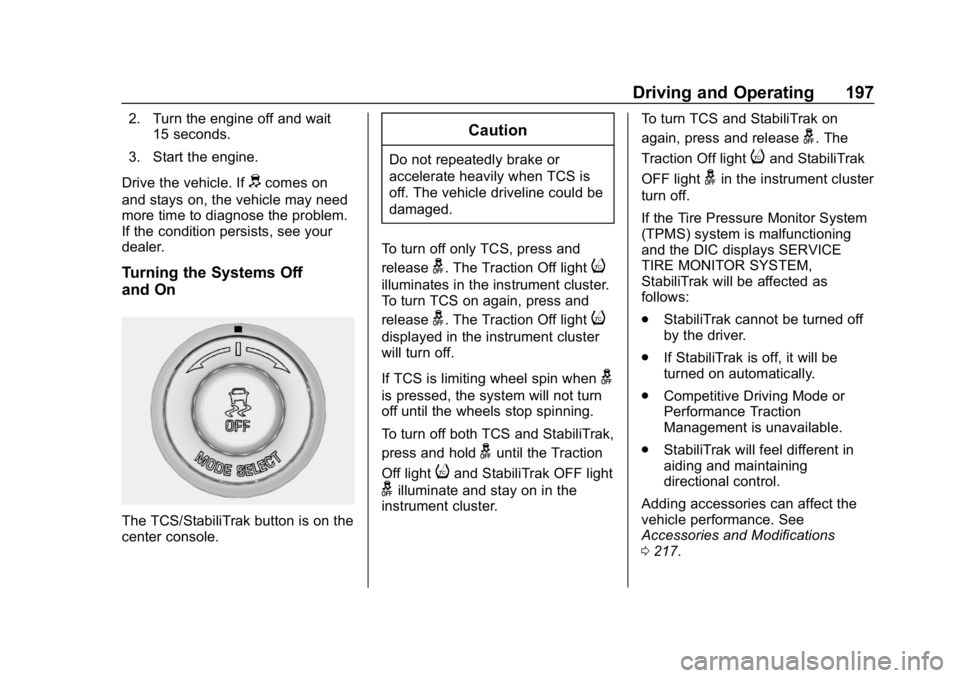
The TCS/StabiliTrak button is on the
center console.
Caution
Do not repeatedly brake or
accelerate heavily when TCS is
off. The vehicle driveline could be
damaged.
To turn off only TCS, press and
release
g. The Traction Off lighti
illuminates in the instrument cluster.
To turn TCS on again, press and
release
g. The Traction Off lighti
displayed in the instrument cluster
will turn off.
If TCS is limiting wheel spin when
g
is pressed, the system will not turn
off until the wheels stop spinning.
To turn off both TCS and StabiliTrak,
press and hold
guntil the Traction
Off light
iand StabiliTrak OFF light
gilluminate and stay on in the
instrument cluster. To turn TCS and StabiliTrak on
again, press and release
g. The
Traction Off light
iand StabiliTrak
OFF light
gin the instrument cluster
turn off.
If the Tire Pressure Monitor System
(TPMS) system is malfunctioning
and the DIC displays SERVICE
TIRE MONITOR SYSTEM,
StabiliTrak will be affected as
follows:
. StabiliTrak cannot be turned off
by the driver.
. If StabiliTrak is off, it will be
turned on automatically.
. Competitive Driving Mode or
Performance Traction
Management is unavailable.
. StabiliTrak will feel different in
aiding and maintaining
directional control.
Adding accessories can affect the
vehicle performance. See
Accessories and Modifications
0 217.
Page 199 of 358

Chevrolet Corvette Owner Manual (GMNA-Localizing-U.S./Canada/Mexico-
11374030) - 2018 - CRC - 11/8/17
198 Driving and Operating
Driver Mode Control
The Driver Mode Selector knob is
on the console behind the shift
lever.
There are five modes for different
driving conditions: Weather, Eco,
Tour, Sport, and Track.The outer ring turns to change the
modes, which display in the
instrument cluster.
Press the button in the center of the
knob for StabiliTrak and Traction
Control System (TCS), or if the
vehicle is in Track Mode with
Performance Traction Management
(PTM). See
Traction Control/
Electronic Stability Control 0196 or
the information on PTM in
Competitive Driving Mode 0201.
When PTM is active, the outer ring
will change the PTM mode and the
Driver mode will display in the
instrument cluster. Each mode is configured for use in
different driving conditions. Use:
.
Weather Mode for rain
and snow.
. Eco Mode to improve fuel
economy.
. Tour Mode for comfortable
normal driving.
. Sport Mode for spirited on road
driving.
. Track Mode for track use.
Page 200 of 358
Chevrolet Corvette Owner Manual (GMNA-Localizing-U.S./Canada/Mexico-
11374030) - 2018 - CRC - 11/8/17
Driving and Operating 199
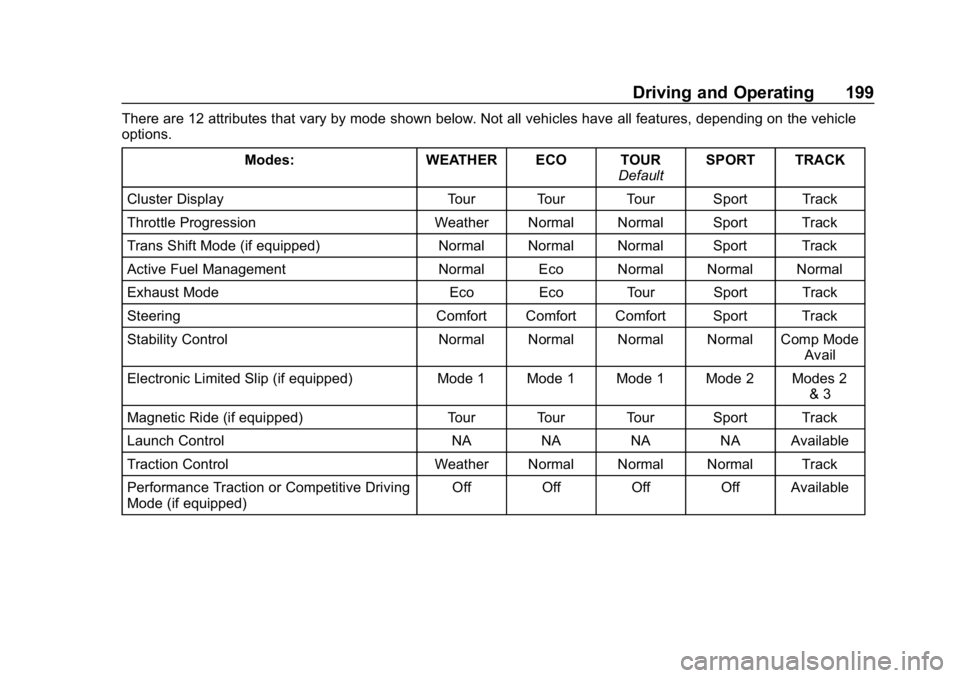
There are 12 attributes that vary by mode shown below. Not all vehicles have all features, depending on the vehicle
options.Modes: WEATHER ECO TOUR DefaultSPORT TRACK
Cluster Display Tour Tour Tour Sport Track
Throttle Progression Weather Normal Normal Sport Track
Trans Shift Mode (if equipped) Normal Normal Normal Sport Track
Active Fuel Management Normal Eco Normal Normal Normal
Exhaust Mode Eco Eco Tour Sport Track
Steering Comfort Comfort Comfort Sport Track
Stability Control Normal Normal Normal Normal Comp Mode Avail
Electronic Limited Slip (if equipped) Mode 1 Mode 1 Mode 1 Mode 2 Modes 2 & 3
Magnetic Ride (if equipped) Tour Tour Tour Sport Track
Launch Control NA NA NA NA Available
Traction Control Weather Normal Normal Normal Track
Performance Traction or Competitive Driving
Mode (if equipped) Off Off Off Off Available
Page 201 of 358
Chevrolet Corvette Owner Manual (GMNA-Localizing-U.S./Canada/Mexico-
11374030) - 2018 - CRC - 11/8/17
200 Driving and Operating
Driver Mode Selector Attributes
Affected
Instrument Cluster Display
Configures the gauge cluster
display for each mode when linked
(default):
.Tour: Modern theme which
features displays for audio and
navigation.
. Sport: Classic easy to read
Sports Car gauges.
. Track: Gauges design based on
Corvette Racing display with lap
timer.
Throttle Progression
Adjusts throttle sensitivity by
selecting how quickly or slowly the
throttle reacts to input.
Transmission Shift Mode −Paddle
Shift Automatic
. Adjusts to either a smoother or
firmer shift.
. Sport –Performance Algorithm
Liftfoot (PAL) recognizes
aggressive throttle maneuvers and holds lower gears for
greater engine braking and
enhanced vehicle control when
not using paddles. (Available in
Sport or Track Mode.)
. Track –Performance Algorithm
Shift (PAS) recognizes
aggressive cornering, heavy
braking, and high acceleration to
select and hold lower gears
when not using paddles.
Active Fuel Management (engine
cylinder shuts off)
4-Cylinder Mode
. Normal with automatic
transmission: The engine uses
8-cylinder mode when
accelerating, but changes to
4-cylinder mode when coasting.
. With manual transmission:
Active Fuel Management only
active in Eco Mode.
. Off in Manual Mode with
automatic transmission unless in
Eco Mode. .
Eco keeps the engine in
4-cylinder mode unless heavy
acceleration is needed.
Exhaust (variable mode exhaust
system)
Changes when the variable exhaust
valves open.
Steering (Assist Effort)
Adjusts from a lighter steering feel
to reduced assist for more
steering feel.
Magnetic Ride Control (if
equipped)
Adjusts the shock dampening
firmness based on driving
conditions to improve comfort and
performance.
Launch Control
Available only in Track Mode for
maximum “off-the-line” acceleration
when in Competitive or PTM modes.
Page 202 of 358
Chevrolet Corvette Owner Manual (GMNA-Localizing-U.S./Canada/Mexico-
11374030) - 2018 - CRC - 11/8/17
Driving and Operating 201
Stability Control
.Competitive Driving Mode allows
less computer control to permit
some slide and drift and is
selected with
g–only available
in Sport or Track Mode.
. StabiliTrak can be turned off by
pressing and holding
gfor
10 seconds.
PTM (Performance Traction
Management) (if equipped)
. Available in Track Mode.
. There are five selectable
settings if Competitive Driving
Mode is activated.
Competitive Driving Mode
If equipped, Competitive Driving
Mode, Performance Traction
Management, and Launch Control
are systems designed to allow
increased performance while
accelerating and/or cornering. This
is accomplished by regulating and
optimizing the engine, brakes, and
suspension performance. These modes are for use at a closed
course race track and are not
intended for use on public roads.
They will not compensate for driver
inexperience or lack of familiarity
with the race track. Drivers who
prefer to allow the system to have
more control of the engine, brake,
and suspension are advised to turn
the normal Traction Control System
(TCS) and StabiliTrak system on.
Caution
Attempting to shift when the drive
wheels are spinning and do not
have traction may cause damage
to the transmission. Damage
caused by misuse of the vehicle
is not covered by the vehicle
warranty. Do not attempt to shift
when the drive wheels do not
have traction.
Competitive Driving Mode
Competitive Driving Mode allows full
engine power while StabiliTrak
helps maintain directional control ofthe vehicle by selective brake
application. In this mode, TCS is off.
Launch Control is available if in
Track Mode. Adjust your driving
style to account for the available
engine power. See
“Launch Control”
later in this section.
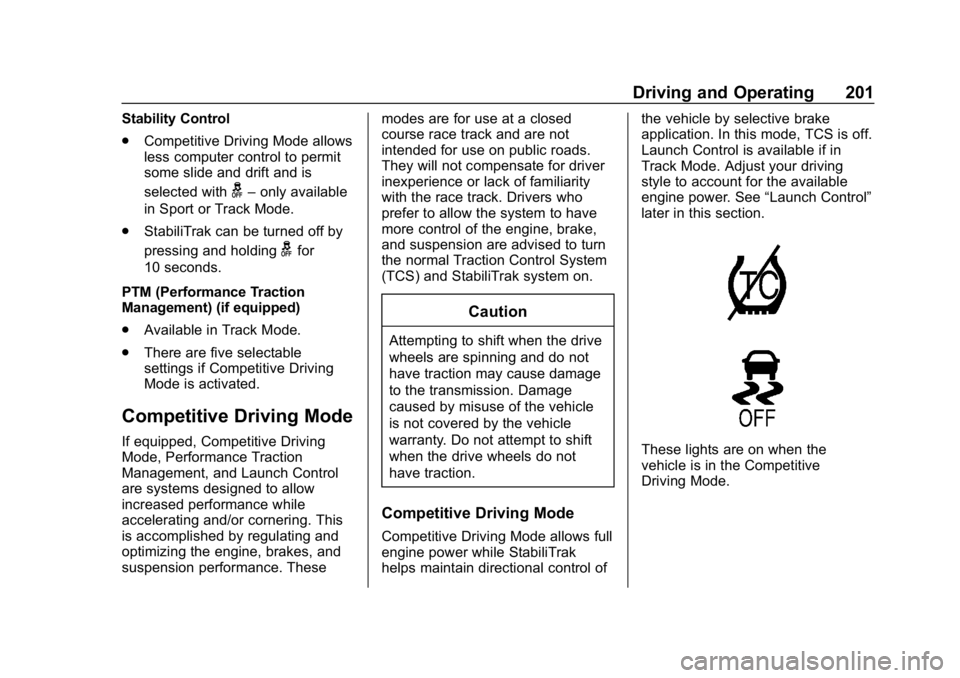
These lights are on when the
vehicle is in the Competitive
Driving Mode.
Page 204 of 358
Chevrolet Corvette Owner Manual (GMNA-Localizing-U.S./Canada/Mexico-
11374030) - 2018 - CRC - 11/8/17
Driving and Operating 203
The PTM system contains five
modes. These modes are selected
by turning the Selective Ride
Control/Performance Traction
Management MODE SELECT knob
on the center console. Scroll up or
down through modes 1–5 by turning
the MODE SELECT knob to the
right or left.
The following is a DIC display
description and the recommended
usage of each mode:
PERF TRAC 1–WET ACTIVE
HANDLING ON
. Intended for all driver skill levels.
. Wet or damp conditions only —
not intended for use in heavy
rain or standing water.
. StabiliTrak is on and engine
power is reduced based on
conditions.
PERF TRAC 2 –DRY ACTIVE
HANDLING ON
. For use by less experienced
drivers or while learning a new
track. .
Dry conditions only.
. StabiliTrak is on and engine
power is slightly reduced.
PERF TRAC 3 –SPORT
ACTIVE HANDLING ON
. For use by drivers who are
familiar with the track.
. Dry conditions only.
. Requires more driving skill than
mode 2.
. StabiliTrak is on and more
engine power is available than in
mode 2.
PERF TRAC 4 –SPORT
ACTIVE HANDLING OFF
. For use by drivers who are
familiar with the track.
. Dry conditions only.
. Requires more driving skill than
modes 2 or 3.
. StabiliTrak is off and available
engine power is the same as
mode 3.
PERF TRAC 5 –RACE ACTIVE
HANDLING OFF
. For use by experienced drivers
who are familiar with the track.
. Dry conditions only.
. Requires more driving skill than
in other modes.
. StabiliTrak is off and engine
power is available for maximum
cornering speed.
Press and release
gto turn off PTM
and return to the traction control and
StabiliTrak systems. The traction off
light
iand StabiliTrak OFF lightg
will go out.
Launch Control (Track
Mode Only)
A Launch Control feature is
available, within Competitive Driving
Mode, on all vehicles to allow the
driver to achieve high levels of
vehicle acceleration in a straight
line. Launch Control is a form of
traction control that manages tire
spin while launching the vehicle.
This feature is intended for use
Page 206 of 358
Chevrolet Corvette Owner Manual (GMNA-Localizing-U.S./Canada/Mexico-
11374030) - 2018 - CRC - 11/8/17
Driving and Operating 205
Limited-Slip Differential
(Stingray without
Z51 Only)
If equipped, the mechanical
limited-slip differential can give more
traction on snow, mud, ice, sand,
or gravel. It works like a standard
axle most of the time, but when
traction is low, this feature allows
the drive wheel with the most
traction to move the vehicle. For
vehicles with limited-slip differential,
driven under severe conditions, the
rear axle fluid should be changed.
SeeCompetitive Driving Mode
0 201 andMaintenance Schedule
0 304.
Limited-Slip Differential
(Z06, Grand Sport, and
Stingray with Z51)
If equipped, the Electronic
Limited-Slip Differential (eLSD) is
automatically activated. eLSD
actively monitors vehicle sensors
and driver inputs to determine the
amount of change for the
conditions. With eLSD, the
vehicle has:
.
Enhanced high-speed control
. Improved traction through
corners, allowing more
acceleration
. More precise steering
. Increased vehicle agility
. Integration with StabiliTrak
For vehicles with eLSD, driven
under severe conditions, the rear
axle fluid should be changed.
See Competitive Driving Mode
0 201 andMaintenance Schedule
0 304.
Cruise Control
With cruise control, a speed of
about 40 km/h (25 mph) or more
can be maintained without keeping
your foot on the accelerator. Cruise
control does not work at speeds
below about 40 km/h (25 mph).
{Warning
Cruise control can be dangerous
where you cannot drive safely at
a steady speed. Do not use
cruise control on winding roads or
in heavy traffic.
Cruise control can be dangerous
on slippery roads. On such roads,
fast changes in tire traction can
cause excessive wheel slip, and
you could lose control. Do not use
cruise control on slippery roads.
If equipped with a manual
transmission, the cruise control will
remain active when the gears are
shifted. The cruise is disengaged if
the clutch is pressed for several
seconds.
Page 326 of 358
Chevrolet Corvette Owner Manual (GMNA-Localizing-U.S./Canada/Mexico-
11374030) - 2018 - CRC - 11/8/17
Customer Information 325
.Find the
Chevrolet-recommended
maintenance services.
GM Mobility
Reimbursement Program
This program is available to
qualified applicants for cost
reimbursement, up to certain limits,
of eligible aftermarket adaptive
equipment required for the vehicle,
such as hand controls or a
wheelchair/scooter lift for the
vehicle.
To learn about the GM Mobility
program, see www.gmmobility.com
or call the GM Mobility Assistance
Center at 1-800-323-9935. Text
Telephone (TTY) users, call
1-800-833-9935. General Motors of Canada also has
a Mobility program. See www.gm.ca
or call 1-800-GM-DRIVE
(800-463-7483) for details. TTY
users call 1-800-263-3830.
Roadside Assistance
Program
For U.S.-purchased vehicles, call
1-800-243-8872. (Text Telephone
(TTY): 1-888-889-2438.)
For Canadian-purchased vehicles,
call 1-800-268-6800.
Service is available 24 hours a day,
365 days a year.
Calling for Assistance
When calling Roadside Assistance,
have the following information
ready:
.
Your name, home address, and
home telephone number
. Telephone number of your
location
. Location of the vehicle .
Model, year, color, and license
plate number of the vehicle
. Odometer reading, Vehicle
Identification Number (VIN), and
delivery date of the vehicle
. Description of the problem
Coverage
Services are provided for the
duration of the vehicle’s powertrain
warranty.
In the U.S., anyone driving the
vehicle is covered. In Canada, a
person driving the vehicle without
permission from the owner is not
covered.
Roadside Assistance is not a part of
the New Vehicle Limited Warranty.
General Motors North America and
Chevrolet reserve the right to make
any changes or discontinue the
Roadside Assistance program at
any time without notification.
General Motors North America and
Chevrolet reserve the right to limit
services or payment to an owner or