trunk CHEVROLET CORVETTE 2018 Owner's Guide
[x] Cancel search | Manufacturer: CHEVROLET, Model Year: 2018, Model line: CORVETTE, Model: CHEVROLET CORVETTE 2018Pages: 358, PDF Size: 5.46 MB
Page 55 of 358
Chevrolet Corvette Owner Manual (GMNA-Localizing-U.S./Canada/Mexico-
11374030) - 2018 - CRC - 11/8/17
54 Keys, Doors, and Windows
2. Remove all objects from thetop of the tonneau cover and
forward of the partition. Place
the partition in the rear storage
area in the upright position.
Fasten both sides of the
partition to the posts just below
the tonneau cover. See Rear
Storage 093.
3. Close the trunk.
4. Start the vehicle or place it in ACC/ACCESSORY.
5. When possible, operate the convertible top when the
vehicle is stopped. The top can
be operated while driving
below 50 km/h (31 mph) and
will stop if that speed is
exceeded. The top operation
will take approximately
25 seconds. Make sure the top
operation can be completed
before that speed is reached.
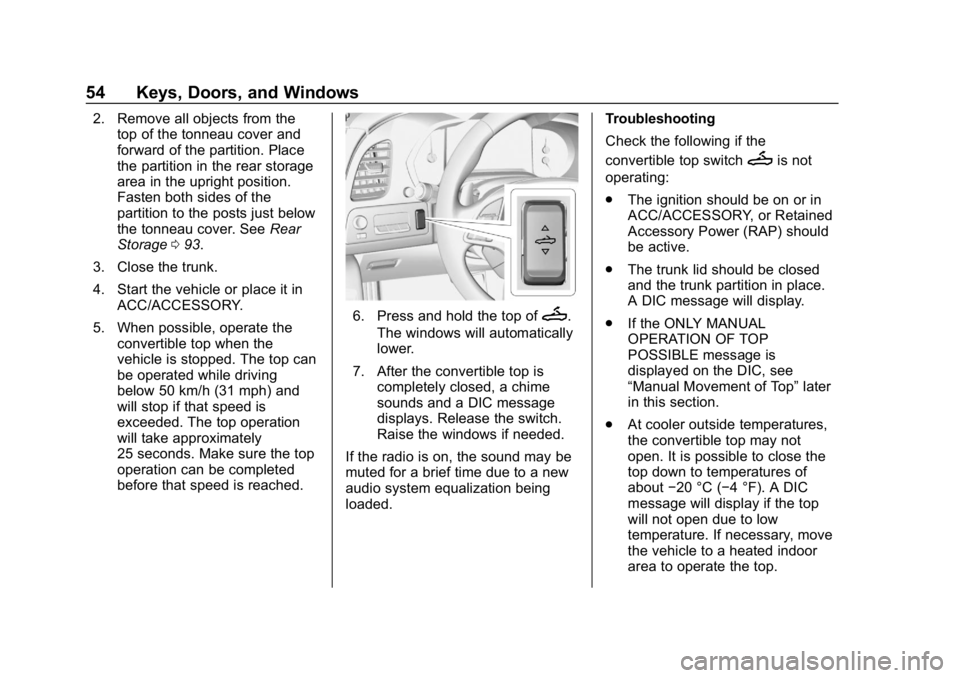
6. Press and hold the top ofM.
The windows will automatically
lower.
7. After the convertible top is completely closed, a chime
sounds and a DIC message
displays. Release the switch.
Raise the windows if needed.
If the radio is on, the sound may be
muted for a brief time due to a new
audio system equalization being
loaded. Troubleshooting
Check the following if the
convertible top switch
Mis not
operating:
. The ignition should be on or in
ACC/ACCESSORY, or Retained
Accessory Power (RAP) should
be active.
. The trunk lid should be closed
and the trunk partition in place.
A DIC message will display.
. If the ONLY MANUAL
OPERATION OF TOP
POSSIBLE message is
displayed on the DIC, see
“Manual Movement of Top” later
in this section.
. At cooler outside temperatures,
the convertible top may not
open. It is possible to close the
top down to temperatures of
about −20 °C (−4 °F). A DIC
message will display if the top
will not open due to low
temperature. If necessary, move
the vehicle to a heated indoor
area to operate the top.
Page 56 of 358
Chevrolet Corvette Owner Manual (GMNA-Localizing-U.S./Canada/Mexico-
11374030) - 2018 - CRC - 11/8/17
Keys, Doors, and Windows 55
.If the top has recently been
cycled repeatedly or left in an
intermediate state, it will be
temporarily disabled. A DIC
message displays. Normal
operation will be restored within
10 minutes after the system has
cooled.
. If the vehicle battery is low, the
power top operation may be
disabled. Try to start the vehicle.
A DIC message displays.
. If the battery has recently been
reconnected or if the vehicle has
been jump started, the top may
not operate until the power
windows have been indexed.
Complete the power window
indexing procedure. See Power
Windows 046.
Other features may be affected
while operating the convertible top:
. The trunk can only be opened
with the key until the convertible
top is completely opened or
closed. .
Do not try to start the vehicle
while opening the top with the
RKE transmitter. A DIC message
may display. Release both
buttons and wait a few seconds
before starting the vehicle
normally.
. The passive door unlock feature
may not operate properly while
using the RKE transmitter to
open the convertible top.
. The windows cannot close while
the top is moving.
. When driving with the top not
fully secured, chimes can be
heard above 80 km/h (50 mph).
If the vehicle battery has been
disconnected and reconnected, the
fuses were pulled or replaced, or a
jump start was performed, the TOP
NOT SECURE message may
display. Press and hold
Mon the
RKE transmitter or on the
instrument panel to open/close the
top until this message is cleared. Partial Top Cycling
If the convertible top operation is
stopped before completion, the top
will temporarily hold its position.
If the ignition is on or in ACC/
ACCESSORY, the top will be held
for up to five minutes. If the vehicle
is moving or off, the amount of time
will vary from a few seconds to
about a minute.
Beeps and DIC messages will be
displayed before the top will move.
When this occurs, immediately finish
the convertible top operation by
pressing
Mon the RKE
transmitter or on the instrument
panel again until it completes.
If the top cannot be secured, keep
clear of the top components. In
some conditions the top may move
quickly.
Do not drive with the convertible top
in an unsecured position. The top
components may move
unexpectedly. In some cases the
top may not be able to be power
operated. If this occurs, follow the
DIC messages displayed.
Page 94 of 358
Chevrolet Corvette Owner Manual (GMNA-Localizing-U.S./Canada/Mexico-
11374030) - 2018 - CRC - 11/8/17
Storage 93
To open, press the button.
If equipped, the glove box locks
when Valet Mode is enabled. See
Vehicle Personalization0126.
Cupholders
Press the top of the cover to access
the cupholders. There is a
removable divider.
Rear Storage
Caution
Do not store heavy or sharp
objects in the rear storage
compartments located in the
hatch/trunk area. The objects
could damage the underside of
the hatch/trunk.
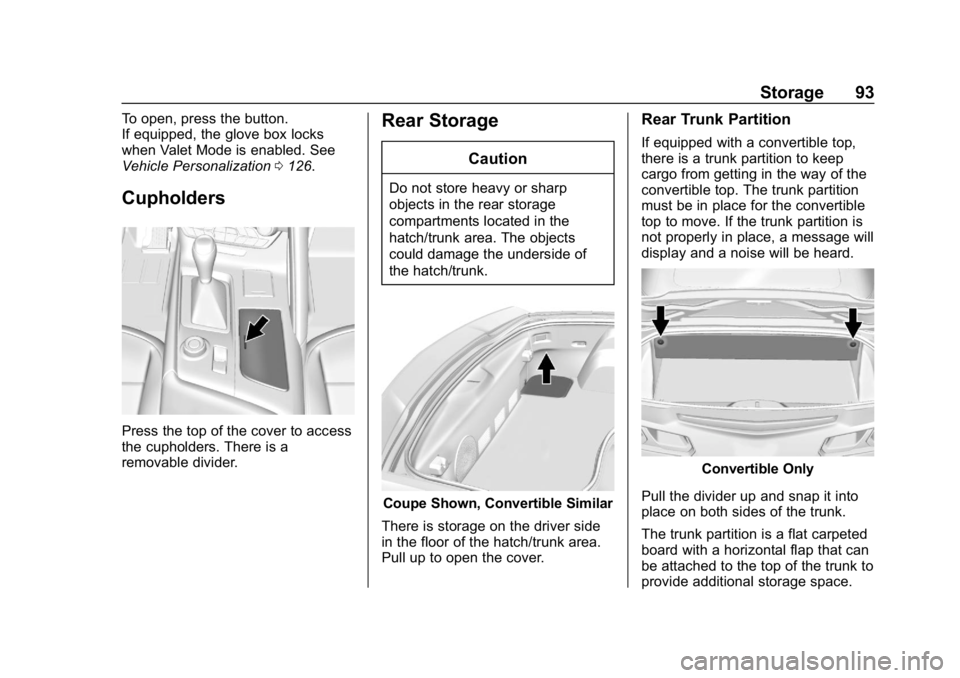
Coupe Shown, Convertible Similar
There is storage on the driver side
in the floor of the hatch/trunk area.
Pull up to open the cover.
Rear Trunk Partition
If equipped with a convertible top,
there is a trunk partition to keep
cargo from getting in the way of the
convertible top. The trunk partition
must be in place for the convertible
top to move. If the trunk partition is
not properly in place, a message will
display and a noise will be heard.
Convertible Only
Pull the divider up and snap it into
place on both sides of the trunk.
The trunk partition is a flat carpeted
board with a horizontal flap that can
be attached to the top of the trunk to
provide additional storage space.
Page 95 of 358
Chevrolet Corvette Owner Manual (GMNA-Localizing-U.S./Canada/Mexico-
11374030) - 2018 - CRC - 11/8/17
94 Storage
With the convertible top up, the
trunk partition can be unsnapped
and laid flat to increase trunk cargo
space.
Center Console Storage
Caution
The area inside the console can
get hot. Do not store items that
can be damaged by heat.
To open, press the button on the
driver side.
Depending on the options, there
may be two USB ports and an
accessory outlet inside. SeePower
Outlets 099 and “Audio Players” in
the infotainment manual.
Additional Storage
Features
Cargo Cover
If equipped, the cargo cover
provides hidden storage in the rear
area of the vehicle. The cover also
blocks glare from the removable
roof panel when it is stored in the
rear compartment.
The cargo cover has two pieces: a
flat and an L-shaped piece.
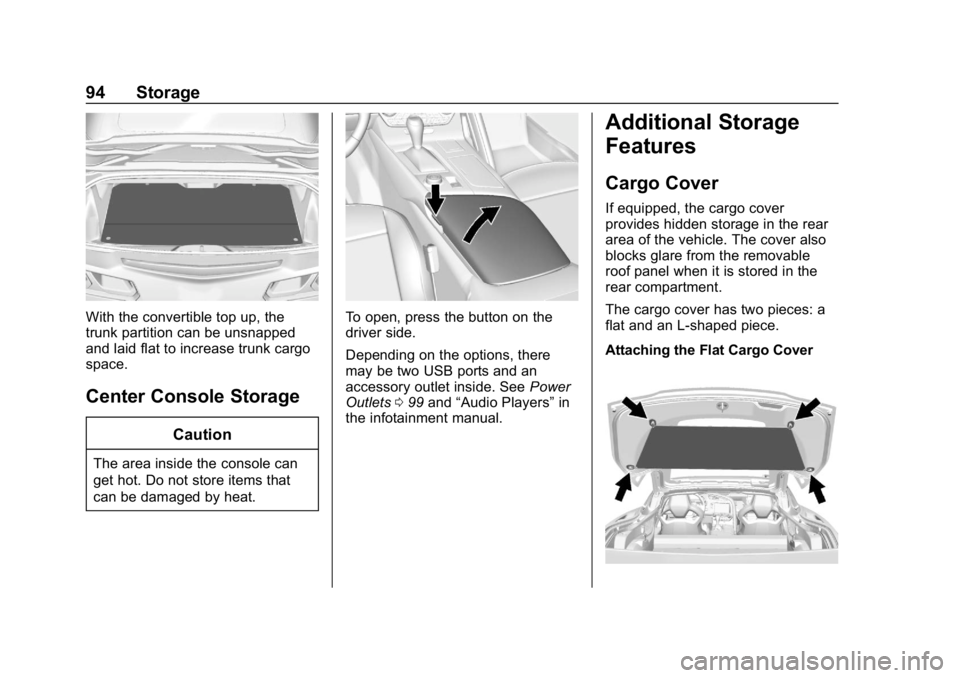
Attaching the Flat Cargo Cover
Page 96 of 358
Chevrolet Corvette Owner Manual (GMNA-Localizing-U.S./Canada/Mexico-
11374030) - 2018 - CRC - 11/8/17
Storage 95
Attach the elastic loops on the four
corners of the cargo cover to the
hooks on the front and rear corners
of the hatch.
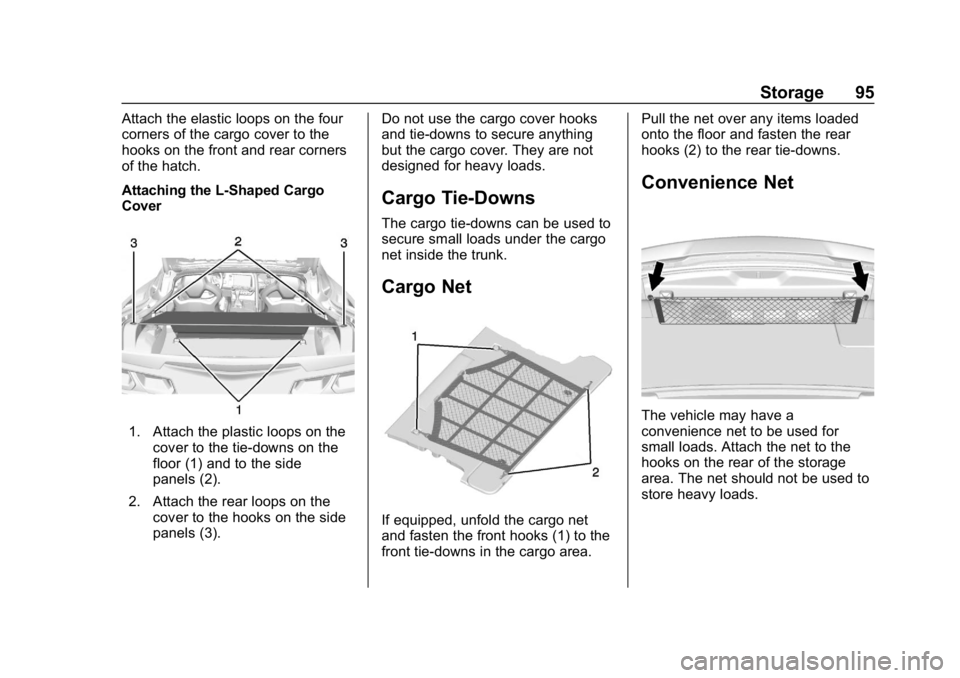
Attaching the L-Shaped Cargo
Cover
1. Attach the plastic loops on thecover to the tie-downs on the
floor (1) and to the side
panels (2).
2. Attach the rear loops on the cover to the hooks on the side
panels (3). Do not use the cargo cover hooks
and tie-downs to secure anything
but the cargo cover. They are not
designed for heavy loads.
Cargo Tie-Downs
The cargo tie-downs can be used to
secure small loads under the cargo
net inside the trunk.
Cargo Net
If equipped, unfold the cargo net
and fasten the front hooks (1) to the
front tie-downs in the cargo area. Pull the net over any items loaded
onto the floor and fasten the rear
hooks (2) to the rear tie-downs.
Convenience Net
The vehicle may have a
convenience net to be used for
small loads. Attach the net to the
hooks on the rear of the storage
area. The net should not be used to
store heavy loads.
Page 100 of 358
Chevrolet Corvette Owner Manual (GMNA-Localizing-U.S./Canada/Mexico-
11374030) - 2018 - CRC - 11/8/17
Instruments and Controls 99
Date
To set the date:1. Touch SETTINGS, then touch Time and Date.
2. Touch Set Date, then touch
RorQto increase or
decrease month, day, or year.
3. Touch
}to go back to the
previous menu.
Auto Set
When on, the time and date will
automatically update.
Auto set requires an active OnStar
service plan.
To set auto set: 1. Touch SETTINGS, then touch Time and Date.
2. Touch Set Time or Set Date.
3. Touch Auto Set, then select On-Cell Network or Off-Manual
to manually set the time
and date.
4. Touch
}to go back to the
previous menu. If auto set is on, the time displayed
on the clock may not update
immediately when driving into a new
time zone.
Clock Display
When on, the digital clock will show
on the infotainment display.
To set the clock display:
1. Touch SETTINGS, then touch Time and Date.
2. Touch Clock Display, then select Off or On.
3. Touch
}to go back to the
previous menu.
Power Outlets
Use the accessory power outlet to
plug in electrical equipment, such as
a cell phone or MP3 player.
There are three accessory power
outlets:
. In front of the cupholder. Open
the door compartment to access.
. Inside the center console
storage compartment. .
In the rear compartment.
Lift the cover to access and replace
when not in use.
The power outlets in front of the
cupholder and inside the center
console storage compartment are
powered when the ignition is on or
in ACC/ACCESSORY, or until the
driver door is opened within
10 minutes of turning off the vehicle.
See Retained Accessory Power
(RAP) 0182.
The rear compartment power outlet
is powered at all times. The
vehicle’s battery may run down if
the power outlet is used while the
ignition is off. Use this power outlet
for plugging in the battery
maintainer, if equipped.
{Warning
Power is always supplied to the
trunk outlet. Do not leave
electrical equipment plugged in
when the vehicle is not in use
because the vehicle could catch
fire and cause injury or death.
Page 142 of 358
Chevrolet Corvette Owner Manual (GMNA-Localizing-U.S./Canada/Mexico-
11374030) - 2018 - CRC - 11/8/17
Lighting 141
Interior Lighting
Instrument Panel
Illumination Control
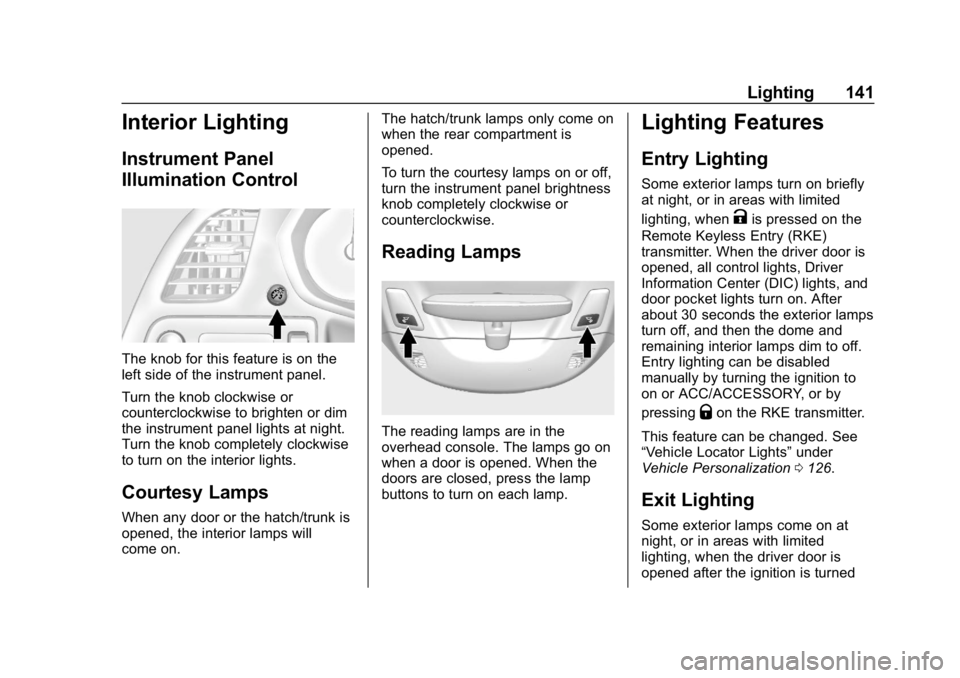
The knob for this feature is on the
left side of the instrument panel.
Turn the knob clockwise or
counterclockwise to brighten or dim
the instrument panel lights at night.
Turn the knob completely clockwise
to turn on the interior lights.
Courtesy Lamps
When any door or the hatch/trunk is
opened, the interior lamps will
come on.The hatch/trunk lamps only come on
when the rear compartment is
opened.
To turn the courtesy lamps on or off,
turn the instrument panel brightness
knob completely clockwise or
counterclockwise.
Reading Lamps
The reading lamps are in the
overhead console. The lamps go on
when a door is opened. When the
doors are closed, press the lamp
buttons to turn on each lamp.
Lighting Features
Entry Lighting
Some exterior lamps turn on briefly
at night, or in areas with limited
lighting, when
Kis pressed on the
Remote Keyless Entry (RKE)
transmitter. When the driver door is
opened, all control lights, Driver
Information Center (DIC) lights, and
door pocket lights turn on. After
about 30 seconds the exterior lamps
turn off, and then the dome and
remaining interior lamps dim to off.
Entry lighting can be disabled
manually by turning the ignition to
on or ACC/ACCESSORY, or by
pressing
Qon the RKE transmitter.
This feature can be changed. See
“Vehicle Locator Lights” under
Vehicle Personalization 0126.
Exit Lighting
Some exterior lamps come on at
night, or in areas with limited
lighting, when the driver door is
opened after the ignition is turned
Page 214 of 358
Chevrolet Corvette Owner Manual (GMNA-Localizing-U.S./Canada/Mexico-
11374030) - 2018 - CRC - 11/8/17
Driving and Operating 213
spillage. Clean fuel from painted
surfaces as soon as possible. See
Exterior Care0292.
{Warning
If a fire starts while you are
refueling, do not remove the
nozzle. Shut off the flow of fuel by
shutting off the pump or by
notifying the station attendant.
Leave the area immediately.
Filling the Tank with a Portable
Gas Can
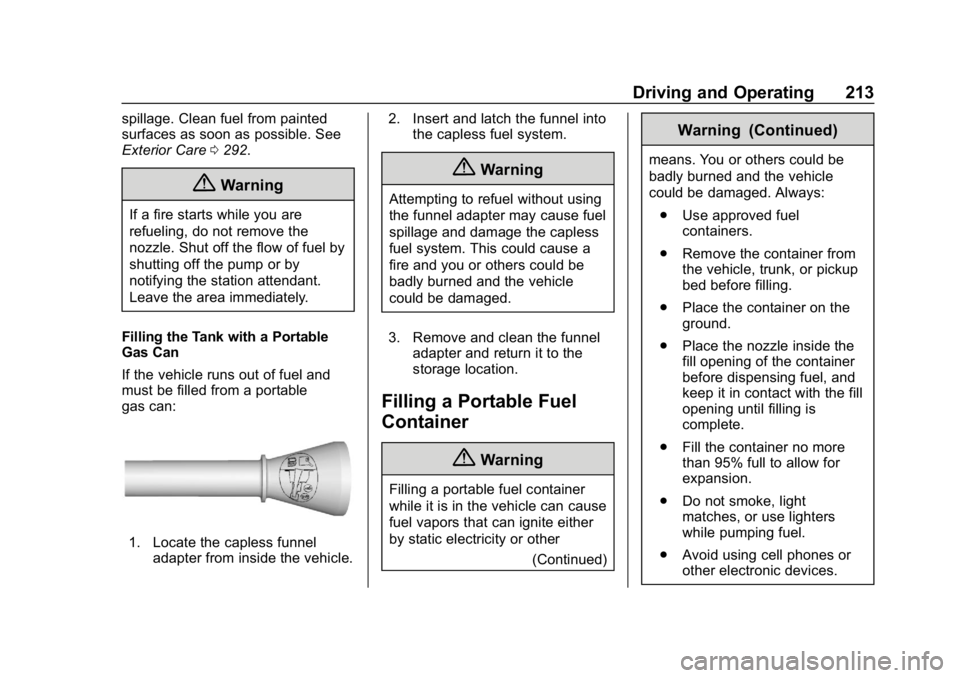
If the vehicle runs out of fuel and
must be filled from a portable
gas can:
1. Locate the capless funnel adapter from inside the vehicle. 2. Insert and latch the funnel into
the capless fuel system.
{Warning
Attempting to refuel without using
the funnel adapter may cause fuel
spillage and damage the capless
fuel system. This could cause a
fire and you or others could be
badly burned and the vehicle
could be damaged.
3. Remove and clean the funnel adapter and return it to the
storage location.
Filling a Portable Fuel
Container
{Warning
Filling a portable fuel container
while it is in the vehicle can cause
fuel vapors that can ignite either
by static electricity or other
(Continued)
Warning (Continued)
means. You or others could be
badly burned and the vehicle
could be damaged. Always:
. Use approved fuel
containers.
. Remove the container from
the vehicle, trunk, or pickup
bed before filling.
. Place the container on the
ground.
. Place the nozzle inside the
fill opening of the container
before dispensing fuel, and
keep it in contact with the fill
opening until filling is
complete.
. Fill the container no more
than 95% full to allow for
expansion.
. Do not smoke, light
matches, or use lighters
while pumping fuel.
. Avoid using cell phones or
other electronic devices.
Page 249 of 358
Chevrolet Corvette Owner Manual (GMNA-Localizing-U.S./Canada/Mexico-
11374030) - 2018 - CRC - 11/8/17
248 Vehicle Care
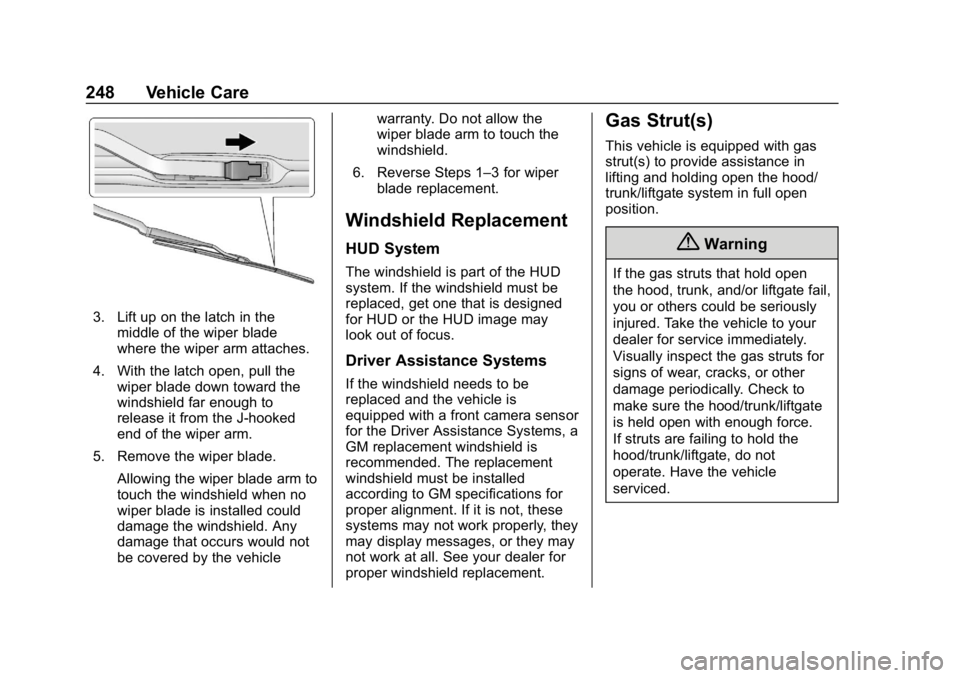
3. Lift up on the latch in themiddle of the wiper blade
where the wiper arm attaches.
4. With the latch open, pull the wiper blade down toward the
windshield far enough to
release it from the J-hooked
end of the wiper arm.
5. Remove the wiper blade. Allowing the wiper blade arm to
touch the windshield when no
wiper blade is installed could
damage the windshield. Any
damage that occurs would not
be covered by the vehicle warranty. Do not allow the
wiper blade arm to touch the
windshield.
6. Reverse Steps 1–3 for wiper blade replacement.
Windshield Replacement
HUD System
The windshield is part of the HUD
system. If the windshield must be
replaced, get one that is designed
for HUD or the HUD image may
look out of focus.
Driver Assistance Systems
If the windshield needs to be
replaced and the vehicle is
equipped with a front camera sensor
for the Driver Assistance Systems, a
GM replacement windshield is
recommended. The replacement
windshield must be installed
according to GM specifications for
proper alignment. If it is not, these
systems may not work properly, they
may display messages, or they may
not work at all. See your dealer for
proper windshield replacement.
Gas Strut(s)
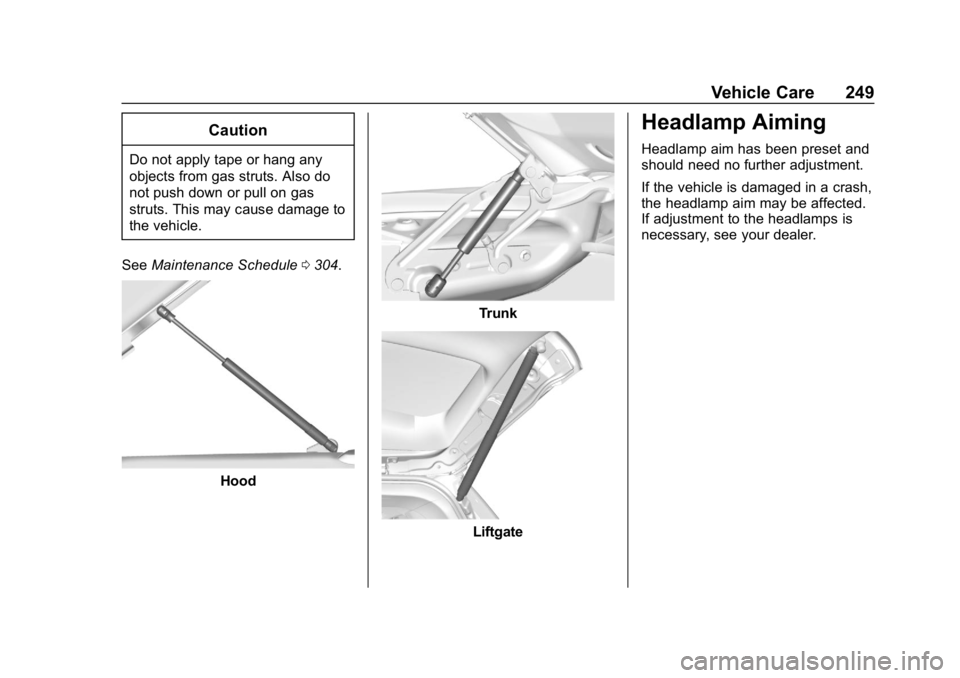
This vehicle is equipped with gas
strut(s) to provide assistance in
lifting and holding open the hood/
trunk/liftgate system in full open
position.
{Warning
If the gas struts that hold open
the hood, trunk, and/or liftgate fail,
you or others could be seriously
injured. Take the vehicle to your
dealer for service immediately.
Visually inspect the gas struts for
signs of wear, cracks, or other
damage periodically. Check to
make sure the hood/trunk/liftgate
is held open with enough force.
If struts are failing to hold the
hood/trunk/liftgate, do not
operate. Have the vehicle
serviced.
Page 250 of 358
Chevrolet Corvette Owner Manual (GMNA-Localizing-U.S./Canada/Mexico-
11374030) - 2018 - CRC - 11/8/17
Vehicle Care 249
Caution
Do not apply tape or hang any
objects from gas struts. Also do
not push down or pull on gas
struts. This may cause damage to
the vehicle.
See Maintenance Schedule 0304.
Hood
Trunk
Liftgate
Headlamp Aiming
Headlamp aim has been preset and
should need no further adjustment.
If the vehicle is damaged in a crash,
the headlamp aim may be affected.
If adjustment to the headlamps is
necessary, see your dealer.