lock CHEVROLET CORVETTE 2018 Repair Manual
[x] Cancel search | Manufacturer: CHEVROLET, Model Year: 2018, Model line: CORVETTE, Model: CHEVROLET CORVETTE 2018Pages: 358, PDF Size: 5.46 MB
Page 191 of 358
Chevrolet Corvette Owner Manual (GMNA-Localizing-U.S./Canada/Mexico-
11374030) - 2018 - CRC - 11/8/17
190 Driving and Operating
Manual Transmission
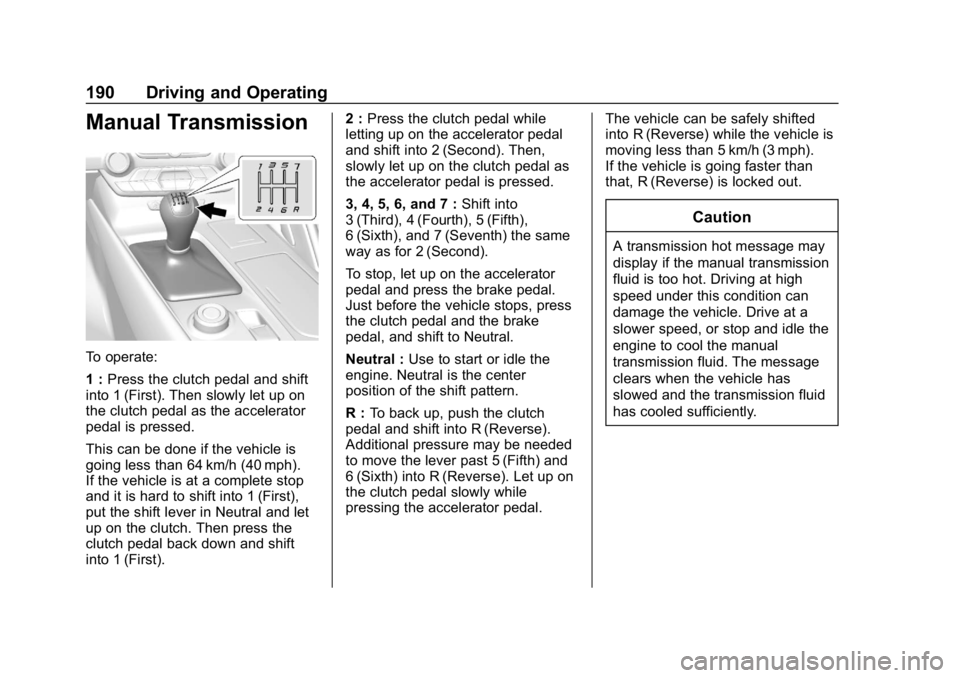
To operate:
1 :Press the clutch pedal and shift
into 1 (First). Then slowly let up on
the clutch pedal as the accelerator
pedal is pressed.
This can be done if the vehicle is
going less than 64 km/h (40 mph).
If the vehicle is at a complete stop
and it is hard to shift into 1 (First),
put the shift lever in Neutral and let
up on the clutch. Then press the
clutch pedal back down and shift
into 1 (First). 2 :
Press the clutch pedal while
letting up on the accelerator pedal
and shift into 2 (Second). Then,
slowly let up on the clutch pedal as
the accelerator pedal is pressed.
3, 4, 5, 6, and 7 : Shift into
3 (Third), 4 (Fourth), 5 (Fifth),
6 (Sixth), and 7 (Seventh) the same
way as for 2 (Second).
To stop, let up on the accelerator
pedal and press the brake pedal.
Just before the vehicle stops, press
the clutch pedal and the brake
pedal, and shift to Neutral.
Neutral : Use to start or idle the
engine. Neutral is the center
position of the shift pattern.
R : To back up, push the clutch
pedal and shift into R (Reverse).
Additional pressure may be needed
to move the lever past 5 (Fifth) and
6 (Sixth) into R (Reverse). Let up on
the clutch pedal slowly while
pressing the accelerator pedal. The vehicle can be safely shifted
into R (Reverse) while the vehicle is
moving less than 5 km/h (3 mph).
If the vehicle is going faster than
that, R (Reverse) is locked out.
Caution
A transmission hot message may
display if the manual transmission
fluid is too hot. Driving at high
speed under this condition can
damage the vehicle. Drive at a
slower speed, or stop and idle the
engine to cool the manual
transmission fluid. The message
clears when the vehicle has
slowed and the transmission fluid
has cooled sufficiently.
Page 194 of 358
Chevrolet Corvette Owner Manual (GMNA-Localizing-U.S./Canada/Mexico-
11374030) - 2018 - CRC - 11/8/17
Driving and Operating 193
Brakes
Antilock Brake
System (ABS)
This vehicle has an Antilock Brake
System (ABS), an advanced
electronic braking system that helps
prevent a braking skid.
When the vehicle begins to drive
away, ABS checks itself.
A momentary motor or clicking noise
may be heard while this test is going
on, and it may even be noticed that
the brake pedal moves a little. This
is normal.
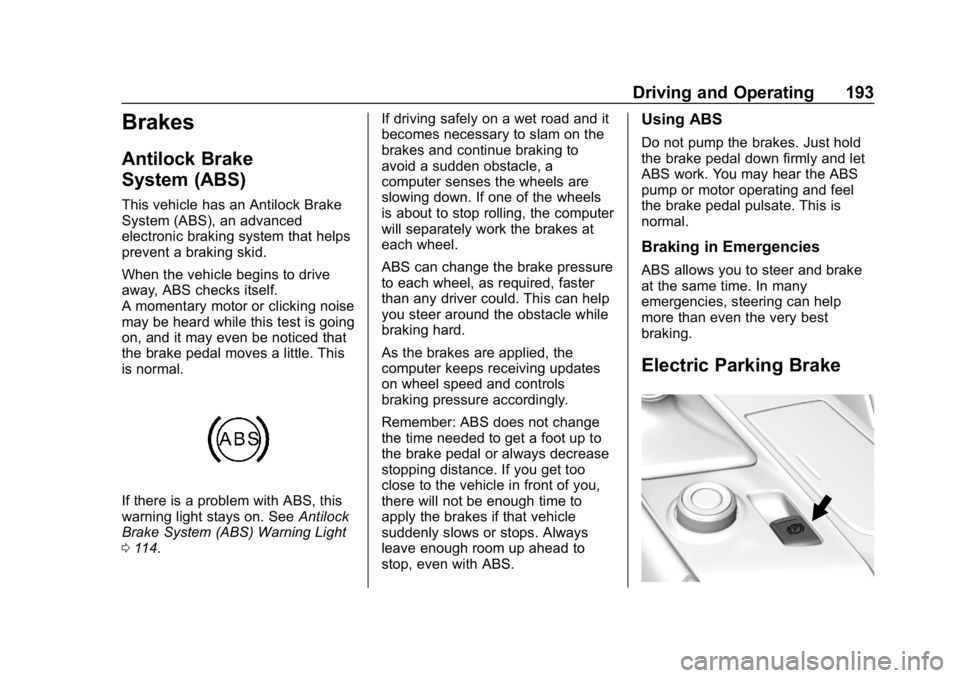
If there is a problem with ABS, this
warning light stays on. SeeAntilock
Brake System (ABS) Warning Light
0 114. If driving safely on a wet road and it
becomes necessary to slam on the
brakes and continue braking to
avoid a sudden obstacle, a
computer senses the wheels are
slowing down. If one of the wheels
is about to stop rolling, the computer
will separately work the brakes at
each wheel.
ABS can change the brake pressure
to each wheel, as required, faster
than any driver could. This can help
you steer around the obstacle while
braking hard.
As the brakes are applied, the
computer keeps receiving updates
on wheel speed and controls
braking pressure accordingly.
Remember: ABS does not change
the time needed to get a foot up to
the brake pedal or always decrease
stopping distance. If you get too
close to the vehicle in front of you,
there will not be enough time to
apply the brakes if that vehicle
suddenly slows or stops. Always
leave enough room up ahead to
stop, even with ABS.
Using ABS
Do not pump the brakes. Just hold
the brake pedal down firmly and let
ABS work. You may hear the ABS
pump or motor operating and feel
the brake pedal pulsate. This is
normal.
Braking in Emergencies
ABS allows you to steer and brake
at the same time. In many
emergencies, steering can help
more than even the very best
braking.
Electric Parking Brake
Page 195 of 358
Chevrolet Corvette Owner Manual (GMNA-Localizing-U.S./Canada/Mexico-
11374030) - 2018 - CRC - 11/8/17
194 Driving and Operating
The vehicle has an Electric Parking
Brake (EPB). The EPB can always
be activated, even if the ignition is
off. To prevent draining the battery,
avoid repeated cycles of the EPB
system when the engine is not
running.
The system has a
Yor PARK
Electric Parking Brake light, and a
8
Service Parking Brake light. See
Electric Parking Brake Light 0113
and Service Electric Parking Brake
Light 0114.
Before leaving the vehicle, check for
the
Yor PARK light to ensure that
the EPB is applied.
EPB Apply
To apply the EPB:
1. Be sure the vehicle is at a complete stop.
2. Lift up the EPB switch momentarily.
The
Yor PARK light will flash and
then stay on once the EPB is fully
applied. If the
Yor PARK light flashes continuously, then the EPB
is only partially applied or there is a
problem with the EPB. A Driver
Information Center (DIC) message
will display. Release the EPB and
try to apply it again. If the light does
not come on, or keeps flashing,
have the vehicle serviced. Do not
drive the vehicle if the
Yor PARK
light is flashing. See your dealer.
See Electric Parking Brake Light
0 113.
If the
8light is on, press the EPB
switch and hold it. Continue to hold
the switch until the
Yor PARK
light remains on. If the
8light
remains on, see your dealer.
If the EPB is applied while the
vehicle is moving, the vehicle will
decelerate as long as the switch is
pressed. If the switch is pressed
until the vehicle comes to a stop,
the EPB will remain applied.
The vehicle may automatically apply
the EPB in some situations when
the vehicle is not moving. This is normal, and is done to periodically
check the correct operation of the
EPB system.
If the EPB fails to apply, block the
rear wheels to prevent vehicle
movement.
EPB Release
To release the EPB:
1. Turn the ignition on or to ACC/ ACCESSORY.
2. Apply and hold the brake pedal.
3. Press the EPB switch momentarily.
The EPB is released when the
Y
or PARK light is off.
If the
8light is on, release the EPB
by pressing and holding the EPB
switch. Continue to hold the switch
until the
Yor PARK light is off.
If either light stays on after release
is attempted, see your dealer.
Page 213 of 358
Chevrolet Corvette Owner Manual (GMNA-Localizing-U.S./Canada/Mexico-
11374030) - 2018 - CRC - 11/8/17
212 Driving and Operating
Filling the Tank
{Warning
Fuel vapors and fuel fires burn
violently and can cause injury or
death.. To help avoid injuries to you
and others, read and follow
all the instructions on the
fuel pump island.
. Turn off the engine when
refueling.
. Keep sparks, flames, and
smoking materials away
from fuel.
. Do not leave the fuel pump
unattended.
. Do not use a cell phone
while refueling.
. Do not reenter the vehicle
while pumping fuel.
. Keep children away from
the fuel pump and never let
children pump fuel.
(Continued)
Warning (Continued)
.Fuel can spray out if the
refueling nozzle is inserted
too quickly. This spray can
happen if the tank is nearly
full, and is more likely in hot
weather. Insert the refueling
nozzle slowly and wait for
any hiss noise to stop prior
to beginning to flow fuel.
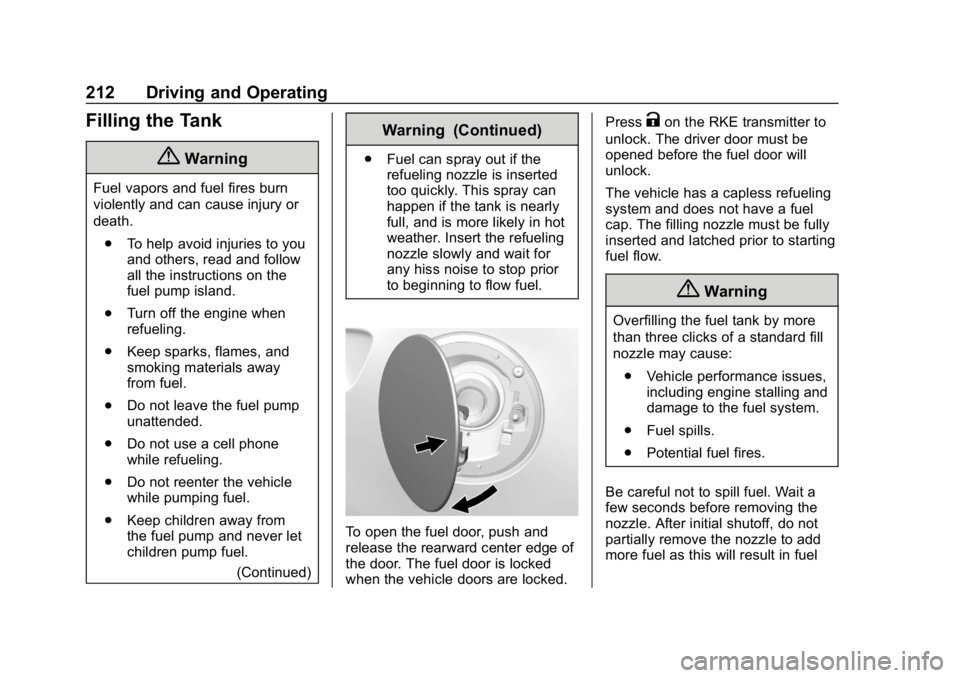
To open the fuel door, push and
release the rearward center edge of
the door. The fuel door is locked
when the vehicle doors are locked. Press
Kon the RKE transmitter to
unlock. The driver door must be
opened before the fuel door will
unlock.
The vehicle has a capless refueling
system and does not have a fuel
cap. The filling nozzle must be fully
inserted and latched prior to starting
fuel flow.
{Warning
Overfilling the fuel tank by more
than three clicks of a standard fill
nozzle may cause:
. Vehicle performance issues,
including engine stalling and
damage to the fuel system.
. Fuel spills.
. Potential fuel fires.
Be careful not to spill fuel. Wait a
few seconds before removing the
nozzle. After initial shutoff, do not
partially remove the nozzle to add
more fuel as this will result in fuel
Page 216 of 358
Chevrolet Corvette Owner Manual (GMNA-Localizing-U.S./Canada/Mexico-
11374030) - 2018 - CRC - 11/8/17
Vehicle Care 215
Vehicle Care
General Information
General Information . . . . . . . . . . 216
California Proposition65 Warning . . . . . . . . . . . . . . . . . 216
California Perchlorate Materials Requirements . . . . . 217
Accessories and Modifications . . . . . . . . . . . . . . . . 217
Lifting the Vehicle . . . . . . . . . . . . 217
Vehicle Checks
Doing Your Own Service Work . . . . . . . . . . . . . . . 220
Hood . . . . . . . . . . . . . . . . . . . . . . . . . 220
Engine Compartment Overview . . . . . . . . . . . . . . . . . . . . 221
Engine Oil . . . . . . . . . . . . . . . . . . . . 226
Engine Oil Life System . . . . . . . 231
Automatic Transmission Fluid . . . . . . . . . . . . . . . . . . . . . . . . 232
Manual Transmission Fluid . . . 233
Hydraulic Clutch . . . . . . . . . . . . . . 233
Engine Air Cleaner/Filter . . . . . . 233
Cooling System (Engine) . . . . . 236
Cooling System (Aero Panel) . . . . . . . . . . . . . . . . . . . . . . . 239
Engine Overheating . . . . . . . . . . 240 Washer Fluid . . . . . . . . . . . . . . . . . 241
Brakes . . . . . . . . . . . . . . . . . . . . . . . 242
Brake Fluid . . . . . . . . . . . . . . . . . . . 243
Battery - North America . . . . . . 244
Rear Axle . . . . . . . . . . . . . . . . . . . . 245
Starter Switch Check . . . . . . . . . 246
Automatic Transmission Shift
Lock Control Function
Check . . . . . . . . . . . . . . . . . . . . . . . 247
Park Brake and P (Park) Mechanism Check . . . . . . . . . . 247
Wiper Blade Replacement . . . . 247
Windshield Replacement . . . . . 248
Gas Strut(s) . . . . . . . . . . . . . . . . . . 248Headlamp Aiming
Headlamp Aiming . . . . . . . . . . . . 249
Bulb Replacement
Bulb Replacement . . . . . . . . . . . . 250
High Intensity Discharge (HID) Lighting . . . . . . . . . . . . . . . . . . . . . 250
LED Lighting . . . . . . . . . . . . . . . . . 250
License Plate Lamp . . . . . . . . . . 250
Electrical System
Electrical System Overload . . . 251
Fuses . . . . . . . . . . . . . . . . . . . . . . . . 251
Engine Compartment Fuse Block . . . . . . . . . . . . . . . . . . . . . . . . 252 Rear Compartment Fuse
Block . . . . . . . . . . . . . . . . . . . . . . . . 254
Wheels and Tires
Tires . . . . . . . . . . . . . . . . . . . . . . . . . . 257
Winter Tires . . . . . . . . . . . . . . . . . . 258
Run-Flat Tires . . . . . . . . . . . . . . . . 258
Low-Profile Tires . . . . . . . . . . . . . 259
Competition Oriented Tires . . . 260
Summer Tires . . . . . . . . . . . . . . . . 261
Tire Sidewall Labeling . . . . . . . . 261
Tire Designations . . . . . . . . . . . . . 262
Tire Terminology andDefinitions . . . . . . . . . . . . . . . . . . 263
Tire Pressure . . . . . . . . . . . . . . . . . 266
Tire Pressure for High-Speed Operation . . . . . . . . . . . . . . . . . . . 267
Tire Pressure Monitor System . . . . . . . . . . . . . . . . . . . . . . 267
Tire Pressure Monitor Operation . . . . . . . . . . . . . . . . . . . 268
Tire Inspection . . . . . . . . . . . . . . . . 270
Tire Rotation . . . . . . . . . . . . . . . . . 271
When It Is Time for New Tires . . . . . . . . . . . . . . . . . . . . . . . . 272
Buying New Tires . . . . . . . . . . . . . 272
Different Size Tires and Wheels . . . . . . . . . . . . . . . . . . . . . . 274
Uniform Tire Quality Grading . . . . . . . . . . . . . . . . . . . . . 274
Page 218 of 358
Chevrolet Corvette Owner Manual (GMNA-Localizing-U.S./Canada/Mexico-
11374030) - 2018 - CRC - 11/8/17
Vehicle Care 217
California Perchlorate
Materials Requirements
Certain types of automotive
applications, such as airbag
initiators, seat belt pretensioners,
and lithium batteries contained in
Remote Keyless Entry transmitters,
may contain perchlorate materials.
Special handling may be necessary.
For additional information, see
www.dtsc.ca.gov/hazardouswaste/
perchlorate.
Accessories and
Modifications
Adding non-dealer accessories or
making modifications to the vehicle
can affect vehicle performance and
safety, including such things as
airbags, braking, stability, ride and
handling, emissions systems,
aerodynamics, durability, and
electronic systems like antilock
brakes, traction control, and stability
control. These accessories or
modifications could even cause
malfunction or damage not covered
by the vehicle warranty.Damage to suspension components
caused by modifying vehicle height
outside of factory settings will not be
covered by the vehicle warranty.
Damage to vehicle components
resulting from modifications or the
installation or use of non-GM
certified parts, including control
module or software modifications, is
not covered under the terms of the
vehicle warranty and may affect
remaining warranty coverage for
affected parts.
GM Accessories are designed to
complement and function with other
systems on the vehicle. See your
dealer to accessorize the vehicle
using genuine GM Accessories
installed by a dealer technician.
Also, see
Adding Equipment to the
Airbag-Equipped Vehicle 081.
Lifting the Vehicle
{Warning
Lifting a vehicle can cause an
injury. The vehicle can slip off the
jack and roll over you or other
people. You and they could be
badly injured. Find a level place
to lift your vehicle. To help
prevent the vehicle from moving:
1. Set the parking brake firmly.
2. Put an automatictransmission in P (Park) or a
manual transmission in
1 (First) or R (Reverse).
3. Turn off the engine.
To be even more certain the
vehicle will not move, put blocks
in front of and behind the wheels.
Page 219 of 358
Chevrolet Corvette Owner Manual (GMNA-Localizing-U.S./Canada/Mexico-
11374030) - 2018 - CRC - 11/8/17
218 Vehicle Care
{Warning
Getting under a vehicle when it is
lifted on a jack is dangerous.
If the vehicle slips off the jack,
you could be badly injured or
killed. Never get under a vehicle
when it is supported only by
a jack.
{Warning
Raising the vehicle with the jack
improperly positioned can
damage the vehicle or the vehicle
may fall and cause injury to you
or others.
If a jack is used to lift the vehicle,
follow the instructions that came
with the jack, and be sure to use the
correct lifting points to avoid
damaging the vehicle.
Caution
Lifting the vehicle improperly can
damage it and result in costly
repairs not covered by the vehicle
warranty. To lift the vehicle
properly and prevent vehicle
damage: . Be sure to place a block or
pad between the jack and
the vehicle.
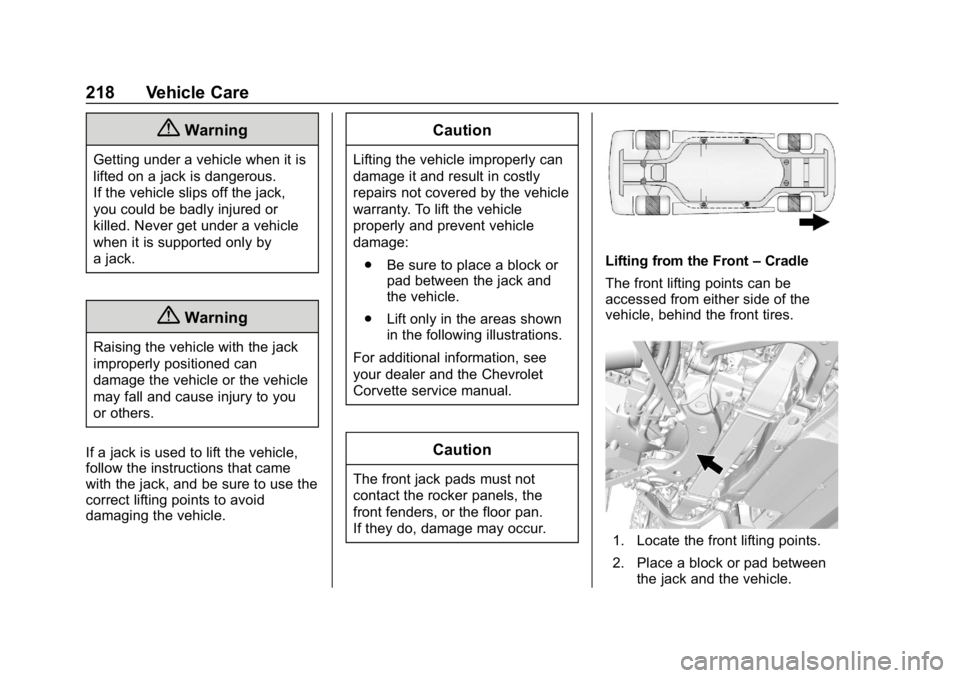
. Lift only in the areas shown
in the following illustrations.
For additional information, see
your dealer and the Chevrolet
Corvette service manual.
Caution
The front jack pads must not
contact the rocker panels, the
front fenders, or the floor pan.
If they do, damage may occur.
Lifting from the Front –Cradle
The front lifting points can be
accessed from either side of the
vehicle, behind the front tires.
1. Locate the front lifting points.
2. Place a block or pad between the jack and the vehicle.
Page 220 of 358
Chevrolet Corvette Owner Manual (GMNA-Localizing-U.S./Canada/Mexico-
11374030) - 2018 - CRC - 11/8/17
Vehicle Care 219
3. Lift the vehicle with the jack.
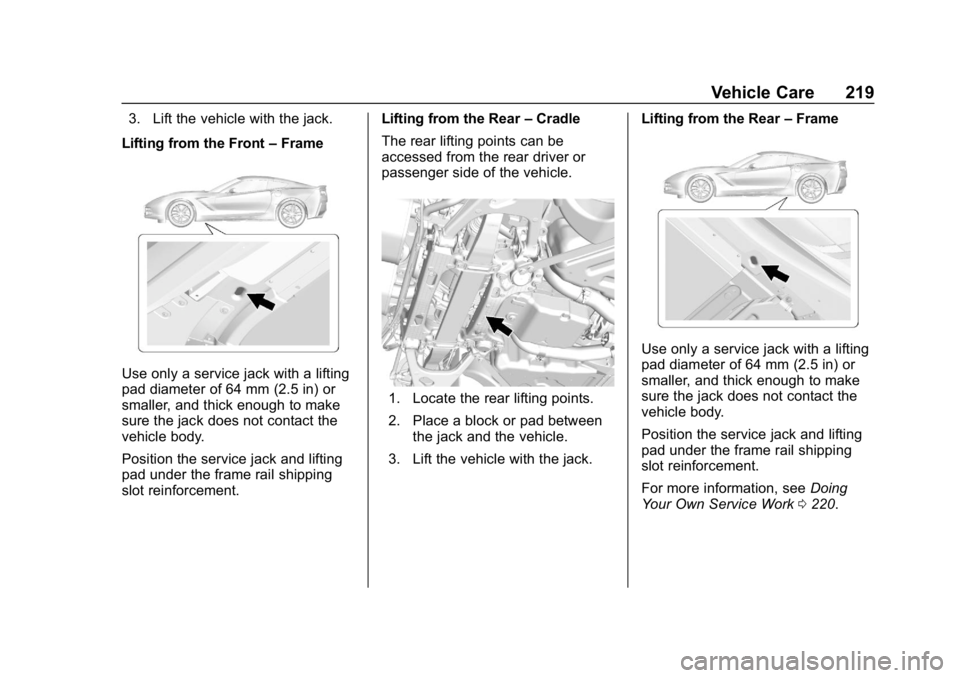
Lifting from the Front –Frame
Use only a service jack with a lifting
pad diameter of 64 mm (2.5 in) or
smaller, and thick enough to make
sure the jack does not contact the
vehicle body.
Position the service jack and lifting
pad under the frame rail shipping
slot reinforcement. Lifting from the Rear
–Cradle
The rear lifting points can be
accessed from the rear driver or
passenger side of the vehicle.
1. Locate the rear lifting points.
2. Place a block or pad between the jack and the vehicle.
3. Lift the vehicle with the jack. Lifting from the Rear
–Frame
Use only a service jack with a lifting
pad diameter of 64 mm (2.5 in) or
smaller, and thick enough to make
sure the jack does not contact the
vehicle body.
Position the service jack and lifting
pad under the frame rail shipping
slot reinforcement.
For more information, see Doing
Your Own Service Work 0220.
Page 223 of 358

Chevrolet Corvette Owner Manual (GMNA-Localizing-U.S./Canada/Mexico-
11374030) - 2018 - CRC - 11/8/17
222 Vehicle Care
1.Passenger Compartment Air
Filter 0153 (Out of View).
2. Coolant Surge Tank and Pressure Cap.
See Cooling System (Engine)
0 236 orCooling System (Aero
Panel) 0239.
3. Engine Compartment Fuse
Block 0252.
4. Engine Air Cleaner/Filter 0233. 5. Engine Cooling Fan (Out of
View). See Cooling System
(Engine) 0236 orCooling
System (Aero Panel) 0239.
6. Engine Oil Fill Cap. See “When
to Add Engine Oil” under
Engine Oil 0226.
7. Engine Oil Dipstick. See “Checking Engine Oil” under
Engine Oil 0226. 8. Brake Fluid Reservoir. See
Brake Fluid 0243.
9. Clutch Master Cylinder Reservoir (If Equipped). See
Hydraulic Clutch 0233.
10. Windshield Washer Fluid Reservoir. See “Adding Washer
Fluid” under Washer Fluid
0 241.
Page 225 of 358

Chevrolet Corvette Owner Manual (GMNA-Localizing-U.S./Canada/Mexico-
11374030) - 2018 - CRC - 11/8/17
224 Vehicle Care
1. Engine Oil Dipstick. See“Checking Engine Oil” under
Engine Oil 0226.
2. Dry Sump Engine Oil Tank Fill Cap. See “Changing Engine Oil
and Filter” Engine Oil 0226.
3. Passenger Compartment Air
Filter 0153 (Out of View).
4. Coolant Surge Tank and Pressure Cap. See Cooling
System (Engine) 0236 or
Cooling System (Aero Panel)
0 239. 5.
Engine Compartment Fuse
Block 0252.
6. Engine Air Cleaner/Filter 0233.
7. Engine Cooling Fan (Out of View). See Cooling System
(Engine) 0236 orCooling
System (Aero Panel) 0239.
8. Brake Fluid Reservoir. See Brake Fluid 0243. 9. Clutch Master Cylinder
Reservoir (If Equipped). See
Hydraulic Clutch 0233.
10. Windshield Washer Fluid Reservoir. See “Adding Washer
Fluid” under Washer Fluid
0 241.