wiper fluid CHEVROLET CORVETTE 2018 Owner's Manual
[x] Cancel search | Manufacturer: CHEVROLET, Model Year: 2018, Model line: CORVETTE, Model: CHEVROLET CORVETTE 2018Pages: 358, PDF Size: 5.46 MB
Page 18 of 358
Chevrolet Corvette Owner Manual (GMNA-Localizing-U.S./Canada/Mexico-
11374030) - 2018 - CRC - 11/8/17
In Brief 17
In Canada, the headlamps will
automatically reactivate when the
vehicle is shifted out of P (Park).
AUTO :Sets the exterior lamps to
automatic mode. AUTO mode turns
the exterior lamps on and off
depending on how much light is
available outside the vehicle.
;: Turns on the parking lamps
including all lamps except the
headlamps.
5: Turns on the headlamps
together with the parking lamps and
instrument panel lights.
See:
. Exterior Lamp Controls 0137.
. Automatic Headlamp System
0139.
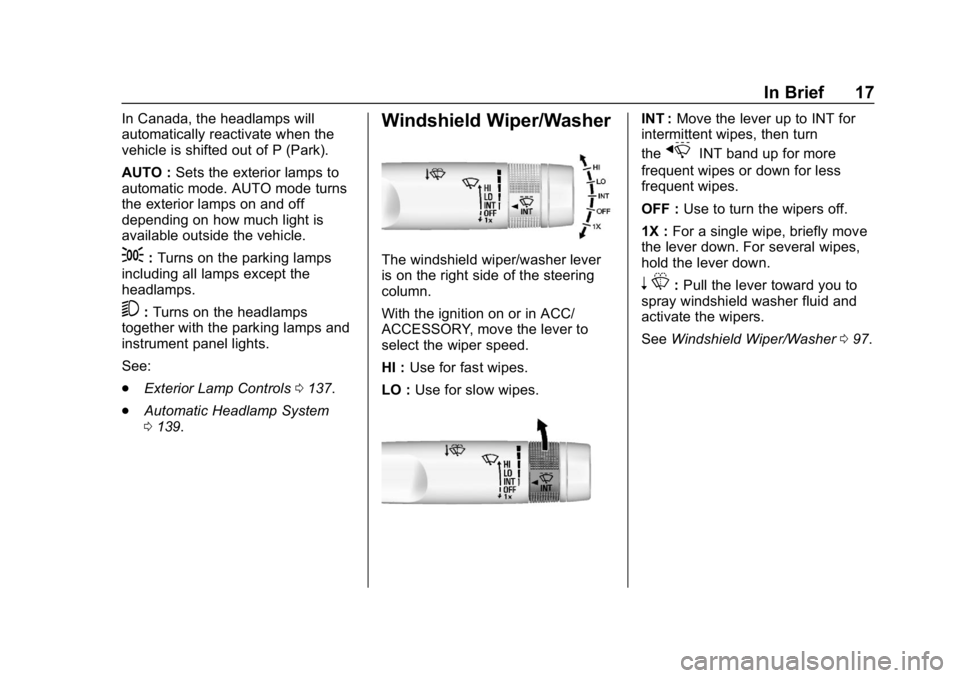
Windshield Wiper/Washer
The windshield wiper/washer lever
is on the right side of the steering
column.
With the ignition on or in ACC/
ACCESSORY, move the lever to
select the wiper speed.
HI : Use for fast wipes.
LO : Use for slow wipes.
INT : Move the lever up to INT for
intermittent wipes, then turn
the
xINT band up for more
frequent wipes or down for less
frequent wipes.
OFF : Use to turn the wipers off.
1X : For a single wipe, briefly move
the lever down. For several wipes,
hold the lever down.
n L: Pull the lever toward you to
spray windshield washer fluid and
activate the wipers.
See Windshield Wiper/Washer 097.
Page 98 of 358
Chevrolet Corvette Owner Manual (GMNA-Localizing-U.S./Canada/Mexico-
11374030) - 2018 - CRC - 11/8/17
Instruments and Controls 97
Controls
Steering Wheel
Adjustment
Press the control to move the tilt
and telescoping steering wheel up
and down or forward and rearward.
Both the tilt and telescoping steering
column positions can be stored with
your memory settings, if equipped.
SeeMemory Seats 060.
Do not adjust the steering wheel
while driving.
Steering Wheel Controls
The infotainment system can be
operated by using the steering
wheel controls. See "Steering
Wheel Controls" in the infotainment
manual.
Horn
Press near or on the horn symbols
on the steering wheel pad to sound
the horn.
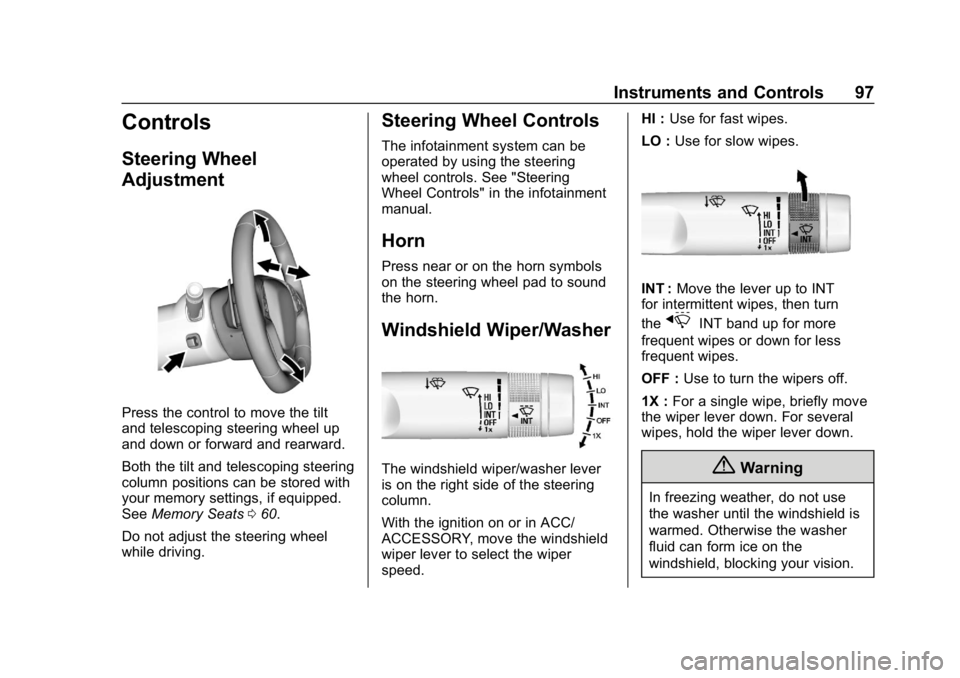
Windshield Wiper/Washer
The windshield wiper/washer lever
is on the right side of the steering
column.
With the ignition on or in ACC/
ACCESSORY, move the windshield
wiper lever to select the wiper
speed. HI :
Use for fast wipes.
LO : Use for slow wipes.
INT : Move the lever up to INT
for intermittent wipes, then turn
the
xINT band up for more
frequent wipes or down for less
frequent wipes.
OFF : Use to turn the wipers off.
1X : For a single wipe, briefly move
the wiper lever down. For several
wipes, hold the wiper lever down.
{Warning
In freezing weather, do not use
the washer until the windshield is
warmed. Otherwise the washer
fluid can form ice on the
windshield, blocking your vision.
Page 99 of 358
Chevrolet Corvette Owner Manual (GMNA-Localizing-U.S./Canada/Mexico-
11374030) - 2018 - CRC - 11/8/17
98 Instruments and Controls
nL: Pull the windshield wiper
lever toward you to spray washer
fluid and activate the wipers. The
wipers will continue until the lever is
released or the maximum wash time
is reached. When the lever is
released, additional wipes may
occur depending on how long the
windshield washer had been
activated. See Washer Fluid0241
for information on filling the
windshield washer fluid reservoir.
Clear snow and ice from the wiper
blades and windshield before using
them. If frozen to the windshield,
carefully loosen or thaw them.
Damaged blades should be
replaced. See Wiper Blade
Replacement 0247.
Heavy snow or ice can overload the
wiper motor.
Wiper Parking
If the ignition is turned off while the
wipers are on LO, HI, or INT, they
will immediately stop. If the windshield wiper lever is then
moved to OFF before the driver
door is opened or within 10 minutes,
the wipers will restart and move to
the base of the windshield.
If the ignition is turned off while the
wipers are performing wipes due to
windshield washing, the wipers
continue to run until they reach the
base of the windshield.
Compass
The vehicle may have a compass
display on the center stack. The
compass receives its heading and
other information from the Global
Positioning System (GPS) antenna,
Electronic Stability Control, and
vehicle speed information.
The compass system is designed to
operate for a certain number of
miles or degrees of turn before
needing a signal from the GPS
satellites. When the compass
display shows CAL, drive the
vehicle for a short distance in an
open area where it can receive a
GPS signal. The compass systemwill automatically determine when a
GPS signal is restored and provide
a heading again.
Clock
The infotainment system controls
are used to access the time and
date settings through the menu
system. See
“Home Page” in the
infotainment manual for information
about how to use the menu system.
Setting the Clock
Time
To set the time:
1. From the Home Page, touch SETTINGS, then touch Time
and Date.
2. Touch Set Time, then touch
RorQto increase or
decrease hours or minutes,
and change AM or PM.
3. Touch 12-24 Hr for a 12 or 24 hour clock.
4. Touch
}to go back to the
previous menu.
Page 126 of 358
Chevrolet Corvette Owner Manual (GMNA-Localizing-U.S./Canada/Mexico-
11374030) - 2018 - CRC - 11/8/17
Instruments and Controls 125
HUD Troubleshooting
Check that:
.Nothing is covering the
HUD lens.
. HUD brightness setting is not
too dim or too bright.
. HUD is adjusted to the proper
height.
. Polarized sunglasses are
not worn.
. Windshield and HUD lens are
clean.
If the HUD image is not correct,
contact your dealer.
The windshield is part of the HUD
system. See Windshield
Replacement 0248.
Vehicle Messages
Messages displayed on the DIC
indicate the status of the vehicle or
some action that may be needed to
correct a condition. Multiple
messages may appear one after
another.
The messages that do not require
immediate action can be
acknowledged and cleared by
pressing
V. The messages that
require immediate action cannot be
cleared until that action is
performed.
All messages should be taken
seriously; clearing the message
does not correct the problem.
If a SERVICE message appears,
see your dealer.
Follow the instructions given in the
messages. The system displays
messages regarding the following
topics:
. Service Messages
. Fluid Levels
. Vehicle Security .
Brakes
. Ride Control Systems
. Driver Assistance Systems
. Cruise Control
. Lighting and Bulb Replacement
. Wiper/Washer Systems
. Doors and Windows
. Seat Belts
. Airbag Systems
. Engine and Transmission
. Tire Pressure
. Battery
Engine Power Messages
ENGINE POWER IS REDUCED
This message displays when the
vehicle's propulsion power is
reduced. Reduced propulsion power
can affect the vehicle's ability to
accelerate. If this message is on,
but there is no observed reduction
in performance, proceed to your
destination. The performance may
be reduced the next time the vehicle
Page 216 of 358
Chevrolet Corvette Owner Manual (GMNA-Localizing-U.S./Canada/Mexico-
11374030) - 2018 - CRC - 11/8/17
Vehicle Care 215
Vehicle Care
General Information
General Information . . . . . . . . . . 216
California Proposition65 Warning . . . . . . . . . . . . . . . . . 216
California Perchlorate Materials Requirements . . . . . 217
Accessories and Modifications . . . . . . . . . . . . . . . . 217
Lifting the Vehicle . . . . . . . . . . . . 217
Vehicle Checks
Doing Your Own Service Work . . . . . . . . . . . . . . . 220
Hood . . . . . . . . . . . . . . . . . . . . . . . . . 220
Engine Compartment Overview . . . . . . . . . . . . . . . . . . . . 221
Engine Oil . . . . . . . . . . . . . . . . . . . . 226
Engine Oil Life System . . . . . . . 231
Automatic Transmission Fluid . . . . . . . . . . . . . . . . . . . . . . . . 232
Manual Transmission Fluid . . . 233
Hydraulic Clutch . . . . . . . . . . . . . . 233
Engine Air Cleaner/Filter . . . . . . 233
Cooling System (Engine) . . . . . 236
Cooling System (Aero Panel) . . . . . . . . . . . . . . . . . . . . . . . 239
Engine Overheating . . . . . . . . . . 240 Washer Fluid . . . . . . . . . . . . . . . . . 241
Brakes . . . . . . . . . . . . . . . . . . . . . . . 242
Brake Fluid . . . . . . . . . . . . . . . . . . . 243
Battery - North America . . . . . . 244
Rear Axle . . . . . . . . . . . . . . . . . . . . 245
Starter Switch Check . . . . . . . . . 246
Automatic Transmission Shift
Lock Control Function
Check . . . . . . . . . . . . . . . . . . . . . . . 247
Park Brake and P (Park) Mechanism Check . . . . . . . . . . 247
Wiper Blade Replacement . . . . 247
Windshield Replacement . . . . . 248
Gas Strut(s) . . . . . . . . . . . . . . . . . . 248Headlamp Aiming
Headlamp Aiming . . . . . . . . . . . . 249
Bulb Replacement
Bulb Replacement . . . . . . . . . . . . 250
High Intensity Discharge (HID) Lighting . . . . . . . . . . . . . . . . . . . . . 250
LED Lighting . . . . . . . . . . . . . . . . . 250
License Plate Lamp . . . . . . . . . . 250
Electrical System
Electrical System Overload . . . 251
Fuses . . . . . . . . . . . . . . . . . . . . . . . . 251
Engine Compartment Fuse Block . . . . . . . . . . . . . . . . . . . . . . . . 252 Rear Compartment Fuse
Block . . . . . . . . . . . . . . . . . . . . . . . . 254
Wheels and Tires
Tires . . . . . . . . . . . . . . . . . . . . . . . . . . 257
Winter Tires . . . . . . . . . . . . . . . . . . 258
Run-Flat Tires . . . . . . . . . . . . . . . . 258
Low-Profile Tires . . . . . . . . . . . . . 259
Competition Oriented Tires . . . 260
Summer Tires . . . . . . . . . . . . . . . . 261
Tire Sidewall Labeling . . . . . . . . 261
Tire Designations . . . . . . . . . . . . . 262
Tire Terminology andDefinitions . . . . . . . . . . . . . . . . . . 263
Tire Pressure . . . . . . . . . . . . . . . . . 266
Tire Pressure for High-Speed Operation . . . . . . . . . . . . . . . . . . . 267
Tire Pressure Monitor System . . . . . . . . . . . . . . . . . . . . . . 267
Tire Pressure Monitor Operation . . . . . . . . . . . . . . . . . . . 268
Tire Inspection . . . . . . . . . . . . . . . . 270
Tire Rotation . . . . . . . . . . . . . . . . . 271
When It Is Time for New Tires . . . . . . . . . . . . . . . . . . . . . . . . 272
Buying New Tires . . . . . . . . . . . . . 272
Different Size Tires and Wheels . . . . . . . . . . . . . . . . . . . . . . 274
Uniform Tire Quality Grading . . . . . . . . . . . . . . . . . . . . . 274
Page 242 of 358
Chevrolet Corvette Owner Manual (GMNA-Localizing-U.S./Canada/Mexico-
11374030) - 2018 - CRC - 11/8/17
Vehicle Care 241
If No Steam Is Coming from
the Engine
If an engine overheat warning is
displayed but no steam can be seen
or heard, the problem may not be
too serious. Sometimes the engine
can get a little too hot when the
vehicle:
.Climbs a long hill on a hot day.
. Stops after high-speed driving.
. Idles for long periods in traffic.
If the overheat warning is displayed
with no sign of steam: 1. Turn the air conditioning off.
2. Turn the heater on to the highest temperature and to the
highest fan speed. Open the
windows as necessary.
3. When it is safe to do so, pull off the road, shift to P (Park) or
N (Neutral), and let the
engine idle.
If the temperature overheat gauge is
no longer in the shaded area or an
overheat warning no longer
displays, the vehicle can be driven. Continue to drive the vehicle slowly
for about 10 minutes. Keep a safe
vehicle distance from the vehicle in
front. If the warning does not come
back on, continue to drive normally
and have the cooling system
checked for proper fill and function.
If the warning continues, pull over,
stop, and park the vehicle
right away.
If there is no sign of steam, idle the
engine for three minutes while
parked. If the warning is still
displayed, turn off the engine until it
cools down.
Washer Fluid
What to Use
When the vehicle needs windshield
washer fluid, be sure to read the
manufacturer instructions before
use. If the vehicle will be operating
in an area where the temperature
may fall below freezing, use a fluid
that has sufficient protection against
freezing.
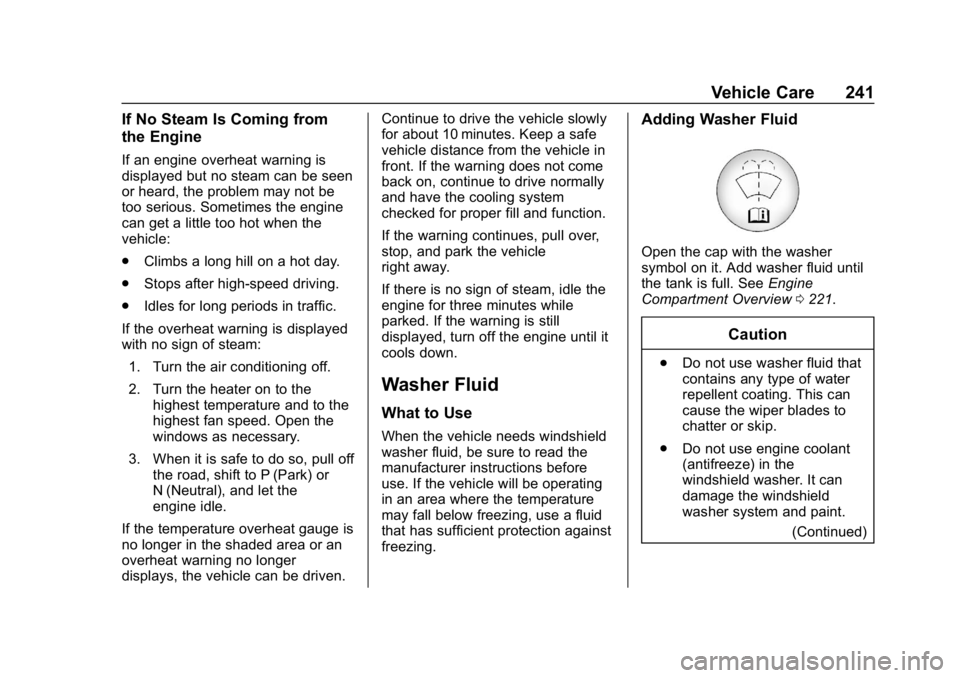
Adding Washer Fluid
Open the cap with the washer
symbol on it. Add washer fluid until
the tank is full. See
Engine
Compartment Overview 0221.
Caution
.
Do not use washer fluid that
contains any type of water
repellent coating. This can
cause the wiper blades to
chatter or skip.
. Do not use engine coolant
(antifreeze) in the
windshield washer. It can
damage the windshield
washer system and paint.
(Continued)
Page 296 of 358
Chevrolet Corvette Owner Manual (GMNA-Localizing-U.S./Canada/Mexico-
11374030) - 2018 - CRC - 11/8/17
Vehicle Care 295
.Aftermarket appearance caps or
covers while the lamps are
illuminated, due to excessive
heat generated
Caution
Failure to clean lamps properly
can cause damage to the lamp
cover that would not be covered
by the vehicle warranty.
Caution
Using wax on low gloss black
finish stripes can increase the
gloss level and create a
non-uniform finish. Clean low
gloss stripes with soap and
water only.
Air Intakes
Clear debris from the air intakes,
between the hood and windshield,
when washing the vehicle.
Windshield and Wiper Blades
Clean the outside of the windshield
with glass cleaner.
Clean rubber blades using lint-free
cloth or paper towel soaked with
windshield washer fluid or a mild
detergent. Wash the windshield
thoroughly when cleaning the
blades. Bugs, road grime, sap, and
a buildup of vehicle wash/wax
treatments may cause wiper
streaking.
Replace the wiper blades if they are
worn or damaged. Damage can be
caused by extreme dusty
conditions, sand, salt, heat, sun,
snow, and ice.
Weatherstrips
Apply weatherstrip lubricant on
weatherstrips to make them last
longer, seal better, and not stick or
squeak. Lubricate weatherstrips at
least once a year. Hot, dry climates
require more frequent application.
Black marks from rubber material on
painted surfaces can be removed by rubbing with a clean cloth. See
Recommended Fluids and
Lubricants
0313.
Tires
Use a stiff brush with tire cleaner to
clean the tires.
Caution
Using petroleum-based tire
dressing products on the vehicle
may damage the paint finish and/
or tires. When applying a tire
dressing, always wipe off any
overspray from all painted
surfaces on the vehicle.
Wheels and Trim —Aluminum
or Chrome
Use a soft, clean cloth with mild
soap and water to clean the wheels.
After rinsing thoroughly with clean
water, dry with a soft, clean towel.
A wax may then be applied.
Page 303 of 358
Chevrolet Corvette Owner Manual (GMNA-Localizing-U.S./Canada/Mexico-
11374030) - 2018 - CRC - 11/8/17
302 Service and Maintenance
Service and
Maintenance
General Information
General Information . . . . . . . . . . 302
Maintenance Schedule
Maintenance Schedule . . . . . . . 304
Special Application Services
Special ApplicationServices . . . . . . . . . . . . . . . . . . . . 309
Additional Maintenance
and Care
Additional Maintenanceand Care . . . . . . . . . . . . . . . . . . . . 310
Recommended Fluids,
Lubricants, and Parts
Recommended Fluids andLubricants . . . . . . . . . . . . . . . . . . . 313
Maintenance Replacement Parts . . . . . . . . . . . . . . . . . . . . . . . . 315
Maintenance Records
Maintenance Records . . . . . . . . 316
General Information
Your vehicle is an important
investment. This section describes
the required maintenance for the
vehicle. Follow this schedule to help
protect against major repair
expenses resulting from neglect or
inadequate maintenance. It may
also help to maintain the value of
the vehicle if it is sold. It is the
responsibility of the owner to have
all required maintenance performed.
Your dealer has trained technicians
who can perform required
maintenance using genuine
replacement parts. They have
up-to-date tools and equipment for
fast and accurate diagnostics. Many
dealers have extended evening and
Saturday hours, courtesy
transportation, and online
scheduling to assist with service
needs.
Your dealer recognizes the
importance of providing
competitively priced maintenance
and repair services. With trained
technicians, the dealer is the place for routine maintenance such as oil
changes and tire rotations and
additional maintenance items like
tires, brakes, batteries, and wiper
blades.
Caution
Damage caused by improper
maintenance can lead to costly
repairs and may not be covered
by the vehicle warranty.
Maintenance intervals, checks,
inspections, recommended fluids,
and lubricants are important to
keep the vehicle in good working
condition.
Do not have chemical flushes that
are not approved by GM
performed on the vehicle. The
use of flushes, solvents, cleaners,
or lubricants that are not
approved by GM could damage
the vehicle, requiring expensive
repairs that are not covered by
the vehicle warranty.
Page 305 of 358
Chevrolet Corvette Owner Manual (GMNA-Localizing-U.S./Canada/Mexico-
11374030) - 2018 - CRC - 11/8/17
304 Service and Maintenance
Maintenance
Schedule
Owner Checks and Services
At Each Fuel Stop
.Check the engine oil level. See
Engine Oil 0226.
Once a Month
. Check the tire inflation
pressures. See Tire Pressure
0 266.
. Inspect the tires for wear. See
Tire Inspection 0270.
. Check the windshield washer
fluid level. See Washer Fluid
0 241.
Engine Oil Change
When the CHANGE ENGINE OIL
SOON message displays, have the
engine oil and filter changed within
the next 1 000 km/600 mi. If driven
under the best conditions, the
engine oil life system may not
indicate the need for vehicle service
for up to a year. The engine oil and filter must be changed at least once
a year and the oil life system must
be reset. Your trained dealer
technician can perform this work.
If the engine oil life system is reset
accidentally, service the vehicle
within 5 000 km/3,000 mi since the
last service. Reset the oil life
system when the oil is changed.
See
Engine Oil Life System 0231.
Dry Sump Engine Break-In Oil
Change
If equipped with a dry sump engine,
the initial oil and filter change must
be performed at 800 km/500 mi.
Follow the engine oil life system for
every oil change thereafter.
Required Services Every
12 000 km/7,500 mi
. Check engine oil level and oil
life percentage. If needed,
change engine oil and filter,
and reset oil life system.
See Engine Oil 0226 and
Engine Oil Life System 0231. .
Check engine coolant level.
See Cooling System (Engine)
0 236 orCooling System (Aero
Panel) 0239.
. Check windshield washer fluid
level. See Washer Fluid 0241.
. Visually inspect windshield wiper
blades for wear, cracking,
or contamination. See Exterior
Care 0292. Replace worn or
damaged wiper blades. See
Wiper Blade Replacement
0 247.
. Check tire inflation pressures.
See Tire Pressure 0266.
. Inspect tire wear. See Tire
Inspection 0270.
. Visually check for fluid leaks.
. Inspect engine air cleaner filter.
See Engine Air Cleaner/Filter
0 233.
. Inspect brake system. See
Exterior Care 0292.
Page 349 of 358

Chevrolet Corvette Owner Manual (GMNA-Localizing-U.S./Canada/Mexico-
11374030) - 2018 - CRC - 11/8/17
348 Index
Automatic (cont'd)Transmission Fluid . . . . . . . . . . . 232
Automatic Transmission Manual Mode . . . . . . . . . . . . . . . . . 187
Shift Lock Control Function
Check . . . . . . . . . . . . . . . . . . . . . . . 247
Axle, Rear . . . . . . . . . . . . . . . . . . . . . . 245
B
Battery Exterior Lighting BatterySaver . . . . . . . . . . . . . . . . . . . . . . . 142
Power Protection . . . . . . . . . . . . . 142
Battery - North America . . . . 244, 287
Blade Replacement, Wiper . . . . . 247
Boost Gauge . . . . . . . . . . . . . . . . . . . 107
Brake
Parking, Electric . . . . . . . . . . . . . . 193
System Warning Light . . . . . . . . .113
Brakes . . . . . . . . . . . . . . . . . . . . . . . . . . 242 Antilock . . . . . . . . . . . . . . . . . . . . . . . 193
Assist . . . . . . . . . . . . . . . . . . . . . . . . . 195
Fluid . . . . . . . . . . . . . . . . . . . . . . . . . . 243
Braking . . . . . . . . . . . . . . . . . . . . . . . . . 157
Break-In, New Vehicle . . . . . . . . . . 177
Bulb Replacement
Headlamp Aiming . . . . . . . . . . . . . 249
Headlamps . . . . . . . . . . . . . . . . . . . 250 Bulb Replacement (cont'd)
High Intensity Discharge
(HID) Lighting . . . . . . . . . . . . . . . 250
License Plate Lamps . . . . . . . . . 250
Buying New Tires . . . . . . . . . . . . . . . 272
C
Calibration . . . . . . . . . . . . . . . . . . . . . . . 98
California Fuel Requirements . . . . . . . . . . . .211
Perchlorate Materials
Requirements . . . . . . . . . . . . . . . 217
California Proposition
65 Warning . . . . . . . . . .216, 244, 287,
Back Cover
Canadian Vehicle Owners . . . . . . . . 2
Capacities and Specifications . . . . . . . . . . . . . . . . . 318
Carbon Monoxide Engine Exhaust . . . . . . . . . . . . . . . 184
Hatch . . . . . . . . . . . . . . . . . . . . . . . . . . . 39
Winter Driving . . . . . . . . . . . . . . . . 172
Cargo
Cover . . . . . . . . . . . . . . . . . . . . . . . . . . . 94
Tie-Downs . . . . . . . . . . . . . . . . . . . . . . 95
Cargo Net . . . . . . . . . . . . . . . . . . . . . . . 95
Caution, Danger, and Warning . . . . 2 Center Console Storage . . . . . . . . . 94
Chains, Tire . . . . . . . . . . . . . . . . . . . . 278
Charging System Light . . . . . . . . . 111
Check
Engine Light (MalfunctionIndicator) . . . . . . . . . . . . . . . . . . . . . 111
Child Restraints
Infants and Young Children . . . . . 84
Lower Anchors and Tethersfor Children . . . . . . . . . . . . . . . . . . . 88
Older Children . . . . . . . . . . . . . . . . . . 83
Securing . . . . . . . . . . . . . . . . . . . . . . . . 89
Systems . . . . . . . . . . . . . . . . . . . . . . . . 87
Cleaning Exterior Care . . . . . . . . . . . . . . . . . 292
Interior Care . . . . . . . . . . . . . . . . . . 297
Climate Control Systems Dual Automatic . . . . . . . . . . . . . . . 149
Clock . . . . . . . . . . . . . . . . . . . . . . . . . . . . 98
Cluster, Instrument . . . . . . . . . . . . . 101
Clutch, Hydraulic . . . . . . . . . . . . . . . 233
Collision Damage Repair . . . . . . . 328
Compartments Storage . . . . . . . . . . . . . . . . . . . . . . . . . 92
Compass . . . . . . . . . . . . . . . . . . . . . . . . 98
Competition Oriented Tires . . . . . 260
Competitive Driving Mode . . . . . . 201
Composite Materials . . . . . . . . . . . . 178