ABS CHEVROLET CORVETTE 2019 Infotainment Manual
[x] Cancel search | Manufacturer: CHEVROLET, Model Year: 2019, Model line: CORVETTE, Model: CHEVROLET CORVETTE 2019Pages: 90, PDF Size: 0.98 MB
Page 47 of 90
Chevrolet Corvette MyLink Infotainment System(GMNA-Localizing-U.S./
Canada-12145685) - 2019 - crc - 4/16/18
46 Navigation
.A pop-up displays asking for
confirmation of the waypoint
deletion.
SiriusXM Travel Link Weather
(If Equipped)
SiriusXM Travel Link Weather is
available on the navigation system
through a service fee subscription.
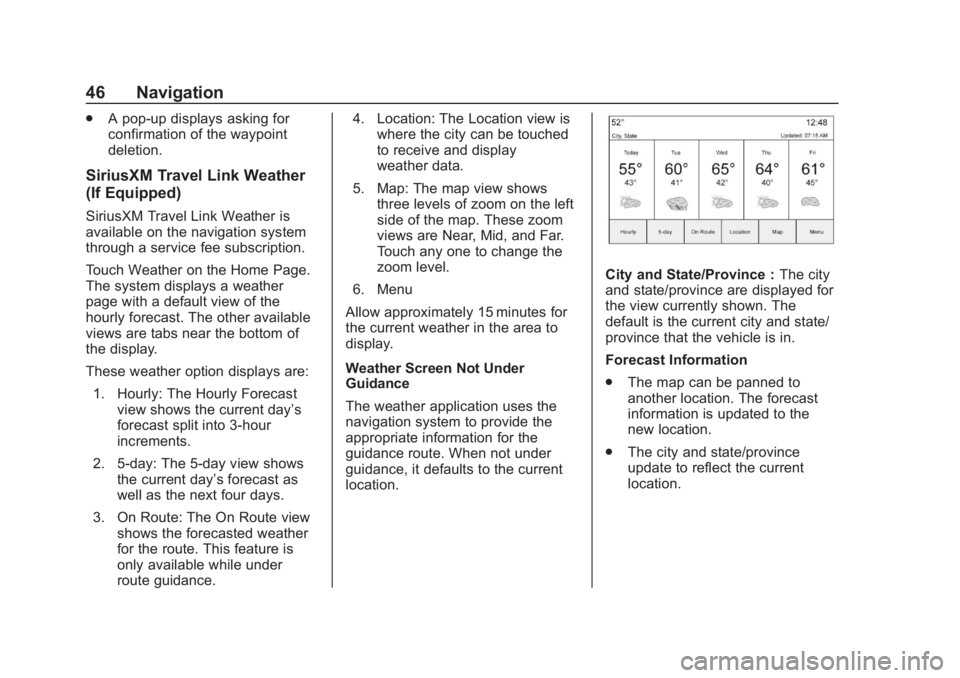
Touch Weather on the Home Page.
The system displays a weather
page with a default view of the
hourly forecast. The other available
views are tabs near the bottom of
the display.
These weather option displays are:
1. Hourly: The Hourly Forecast view shows the current day’s
forecast split into 3-hour
increments.
2. 5-day: The 5-day view shows the current day’s forecast as
well as the next four days.
3. On Route: The On Route view shows the forecasted weather
for the route. This feature is
only available while under
route guidance. 4. Location: The Location view is
where the city can be touched
to receive and display
weather data.
5. Map: The map view shows three levels of zoom on the left
side of the map. These zoom
views are Near, Mid, and Far.
Touch any one to change the
zoom level.
6. Menu
Allow approximately 15 minutes for
the current weather in the area to
display.
Weather Screen Not Under
Guidance
The weather application uses the
navigation system to provide the
appropriate information for the
guidance route. When not under
guidance, it defaults to the current
location.
City and State/Province : The city
and state/province are displayed for
the view currently shown. The
default is the current city and state/
province that the vehicle is in.
Forecast Information
. The map can be panned to
another location. The forecast
information is updated to the
new location.
. The city and state/province
update to reflect the current
location.
Page 77 of 90
Chevrolet Corvette MyLink Infotainment System(GMNA-Localizing-U.S./
Canada-12145685) - 2019 - crc - 4/16/18
76 Settings
Braking, this is the number of
times the vehicle detected that a
forward collision was imminent
and applied the brakes.
. Traction Control –the number of
times the traction control system
activated to reduce wheel spin
or loss of traction.
. Stability Control –the number of
events which required the use of
electronic stability control.
. ABS Active –Also referred to as
Antilock Brake System Active,
the number of Antilock Brake
System activations.
. Tailgating Alerts –the number of
times the driver was alerted for
following the vehicle ahead too
closely.
Delete Report Card Data
Data is saved for all trips until the
data is deleted using the PIN or until
the maximum count is exceeded.
Each item will report a maximum of
1,000 counts. The distance driven
will report a maximum of 64,374 km
(40,000 mi). To delete Report Card data, do one
of the following:
.
From the Report Card display,
touch Reset.
. Touch Clear All Teen Keys/PIN
from the Teen Driver menu. This
will also unregister any Teen
Driver keys and delete the PIN.
Forgotten PIN
See your dealer to reset the PIN.