ECO mode CHEVROLET CORVETTE 2019 Owner's Guide
[x] Cancel search | Manufacturer: CHEVROLET, Model Year: 2019, Model line: CORVETTE, Model: CHEVROLET CORVETTE 2019Pages: 367, PDF Size: 6.8 MB
Page 180 of 367
Chevrolet Corvette Owner Manual (GMNA-Localizing-U.S./Canada/Mexico-
12032182) - 2019 - crc - 5/8/18
Driving and Operating 179
Starting and
Operating
New Vehicle Break-In
Follow these recommended
guidelines during the first 2 414 km
(1,500 mi) of driving this vehicle.
Parts have a break-in period and
performance will be better in the
long run.
For the first 322 km (200 mi):
.To break in new tires, drive at
moderate speeds and avoid hard
cornering.
. New brake linings also need a
break-in period. Avoid making
hard stops. This is
recommended every time brake
linings are replaced.
For the first 800 km (500 mi):
. Avoid full throttle starts and
abrupt stops.
. Do not exceed 4000 rpm. .
Avoid driving at any one
constant speed, fast or slow,
including the use of cruise
control.
. Avoid downshifting to brake or
slow the vehicle when the
engine speed will exceed
4000 rpm.
. Do not let the engine labor.
Never lug the engine. With a
manual transmission, shift to the
next lower gear. This rule
applies at all times, not just
during the break-in period.
. If equipped with a dry sump
engine (Stingray with Z51,
Grand Sport, and Z06), the initial
oil and filter change must be
performed at 800 km (500 mi).
For the first 2 414 km (1,500 mi):
. Do not participate in track
events, sport driving schools,
or similar activities.
. Check engine oil with every
refueling and add if necessary.
Oil and fuel consumption may be
higher than normal.
Front Air Dam
If equipped, the front air dam has
minimal ground clearance.
Under normal operation, the
components will occasionally
contact some road surfaces (speed
bumps, driveway ramps, etc.). This
can be heard inside the vehicle as a
scraping noise. This is normal and
does not indicate a problem.
Use care when approaching bumps
or objects on road surfaces and
avoid them when possible.
Composite Materials
This vehicle may be equipped with
parts containing carbon fiber,
sheet-molding compound, or other
composite materials.
Dealer-installed accessories may
also contain composite materials.
These parts and accessories may
include the splitter or rocker
extensions.
Page 182 of 367
Chevrolet Corvette Owner Manual (GMNA-Localizing-U.S./Canada/Mexico-
12032182) - 2019 - crc - 5/8/18
Driving and Operating 181
Do not turn the engine off when the
vehicle is moving. This will cause a
loss of power assist in the brake
and steering systems and disable
the airbags.
If the vehicle must be shut off in an
emergency:1. Brake using a firm and steady pressure. Do not pump the
brakes repeatedly. This may
deplete power assist, requiring
increased brake pedal force.
2. Shift the vehicle to N (Neutral). This can be done while the
vehicle is moving. After shifting
to N (Neutral), firmly apply the
brakes and steer the vehicle to
a safe location.
3. Come to a complete stop. Shift to P (Park) with an automatic
transmission, or Neutral with a
manual transmission. Turn the
ignition off.
4. Set the parking brake. See Electric Parking Brake 0195.{Warning
Turning off the vehicle while
moving may cause loss of power
assist in the brake and steering
systems and disable the airbags.
While driving, only shut the
vehicle off in an emergency.
If the vehicle cannot be pulled over,
and must be shut off while driving,
press and hold ENGINE START/
STOP for longer than two seconds,
or press twice within five seconds.
ACC/ACCESSORY (Amber
Indicator Light) : This mode allows
the use of some electrical
accessories when the engine is off.
With the ignition off, pressing the
button one time without the brake
pedal applied will place the ignition
system in ACC/ACCESSORY.
The ignition will switch from ACC/
ACCESSORY to off after
five minutes to prevent battery
rundown. ON/RUN/START (Green Indicator
Light) :
This mode is for driving and
starting. With the ignition off, and
the brake pedal applied, pressing
the button once will place the
ignition system in ON/RUN/START.
Once engine cranking begins,
release the button. Engine cranking
will continue until the engine starts.
See Starting the Engine 0182. The
ignition will then remain in ON/RUN.
Service Mode
This power mode is available for
service and diagnostics, and to
verify the proper operation of the
malfunction indicator lamp as may
be required for emission inspection
purposes. With the vehicle off, and
the brake pedal not applied,
pressing and holding ENGINE
START/STOP for more than
five seconds will place the vehicle in
Service Mode. The instruments and
audio systems will operate as they
do in ON/RUN, but the vehicle will
not be able to be driven. The engine
will not start in Service Mode. Press
ENGINE START/STOP again to turn
the vehicle off.
Page 184 of 367
Chevrolet Corvette Owner Manual (GMNA-Localizing-U.S./Canada/Mexico-
12032182) - 2019 - crc - 5/8/18
Driving and Operating 183
4. If the engine does not start andno DIC message is displayed,
wait 15 seconds before trying
again to let the cranking motor
cool down.
If the engine does not start
after five to 10 seconds,
especially in very cold weather
(below −18 °C or 0 °F), it could
be flooded with too much
gasoline. Try pushing the
accelerator pedal all the way to
the floor while cranking for up
to 15 seconds maximum. Wait
at least 15 seconds between
each try, to allow the cranking
motor to cool down. When the
engine starts, let go of the
accelerator. If the vehicle starts
briefly but then stops again,
repeat these steps. This clears
the extra gasoline from the
engine.Caution
Cranking the engine for long
periods of time, by returning the
ignition to the START position
immediately after cranking has
ended, can overheat and damage
the cranking motor, and drain the
battery. Wait at least 15 seconds
between each try, to let the
cranking motor cool down.
Stopping the Engine
If the vehicle has an automatic
transmission, move the shift lever to
P (Park) and press and hold
ENGINE START/STOP on the
instrument panel, until the engine
shuts off. If the shift lever is not in
P (Park), the engine shuts off and
the vehicle goes into the accessory
mode. The DIC displays SHIFT TO
PARK. Once the shift lever is moved
to P (Park), the vehicle turns off.
If the vehicle has a manual
transmission, move the shift lever to
R (Reverse) and set the parking brake after turning off the engine by
pressing and holding ENGINE
START/STOP.
If the RKE transmitter is not
detected inside the vehicle when it
is turned off, the DIC displays a
message.
Retained Accessory
Power (RAP)
Some vehicle accessories may be
used after the ignition is turned off.
The power windows and sunroof,
if equipped, will continue to work for
up to 10 minutes or until any door is
opened.
The infotainment system will
continue to work for 10 minutes,
until the driver door is opened,
or until the ignition is turned on or
placed in ACC/ACCESSORY.
Page 186 of 367
Chevrolet Corvette Owner Manual (GMNA-Localizing-U.S./Canada/Mexico-
12032182) - 2019 - crc - 5/8/18
Driving and Operating 185
Shifting out of Park
This vehicle is equipped with an
electronic shift lock control system.
The shift lock release is designed to
prevent movement of the shift lever
out of P (Park), unless the ignition is
on and the brake pedal is applied.
The shift lock release is always
functional except in the case of an
uncharged or low voltage (less than
9-volt) battery. SeeJump Starting -
North America 0295.
To shift out of P (Park): 1. Apply the brake pedal.
2. Release the parking brake. See Electric Parking Brake
0 195.
3. Press the shift lever button.
4. Move the shift lever to the desired position.
If you still are unable to shift out of
P (Park): 1. Fully release the shift lever button, and let go of the shift
lever. 2. While holding down the brake
pedal, press the shift lever
button again.
3. Move the shift lever to the desired position.
If you still cannot move the shift
lever from P (Park), consult your
dealer or a professional towing
service.
Parking (Manual
Transmission)
{Warning
If the vehicle has a manual
transmission, never get out of the
vehicle without first moving the
shift lever into 1st or R (Reverse),
setting the parking brake and
turning the ignition off. The
vehicle can roll, which could
cause serious injury or death.
Parking over Things
That Burn
{Warning
Things that can burn could touch
hot exhaust parts under the
vehicle and ignite. Do not park
over papers, leaves, dry grass,
or other things that can burn.
Active Fuel Management
(Except ZR1/LT5)
This system allows the engine to
operate on either all or half of its
cylinders, depending on the driving
conditions. With a manual
transmission, the system is only
active in Eco Mode. With an
automatic transmission, the system
is available in all modes, but is more
aggressive in Eco Mode. See Driver
Mode Control 0200.
When less power is required, such
as cruising at a constant vehicle
speed, the system will operate in
the half cylinder mode, allowing the
Page 190 of 367
Chevrolet Corvette Owner Manual (GMNA-Localizing-U.S./Canada/Mexico-
12032182) - 2019 - crc - 5/8/18
Driving and Operating 189
Downshifting the transmission in
slippery road conditions could result
in skidding. See“Skidding”under
Loss of Control 0161.
The transmission can be shifted like
a manual transmission using the
paddle shift controls while in
D (Drive). See Manual Mode0189.
Caution
A transmission hot message may
display if the automatic
transmission fluid is too hot.
Driving under this condition can
damage the vehicle. Stop and idle
the engine to cool the automatic
transmission fluid. This message
clears when the transmission fluid
has cooled sufficiently.
M : In M (Manual Mode), the
transmission can be shifted like a
manual transmission using the
paddle shift controls. See Manual
Mode 0189.
Manual Mode
Manual Paddle Shift
(Automatic Transmission)
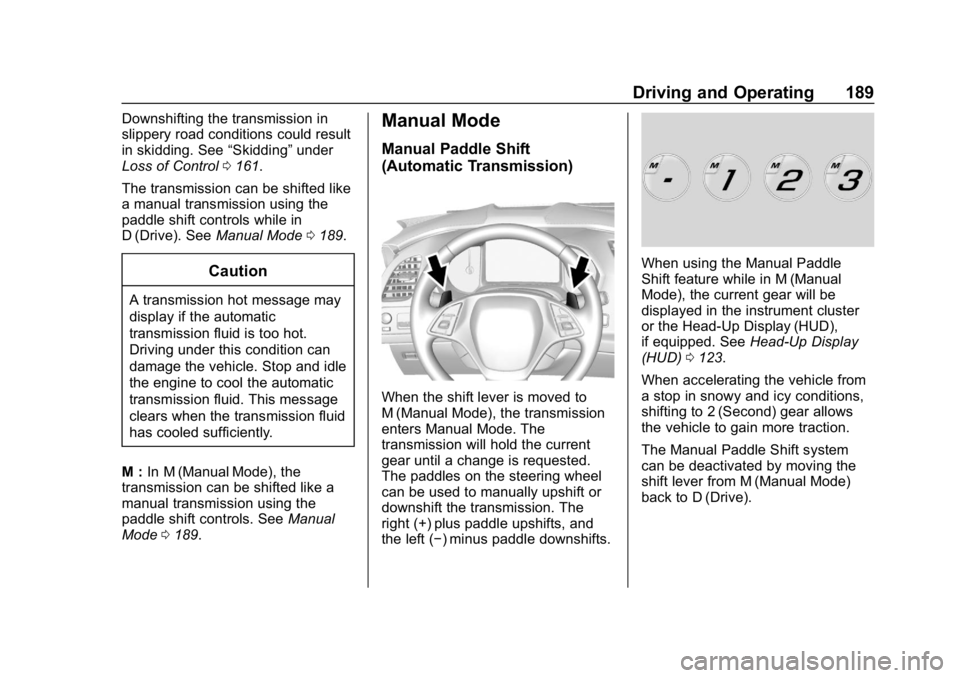
When the shift lever is moved to
M (Manual Mode), the transmission
enters Manual Mode. The
transmission will hold the current
gear until a change is requested.
The paddles on the steering wheel
can be used to manually upshift or
downshift the transmission. The
right (+) plus paddle upshifts, and
the left (−) minus paddle downshifts.
When using the Manual Paddle
Shift feature while in M (Manual
Mode), the current gear will be
displayed in the instrument cluster
or the Head-Up Display (HUD),
if equipped. See Head-Up Display
(HUD) 0123.
When accelerating the vehicle from
a stop in snowy and icy conditions,
shifting to 2 (Second) gear allows
the vehicle to gain more traction.
The Manual Paddle Shift system
can be deactivated by moving the
shift lever from M (Manual Mode)
back to D (Drive).
Page 191 of 367
Chevrolet Corvette Owner Manual (GMNA-Localizing-U.S./Canada/Mexico-
12032182) - 2019 - crc - 5/8/18
190 Driving and Operating
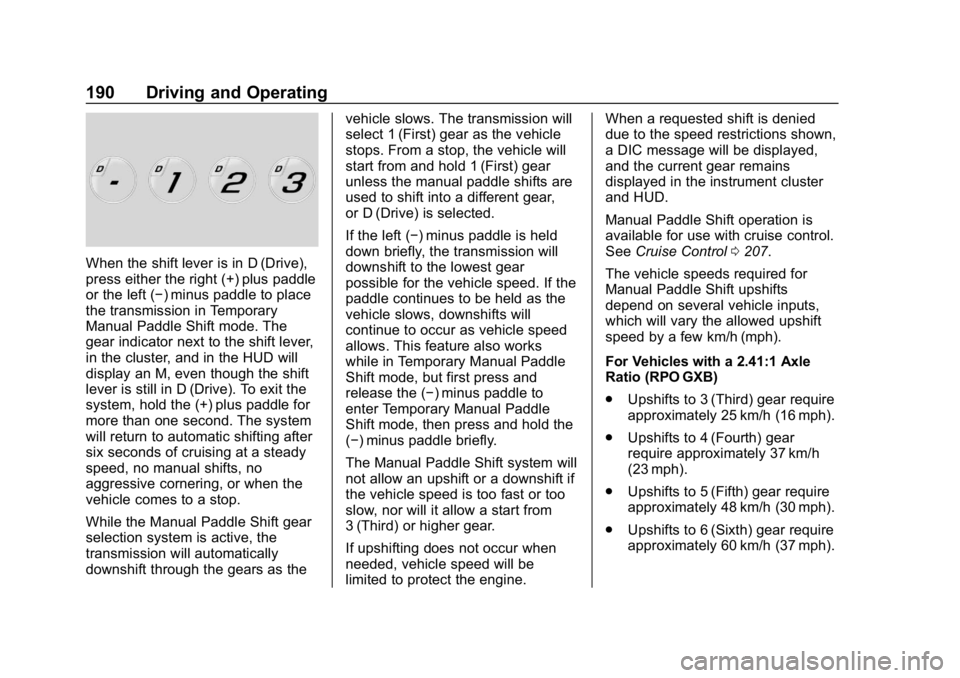
When the shift lever is in D (Drive),
press either the right (+) plus paddle
or the left (−) minus paddle to place
the transmission in Temporary
Manual Paddle Shift mode. The
gear indicator next to the shift lever,
in the cluster, and in the HUD will
display an M, even though the shift
lever is still in D (Drive). To exit the
system, hold the (+) plus paddle for
more than one second. The system
will return to automatic shifting after
six seconds of cruising at a steady
speed, no manual shifts, no
aggressive cornering, or when the
vehicle comes to a stop.
While the Manual Paddle Shift gear
selection system is active, the
transmission will automatically
downshift through the gears as thevehicle slows. The transmission will
select 1 (First) gear as the vehicle
stops. From a stop, the vehicle will
start from and hold 1 (First) gear
unless the manual paddle shifts are
used to shift into a different gear,
or D (Drive) is selected.
If the left (−) minus paddle is held
down briefly, the transmission will
downshift to the lowest gear
possible for the vehicle speed. If the
paddle continues to be held as the
vehicle slows, downshifts will
continue to occur as vehicle speed
allows. This feature also works
while in Temporary Manual Paddle
Shift mode, but first press and
release the (−) minus paddle to
enter Temporary Manual Paddle
Shift mode, then press and hold the
(−) minus paddle briefly.
The Manual Paddle Shift system will
not allow an upshift or a downshift if
the vehicle speed is too fast or too
slow, nor will it allow a start from
3 (Third) or higher gear.
If upshifting does not occur when
needed, vehicle speed will be
limited to protect the engine.When a requested shift is denied
due to the speed restrictions shown,
a DIC message will be displayed,
and the current gear remains
displayed in the instrument cluster
and HUD.
Manual Paddle Shift operation is
available for use with cruise control.
See
Cruise Control 0207.
The vehicle speeds required for
Manual Paddle Shift upshifts
depend on several vehicle inputs,
which will vary the allowed upshift
speed by a few km/h (mph).
For Vehicles with a 2.41:1 Axle
Ratio (RPO GXB)
. Upshifts to 3 (Third) gear require
approximately 25 km/h (16 mph).
. Upshifts to 4 (Fourth) gear
require approximately 37 km/h
(23 mph).
. Upshifts to 5 (Fifth) gear require
approximately 48 km/h (30 mph).
. Upshifts to 6 (Sixth) gear require
approximately 60 km/h (37 mph).
Page 200 of 367
Chevrolet Corvette Owner Manual (GMNA-Localizing-U.S./Canada/Mexico-
12032182) - 2019 - crc - 5/8/18
Driving and Operating 199
2. Turn the engine off and wait15 seconds.
3. Start the engine.
Drive the vehicle. If
dcomes on
and stays on, the vehicle may need
more time to diagnose the problem.
If the condition persists, see your
dealer.
Turning the Systems Off
and On
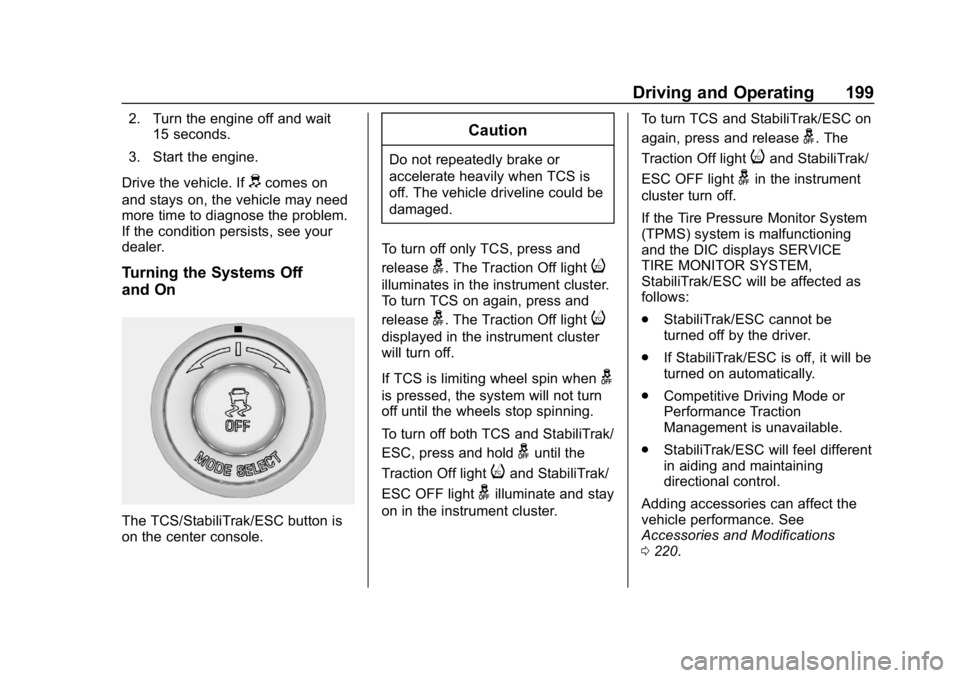
The TCS/StabiliTrak/ESC button is
on the center console.
Caution
Do not repeatedly brake or
accelerate heavily when TCS is
off. The vehicle driveline could be
damaged.
To turn off only TCS, press and
release
g. The Traction Off lighti
illuminates in the instrument cluster.
To turn TCS on again, press and
release
g. The Traction Off lighti
displayed in the instrument cluster
will turn off.
If TCS is limiting wheel spin when
g
is pressed, the system will not turn
off until the wheels stop spinning.
To turn off both TCS and StabiliTrak/
ESC, press and hold
guntil the
Traction Off light
iand StabiliTrak/
ESC OFF light
gilluminate and stay
on in the instrument cluster. To turn TCS and StabiliTrak/ESC on
again, press and release
g. The
Traction Off light
iand StabiliTrak/
ESC OFF light
gin the instrument
cluster turn off.
If the Tire Pressure Monitor System
(TPMS) system is malfunctioning
and the DIC displays SERVICE
TIRE MONITOR SYSTEM,
StabiliTrak/ESC will be affected as
follows:
. StabiliTrak/ESC cannot be
turned off by the driver.
. If StabiliTrak/ESC is off, it will be
turned on automatically.
. Competitive Driving Mode or
Performance Traction
Management is unavailable.
. StabiliTrak/ESC will feel different
in aiding and maintaining
directional control.
Adding accessories can affect the
vehicle performance. See
Accessories and Modifications
0 220.
Page 201 of 367
Chevrolet Corvette Owner Manual (GMNA-Localizing-U.S./Canada/Mexico-
12032182) - 2019 - crc - 5/8/18
200 Driving and Operating
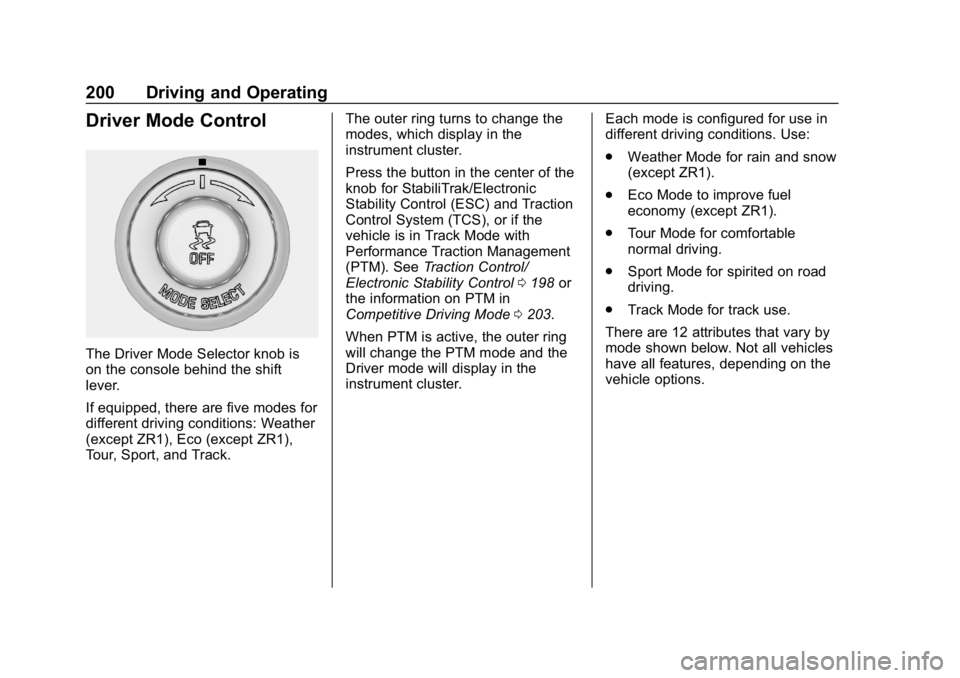
Driver Mode Control
The Driver Mode Selector knob is
on the console behind the shift
lever.
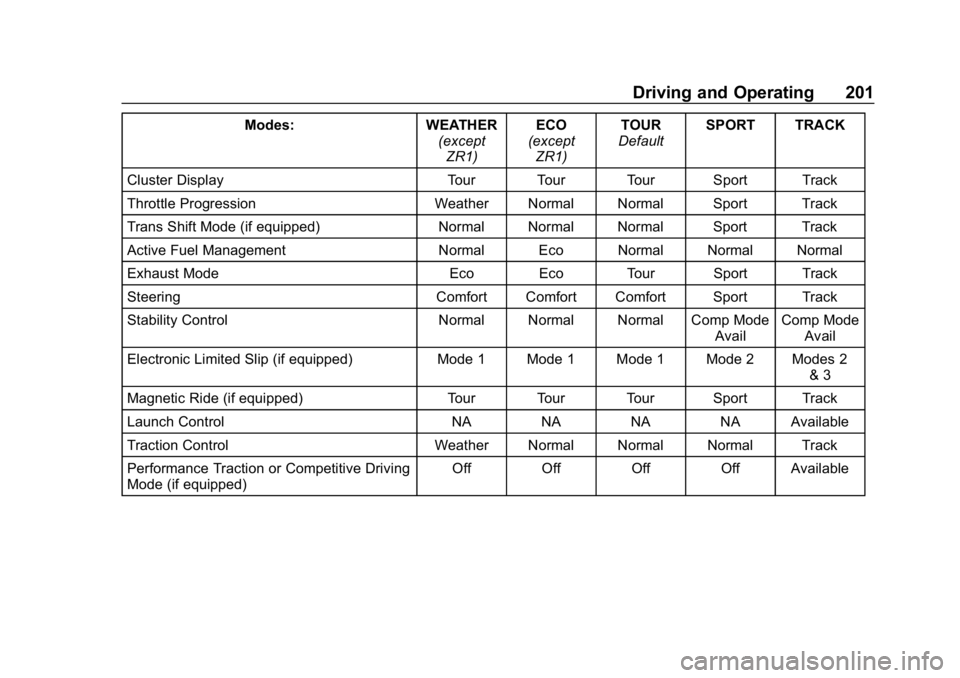
If equipped, there are five modes for
different driving conditions: Weather
(except ZR1), Eco (except ZR1),
Tour, Sport, and Track.The outer ring turns to change the
modes, which display in the
instrument cluster.
Press the button in the center of the
knob for StabiliTrak/Electronic
Stability Control (ESC) and Traction
Control System (TCS), or if the
vehicle is in Track Mode with
Performance Traction Management
(PTM). See
Traction Control/
Electronic Stability Control 0198 or
the information on PTM in
Competitive Driving Mode 0203.
When PTM is active, the outer ring
will change the PTM mode and the
Driver mode will display in the
instrument cluster. Each mode is configured for use in
different driving conditions. Use:
.
Weather Mode for rain and snow
(except ZR1).
. Eco Mode to improve fuel
economy (except ZR1).
. Tour Mode for comfortable
normal driving.
. Sport Mode for spirited on road
driving.
. Track Mode for track use.
There are 12 attributes that vary by
mode shown below. Not all vehicles
have all features, depending on the
vehicle options.
Page 202 of 367
Chevrolet Corvette Owner Manual (GMNA-Localizing-U.S./Canada/Mexico-
12032182) - 2019 - crc - 5/8/18
Driving and Operating 201
Modes:WEATHER
(exceptZR1) ECO
(except ZR1) TOUR
Default SPORT TRACK
Cluster Display Tour Tour Tour Sport Track
Throttle Progression Weather Normal Normal Sport Track
Trans Shift Mode (if equipped) Normal Normal Normal Sport Track
Active Fuel Management Normal Eco Normal Normal Normal
Exhaust Mode Eco Eco Tour Sport Track
Steering Comfort Comfort Comfort Sport Track
Stability Control Normal Normal Normal Comp Mode
AvailComp Mode
Avail
Electronic Limited Slip (if equipped) Mode 1 Mode 1 Mode 1 Mode 2 Modes 2
& 3
Magnetic Ride (if equipped) Tour Tour Tour Sport Track
Launch Control NA NA NA NA Available
Traction Control Weather Normal Normal Normal Track
Performance Traction or Competitive Driving
Mode (if equipped) Off Off Off Off Available
Page 203 of 367
Chevrolet Corvette Owner Manual (GMNA-Localizing-U.S./Canada/Mexico-
12032182) - 2019 - crc - 5/8/18
202 Driving and Operating
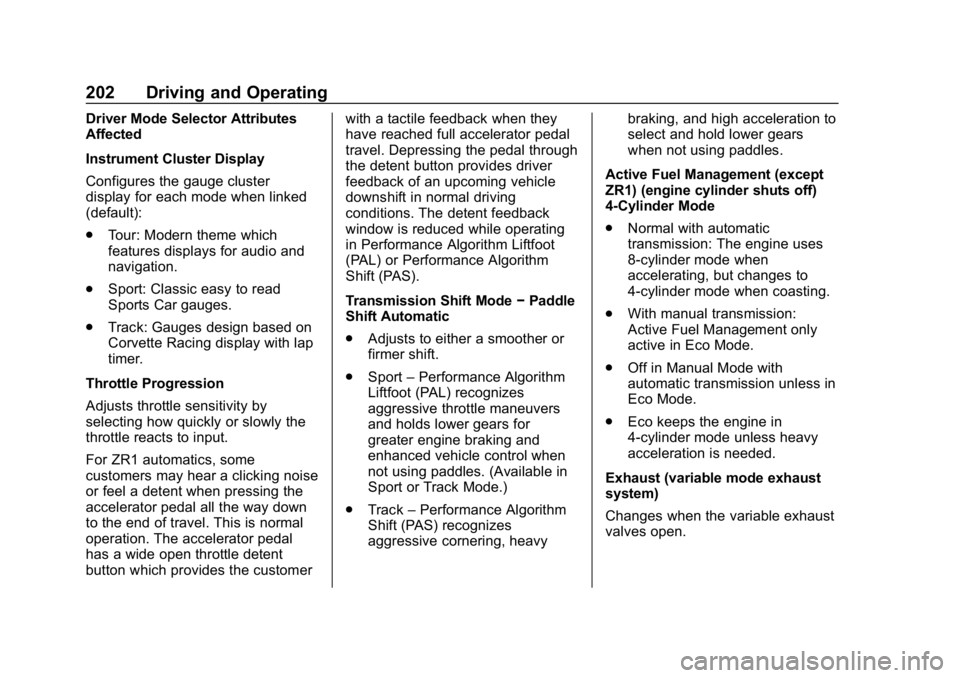
Driver Mode Selector Attributes
Affected
Instrument Cluster Display
Configures the gauge cluster
display for each mode when linked
(default):
.Tour: Modern theme which
features displays for audio and
navigation.
. Sport: Classic easy to read
Sports Car gauges.
. Track: Gauges design based on
Corvette Racing display with lap
timer.
Throttle Progression
Adjusts throttle sensitivity by
selecting how quickly or slowly the
throttle reacts to input.
For ZR1 automatics, some
customers may hear a clicking noise
or feel a detent when pressing the
accelerator pedal all the way down
to the end of travel. This is normal
operation. The accelerator pedal
has a wide open throttle detent
button which provides the customer with a tactile feedback when they
have reached full accelerator pedal
travel. Depressing the pedal through
the detent button provides driver
feedback of an upcoming vehicle
downshift in normal driving
conditions. The detent feedback
window is reduced while operating
in Performance Algorithm Liftfoot
(PAL) or Performance Algorithm
Shift (PAS).
Transmission Shift Mode
−Paddle
Shift Automatic
. Adjusts to either a smoother or
firmer shift.
. Sport –Performance Algorithm
Liftfoot (PAL) recognizes
aggressive throttle maneuvers
and holds lower gears for
greater engine braking and
enhanced vehicle control when
not using paddles. (Available in
Sport or Track Mode.)
. Track –Performance Algorithm
Shift (PAS) recognizes
aggressive cornering, heavy braking, and high acceleration to
select and hold lower gears
when not using paddles.
Active Fuel Management (except
ZR1) (engine cylinder shuts off)
4-Cylinder Mode
. Normal with automatic
transmission: The engine uses
8-cylinder mode when
accelerating, but changes to
4-cylinder mode when coasting.
. With manual transmission:
Active Fuel Management only
active in Eco Mode.
. Off in Manual Mode with
automatic transmission unless in
Eco Mode.
. Eco keeps the engine in
4-cylinder mode unless heavy
acceleration is needed.
Exhaust (variable mode exhaust
system)
Changes when the variable exhaust
valves open.