belt CHEVROLET CORVETTE 2020 Infotainment Manual
[x] Cancel search | Manufacturer: CHEVROLET, Model Year: 2020, Model line: CORVETTE, Model: CHEVROLET CORVETTE 2020Pages: 78, PDF Size: 1.09 MB
Page 34 of 78
Corvette Infotainment System (3.x) (GMNA-Localizing-U.S./Canada-
14097683) - 2020 - CRC - 4/22/20
Navigation 33
Search While in Motion with Front
Seat Passenger Present
If the system detects that the front
seat passenger is present with both
driver and passenger seat belts
buckled, touching the search icon
will display an alert message that
allows the passenger to search for a
destination as if the vehicle were
stopped.
Connected Navigation
Connected Navigation is a
subscription service that enables
certain capabilities within the
navigation system, such as Traffic,
Smart Search/Routing, and
Predictive Navigation capabilities.
The system will show an alert when
the subscription is expiring and will
ask to renew the plan.
OnStar System
With a connected plan, an OnStar
Advisor can download a destination
to the vehicle or into the built-in
navigation system.
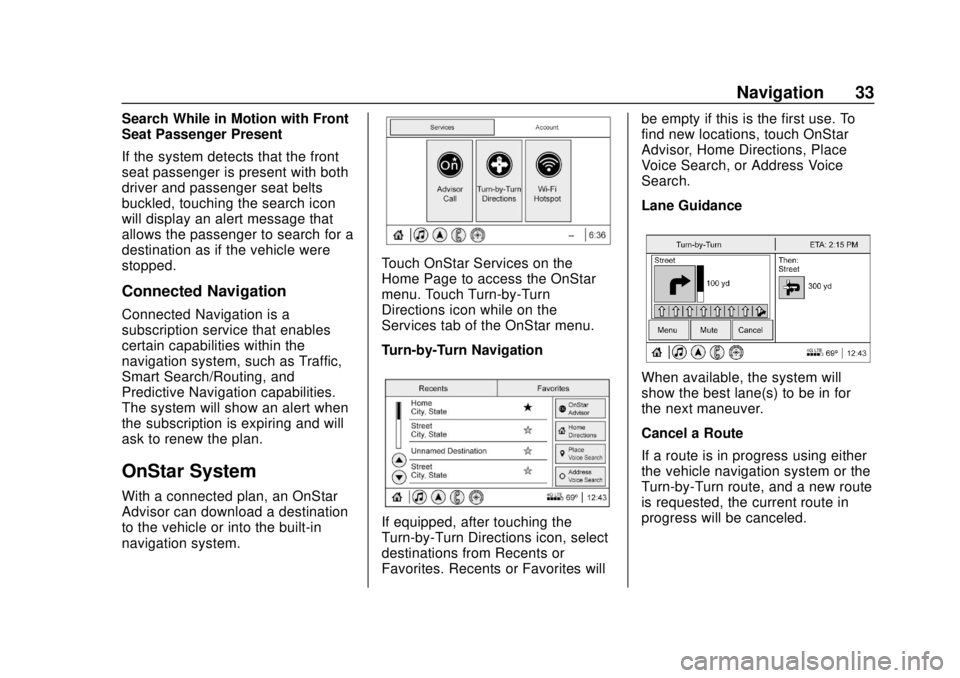
Touch OnStar Services on the
Home Page to access the OnStar
menu. Touch Turn-by-Turn
Directions icon while on the
Services tab of the OnStar menu.
Turn-by-Turn Navigation
If equipped, after touching the
Turn-by-Turn Directions icon, select
destinations from Recents or
Favorites. Recents or Favorites willbe empty if this is the first use. To
find new locations, touch OnStar
Advisor, Home Directions, Place
Voice Search, or Address Voice
Search.
Lane Guidance
When available, the system will
show the best lane(s) to be in for
the next maneuver.
Cancel a Route
If a route is in progress using either
the vehicle navigation system or the
Turn-by-Turn route, and a new route
is requested, the current route in
progress will be canceled.
Page 62 of 78
Corvette Infotainment System (3.x) (GMNA-Localizing-U.S./Canada-
14097683) - 2020 - CRC - 4/22/20
Settings 61
recognize the non-Teen Driver key
to start the vehicle. The Teen Driver
settings will not be active.
For a keyed ignition system:1. Start the engine.
2. For automatic transmissions, the vehicle must be in P (Park).
For manual transmissions, the
vehicle must be stopped with
the parking brake set.
3. From the Settings menu, touch Vehicle and then Teen Driver.
4. Enter the PIN.
5. Touch Setup Keys. The system displays instructions for
registering or unregistering a
key. A confirmation message
displays.
Manage Settings
Audio Volume Limit : Allows the
audio volume limit to be turned on
or off. Touch Set Audio Volume Limit
to choose the maximum allowable
audio volume level. Set Audio Volume Limit :
Allows a
maximum radio volume to be set.
Use the arrows to choose the
maximum allowable level for the
audio volume.
Teen Driver Speed Limiter : Limits
the maximum speed of the vehicle.
When the speed limiter is turned on
and the vehicle is started with a
Teen Driver key, the DIC displays a
message that the top speed is
limited.
On certain vehicles, when the
Speed Limiter is turned ON, the
vehicle’s maximum acceleration will
be limited. The DIC will display a
message that the acceleration is
limited.
Teen Driver Speed Warning :
Allows the speed warning to be
turned on or off. Touch Set Teen
Driver Speed Warning to set the
warning speed.
Set Teen Driver Speed Warning :
Displays a warning in the DIC when
exceeding a selectable speed.
Choose the desired speed warning
level. The speed warning does not
limit the speed of the vehicle. SiriusXM Explicit Content Filter (if
equipped) :
Allows the SiriusXM
Explicit Content Filter to be turned
ON or OFF. When ON, the teen
driver will not be able to listen to
SiriusXM stations that contain
explicit content, and the Explicit
Content Filter selection in the Audio
Settings will be unavailable for
change.
When Teen Driver is Active:
. If equipped with Buckle to Drive,
shifting out of P (Park) will be
prevented if the driver seat belt,
and in some vehicles the front
passenger seat belt, is not
buckled. See “Buckle to Drive” in
the owner ’s manual.
. The radio will mute when the
driver seat belt, and in some
vehicles the front passenger
seat belt, is not buckled. The
audio from any device paired to
the vehicle will also be muted.
. An object placed on the front
passenger seat, such as a
briefcase, handbag, grocery bag,
laptop, or other electronic