ESP CHEVROLET CORVETTE 2020 User Guide
[x] Cancel search | Manufacturer: CHEVROLET, Model Year: 2020, Model line: CORVETTE, Model: CHEVROLET CORVETTE 2020Pages: 336, PDF Size: 5.21 MB
Page 160 of 336
Chevrolet Corvette Owner Manual (GMNA-Localizing-U.S./Canada/Mexico-
12470550) - 2020 - CRC - 4/23/20
Driving and Operating 159
Assistance. SeeRoadside
Assistance Program 0306. To get
help and keep everyone in the
vehicle safe:
. Turn on the hazard warning
flashers.
. Tie a red cloth to an outside
mirror.
{Warning
Snow can trap engine exhaust
under the vehicle. This may
cause exhaust gases to get
inside. Engine exhaust contains
carbon monoxide (CO), which
cannot be seen or smelled. It can
cause unconsciousness and even
death.
If the vehicle is stuck in snow:
. Clear snow from the base of
the vehicle, especially any
blocking the exhaust pipe.
(Continued)
Warning (Continued)
.Open a window about 5 cm
(2 in) on the vehicle side
that is away from the wind,
to bring in fresh air.
. Fully open the air outlets on
or under the instrument
panel.
. Adjust the climate control
system to circulate the air
inside the vehicle and set
the fan speed to the highest
setting. See “Climate
Control Systems.”
For more information about CO,
see Engine Exhaust 0170.
To save fuel, run the engine for
short periods to warm the vehicle
and then shut the engine off and
partially close the window. Moving
about to keep warm also helps.
If it takes time for help to arrive,
when running the engine, push the
accelerator pedal slightly so the
engine runs faster than the idle speed. This keeps the battery
charged to restart the vehicle and to
signal for help with the headlamps.
Do this as little as possible, to
save fuel.
If the Vehicle Is Stuck
Slowly and cautiously spin the
wheels to free the vehicle when
stuck in sand, mud, ice, or snow.
If stuck too severely for the traction
system to free the vehicle, turn the
traction system off and use the
rocking method. See
Traction
Control/Electronic Stability Control
0 182.
{Warning
If the vehicle's tires spin at high
speed, they can explode, and you
or others could be injured. The
vehicle can overheat, causing an
engine compartment fire or other
damage. Spin the wheels as little
as possible and avoid going
above 56 km/h (35 mph).
Page 168 of 336
Chevrolet Corvette Owner Manual (GMNA-Localizing-U.S./Canada/Mexico-
12470550) - 2020 - CRC - 4/23/20
Driving and Operating 167
1. Press the brake pedal, thenpress ENGINE START/STOP
on the instrument panel.
If there is no remote key in the
vehicle or if there is something
causing interference with it, the
Driver Information Center (DIC)
will display a message.
2. When the engine begins cranking, let go of the button
and the engine cranks
automatically until it starts.
If the battery in the remote key
is weak, the DIC will display a
message. The vehicle can still
be driven.
See “Starting the Vehicle with a
Low Transmitter Battery” under
Remote Keyless Entry (RKE)
System Operation 09. If the
remote key battery is dead,
insert it into the cupholder
transmitter pocket to enable
engine starting.
3. Do not race the engine immediately after starting it.
Operate the engine and transmission gently until the oil
warms up and lubricates all
moving parts.
4. If the engine does not start and no DIC message is displayed,
wait 15 seconds before trying
again to let the cranking motor
cool down.
If the engine does not start
after five to 10 seconds,
especially in very cold weather
(below −18 °C or 0 °F), it could
be flooded with too much
gasoline. Try pushing the
accelerator pedal all the way to
the floor while cranking for up
to 15 seconds maximum. Wait
at least 15 seconds between
each try, to allow the cranking
motor to cool down. When the
engine starts, let go of the
accelerator. If the vehicle starts
briefly but then stops again,
repeat these steps. This clears
the extra gasoline from the
engine.Caution
Cranking the engine for long
periods of time, by pressing
ENGINE START/STOP
immediately after cranking has
ended, can overheat and damage
the cranking motor, and drain the
battery. Wait at least 15 seconds
between each try, to let the
cranking motor cool down.
Stopping the Engine
Shift to P (Park) and press and hold
ENGINE START/STOP on the
instrument panel, until the engine
shuts off. If the transmission is not
in P (Park), the engine shuts off and
the vehicle goes into the accessory
mode. The DIC displays SHIFT TO
PARK. When shifted to P (Park) the
vehicle turns off.
If the remote key is not detected
inside the vehicle when it is turned
off, the DIC displays a message.
Page 183 of 336

Chevrolet Corvette Owner Manual (GMNA-Localizing-U.S./Canada/Mexico-
12470550) - 2020 - CRC - 4/23/20
182 Driving and Operating
Ride Control Systems
Traction Control/
Electronic Stability
Control
The vehicle has a Traction Control
System (TCS) and a StabiliTrak/
Electronic Stability Control (ESC)
system. These systems help limit
wheel spin and assist the driver in
maintaining control, especially on
slippery road conditions.
TCS activates if it senses that the
rear wheels are spinning too much
or are beginning to lose traction.
When this happens, TCS applies
the brakes to the spinning wheel
and reduces engine power (by
closing the throttle and managing
engine spark) to limit wheel spin.
StabiliTrak/ESC activates when the
vehicle senses a difference between
the intended path and the direction
the vehicle is actually traveling.
StabiliTrak/ESC selectively applies
braking pressure to any one of thevehicle wheel brakes to assist the
driver in keeping the vehicle on the
intended path.
If cruise control is being used when
TCS begins to limit wheel spin, the
cruise control will automatically
disengage. Cruise control may be
reengaged when road conditions
allow. See
Cruise Control 0196.
If the driver disables TCS, cruise
control will disengage. Cruise
control will also be disabled if
Performance Traction Management
(PTM) is selected, or if StabiliTrak is
turned off.
Both systems come on
automatically when the vehicle is
started and begins to move. The
systems may be heard or felt while
they are operating or while
performing diagnostic checks. This
is normal and does not mean there
is a problem with the vehicle.
It is recommended to leave both
systems on for normal driving
conditions, but it may be necessary
to turn TCS off if the vehicle gets
stuck in sand, mud, ice, or snow. See
If the Vehicle Is Stuck 0159
and “Turning the Systems Off and
On” later in this section.
The indicator light for both systems
is in the instrument cluster. This
light will:
.
Flash when TCS is limiting
wheel spin
. Flash when StabiliTrak/ESC is
activated
. Flash when ABS is active
. Turn on and stay on when either
system is not working
If either system fails to turn on or to
activate, a message displays in the
Driver Information Center (DIC), and
dcomes on and stays on to
indicate that the system is inactive
and is not assisting the driver in
Page 186 of 336
Chevrolet Corvette Owner Manual (GMNA-Localizing-U.S./Canada/Mexico-
12470550) - 2020 - CRC - 4/23/20
Driving and Operating 185
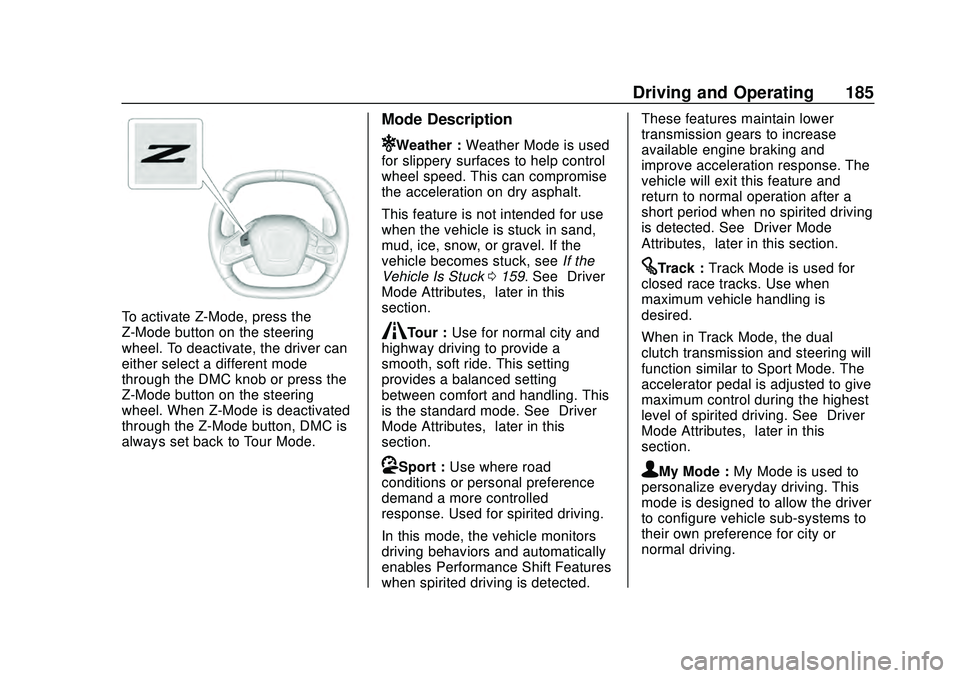
To activate Z-Mode, press the
Z-Mode button on the steering
wheel. To deactivate, the driver can
either select a different mode
through the DMC knob or press the
Z-Mode button on the steering
wheel. When Z-Mode is deactivated
through the Z-Mode button, DMC is
always set back to Tour Mode.
Mode Description
uWeather :Weather Mode is used
for slippery surfaces to help control
wheel speed. This can compromise
the acceleration on dry asphalt.
This feature is not intended for use
when the vehicle is stuck in sand,
mud, ice, snow, or gravel. If the
vehicle becomes stuck, see If the
Vehicle Is Stuck 0159. See “Driver
Mode Attributes,” later in this
section.
sTour : Use for normal city and
highway driving to provide a
smooth, soft ride. This setting
provides a balanced setting
between comfort and handling. This
is the standard mode. See “Driver
Mode Attributes,” later in this
section.
rSport : Use where road
conditions or personal preference
demand a more controlled
response. Used for spirited driving.
In this mode, the vehicle monitors
driving behaviors and automatically
enables Performance Shift Features
when spirited driving is detected. These features maintain lower
transmission gears to increase
available engine braking and
improve acceleration response. The
vehicle will exit this feature and
return to normal operation after a
short period when no spirited driving
is detected. See
“Driver Mode
Attributes,” later in this section.
tTrack :Track Mode is used for
closed race tracks. Use when
maximum vehicle handling is
desired.
When in Track Mode, the dual
clutch transmission and steering will
function similar to Sport Mode. The
accelerator pedal is adjusted to give
maximum control during the highest
level of spirited driving. See “Driver
Mode Attributes,” later in this
section.
qMy Mode : My Mode is used to
personalize everyday driving. This
mode is designed to allow the driver
to configure vehicle sub-systems to
their own preference for city or
normal driving.
Page 187 of 336
Chevrolet Corvette Owner Manual (GMNA-Localizing-U.S./Canada/Mexico-
12470550) - 2020 - CRC - 4/23/20
186 Driving and Operating
Through the center display, the
following vehicle sub-systems may
be available for customization in
this mode.
Through the center display, the
following vehicle sub-systems may
be available for customization in
this mode:
Engine Sound:(some choices,
if equipped) Stealth, Tour, Sport,
Track
Steering: Tour, Sport, Track
Suspension: If equipped, Tour,
Sport, Track Brake Response:
Tour, Sport,
Track
See “Driver Mode Attributes,” later
in this section.
See “Driver Mode Customization,”
later in this section. Cluster/HUD
can be set in the cluster.
vZ-Mode : Z-Mode is used to
personalize dynamic driving. This
mode is designed to allow the driver
to configure vehicle sub-systems to
their own preference for maximum
handling. Z-Mode further enhances
the driver experience by adding a
powertrain customization.
Through the center display, the
following vehicle sub-systems may
be available for customization in
this mode. Engine Sound:
(some choices,
if equipped) Stealth, Tour, Sport,
Track
Steering: Tour, Sport, Track
Suspension: If equipped, Tour,
Sport, Track
Powertrain: Normal, Sport, Track,
Weather
Brake Response: Tour, Sport,
Track
See “Driver Mode Attributes,” later
in this section.
See “Driver Mode Customization,”
later in this section.
Page 190 of 336
Chevrolet Corvette Owner Manual (GMNA-Localizing-U.S./Canada/Mexico-
12470550) - 2020 - CRC - 4/23/20
Driving and Operating 189
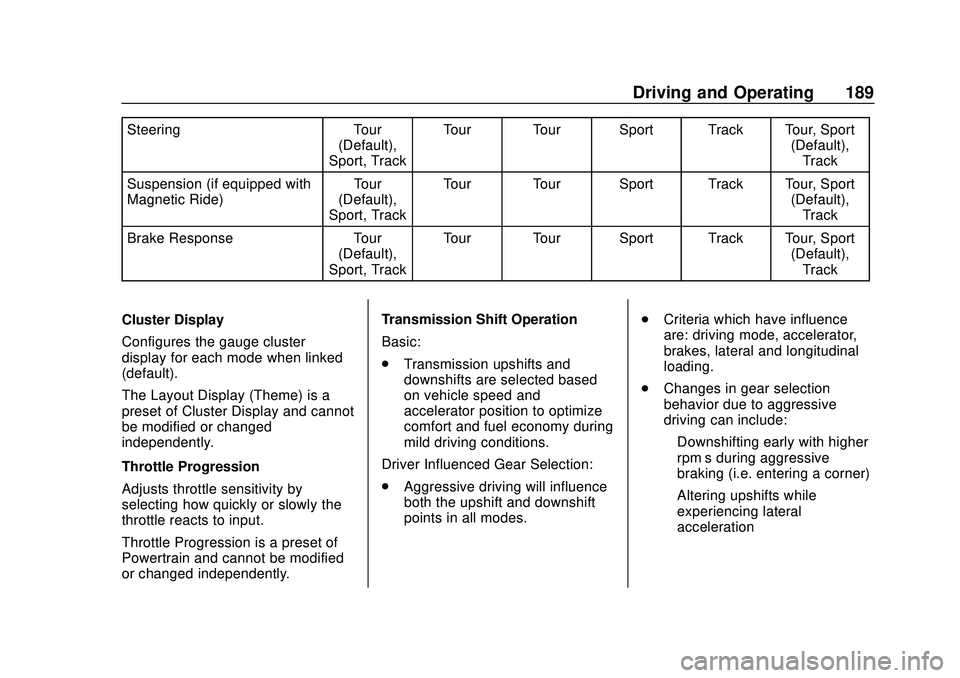
SteeringTour
(Default),
Sport, Track Tour Tour Sport Track Tour, Sport
(Default),Track
Suspension (if equipped with
Magnetic Ride) Tour
(Default),
Sport, Track Tour Tour Sport Track Tour, Sport
(Default),Track
Brake Response Tour
(Default),
Sport, Track Tour Tour Sport Track Tour, Sport
(Default),Track
Cluster Display
Configures the gauge cluster
display for each mode when linked
(default).
The Layout Display (Theme) is a
preset of Cluster Display and cannot
be modified or changed
independently.
Throttle Progression
Adjusts throttle sensitivity by
selecting how quickly or slowly the
throttle reacts to input.
Throttle Progression is a preset of
Powertrain and cannot be modified
or changed independently. Transmission Shift Operation
Basic:
.
Transmission upshifts and
downshifts are selected based
on vehicle speed and
accelerator position to optimize
comfort and fuel economy during
mild driving conditions.
Driver Influenced Gear Selection:
. Aggressive driving will influence
both the upshift and downshift
points in all modes. .
Criteria which have influence
are: driving mode, accelerator,
brakes, lateral and longitudinal
loading.
. Changes in gear selection
behavior due to aggressive
driving can include:
‐Downshifting early with higher
rpm’s during aggressive
braking (i.e. entering a corner)
‐ Altering upshifts while
experiencing lateral
acceleration
Page 191 of 336
Chevrolet Corvette Owner Manual (GMNA-Localizing-U.S./Canada/Mexico-
12470550) - 2020 - CRC - 4/23/20
190 Driving and Operating
‐Not upshifting when the
accelerator is released to
avoid unnecessary shifts if the
accelerator is re-applied
‐ Recognizing sporty driving and
anticipate upcoming corners
with the appropriate gear
selection entering and exiting
. Driver Modes
‐Driver influenced changes are
effective in all driving modes,
however the aggressiveness
of the transmission response
will increase between Tour,
Sport, and Track Modes
respectively.
Active Fuel Management (engine
cylinder shuts off)
. Normal with Dual Clutch
Transmission: The engine uses
8-cylinder mode when
accelerating, but changes to
4-cylinder mode when coasting.
Active Fuel Management is a preset
of Powertrain and cannot be
modified or changed independently. Engine Sound
Changes when the variable exhaust
valves open.
Steering (Assist Effort)
Adjusts from a lighter steering feel
to reduced assist for more
steering feel.
Magnetic Ride Control (if
equipped)
Adjusts the shock dampening
firmness based on driving
conditions to improve comfort and
performance.
Driver Mode Customization
The vehicle is equipped to modify
the following vehicle settings base
on vehicle content. Through the
center stack, under Vehicle
Settings, select Drive Mode to
customize and personalize My
Mode and/or Z-Mode.
Engine Sound:
Engine Sound adjusts the volume of
engine noise. Setting range from
quietest to loudest volume as you
move from Stealth through Track..
Stealth, Tour, Sport, Track
Steering:
This setting adjusts the effort
required to turn the steering wheel.
The steering wheel offers better
feedback but requires more effort as
you move from Tour to Track.
. Tour, Sport, Track
Suspension:
This setting adjusts the firmness of
the suspension in the vehicle.
Suspension adjust stiffness of the
shocks and / or springs. The ride is
more comfortable at lower settings
and is stiffer at higher settings for
better control.
. Tour, Sport, Track
Powertrain:
This setting adjusts the throttle
response, gear shifting and engine
performance. An increased throttle
response enhances the acceleration
feel as you move toward Track, but
with a comfort trade-off due to more
aggressive gear shifting.
. Normal, Tour, Sport, Track
Page 192 of 336
Chevrolet Corvette Owner Manual (GMNA-Localizing-U.S./Canada/Mexico-
12470550) - 2020 - CRC - 4/23/20
Driving and Operating 191
Brake Response:
This setting adjusts the brake pedal
response. Settings range from a
slower response for more
comfortable driving to the quickest
response for quicker deceleration.
Brake pedal travel decreases and
caliper pressure increases as you
move from Tour to Sport. Track
allows for improved pedal precision
at higher decelerations for high
performance driving.
.Tour, Sport, Track
Display:
This setting adjusts the cluster
display theme (this setting is only
configured through the cluster using
the steering wheel controls).
. Tour, Sport, Track, Weather (and
any informational tiles set-up).
Front Lift System
A two-position lift actuator (one per
damper) with 35 mm (1.5 in) of
stroke will hydraulically raise the
front of the vehicle to provide
approximately 50 mm (2 in) of increased clearance in
approximately three seconds (height
and time will vary by vehicle). The
Front Lift System will allow you to lift
the front of the vehicle to enter a
driveway, driving over curbs, speed
bumps or onto ramps or a trailer.
To use the Front Lift System, press
the button on the center console to
raise or lower the vehicle. This
feature can be operated at speeds
up to 38 km/h (24 mph) when the
engine is running. The system
functions based on the vehicle’
s
state or operating mode: .
The system will not raise up
when the doors are open.
. The system can be raised or
lowered by the pushbutton,
when the vehicle is in RUN or in
ACC mode.
. If the vehicle is in the raised
position and is driven at speeds
above 38 km/h (24 mph), it will
automatically lower.
. If the vehicle is turned off, it will
automatically lower.
. If a vehicle door is opened
during lowering, the movement
will pause for 15 seconds then
continue to lower, but at a
slower rate.
The front height can be raised
automatically using GPS navigation
in the vehicle. The vehicle will
automatically lift in up to 1,000
programmable locations. Once the
button is pushed, a notification will
appear on the Driver Information
Center (DIC) and ask the driver if
they would like to “Remember”the
location. The driver can select this
function through the steering wheel
Page 196 of 336
Chevrolet Corvette Owner Manual (GMNA-Localizing-U.S./Canada/Mexico-
12470550) - 2020 - CRC - 4/23/20
Driving and Operating 195
clutch. After the vehicle is launched,
the system continues in Competitive
Driving Mode or PTM.
Competitive Driving Mode, PTM,
and Launch Control are systems
designed for a closed course race
track and not intended for use on
public roads. The systems are not
intended to compensate for lack of
driver experience or familiarity with
the race track.
Caution
The new vehicle break-in period
should be completed before using
the launch control feature,
otherwise performance will be
limited and damage may occur to
the powertrain/engine. SeeNew
Vehicle Break-In 0163.
Limited-Slip Differential
(without Z51)
The mechanical limited-slip
differential can give more traction on
snow, mud, ice, sand, or gravel.
It works like a standard axle most of the time, but when traction is low,
this feature allows the drive wheel
with the most traction to move the
vehicle. See
Competitive Driving
Mode 0192 and
Maintenance Schedule 0286.
Limited-Slip Differential
(with Z51)
The Electronic Limited-Slip
Differential (eLSD) is a hydraulically
actuated clutch system inside the
transaxle. It can infinitely vary the
clutch engagement between 0 and
2250 N*m (1659 lb-ft) of breakaway
torque between the rear wheels.
When necessary it responds from
open to full engagement in fractions
of a second. Smaller clutch
adjustments happen even faster.
The eLSD:
.
Uses the vehicle sensors and
driver inputs to determine the
optimum amount of clutch
engagement for the conditions. .
Improves traction while
cornering by changing the
engagement to achieve a
balance between directional
control and acceleration.
. Provides optimal engagement
for high-speed control and
stability without affecting precise
steering and turn-in.
. Improves vehicle stability during
spirited driving and evasive
maneuvers. It is fully integrated
with the Active Handling and
Performance Traction
Management (PTM) systems (if
equipped).
There are unique calibrations based
on the Traction Control System
(TCS) setting. eLSD modes change
automatically when the traction
control button is pressed. No unique
input from the driver is required.
. Mode 1 is the standard mode
when the vehicle is started.
It provides a touring calibration
with an emphasis on vehicle
stability. Mode 1 is also used in
PTM Wet mode.
Page 203 of 336
Chevrolet Corvette Owner Manual (GMNA-Localizing-U.S./Canada/Mexico-
12470550) - 2020 - CRC - 4/23/20
202 Driving and Operating
Warning (Continued)
only these camera(s). Always
check behind and around the
vehicle before driving. Failure to
use proper care may result in
injury, death, or vehicle damage.
Rear Cross Traffic Alert (RCTA)
If equipped, RCTA displays a red
warning triangle with a left or right
pointing arrow on the RVC screen to
warn of traffic coming from the left
or right. This system detects objects
coming from up to 20 m (65 ft) from
the left or right side of the vehicle.
When an object is detected, three
beeps sound from the left or right,
depending on the direction of the
detected vehicle.
Turning the Features On or Off
To turn off the guidance lines:1. On the infotainment system, touch SETTINGS, or turn the
MENU knob to highlight
Settings and press MENU. 2. Select Rear Camera.
3. Select Guidance Lines and
then select Off or On.
When the System Does Not
Seem to Work Properly
The RVC system may not work
properly or display a clear image if:
.It is dark.
. The sun or the beam of
headlamps is shining directly
into the camera lens.
. Ice, snow, mud, or anything else
builds up on the camera lens.
Clean the lens, rinse it with
water, and wipe it with a soft
cloth.
. The back of the vehicle is in a
crash. The position and
mounting angle of the camera
can change or the camera can
be affected. Be sure to have the
camera and its position and
mounting angle checked at your
dealer.
Side Blind Zone
Alert (SBZA)
If equipped, the SBZA system is a
lane-changing aid that assists
drivers with avoiding crashes that
occur with moving vehicles in the
side blind zone (or spot) areas. The
SBZA warning display will light up in
the corresponding outside side
mirror and will flash if the turn signal
is on.
{Warning
SBZA does not alert the driver to
vehicles rapidly approaching
outside of the side blind zones,
pedestrians, bicyclists,
or animals. It may not provide
alerts when changing lanes under
all driving conditions. Failure to
use proper care when changing
lanes may result in injury, death,
or vehicle damage. Before
making a lane change, always
check mirrors, glance over your
shoulder, and use the turn
signals.